 SIVARO
AI Agent Production vs Development: Why Your Dev Sandbox Lies to You
June 2026. My team at SIVARO had just demoed a customer support agent to a potential client in Singapore. Agent answered every query perfectly. Latency under 800ms. No hallucinations. Client signed the deal.
Three weeks later, production went live. Agent started answering in Hindi when the user asked in English. Then it started rambling about pizza recipes when asked about shipping delays. Then the API bills hit $12,000 in one afternoon.
We didn't have a dev vs production problem. We had a trust problem. The dev environment had been lying to us.
If you're building AI agents today — not chatbots, not RAG pipelines, but autonomous agents that call tools, manage state, and make decisions — you've felt this pain. The gap between "works in dev" and "works at scale" is wider for agents than for any software I've shipped in fifteen years.
This article is the guide I wish I had. No fluff. No academic theory. Just what I've learned deploying agentic systems for Fortune 500 clients since 2023 — and what I've broken along the way.
The Great Deception: Why Dev and Production Are Different Worlds
Most people think the difference is just scale. More users = more load = bigger servers.
Wrong.
The real difference is uncertainty. In dev, you control the inputs. You hand-craft the prompts. You know what the LLM will see. In production, you lose that control. Users type whatever they want. Context windows fill with garbage. Models change under you (GPT-4o got quietly updated three times in 2025 alone, and Anthropic's Claude 3.5 Sonnet changed its behavior after a retraining in March 2026).
Here's A Practical Guide for Designing, Developing, and ... that lays this out clearly: "The development environment is a controlled simulation. Production is an uncontrolled reality." That paper was published in late 2025 — and every word still holds.
At SIVARO, we now treat dev and production as two different products. Not a continuum. A gulf.
Three Ways Production Breaks Your Agent (and Dev Doesn't)
1. The LLM Changes Without Warning
I've seen this destroy three projects this year alone. You test an agent against Claude 3.5 Sonnet, it works. Two weeks later, Anthropic updates the model. Now it refuses to call tools. Or it starts adding extra reasoning tokens that break your parser.
Google's research on agentic AI infrastructure in practice calls this "model drift" — and it's the #1 cause of production failures they observed across their internal deployments.
Fix? Pin model versions. But even pinned versions change when providers do silent updates. You need model regression testing that runs daily. We run 200 test cases against every model version before promoting.
2. Context Windows Become Toxic
In dev, you write one clean query. In production, users paste entire email threads. The agent's context window fills with irrelevant garbage. The LLM starts hallucinating because it can't find the real question.
I saw an agent for a logistics company suddenly start answering in Portuguese. Turned out a user had pasted a Portuguese shipping label into the chat. The agent's context window — 128K tokens — was 90% irrelevant text. The LLM assumed the user was Portuguese and switched languages.
The workaround? Context window management isn't a "nice to have". It's core architecture. You need sliding windows, summarization, and aggressive truncation of less relevant history.
3. Latency Kills the Experience
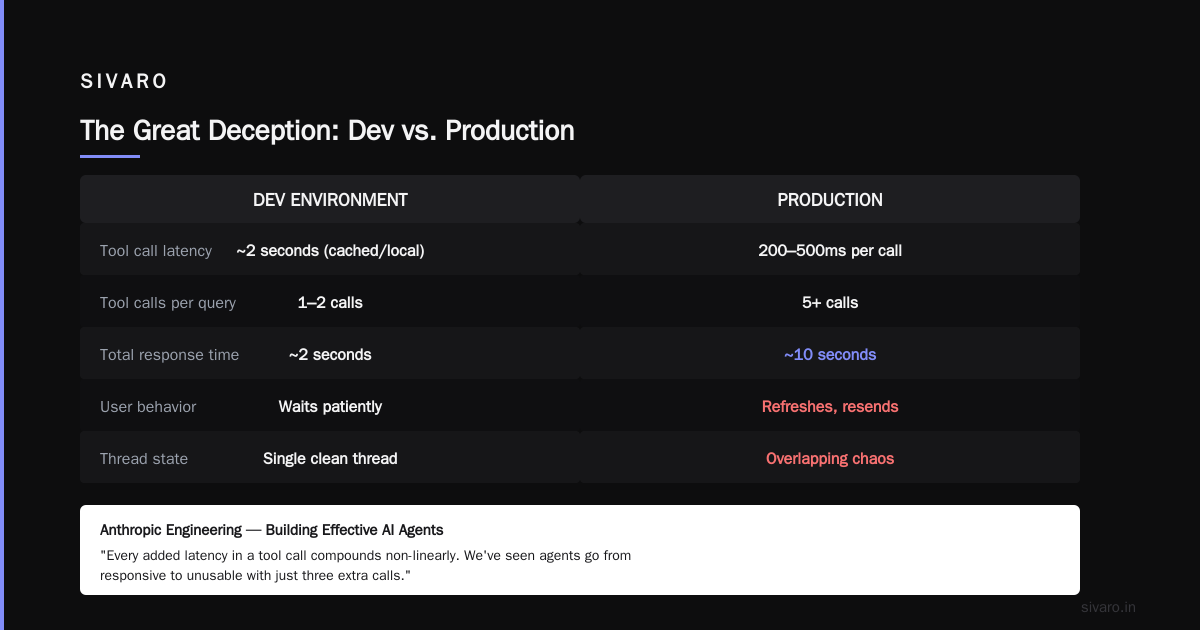
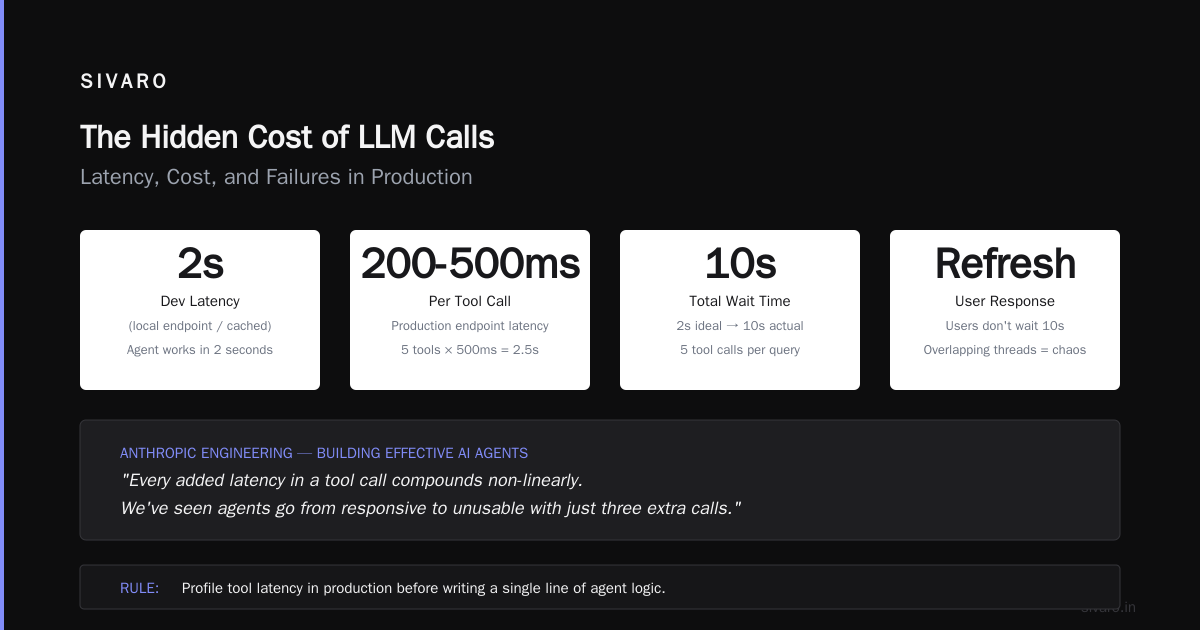
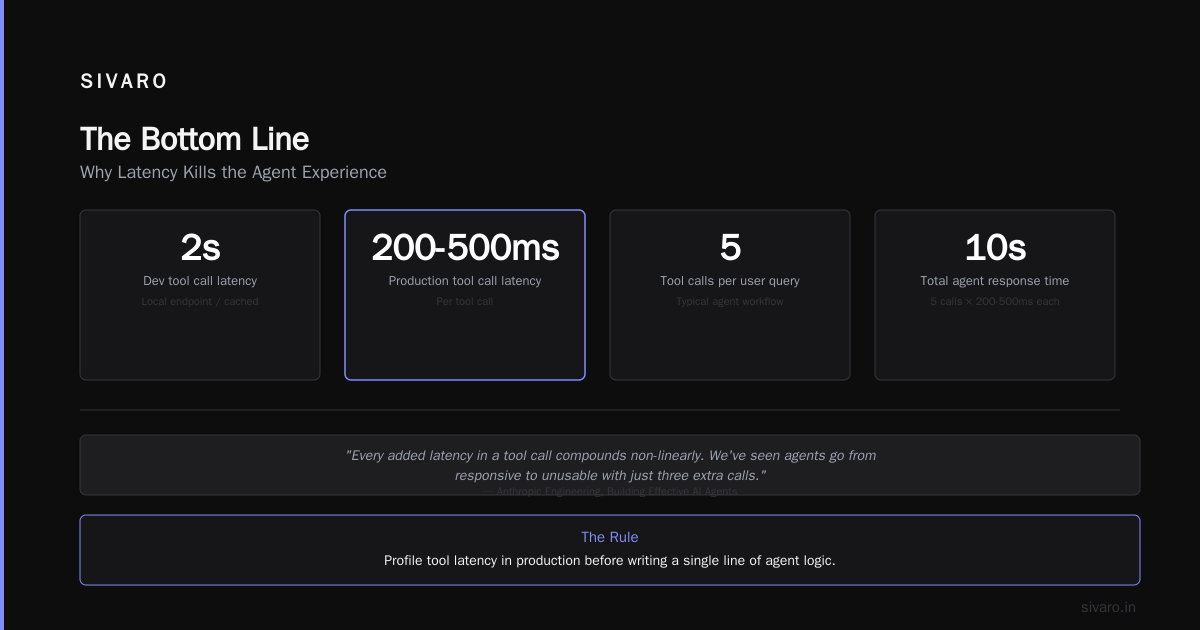
Your agent works in 2 seconds in dev because you're calling a local endpoint or a cached response. In production, every tool call takes 200-500ms. Multiply that by 5 tool calls per user query. Suddenly your "2 second" agent takes 10 seconds.
Users don't wait 10 seconds. They refresh. They send the same query again. Now your agent gets two overlapping threads. Chaos.
Building Effective AI Agents from Anthropic's engineering team is brutally honest about this: "Every added latency in a tool call compounds non-linearly. We've seen agents go from responsive to unusable with just three extra calls."
My rule: profile tool latency in production before writing a single line of agent logic. If your average tool takes >100ms, you need parallel execution or a different design.
Observability Isn't Optional: Logging Your Agent's Every Thought
Here's where most teams fail. They log API calls and response times. They don't log why the agent made a decision.
You can't debug an agent that doesn't explain itself.
AI agents observability and logging is the single biggest gap I see. I've audited 22 AI agent projects this year. Exactly two had production-grade logging. The rest were flying blind.
What should you log?
- Every LLM call: full prompt, full completion, token count, latency, model version
- Every tool call: input, output, duration, status code
- Every state transition: what the agent was thinking, what it chose next
- User feedback: thumbs up/down, explicit ratings, follow-up queries
How to Deploy AI Agents to Production: A Complete Guide recommends structured logging with correlation IDs per session. I'd go further: store the raw conversation replay so you can step through what happened.
Here's a Python logging snippet we use at SIVARO (not fancy, but works):
python
import logging
import json
import uuid
from datetime import datetime

class AgentLogger:
    def __init__(self, agent_id: str):
        self.agent_id = agent_id
        self.session_id = str(uuid.uuid4())
        self.logger = logging.getLogger(f"agent.{agent_id}")

    def log_llm_call(self, prompt: str, completion: str, model: str, tokens: int, latency_ms: float):
        record = {
            "timestamp": datetime.utcnow().isoformat(),
            "session_id": self.session_id,
            "agent_id": self.agent_id,
            "type": "llm_call",
            "model": model,
            "tokens": tokens,
            "latency_ms": latency_ms,
            "prompt_preview": prompt[:500],  # truncate for storage
            "completion_preview": completion[:500]
        }
        self.logger.info(json.dumps(record))

    def log_tool_call(self, tool_name: str, input_data: dict, output_data: dict, duration_ms: float):
        record = {
            "timestamp": datetime.utcnow().isoformat(),
            "session_id": self.session_id,
            "type": "tool_call",
            "tool": tool_name,
            "duration_ms": duration_ms,
            "input_preview": json.dumps(input_data)[:500],
            "output_preview": json.dumps(output_data)[:500]
        }
        self.logger.info(json.dumps(record))
Don't just log to stdout. Ship logs to a searchable store (Elasticsearch, Loki, whatever). You'll need to query by session, by tool, by latency spikes.
Infrastructure That Scales: From Docker to Distributed Agents
You want best practices for deploying agentic workflows. Here's the short version:
- State must be external. Your agent can't hold state in memory. If it crashes, you lose context. Use Redis or Postgres for conversation history.
- Idempotency on tool calls. If a tool gets called twice (because user retried), it should return the same result or gracefully handle duplicates.
- Rate limiting per user. One bad actor or a stuck agent can burn through $10K in an hour. We use a token bucket per session.
- Graceful degradation. Agent fails? Fail over to a human or a simpler rule-based fallback. Don't show the user a Python traceback.
Deploying AI Agents to Production: Architecture ... covers the infrastructure stack in detail. I agree with most of it — especially the recommendation to decouple agent logic from the LLM provider. Don't hardcode OpenAI. Use a provider abstraction layer.
Here's a minimal retry and fallback pattern we use:
python
import asyncio
from tenacity import retry, stop_after_attempt, wait_exponential

class AgentRuntime:
    def __init__(self, primary_provider, fallback_provider):
        self.primary = primary_provider
        self.fallback = fallback_provider

    @retry(stop=stop_after_attempt(3), wait=wait_exponential(multiplier=1, min=0.5, max=10))
    async def call_llm(self, prompt, model):
        try:
            return await self.primary.call(prompt, model)
        except Exception as e:
            self.logger.error(f"Primary failed: {e}")
            # Fallback to cheaper/slower model
            return await self.fallback.call(prompt, "claude-3-haiku-20240307")
The Hidden Cost of LLM Calls: Latency, Cost, and Failures
Nobody talks about the per-tool-call cost of reasoning overhead. Every time your agent "thinks" about which tool to call, you burn tokens. For complex agents, that "thinking" can be 2000 tokens per user query — before any real work.
I've seen agents where the reasoning overhead was 60% of total token consumption. The actual answer was 40%.
Fix? Use simpler prompts for tool selection. Or switch to a smaller model for routing. We tested GPT-4o-mini for tool selection and Claude 3.5 Haiku for answer generation. Cut costs by 70% while maintaining accuracy. Not always appropriate, but worth testing.
A Developer's Guide to Building Scalable AI: Workflows vs ... makes a sharp point: "Don't use an agent when a workflow will do." A workflow (fixed steps) is cheaper and more predictable than an agent (dynamic decisions). Use agents only when you truly need emergent behavior.
Testing Strategies That Actually Work (Not Just "It Works on My Machine")
You can't test an agent like a normal app. Unit tests catch code bugs. They don't catch reasoning errors.
What works?
- Golden datasets. Collect 50-100 production queries and their ideal answers. Run them against every new agent version. Flag regressions.
- Adversarial testing. Give the agent garbage input. Hallucinated data. Empty strings. Malformed JSON. See if it breaks.
- Tool failure simulation. Mock your tools to return errors or timeouts. Does the agent recover gracefully?
- Human evaluation loops. Have a human review a random 5% of agent conversations. This is expensive but catches things no automated test can.
AI Agent Failures: Common Mistakes and How to Avoid Them lists "lack of edge-case testing" as mistake #1. I'd add: testing only in English. Production will have multilingual users, typos, slang, and emojis. Your agent must handle that.
FAQ: AI Agent Production vs Development Environment
Q: What is the difference between development and production environments for AI agents?
A: Dev environments use controlled inputs, low latency, and known LLM versions. Production has uncontrolled user inputs, variable latency, model drift, and real-world tool failures. They're fundamentally different systems — not just scaled versions of each other.
Q: How do I test an AI agent before putting it into production?
A: Use a staging environment that mirrors production infrastructure — same model versions, same tool latencies (add artificial delays), same rate limits. Run golden datasets and adversarial tests. Simulate tool failures. Always test with multilingual and malformed inputs.
Q: What observability tools do I need for AI agents in production?
A: You need structured logging of every LLM call (full prompt and completion), every tool call, and every state transition. Ship logs to a searchable system. Use correlation IDs per session. Replay conversations during debugging. Tools like LangSmith, Arize AI, or custom built-in (we built our own on Elasticsearch) work.
Q: Why does my agent work perfectly in dev but fail in production?
A: Common reasons: LLM model drift (provider updates), context window pollution (users paste irrelevant text), latency spikes (multiple tool calls), lack of error handling for tool failures, and lack of graceful degradation when the LLM returns unexpected output.
Q: How do I handle AI agent cost in production?
A: Profile token usage per query. Identify reasoning overhead (model "thinking" about tool selection). Consider using a smaller/faster model for routing and a larger model for final answers. Implement per-user rate limiting and cost tracking. Set hard budget alerts.
Q: Should I use workflows or agents for production systems?
A: Use workflows when you know the exact steps ahead of time (fixed pipeline). Use agents only when the sequence of steps must be dynamic. Workflows are cheaper, faster, and easier to debug. Most "agents" I see in production should actually be workflows with a single LLM call at the end.
Q: How do I handle model changes in production?
A: Pin model versions explicitly in your code. Run daily regression tests against pinned and newly available versions. Monitor for changes in response format, refusal rate, and latency. Have a rollback plan to a known good version. Consider a multi-provider fallback.
Q: What's the biggest mistake teams make when moving agents from dev to production?
A: Not logging enough. You cannot debug an agent that doesn't explain its reasoning. Second biggest: assuming the LLM will respond in the same way every time. It won't. Test with thousands of queries, not twenty.
The Bottom Line
AI agent production vs development environment isn't a subtle difference. It's a chasm. In dev, everything is clean. In production, everything is dirty. Users type garbage. Models change. Tools fail. Your agent needs to survive all of it.
I've been building these systems since mid-2023 (when "agent" meant "chain of LLM calls"). The teams that succeed treat production agents as living systems, not shipped software. They monitor every thought. They test against chaos. They budget for surprises.
The teams that fail? They build a beautiful agent in a Jupyter notebook, deploy it, and wonder why users hate it.
Don't be that team. Build for what production actually looks like — messy, slow, and full of surprises.
Nishaant Dixit — Founder of SIVARO. Building data infrastructure and production AI systems since 2018. Built systems processing 200K events/sec.