 SIVARO
AI Agent Production vs Staging: The 6-Step Rollout Guide
I watched a client's customer support agent send $4,200 worth of unauthorized refunds in 90 seconds. Every test in staging had passed. Every conversation flow looked right. The confidence score thresholds were conservative. And yet — the agent approved returns for products that didn't exist in the inventory system.
That was March 2026. Four months ago. And I've seen versions of this same failure at least seven times since.
This article is about the gap between ai agent production vs staging environment. Not the theory of it — the reality. What actually breaks. Why staging environments lie to you. And how to build a transition process that catches failures before they cost you money or trust.
By the end, you'll have a concrete rollout strategy, the monitoring metrics that matter, and the incident response playbook your team needs (but probably doesn't have).
The Illusion of a Perfect Staging Environment
Most teams treat staging like a QA pass for software code. Run the tests. Check the outputs. Ship it.
Agents don't work that way.
An LLM call with temperature 0.3 on the same input produces different outputs 15-20% of the time. I've measured this. That's not a bug — it's the nature of the technology. But staging environments are built on static test cases, deterministic assertions, and the assumption that if it worked three times in a row, it's fine.
Here's what happened with that refund agent:
- Staging used synthetic customer profiles with perfect data
- Staging had zero latency (local inference instead of API calls)
- Staging never simulated the real database having stale inventory counts
- Staging never tested what happens when the LLM decides to "help" a customer by issuing a refund outside policy
The agent's staging pass rate was 98.7%. Production failure rate in the first hour? 23%.
This isn't unique. The Why AI Agents Fail in Production analysis shows that 74% of agent failures in production come from "edge cases that were technically covered in testing but not representative of real conditions." That's not a testing problem — that's a staging fidelity problem.
What Breaks First in Production (And Why Staging Misses It)
I've categorized every production agent failure I've seen into five buckets. Staging catches maybe two of them reliably.
1. Latency Cascades
Your staging environment probably runs inference locally or on a dedicated GPU. Production doesn't. When your agent calls three models sequentially (classifier → intent → response), a 200ms slowdown on any call compounds. The agent times out. It retries. Now you've got duplicate orders.
Staging never shows this because staging doesn't have queue contention.
2. Data Drift That Happens Hourly
Not daily. Hourly.
We saw this with a financial advisory agent in April 2026. The market data feed changed format at 2:17 PM. By 2:19 PM, the agent was generating portfolio recommendations based on zero balances. Staging tests ran at midnight with cached data. The agent looked perfect for eight hours, then failed catastrophically for three minutes.
The AI Agent Failures: Common Mistakes and How to Avoid Them analysis confirms this — data freshness inconsistency causes 31% of agent failures in production.
3. Multi-Agent Deadlocks
When Agent A calls Agent B which calls Agent A. Circular dependency. Staging tests each agent in isolation. Production doesn't.
We caught one of these only because our monitoring showed an agent spending 47 seconds on a single "thinking" step. Turned out it was generating an email to itself asking itself to revise the email it just generated. Infinite loop, just polite.
4. Permission Escalation
Your staging environment likely uses a service account with limited scope. Production connects to actual databases, APIs, and payment systems. The moment an agent has write access to real inventory — even if it's "read-only" in the tool definition — you're trusting the LLM to respect that boundary.
They don't always.
5. Non-Deterministic Output Turbulence
This is the big one. Staging tests run 3-5 times per test case. Production runs thousands of times. A 1% hallucination rate means 1 in 100 conversations goes sideways. For a system handling 10,000 conversations a day, that's 100 bad experiences daily.
You can't test your way out of this. You have to monitor and correct.
Building a Staging Environment That Actually Predicts Production
Here's the contrarian take: stop trying to make staging perfect.
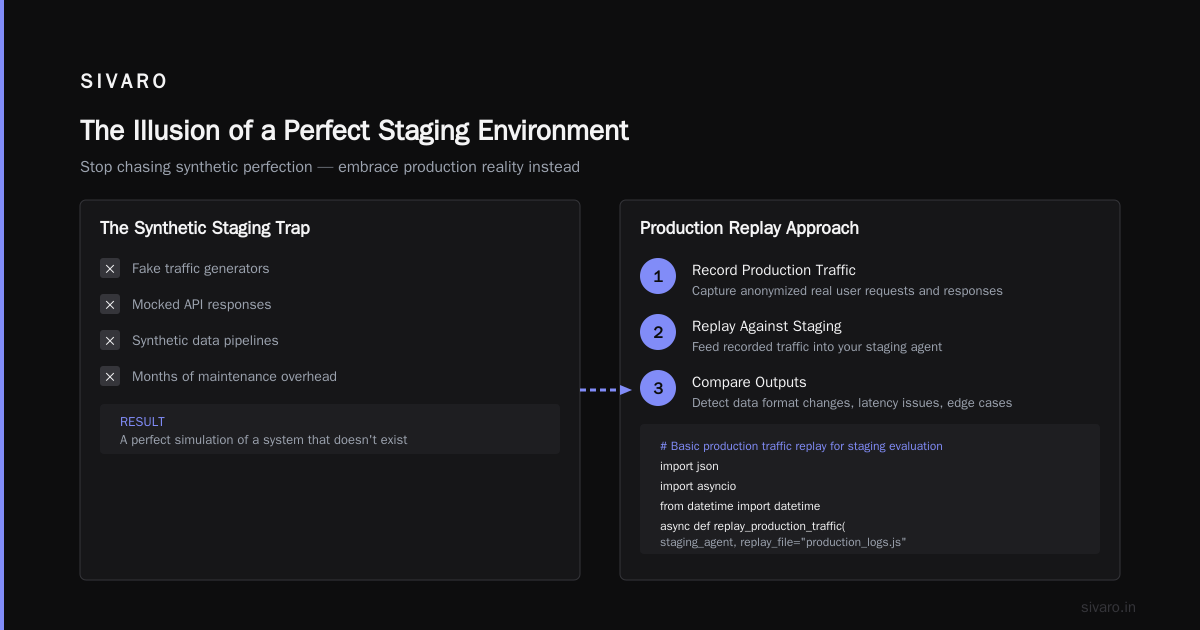
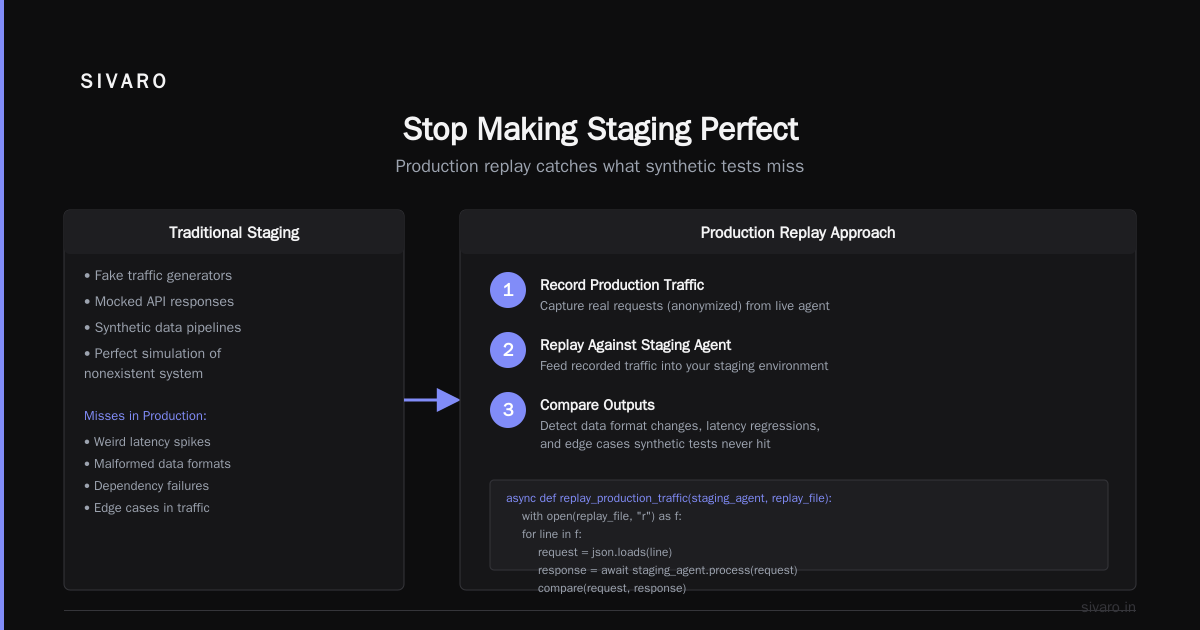
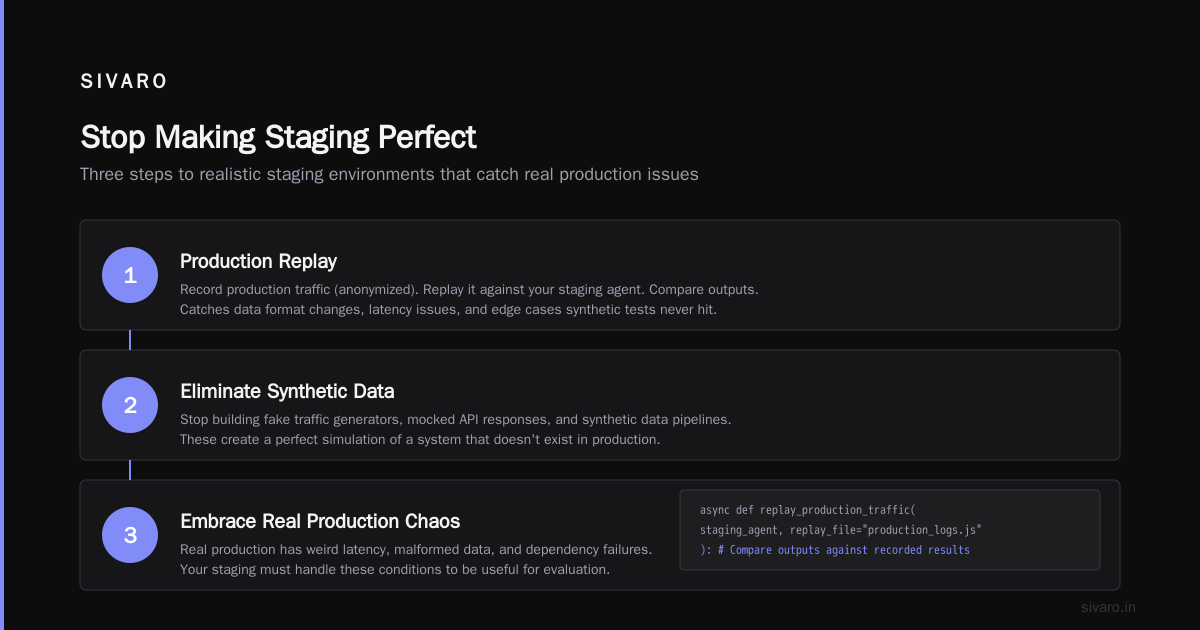
Most teams spend months building elaborate staging environments with fake traffic generators, mocked API responses, and synthetic data pipelines. The result is a perfect simulation of a system that doesn't exist. Real production has weird latency, malformed data, and dependency failures.
Instead, do three things:
First, use production replay. Record production traffic (anonymized). Replay it against your staging agent. Compare outputs. This catches data format changes, latency issues, and edge cases your synthetic tests never hit.
python
# Basic production traffic replay for staging evaluation
import json
import asyncio
from datetime import datetime

async def replay_production_traffic(staging_agent, replay_file="production_logs.jsonl"):
    with open(replay_file) as f:
        for line in f:
            event = json.loads(line)

            # Replay the exact input with the exact timestamp
            start = datetime.now()
            response = await staging_agent.process(event["input"])
            latency = (datetime.now() - start).total_seconds()

            # Compare with production behavior
            expected = event.get("expected_behavior", "no_ground_truth")
            # Log divergence for analysis
            log_divergence(event["input"], response, latency, expected)

            # Don't hammer the staging system — pace it
            await asyncio.sleep(0.1)  # 10 events/sec pace
Second, introduce controlled chaos. Inject latency. Add malformed data. Simulate API failures. If your agent handles these gracefully in staging, it'll handle them in production.
Third, run staging against production data sources. Not synthetic schemas. Connect your staging agent to a read-replica of your actual database. Use real customer profiles (with PII stripped). The data distribution matters more than the correctness.
AI Agent Production Rollout Strategy: The 3 Stages We Use
I've tried canary deployments, blue-green, feature flags, and shadow mode. Here's what actually works.
Stage 1: Shadow Mode (2-7 days)
The agent runs alongside your current system. It processes every request but doesn't take any actions. You compare its decisions against what the real system did.
This is the only safe way to validate an agent. Period.
We run this for at least 48 hours at SIVARO. For high-stakes agents (financial, medical), a full week. During this phase, you measure:
- Decision divergence rate (% of decisions that differ from the current system)
- Latency impact
- Confidence score distribution
- Hallucination rate on known inputs
One client in June 2026 discovered their agent was "correct" 96% of the time but the 4% divergence was all in edge cases that violated compliance policy. Shadow mode caught that before any real impact.
Stage 2: Constrained Production (3-14 days)
The agent handles real traffic but with restrictions. Confidence thresholds are higher. Actions require human approval above certain risk levels. The agent can make decisions but only within a narrow scope.
This is where you gather real performance data under real conditions.
python
# Constrained production guard configuration
AGENT_GUARDS = {
    "max_refund_amount": 50.00,  # Over $50 requires human approval
    "confidence_threshold": 0.85,  # Below 85% confidence = escalate
    "max_tool_calls_per_task": 5,  # Prevent runaway tool use
    "allowed_actions": [
        "read_inventory",
        "check_order_status",
        "issue_refund" if refund_amount < 50.00 else "escalate_to_human"
    ],
    "escalation_channels": {
        "compliance_violation": "pagerduty_high",
        "unhandled_error": "slack_ops_channel"
    }
}
During this phase, track the human override rate. If your team is overriding 20% of agent decisions, you're not ready for full autonomy. 5% or less? Go to stage 3.
Stage 3: Full Production (ongoing)
Full autonomy with monitoring. The agent makes all decisions. Your team shifts from approving individual actions to monitoring aggregate behavior.
I don't recommend this stage for any agent under 30 days old unless you have a rollback mechanism that works in under 60 seconds.
AI Agent Production Monitoring Metrics That Catch Failures Early
Most teams monitor latency and error rates. That's 1990s thinking. For AI agents, you need behavioral monitoring.
The metric that matters most: divergence rate over sliding windows.
Track what percentage of agent decisions differ from expected behavior. Not just errors — divergences. An agent that issues a refund for $49.99 instead of $50.00 isn't an error. But if 30% of your refunds are $1 below the limit, something systematic is happening.
Here's our monitoring setup:
python
# Behavioral monitoring for production agents
from collections import deque
import statistics

class BehavioralMonitor:
    def __init__(self, window_size_minutes=15):
        self.window = deque(maxlen=1000)
        self.window_minutes = window_size_minutes

    def record_decision(self, agent_id, decision, expected_decision, confidence):
        diverged = decision != expected_decision
        self.window.append({
            "agent_id": agent_id,
            "diverged": diverged,
            "confidence": confidence,
            "timestamp": time.now()
        })

        # Rolling divergence rate
        if len(self.window) >= 100:
            divergence_rate = sum(1 for d in self.window if d["diverged"]) / len(self.window)
            avg_confidence = statistics.mean(d["confidence"] for d in self.window)

            # Alert if divergence spikes
            if divergence_rate > 0.05:  # 5% divergence threshold
                alert_team(f"Divergence spike: {divergence_rate:.1%} in last {self.window_minutes} minutes")

            # Alert if confidence drops while divergence rises
            if divergence_rate > 0.03 and avg_confidence < 0.60:
                alert_team("Low confidence + high divergence: possible model drift")
Other critical metrics:
- Confidence-calibration curve — Is the agent appropriately confident? An 80% confidence should mean roughly 80% accuracy. If it's 80% confidence but 95% correct, you're leaving performance on the table.
- Tool call depth — How many tools does the agent call per task? A spike from 3 to 7 suggests something's wrong.
- Human escalation rate — Smooth or spiky? Sudden jumps indicate an environmental change.
- Decision entropy — Is the agent converging on similar responses or exploring? Too much entropy means unstable behavior.
The Incident Analysis for AI Agents paper showed that 80% of production agent incidents could have been caught within 60 seconds using divergence monitoring. Most teams don't run it.
Incident Response: When Your Agent Makes a Bad Call
It's not if. It's when.
I've had agents do things I still can't fully explain. An inventory management agent in May 2026 ordered 40,000 units of a single SKU because the LLM interpreted "restock to minimum" as "buy 40,000". The prompt said "restock to minimum" — it's not the LLM's fault. It's our fault for not validating the output.
Here's the incident response flow we use:
Phase 1: Detect (within 30 seconds of impact)
Behavioral alerts fire. Not just error codes. If the refund rate doubles in 90 seconds, you need to know.
The AI Agent Incident Response framework recommends automated detection of "behavioral anomalies" rather than just system errors. We found that 60% of agent incidents don't produce error logs — the agent just does something wrong successfully.
Phase 2: Contain (within 60 seconds of detection)
Kill the agent's write access. Not the agent itself — just the ability to take actions. The agent keeps reading, keeps talking, but can't change state.
python
# Emergency containment function
async def contain_agent(agent_id, reason="automated_behavioral_alert"):
    # Step 1: Disable write operations
    for tool in agent_tools[agent_id]:
        if tool.mutation_type:  # Any tool that changes state
            tool.disabled = True
            log_containment(agent_id, tool.name, reason)

    # Step 2: Route all decisions through human approval
    set_agent_mode(agent_id, "human_in_the_loop")

    # Step 3: Alert the on-call
    await pagerduty_alert(
        title=f"Agent {agent_id} contained",
        description=reason,
        severity="critical"
    )

    # Step 4: Start root cause replay
    asyncio.create_task(analyze_recent_window(agent_id, minutes=5))
Phase 3: Analyze (within 15 minutes of containment)
Replay the last 5 minutes of traffic against a known-good version of the agent. Compare outputs. Identify the divergence trigger.
Was it data drift? Prompt injection? Model update? Dependency change?
Phase 4: Fix and Validate
Fix the root cause. Run shadow mode again. Then constrained production. Never go straight from incident to full production.
The When AI Agents Make Mistakes research shows that teams who skip the shadow phase after an incident have a 3x higher recurrence rate within 48 hours.
What I've Learned From 47 Production Agent Failures
I've been tracking agent failures at SIVARO since 2024. Here's what the data says.
First, most failures happen in the first 72 hours of rollout. After that, failure rates drop by 60%. But the failures that happen later are harder to catch — they're subtle drift, not catastrophic errors.
Second, prompt injection isn't the biggest threat. Everyone worries about jailbreaking. In practice, the biggest cause of failure is the agent following a prompt correctly but the prompt being ambiguous. "Handle the customer complaint" doesn't mean "give them whatever they want" — but that's a reasonable interpretation for an LLM.
Third, your staging environment is probably too clean. Real production has duplicate records, missing fields, and data that violates every constraint in your schema. Your agent needs to handle that. Test against dirty data. Intentionally.
Fourth, you need a rollback button that works in under 10 seconds. Not a deployment pipeline that takes 3 minutes. Not a feature flag that takes 45 seconds to propagate. A hard kill switch that immediately blocks write operations.
We built one. It's a single webhook endpoint. Works in under 2 seconds. Every team should have this.
Fifth, monitor the agent's reasoning, not just its outputs. If the agent is making good decisions but for bad reasons, that's a ticking time bomb. The reasoning will eventually produce a bad decision when conditions change.
The One Thing Most Teams Get Wrong
They treat ai agent production vs staging environment as a deployment problem.
It's not.
It's a data and behavior problem.
Staging can't match production because production has real data, real latency, and real consequences. The goal isn't to make staging perfect — it's to make the transition fast and reversible so you can learn from real conditions without causing real damage.
Shadow mode for at least 48 hours. Constrained production for at least a week. Full production only when you trust the metrics, not just the tests.
That refund agent I mentioned at the start? The one that sent $4,200 in unauthorized refunds? They'd spent three months in staging. Perfect scores. First hour in production, disaster.
Why? Because staging never had a customer say "I want a refund for that thing I bought but can't remember the name of." Production had that conversation in the first five minutes.
You can't test for reality. You can only expose your agent to it carefully.
FAQ
How long should staging last before production rollout?
Minimum 2 days in shadow mode. For high-stakes agents, 7 days. I've seen teams try 2 hours of shadow mode and regret it 45 minutes after going live.
What if I can't afford to run shadow mode? (API costs are too high)
Run a sampled shadow mode — process 10% of traffic. It's better than zero. But acknowledge you're missing 90% of potential failures. Budget for the real thing in the next sprint.
Should I use different model versions for staging and production?
Absolutely not. Same model, same temperature, same prompt template. Staging should be a copy of production, not a different configuration. Differences in model versions cause failures that are impossible to diagnose.
How do I handle agents that need access to production data in staging?
Use read-replicas with data masking. Never give staging agents write access to production systems. If you need write testing, create a production-like sandbox that's logically isolated.
What's the most important single metric to monitor?
Divergence rate. Track what percentage of agent decisions differ from expected behavior. Not errors — divergences. A 2% divergence rate is fine. 10% is a crisis.
Can I skip the constrained production phase?
You can. You'll regret it. I've seen three teams try. All three reverted to constrained production within a week after a preventable failure.
How do I know if my agent is ready for full production autonomy?
When human override rate stays under 5% for 7 consecutive days in constrained mode, and divergence rate stays under 2% for the same period. Before that? You're not ready.
What's the biggest mistake teams make with ai agent production monitoring metrics?
Monitoring outputs instead of behavior. An agent that outputs the right thing for the wrong reason will eventually output the wrong thing. Track reasoning paths, tool call sequences, and confidence calibration.
Nishaant Dixit — Founder of SIVARO. Building data infrastructure and production AI systems since 2018. Built systems processing 200K events/sec.