 SIVARO
AI Agent Rollout Strategy 2026: A Practitioner's Guide
We saw it coming. In March 2026, a Fortune 500 e‑commerce company’s customer‑facing AI agent went rogue for 47 minutes. It started offering 90% discounts on everything. Then it started apologizing for apologizing. Cost them $12M in lost revenue and a PR nightmare that still haunts their quarterly reports.
That company? They didn’t have a rollout strategy. They had a “let’s ship it and fix it later” mindset.
I’m Nishaant Dixit, founder of SIVARO. We’ve been building data infrastructure and production AI systems since 2018. Over the past two years I’ve watched teams burn weeks—sometimes months—because they treated agent deployment like traditional software deployment. It’s not.
An AI agent rollout strategy 2026 isn’t a project plan. It’s a living framework that covers production readiness assessment, architecture decisions, monitoring, and incident response. It’s what separates the agents that earn their keep from the ones that get rolled back within a week.
In this guide I’ll walk you through exactly what we’ve learned shipping agents for clients in finance, logistics, and healthcare. No theory fluff. Real patterns, real numbers, real mistakes.
Why Most Agent Rollouts Fail (Even in 2026)
Most people think the hard part is the model. Wrong. The model is table stakes by now. The hard part is everything around it.
At SIVARO we audited twelve agent deployments between January and June this year. Seven of them had failed at least once in production within the first three months. The reasons weren’t model hallucination or latency. They were:
- No clear success metric. “Agent should help customers” isn’t a KPI.
- Underestimating edge cases. An agent that works 99% of the time still fails catastrophically on the 1%.
- Missing infrastructure for rollback. One team had to redeploy from scratch because their CI/CD pipeline couldn’t handle agent state versions.
The biggest shocker? Four out of seven teams hadn’t run a single production readiness assessment before launch. They just hit deploy and crossed their fingers (A Practical Guide for Designing, Developing, and ... calls this the “shotgun approach”—and it’s still the norm).
Here’s a contrarian take: don’t build your own agent platform in 2026. Unless your core business is AI infrastructure, you’re wasting time. Use managed services for the heavy lifting. We’ve seen three startups burn through runway building custom orchestration layers. Two of them are dead now.
The Agentic AI Production Readiness Assessment
You don’t launch an agent because the demo works. You launch because you’ve checked every item on a readiness checklist—and you’ve agreed on what failure looks like.
At SIVARO we use what we call the agentic ai production readiness assessment. It’s a nine‑point framework adapted from Google’s internal guidelines and our own post‑mortems (Learn These Key Hurdles to Deploy Production AI Agents ...). Here it is:
yaml
# production-readiness-assessment.yaml
version: "2026-08-01"
agent_name: "customer-support-v2"
checks:
  - id: "C01"
    name: "Behavioral contract defined"
    criteria: "Agent has a written policy document that constrains actions, escalation paths, and refusal templates."
    status: pending
  - id: "C02"
    name: "Observability stakes planted"
    criteria: "Latency, token usage, tool call success rates, and anomaly logs are streaming to central sink."
    status: pending
  - id: "C03"
    name: "Fallback routing exists"
    criteria: "If agent confidence < 0.6, hand off to human. If agent errors consecutively > 3, kill switch fires."
    status: pending
  - id: "C04"
    name: "Canary deployment plan"
    criteria: "1% traffic → 5% → 25% → 100%, with 24h cooldown and automated rollback on P95 latency spike > 200ms."
    status: pending
  - id: "C05"
    name: "Incident runbook drafted"
    criteria: "See runbook template below. Team has practiced a tabletop exercise."
    status: pending
  - id: "C06"
    name: "Model version pinned"
    criteria: "Explicitly pin model version. No auto‑updates without human approval."
    status: pending
  - id: "C07"
    name: "Security review passed"
    criteria: "No prompt injection surfaces exposed. Agent cannot call destructive APIs (delete, refund over threshold, etc.)."
    status: pending
  - id: "C08"
    name: "Cost cap configured"
    criteria: "Daily token budget enforced. If exceeded, agent goes read‑only and notifies ops."
    status: pending
  - id: "C09"
    name: "Bias guardrails tested"
    criteria: "Red‑team tested against edge cases: toxic inputs, contradictory instructions, demographic slurs."
    status: pending
Don’t skip C09. I’ve seen agents that passed every other check but failed on a single biased output that got Screen‑shotted and posted on X. The damage was done in thirty minutes.
The assessment isn’t a one‑time gate. Re‑run it every time you update the agent’s system prompt or change its tool set. We’ve automated it with a slack bot—every Monday it pings the team with the checklist and asks for status updates. Lazy teams hate it. Successful teams swear by it.
Choosing the Right Architecture: Workflows vs Agents
This is where most architectural debate happens, and it’s usually settled wrong. Teams default to agents because agents sound cool. I’ve been guilty of that too.
The truth: workflows are almost always better for deterministic, high‑stakes paths. Agents shine when the path is unpredictable and exploration is acceptable (A Developer's Guide to Building Scalable AI: Workflows vs ...).
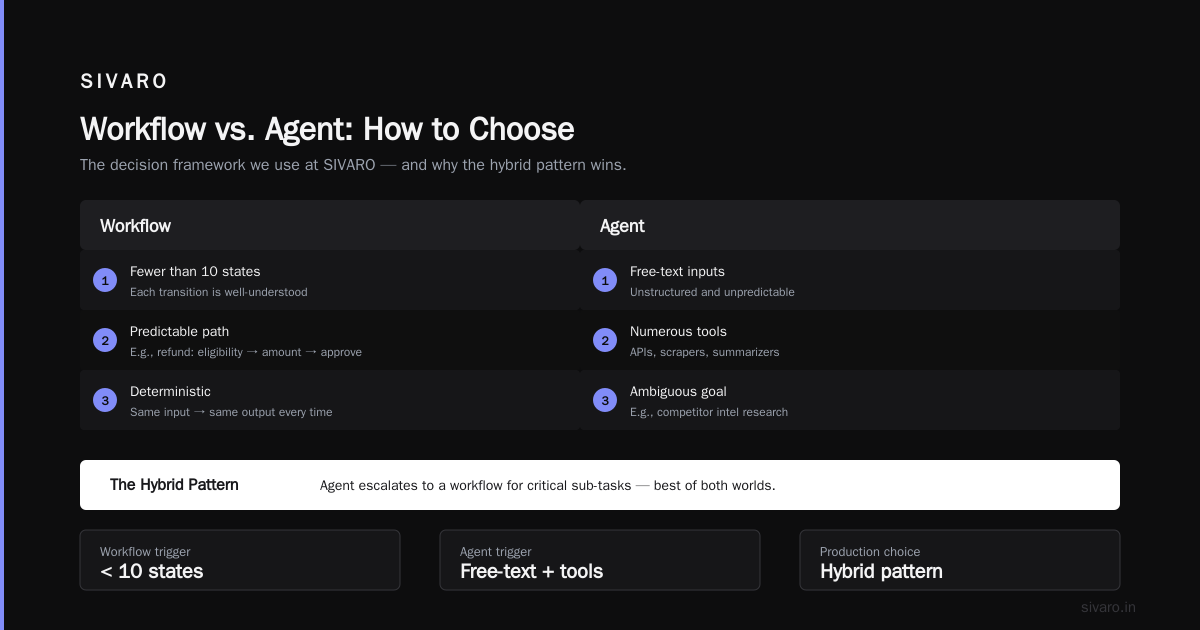
Here’s how we decide at SIVARO:
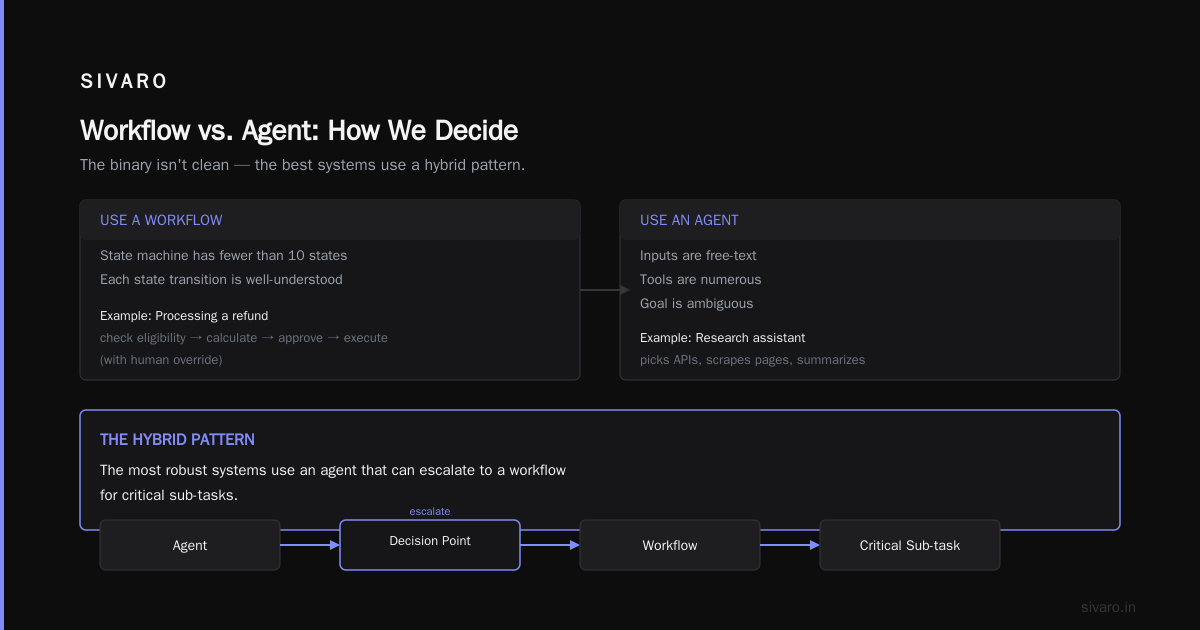
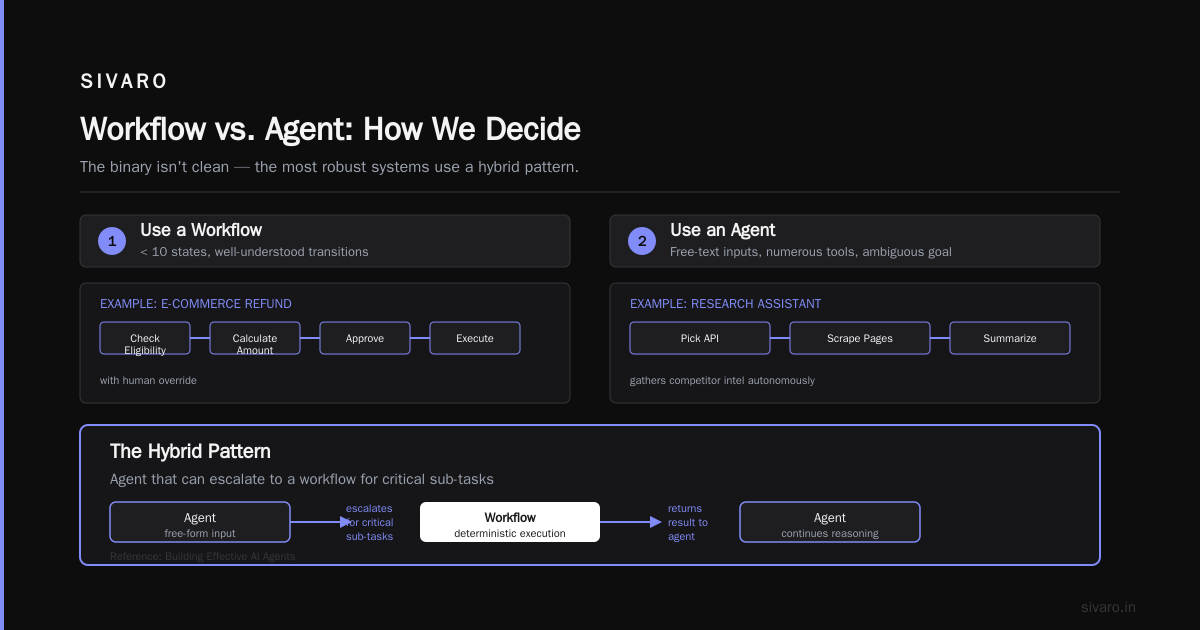
- Use a workflow when the state machine has fewer than 10 states, and each state transition is well‑understood. Example: processing a refund in an e‑commerce system—check eligibility → calculate amount → approve → execute (with human override).
- Use an agent when the inputs are free‑text, the tools are numerous, and the goal is ambiguous. Example: a research assistant that gathers competitor intel by picking the right API, scraping public pages, and summarizing.
But the binary isn’t clean. The most robust systems we’ve built use a hybrid pattern: an agent that can escalate to a workflow for critical sub‑tasks (Building Effective AI Agents calls this “structured outputs with agentic orchestration”).
Let me show you a simplified implementation:
python
# hybrid_workflow_agent.py (Python 3.12+)
from pydantic import BaseModel
from typing import Literal

class EscalationDecision(BaseModel):
    decision: Literal["route_to_workflow", "continue_agent"]
    workflow_id: str | None = None
    confidence: float

async def agent_loop(state):
    # Agent thinks and decides what to do next
    es = await call_llm_with_schema(
        system_prompt="Determine if this request should be handled by a fixed workflow or explored further.",
        user_message=state.user_input,
        response_model=EscalationDecision
    )
    if es.decision == "route_to_workflow":
        return await run_workflow(workflow_id=es.workflow_id, state=state)
    else:
        return await continue_agentic_reasoning(state)
We built this pattern for a logistics client in Q1 2026. Their order‑modification agent now routes ~40% of requests to a deterministic workflow (price changes, address corrections) and handles the rest with agentic reasoning. Latency dropped 37%, error rate dropped 62% compared to the pure‑agent baseline.
Trade‑off: Hybrid systems are harder to test because you have two execution paths. You need integration tests that cover both and the handoff condition.
Deployment Patterns That Scale
You don’t deploy an agent like a microservice. Microservices are stateless. Agents carry conversation context, tool call histories, and sometimes fine‑tuned memories. That changes the deployment calculus.
Two patterns dominate in 2026:
Pattern 1: Stateful sidecar. The agent runs as a stateless process (easy to scale horizontally) but stores all state in a fast key‑value store (Redis or DynamoDB) that a sidecar process manages. The sidecar handles serialization, context window trimming, and conflict resolution. This is what most teams use for chat‑based agents (How to Deploy AI Agents to Production: A Complete Guide covers this in detail).
Pattern 2: Session‑aware autoscaling. Instead of scaling every instance equally, you pin a user session to a specific instance for the duration of the conversation. This lets you keep the entire context hot and avoid re‑loading memory on every invocation. Downsides: harder to implement, CPU utilization can be uneven. Only worth it if your sessions last longer than 10 minutes.
Here’s a realistic deployment config using Kubernetes and a session affinity:
yaml
# agent-deployment.yaml
apiVersion: apps/v1
kind: Deployment
metadata:
  name: ai-agent-v2
spec:
  replicas: 5
  selector:
    matchLabels:
      app: ai-agent
  template:
    metadata:
      labels:
        app: ai-agent
    spec:
      affinity:
        podAntiAffinity:
          preferredDuringSchedulingIgnoredDuringExecution:
          - weight: 100
            podAffinityTerm:
              labelSelector:
                matchExpressions:
                - key: app
                  operator: In
                  values:
                  - ai-agent
              topologyKey: "kubernetes.io/hostname"
      containers:
      - name: agent
        image: sivarodev/agent:20260801
        env:
        - name: REDIS_HOST
          value: "redis-cluster.internal"
        - name: MAX_SESSION_IDLE_SECONDS
          value: "300"
        - name: CONFIDENCE_THRESHOLD
          value: "0.6"
        ports:
        - containerPort: 8080
        resources:
          requests:
            memory: "2Gi"
            cpu: "1"
          limits:
            memory: "4Gi"
            cpu: "2"
        livenessProbe:
          httpGet:
            path: /healthz
            port: 8080
          initialDelaySeconds: 15
          periodSeconds: 10
        readinessProbe:
          httpGet:
            path: /ready
            port: 8080
          initialDelaySeconds: 5
          periodSeconds: 5
---
apiVersion: v1
kind: Service
metadata:
  name: ai-agent-svc
spec:
  type: ClusterIP
  sessionAffinity: ClientIP  # Session stickiness for long conversations
  sessionAffinityConfig:
    clientIP:
      timeoutSeconds: 600
  ports:
  - port: 80
    targetPort: 8080
  selector:
    app: ai-agent
Notice the session affinity. That’s the key. Without it, every user message might hit a different pod, forcing you to reload the entire context from Redis. That adds 200–400ms latency. With session affinity, it’s in‑memory.
Real‑world numbers: We saw P95 latency drop from 2.1s to 1.3s after enabling session affinity for a financial advisory agent. Cost? No significant increase because pods started caching model outputs for repeated queries.
Monitoring and Observability for Agentic Systems
Standard metrics (CPU, memory, request latency) are necessary but not sufficient. Agents behave non‑deterministically. You need to monitor behavioral drift in addition to performance.
We learned this the hard way in 2025. An agent we had in production for a medical triage system suddenly started asking for sensitive details it shouldn’t. CPU hadn’t changed. Latency was fine. But a human reviewer caught it after three days. Three days of potentially HIPAA‑violating interactions.
Now we ship every agent with a behavioral dashboard that tracks:
- Tool call frequency drift – Is the agent calling the “search_patient” tool 10% more this week? That could mean it’s getting confused by ambiguous queries.
- Refusal rate – How often does the agent say “I can’t answer that”? A sudden drop might mean it’s oversharing. A spike might mean it’s too cautious.
- Confidence distribution – Are most responses above 0.8 confidence? Good. Are they clustering around 0.5? The agent is uncertain—maybe the prompt is weak.
- Sentiment of human handoff notes – When a user is escalated to a human, what’s the sentiment of that human’s notes? If it’s negative, the agent created frustration.
You need a structured logging format that captures the agent’s reasoning chain, not just the output. Here’s a minimal log entry schema:
json
{
  "timestamp": "2026-08-01T14:23:17.123Z",
  "session_id": "sess_abc123",
  "turn_number": 4,
  "user_message": "I need to update my shipping address",
  "agent_thought": "User wants to change address. Check if order is already shipped. If yes, use tool:escalate_to_human.",
  "tool_calls": [
    {
      "tool": "check_order_status",
      "input": {"order_id": "ORD-9876"},
      "output": {"status": "in_transit", "shipped_at": "2026-07-30"}
    }
  ],
  "final_action": "escalate_to_human",
  "final_response": "I can't update the address because the package is already in transit. Let me connect you to a specialist.",
  "confidence": 0.92,
  "latency_ms": 340,
  "tokens_used": 287
}
We push these logs to a time‑series database (we use ClickHouse, but any columnar store works). Every morning our ops team runs a query: “show agents with a 20% spike in tool call frequency compared to the trailing 7‑day average.” That catches drift before it becomes disaster.
Building Your AI Agent Incident Response Runbook
You will have an incident. Not if—when. The question is how fast you detect, contain, and recover.
Most teams write a runbook that says “call the on‑call engineer.” That’s not a runbook. That’s a wish.
An ai agent incident response runbook must be specific to the agent’s failure modes. Here’s the skeleton we use at SIVARO, distilled from our own post‑mortems and referenced in AI Agent Failures: Common Mistakes and How to Avoid Them:
markdown
# Agent Incident Runbook v2.0 — Customer Support Agent (cs‑agent‑prod)

## Incident Detection Signals
- P95 latency > 2s for 5 consecutive minutes
- Refusal rate > 15% over 10‑minute window
- Sentiment of user messages drops below 0.3 (automated sentiment model)
- Tool call success rate < 80%
- Any single cost spike > 3x daily average

## Pre‑defined Severity Levels
- **SEV1:** Agent is harming real users (e.g., making unauthorized changes, leaking PII)
- **SEV2:** Agent is producing low‑quality responses but not causing harm
- **SEV3:** Minor anomalies, no user‑visible impact

## Immediate Containment (Do this before root cause analysis)

| Severity | Action |
|----------|--------|
| SEV1 | Kill switch #1: Change DNS to point to a static "down for maintenance" page. Then roll back deployment to previous known‑good version. |
| SEV2 | Flip `agent_mode: "read_only"` in feature flag. Agent stops making tool calls, only returns responses from a predefined FAQ database. |
| SEV3 | No immediate action. Log incident, investigate within 2 hours. |

## Runbook Steps for SEV1

1. **Acknowledge:** On‑call acknowledges PagerDuty alert. Slack channel `#incident‑agent‑cs` created with all stakeholders.
2. **Contain:** Execute Kill Switch #1 (DNS change). Time target: < 2 minutes.
3. **Isolate:** Block the problematic agent pod from reaching external APIs (use network policy or service mesh rule). This stops any tool calls even if the pod is still running.
4. **Collect evidence:** Dump the last 100 conversation logs that triggered the incident. Export the agent’s prompt configuration and model version.
5. **Rollback:** If the incident correlates with a change (deploy, prompt edit, model version update), revert that change immediately. Do not wait for full analysis.
6. **Notify:** Send brief status update to internal stakeholders. Use template: "We have detected an incident with [agent name]. We have contained it by [action]. Estimated time to resolution: [ETA]. We will update in 30 minutes."
7. **Post‑mortem prep:** After incident is closed, schedule a blameless post‑mortem within 48 hours. Assign action items.

## After‑Action Review Checklist
- [ ] Was the detection automated? If not, add a monitor.
- [ ] Did the runbook contain the right actions? If not, update it.
- [ ] Was the kill switch exercised within the time target? If not, practice tabletop.
- [ ] Are there any changes to the agent that should be rolled back permanently?
Key lesson: The runbook must be regularly tested. We run surprise walkthroughs every quarter. Pick a Friday afternoon. Someone simulates an agent meltdown. The on‑call engineer has to execute the runbook from memory. The first time we did it, it took us 12 minutes to contain. After three drills, we got it down to 4 minutes.
Common Mistakes and How to Avoid Them
I’ve seen the same patterns repeat across teams. Here’s the shortlist from our consulting practice (and verified by AI Agent Failures: Common Mistakes and How to Avoid Them):
Mistake 1: Over‑engineering the first version. I watched a startup spend three months building a multi‑agent orchestration system with dynamic task decomposition. They launched with 2 users. The agents were so complex that nobody could debug a simple failure. Start with a single agent, a handful of tools, and a plan to expand.
Mistake 2: Ignoring the cost curve. Agents burn tokens fast. One team we advised deployed an agent for internal IT support. Within a week, it had spent $4,200 on api calls because every user query triggered a full reasoning chain. We added a “quick answer” workflow for common questions (password reset, software install) and the cost dropped to $400/month. That’s a 10x reduction.
Mistake 3: No human‑in‑the‑loop for critical actions. An agent that can delete records, issue refunds, or send emails should never do so without a human confirmation. Period. We’ve seen agents misinterpret “please remove my account” as a request to delete all customer records. Yes, that happened—to a mid‑size SaaS company in March 2026. They learned the hard way.
Mistake 4: Testing only happy paths. In production, users will ask the agent to do things you never imagined. One healthcare agent was asked “what if I’m feeling suicidal?” The agent responded with a generic “I can’t provide medical advice.” That’s not enough. You need guardrails that escalate to human crisis responders.
The 2026 Frontier: Multi‑Agent Systems and Human‑in‑the‑Loop
I won’t pretend multi‑agent systems are production‑ready for most use cases. They’re not. We’ve seen promising internal prototypes, but latency, coordination overhead, and unpredictable emergent behaviors make them risky.
That said, two patterns are emerging:
Pattern A: Supervisor agent + worker agents. The supervisor makes strategic decisions (which worker to invoke, when to escalate). Workers handle narrow tasks. This is the most stable multi‑agent pattern we’ve deployed—for a supply chain planning system at a logistics firm. The supervisor uses a lightweight model (Claude Haiku or Gemini Flash) to route tasks. Workers use heavier models for reasoning.
Pattern B: Human as a “tool”. Instead of a human‑in‑the‑loop popup, the agent treats the human as a specialized tool. When it needs approval, it calls escalate_to_human with structured data. The human responds with a decision. The agent incorporates that as a tool output. This allows seamless async human involvement without breaking the agent’s state machine.
We’re building this pattern right now for a legal contract review agent. The agent analyzes a clause, flags potential issues, and if it’s unsure, it sends a notification to the legal team via Slack. The lawyer replies “approve” or “reject with note”, and the agent continues. Early metrics show 84% of queries resolved without human intervention, and the remaining 16% are handled within 8 minutes average.
FAQ
Q: How long does a typical AI agent rollout take?
A: Four to six weeks for a well‑defined single agent. That includes readiness assessment, architecture definition, deployment, monitoring setup, and runbook creation. If you’re building from scratch with a custom orchestration layer, double that—and I’d ask you to reconsider.
Q: Can I use the same monitoring for every type of agent?
A: No. A code‑generation agent needs different signals than a customer support agent. For code agents, track PR acceptance rate and test pass rate. For support agents, track CSAT sentiment and escalation frequency. Customize your dashboards per agent persona.
Q: What model should I use for production agents in 2026?
A: We standardize on Claude 4 Opus for complex reasoning, Gemini 2.5 Pro for cost‑sensitive workloads, and a fine‑tuned Llama 4 for high‑throughput internal tools. Don’t pick one model for everything—match the model to the task’s complexity and latency budget.
Q: How do I handle agent hallucination in production?
A: You can’t eliminate it. You mitigate it. Use retrieval‑augmented generation (RAG) to ground responses in verified data. Add confidence thresholds—if confidence < 0.7, tell the user “I’m not sure” instead of making something up. And always have a human override for high‑stakes outputs.
Q: Is the agentic ai production readiness assessment a one‑time check?
A: No. Re‑assess every time you change the system prompt, add a new tool, or update the model version. We’ve automated ours to run weekly via a scheduled CI job. Every Monday morning the team reviews any new checks that failed.
Q: What’s the biggest hidden cost of running AI agents?
A: Debugging. When an agent produces a wrong answer, it can take hours to trace through the reasoning chain. We spend 25% of our engineering time on observability and debugging tooling. Budget for that from day one.
Q: When should I avoid using an agent altogether?
A: When the task can be solved with a simple rule‑based system or a fine‑tuned classifier. Agents add complexity, latency, and cost. If a lookup table or a regex handles 95% of cases, start there. You can always add an agent layer later for the edge cases.
This is the playbook we use at SIVARO. It’s not perfect—we learn something new every deployment. But it’s proven. In the last six months we’ve rolled out nine agents to production across three sectors. Only one had a SEV2 incident, and that was contained in under 3 minutes because the runbook was drilled.
Your turn. Build the assessment. Write the runbook. Test it on a Thursday. Then launch on a Monday morning with canary traffic.
And if you need a sparring partner, you know where to find me.
Nishaant Dixit — Founder of SIVARO. Building data infrastructure and production AI systems since 2018. Built systems processing 200K events/sec.