 SIVARO
AI Agent Scaling: Production Best Practices (2026)
Three weeks ago, a client called with a problem. They'd built an AI agent that could write and deploy code changes. In staging, it worked beautifully. In production, it broke things — badly. Cost them 47 hours of engineering time and a near-miss with the compliance team. Sound familiar?
Welcome to the gap between demo and production.
I'm Nishaant Dixit. At SIVARO, we've been shipping production AI systems since 2018. We've processed over 200K events per second through agentic pipelines. And I've made every mistake in the book — sometimes twice.
This guide is about ai agent scaling production best practices. The patterns that separate one-off demos from systems that run 24/7 without melting down. You'll learn what works, what doesn't, and exactly where most teams get burned.
Why Most Agent Deployments Fail (and How to Avoid It)
At first I thought this was a technology problem. Better models, smarter prompt engineering. Turns out it was infrastructure — and culture.
The biggest failure pattern? Teams treat an AI agent like a traditional microservice. They containerize it, throw it behind a load balancer, and call it a day. Then the agent hallucinates a SQL query that drops a table, or enters an infinite loop generating support tickets. The system has no guardrails because nobody thought to build them.
I've seen this at a Series A company in early 2026. They deployed a customer-facing agent without rate limiting or tool access scoping. Within four hours, the agent had escalated 800 fake emergencies. Overnight, they lost $12K in compute.
The fix isn't more model tweaking. It's operational rigor.
Here's the shortlist of what you absolutely need before going to production:
- Observability (we'll get to that)
- Graduated rollout (canary → shadow → production)
- Tool access control (the agent should not be able to call
DELETE *) - Spending limits (per agent, per user, per session)
- Human override (kill switch, approval gates)
If you don't have these, you're not ready. Period.
Observability: The Non-Negotiable Foundation
I'm going to be blunt: if you can't see what your agent is doing, you shouldn't deploy it. Full stop.
AI agent observability tools production used to be an afterthought. In 2024, most teams relied on LangSmith or Weights & Biases for traces, but those were designed for prompt debugging, not production monitoring. In 2026, the category has matured. Tools like Helicone, Langfuse, and SIVARO's internal observability platform give you per-invocation traces, token cost attribution, and anomaly detection.
But tools alone don't solve the problem.
You need to track:
- Latency breakdowns — Where does the agent spend time? LLM calls? Tool executions? Waiting for external APIs?
- Decision paths — Every choice the agent makes, recorded. Not just the final output.
- Error modes — Timeouts, malformed tool inputs, context window overflows.
- Drift detection — Is the agent behaving differently than last week? Model updates can shift behavior silently.
Here's a practical tip: log every tool call input and output. Even if you think it's too expensive. The debugging value is immense. One of our clients at SIVARO caught a bug where their agent was passing NaN values to a calculator tool because of a floating-point error. Without those logs, it would have looked like random failures.
Example trace structure in Python:
python
{
  "agent_id": "customer-support-v3",
  "session_id": "abc123",
  "timestamps": {
    "start": "2026-07-31T14:22:10Z",
    "llm_call_1_end": "2026-07-31T14:22:12.3Z",
    "tool_call_1_start": "2026-07-31T14:22:12.4Z",
    "tool_call_1_end": "2026-07-31T14:22:13.1Z",
    "llm_call_2_end": "2026-07-31T14:22:15.8Z",
    "end": "2026-07-31T14:22:16.0Z"
  },
  "tool_calls": [
    {
      "tool": "database_query",
      "input": "SELECT COUNT(*) FROM orders WHERE status='pending'",
      "output": "[{'count': 238}]",
      "latency_ms": 700
    }
  ],
  "errors": [],
  "cost_usd": 0.0042
}
I recommend shipping this to a time-series database (TimescaleDB or similar) from day one. You'll thank me after the first incident.
Choosing Between Workflows and Agents
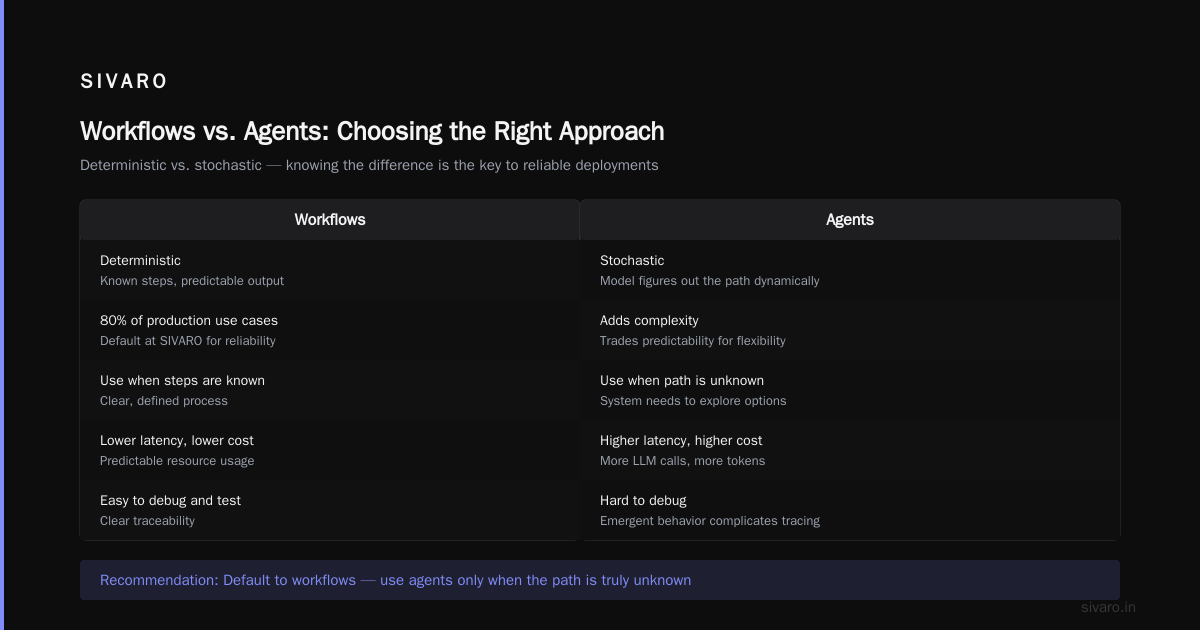
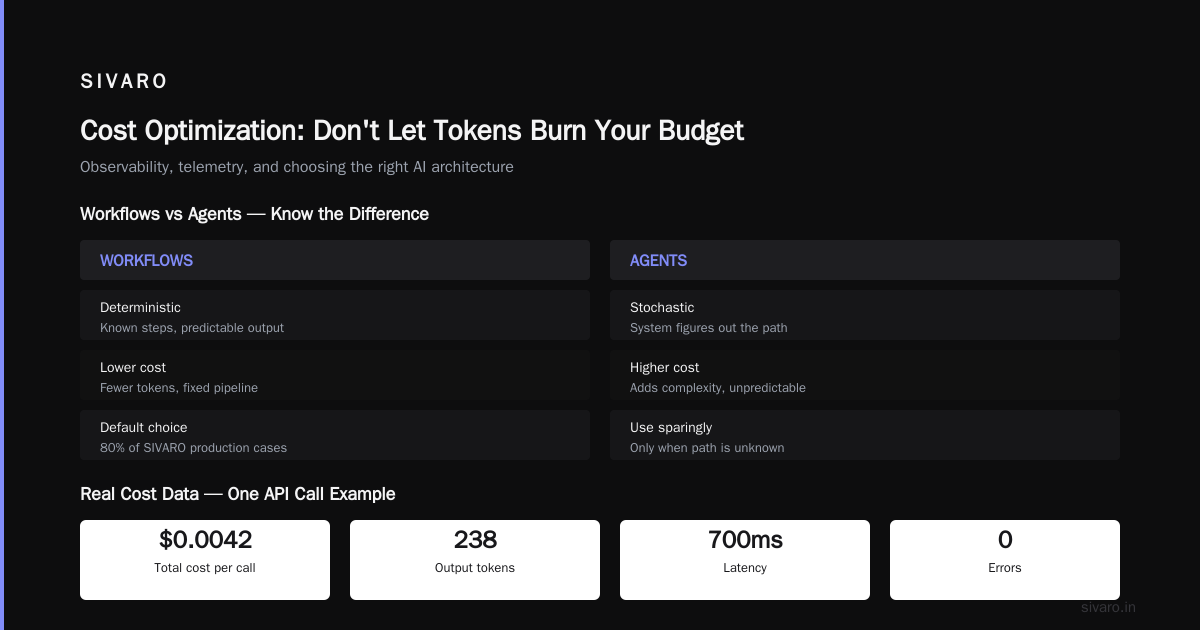
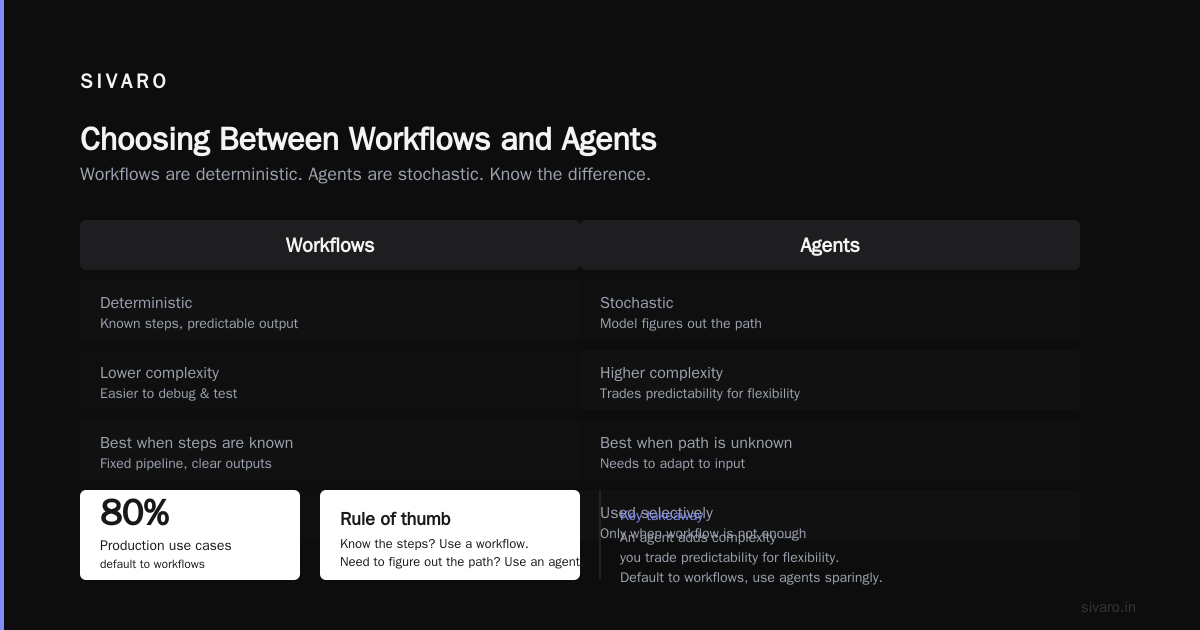
Most people think "agent" is always the answer. Nope. The A Developer's Guide to Building Scalable AI: Workflows vs Agents nails this: workflows are deterministic, agents are stochastic. Use workflows when you know the steps. Use agents when you need the system to figure out the path.
At SIVARO, we default to workflows for 80% of our production use cases. An agent adds complexity — you trade predictability for flexibility. And most business processes don't need that flexibility.
Example: processing a refund. Should the LLM decide which endpoint to hit? No. Hard-code the workflow: validate request → call refund API → log outcome → notify customer. That's a workflow, not an agent.
When do you use an agent? When the solution path is unknown. For instance, a research assistant that browses the web, reads documentation, and synthesizes answers. There's no predefined workflow for that.
Rule of thumb I use: if you can draw a flowchart of the process, use a workflow. If the flowchart would have a question mark at every node, use an agent.
That said, hybrid patterns work best. We've built systems where a workflow orchestrates multiple agents. Each agent handles a sub-task, but the overall flow is deterministic. Best of both worlds.
Building a CI/CD Pipeline for AI Agents
Here's something I rarely see in blog posts: a CI/CD pipeline for ai agents isn't the same as for traditional software. You can't just run unit tests and deploy. Models change. Prompts drift. Tool APIs break.
Your pipeline must include:
- Prompt validation — Check for output format compliance, safety filters, and token limits.
- Regression test suite — Run a fixed set of test cases against every new model or prompt version. We maintain 200+ test scenarios at SIVARO.
- Cost benchmarks — Track average token usage per invocation. A new prompt should not increase cost by 30% without review.
- Side-effect simulation — Run agent actions against a sandbox before allowing real tool execution.
- A/B evaluation — Deploy new version to 5% of traffic, measure success metrics, roll back if regression.
Here's a minimal GitHub Actions workflow for agent CI:
yaml
name: Agent Test Suite
on: [pull_request]
jobs:
  test:
    runs-on: ubuntu-latest
    steps:
      - uses: actions/checkout@v4
      - name: Run unit tests
        run: pytest tests/
      - name: Run prompt evaluation
        run: python -m script.evaluate_prompts --test-data tests/fixtures/prompts.json
      - name: Cost check
        run: python -m script.cost_benchmark --threshold 0.01
      - name: Deploy to staging
        run: python -m script.deploy --env staging
      - name: Smoke test
        run: python -m script.smoke_test --endpoint https://staging.agent.example.com
Notice it doesn't deploy to production automatically. We never auto-deploy agents. Too many unknowns.
I also recommend a "shadow deployment" step: run the new agent version alongside the current one, compare outputs, alert on divergence. That catches cases where the model answers correctly but differently — which your users might not appreciate.
The Infrastructure Stack That Scales
I've seen teams try to run agents on serverless functions. It works for low traffic. For scale? You need something with state management.
Our stack at SIVARO for high-volume agents:
- Orchestration layer — Temporal or Prefect for long-running workflows with retries and timeouts.
- Model gateway — BAML or a custom proxy to handle rate limits, fallback models, and cost tracking.
- Memory store — Redis or Memcached for short-term conversation history. Postgres for long-term.
- Tool execution sandbox — gVisor or Firecracker micro-VMs for dangerous operations (code execution, database writes).
- Queue — RabbitMQ or Redis Streams for buffering agent requests during spikes.
The Deploying AI Agents to Production: Architecture... goes deeper into this. I agree with their emphasis on asynchronous processing. Never make the LLM call synchronous unless you have extremely low latency requirements.
One contrarian take: don't use Kubernetes for small deployments. The cognitive overhead isn't worth it. We run dozens of agent services on simple Docker Compose setups for clients doing under 100 requests per minute. K8s only when you cross that threshold.
Cost Optimization: Don't Let Tokens Burn Your Budget
Token costs are the silent killer. An agent that calls a model on every step — even for trivial decisions — will bankrupt you.
In Q1 2026, a client came to us with $80K monthly spend on a single customer support agent. We cut it to $22K without changing the user experience. How?
- Caching: Store embeddings and common LLM responses. We used Redis with TTL. Hit rate: 34%.
- Prompt compression: Trim conversation history to the last N messages. Cut tokens by 40%.
- Model tiering: Use cheap models (Claude Haiku, GPT-4o mini) for classification steps. Only use expensive ones for complex reasoning.
- Tool invocation batching: Instead of one LLM call per tool, batch tool results and ask the model to process them together.
Anthropic's Building Effective AI Agents has a great section on this. They recommend "designing for the minimum viable model" — something we've adopted religiously.
Example cost tracking middleware in Python:
python
import time
import logging

class CostTracker:
    def __init__(self, model_pricing):
        self.model_pricing = model_pricing
        self.total_cost = 0

    async def __call__(self, request, call_next):
        start = time.monotonic()
        response = await call_next(request)
        duration = time.monotonic() - start

        # Estimate cost from response metadata
        tokens_in = response.headers.get("X-Input-Tokens", 0)
        tokens_out = response.headers.get("X-Output-Tokens", 0)
        model = response.headers.get("X-Model", "unknown")

        cost = (tokens_in * self.model_pricing[model].input_per_1k
                + tokens_out * self.model_pricing[model].output_per_1k) / 1000
        self.total_cost += cost

        logging.info(f"Request {request.url.path}: {cost:.4f} USD, duration {duration:.2f}s")
        return response
Track cost per user, per session, per agent. Alert when a single session exceeds $2. I've seen loops that racked up $50 in minutes.
Testing in Production: The New Normal
You can't simulate production in staging. Environments differ. User inputs are weird. Models behave differently under load.
So you test in production — safely.
Techniques we use:
- Canary deployments: Roll out to 1% of users, monitor for 24 hours, then ramp.
- Shadow mode: Run the new agent, capture its decisions, but don't act on them. Compare to the old agent.
- Synthetic monitoring: Simulate conversations every 5 minutes. Measure success rate, latency, cost. Alert on deviation.
- Red teaming: Have internal users deliberately try to break the agent. We do this weekly.
The A Practical Guide for Designing, Developing, and ... recommends a "guardrails-first" approach. I agree. Your guardrails should be tested in the same CI pipeline as the agent code.
One mistake I see: teams only test happy paths. Your agent will receive gibberish, misspellings, and malicious inputs. Test those. A customer wrote "pls refund i h8 this" and our agent initially tried to escalate to abuse team. That's not what you want.
The Human-in-the-Loop: When and How
Not every action needs human approval. But some do.
Rule: Any action that modifies data or costs money above a threshold should require human confirmation. Our threshold is $10 for financial transactions, or any SQL DELETE statement.
Implementation detail: make the approval async. The agent posts a message to a Slack channel, waits for a thumbs-up emoji, then proceeds. Or integrates with PagerDuty for time-sensitive approvals.
Blaxel's guide on deploying agents suggests a "human-in-the-loop as a service" pattern. We do something similar: a dedicated microservice that holds the approval request, sends notifications, and has a configurable timeout (default 5 minutes). If no response, escalate to the on-call engineer.
But don't overdo it. If every single action needs approval, you've built a glorified chatbot that's slower than humans. Find the balance.
FAQ
Q: What's the minimum observability I need before going to production?
A: At minimum: per-request trace with tool calls and LLM responses, cost per request, and anomaly detection on latency and error rate. Without that, you're flying blind.
Q: How do I handle rate limits from the model provider?
A: Use a gateway that queues requests and retries with exponential backoff. We use a simple Redis-backed queue with a semaphore per model. Track your quota usage and preemptively throttle.
Q: Should I use a managed AI agent platform or build my own?
A: If you're a startup with fewer than 10 engineers, use a managed platform (LangGraph Cloud, Vellum, etc.). If you need custom tool integrations or have compliance constraints, build your own. We've seen teams waste 6 months building internal platforms they could have bought.
Q: How do I prevent infinite loops?
A: Set a max number of steps (cycle budget) per session. If the agent exceeds it, force a final summary and end. Also detect when the agent repeats the same action without progress — we terminate after 3 identical tool calls.
Q: How often should I update the model or prompt?
A: Don't update unless you have a business reason. Model updates can change behavior silently. We update prompts on a 2-week cycle, models on 4-week cycle, with A/B testing before full rollout.
Q: What's the biggest cost surprise when scaling agents?
A: Context window usage. The longer the conversation, the more tokens you pay for history. Some agents re-read the entire conversation history on every step. Compress aggressively — store summary after N steps, drop old details.
Q: Can I trust open-source models for production agents?
A: For non-critical tasks, yes. For production with real data? I'd be cautious. We use closed models (Claude, GPT-4) for decisions, and open-source models (Llama 3.1 70B) for embedding and classification. The reliability difference matters.
Closing Thoughts
Scaling AI agents to production is hard. Not because the models aren't smart enough — they are. It's because the operational practices haven't caught up yet. We're where DevOps was in 2015: lots of hype, few standard patterns.
The practices I've shared here — observability, CI/CD pipelines, cost tracking, graduated rollout — are the foundation. They're not sexy. But they're what keep your agent running without burning money or breaking things.
We're still learning. At SIVARO, we ship new patterns every month. The field moves fast. But the principles remain: build to observe, test in production, and always have a kill switch.
If you're deploying an agent in 2026, start with these best practices. You'll save yourself a lot of 2 AM calls.
Nishaant Dixit — Founder of SIVARO. Building data infrastructure and production AI systems since 2018. Built systems processing 200K events/sec.