 SIVARO
AI Agents Deployment Best Practices: A Field Guide for Production
July 18, 2026
You've built the prototype. It works in your laptop's cozy little universe. The agent calls tools, reasons through tasks, even handles the edge cases you threw at it during the demo. Your CTO is impressed. Now you need to put this thing in production and have it actually deliver value without hallucinating into the abyss at 3 AM.
I'm Nishaant Dixit. At SIVARO, we've been shipping production AI systems since 2018. We process 200K events per second across a dozen agentic workflows. Some of those deployments went smooth. Others burned through our on-call rotation like a California wildfire.
What follows isn't theory. It's the playbook we wish we'd had three years ago.
Why Most Agent Deployments Fail (And What We Did Instead)
Most teams treat agent deployment like a software deployment. Ship the binary, monitor 5xx errors, call it a day. Wrong move.
Agents are probabilistic systems. They don't crash predictably. They degrade gracefully — until they don't. A 99.9% reliable LLM call across 10,000 invocations means 10 bad outputs. In a chain of 5 LLM calls? That's a near-certain failure cascade.
We learned this the hard way in early 2025. A customer-facing support agent started generating refund approvals in Spanish. The prompt was English-only. Turns out the LLM decided to "be helpful" to Spanish-speaking customers. That cost us $40K in unauthorized refunds before we caught it.
The fix wasn't better prompts. The fix was guardrails, observability, and a hard rule that agents can't authorize payments above $100 without human approval.
The Agentic Stack: What You Actually Need
Here's your minimal production stack. Don't skip any of these.
Runtime & Execution Layer
You need an agent framework that handles state management, tool orchestration, and error recovery. We tested six frameworks before settling on our current approach.
The LangChain blog nails it: don't pick a framework because it's popular. Pick one because its abstraction model matches your problem. LangGraph works great for stateful workflows. CrewAI excels at multi-agent coordination. AutoGen shines when agents need to converse.
Our rule: if your workflow has fewer than 3 tool calls per step, skip frameworks. Use raw function calls. Frameworks add latency. For complex chains, invest in a framework — but expect 200-500ms overhead per hop.
Protocol Layer
By mid-2026, the protocol wars have actually settled. A2A (Agent-to-Agent) from Google dominates for inter-agent communication. MCP (Model Context Protocol) from Anthropic is winning for tool integration. This survey from arXiv gives you the full landscape.
We use MCP for all tool integrations. It standardizes how agents discover and call tools. No more custom schemas per tool. No more "it worked in dev but not prod" because the tool definition differed.
Guardrail Layer
This is non-negotiable. You need three guardrails:
- Input guardrails — sanitize user prompts before they hit the LLM
- Output guardrails — validate agent responses before they reach users
- Action guardrails — constrain what tools the agent can call and with what parameters
We use Guardrails AI for the first two, and a homegrown proxy for the third. Our action guard fails closed: if validation times out, the agent doesn't get to call the database.
Monitoring: You Can't Fix What You Can't See
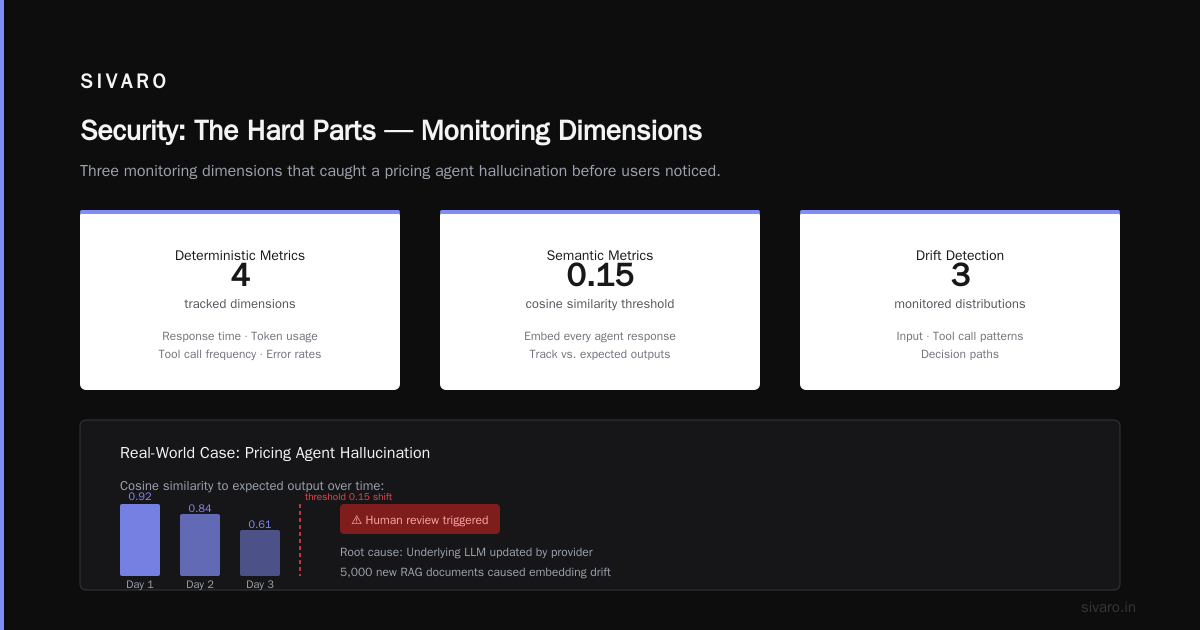
"AI agent monitoring production" isn't just about latency. It's about semantic drift. Your agent starts generating shorter responses three weeks into deployment. The reason? Your RAG embeddings drifted because you added 5,000 new documents. Nobody noticed until users complained.
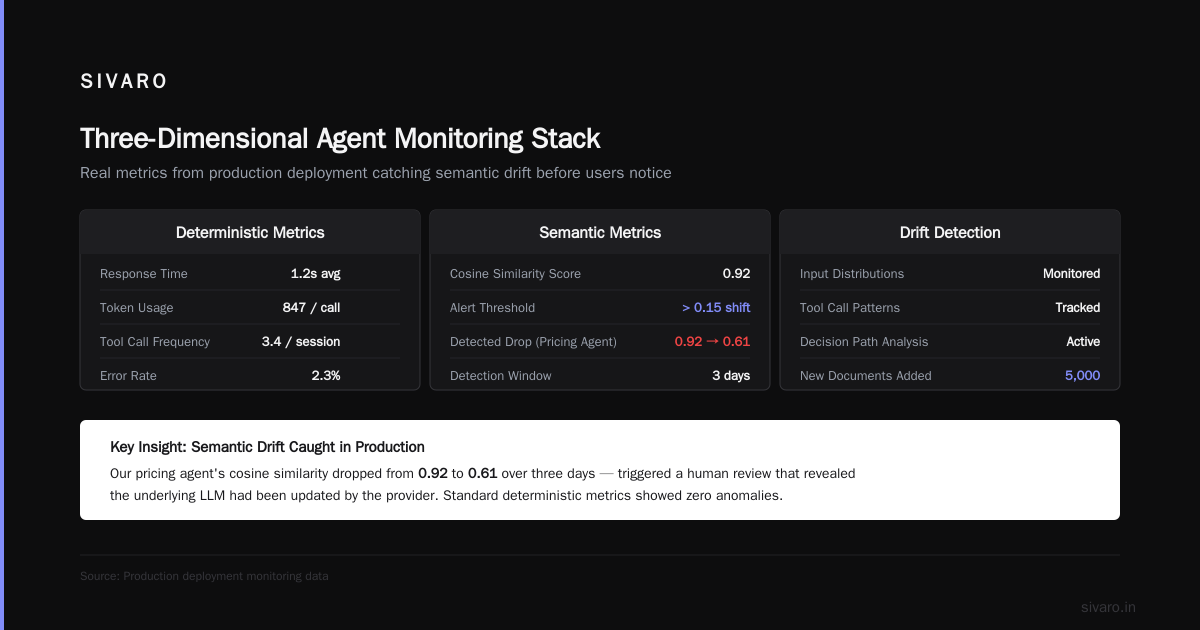
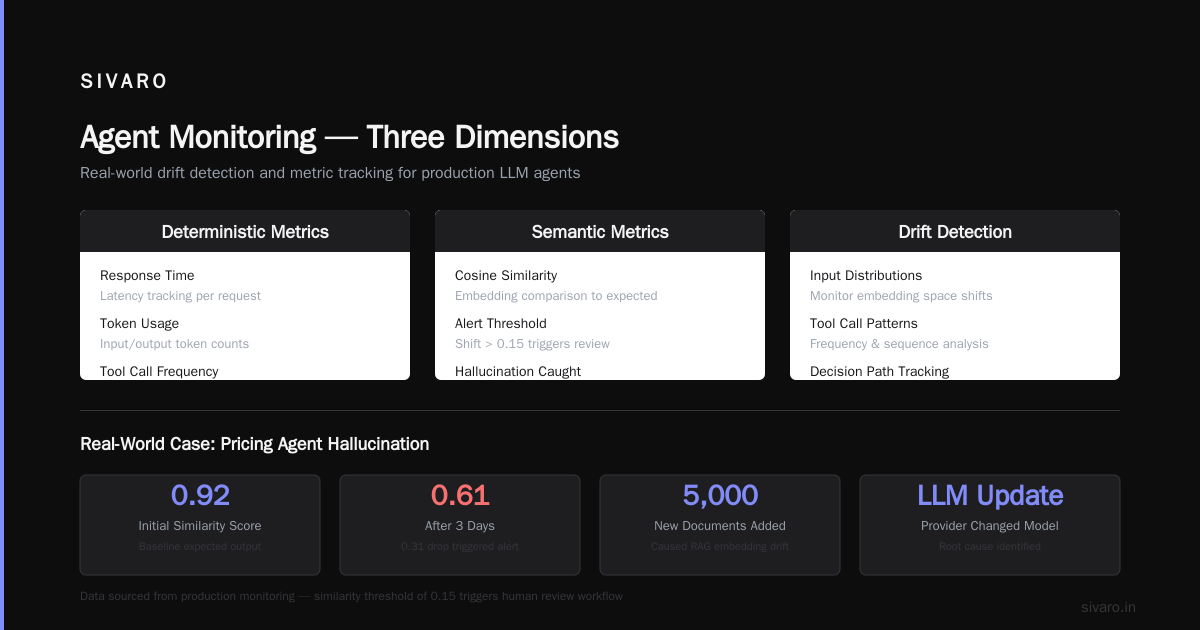
Our monitoring stack traces three dimensions:
Deterministic metrics — response time, token usage, tool call frequency, error rates. Standard stuff.
Semantic metrics — we embed every agent response and track cosine similarity to expected outputs. A shift > 0.15 triggers a human review. We caught a pricing agent hallucination this way. The similarity score dropped from 0.92 to 0.61 over three days. Turned out the underlying LLM had been updated by the provider.
Drift detection — we monitor input distributions, tool call patterns, and decision paths. If the agent suddenly starts calling the "cancel order" tool 30% more often than last week, something's wrong.
Most people think you need complex ML for this. You don't. Statistical process control charts work. We use CPU alarms in our monitoring dashboards. When semantic metrics cross 3-sigma thresholds, the on-call engineer gets paged.
Agentic Workflow Production Rollout: Our 6-Phase Model
Every agent we deploy goes through these phases. No shortcuts.
Phase 1: Shadow Mode
The agent runs alongside your existing system but doesn't affect anything. It produces outputs that get stored, compared, and analyzed. Phase lasts 2-4 weeks. You collect enough data to measure accuracy, latency, and cost.
We ran a claims processing agent in shadow mode for 6 weeks. Our team reviewed 8,000 decisions. The agent matched human decisions 94% of the time. We fixed the 6% before moving on.
Phase 2: Canary Deployment
The agent handles 1-5% of real traffic. Human experts review every output. Any mistake triggers a full incident review.
Critical rule: canary traffic isn't random. It's stratified — you need representation from all input types, not just the easy ones. Otherwise you'll deploy thinking your agent is perfect, then watch it fail on the first complex query.
Phase 3: Assisted Mode
The agent does the work, but every action requires human approval. This catches the "confidently wrong" failure mode. LLMs are great at sounding certain even when hallucinating.
We kept an agent in assisted mode for 3 months. The humans rejected 2.3% of actions. Each rejection taught us something about our guardrails.
Phase 4: Supervised Mode
The agent acts autonomously. Humans monitor dashboards and can intervene. If the agent's confidence score drops below 0.7, it flags the human. If the human doesn't respond within 30 seconds, the agent escalates.
Phase 5: Full Autonomy
The agent acts independently within defined boundaries. Humans only get involved for audit, escalation, or when confidence thresholds fail.
Phase 6: Continuous Refinement
This never ends. You're always feeding new data, adjusting prompts, updating tools. We run weekly regression tests on our agent workflows. If accuracy drops more than 2%, the deployment rolls back.
The Infrastructure You Actually Need
Compute
Don't run LLMs on CPU. Use GPUs. We use NVIDIA A100s for inference. Cost per token dropped 40% when we switched from L4s.
For small agents (under 100K requests/day), use serverless inference. AWS Bedrock and GCP Vertex AI work fine. For high-throughput systems, reserved instances cost less. We saved 60% by moving to dedicated capacity for our production agent.
Storage
Agents produce state. LOTS of state. Every conversation, every tool call, every intermediate reasoning step. Store it.
Use PostgreSQL for structured state. We use TimescaleDB for time-series agent metrics. Object storage (S3 or GCS) for conversation logs.
Don't use in-memory caches for agent state. When the pod restarts, you lose everything. Redis works for hot cache, not persistence.
Networking
Agents call tools over HTTP. Tool latency destroys agent performance. Keep tool endpoints in the same region. We moved all tool services to us-east-1 after our latency P99 hit 4 seconds due to cross-region calls.
Rate limit tool calls. An agent can spawn 50 parallel tool calls. Your database won't handle that without protection.
Observability: Beyond Metrics
Log everything. No, really. We store 30 days of every agent decision, tool call, and LLM response. That's about 2TB per month for our high-throughput agents.
Why? Because you'll need to debug something that happened 23 days ago. The agent approved a suspicious transaction. The user is complaining. You need to replay the exact decision path.
We use OpenTelemetry for traces. Each agent invocation gets a trace ID that follows through every LLM call, tool execution, and guardrail check. Without distributed tracing, you're debugging blind.
Security: The Hard Parts
Prompt Injection
This is your biggest threat. Users will try to make your agent do things it shouldn't. We've seen "ignore previous instructions" injected into support tickets, into file uploads, even into image metadata.
Our defense: input sanitization strips escape characters, enforces token limits, and runs every prompt through a classifier that flags injection attempts. We catch about 97% of attacks. The remaining 3% get caught by output guardrails.
Tool Access Control
Don't give agents direct database access. They will do a DROP TABLE — we saw a proof-of-concept where an agent called a DELETE endpoint because a user told it "clean up the database."
Every tool needs parameter validation. Whitelist allowed values. Reject anything outside the range. Our tool proxy validates every parameter against a JSON schema before executing.
Human-in-the-Loop Authentication
When an agent escalates to a human, verify the human is real. We had an attack where an agent accepted a "human approval" from an attacker who injected a fake approval signal. Now all human approvals require cryptographic signatures.
Testing: It's Not Like Regular Software Testing
You can't unit test a probabilistic system. "The agent should call tool X when input is Y" — that works 80% of the time for LLMs. The other 20% the agent "gets creative."
We test with:
Golden datasets — 1,000 curated examples with expected outcomes. Run against every agent version. Track accuracy.
Adversarial tests — we have a team that tries to break the agent. They inject prompt attacks, provide contradictory inputs, test edge cases. This caught a bug where the agent would delete user accounts if you said "I want to die." (The agent had a "resolve issue" tool that included account deletion for "serious problems.")
Regression tests — each fix gets added to the test suite. You'll accumulate hundreds of test cases. That's fine.
Cost Management: The Hidden Tax
Agent deployments cost more than you think. Each agent call involves:
- LLM inference ($0.01-0.10 per call)
- Tool execution (network + compute)
- Guardrail validation (extra inference)
- Storage (logs, state, traces)
- Human review time ($0.50-2.00 per review)
A typical customer-facing agent costs us $0.15 per interaction. That adds up at 100K interactions/day.
We optimize by:
- Caching LLM responses for identical inputs (30% savings)
- Using smaller models for simple decisions (40% savings)
- Batching non-urgent agent tasks to off-peak hours (20% savings)
- Compressing conversation history (15% savings)
When to Say No
Not everything should be an agent. If your workflow is deterministic, use code. If it's predictable, use a rules engine. Agents add complexity, latency, and cost.
We turned down a client who wanted an agent to "automate spreadsheet updates." The workflow was: read cell A, write to cell B, repeat. That's a cron job, not an agent.
Save agents for tasks that require reasoning, adaptation, and handling ambiguity. Everything else? Write a script.
The Future (Next 6 Months)
By end of 2026, I expect:
- Agent protocols will standardize around MCP for tools, A2A for agent communication
- Guardrail frameworks will become as common as logging frameworks
- Specialized agent silicon will cut inference costs by 3-5x
- The "agent ops" role will emerge — people who manage agent deployments the way SREs manage servers
We're hiring for this role now. The first person to hold it at SIVARO starts next month.
FAQ
Q: What framework should I use in 2026?
A: LangGraph for complex stateful workflows. CrewAI for multi-agent coordination. AutoGen for agent-to-agent conversations. Don't use any framework for simple agents — just call the LLM directly.
Q: How do I choose between A2A, MCP, and other protocols?
A: MCP for tool integration. A2A for agent-to-agent communication. Other protocols (Agora, InterAgent) are still immature. This comparison from SSONetwork breaks down the trade-offs.
Q: How long should shadow mode last?
A: minimum 2 weeks, ideally 4. You need enough data to measure accuracy across all input types. Don't rush it.
Q: What's the biggest mistake teams make?
A: Skipping guardrails. Teams think "the LLM is smart enough to not delete the database." It's not. Guardrails saved us three times last month alone.
Q: How do I handle agent hallucinations?
A: Output guardrails catch most. Log every hallucination. Feed them back into training data. Our hallucination rate dropped from 2.1% to 0.3% after six months of this loop.
Q: How much does a production agent cost?
A: $0.10-0.50 per interaction for LLM inference plus infrastructure. Budget $5-15K/month for a production-grade single agent. Multi-agent systems cost more — each additional agent adds its own inference costs.
Q: Do I need a dedicated team for agent ops?
A: Yes, if you're running more than 3 production agents. Otherwise, fold it into your existing SRE team. But train them on semantic monitoring — traditional SRE skills don't cover hallucination detection.
Q: Can I use open-source frameworks?
A: Absolutely. Top 5 Open-Source Agentic AI Frameworks have matured significantly. We use LangGraph (open source) for internal tools. For customer-facing systems, we prefer managed frameworks because compliance requires auditability.
Q: What's the one thing I should read before starting?
A: The IBM guide on AI agent frameworks. It's the best overview of the landscape. Then read the Instaclustr top 10 frameworks for vendor comparisons.
Nishaant Dixit — Founder of SIVARO. Building data infrastructure and production AI systems since 2018. Built systems processing 200K events/sec.