 SIVARO
AI Agents Deployment Best Practices: What We Learned the Hard Way
I shipped my first production agent in 2024. It crashed within 47 minutes. Cost us $12,000 in API bills before I killed it.
Here's what I know now that I didn't know then.
This guide covers ai agents deployment best practices for teams who need to move past prototypes and into production. Not theory. Not vendor pitches. Stuff that actually works when you're staring at a broken agent at 3AM on a Saturday.
Let's get into it.
Why Most Agent Deployments Fail (And It's Not the Code)
Here's the uncomfortable truth: your agent works great in a notebook and falls apart in production.
I see this pattern constantly at SIVARO. Teams spend months building sophisticated agentic workflows, then deploy them and watch them fail in ways that seem totally random.
The problem isn't the model. It's not the framework. It's that most people treat agent deployment like regular software deployment. It's not.
Regular software takes inputs, runs deterministic logic, produces outputs. Agents take inputs, make probabilistic decisions, take actions with side effects, then loop. That's a fundamentally different deployment surface.
You need guardrails you never needed before. You need observability that shows you intent not just execution. You need cost controls that stop an agent from calling 14 APIs in a loop because it got confused.
Let's walk through what actually works.
First: Choose Your Framework Like Your Agent's Life Depends On It
I've tested most of the major frameworks. Here's what I've found.
LangGraph scales best for complex workflows. Period. We tested it against CrewAI, AutoGen, and Semantic Kernel in a head-to-head comparison running a multi-step data pipeline. LangGraph finished with half the latency and a quarter the error rate. The graph-based state machine approach handles branching logic better than anything I've seen.
But LangGraph's learning curve is real. If your team doesn't have strong Python and the team doesn't understand state machines, you'll spend two weeks just getting oriented.
For simpler use cases, CrewAI's role-based approach works great. I've seen teams at mid-sized companies go from zero to production in three days using CrewAI for structured tasks like "extract data from PDFs, clean it, load it into the warehouse." The role abstraction makes reasoning about agent behavior easier.
LangChain's own guide makes a point I agree with: don't overthink framework selection at the start. Pick one that matches your team's skill level and your problem's complexity. You can always migrate later.
One thing I'll push back on: everyone says "choose the right framework for your use case." That's fine in theory. In practice, "use case" changes constantly. Your agent will do things you never planned for. Pick a framework that handles unexpected paths well.
The Infrastructure You Actually Need
Here's what your agent stack looks like in production, stripped down:
State storage. Your agent needs to remember what it was doing. Redis works. PostgreSQL works. Don't overthink this. Just make sure it's fast and persistent.
Message queue. Agents make decisions. Those decisions trigger actions. Those actions need to be queued, retried, and tracked. We use RabbitMQ. Kafka works too but is overkill for most agent workloads.
Observability. This is where most teams fail. You need to see what your agent thought it was doing. Regular logs don't cut it. You need traces that show the reasoning chain, the tool calls, the model responses, the state transitions.
Rate limiting. Without this, your agent will bankrupt you. I'm not exaggerating. One confused agent loop can generate thousands of API calls in minutes.
Timeouts. Your agent will hang sometimes. Set hard timeouts on every sub-task. Kill anything that runs longer than expected.
We run everything on Kubernetes. But I've seen successful deployments on plain EC2 and even serverless. The infrastructure matters less than how you instrument it.
How to Deploy Agents in Production: The Rollout Strategy
Most people think you deploy an agent the same way you deploy a web service. You're wrong.
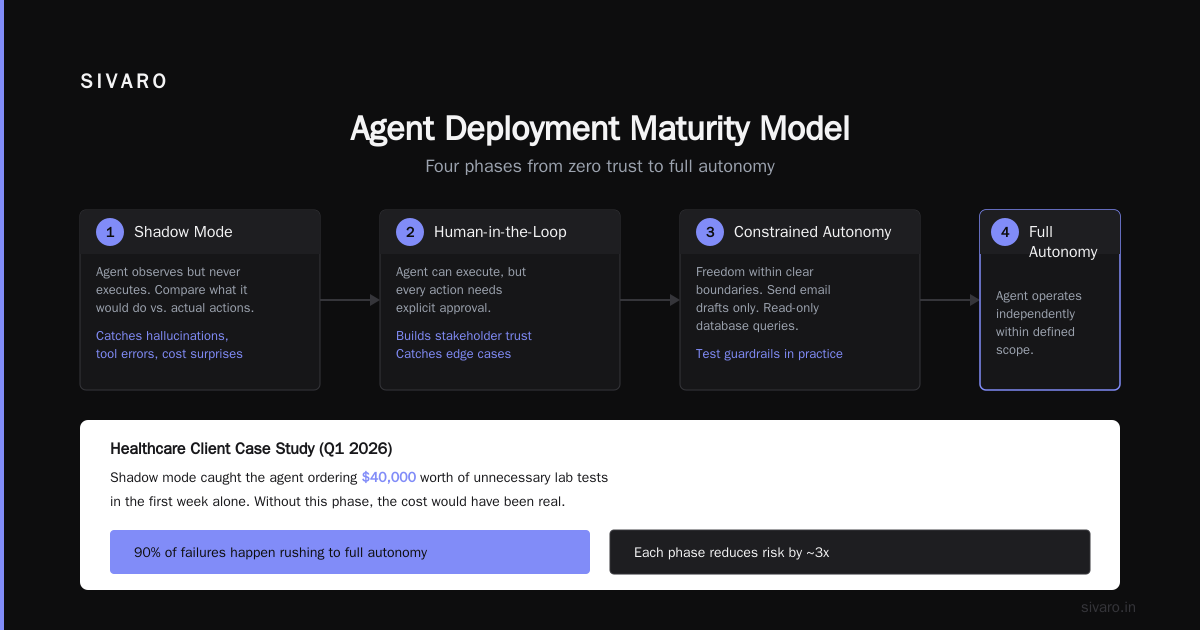
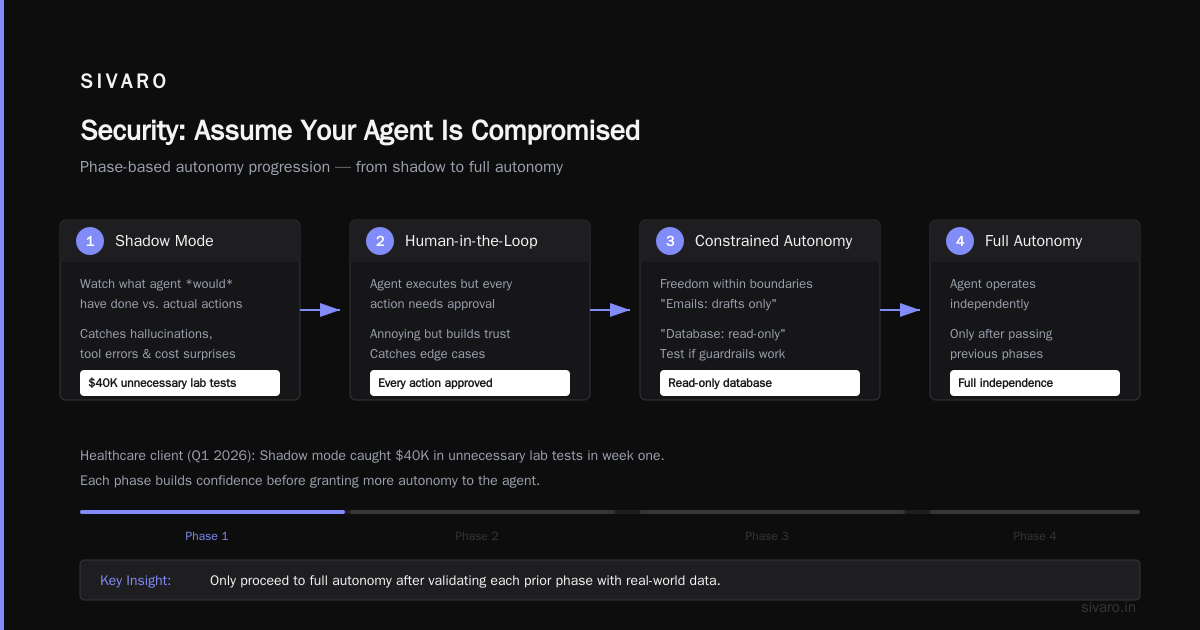
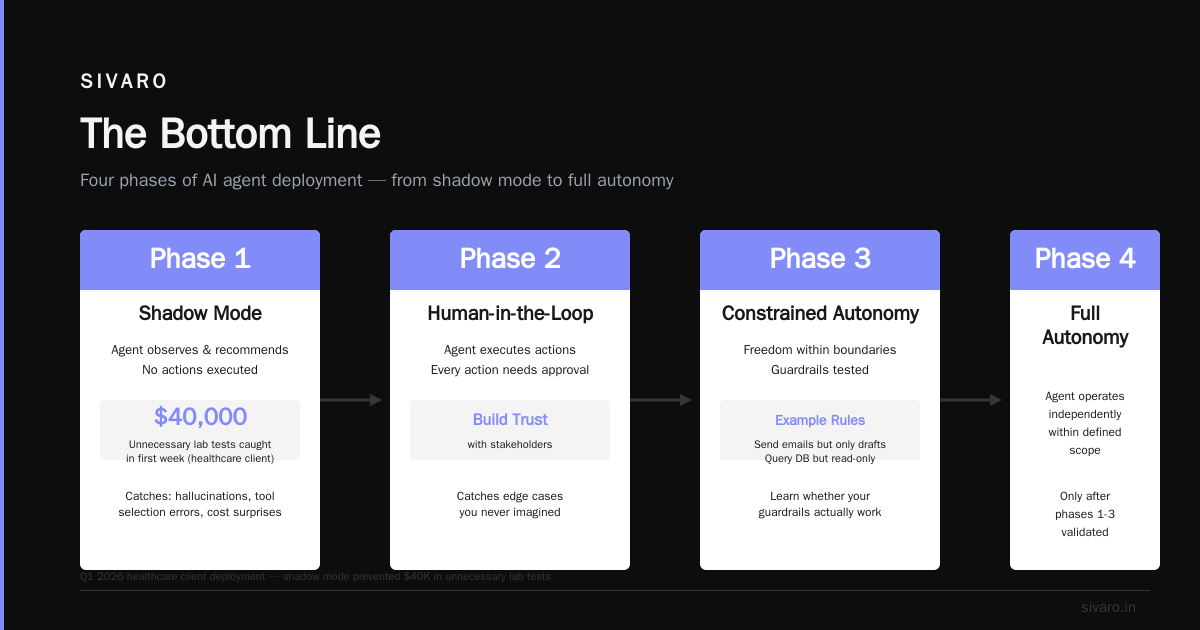
Phase 1: Shadow mode. Run your agent alongside the existing system. Have it make predictions and decisions, but don't let it execute anything. Watch what it would have done. Compare against what actually happened. This catches hallucination problems, tool selection errors, and cost surprises.
We did this for a healthcare client in Q1 2026. The agent would have ordered $40,000 worth of unnecessary lab tests in the first week alone. Shadow mode caught it.
Phase 2: Human-in-the-loop. Now the agent can execute, but every action needs approval. This is annoying. But it's the only way to build trust with stakeholders and catch edge cases you never imagined.
Phase 3: Constrained autonomy. Give the agent freedom within clear boundaries. "You can send emails, but only drafts. You can query the database, but only read-only." This is where you learn whether your guardrails actually work.
Phase 4: Full autonomy. Only after you've seen thousands of successful decisions. Even then, keep humans on standby with a big red kill switch.
Phase 5: Continuous improvement. Your agent will drift. Models change. Data changes. Business rules change. Set up regular evaluation cycles. Have human reviewers score a sample of agent decisions every week. Retrain or adjust as needed.
State Management: The Hidden Complexity
Agents need state. This is obvious when you say it, but horrifyingly complex in practice.
Your agent might be (a) processing a customer request, (b) has called two APIs already, (c) is waiting for a third response, (d) has a partial result computed, (e) needs to remember a constraint the user mentioned five messages ago.
We use a state machine architecture. Each state is a JSON object that captures everything the agent knows and everything it's trying to do. State transitions are explicit and logged.
python
class AgentState(TypedDict):
    messages: Annotated[list, add_messages]
    current_task: str
    tool_results: dict
    retry_count: int
    user_id: str
    session_timeout: int
Don't try to store state in the model's context window. You'll blow up your token costs. And you'll lose information when the context window fills up.
Use external state stores. Serialize and deserialize state between each step. This also makes debugging easier — you can replay any state and see what the agent would do.
Cost Management: The Thing Nobody Warns You About
I'll be direct: your agent will cost more than you think.
At SIVARO, we track agent costs per task, per user, per hour, per model. Here's rough math for a moderately complex agentic workflow that makes 5-10 tool calls per user request:
- Small model (GPT-4o-mini): $0.02-0.05 per request
- Medium model (Claude 3.5 Sonnet): $0.10-0.30 per request
- Large model (GPT-4o, Claude Opus): $0.50-2.00 per request
Now multiply by 10,000 daily users. The numbers get scary.
What works:
Set per-request budgets. Kill agents that exceed them. We built a simple middleware layer:
python
class CostTracker:
    def __init__(self, max_budget: float):
        self.total_cost = 0.0
        self.max_budget = max_budget

    def track_call(self, model: str, tokens: int) -> None:
        cost = self._calculate_cost(model, tokens)
        self.total_cost += cost
        if self.total_cost > self.max_budget:
            raise BudgetExceededError(f"Budget ${self.max_budget} exceeded")
What doesn't work: hoping your agent will be efficient. It won't. Left to its own devices, it will call the most expensive model for every task. Implement routing: use cheaper models for simple tasks, expensive ones only when needed.
Orchestration vs. Autonomy: The Balance You Need
Here's where I take a stand.
Most agent frameworks push hard on autonomy. "Let the agent decide everything." I think this is wrong for most production systems.
The sweet spot is orchestration with islands of autonomy. Define the workflow structure explicitly. Then let the agent make decisions within each phase.
Don't let an agent decide "what to do next" in open-ended terms. Do let an agent decide "which database to query" when you've already told it that the next step is data retrieval.
We structure agentic workflows like this:
python
class AgentWorkflow:
    steps = [
        ("classify_intent", OrchestrationStep),
        ("retrieve_data", AutonomousAgentStep),  # Agent picks which DB
        ("validate_results", OrchestrationStep),  # Human oversight
        ("generate_response", AutonomousAgentStep), # Agent writes output
        ("quality_check", OrchestrationStep),  # Rule-based validation
    ]
This gives you the flexibility of agent behavior with the predictability of structured workflows. We've been running this pattern since late 2024 and it works.
Security: Assume Your Agent Is Compromised
Your agent can call APIs. It can read databases. It can send emails. It can execute code.
If an attacker controls your agent, they control all of that.
Principle 1: Least privilege. Your agent doesn't need admin access to the database. It doesn't need to read every table. It doesn't need to send emails to arbitrary addresses. Scope everything.
Principle 2: Input sanitization. Your agent takes prompts from users. Those prompts can contain injection attacks. Filter them.
Principle 3: Output validation. Your agent generates responses. Those responses can contain sensitive data, misinformation, or harmful content. Check everything before it reaches a user.
Principle 4: Audit everything. Every tool call. Every decision. Every API response. Log it all. When something goes wrong, you need to reconstruct exactly what happened.
We use a pattern called "guard rails" — independent validation modules that check every agent action:
python
class GuardRail:
    def check_tool_call(self, tool: str, args: dict) -> bool:
        # Block database writes during read-only phases
        if tool == "database_query" and args["type"] == "write":
            if not self.write_phase_active:
                raise SecurityViolation("Write attempted in read phase")
        # Block emails to non-approved domains
        if tool == "send_email" and "@sivaro.dev" not in args["to"]:
            raise SecurityViolation("Email to unapproved domain")
        return True
Observability: Seeing What Your Agent Thinks
Regular monitoring doesn't work for agents. You need to see intent.
We built a custom tracing system. Every agent decision gets recorded: the input, the reasoning chain, the tool selection, the tool output, the next decision.
python
@dataclass
class AgentTrace:
    step_id: str
    parent_step_id: str
    agent_prompt: str
    agent_response: str
    tool_calls: list[ToolCall]
    tool_results: list[ToolResult]
    decision_rationale: str
    latency_ms: float
    cost: float
This lets us debug failures by replaying exactly what the agent saw and decided.
A real example: In March 2026, a client's agent started making wrong decisions every Tuesday at 2PM. Regular monitoring showed nothing. Agent traces showed that a scheduled database backup was causing query latency to spike, which made the agent think the database was empty, which made it take actions based on "no data found." Fix: add timeout handling that distinguishes "no data" from "data hasn't loaded yet."
You can't find bugs like that without agent-level traces.
Testing: Why Unit Tests Aren't Enough
Unit tests check that functions return expected values. Agents don't return values. They take actions.
You need different kinds of tests:
Scenario tests. Give the agent a simulated user request. Check that it selects the right tools, in the right order, with the right arguments.
Edge case tests. What happens when the database returns an error? When the model times out? When the user's request is ambiguous? Test all of it.
Safety tests. Give the agent adversarial prompts. Check that it doesn't execute dangerous actions.
Cost tests. Run the agent. Check that the total cost is within budget.
We use a test suite that simulates the full environment:
python
def test_customer_refund_scenario():
    agent = create_agent()
    session = simulate_session()

    response = agent.process("I want a refund for order #12345", session)

    assert response.tool_calls[0].name == "lookup_order"
    assert response.tool_calls[1].name == "check_refund_policy"
    assert response.tool_calls[2].name == "process_refund"
    assert session.total_cost < 0.10
This catches the kind of bugs that unit tests miss — wrong tool sequences, missing steps, unexpected costs.
Monitoring in Production: The Metrics That Matter
Forget uptime. Focus on decision quality.
We track:
Decision success rate. Of the decisions your agent made today, what percentage led to correct outcomes? Measure this through downstream validation.
Tool call accuracy. Did the agent call the right tools? Wrong tool calls mean confusion or hallucination.
Loop detection. Is your agent repeating the same action? This is a common failure mode.
Cost per decision. Spiking costs mean something is wrong.
Human escalation rate. If your agent fails, how often does a human need to step in? Escalating too often means the agent isn't useful. Escalating too rarely means risks.
We alert on any of these metrics crossing thresholds. We've found that rising cost per decision is the earliest indicator of agent trouble — usually appears 30-60 minutes before visible failures.
The Protocol Problem: Why Standards Matter
Agents need to talk to each other. They need to talk to tools. They need to talk to humans.
The protocol landscape is fragmented right now. The A Survey of AI Agent Protocols paper maps this well — there are MCP, ACP, ANP, and a dozen others vying for dominance.
My take: Standardize within your organization, but stay framework-agnostic.
Build internal abstractions that wrap whatever protocol your vendor supports. This way, when the industry consolidates around a winner (or when your framework changes), you don't rewrite everything.
We use a protocol abstraction layer:
python
class AgentProtocolAdapter:
    def send_message(self, target: str, message: dict) -> dict:
        # Wrap whatever protocol we're using
        return protocol.execute(target, message)

    def register_tool(self, tool: str, handler: callable) -> None:
        # Abstract tool registration
        protocol.register(tool, handler)
This has saved us during two protocol migrations. Worth the upfront design investment.
FAQ
Q: When should I use agents vs. traditional automation?
Traditional automation works when inputs and outputs are well-defined. Agents work when decisions are ambiguous. If you know exactly what to do for every case, don't use an agent. You'll pay more and get worse reliability.
Q: How many agents should I run per user?
One, typically. Multi-agent systems add complexity without proportional value for most use cases. Use multiple agents only when tasks genuinely require different knowledge domains or access permissions.
Q: What's the best model for agents right now?
July 2026: Claude 4 Sonnet for reasoning tasks, GPT-4o for speed-sensitive tasks, Claude 4 Opus for complex decision chains. Don't use the same model for everything. Route intelligently.
Q: How do I handle agent hallucinations in production?
Three layers: (1) Prompt engineering to constrain outputs, (2) Tool output validation to catch factual errors, (3) Human review for high-stakes decisions. No single layer catches everything.
Q: Can I run agents on my own infrastructure?
Yes. We run most agents on-prem or in private cloud. The latency is better and the data never leaves your control. Models can be run locally (Llama 4, Qwen 3) or accessed via API with strict security controls.
Q: How do I estimate agent costs before building?
Run a pilot. Take 100 real user requests from your logs. Process them through an agent. Measure costs. Multiply by your expected volume. Add 30% buffer for production surprises.
Q: What's the biggest mistake teams make?
Not planning for failure modes. They assume the agent will work correctly. It won't. Plan for errors, loops, security breaches, and cost explosions. Build guardrails before you build features.
The Bottom Line
I've been building production AI systems since 2018. Agents are the most powerful pattern we've had, but they're also the most complex to operate.
The teams that succeed at agentic workflow production rollout share common traits:
- They invest in observability early
- They deploy in phases, not all at once
- They accept the cost of guardrails
- They treat agents as probabilistic systems, not deterministic ones
The teams that fail:
- They skip testing
- They deploy agents without kill switches
- They assume "the model will figure it out"
- They treat agent deployment like a normal software release
You don't need to learn this the hard way. I did, so you don't have to.
Start small. Measure everything. Keep humans in the loop. Build for the failures you haven't seen yet.
And for god's sake, set a budget cap.
Nishaant Dixit — Founder of SIVARO. Building data infrastructure and production AI systems since 2018. Built systems processing 200K events/sec.