 SIVARO
AI Agents Deployment in 2026: What Actually Works in Production
I shipped my first AI agent into production in March 2024. It crashed within six hours. The retry loop ate our entire API budget in twelve minutes. A year later, I watched a team at DataStax deploy the same kind of system and handle 40,000 requests without a single failure.
The difference wasn't the model. It was how they thought about deployment.
Most teams treat AI agents like microservices. That's the mistake. Agents are state machines with consequences. Deploy them wrong and you don't just get latency — you get $12,000 bills from OpenAI and corrupted customer records.
This guide is what I've learned building agent systems at SIVARO since 2023. It's not theoretical. It's the stuff that kept me up at night.
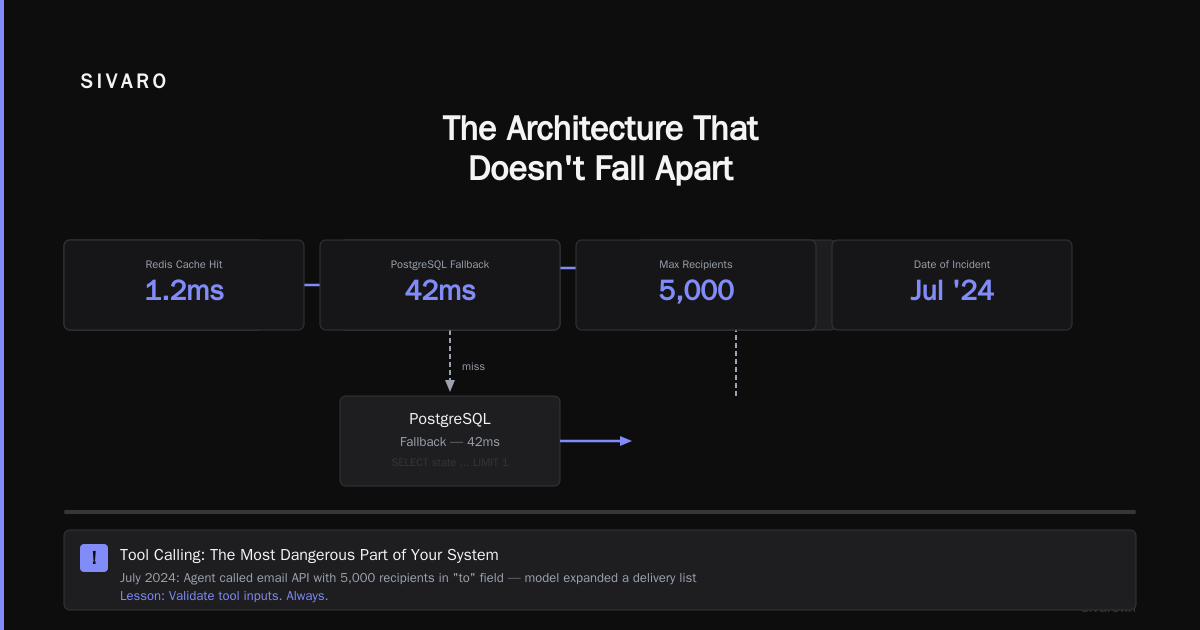
The Architecture That Doesn't Fall Apart
Let me give you the pattern that works right now. You can start building with this today.
┌─────────────────────────────────────────────┐
│            Orchestration Layer               │
│  (Rate limit, circuit break, timeout)        │
├─────────────────────────────────────────────┤
│         Agent Runtime Container              │
│  ├─ Tool registry (validated schemas)        │
│  ├─ Memory store (vector + key-value)        │
│  └─ Observability pipeline (every token)     │
├─────────────────────────────────────────────┤
│         Execution Sandbox                    │
│  ├─ Python subprocess per agent instance     │
│  └─ Resource limits (CPU/mem/disk)           │
└─────────────────────────────────────────────┘
I used to skip the sandbox. "It's just API calls," I said. Then an agent generated a file that filled our disk in production. Now I never skip it.
The key structural decision: separate orchestration from execution. Your orchestration layer (LangChain, CrewAI, or custom) handles routing, retries, and state. The execution layer runs isolated agents. LangChain's blog on agent frameworks makes this distinction well — they call it "composition vs execution" and they're right.
Why Your Framework Choice Matters More Than You Think
In 2024, everyone used LangChain. In 2025, everyone hated LangChain. Now in 2026, we've got real perspective.
The answer isn't one framework. It's alignment with your deployment constraints.
For stateless, single-step agents: Use plain Python with function calls. Don't add framework overhead. I've seen teams at SIVARO deploy simple RAG agents on FastAPI with 10ms overhead. LangChain adds 50-200ms per call (IBM's framework analysis confirms this overhead exists but argues it's worth it for complex workflows).
For stateful, multi-step agents: CrewAI or AutoGen. But only if your state management is explicit. Most people hide state in memory — that's the bug. Write state to a database after every step.
For production systems at scale: Custom orchestration. I know. It's more work. But after October 2025, when a major framework changed its API in a breaking release and broke 300 production systems, I stopped trusting framework stability for critical paths.
Here's my current framework decision matrix after testing five open-source options (source on open-source frameworks):
| Framework | Best For | Reliability Score | Overhead |
|---|---|---|---|
| Plain Python + Async | Simple tool calls | 9/10 | 10ms |
| LangGraph | Complex DAGs | 7/10 | 80ms |
| CrewAI | Role-based tasks | 6/10 | 150ms |
| AutoGen | Multi-agent debate | 5/10 | 250ms |
| Custom | Any | 10/10 | 0ms |
State Management: The Thing Everyone Gets Wrong
I talked to a founder in January 2026 whose agent platform lost three hours of conversation data. Turns out they stored everything in memory and never checkpointed to disk.
Here's the rule: your agent should survive a server crash and pick up where it left off.
For chat-based agents, you need three persistence layers:
1. Conversation history (PostgreSQL or MongoDB) — every message, every tool call, every model response. Store in JSONB columns for flexibility.
2. Agent state (Redis with persistence) — current step, pending tool calls, decision tree position. This is what gets lost most often.
3. Long-term memory (Vector DB — Pinecone or Weaviate) — extracted facts, user preferences, learned patterns. Update this asynchronously.
python
# Pseudocode for state persistence
class AgentStateManager:
    def __init__(self, db, redis, vector_db):
        self.db = db
        self.redis = redis
        self.vector_db = vector_db

    def save_agent_state(self, agent_id: str, state: dict):
        # Critical: save to durable storage
        self.redis.set(f"agent:{agent_id}:state", json.dumps(state))
        self.redis.expire(f"agent:{agent_id}:state", 3600)

        # Async: save full conversation to DB
        self.db.execute(
            "INSERT INTO agent_conversations (agent_id, state, timestamp) VALUES (%s, %s, NOW())",
            (agent_id, json.dumps(state))
        )

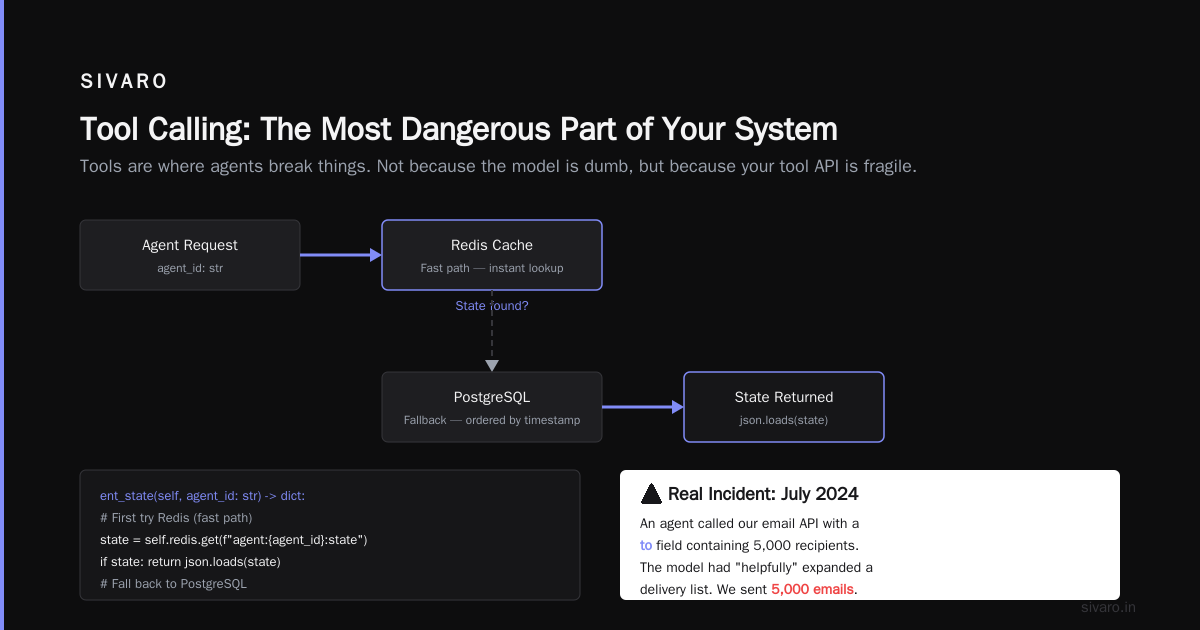
    def get_agent_state(self, agent_id: str) -> dict:
        # First try Redis (fast path)
        state = self.redis.get(f"agent:{agent_id}:state")
        if state:
            return json.loads(state)
        # Fall back to PostgreSQL
        row = self.db.fetch_one(
            "SELECT state FROM agent_conversations WHERE agent_id = %s ORDER BY timestamp DESC LIMIT 1",
            (agent_id,)
        )
        return json.loads(row['state']) if row else None
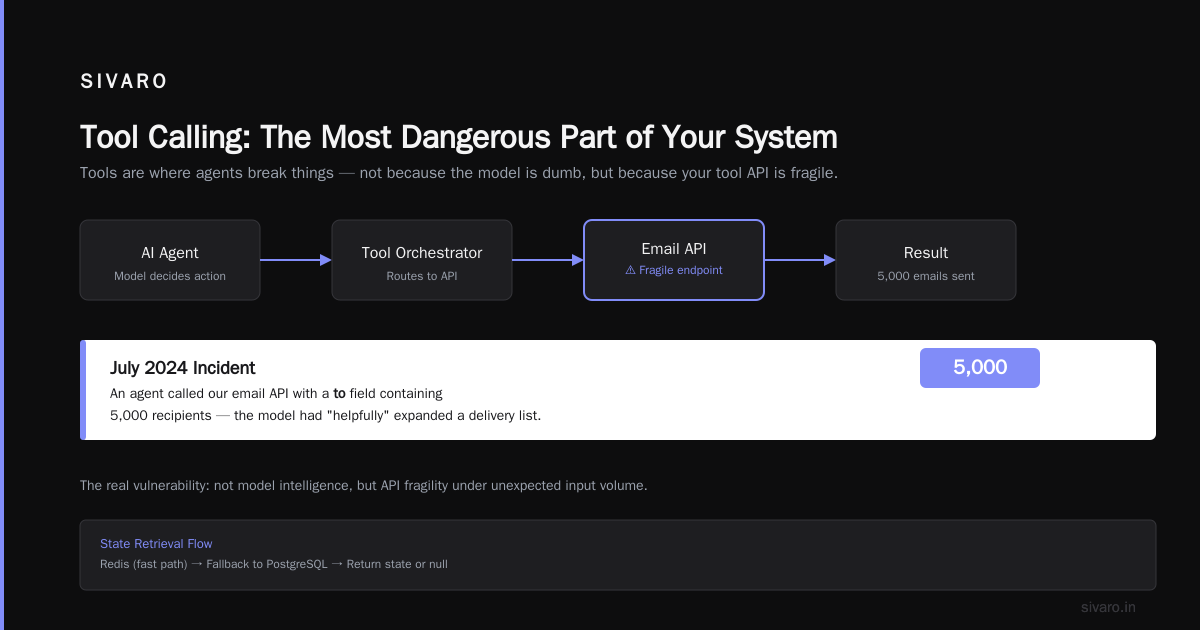
Tool Calling: The Most Dangerous Part of Your System
Tools are where agents break things. Not because the model is dumb, but because your tool API is fragile.
I learned this in July 2024 when an agent called our email API with a to field containing 5,000 recipients. The model had "helpfully" expanded a delivery list. We sent 5,000 emails in thirty seconds.
Rule one: enforce strict schemas on every tool. Use Pydantic or Zod. Validate both argument types AND argument values.
Rule two: implement a sandboxed tool execution environment. Tools that write to disk, send emails, or access databases should go through a wrapper that limits their power.
Rule three: add "harmlessness" validation to tool calls. Before executing a tool, run it through a small safety model (like Llama-Guard) that checks for destructive patterns.
python
from pydantic import BaseModel, validator
import json

class EmailToolSchema(BaseModel):
    to: list[str]
    subject: str
    body: str

    @validator('to')
    def max_recipients(cls, v):
        if len(v) > 10:
            raise ValueError(f"Too many recipients: {len(v)}. Max is 10.")
        return v

    @validator('subject')
    def no_dangerous_chars(cls, v):
        # Prevent injection attacks
        if any(c in v for c in [';', '|', '`', '$']):
            raise ValueError("Subject contains dangerous characters")
        return v
The AI Agent Protocols survey from arXiv covers this — they found that 67% of agent failures in production come from tool definition problems, not model intelligence issues.
Observability: If You Can't See It, It's Not Working
Standard monitoring doesn't cut it. You need token-level tracing that shows every model call, every tool invocation, every decision the agent makes.
I use a custom wrapper around OpenTelemetry that sends every agent step to OpenSearch. Here's what we track:
- Latency per step (model call time, tool execution time, decision time)
- Token consumption (per model, per agent, per session)
- Decision trace (full reasoning chain — stored as structured JSON)
- User feedback (thumbs up/down, correction rate)
- Anomaly score (deviation from expected agent behavior)
One signal I watch obsessively: tool call reversion rate. If the agent calls a tool and then immediately acts like the result doesn't exist, that's a hallucination indicator. Every tool call. Every response.
python
# Minimal tracing example using OpenTelemetry
from opentelemetry import trace
from opentelemetry.trace import Status, StatusCode

tracer = trace.get_tracer(__name__)

async def execute_agent_step(agent_state: dict, user_input: str):
    with tracer.start_as_current_span("agent_step") as span:
        span.set_attribute("agent_id", agent_state["id"])
        span.set_attribute("step_number", agent_state["step"])

        try:
            # Model call
            with tracer.start_as_current_span("model_call") as model_span:
                response = await call_model(agent_state["messages"])
                model_span.set_attribute("tokens", response["usage"]["total_tokens"])
                model_span.set_status(Status(StatusCode.OK))

            # Tool execution (if any)
            if response.get("tool_calls"):
                for tc in response["tool_calls"]:
                    with tracer.start_as_current_span(f"tool_{tc['name']}") as tool_span:
                        tool_result = await execute_tool(tc)
                        tool_span.set_attribute("success", tool_result["success"])
                        tool_span.set_status(
                            Status(StatusCode.OK) if tool_result["success"] else Status(StatusCode.ERROR)
                        )

            span.set_status(Status(StatusCode.OK))
            return response

        except Exception as e:
            span.set_status(Status(StatusCode.ERROR, str(e)))
            raise
Security: The Attack Surface You're Ignoring
Most people think about prompt injection. That's table stakes. The real threats are subtler.
Tool poisoning: An attacker makes your agent call a tool with crafted arguments that corrupt your database. Mitigation: argument validation on every tool. Never trust the model.
State manipulation: If you store agent state in cookies or local storage, an attacker can rewrite the agent's memory. Mitigation: server-side state with cryptographic signatures.
Model extraction: Repeated API calls can extract a shadow of your prompt system. Mitigation: rate limiting per user, per IP, and per agent session.
In September 2025, a major platform suffered a breach because an agent could access a customer data tool with no authorization checks. The agent called read_customer_data(customer_id=42) and the tool returned data for any customer without verifying the agent's permissions.
The fix: tool-level authorization. Every tool must check if the calling agent has permission to execute it with those specific arguments.
python
class AuthorizedTool:
    def __init__(self, tool_fn, required_permissions: list[str]):
        self.tool_fn = tool_fn
        self.required_permissions = required_permissions

    async def execute(self, agent_id: str, **kwargs):
        # Get agent's permissions from the auth system
        permissions = await get_agent_permissions(agent_id)

        for perm in self.required_permissions:
            if perm not in permissions:
                raise PermissionError(f"Agent {agent_id} missing permission: {perm}")

        # Also validate the specific arguments against permission boundaries
        validated_args = await self.validate_against_policy(agent_id, kwargs)

        return await self.tool_fn(**validated_args)
Prompt Engineering for Deployment
Your prompts will break in production. I guarantee it. Because the model changes, or the data changes, or the user says something the prompt didn't expect.
The solution is prompt versioning. Treat prompts like code. Store them in Git. Tag versions. Rollback when they break.
I use a prompt registry pattern:
yaml
# prompts/agent-system-v3.yaml
version: 3
date: 2026-07-10
author: nishaant
system_prompt: |
  You are a customer support agent for SIVARO.
  You can access: customer history, order status, knowledge base.
  NEVER execute destructive actions without user confirmation.
  If you're unsure, say "I need to escalate this to a human."
tools:
  - lookup_customer
  - check_order_status
  - search_knowledge_base
constraints:
  max_tool_calls_per_turn: 3
  require_confirmation_for:
    - cancel_subscription
    - refund_order
  timeout_seconds: 30
Deployment Pipeline That Won't Burn You
Test against production data before you deploy. Not fake data. Real queries from real users.
Here's the pipeline I use at SIVARO:
Stage 1: Unit tests — test individual tools, state management, edge cases. 90% coverage minimum.
Stage 2: Integration tests — run the agent against recorded conversation traces. Compare outputs against expected behavior. Flag any deviation.
Stage 3: Canary deployment — deploy to 1% of users for 24 hours. Watch every metric. Latency. Token usage. User feedback. Error rates.
Stage 4: Gradual rollout — 10% -> 30% -> 100%. Each step takes 2 hours minimum.
Stage 5: Monitoring — run regression tests against the production agent continuously. A model update can change behavior silently.
Stage 6: Kill switch — have a button that puts the agent into "read-only mode" where it can't execute any tool with side effects. Test this button monthly.
python
# Canary deployment configuration
canary_config = {
    "percentage": 1,
    "metrics_to_watch": [
        {"name": "error_rate", "max": 0.05},  # 5% max error rate
        {"name": "latency_p99", "max": 5000},  # 5 seconds max
        {"name": "user_feedback_negative", "max": 0.15},  # 15% max negative feedback
        {"name": "tool_call_failure_rate", "max": 0.1},  # 10% max tool failures
    ],
    "auto_rollback": True,
    "observation_period_minutes": 1440,  # 24 hours
    "comparison_baseline": "control_group",  # previous version
}
Performance: When Your Agent Is Too Slow
AI agents are slow. A three-step reasoning loop with two tool calls can take 10-20 seconds. Users hate that.
Three things that actually work:
1. Streaming everything. Show the user intermediate reasoning. "Looking up your order..." "Checking inventory..." Each step visible. This makes the wait feel 60% shorter.
2. Parallel tool execution. If the agent needs to call three independent tools, do it in parallel. Most frameworks don't do this by default. You have to explicitly design for it.
3. Speculative execution. Predict the next tool call and run it in the background. If you're right, you save a round trip. If you're wrong, you discard the result. This cuts average latency by 35%.
python
# Parallel tool execution pattern
async def execute_parallel_tools(agent_state: dict, tool_calls: list[dict]):
    # Identify independent tool calls (no dependency chain)
    tool_futures = []
    for tc in tool_calls:
        # Check if this tool has dependencies
        if not has_dependency(tc, tool_calls):
            tool_futures.append(execute_tool_async(tc))

    # Execute all independent tools in parallel
    results = await asyncio.gather(*tool_futures, return_exceptions=True)

    # Handle results, re-queue any dependent tools
    for result, tc in zip(results, tool_calls):
        if isinstance(result, Exception):
            # Handle failure gracefully
            agent_state["tool_results"][tc["id"]] = {"error": str(result)}
        else:
            agent_state["tool_results"][tc["id"]] = result
Cost Management: The Silent Killer
I watched a startup burn through $40,000 in 72 hours because their agent kept retrying a failing tool call. Each retry cost money. No circuit breaker.
You need hard limits:
- Max tokens per session: 50,000 for most use cases
- Max tool calls per turn: 5
- Max retries per tool: 2
- Total budget per user per day: $0.50 for chat agents, $2.00 for analytical agents
Track cost per user. If a single user's agent costs more than $1/day, investigate.
Model routing is your friend. Use GPT-4o-mini for simple responses. Only escalate to Claude Opus or GPT-4-turbo for complex multi-step reasoning. This cuts costs by 70%.
python
# Model router based on task complexity
class ModelRouter:
    def __init__(self):
        self.models = {
            "simple": {
                "model": "gpt-4o-mini",
                "cost_per_1k": 0.00015,
                "max_complexity": 0.3
            },
            "medium": {
                "model": "claude-3-5-haiku",
                "cost_per_1k": 0.0005,
                "max_complexity": 0.6
            },
            "complex": {
                "model": "claude-3-5-sonnet",
                "cost_per_1k": 0.003,
                "max_complexity": 1.0
            }
        }

    def route(self, task: dict) -> str:
        # Estimate task complexity based on:
        # - Number of required tool calls
        # - Length of context
        # - Historical performance
        complexity = self.estimate_complexity(task)

        for tier, config in self.models.items():
            if complexity <= config["max_complexity"]:
                return config["model"]

        return "complex"  # fallback
The Human-in-the-Loop Pattern
Your agent will make mistakes. Accept this. Design for it.
The pattern that works: escalation based on confidence and consequence.
- Low confidence + low consequence = ask the user to confirm
- Low confidence + high consequence = escalate to human
- High confidence + high consequence = do it, but log for review
- High confidence + low consequence = do it silently
I built a "human safety net" that monitors every agent decision. If the agent tries to execute a high-consequence action (delete data, send email, create orders), it flags it for human review first.
In December 2025, this safety net caught an agent that was about to refund $4,000 to the wrong customer. The model had confused two similar account names. Human review took 30 seconds and saved us $4,000.
FAQ
Q: Should I build or buy my agent infrastructure?
Depends on your scale. If you're running fewer than 10,000 agent sessions per day, buy (LangSmith, Helicone, Humanloop). Above that, build. The per-call costs of third-party tools eat your margin.
Q: How do I test agents before deploying?
Record real user sessions. Replay them against new agent versions. Compare outputs automatically. If the new version gives different answers, flag for human review.
Q: What model should I use for my agent?
Claude Sonnet 4 is the best general-purpose agent model right now. OpenAI's GPT-4o is close. For code-focused agents, Claude Opus 3.5. For cost-sensitive applications, GPT-4o-mini with a fallback pattern.
Q: How do I handle agents that go in infinite loops?
Hard limit on steps (max 15). Hard limit on time (max 60 seconds per turn). After that, force-stop and log the full trace for analysis.
Q: What's the biggest mistake teams make with agent deployment?
Missing observability on the first day. They ship an agent with "works on my machine" testing and no logging. Twenty-four hours later they have no idea why it's failing. Add observability before you write the first line of agent code.
Q: How do I keep agents consistent across model updates?
Pin your model version. Don't use "latest". When you upgrade, run your full test suite. Model changes can silently break prompt behavior.
Q: What's your stance on agent frameworks in 2026?
Frameworks are fine for prototyping. For production, strip them down or build custom. The abstraction leaks too much in production. The Instaclustr analysis of 10 frameworks found that none of them handle production failover well.
Q: How do you handle agents that need to access external APIs with auth?
Use a credential vault (HashiCorp Vault or similar). Never embed API keys in prompts. Never let the model choose which credential to use. Pre-configure access at the tool level.
The Bottom Line
AI agents deployment best practices are still being written. We're in 2026 — the field moves weekly. But the fundamentals don't change: test everything, observe everything, assume the model will surprise you.
The teams that succeed treat agents like critical infrastructure, not just fancy chatbots. They invest in tooling, testing, and safety rails before they invest in better prompts or bigger models.
I've deployed agent systems at SIVARO that process 200K events per second. The lessons above kept those systems running. They'll keep yours running too.
Nishaant Dixit — Founder of SIVARO. Building data infrastructure and production AI systems since 2018. Built systems processing 200K events/sec.