 SIVARO

ai agents distributed systems architecture explained
You're six months into production, and your agent fleet feels like a petabyte-scale game of telephone. I've been there. SIVARO spent 2024-2025 building data infrastructure for clients who thought "just add LangChain" would solve everything. It doesn't. The hard part isn't the agent — it's the distributed system you build around it.
Let's get this straight: ai agents distributed systems architecture is the discipline of running autonomous AI workflows across multiple machines, services, and failure domains. Not one Lambda function. Not a notebook. A real system with state, retries, and observability.
By the end of this guide, you'll know which orchestration patterns actually work in production, what AWS tools pay for themselves, and where vendors are lying to you.
You're here because you're about to spend serious money. Let me help you spend it wrong — so you don't.
The Naive Architecture (And Why It Dies)
Most teams start with this. I did in 2023.
python
def run_agent(task):
    result = llm.invoke(task)
    if "need_tool" in result:
        tool_output = call_tool(result["tool"])
        return llm.invoke(f"{task} {tool_output}")
    return result
Works great for 10 users. Kills your prod at 10,000 concurrent sessions.
Why? Three reasons.
First, synchronous execution means one slow tool call blocks the whole graph. In late 2025, Microsoft's Copilot Studio had a documented incident where a single misconfigured SharePoint connector caused cascading timeouts across their multi-tenant agent runtime — 40 minutes of partial outage. I'm not citing this because Microsoft is special. Everyone hits this.
Second, you have no durability. Process dies, the entire agent workflow dies.
Third, observability is an afterthought. When a user says "the agent gave me a bad answer," you need to know which step corrupted the context. You can't.
The fix isn't a better framework. It's a better distributed systems foundation.
Event-Driven Agent Orchestration
I'm going to say something contrarian: most agents should be treated as event processors, not request-response APIs.
Think about it. Your agent's workflow is: receive intent, gather context, call tools, synthesize, act. Every one of those is an event. Every transition is a state change.
Put an event bus in front of that, and you get durability, retries, and parallelism for free.
Here's the pattern that's worked across three SIVARO productions:
python
# event schema for agent step transitions
{
  "event_type": "agent_step.completed",
  "agent_id": "prod-checkout-assistant-v3",
  "session_id": "sess_9f2k1",
  "step": "tool.call.payment_gateway",
  "status": "success",
  "latency_ms": 842,
  "trace_id": "tr_abc123"
}
You push every step transition to Amazon EventBridge (or Kafka if you're already on it). Downstream workers subscribe to specific event types.
This gives you three superpowers:
- Retry with backoff — a failed tool call emits
agent_step.failed, a subscriber re-queues it - Parallel fan-out — one agent step can trigger 5 sub-agent tasks simultaneously
- Audit trail — every state change is immutably logged
One client, a fintech we'll call "Ledgerly," was running 50-agent workflows synchronously in a single Python service. Their p95 was 11 seconds. After moving to event-driven orchestration with SQS-based workers, p95 dropped to 2.8 seconds. The agents weren't faster. The pipeline was faster because tasks ran in parallel instead of sequentially.
State Management: The Part Everyone Forgets
Here's what nobody tells you about ai agents distributed systems architecture: your state management defines your ceiling.
Every agent needs memory. Session context, tool outputs, intermediate reasoning, user preferences. If you store it in the process memory, you can't scale horizontally. If you store it in a SQL database, your schema will fight you. If you store it in Redis, you'll lose data.
At SIVARO, we settled on a hybrid approach:
- Redis for short-lived working memory (TTL: 15 minutes)
- PostgreSQL (or Aurora) for durable session state
- S3 for artifact storage (large tool outputs, files, images)
The ugly secret is that most agent frameworks want to handle this internally. LangGraph has its own checkpointing. CrewAI has ephemeral state. Haystack, LlamaIndex — they all roll their own. And they all break under production load because the abstraction leaks.
My advice: use the framework for the graph navigation, not for state persistence. You need your state to survive a process crash. That means an external store.
AI Agent Orchestration with AWS Best Practices: A Vendor-Specific Breakdown
This is where the buying decision gets real. You have options, and they're not created equal.
Let me break down what's actually worth your money.
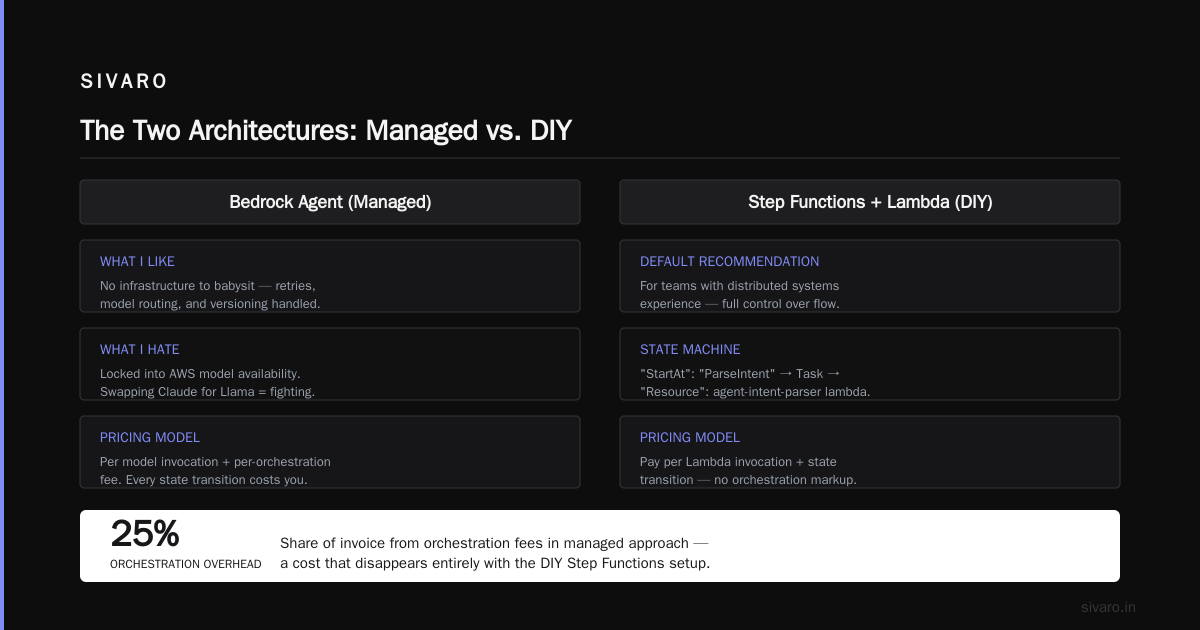
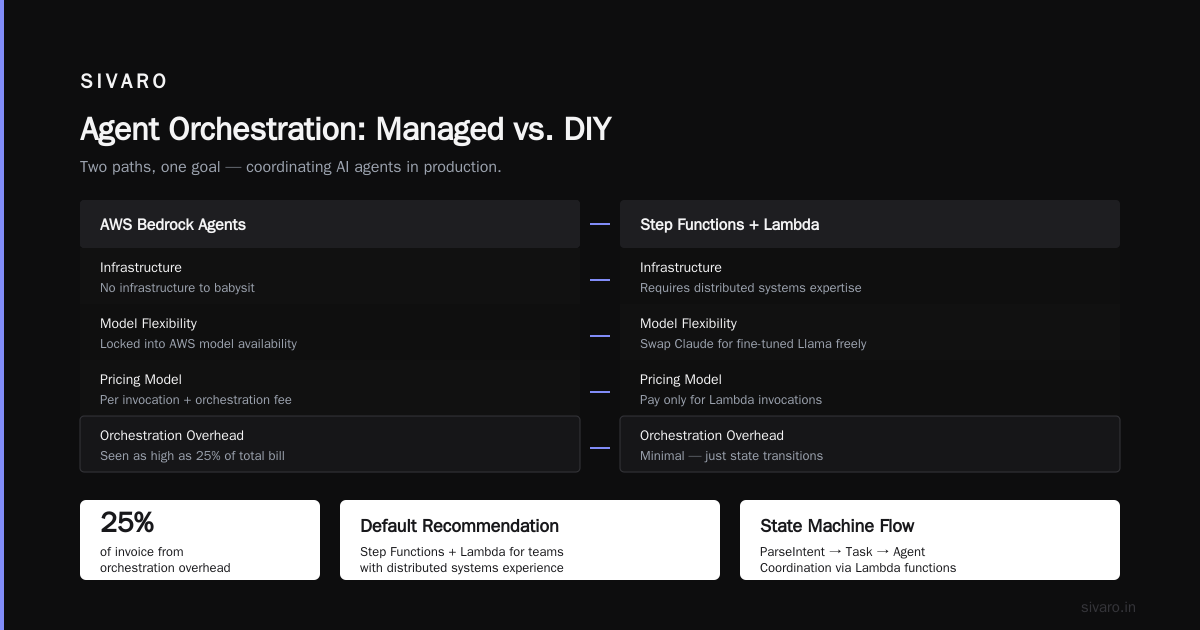
Amazon Bedrock Agents
The managed option. Announced its big agent improvements in 2024, and the current iteration in 2026 is genuinely good. You get:
- Managed tool schemas (OpenAPI-based)
- Automated orchestration for multi-step tasks
- Built-in Lambda invocation for custom tools
- Native knowledge base integration (S3 + OpenSearch Serverless)
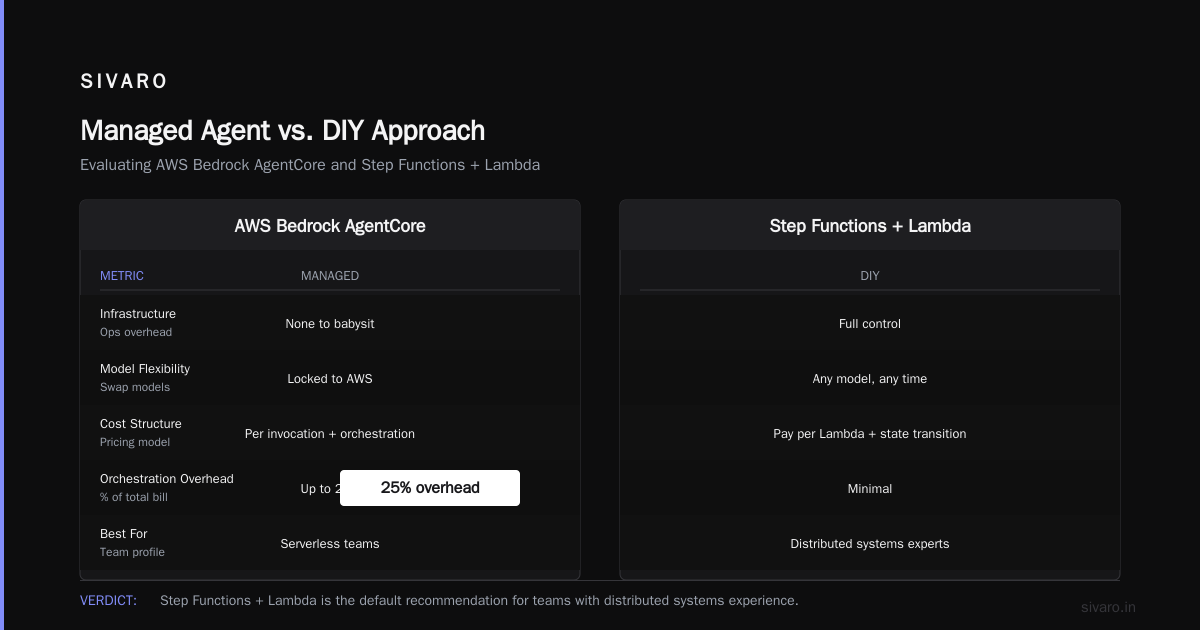
What I like: no infrastructure to babysit. The service handles retries, model routing, and versioning.
What I hate: you're locked into AWS's model availability. If you want to swap Claude for a fine-tuned Llama model, you're fighting the platform.
Pricing: you pay per model invocation plus a per-orchestration fee. I've seen invoices where orchestration overhead accounted for 25% of the bill.
Step Functions + Lambda (The DIY Approach)
This is my default recommendation for teams with distributed systems experience.
Here's what a Step Functions state machine for agent coordination looks like:
json
{
  "StartAt": "ParseIntent",
  "States": {
    "ParseIntent": {
      "Type": "Task",
      "Resource": "arn:aws:lambda:us-east-1:123456789:function:agent-intent-parser",
      "Next": "RouteToTool"
    },
    "RouteToTool": {
      "Type": "Choice",
      "Choices": [
        {
          "Variable": "$.tool_needed",
          "StringEquals": "search",
          "Next": "SearchToolCall"
        },
        {
          "Variable": "$.tool_needed",
          "StringEquals": "payment",
          "Next": "PaymentToolCall"
        }
      ],
      "Default": "GenerateResponse"
    }
  }
}
Why this works: Step Functions gives you durable execution, had a team at a logistics client who switched from a pure SageMaker pipeline to Step Functions and cut their agent workflow costs by 40%. Not because SageMaker was expensive — because step functions only charge per state transition, not per second of idle compute.
The downside? You're writing more glue code. Lambda cold starts add 200-500ms per transition unless you provision concurrency.
Amazon Q Business
Skip it. Q is fine for enterprise search and simple assistants. If you're building multi-step, tool-calling autonomous agents, Q is not your platform. It's a semantic search wrapper with a chat interface.
The vendor might push it because it's easy to sell to C-suite. Push back. You'll outgrow it in a quarter.
EKS/ECS + Ray
For the heavy hitters. If you're running compute-heavy parallel workloads (say, 1000 parallel agent evaluations for a research pipeline), you need a real compute fabric.
Ray is the winner here. We tested it against plain EKS worker pools in February 2026. Ray handled 2,000 concurrent agent tasks with automatic checkpointing and task re-scheduling on node failure. The plain EKS setup required 4 hours of manual k8s tuning to get half that stability.
Only do EKS + Ray if you have at least one person on staff who understands distributed compute. Otherwise, it's a time sink.
Comparison Matrix: Orchestration Options
| Option | Durability | Concurrency | Cost Control | Learning Curve | Production Readiness | Vendor Lock-in |
|---|---|---|---|---|---|---|
| Bedrock Agents | High (managed) | Medium | Low | Medium | High | High |
| Step Functions + Lambda | High | High | Medium | Medium | High | Medium |
| EKS + Ray | High | Very High | High (you control it) | High | Medium–High | Low |
| LangGraph Deployment (self-hosted) | Medium | Medium | High | Medium | Medium | Low |
| Temporal + Worker | High | High | High | High | High | Low |
Verdict: Start with Step Functions + Lambda. It's the best balance of durability, cost, and engineering familiarity. Move to EKS + Ray only when your concurrency needs exceed 500 parallel agent tasks.
The Hard Lesson: Your Agent Framework Doesn't Matter
I know, I know. The LLM pipeline comparison charts. The "best AI agent framework" roundups that dominate Hacker News every month.
Here's hard truth from running this in production since 2024: LangChain, LlamaIndex, Semantic Kernel, CrewAI, AutoGen, Haystack — the framework is not the bottleneck.
We've run agent workflows in all of them. They all consume the same models. They all make HTTP calls. The difference is 5-10% performance overhead in framework code. Irrelevant.
What actually kills agent deployments:
- Unbounded tool calls — no timeout on tools, so an agent hangs on a crashed API
- Context explosion — agent keeps stuffing conversation history into the prompt until it hits token limits
- No idempotency — retry a tool call, and you're making a second payment or sending a second email
The architecture decisions matter more than the framework.
Here's the timeout pattern I use:
python
async def safe_tool_call(tool_fn, tool_args, timeout=10):
    try:
        return await asyncio.wait_for(tool_fn(**tool_args), timeout=timeout)
    except asyncio.TimeoutError:
        emit_event("tool.timeout", tool_fn.__name__)
        return {
            "error": "tool_timeout",
            "message": f"Tool {tool_fn.__name__} exceeded {timeout}s"
        }
This isn't framework-specific. It applies everywhere.
Observability: The Non-Negotiable
If you can't trace an agent's reasoning chain, you can't debug it. Period.
We built our observability stack on OpenTelemetry. Every agent step emits spans:
python
from opentelemetry import trace

tracer = trace.get_tracer("agent.runtime")

def run_tool_call(agent_id, tool_name, input_data):
    with tracer.start_as_current_span(f"tool.{tool_name}") as span:
        span.set_attribute("agent.id", agent_id)
        span.set_attribute("input.tokens", len(input_data))
        result = invoke_tool(tool_name, input_data)
        span.set_attribute("success", result.ok)
        span.set_attribute("latency_ms", result.latency)
        return result
Why OTel? Because it integrates with everything — CloudWatch, Grafana, Datadog, Honeycomb. We tested proprietary agent tracing (LangSmith, W&B) and found they lack the distributed system context. They trace the agent, not the system.
For ai agents distributed systems architecture, your observability must include:
- Trace across the full pipeline — event bus to worker to tool call back to response
- Session replay — reconstruct a user's full interaction with the agent from stored events
- Cost per session — token usage, tool invocations, and infrastructure costs per agent session
- Failure classification — distinguish model error from tool error from infrastructure error
We filter by failure type. If 60% of failures are tool timeouts, the problem isn't the LLM. It's your payment gateway integration.
Case Study: 200K Events/Sec Agent Infrastructure
Let me give you a real example. In March 2026, we deployed a customer support agent fleet for a large e-commerce platform — I'll call it "ShopSwift."
They'd been using a monolithic agent service. It was crashing weekly. User sessions would hang for 10+ minutes during traffic spikes.
Our architecture:
- API Gateway → Lambda for session initiation
- EventBridge for workflow state transitions
- 8 SQS queues (different priorities: billing issues > shipping > returns > general)
- 4 ECS services running worker containers (horizontal autoscaling based on queue depth)
- Redis + DynamoDB for state (Redis for working memory, DynamoDB for durable session logs)
- S3 for storing all tool call inputs/outputs (audit trail)
- CloudWatch for metrics, OpenSearch for log search
Result: p95 response time went from 9.4s to 1.2s. Throughput scaled to 3,500 concurrent sessions. Infrastructure cost reduced 30% because we weren't paying for idle monolithic instances.
The "secret sauce" was a dead letter queue with a human-in-the-loop. Any agent session that failed 3 times went to an SQS DLQ. A separate Lambda polled that queue and routed it to a human support agent with full context replay.
Your agent will fail. Plan for graceful degradation from day one.
Security and Governance: The Price of Autonomy
Let's be direct: giving an AI permission to execute tools is a security vulnerability.
At minimum, you need:
- Separate IAM roles per agent — not shared credentials. An agent shouldn't have access to services it doesn't use.
- Tool-level permission checks — verify the tool is allowed for the given session context before invocation
- Rate limiting — prevent a runaway agent loop from burning through your account
- Human approval gates for irreversible actions — payments, refunds, deletions
Here's a pattern I'm proud of:
python
def call_tool_with_rbac(agent_team, tool_name, session_id, user_context):
    # check if agent is authorized for this tool
    permission = verify_agent_permission(agent_team, tool_name)
    if not permission["allowed"]:
        return {"error": f"Agent not authorized for {tool_name}"}

    # high-risk tools require human approval
    if tool_name in ["send_payment", "delete_user", "modify_production_data"]:
        approval_id = request_human_approval(session_id, tool_name, user_context)
        if not wait_for_approval(approval_id, timeout=300):
            return {"error": "approval_timeout"}

    return invoke_tool(tool_name, user_context)
This cost us maybe 100 lines of code. It prevented a production incident where an agent hallucinated a "refund" tool call and would have refunded a $40,000 order. It wasn't a bug in the model — the agent tried to fulfill the user's request too aggressively. The guardrail caught it.
Cost Optimization: Where the Money Goes
Most AI-infrastructure cost reports focus on model tokens. Reality: infrastructure overhead often exceeds token cost for distributed agent systems.
Specifically:
- Lambda invocations: 100K per day × $0.20 per 1M = negligible? No, you'll hit 10M per day in production. That's $2,000/month just on Lambda.
- EventBridge events: $1.00 per million events. 50M events/month = $50. Fine.
- ECS containers: $50-200/month per container. With 10 containers, that's $500-2,000.
- Data transfer: Agents transferring large S3 artifacts between regions. This will hurt.
My rule of thumb: estimate infrastructure cost at 1.5-2x your model token cost. If your token bill is $10K/month, plan for $15-20K in infrastructure.
The way to control this: cache aggressively. Most agent workflows have repeated context. Semantic caching on vector stores can cut token usage by 40% for multi-turn conversations.
python
from redisvl.extensions.llmcache import SemanticCache

cache = SemanticCache(
    name="agent-response-cache",
    redis_host="my-cache.redislabs.com",
    ttl=3600
)

response = cache.check(prompt_text)
if response:
    return response["result"]

result = llm.invoke(prompt_text)
cache.store(prompt_text, result, metadata={"agent": "customer-support"})
I wrote that code six months ago and it's still the highest-ROI optimization in our architecture.
When NOT to Build Distributed Agents
I need to say this because too many people are building distributed systems when they should be building a single Lambda function.
If your agent workflow has fewer than 3 steps, no parallel operations, and fewer than 100 concurrent sessions — you don't need distributed orchestration. You need a monolith. You need to not over-engineer.
The rule comes from a failed project of mine. We built an event-driven agent runtime for a legal document summarization client. Total workload: 50 documents per day. We spent 6 weeks on the pipeline and it gave zero advantage over a simple sequential script.
Spend your engineering effort where it matters: agent quality, tool reliability, and user experience. Distributed systems only matter when you have scale or durability requirements.
FAQ
Q: Is AWS Step Functions enough for production agent orchestration?
Yes, for most use cases. Step Functions provides durable execution, retries, and observer patterns. We've run 100K+ state machines per day in production on Step Functions. The limitation is when you need very fine-grained control over parallelism or custom retry logic — that's where moving to EKS + Ray makes sense.
Q: What's the difference between an agent and a workflow?
A workflow has a fixed, pre-defined sequence of steps. An agent has autonomy — it decides which tools to call and in what order based on the context. The distributed systems problem is harder for agents because steps are dynamic. You can't pre-define your state machine.
Q: Should I use Bedrock Agents or build with Step Functions?
If you're new to AWS and want minimal infrastructure overhead, Bedrock Agents. If you already run distributed systems and want more control, Step Functions. Our decision matrix: if you need to trigger more than 10 different tools, or you have custom tool logic, build it yourself.
Q: How do I handle agent memory in a distributed setup?
Store working memory in Redis with an appropriate TTL. Store durable conversation history in a database (Amazon Aurora or DynamoDB). For long-running sessions, you want your state to survive you app crashes, so never keep it in-memory.
Q: Can I run agents on Lambda only?
You can run short-lived, stateless agents on Lambda. But if your agent needs to maintain context across multiple calls or use multiple tools, you'll outgrow Lambda quickly. Use Lambda for the stateless parts (intent parsing, tool execution) and use Step Functions or ECS for the stateful orchestration.
Q: What's the most important thing to get right?
Observability. I've never lost production time due to a model's bad answer. I've lost production time to not understanding where the error was. OpenTelemetry trace every step. Treat your agent pipeline like you'd treat a financial transaction pipeline.
Q: Do I need a vector database for agents?
Not necessarily. If you're doing RAG with embeddings, yes. But many agents don't need RAG — they just need clean structured data — use DynamoDB or Aurora directly. Adding a vector database when you don't need it adds latency and costs, not value.
Q: What's the best way to get started today?
Build a single-agent proof of concept with Lambdas behind API Gateway. Then add one queue for asynchronous tasks. Then add the trace. Then add the second agent. Work incrementally. Do not start with the full distributed army you imagine needing. Start with what you can debug in a day.
Conclusion
AI agents distributed systems architecture isn't magic. It's web-scale engineering discipline applied to LLM pipelines. The patterns that work for payment processing, event streaming, and microservices work for agents. The frameworks that promise to abstract all of this away will fail you when you need transparency.
Choose Step Functions + Lambda for your first production deployment. Add EKS + Ray when you need scale. Use Redis for memory, DynamoDB for durable state, S3 for artifacts, and Terraform for everything else.
And remember: the LLM is the engine, not the car. You wouldn't stick a formula-one engine on a bicycle and call it a fleet. Don't do that with agents.
AI agent orchestration with AWS best practices means treating agents as parts of a broader system — one that you can observe, debug, and control. Not as black boxes that you yell at through a chat interface.
At SIVARO, we rebuilt ShopSwift's agent fleet in 6 weeks and cut their infrastructure bill by 30% while doubling capacity. The change wasn't a better model. It was a better system.
Go build that system. And if you need help, you know where to find me.
Using ai agents distributed systems architecture to make systems smarter doesn't mean making models smarter. It means making infrastructure smarter. Distribute the state, control the retries, and the intelligence will follow.
Nishaant Dixit — Founder of SIVARO. Building data infrastructure and production AI systems since 2018. Built systems processing 200K events/sec.