 SIVARO
AI Agents in Production Are Failing — Here's What I Keep Seeing
I’ve spent the last eight years building data infrastructure and production AI systems at SIVARO. In 2024 and 2025, I watched teams rush to deploy autonomous agents. In 2026, most of them are quietly rolling them back.
Not because agents don’t work. Because the mistakes are predictable, expensive, and almost always avoidable.
I’ve made a bunch of these mistakes myself. I’ve also fixed a few for clients who were hours away from killing their agent projects after burning six-figure cloud bills.
This article is the field guide I wish I’d read in early 2024. It covers the six most common mistakes deploying AI agents in production — and what to do instead. No theory. Just what we’ve tested, broken, and rebuilt.
If you’re shipping an agent today, you’re going to hit at least three of these. Let’s cut the pain down.
Mistake #1: Treating Your Production Environment Like Your Development Environment
This one kills teams within weeks.
You test your agent in a sandbox with three simulated tools, a clean database, and a single well-behaved LLM. Everything works beautifully. Then you push to production — and your agent starts hallucinating API endpoints, calling the wrong service, and racking up $2,000 in a single afternoon.
What changed? Everything. In development, you control the latency. You control the input distribution. You get deterministic retries. Production is a firehose of shifting schemas, rate-limited services, and users who paste 10,000-word documents into a chat box.
The gap between ai agents in production vs development environment isn't minor — it's the biggest source of failure I see. As Google’s research team recently documented in their Agentic AI Infrastructure in Practice paper, “environment fidelity” is the single most underestimated risk. You can’t assume your agent will behave the same way in both places. It won’t.
Fix it: Build a staging environment that mirrors production — same API rate limits, same latency distribution, same noise. Run your agent through 1,000 adversarial test cases before you even think about a canary deployment. And I mean mirror. If production has a S3 bucket with eventual consistency, your staging should too.
Here’s a pattern we use at SIVARO for staged agent rollout:
python
# agent_deployment.py - Staged rollout logic
class AgentDeployer:
    def __init__(self, agent, stages):
        self.agent = agent
        self.stages = stages  # e.g., ["shadow", "canary_5%", "canary_50%", "production"]
        self.current_stage = "development"

    def deploy(self):
        for stage in self.stages:
            self.current_stage = stage
            if stage == "shadow":
                # Run agent in shadow mode—log outputs but don't act
                self.agent.run_in_shadow()
            elif stage == "canary_5%":
                # Route 5% of real traffic
                self.agent.set_traffic_share(0.05)
                if self.agent.error_rate() > 0.02:
                    self.rollback(stage)
                    return
            # ... proceed only if all checks pass
That’s not enough, but it’s a start. The point: never assume production will forgive what staging forgave.
Mistake #2: Over-Engineering the Agent Before You Have a Working Loop
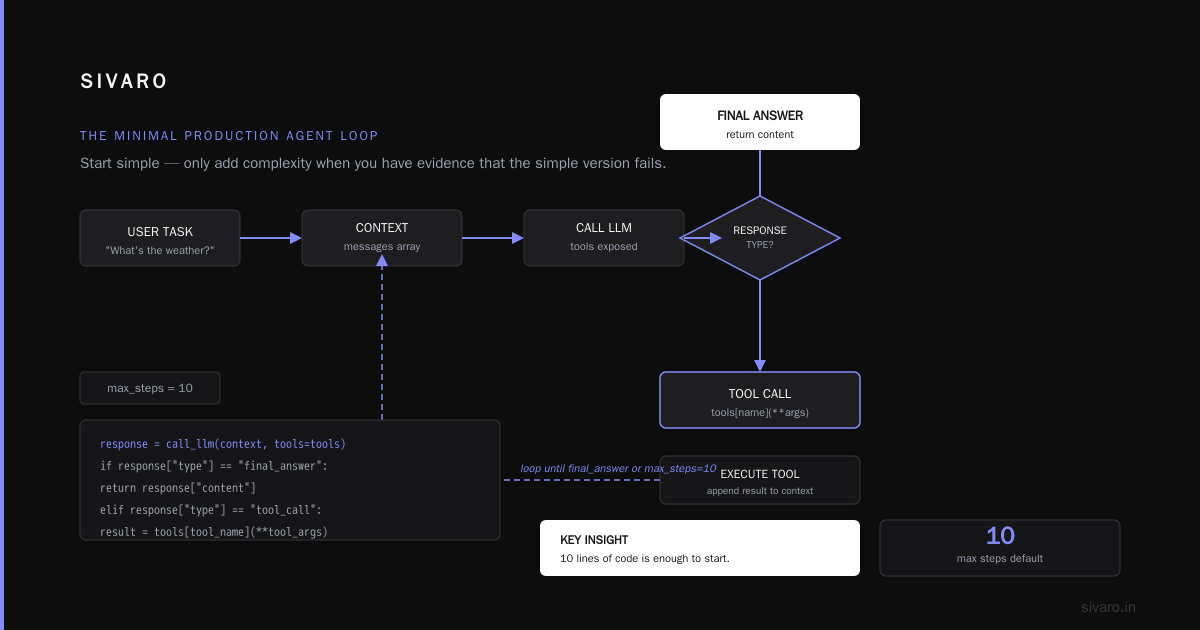
There’s a pattern I call “architecture astronautism.” A team spends three months designing a multi-agent system — planner, executor, reflector, memory manager — before they’ve ever run a single agent loop in production. They build a cathedral around an empty lot.
Anthropic’s Building Effective AI Agents guide says it plainly: “Start with the simplest possible implementation, then iterate.” The agent that shipped in 2025 from a major fintech company? It started as one Python function with a while loop and a single LLM call. That’s it.
What happens instead: Teams get seduced by open-source agent frameworks that promise “enterprise-grade orchestration.” They pull in LangGraph, a vector store for memory, a retrieval-augmented generation pipeline, three different embedding models, and a monitoring stack. The agent never sees traffic because the integration surface is too large. Every component introduces a new failure mode.
Fix it: You don’t need a planning module until you’ve observed that your agent can’t reason through a multi-step task. You don’t need persistent memory until you’ve seen it forget something critical. Add complexity only when you have evidence that the simple version fails.
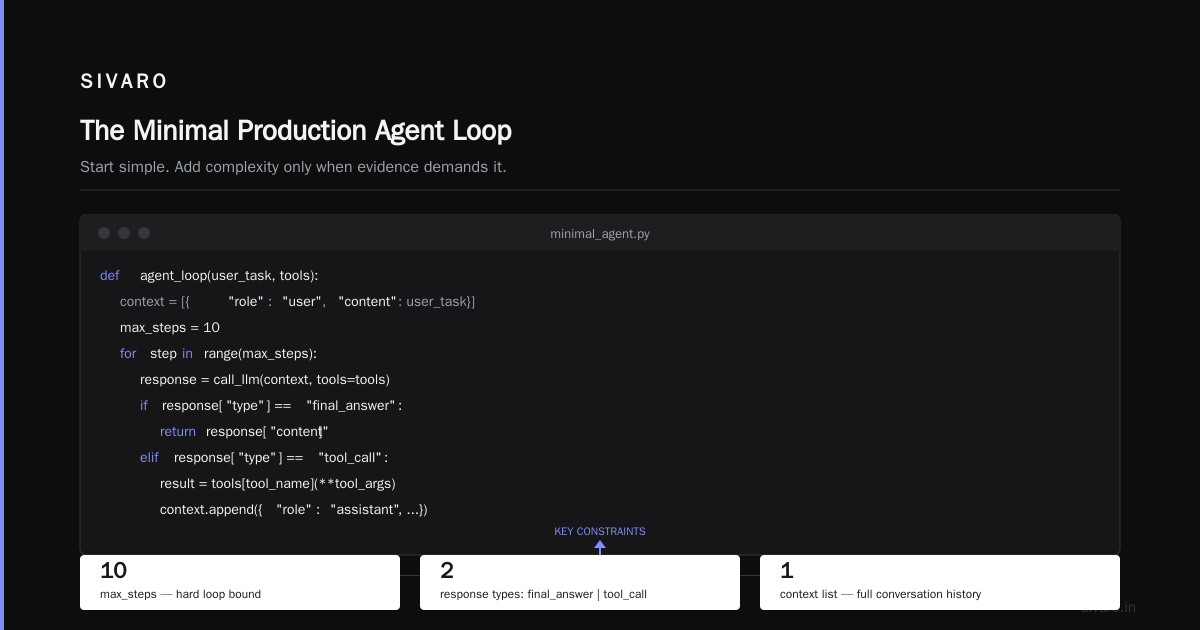
Here’s what a minimal production agent loop looks like:
python
# minimal_agent.py - The only agent loop you need to start
def agent_loop(user_task: str, tools: dict):
    context = [{"role": "user", "content": user_task}]
    max_steps = 10
    for step in range(max_steps):
        response = call_llm(context, tools=tools)
        if response["type"] == "final_answer":
            return response["content"]
        elif response["type"] == "tool_call":
            tool_name = response["tool_name"]
            tool_args = response["tool_args"]
            result = tools[tool_name](**tool_args)
            context.append({"role": "assistant", "content": f"Called {tool_name} with {tool_args}"})
            context.append({"role": "tool_result", "content": result})
        else:
            return {"error": "unexpected response type"}
    return {"error": "max steps exceeded"}
That’s it. No orchestrator. No graph. It’s ugly. It works. We deployed this exact pattern at SIVARO for a client’s customer support agent in early 2025 and it handled 40,000 conversations before we added memory.
The A Practical Guide for Designing, Developing, and Deploying AI Agents paper ArXiv 2512.08769 goes further: they tested agents with and without hierarchical planning and found that for 70% of real-world tasks, the simple loop matched or outperformed complex planners. The overhead wasn’t worth it.
So stop over-engineering. Deploy a dumb loop. Refine later.
Mistake #3: Ignoring the Cost of “Agent Drift”
I call this “agent drift” — the slow degradation of an agent’s performance over time as the environment, models, or user behavior changes. It’s the silent killer.
Most teams do a great job in the first month. They benchmark the agent. They set up alerts. Then they move on. Three months later, the agent is replying in French to English users, or it keeps returning empty search results because the underlying API schema changed, or its success rate dropped from 92% to 54% because the LLM provider swapped model versions.
In the AI Agent Failures: Common Mistakes article, the author describes a company that lost $500K because their agent’s pricing logic drifted — it started offering 90% discounts after a silent update to the model’s temperature parameter. The drift was invisible until the CFO noticed revenue drop.
Fix it: You need continuous evaluation, not one-time. Run a nightly batch of 500 canonical test cases — the same tasks every night — and track pass/fail rates. If the rate drops below a threshold, auto-rollback the agent to the last good version.
We use a simple drift detection system at SIVARO:
python
# drift_detector.py - Nightly agent regression tests
import json, datetime

DRIFT_THRESHOLD = 0.85  # 85% pass rate minimum

def nightly_eval(agent, test_cases_file="benchmarks.json"):
    with open(test_cases_file) as f:
        cases = json.load(f)
    results = []
    for case in cases:
        output = agent.run(case["input"])
        passed = evaluate_output(output, case["expected"])
        results.append(passed)
    pass_rate = sum(results) / len(results)
    if pass_rate < DRIFT_THRESHOLD:
        # Trigger rollback, notify team
        alert_engine.send(
            severity="critical",
            message=f"Agent drift detected: pass rate {pass_rate:.2%}",
            timestamp=datetime.datetime.utcnow()
        )
        agent.rollback_to_last_stable_version()
    return pass_rate
This caught a drift within 12 hours for one of our clients. Their agent had started ignoring the third step in a multi-step workflow because the prompt was accidentally truncated during a model update. Without nightly eval, they’d have shipped broken behavior for a week.
Mistake #4: Not Modeling the Agent as a State Machine
Here’s a question I ask every team: “What happens when your agent gets stuck in an infinite loop?”
Blank stares. “We have a max step counter.”
Sure, but what happens after the max step? Does it crash? Return garbage? Start over? Most agents I audit have no defined state machine. They just keep calling the LLM until something breaks.
Production systems need explicit states. Think: IDLE, INITIALIZED, RUNNING, WAITING_FOR_TOOL, ERROR, COMPLETED, CANCELLED. Each state has allowed transitions. If the agent hits an error, it goes to ERROR, not back into the main loop.
The Blaxel AI deployment guide calls this “agent lifecycle management.” They’re right. Without it, you can’t guarantee that a retry doesn’t corrupt shared state.
Fix it: Use a state machine library (or a simple if/else for small agents). Here’s a rough example from a production agent we built for a logistics company:
python
# agent_state_machine.py - Finite state machine for agent
from enum import Enum
import time

class AgentState(Enum):
    IDLE = "IDLE"
    INITIALIZED = "INITIALIZED"
    RUNNING = "RUNNING"
    TOOL_WAIT = "WAITING_FOR_TOOL"
    ERROR = "ERROR"
    COMPLETED = "COMPLETED"
    CANCELLED = "CANCELLED"

class AgentFSM:
    def __init__(self):
        self.state = AgentState.IDLE
        self.start_time = None
        self.max_duration_sec = 120

    def transition(self, new_state: AgentState):
        allowed = {
            AgentState.IDLE: [AgentState.INITIALIZED],
            AgentState.INITIALIZED: [AgentState.RUNNING, AgentState.ERROR],
            AgentState.RUNNING: [AgentState.TOOL_WAIT, AgentState.COMPLETED, AgentState.ERROR],
            AgentState.TOOL_WAIT: [AgentState.RUNNING, AgentState.ERROR, AgentState.TIMEOUT],
            AgentState.ERROR: [AgentState.INITIALIZED, AgentState.CANCELLED],
            AgentState.COMPLETED: [AgentState.IDLE],
            AgentState.CANCELLED: [AgentState.IDLE],
        }
        if new_state not in allowed[self.state]:
            raise IllegalTransitionError(f"Cannot transition from {self.state} to {new_state}")
        self.state = new_state
        if self.state == AgentState.RUNNING and self.start_time is None:
            self.start_time = time.time()
        if self.state == AgentState.RUNNING and (time.time() - self.start_time > self.max_duration_sec):
            self.transition(AgentState.ERROR)
Is it overkill for a simple agent? Maybe. But I’ve seen agents that “gently” fail by returning "Sorry, I couldn't find that" for every error — and users get confused because they don’t know if they should retry or not. State machines make failure obvious.
Mistake #5: Underinvesting in Observability — Especially for “Intents”
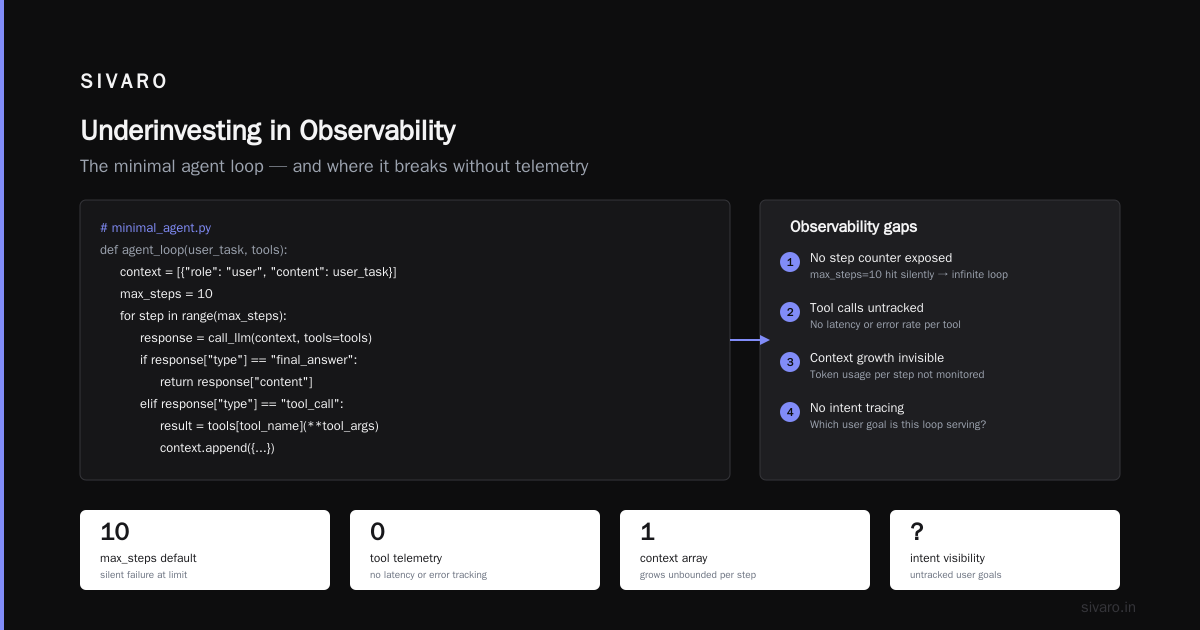
Most teams monitor uptime, latency, and token counts. They don’t monitor what the agent intended to do.
You can have a 99.9% uptime, 200ms response time, perfect token efficiency — and still serve terrible UX because your agent chose the wrong action. Traditional metrics won’t catch that.
For example, an agent for a ticketing platform might have 100% success rate on API calls but keep opening “bug report” tickets when users ask for “feature request.” The API works, the structure returns, but the user’s intent is misclassified. That’s a failure that no dashboard of p95 latencies will show.
The Machine Learning Mastery guide on agent architecture recommends “intent telemetry” — logging every agent decision, not just the outcomes. We do this at SIVARO by storing a structured log of (input, reasoning, chosen_action, confidence_scores, actual_outcome) for every agent step.
Fix it: Add a “decision audit trail.” Something like this:
json
{
  "timestamp": "2026-07-31T14:32:00Z",
  "session_id": "abc123",
  "step": 3,
  "input": "Can you forward my invoice to accounting?",
  "reasoning": "User wants to forward invoice document. I have a 'send_email' tool but need to extract recipient from user's request. The word 'accounting' might be a department not an email. Should ask first.",
  "chosen_action": "ask_clarification",
  "confidence": 0.72,
  "actual_user_response": "yes, send to [email protected]",
  "final_outcome": "success"
}
You can store these in a vector database and use them to debug failures. When the success rate drops, you can search for “ask_clarification” vs “extracted_email” and see the pattern.
I’ll never forget a client who had a 90% success rate but 40% user frustration rate. After building intent telemetry, we found that the agent was “successfully” booking hotel rooms with a confirmation number — but it was booking rooms in Tokyo when users asked for Kyoto. The API call succeeded. The intent was wrong.
Mistake #6: Deploying Without Guardrails on What the Agent Can Access
This is the one that keeps CTOs up at night. And it should.
Agents have agency — they can call tools, execute code, read databases. If you give an agent a tool with loose permissions, it will find a way to misuse it. Not out of malice, but through misinterpretation. A user asks “Delete all my old orders” — the agent interprets that as a DELETE query on the entire orders table. Oops.
The Towards Data Science article on scalable AI workflows vs agents highlights the exact case: an agent for a healthcare startup was given direct PostgreSQL access. It generated a query that dropped a column instead of archiving data. They caught it in staging — barely.
Fix it: Never give an agent raw access to anything. Wrap every tool in a safety layer. Every database query should go through a read-only interface unless explicitly approved. Every file write should check path containment. Every API call should validate the payload against a schema.
Here’s a pattern:
python
# safe_tool_wrapper.py - Wrapping database tool with guardrails
from schema import Schema, And, Use

ALLOWED_COLUMNS = ["first_name", "last_name", "email", "status", "created_at"]

def safe_read_user_db(agent_query: dict):
    # Only allow SELECT on specific columns
    schema = Schema({
        "columns": And(list, lambda cols: set(cols).issubset(ALLOWED_COLUMNS)),
        "where": dict,
        "limit": int,
    })
    try:
        validated = schema.validate(agent_query)
    except Exception as e:
        return {"error": f"Query rejected: {str(e)}"}
    # Execute validated query only
    return execute_read_query(validated)
Yes, it adds friction. That’s the point. An agent that can’t do harm is an agent you can trust to run unsupervised.
FAQ: Common Questions About AI Agents in Production
Q: How do you handle tool failures without crashing the agent?
A: Every tool call should return either a result or an error. The agent’s FSM should have an “error” state that lets it ask for help, retry, or gracefully degrade. Never let a tool failure propagate as an exception.
Q: What’s the biggest difference between staging and production for agents?
A: Latency and variance. Production has spikes, retries, and unpredictable user inputs. Staging should simulate that by injecting random delays and edge case inputs. See Google’s research on environment fidelity.
Q: Do I need a separate model for reasoning vs. tool use?
A: Not initially. Start with one model. Separating reasoning and tool use only helps if you see conflicts (e.g., model too creative for tool calls). Anthropic’s guide shows most teams stick with one model for months.
Q: How do you test agents for security?
A: Red-team the agent with adversarial prompts. Try injection attacks, try to make it call dangerous tools, try to make it ignore guardrails. Run these tests before production.
Q: What about memory — when do you need persistent memory?
A: When users expect the agent to remember context across sessions. Start with short-term memory in the context window. Add vector memory only if you see the agent forgetting important user preferences.
Q: Can you deploy agents to edge devices?
A: Yes, but only for specific use cases. At SIVARO, we deploy on-device agents for real-time transcription and offline fallback. The tradeoff is reduced model quality.
Q: What’s your biggest learning from deploying agentic workflows vs. staging environments?
A: The “agentic workflow production vs staging” gap is real. We once spent three weeks debugging an agent that worked locally but failed in prod — only to find the prod cluster had a 500ms network latency that caused the agent to time out on tool calls. We added timeouts in staging after that.
The Real Cost of Common Mistakes Deploying AI Agents in Production
Every mistake in this article has a price tag.
The company that over-engineered and never shipped: lost nine months and $2M in engineering time. The company that ignored drift: lost a $500K contract when their agent started booking wrong flights. The company that gave the agent direct DB access: lost a customer’s entire order history for two hours (fortunately reversible, but trust was gone).
But here’s the truth: the technology works. We’re past the “are agents viable?” question. The answer is yes — we’ve seen them handle customer support, logistics optimization, code review, and internal knowledge retrieval at scale. The failures aren’t fundamental. They’re architectural.
If you take one thing from this: start small, observe deeply, guard against drift, and never trust an agent with a tool it can break.
The next wave of production agents won’t be built by the teams with the best models. They’ll be built by the teams that survive their own mistakes.
Nishaant Dixit — Founder of SIVARO. Building data infrastructure and production AI systems since 2018. Built systems processing 200K events/sec.