 SIVARO

AI Agents in Production: Lessons Learned
If I had a dollar for every demo that collapsed the moment it hit real traffic, I could fund SIVARO for a decade.
I'm Nishaant Dixit. I run product engineering for data infrastructure and production AI systems. Since 2018, my team has pushed systems that process over 200K events per second. We've deployed AI agents into environments where failure means lost revenue, not just a lost demo.
This article is everything I wish someone had told me before we put our first agent into production.
You'll learn the concrete lessons from my team's failures and wins. We'll cover the hard architectural trade-offs, the observability traps, and the evaluation frameworks that actually matter. This is the stuff that separates a prototype from a revenue-generating system.
Let's be clear about something upfront: most of what you read about AI agents is marketing. The reality is messier. Agents are powerful, but they will burn your infrastructure budget, confound your debugging tools, and fail in ways you never anticipated. That's okay. You just need to know what you're signing up for.
The Workflow vs. Agent Line Is a Trap
Most people treat "workflow" and "agent" as opposing categories. I've stopped caring about the label.
The real question is: how much autonomy does the system have?
In my experience, an agent is a system where the path to the output isn't fully predetermined. A workflow has a fixed graph. An agent has a loop with decision points. The distinction matters because your infrastructure needs to change based on which one you're actually building.
Here's the tough truth from Anthropic's engineering team: you should use the simplest solution that works. Anthropic explicitly recommends starting with workflows before graduating to agents. Their engineering team found that "the simplest solution that works" often means a deterministic workflow with an LLM embedded in one or two steps.
We tested this at SIVARO. For a document processing pipeline, we built a full agent that could decide its own sequence of actions. It was brilliant. It was also impossible to debug. We replaced it with a workflow where the LLM only handled extraction and classification. Every other step was deterministic code. The system became more reliable, faster, and easier to monitor.
The lesson? Most production problems don't need a full agent. They need a workflow with a narrow AI component. As this guide on workflows vs. agents points out, the choice should be driven by the need for flexibility and the cost of errors. Low error tolerance? Use workflows. High complexity and need for adaptation? Use agents.
But don't be fooled into thinking this is a one-time decision. In 2026, we're seeing hybrid systems mature. These are workflows with adaptive routing to agentic subroutines for edge cases. It's more complex to build, but it gives you determinism where you need it and flexibility where you can afford it.
Start with the workflow. Add agentic autonomy only when you have a concrete reason.
The Hardest Lesson Was Saying No to the LLM
The first big mistake we made was letting the LLM handle too much. We assumed that because the model was smart, it should make all the decisions.
Wrong.
Large language models are terrible at following exact strings, doing precise arithmetic, or maintaining state over long sequences. They're phenomenal at classification, extraction, and generating natural language.
At a SIVARO client in the fintech space, we built an agent to parse invoices. It was a mess. The agent hallucinated line items, missed currencies, and occasionally invented vendor names that didn't exist. The fix was to use the LLM purely for unstructured extraction and then run every output through a strict validation layer. Not a nice-to-have. A hard requirement.
Think of it like a human employee with a great brain but terrible handwriting. You don't ask them to write everything down; you ask them to dictate and then have a strict process transcribe it.
Here's what I mean in practice. For any action the agent takes, you need guardrails:
python
def validate_agent_action(action, rules):
    """
    Ensures any agent output passes through deterministic checks
    before it touches the rest of the system.
    """
    for rule in rules:
        result = rule(action)
        if not result.valid:
            raise Exception(f"Guardrail failed: {result.message}")
    return action
Set these up early. Don't be an optimist. Assume the LLM will fail in ways you didn't imagine. Because it will.
The "Just Deploy It" Trap
Everyone wants to ship. I get it.
But the fastest way to kill an agent project is to deploy it to production without an evaluation framework. You need to know what good looks like before the agent starts making decisions. And here's the kicker: for genuinely open-ended tasks, "good" is a moving target.
We deploy domain-specific AI agents and learned that evaluation isn't a single metric. It's a process. You need unit tests for the components, integration tests for the workflows, and then continuous evaluation for the agent as a whole. The practical guide on arxiv for designing these systems calls this the "unit, integration, and evaluation" triad. It helps prevent over-reliance on a single metric that may not reflect reality.
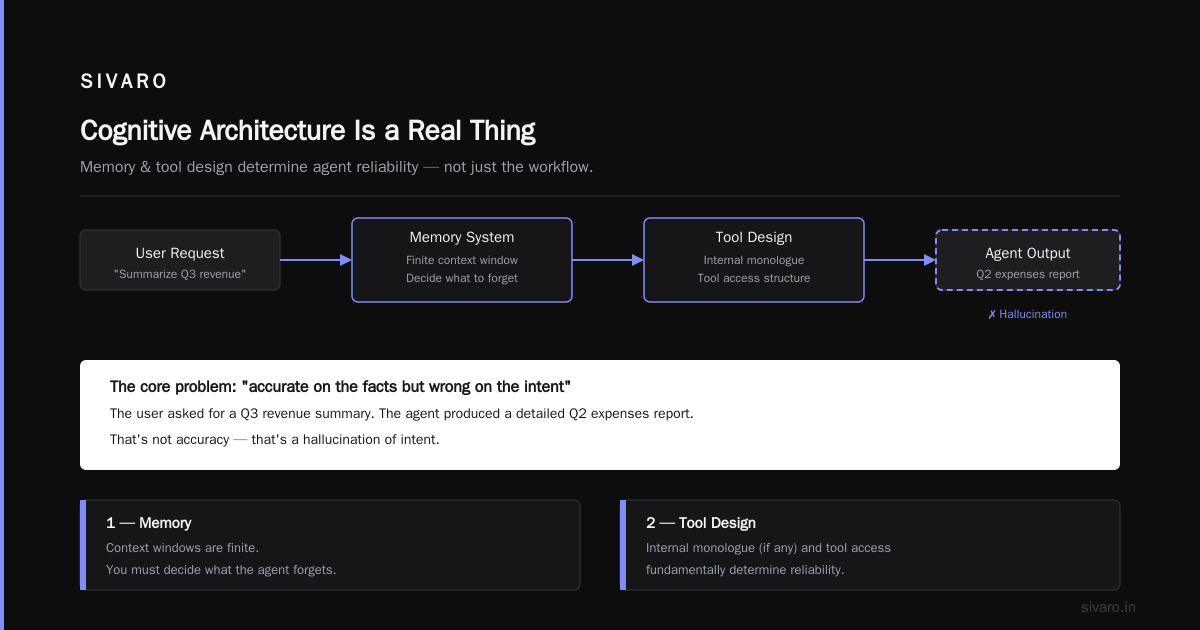
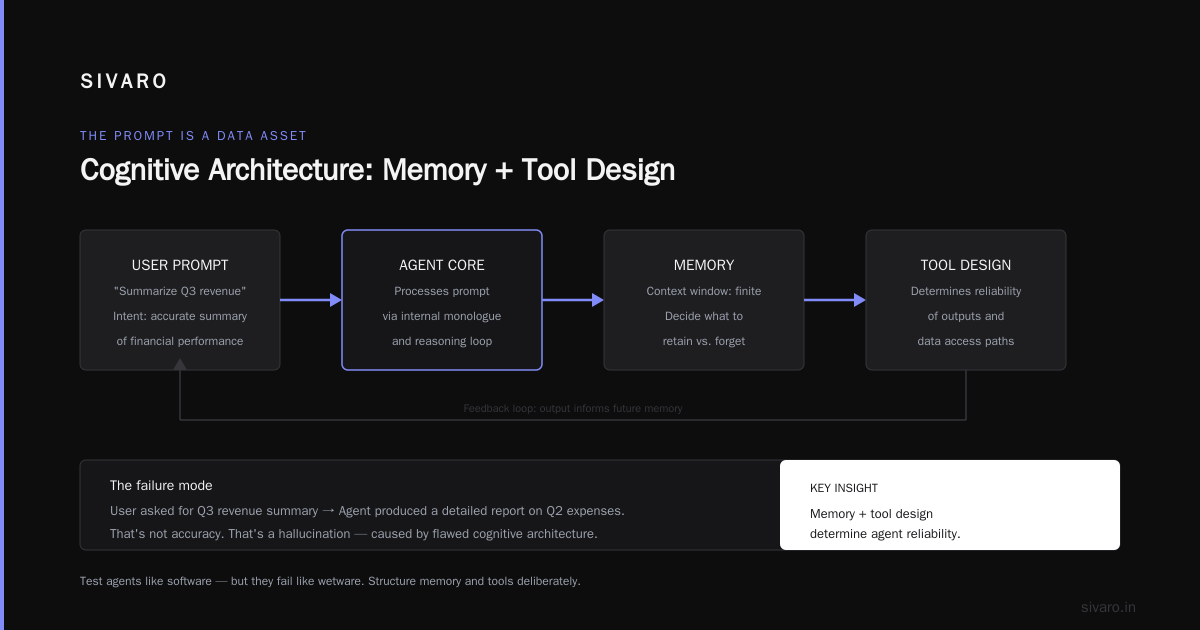
We used to score our retrieval agent with a single "accuracy" number. It looked great. But when we actually shadowed the outputs with a human-in-the-loop, we found the agent was wrong in ways the metric didn't capture. It was accurate on the facts but wrong on the intent. The user asked for a summary of Q3 revenue, and the agent produced a detailed report on Q2 expenses.
That's not accuracy. That's a hallucination.
Cognitive Architecture Is a Real Thing
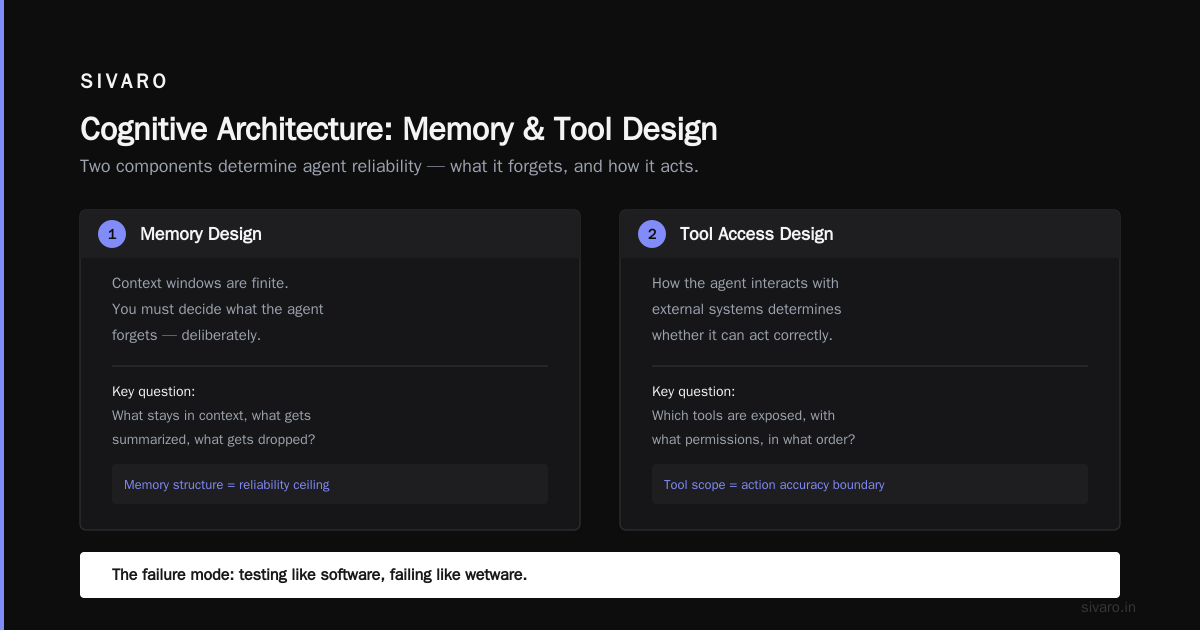
We test our agents like they're software because they are. But they fail like they're wetware.
The term "cognitive architecture" gets thrown around a lot. Most people use it to sound smart. I use it because it's the most accurate description of what we've learned. The way you structure an agent's memory, its internal monologue (if it has one), and its tool access fundamentally determines its reliability.
Let me break this into two components: memory and tool design.
For memory, you need to decide what the agent forgets. Context windows are finite. If you load the entire conversation history into context, you'll hit limits and the agent will start to degrade. We use a hierarchical memory approach. Short-term working memory holds the current task. Long-term memory is an external vector store for facts and past decisions.
This isn't novel, but it's essential. As the architecture guide from MachineLearningMastery outlines, you need to be deliberate about the infrastructure that supports agent memory. It's not just the model; it's the database, the retrieval layer, and the caching strategy.
For tool design, think about affordances. The tools you give an agent are like the controls you give a pilot. Too many, and they get overwhelmed. Too few, and they're useless.
A good test for tool design: if you can perform the task using the tool's API in three or fewer steps, it's a good tool. If it takes ten steps of chaining API calls, it's a bad tool.
Observability: When You Can See the Problem, You Can Fix It
I will die on this hill: AI agent observability in production is the most underrated aspect of the entire stack.
You cannot fix what you cannot see. And with agents, you can't see much by default. The LLM call is a black box. The internal chain-of-thought may or may not be exposed. The tool calls are usually logged, but the sequence of tool calls matters as much as the individual calls.
We had a scenario where an agent for a logistics client was making the correct tool calls in the correct order, but the output was still wrong. Without tracing the entire event chain, we would have never caught that the agent was using stale data from a cache. It was an infrastructure bug, not an algorithm bug.
This is why real-time monitoring integration matters. You need out-of-the-box tracing to see the full path of the agent's decision-making.
Here's what we log for every agent interaction:
typescript
interface AgentTrace {
  agentId: string;
  sessionId: string;
  input: string;
  steps: Array<{
    step: number;
    toolName: string;
    toolInput: string;
    toolOutput: string;
    durationMs: number;
  }>;
  finalOutput: string;
  cost: number;
  latencyMs: number;
  success: boolean;
}
We log everything to a central store. Then we query it not just on failure, but on success. We want to know: why did this succeed? Was it luck or skill?
The Google research team found that organizations face key hurdles in this area. They published their findings on agentic AI infrastructure and one of the biggest hurdles is observability. The tools for tracing agent behavior are lagging behind the tools for building agents. You have to build your own if you're doing anything nontrivial.
Build the observability infrastructure before you build the agent logic.
AI Agent Failure Modes: Real Lessons, Not Theory
We have a word for agents in production at SIVARO: "eventually correct." They're like a junior engineer who knows everything but makes careless mistakes. You have to review their work.
Let me walk you through the common failure modes we've seen in production. I've broken these out into the ones that actually hurt.
The Perfectionist Loop
The agent will loop forever trying to improve its answer. It reads the calendar, checks the email, checks the calendar again, and then checks it a third time to be sure. Cost goes up. Latency goes up. Output doesn't improve.
Fix it by adding a max step count. Never let an agent run indefinitely. Set a hard cap on tool calls and time. This is the most common mistake. Most agents are optimized for correctness, not for bounded latency.
The Hallucinated Tool Call
The agent will call a tool that doesn't exist. Or it will call a tool with parameters that don't match the schema. This is terrible and should be caught by validation. But with agents, the tool call is generated by the LLM, so it's probabilistic.
You need a schema validation layer on every tool call your agent makes. This is non-negotiable.
The Context Poisoning Problem
The agent will become worse as the conversation grows longer. We call it "context poisoning." The agent's attention gets diluted, or it gets confused by contradictory information at the start of the context window.
Fix: periodically summarize the conversation. Compress the context. We use a summary-and-purge strategy that keeps the core intent but removes the noise.
These are all solvable. But you have to know they're coming.
The Concurrency and Scale Problem: Step One Is Isolation
When you move from prototype to production, the first thing that changes is traffic. Your agent might have been handling one user. Now it's handling one hundred. Then ten thousand.
Agents are stateful. That's the core problem. The LLM is stateless, but the agent (with its memory and context) is stateful. And stateful services are hard to scale.
You need to isolate agent instances per session. If you have a single agent handling multiple sessions simultaneously, you'll get cross-contamination of context. You'll also have a risk of resource blow-up. One heavy session can starve another.
Here's the deployment pattern we use:
yaml
# docker-compose example for session isolation
services:
  agent-worker:
    image: agent-service:latest
    scale: 10  # or use a queue-based worker pool
    environment:
      - MAX_CONTEXT_TOKENS=8000
      - MAX_HOPS=5
      - LOG_LEVEL=INFO
    depends_on:
      - redis
      - postgres
      - vector-db
For actual scale, this pattern is insufficient. You need a message queue and a pool of workers, each maintaining session state in a distributed store. The pattern that works:
- Ingest traffic through an API gateway.
- Enqueue session tasks onto a queue (like SQS or RabbitMQ).
- Workers dequeued the tasks and process them, pulling state from Redis or a vector database.
- Then push results back through the queue.
The architecture roadmap from MachineLearningMastery covers this well. You need compute, storage, and a retrieval layer that can scale independently.
The Prompt Is Now a Data Asset
In traditional software, the code is the key asset. In agent systems, the prompt is part of the data and the logic.
Most teams treat their prompts like a config file that someone updates every six months. That's a mistake. A prompt needs version control. It needs automated testing. It needs A/B testing.
We treat prompts like microservices. They have their own repo. They have unit tests that verify the output for a set of golden scenarios. When we ship a new model version, we re-run all the prompt tests to see if the change in model behavior breaks anything.
This is the lesson from a practical guide for designing agents that stuck with me: you need to "decouple business logic from prompts." They recommend domain-specific modules so the prompt itself isn't an unreadable monolith.
We abstract prompts like this:
python
# A prompt is a function, not a string.
def generate_tool_prompt(domain_knowledge, user_query):
    system_prompt = load_prompt_template("system_tool_v2")
    return system_prompt.format(
        domain_context=domain_knowledge,
        query=user_query,
        allowed_actions=["search", "summarize", "schedule"]
    )
Versioning prompts as code means you can roll back. You can audit changes. And you can measure which prompt version performs better.
AI Agent Safety and Guardrails: Please Don't Skip This
We had to tell an agent to stop apologizing once. It was costing us money. The agent would get stuck in an apology loop after a minor failure. Instead of moving forward, it would say "I'm sorry, I can't help with that" and end the conversation.
There's a darker side to this, too. Agents are becoming more powerful. They can send emails, modify databases, and issue refunds. If your guardrails are weak, the agent will eventually do something expensive.
Example: Our customer support agent once issued a full refund to a customer who only asked for their order status. The agent had the tool available and decided that "resolution" meant "refund." It didn't check the order status first.
Guardrails are not optional. They are the thing that saves your ass at 3 AM when some edge case causes the agent to go off the rails.
Here are the guardrails you need:
- Scope limits. The agent can only access data and tools within a certain business domain.
- Redundant validation. Human-in-the-loop for high-risk actions like refunds or deletions.
- Token budgets. Prevent runaway costs by setting a max token limit per session.
- Behavior policies. Explicit instructions for what the agent is not allowed to do.
And enable human takeover. Always build a "human mode" where a person can step in and take over the conversation or action sequence. This is non-negotiable. The BusinessPlusAI guide on agent failures has a good breakdown of these failure points.
The Evaluation Paradox: Metrics That Work
Here's the contradiction. You want your agent to be "intelligent" and adaptive. But you want to evaluate it with fixed, measurable criteria. These two goals sometimes conflict.
For a while, we used LLM-as-judge for all evaluation. We had an LLM evaluate the agent's outputs. It worked well for a while, until the judge LLM started hallucinating about the quality of the output. We went from a system that was "too strict" to a system that was "too lenient."
The lesson: don't rely on a single evaluation method. We now use a combination:
- Unit Tests: Deterministic checks for format and basic correctness.
- Golden Test Sets: A fixed sample of inputs with known-good outputs. We run these on every change.
- Human Evaluation: Random sampling for subjective quality. We do this weekly.
- Production Shadowing: Run the agent in "shadow mode" alongside a rule-based system and compare outputs.
Here's a simple evaluator that scores the agent behavior:
python
def evaluate_agent_run(run_data):
    score = {"valid": 0, "faithful": 0, "context": 0}
    # 1. Validity: Did it follow the format?
    score["valid"] = int(validate_schema(run_data.output))
    # 2. Faithfulness: Did it stay within the guardrail scope?
    score["faithful"] = int(check_guardrail_compliance(run_data))
    # 3. Context: Did it use the right tools and data?
    score["context"] = int(check_tool_usage(run_data))
    return score
But don't stop there. Technical metrics are good. Business metrics are better. Track your "task success rate" — how often the agent actually solved the user's problem in production.
The Human Element: Your Ops Team Needs AI Skills
Here's a lesson that has nothing to do with technology. Your operations team is now your first line of defense for the AI agent. They'll be the ones reading the logs, handling the escalation tickets, and pulling agents back on track.
If they don't understand how the agent works, they can't fix it.
We spent months building the perfect agent, then another month training our ops team on how the agent thinks. That think was the mistake. They didn't need to know how it thinks. They needed to know how to see what it did. Show them the logs. Teach them the common failure modes. The apology loop. The hallucinated tool call. The stuck in a loop.
Once they know the symptoms, they can triage quickly. They don't need to be prompt engineers. They need to be "behavior watchers."
The Cost of an Agent: It's Not Just Tokens
Let's talk numbers.
We had a customer support agent deployed for a client. The cost per conversation was $0.03 per interaction with a rule-based system. With our agent, the cost initially was $0.87 per interaction.
A 29x increase.
The client wasn't happy until we showed them the increase in resolution rate and the decrease in human escalation time. But if you're in a low-margin business, you can't have that cost.
The cost of an agent is not just the LLM tokens. It's the queue infrastructure. It's the vector database. It's the observability stack. It's the GPU instances (if you're self-hosting). It's the development hours for the guardrails.
The deployment guide from Blaxel highlights this: "cost during development is minimal, but skyrockets at production scale." You need to design for cost optimization from the beginning.
Our current best practice: Use smaller, specialized models for most steps. Only break out the big, expensive model for the hard steps. This "multi-model" approach sliced our costs by 60% without degrading quality.
The most expensive token is the one that causes a bad decision. Optimize for accuracy, then for speed, and then for cost.
FAQ
What is the biggest mistake teams make when deploying AI agents to production?
Treating the agent like a stateless API. An agent is stateful, has memory and a context window, and can make autonomous decisions. You need infrastructure for state, tracing, and guardrails.
Do I need a workflow or a full agent?
Start with a workflow. The bias should be toward determinism. A workflow with an LLM in specific steps is easier to debug, cheaper to run, and more reliable than a full agent. Graduating to a full agent should be a deliberate decision driven by a need for flexibility.
How do I handle AI agent cost explosion?
Use smaller models for simple tasks. Set token budgets. Implement strict termination conditions. Evaluate unit cost per task ruthlessly.
What should we monitor for AI agent observability in production?
Log the input, every step (tool call, tool output), latency, cost, and the final output. Trace the entire decision path, not just the model's response. Monitor for looping behavior, hallucinated tool calls, and context degradation over time.
How do we test AI agents?
Use a combination of unit tests for the components, integration tests for the workflows, and continuous evaluation with golden test sets for the agent as a whole. Also, do production shadowing.
How can we ensure agent safety?
Implement scope limits, token budgets, human-in-the-loop for high-risk actions, and behavior policies. Ensure you have a "human takeover" mechanism. Assume the agent will eventually do something you didn't expect.
Are AI agents ready for production?
Yes, but with caveats. If you scope them narrowly and build the right infrastructure, they can be highly effective. If you try to build a general-purpose autonomous agent that can do everything, you will fail. It's a question of scope and control.
Conclusion: Build for the Failure, Not for the Success
Here's what I want you to remember about ai agents in production lessons learned: your agent will fail. The question is not if it fails, but how gracefully it fails.
We've moved from a world where "AI agent" was a buzzword in a demo, to 2026, where they're handling support tickets, optimizing logistics paths, and executing financial trades. The stakes are real. The systems need to be resilient.
At SIVARO, we don't build agents to be perfect. We build them to be controllable. The best agent is the one that, when it makes a mistake, helps you find that mistake quickly and helps you fix it even faster.
So keep the agent adventurous. But keep the infrastructure paranoid.
You're building a partner, not just a program. Treat it with the rigor you'd give any other teammate, and it will perform. Let it run wild, and it will eat your budget and your credibility.
The agent is the new application server. Learn to run it, or it will run you.
Nishaant Dixit — Founder of SIVARO. Building data infrastructure and production AI systems since 2018. Built systems processing 200K events/sec.