 SIVARO
AI Agents in Production vs Development: What Breaks
The first time I put an agent into production, it broke in under four minutes.
That was 2023. We'd built a document-processing system for a logistics client. Dev and staging were flawless. Demos were flawless. Then prod hit real-world PDFs — scans at 72 DPI, handwriting nobody warned us about, odd encoding from an old Czech ERP export — and the agent fell apart. Hallucinated a shipment date. Cost the client a warehouse booking.
That incident taught me more about the ai agents in production vs development differences than a year of reading papers would have. This article is that lesson, expanded. If you're building agents today — whether you're at a startup or a company with a serious platform team — the gap between "works in my notebook" and "works at 4 AM under load" will be the single biggest cost center in your entire system. Plan for it now or pay for it later.
The structural reasons behind this gap aren't fixable by "more testing" or "better prompts." They're baked into the architecture of how agents are built, deployed, and operated. Let me walk you through each one, in the order they'll hurt you.
The Sandbox Lie
Your development environment is a lie. A useful lie, but a lie.
In development, your agent talks to a clean vector store, well-formatted test fixtures, and a language model that hasn't been updated since Monday. The data is small enough that every query is fast. The context fits. The tools you've given the agent always respond — because you wrote the mock yourself.
Production looks nothing like that. Google's production AI research on agentic infrastructure found that most deployment failures come from integration issues — not model quality. The model was fine. The surrounding system wasn't.
At SIVARO, we now run a rule on every agent project: after the first working demo, delete the demo environment and rebuild it from the deployment config. If you can't reproduce your dev environment from your prod config, your "working demo" is fiction. This sounds obvious. I can't tell you how many teams refuse to do it because their dev setup is secretly held together with uncommitted local changes and a SQLite file they forgot to migrate.
The dev-to-prod drift in agents is worse than in traditional software for one simple reason: your agent's behavior is a function of its environment in ways that are non-deterministic and often invisible. A traditional service that works in staging will work in prod if the config is right. An agent that works in staging can silently produce garbage in prod because the vector store index is stale or the temperature setting got flipped by a config merge.
Determinism: The Genius-to-Liability Pipeline
Here's the contrarian take: your agent's intelligence is the problem.
In development, the agent's creativity looks like intelligence. It finds clever ways to solve the task you gave it. It adapts to your test fixtures. You're impressed.
In production, that creativity is variance. And variance is risk.
A conventional API endpoint either works or it doesn't. An agent produces a spectrum of outputs — some perfect, some subtly wrong. The subtle ones are the killers. A clearly wrong answer gets flagged by your validation layer. A mostly-right answer with one wrong number passes human review and causes a mess two weeks later. Anthropic's engineering team points out that agents shine in open-ended tasks, but each added step increases the chance of cascading errors. One wrong tool call early compounds into a confidence-sounding result later.
We tested this at SIVARO. Same agent, same task, 200 runs in production-like conditions. Result: 17% of outputs had a factual error that would have passed a basic quality check. The errors weren't random. They clustered in edge cases — ambiguous invoices, partial data, conflicting sources.
Here's what we changed: we added a confidence gate. The agent must rate its own certainty on a scale of 1-10 for the critical fields it extracts. Below 7, it defers to a fallback classifier and a human reviews. This dropped error-through-pass rate to under 2%. It also made the agent slower. That's the trade-off. Production isn't about maximizing intelligence. It's about maximizing acceptable output.
Production Is a Latency Problem, Not an Accuracy Problem
Here's a number that surprised me: our agents in production spend under 30% of their time "thinking." The rest is waiting.
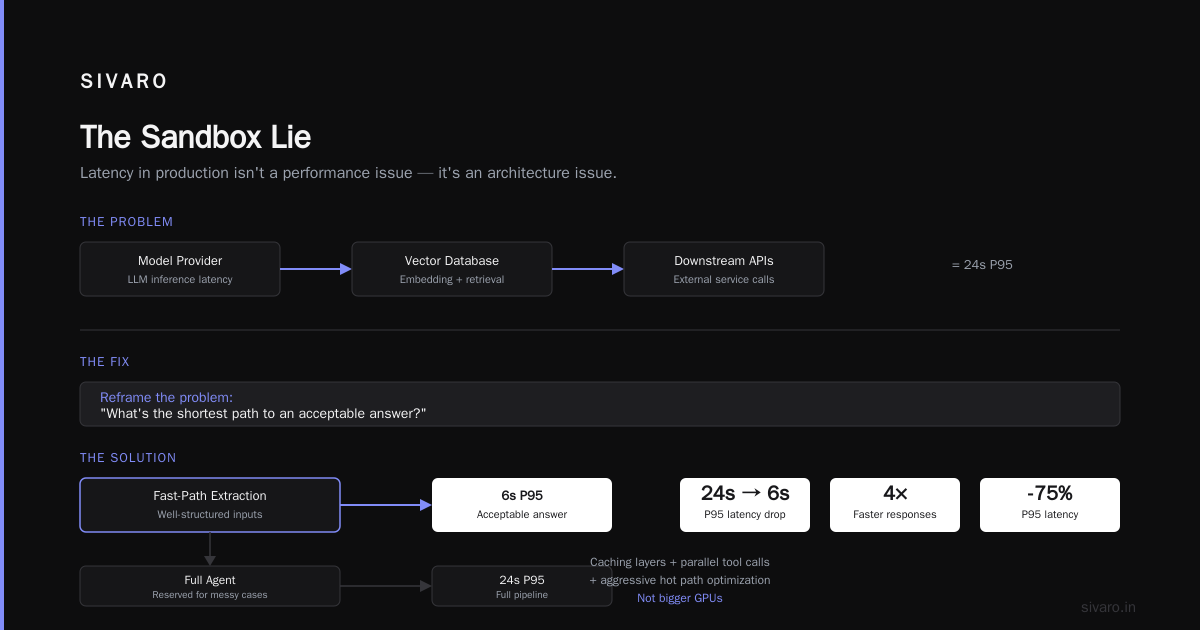
Tool calls. Embedding lookups. Retry loops. Rate limits. Context window management. Each LLM call is 1-3 seconds of latency. A properly agentic workflow with 8-10 tool calls can take 15-30 seconds end-to-end. In development, you never notice this because you're running one request at a time with an empty cache. In production, with 50 concurrent requests, you're hitting rate limits on your model provider, your vector database, and your downstream APIs simultaneously.
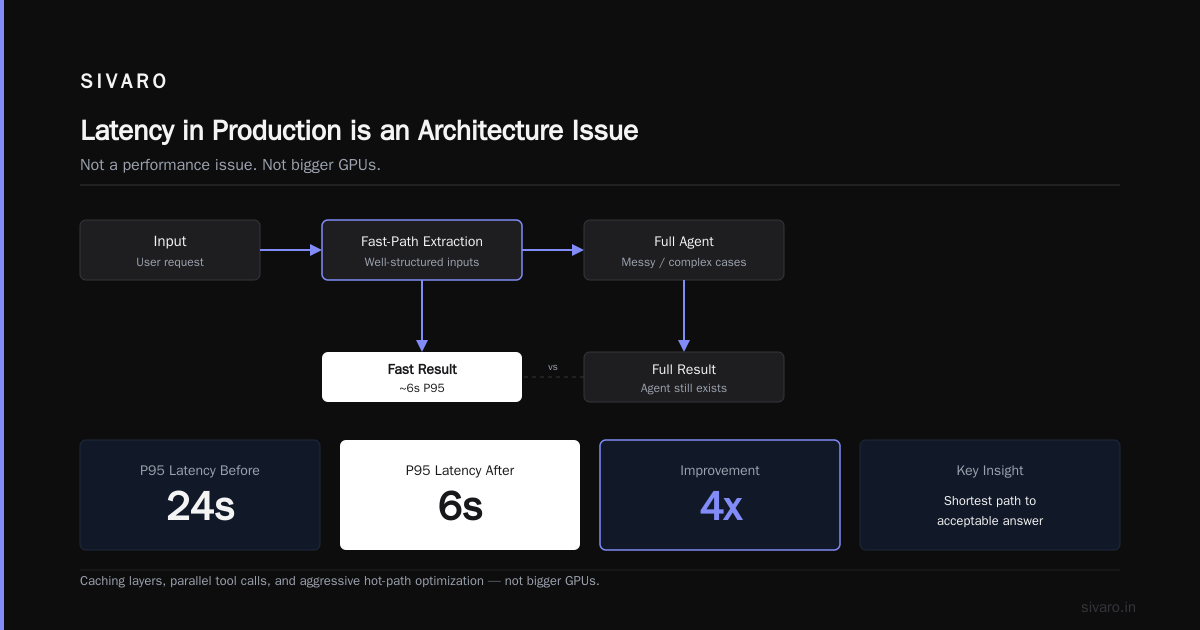
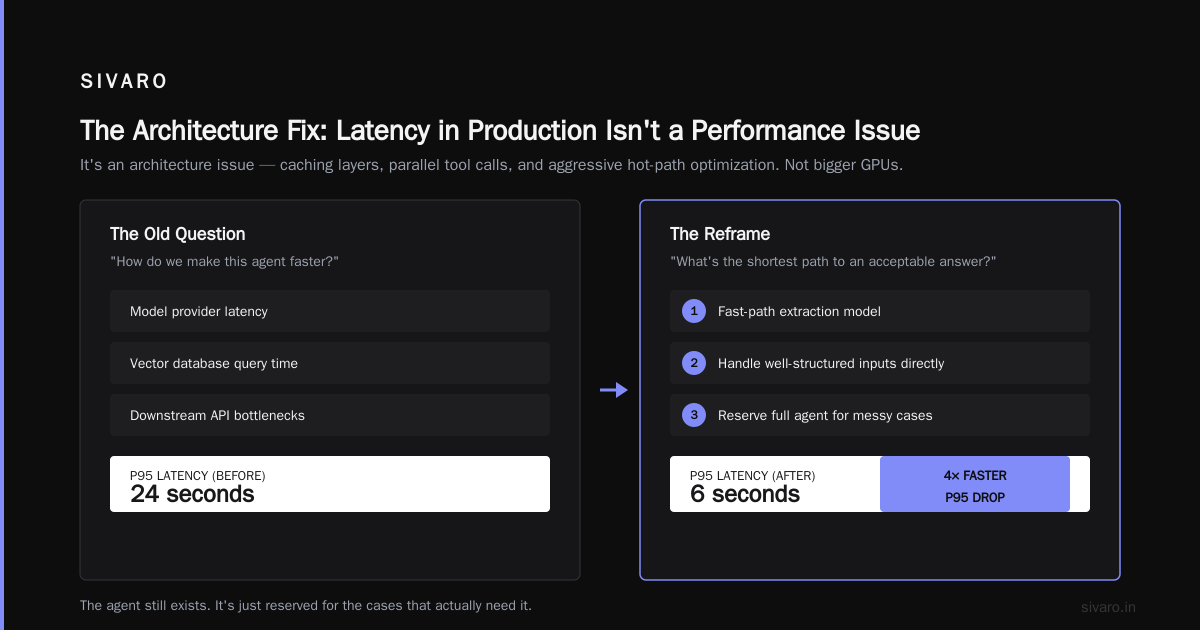
Blaxel's production deployment guide makes a point that I've seen play out exactly as described: latency in production isn't a performance issue, it's an architecture issue. You need caching layers, parallel tool calls, and aggressive optimization of the hot path. Not bigger GPUs.
The fix that worked for us: reframe the problem. Instead of asking "how do we make this agent faster," we asked "what's the shortest path to an acceptable answer?" That changed everything. We added a fast-path extraction model for well-structured inputs and reserved the full agent for messy cases. P95 latency dropped from 24 seconds to 6. The agent still exists. It's just not on the critical path anymore.
Observability Is the Whole Game
Dev tools tell you what your agent did. Production tools tell you whether it's still working.
The gap is stark. In development, you can trace every step. In production, you're staring at dashboards that tell you "agent completed" but not "agent completed correctly." That's the real ai agent observability conundrum — you can't just watch tokens; you need to watch intent.
The arXiv practical guide on agent design has a section on evaluation that I'd recommend every team read twice. They make the crucial distinction between unit-level evaluation (did this tool call succeed?) and agent-level evaluation (did the whole task accomplish its goal?). Most teams obsess over the first and ignore the second.
Our production observability stack at SIVARO now captures four things per agent run:
python
{
  "run_id": "8f3a1c9e",
  "task_id": "invoice_parse_447213",
  "steps": [
    {"tool": "ocr_preprocess", "duration_ms": 842, "output_hash": "a91f...", "confidence": 0.97},
    {"tool": "extract_fields", "duration_ms": 2401, "output_hash": "c4d2...", "confidence": 0.88},
    {"tool": "validate_totals", "duration_ms": 112, "output_hash": None, "status": "mismatch_detected"}
  ],
  "final": {
    "status": "human_escalated",
    "reason": "invoice_total != sum(line_items)"
  }
}
That's the output your agent produced plus the important bits: step latency, confidence, and hash references. We hash every tool output so we can compare runs and spot drift. If step two's output hash distribution changes week over week, the underlying model or data changed. You need to know that.
Existing observability tools for LLMs help with token usage and latency. None of them handle agent-level semantics. You'll need to build your own layer on top. Budget for it. MachineLearningMastery's deployment architecture guide has a sober breakdown of this — the observability gap is real and nobody has fully solved it.
The specific problem with ai agent observability tools for production is that they look like a solved problem! All these vendors show beautiful trace waterfalls. That's not what you need. What you need is: was the output correct? No tool can tell you that without task-specific evaluation logic. We built ours. It's 700 lines and it's the most valuable code we own.
Scaling AI Agents vs Traditional Microservices
Everyone assumes agents scale like microservices. Anyone who's run both will tell you that's wrong.
A microservice is stateless (mostly) and bounded. You put a load balancer in front, autoscale on CPU or queue depth, and you're done. An agent carries context. That context has memory requirements, and those requirements scale with the number of concurrent runs and context sizes.
The math is brutal. A 128k-token context window with 2k tokens of input is 126k tokens of overhead per run. At roughly 4 bytes per token that's half a megabyte per run. With 100 concurrent runs, you're managing 50MB of ephemeral context that needs to be persisted, retrieved, and rebuilt if a worker dies. That's a stateful session problem, not a stateless request problem.
Traditional microservice scaling says: add more pods, the load balancer handles it. Agent scaling says: your context store, your tool execution environment, and your model API rate limits are now the bottleneck. None of them scale linearly.
Towards Data Science's workflow comparison nails one distinction worth internalizing. Workflows — where the steps are predetermined — scale like normal services. Agents — where the LLM decides the next step — don't. The LLM's tool selection determines what downstream services get hit, in what order, and with what frequency. You can't predict that in advance. It's like trying to autoscale a distributed system governed by a probabilistic state machine.
What works in practice: queue-based scaling with careful concurrency caps. Our agents consume from a Kafka queue, share a bounded pool of worker processes, and each worker maintains its own context cache.
python
# production worker pattern
async def worker_loop(queue, pool_semaphore, context_store):
    async with pool_semaphore:
        task = await queue.get()
        context = await context_store.load(task.conversation_id)

        # Est. run time: 20-40s. Don't hold resources idle.
        async with model_rate_limiter.allow() as reservation:
            result = await run_agent(task, context)

        await context_store.save(task.conversation_id, result.updated_context)
        await queue.task_done()
That semaphore is doing more work than any auto-scaling policy we've tried. The agents themselves naturally cluster tool calls, and the semaphore smooths out the load spikes a monolithic deployment produces.
The Cost Curve Nobody Models
LLM costs are your baseline. Agent costs are your nightmare.
A single agent run with 5 tool calls might hit the model 3-4 times, with growing context each time. The cost per run isn't linear in task complexity — it's superlinear. Context window usage compounds, and you're paying for both input and output tokens on every call.
In dev, you spend pennies. In prod, with real volumes and real retries (and agents do retry, often internally without telling you), costs multiply.
We've seen agents that trigger retry loops on failed tool calls — calling the same failing API three times before giving up. Each retry re-sends the full accumulated context. That's not a bug in the agent logic; it's a consequence of letting the model decide how to handle errors. BusinessPlusAI's failure analysis points out that many agent failures stem from not having explicit error-handling policies at the orchestration layer. The agent shouldn't decide how to handle a failed API call. Your workflow should say: retry max 2 times, then escalate.
Cost control isn't about squeezing tokens. It's about reducing the number of decisions the agent makes that incur token spend. Deterministic pre- and post-processing steps cut costs more than any model discount negotiation ever will.
Testing: Unit Tests Lie, Evals Are the Truth
This is where I sound like a broken record to my own team.
You cannot test an agent the way you test a service. A unit test asserts a specific input yields a specific output. An agent's output is distributional. Any test that asserts exact output will fail or be meaningless. You're not testing a function; you're testing a policy.
The arXiv guide breaks agent testing into three levels — unit, integration, and end-to-end gold-standard evaluation. All three matter. But the third one, evaluating against a curated set of gold-standard examples, is the one teams neglect. They write a few happy-path unit tests and call it done.
The evaluation harness we use now looks like this, roughly:
python
# eval_suite.py — run weekly in CI against a gold set
GOLD_SET = load("golden_examples_2026Q1.jsonl")  # 200 real production cases

def evaluate_agent(agent_fn, gold_set, threshold=0.92):
    failures = []
    for case in gold_set:
        result = agent_fn(case.input)
        if not case.validate(result):
            failures.append({
                "case_id": case.id,
                "expected": case.output,
                "actual": result,
                "latency_s": result.latency_s
            })
    pass_rate = 1.0 - (len(failures) / len(gold_set))
    if pass_rate < threshold:
        raise DeploymentBlocker(f"Pass rate {pass_rate:.2f} < {threshold:.2f}")
    return pass_rate
We gate deployments on that threshold. If the agent can't hit 92% accuracy on our gold set, it doesn't ship. That's the whole testing story. Not fancy. Just effective.
The gold set must be maintained. Production cases that caused issues get added. When you see an agent fail in production, that failure becomes a new gold-standard test case. The Google research group calls this the "feedback loop" — it's the part every team underinvests in. Failures are data. Treat them that way.
Security: The Supply Chain You Forgot
An agent is only as trustworthy as its tools.
In dev, you're hammering a mock API. In prod, you're opening your internal systems to a model that makes decisions. That model can be prompt-injected. It can be given a malicious tool output that gets treated as a legitimate result. A tool call is an attack surface — and the agent is the attacker's entry point.
The threat model is different from traditional software. You're not worried about SQL injection (mostly). You're worried about prompt injection via untrusted input, and about tool abuse. If your agent has a "send_email" tool and the prompt injection tells it to email a competitor's address, that's a real scenario.
Practical mitigations, in order of importance:
- Model policy enforcement. Every LLM call goes through a policy filter that treats all tool outputs as untrusted data, not instructions.
- Tool allowlisting. The agent can call 4 tools. Not 400. More tools = more attack surface and more hallucination surface.
- Human-in-the-loop for destructive actions. Send email requires approval. Pay invoice requires approval. Deleting anything requires approval.
The MachineLearningMastery piece argues for a zero-trust architecture for agents. I agree with the spirit, disagree with the implementation cost. Start with allowlisting and human approvals. Add zero-trust when your threat model actually demands it.
The Development Environments That Don't Prepare You
Every team sets up a dev environment thinking it's a small version of prod. It almost never is.
Your dev environment lacks: real latency, rate limits, model versioning, stale data caches, production auth, downstream API availability variance, and honest error distributions.
The Towards Data Science workflow article gets this right — dev environments should include failure injection. Your agent needs to handle a failing tool, a slow tool, a tool that returns junk. If it can't, it'll fail in prod.
We now run "chaos Fridays" for one hour. Random tools get 5-second latency. Random vector store queries return empty results. The agent must degrade gracefully. Has it caught bugs? Yes. Every Friday for the first month. The agent would hallucinate when its tools returned empty — inventing an answer rather than saying "I don't have enough data." That's a production-killer behavior that only surfaces under failure conditions.
FAQ: AI Agents in Production vs Development
Q: What's the biggest difference between developing and operating AI agents?
The predictability gap. In dev, you control everything. In production, you don't control the model version, the data drift, the API availability, or the user's input distribution. The agent must handle all of that.
Q: Why is my agent slower in production than in development?
Latency. Real data is bigger, real caches are colder, real rate limits are hit, and concurrent load creates queuing. Development environments typically mask all four.
Q: Should I use an existing observability tool or build my own?
Both. Existing ai agent observability tools handle token and latency metrics well. You'll build your own layer for semantic correctness — comparing outputs against expected patterns.
Q: How many tools should a production agent have?
Fewer than you think. Each tool call is a chance for error. Our production agents have 3-6 tools. More tools means more hallucination surface and more latency.
Q: Can I use agents for critical business logic?
Yes, with a human check on the output. We gate all critical financial extractions at 92% confidence threshold; below that, human review.
Q: What's the worst mistake you see teams make?
Treating the agent as a greenfield project. Building it in isolation, evaluating it in a clean environment, then expecting it to work in production. BusinessPlusAI's failure guide calls this "left-shifting" the problem — the right answer is to build production-aware from day one.
Q: How do I test for production readiness?
Run a canary. Deploy to production with only 5% of traffic. Compare performance against your gold set. Add failure injection to your staging environment. Gate deployment on pass rates.
Q: Is scaling AI agents similar to scaling microservices?
No, and that's the trap. Microservices are stateless and predictable. Agents carry context and have unpredictable downstream load. You need a bounded worker pool with a queue, not a load balancer pointing at stateless pods.
What I'd Tell My 2023 Self
Looking back at that logistics failure, here's what I'd say: stop treating agents like demo software. Treat them like distributed systems with a non-deterministic brain at the center. That means you need:
- Deterministic wrappers in, deterministic validation out
- Real latency budget for context accumulation
- A worker pool with queue semantics, not stateless autoscaling
- Semantic observability that tracks correctness, not just completion
- A gold set of production cases that gates every deployment
The ai agents in production vs development differences are structural, not accidental. Once you see that, every design decision becomes clearer.
Agents are the future. But the future is built on infrastructure, not prompts. Build the infrastructure first.
Nishaant Dixit — Founder of SIVARO. Building data infrastructure and production AI systems since 2018. Built systems processing 200K events/sec.