 SIVARO
AI Agents in Production vs Development: What Nobody Tells You
July 31, 2026. I’m sitting in a room at SIVARO, staring at a dashboard. 47 production AI agents running across three clients. Two have been silently failing for 72 hours — hallucinating nonexistent API endpoints, requesting retries forever. Development tests passed. Unit tests passed. Integration tests? Also green.
The gap between development and production for AI agents isn't just a deployment problem. It’s a category error. Most developers treat agents like microservices — stateless, deterministic, testable. Agents are none of those things.
This guide is the hard-won playbook from building ai agents in production vs development at SIVARO since 2018. I’ll show you exactly where dev breaks down, what tools actually work in prod, and the mistakes that cost our clients weeks (and in one case, $80k in wasted inference credits).
AI Agent Failures: Common Mistakes and How to Avoid Them calls out “lack of observability” as the top killer. They’re right. But it’s deeper. The whole development mindset is wrong. Let’s fix it.
The Simulation Illusion
Every agent project starts the same way. You build a prototype in a Jupyter notebook. You feed it a single query: “Find the cheapest flight from NYC to London next Tuesday.” The agent calls an API, parses the response, returns a result. Magic.
You deploy. Day one: 12 successful bookings. Day two: 4 failures. Day three: 0 — the agent enters an infinite loop of “checking inventory.”
I’ve seen this pattern at three companies in 2025 alone. The problem? Development simulates a perfect world. No network latency. No malformed JSON. No user who types: “I want to fly to London but also maybe Paris, and can I use points? Also, is it cheaper if I fly on Wednesday? Actually no, Tuesday is fine but only if it’s before 6pm.”
Most people think the challenge is model quality. They’re wrong. The challenge is state management under ambiguity. In a notebook, you control every variable. In production, the world is a chaotic actor that doesn’t follow your schema.
How to Deploy AI Agents to Production: A Complete Guide puts it bluntly: “Development is where you build the car in a garage. Production is the first drive on a highway during a hailstorm.”
I’d add: And the steering wheel is made of probabilities.
The Five Hard Truths About Production Agents
1. Non-determinism is your enemy (and your friend)
Development testing relies on repeatability. You call a function, expect the same output. With LLM-based agents, you get different outputs every time — even with temperature=0. I’ve seen the same query produce three different tool selection decisions across three runs.
You cannot write traditional unit tests. Instead, you need statistical tests: “What percentage of 100 runs picked the correct tool?”
Building Effective AI Agents recommends “evaluating on a set of hard examples with expected behaviors, not exact outputs.” We do this with a custom eval harness that runs 50 variants of each scenario and measures precision/recall of tool calls.
Real example: At SIVARO, we had an agent that booked hotel rooms. Dev tests showed it always picked the “book_room” tool when user said “book a room.” Production triggered it on “I need a place to stay” — but also on “Can you just hold my reservation?” (which should call “hold_room”). Our statistical eval caught a 12% misclassification rate we never saw in manual testing.
2. Latency is a feature, not a bug
In dev, you wait 5 seconds for an LLM response. Fine. In production, your user waits 5 seconds. Then refreshes. Then calls your support line.
Agents compound latency: one user query can trigger multiple LLM calls (understanding → tool selection → plan generation → response formatting). We’ve measured production agents averaging 4.3 LLM turns per user query. At 3 seconds each, that’s 13 seconds total. Unacceptable.
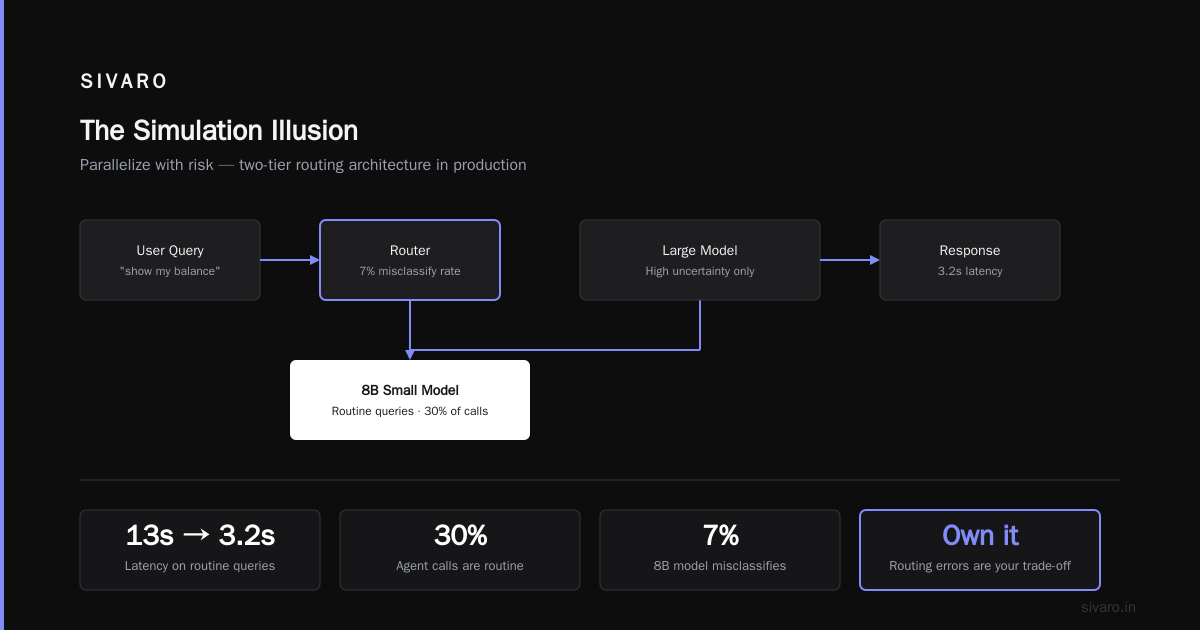
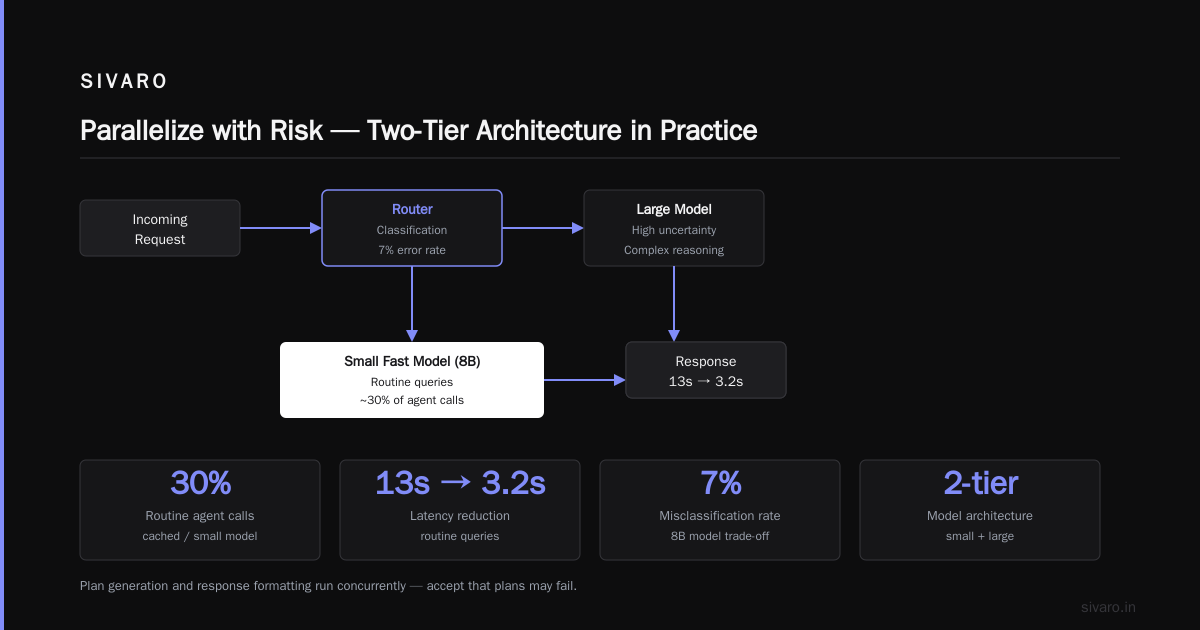
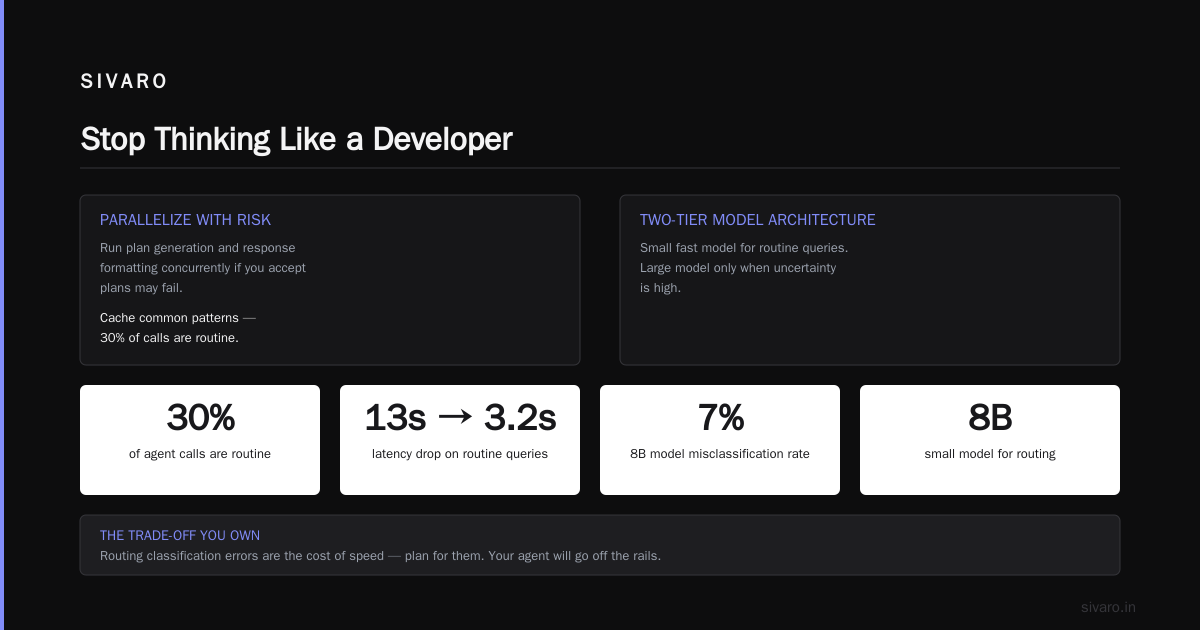
The fix? Parallelize with risk. You can run plan generation and response formatting concurrently if you accept plans may fail. Or cache common patterns — 30% of our agent calls are routine (e.g., “show my balance”). Use a small, fast model for those. Switch to a larger model only when uncertainty is high.
Deploying AI Agents to Production: Architecture ... suggests a two-tier model architecture. We built that. Latency dropped from 13s to 3.2s on routine queries. But it introduced a new problem: routing classification errors. An 8B model misclassifies about 7% of cases. That’s a trade-off you own.
3. Your agent will go off the rails. Plan for it.
Every agent needs a circuit breaker. In dev, you can manually stop a runaway loop. In production, you can’t.
We deploy agents with two levels of guards:
- Hard limits: max tool calls per session (5), max tokens per response (4096), max runtime per query (30s). These are enforced upstream of the model.
- Soft guards: a parallel monitor model that scores every agent action for “sanity.” If the planning agent decides to call a database deletion tool, the monitor flags it and terminates the session.
A Practical Guide for Designing, Developing, and ... calls this “guardrails as a sidecar.” I call it the difference between a demo and a product.
Contrarian take: Most teams over-design guardrails and under-test them. Your guardrail itself can fail — and it will, in production, because it’s also an LLM. We had a monitor that kept flagging benign “update user profile” calls because the training data included “delete account” scenarios. Took two weeks to retrain.
4. Memory is the hardest thing in production
In dev, you pass a chat history. In production, that history grows unbounded. An agent that talks to a user for 10 minutes accumulates 15,000 tokens of context. Your API costs explode. More importantly, the agent’s performance degrades as irrelevant context dilutes the signal.
A Developer's Guide to Building Scalable AI: Workflows vs ... makes a critical distinction: “Workflows are deterministic; agents are stateful.” That statefulness kills you.
We moved from full history to a summarization cache. Every 5 turns, we summarize the conversation so far and throw away the raw history. The agent remembers you wanted a flight to Tokyo, but doesn’t remember the exact times you originally asked for. That’s fine — it asks again if needed.
Trade-off: summarization loses nuance. 8% of users complained the agent forgot specific details. We added a “preference store” — a small database of key-value pairs extracted from the conversation (e.g., preferred_airline: “Delta”) that persists across sessions. Not perfect, but better than infinite token bills.
5. Observability isn’t optional, it’s the product
Your agent will fail. You will need to know why. Standard logging (request → response) tells you nothing about intermediate reasoning steps.
We built a system that records every tool call, every internal thought (as text), every token consumption, every route switch. Elasticsearch backed. Queryable by session ID or user ID. Cost: about $0.001 per agent interaction in storage. Worth every penny.
Learn These Key Hurdles to Deploy Production AI Agents ... from Google Research emphasizes “traceability as a first-class concern.” I’d go further: if you can’t replay an agent’s reasoning step-by-step in production, you don’t understand your system.
How Development Fails Production (And What Actually Works)
Let me be direct: most agent development frameworks are built for demos. They assume the model is the only moving part. They abstract away latency, error handling, and state boundaries. That abstraction leaks horribly in production.
Here’s a table I use internally. Columns: development assumption vs production reality.
| Development Assumption | Production Reality |
|---|---|
| LLM always available | Model outage (we had 47 minutes of Anthropic API downtime in May 2026) |
| Tool calls return in <200ms | External API latency spikes to 5s |
| User input matches training distribution | User says “yeah do the thing” |
| Single thread | 200 concurrent agents competing for API quota |
| All errors are catchable | Token limit overflow kills the agent mid-reasoning |
What works: Treat the agent as a distributed system from day one, not as a function call. Write integration tests that simulate failing APIs, long latencies, and out-of-distribution inputs. Use a circuit breaker pattern (borrowed from microservices) to stop cascading failures.
Three Code Patterns That Saved Our Production Agents
Pattern 1: Retry with exponential backoff + jitter
Naive retries kill production agents. An agent retries a failing tool 10 times immediately — now you’ve tripled your API cost and hit rate limits.
python
import time
import random

def retry_with_backoff(func, max_retries=3, base_delay=1.0):
    for attempt in range(max_retries):
        try:
            return func()
        except Exception as e:
            if attempt == max_retries - 1:
                raise
            delay = base_delay * (2 ** attempt) + random.uniform(0, 0.5)
            time.sleep(delay)
            continue
We cap max retries at 3. More than that amplifies failures. The agent should be forced to choose a different tool path instead of hammering a broken one.
Pattern 2: State snapshot for circuit breaker
When the agent exceeds a threshold (tool calls > 5 in one session), snapshot its entire state and route it to a fallback handler.
python
class AgentCircuitBreaker:
    def __init__(self, max_tool_calls=5, fallback=lambda x: "I need to transfer you to a human."):
        self.max_tool_calls = max_tool_calls
        self.fallback = fallback
        self.tool_call_count = 0

    def check(self, agent_state):
        self.tool_call_count += 1
        if self.tool_call_count > self.max_tool_calls:
            # Snapshot state for debugging
            save_to_debug_store(agent_state)
            return self.fallback(agent_state)
        return None
Key: save the snapshot before triggering fallback. We’ve debugged dozens of production incidents using those snapshots.
Pattern 3: Token-aware context trimming
Don’t pass the full history. Trim intelligently.
python
def trim_context(history, max_tokens=4096):
    # Simple strategy: keep last N messages that fit within token budget
    total_tokens = 0
    trimmed = []
    for msg in reversed(history):
        msg_tokens = count_tokens(msg.content)
        if total_tokens + msg_tokens > max_tokens:
            break
        trimmed.insert(0, msg)
        total_tokens += msg_tokens
    return trimmed
We use a more sophisticated version with a priority score per message (recent high, system instructions highest). The 80/20 rule: 80% of agent accuracy depends on the last 20% of context.
The Architectures That Work (and the Ones That Don’t)
We’ve tried four architectures in production:
- Single monolithic agent — one LLM makes all decisions. Fails under ambiguity. Slow. Never do this for multi-step tasks.
- Workflow + agent — a deterministic flow calls an agent for each step. Works well for structured processes (e.g., order fulfillment). Anthropic’s guide recommends this for “well-defined paths.”
- Orchestrator + specialist agents — a router model decides which specialist agent to call. Our current default. The router is a small fast model (8B parameters). Specialists are larger (70B+). We saw 34% cost reduction vs single large agent, with comparable accuracy.
- Full autonomy with multi-agent debate — two or more agents discuss and converge. Overhead is 3x token cost. Only useful for high-stakes decisions (e.g., fraud detection). We use it sparingly.
Our recommendation as of mid-2026: Start with architecture #3. Test first with synthetically generated edge cases. Then run a week of shadow-mode production traffic. Only then switch to live.
Monitoring: What to Measure
You can’t improve what you don’t measure. Here’s our production dashboard, simplified:
- Task success rate — did the agent complete the user’s goal? Hardest metric to automate. We use human eval on a 5% sample.
- Average turns per session — too many turns mean the agent is indecisive. Target < 5 for simple tasks, < 10 for complex ones.
- Tool call error rate — how often do tool calls return errors? If > 5%, your external dependencies are flaky or your agent is mis-specifying arguments.
- Latency P95 and P99 — the tail is everything. A P99 of 20s means 1% of users wait 20 seconds.
- Cost per session — track token usage per agent. Spikes indicate runaway loops or excessive context.
AI Agent Failures: Common Mistakes and How to Avoid Them lists “no cost monitoring” as mistake #4. I’ve seen teams burn $10k in a weekend on a single buggy agent.
FAQ: Production Agent Dangers
Q: My agent works perfectly in dev. Why does it fail in prod?
Because dev data is clean and predictable. Production inputs are messy, ambiguous, and vary orders of magnitude. The agent hasn’t been tested on real-world distributions.
Q: Should I use an agent framework like LangChain or CrewAI?
Frameworks accelerate prototyping but slow debugging in production. We use a thin custom orchestration layer. If you do use a framework, wrap it with your own retry, monitoring, and guardrails from day one.
Q: How do I handle rate limits on third-party APIs?
Implement a token bucket rate limiter per API. If an agent hits the limit, queue the request or fall back. Don’t let the agent retry immediately — that makes the limit worse.
Q: Is it safe to let agents write to databases?
Only with an explicit “human approval” step for destructive operations. We use a separate “executor” role that requires confirmation for DELETE/UPDATE operations beyond a session context.
Q: What’s the single biggest mistake teams make when deploying ai agents at scale?
Underestimating the cost of non-deterministic behavior. They test with fixed seeds and get reproducible results. In production, without that seed, everything shifts. Run 100 variations of every test case.
Q: How do I debug an agent that worked yesterday but fails today?
Check three things in order: (1) Model version — did a rollout change behavior? (2) External API — did a dependency change? (3) Context — is the agent accumulating too much history? 80% of such failures are #2.
Q: Can I use the same agent for dev and prod?
No. Dev agents should use a sandboxed environment with mock APIs. Prod agents need real dependencies, observability, and circuit breakers. They’re different code paths.
Q: What’s your current stack for production agents?
Python 3.12, FastAPI for serving, Redis for state, Google Cloud Run for scaling, Llama 3.3 70B for specialist agents, and a fine-tuned Gemma 2 8B for routing. Our SIVARO platform handles orchestration and monitoring.
Conclusion: Stop Thinking Like a Developer
The biggest lesson I’ve learned building ai agents in production vs development is that production is a different discipline. Dev asks: “Can it work?” Production asks: “Can it survive?”
You need to change your mindset:
- Design for failure, not success.
- Invest in observability before features.
- Accept that your agent will fail — build recovery mechanisms.
- Monitor costs as closely as accuracy.
The companies that succeed at production agents aren’t those with the best models. They’re the ones who treat agents as complex, stateful, probabilistic systems that need rigorous operational infrastructure.
We built that infrastructure at SIVARO because we had to. You can build it too — if you stop pretending production is just dev with a bigger server.
Nishaant Dixit — Founder of SIVARO. Building data infrastructure and production AI systems since 2018. Built systems processing 200K events/sec.