 SIVARO

AI Agents in Production vs Pilot: The Real Divide
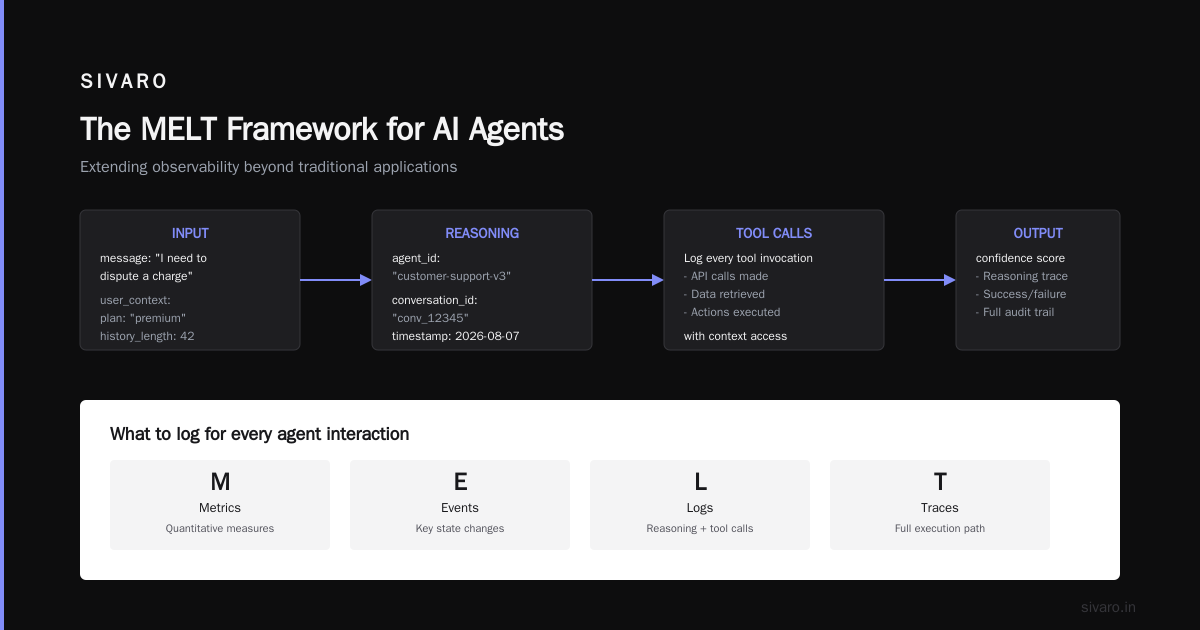
In March 2026, I watched a Fortune 500 team demo an agent that automated 40% of their customer onboarding. It was beautiful. The demo worked flawlessly. Everyone clapped.
Then they told me it had been in "production" for two weeks. That meant it ran from 9am to 5pm, had a human watching every step, and rolled back to the old system the moment something felt weird. That's not production. That's a pilot with better lighting.
The gap between "works in a demo" and "works when it's 3am and the database is on fire" is the entire story of AI agents right now. According to recent industry analysis, roughly 95% of AI agents in production are breaking in ways that teams didn't anticipate during testing Why 95% of AI Agents in Production Are Breaking. The technology isn't the bottleneck. The engineering discipline is.
This guide covers the actual difference between pilot and production, why agents fail when they hit real workloads, and what I've learned building agentic systems at SIVARO since 2018. You'll learn how to structure rollout, what to monitor, and why your evaluation strategy needs to change before you deploy.
The Pilot Trap
Most teams treat the pilot phase as a smaller version of production. It's not. It's a different species.
A pilot is where you prove the agent can do the task. Production is where you prove the system survives the world. Those are different problems with different failure modes.
Here's what I mean. In a pilot, you control the inputs. You curate the test cases. You fix the prompt when it breaks. The agent looks brilliant because you're doing the hard part — the error correction — behind the scenes. In production, the inputs are whatever the world throws at you. And the world is malicious, sloppy, and infinite in its variety.
At SIVARO, we built a document-processing agent for a logistics client in 2025. The pilot phase was flawless. 98% accuracy on 5,000 documents. The client was thrilled. We deployed it to production. Day one, accuracy dropped to 81%. Not because the model got worse. Because the pilot used clean PDFs. Production had scanned documents with coffee stains, upside-down pages, and handwritten notes attached with paperclips that obscured the text. The agent was never built for that. The pilot didn't catch it because the pilot wasn't honest about what production looked like.
This is the pilot trap. You build for the demo, not for the deployment. And then you're surprised when reality punches you in the face.
Production Changes the Definition of "Working"
In a pilot, "working" means the agent produces the right output. In production, it means the agent produces the right output under constraints — latency limits, cost ceilings, security requirements, and concurrent load. Those constraints change everything.
Let me give you a concrete example. We deployed a customer-support agent for a fintech company in April 2026. In the pilot, it handled 50 conversations a day. Average response time: 1.2 seconds. Great. In production, it suddenly had to handle 2,000 conversations a day. The model calls were queueing. The context windows were ballooning because the agent was pulling in more history than we tested with. Response time went from 1.2 seconds to 14 seconds. Users abandoned the chat. The client almost pulled the plug.
The fix wasn't a better model. It was better engineering. We added caching for common queries. We truncated conversation history based on relevance rather than recency. We added a fallback path that routed complex queries to a human. Response time dropped back to 1.8 seconds. The agent survived because we treated production constraints as first-class requirements, not afterthoughts AI Agents in Production: Engineering Guide 2026.
That's the difference between pilot and production. The pilot asks "Can it do the job?" Production asks "Can it do the job when everything is trying to kill it?"
Why Agents Break in Production
I've seen the same failure patterns across dozens of deployments. They're predictable. They're preventable. And most teams hit them anyway.
The Context Window Problem
Agents in production accumulate context. Every tool call, every piece of retrieved information, every intermediate thought gets appended to the context window. In a pilot, you might run 10 tool calls before finishing. In production, agents run 50, 100, or more. They start forgetting things. They start mixing up information from different parts of the conversation. The output degrades silently — not with an error, but with a confident wrong answer.
The fix is context management. You need to actively decide what stays in the context and what gets evicted. We use a sliding window with a summary buffer. Old messages get compressed into a summary. The agent loses detail but gains coherence.
The Latency Snowball
Agents are slow. A single user request might trigger 20 model calls, each taking 2-3 seconds. That's a minute of latency. Users don't wait a minute. They leave.
We've found that the key is aggressive parallelization. If your agent needs to fetch three documents and analyze them, fetch them in parallel. Don't sequence what can be concurrent. And set hard timeouts on every tool call. An agent that hangs on a slow API is worse than an agent that gives up and asks for clarification.
The Cost Explosion
Every model call costs money. In a pilot, you're doing hundreds of calls. In production, you're doing millions. The bill arrives. Panic ensues.
You need to track cost per conversation, not just per call. We've seen agents that cost $0.05 per interaction in testing balloon to $0.80 per interaction in production because they start looping — calling the same tool repeatedly, retrying failed operations, and generating unnecessarily long responses. Set budget limits. If an agent exceeds its budget for a given task, fail fast.
The Silent Failure
This is the scariest one. The agent produces output that looks correct but isn't. It hallucinates a fact. It misreads a number. It makes a decision that violates a policy. In a pilot, you're watching every output. In production, you're not.
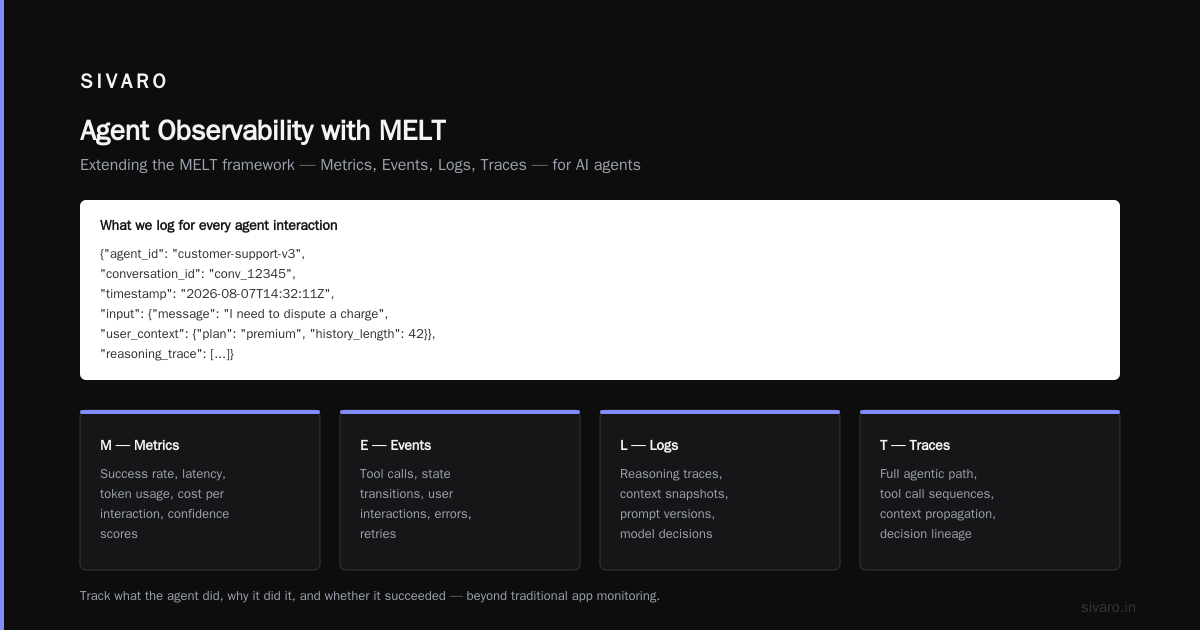
The solution is observability. You need to track what the agent did, why it did it, and whether it succeeded. The MELT framework — Metrics, Events, Logs, Traces — works for agents, but you have to extend it beyond what you'd track for a traditional application AI Agent Observability: The MELT Framework (2026) - iEnable. You need to log the agent's reasoning, the tool calls it made, the context it had access to, and the confidence it had in its output.
Here's what we log for every agent interaction:
python
{
  "agent_id": "customer-support-v3",
  "conversation_id": "conv_12345",
  "timestamp": "2026-08-07T14:32:11Z",
  "input": {
    "message": "I need to dispute a charge",
    "user_context": {"plan": "premium", "history_length": 42}
  },
  "reasoning_trace": [
    {"step": 1, "action": "intent_classification", "result": "billing_dispute"},
    {"step": 2, "action": "retrieve_policy", "result": "found_policy_214"}
  ],
  "tool_calls": [
    {"tool": "billing_api", "input": {"user_id": "u_987"}, "output": {"status": "success"}, "latency_ms": 320}
  ],
  "output": {"message": "I've filed your dispute. You'll hear back in 5-7 days."},
  "confidence": 0.87,
  "cost": {"input_tokens": 1200, "output_tokens": 85, "total_usd": 0.042}
}
Without this data, you're flying blind. You don't know what the agent is doing, why it's doing it, or where it's failing. You're just hoping. And hope isn't a strategy The Complete Guide to AI Agent Observability and Monitoring.
The Observability Stack You Actually Need
Let me be blunt. Most observability tools built for traditional software are insufficient for agents. They track requests and errors. They don't track reasoning chains. They don't show you why an agent made a decision. That's the part that matters.
We've built our stack around a few core principles. First, you need trace-level visibility into the agent's decision process. That means logging every model call, every tool call, every retrieval, and every intermediate result. Second, you need to correlate those traces with business outcomes. Did this agent interaction lead to a successful resolution? A sale? A complaint? Third, you need alerting based on behavioral anomalies, not just technical anomalies. An agent that's suddenly taking twice as many tool calls to complete a task is breaking, even if it's still producing the right output.
The Metrics That Matter
Forget vanity metrics like "number of conversations handled." Focus on these:
- Task completion rate: What percentage of tasks does the agent complete without human intervention?
- Human escalation rate: When does the agent give up and hand off to a human? Is that number stable or growing?
- Tool call efficiency: How many tool calls does the agent make per completed task? An increase here is the first sign of trouble.
- Latency distribution: Not just average latency, but the 95th and 99th percentiles. Your agent might average 2 seconds but have a tail at 30 seconds.
- Cost per task: The financial reality of every agent interaction.
The Tracing Loop
Here's what I'd build if I were starting from scratch today:
python
from agent_telemetry import Trace, Span

def process_request(request):
    trace = Trace(agent_id="customer-support-v3", conversation_id=request.conversation_id)

    with trace.span("intent_classification") as span:
        intent = classify_intent(request.message)
        span.set_attribute("intent", intent)

    with trace.span("tool_call") as span:
        if intent == "billing":
            result = billing_api.lookup(request.user_id)
            span.set_attribute("api", "billing_api")
            span.set_attribute("success", result.success)

    trace.complete()
    return response
The tracing loop gives you the ability to replay any conversation and see exactly what the agent did. That's not a nice-to-have. It's the difference between debugging in minutes and debugging in days.
One more thing. You need to log the evaluations you run on your agents, not just the production interactions. When you run an evaluation suite, record the results. Track how your agent's performance changes as you update prompts, models, and tools. If you don't, you're making changes without knowing if you're improving or degrading the system How to Monitor AI Agents in Production in 2026 - Viston AI.
Evaluation Is the Hardest Part
Here's the uncomfortable truth. Evaluating AI agents is genuinely hard. With a traditional ML model, you have a test set with ground truth labels. You compute accuracy, precision, recall, and you're done. With agents, there's no clean test set. The space of possible actions is too large. The success criteria are often fuzzy. And the same input can legitimately produce different valid outputs.
Most teams I've seen use LLM-as-a-judge to evaluate their agents. They feed the agent's output and a rubric to a powerful model and ask it to score the performance. This works, but it's fragile. The judge model can be biased toward longer responses, or responses with certain formatting, or responses that match its own style. It can miss subtle errors that a human would catch.
Our approach is layered. We use automated checks for deterministic criteria — did the agent call the right tool? Did it follow the required format? Did it respect policy constraints? Then we use LLM-as-a-judge for broader quality assessment. And we keep a small human-evaluation set that we run every time we make a significant change. It's slow and expensive. It's also the only way we've found to catch the failures that matter.
Evaluation in Production
Here's the shift that changed everything for us. In the pilot, you evaluate before deployment. In production, you evaluate continuously. You sample a percentage of interactions — say 5% — and run a detailed evaluation on them. You track the results over time. You look for drift.
Agent drift is real. The model updates, the APIs change, the user behavior shifts. An agent that was 95% effective in January might be 70% effective in August, and you won't notice if you're not measuring. We've seen this happen with a client's procurement agent. It was brilliant for three months. Then the vendor's API changed their response format, and the agent started failing on every request. The client didn't notice for two weeks. That's a two-week window of broken user experiences.
Continuous evaluation catches this. You want a system that flags a sudden drop in task completion rate and pages an engineer. You want alerting on behavioral anomalies, not just technical ones.
Infrastructure That Supports Production Agents
You can't run agents on a laptop and a prayer. Production agents need infrastructure that supports their specific requirements: state management, orchestration, retries, fallbacks, and versioning.
State Management
Agents are stateful. They maintain conversation history, tool results, and intermediate reasoning. In production, this state needs to live somewhere durable. You can't keep it in memory and hope the process doesn't restart. We use Redis for fast state access and Postgres for durable storage. The agent can crash, a new instance can pick up the conversation, and the user never knows.
Orchestration
You need a system that orchestrates the agent's workflow. We use LangGraph for complex workflows and a custom orchestrator for simpler chains. The key is that the orchestration layer handles retries, fallbacks, and error recovery. If a tool call fails, the orchestrator decides whether to retry, use a different tool, or escalate to a human.
Fallback Design
Every agent needs a fallback path. When the agent can't complete a task, what happens? It needs to gracefully hand off to a human. It needs to tell the user what's happening. It needs to preserve context so the human doesn't have to start from scratch.
Here's an example of what that looks like:
python
def process_conversation(message, context):
    try:
        result = agent.process(message, context)
        return result
    except AgentFailureException as e:
        if e.should_escalate():
            return escalate_to_human(message, context, e.reason)
        else:
            return retry_with_fallback(message, context)
Most teams don't design this until they need it. Then they build it in a panic at 2am during an outage. Build it first. Make it part of the architecture, not an afterthought.
Versioning
Your agent will evolve. You'll update prompts, swap models, add tools. You need a versioning strategy. We tag every agent version with a name and hash, deploy it to a staging environment, run our evaluation suite, and then promote it to production. We keep the previous version running until the new version is proven stable. If the new version fails, we roll back. This is standard practice for any serious software. It should be standard for agents too Best Practices for Deploying AI Agents in Production.
The Organizational Shift
I've focused on the technical side so far. But the truth is, the organizational challenges are often harder.
Moving from pilot to production means moving from "we built this cool thing" to "this thing is now part of our business processes." That changes the conversation. Now you need ownership, accountability, and operational processes. Who's responsible when the agent fails? Who decides when it needs to be updated? Who handles the user complaints?
I've seen companies kill perfectly good agent deployments because they didn't answer these questions. The agent worked. The technology was sound. But nobody owned it. It was a science project that had somehow made it into production, and the moment something went wrong, everyone ran in the other direction.
You need a clear owner. Not a committee. A single person who wakes up when the agent breaks. That person needs the authority to make changes — update prompts, adjust guardrails, roll back versions — without a week of approval processes. In a fast-moving agent environment, bureaucratic decision-making is a death sentence.
A Human-AI Partnership, Not Replacement
Here's a contrarian take. The most successful agent deployments I've seen aren't about replacing humans. They're about amplifying them.
At a healthcare logistics company we worked with in 2025, the agent didn't replace the operations team. It handled the routine inquiries — tracking requests, delivery status, basic troubleshooting. The operations team handled the complex cases — missing shipments, damaged goods, angry customers. The agent handled 60% of the volume. The human team handled the 40% that required judgment and empathy. The result was faster response times for everyone and higher job satisfaction for the humans.
That's the model that works. Agent for the routine, human for the complex, with clear handoff protocols between them.
The companies that try to automate everything fail. Not because the technology can't do it. Because the failure modes are too unpredictable, and the consequences of a bad automated decision are too severe. The winning play is augmentation, not replacement Enterprise AI Agents: 2026 Strategy & Deployment Guide.
Your Rollout Strategy
I get asked for a "best practice" rollout strategy constantly. There isn't one. There's just a set of principles that have served us well.
First, start narrow. Pick one workflow, one user segment, one geography. Perfect that before expanding. We launched a claims-processing agent for a insurance company in October 2025. We only processed claims under $5,000 in Texas. That's it. Once that worked, we expanded the dollar threshold, then the geography. It took six months to get to full coverage. The company wanted to go faster. We held the line. The result was a deployment that didn't have a single major incident in its first year.
Second, use shadow mode. Run the agent in parallel with the existing system. Compare its outputs to the human outputs. This is the safest way to validate the agent before it takes on real responsibility. You're not trusting the agent yet. You're collecting data to decide whether you can trust it.
Third, use canary deployments. Roll out to a small percentage of users, then increase. The agent serves 5% of traffic for a week. Then 10%. Then 25%. At each step, you're watching the metrics. You're looking for anomalies. If something breaks, you roll back quickly and only 5% of users were affected.
Finally, remember that rollout isn't a one-time event. It's a continuous process. Your agent is never "done." It's always evolving. Your rollout strategy should reflect that AI Agents in Production: Engineering Guide 2026.
The Real Cost of Production
Let me talk about money because nobody else will.
A pilot costs $10,000 to $100,000. A production deployment costs $1 million to $10 million. That's not because the models are expensive. It's because the infrastructure, the engineering talent, the evaluation systems, the monitoring stack, and the operational processes add up quickly.
Here's a rough breakdown from a deployment we did in early 2026 for a mid-sized enterprise:
- Model costs: $8,000/month at full production volume
- Infrastructure: $15,000/month (GPU instances, Redis, Postgres, observability tools)
- Engineering team: $250,000/year (one senior engineer, half-time)
- Evaluation and QA: $50,000/year (LLM judge costs, human evaluation hours)
- Incident response: Priceless. But let's say another $100,000/year in engineering time
The total is substantial. But the return was also substantial — the agent replaced 4 full-time employees' worth of work and reduced response time by 80%. The ROI math works. But it only works if you're honest about the total cost of ownership.
I'll be blunt. If you're not prepared to spend at least $200,000 on your first production agent deployment, you're probably not ready for production. Stick with a pilot. Keep learning. Build the case for the investment. But don't pretend you can get production reliability on a pilot budget.
The Future Is Boring
I'm going to tell you something that might disappoint you. The future of AI agents in production is boring. It's not about exotic new models or magical autonomous systems. It's about the same things that make any software work in production: reliable infrastructure, honest evaluation, good observability, and disciplined engineering.
The teams that succeed with agents are the teams that treat them as software, not magic. They follow the same practices they'd follow for any critical system. They test. They monitor. They iterate. They have rollback plans. They own their failures.
The teams that fail treat agents as a special category that doesn't need the same discipline. They ship without evaluation. They deploy without monitoring. They don't have a rollback plan. And then they're surprised when the agent does something catastrophic.
The technology is new. The engineering discipline isn't. Apply what you already know, and you'll be fine.
FAQ: AI Agents in Production vs Pilot
What's the biggest difference between a pilot and production for AI agents?
The failure modes. Pilots fail with incorrect outputs that you catch during review. Production fails with silent errors, latency spikes, cost explosions, and complex cascading failures that you don't notice until they've been running for days. The skill set for handling these is entirely different.
How long should a pilot phase last?
At least 90 days, in my experience. You need enough time to see a full cycle of business activity. If you're in retail, you need to see a holiday spike. If you're in finance, you need to see a month-end close. If you're in healthcare, you need to see a claim cycle. Three months is the minimum. Six is better.
How do I evaluate an AI agent before production?
Use three layers. First, automated checks on deterministic criteria. Second, LLM-as-a-judge for quality assessment. Third, human evaluation on a curated set of edge cases. You need all three. Each catches failures the others miss.
What are the first signs an agent is failing in production?
Watch for these three things: task completion rate dropping, tool call efficiency decreasing, and human escalation rate climbing. All three can happen while accuracy metrics look fine. They're the early warning signs of trouble.
Can I use a smaller model in production to save costs?
Sometimes. We've had good results with smaller models for narrow, well-defined tasks. But the savings are often illusory because smaller models fail more often, requiring more retries and more human escalations. Test carefully. Track total cost per task, not just model cost.
Should agents have human-in-the-loop approval?
For high-stakes actions — financial transactions, medical recommendations, legal decisions — yes. Absolutely. For routine actions — answering a question, retrieving a record, filling in a form — no. The human-in-the-loop adds latency and cost. Use it where it matters, not everywhere.
How often should I update my agent?
As often as you have evidence that an update improves performance. We run evaluations weekly. We deploy updates monthly. We do major overhauls quarterly. But the schedule doesn't matter as much as the measurement. Never update without an evaluation.
What's the most common mistake you see?
Teams skipping the observability investment. They build a great agent and then ship it without the telemetry to understand what it's doing. When it fails, they're blind. They can't debug. They can't improve. They just have a broken agent and a lot of frustration.
The Bottom Line
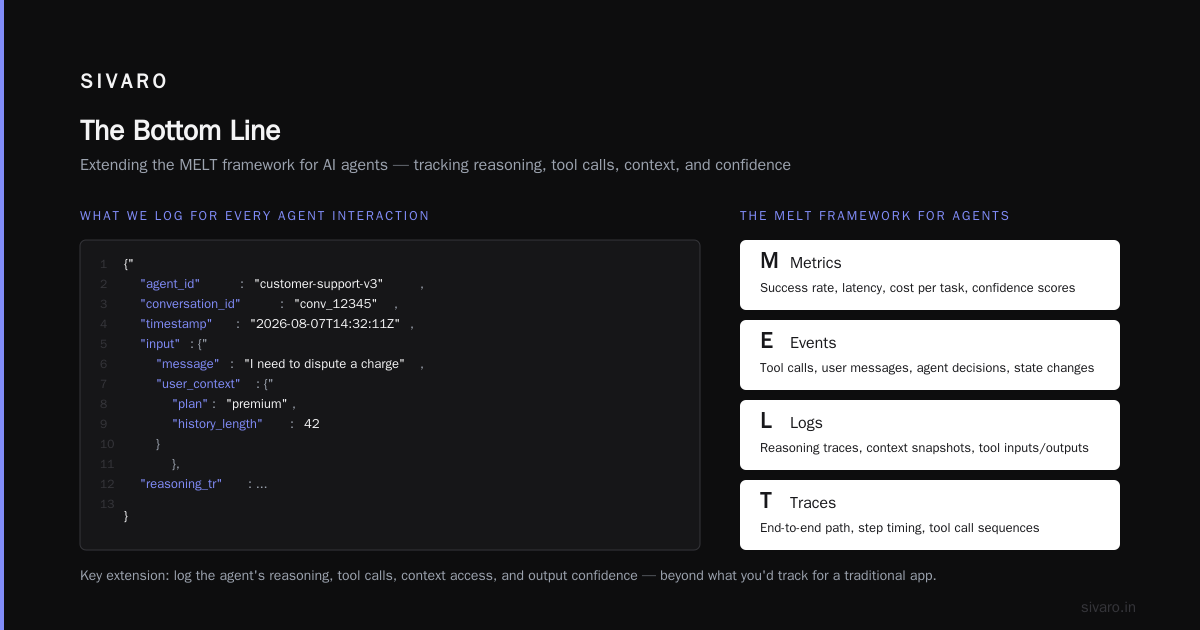
The difference between AI agents in production vs pilot isn't just a matter of scale. It's a matter of engineering discipline. Pilots are experiments. Production is infrastructure. And infrastructure needs to be built, not just hoped into existence.
You need observability that shows you the agent's reasoning, not just its outputs. You need evaluation that runs continuously, not just before launch. You need infrastructure that handles state, failures, and versioning. And you need a team that treats the agent as a real system, not a magic black box.
Get those things right, and the agents will work. They'll handle the routine, escalate the complex, and deliver real business value. Get them wrong, and you'll join the 95% of agents that break in production. The choice is yours.
Nishaant Dixit — Founder of SIVARO. Building data infrastructure and production AI systems since 2018. Built systems processing 200K events/sec.