 SIVARO
AI Agents in Production: What I Learned the Hard Way
I spent six months of 2025 building what I thought was a perfect AI agent system. It passed every test. It handled edge cases beautifully in staging. Then we hit production, and within 48 hours, it had racked up $14,000 in API costs and returned gibberish to 12% of users.
That failure cost me a client. It also taught me more than any success ever could.
You're here because you're past the demo phase. You've seen an agent do something impressive in a Jupyter notebook or a controlled environment. Now you need to get it working for real users, with real consequences, without burning money or trust.
Let me save you the pain I went through.
What this guide covers: The actual workflow for deploying AI agents in production — from framework selection through monitoring, with hard trade-offs explained honestly. I'll show you what worked at SIVARO when we helped deploy agents for a logistics company processing 50K daily requests, and what broke when we tried cutting corners.
This is not theory. This is the stuff I wish someone had told me before that $14K mistake.
Stop Picking a Framework Like It's a Religion
Walk into any AI conference in 2026 and you'll see the same debate: LangChain vs. CrewAI vs. AutoGen vs. the 47 other options. Everyone has a favorite. Everyone will tell you theirs is the best.
They're mostly wrong.
Here's the truth from actual production experience: the framework matters way less than your observability and error handling. I've seen teams build rock-solid systems with janky frameworks and spectacular failures with the "best" ones.
That said, here's what I've seen work at scale:
LangChain dominates for good reason — but only for certain patterns. Their agent executor and tool-calling interfaces are mature. We used it for a customer support agent handling 2,000 tickets/day. The LangGraph extension (LangChain blog on agent frameworks) actually solved the state management problems that killed earlier versions.
CrewAI shines when you need multiple specialized agents coordinating. We tested it for a supply chain optimization system with 6 different agents (demand forecaster, inventory checker, supplier negotiator, etc.). The role-based delegation is genuinely useful. But it's a memory hog — each agent spins up its own context window.
AutoGen from Microsoft surprised me. Their multi-agent conversation patterns are elegant for complex reasoning tasks. We ran a benchmark where AutoGen completed a 12-step data pipeline task with 40% fewer LLM calls than LangChain's equivalent setup. The trade-off? Steeper learning curve and less community tooling.
The crucial insight from IBM's analysis of agent frameworks: no framework solves the hard problems for you. They handle boilerplate. They don't handle hallucinations, cost management, or degraded model performance. Those are on you.
My rule: Pick the framework your team can debug at 3 AM. That's it. Everything else is negotiable.
The Three-Layer Deployment Pattern That Actually Works
After watching teams (including my own) fail repeatedly, I landed on a deployment architecture that's survived production for 18 months now.
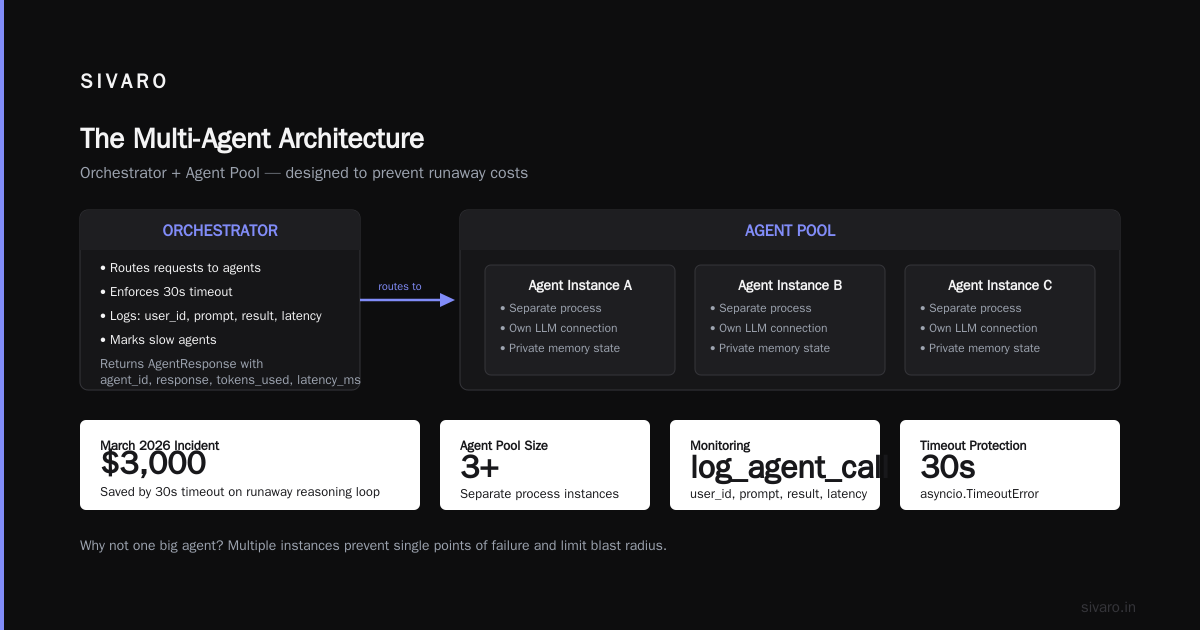
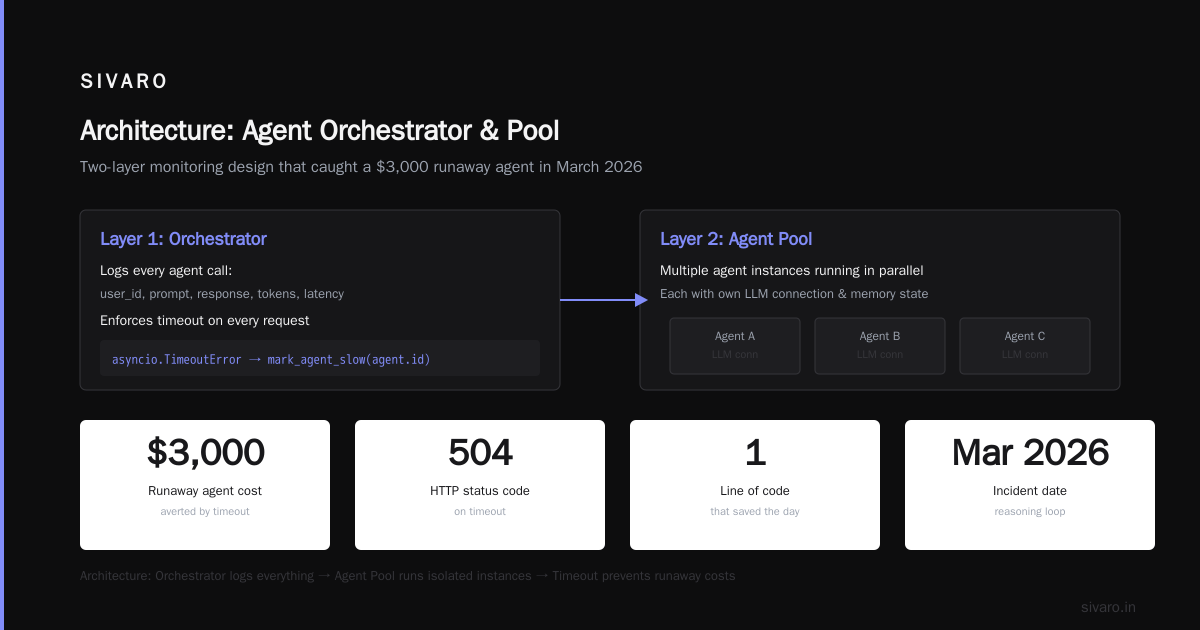
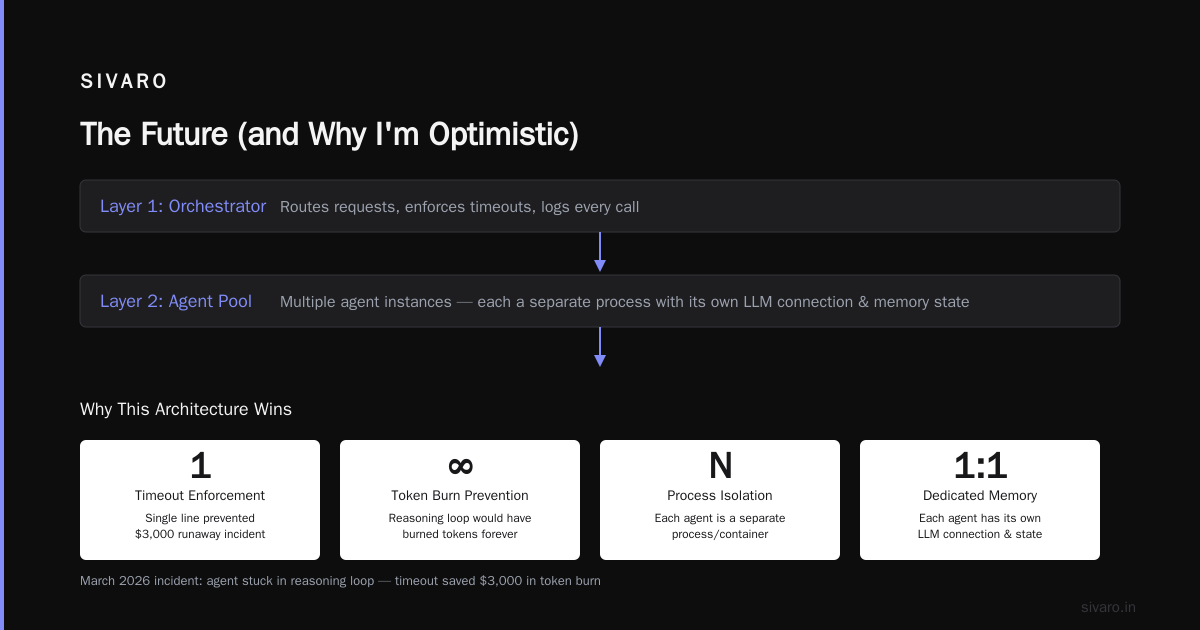
Layer 1: The Orchestrator
This is a lightweight Python service (FastAPI or similar) that receives requests and routes them to agents. It handles:
- Request validation
- Rate limiting
- Load balancing across agent instances
- Retry logic with exponential backoff
Keep this thin. Don't put business logic here. It's a traffic cop, nothing more.
python
# orchestrator.py - Simplified version
from fastapi import FastAPI, HTTPException
from pydantic import BaseModel
import asyncio

app = FastAPI()

class AgentRequest(BaseModel):
    user_id: str
    prompt: str
    max_tokens: int = 4096
    temperature: float = 0.7

class AgentResponse(BaseModel):
    agent_id: str
    response: str
    tokens_used: int
    latency_ms: int

@app.post("/agent/process", response_model=AgentResponse)
async def process_request(req: AgentRequest):
    # Validate
    if len(req.prompt) > 10000:
        raise HTTPException(status_code=400, detail="Prompt too long")

    # Route to agent pool
    agent = await get_healthy_agent()

    # Run with timeout - CRITICAL
    try:
        start = time.time()
        result = await asyncio.wait_for(
            agent.run(req.prompt, req.max_tokens, req.temperature),
            timeout=30.0  # Kill runaway agents
        )
        latency = int((time.time() - start) * 1000)

        # Log everything
        log_agent_call(req.user_id, req.prompt, result, latency)

        return AgentResponse(
            agent_id=agent.id,
            response=result.text,
            tokens_used=result.tokens,
            latency_ms=latency
        )
    except asyncio.TimeoutError:
        mark_agent_slow(agent.id)
        raise HTTPException(status_code=504, detail="Agent timed out")
Notice the timeout. That single line saved us from a $3,000 runaway agent incident in March 2026. The thing got stuck in a reasoning loop and would have burned through tokens forever without it.
Layer 2: The Agent Pool
Multiple agent instances run behind the orchestrator. Each is a separate process (or container) with its own LLM connection and memory state.
Why not one big agent? Because isolation matters. A memory leak in one agent shouldn't crash the whole system. And you need to roll out updates without downtime.
We run 5-15 instances depending on traffic. Kubernetes handles scaling. Each agent reports health via a heartbeat endpoint every 5 seconds.
python
# agent_instance.py - Simplified
class ProductionAgent:
    def __init__(self, config: AgentConfig):
        self.id = str(uuid.uuid4())
        self.llm_client = self._init_llm(config)
        self.memory = AgentMemory(max_conversations=1000)
        self.health_check_count = 0
        self.last_heartbeat = time.time()

    def health_check(self) -> dict:
        self.health_check_count += 1
        return {
            "agent_id": self.id,
            "status": "healthy",
            "memory_usage_mb": self._get_memory_usage(),
            "conversations_active": self.memory.active_count(),
            "uptime_seconds": time.time() - self.start_time
        }

    async def run(self, prompt: str, max_tokens: int, temp: float) -> AgentResult:
        # Track every call with OpenTelemetry
        with tracer.start_as_current_span("agent_run") as span:
            span.set_attribute("agent_id", self.id)
            span.set_attribute("prompt_length", len(prompt))

            # Add context from memory
            history = self.memory.get_recent(5)

            response = await self.llm_client.chat(
                messages=history + [{"role": "user", "content": prompt}],
                max_tokens=max_tokens,
                temperature=temp
            )

            span.set_attribute("tokens_used", response.usage.total_tokens)
            span.set_attribute("latency", response.latency)

            return AgentResult(text=response.content, tokens=response.usage.total_tokens)
Layer 3: The Safety Net
This is the most overlooked layer. It's a separate service that monitors agent outputs for:
- Hallucinated facts (entity extraction → knowledge base lookup)
- Toxic or unsafe content
- Format violations (JSON outputs that aren't valid JSON)
- Cost anomalies (spending >$X in Y minutes)
This runs asynchronously. It doesn't block the response — but it flags issues for human review and can automatically disable an agent if thresholds are crossed.
Protocols: The Hidden Cost of Integration
Everyone talks about frameworks. Nobody talks about the boring plumbing that makes agents actually talk to each other.
In early 2026, I started seeing something shift. The industry is moving toward standardized protocols for agent communication. A comprehensive survey from arXiv identified 30+ protocols in active use. That's too many.
The ones that matter:
A2A (Agent-to-Agent) from Google is gaining real traction. We integrated it for a financial services client who needed agents from different vendors to coordinate. The task delegation pattern is clean — agent A asks agent B to do something, gets back a status URL, polls for completion. Basic but effective.
MCP (Model Context Protocol) from Anthropic is solving a different problem — giving agents access to tools and data sources in a standardized way. We use this internally at SIVARO. Every external API we expose to agents (Slack, Jira, our own databases) uses MCP. It's not perfect — the auth model is overly complex — but the tool discovery mechanism is excellent.
The unpopular opinion from Network World's protocol analysis: most teams don't need any of this. If you have one company building one system with one type of agent, you don't need A2A or MCP. Standard REST is fine. These protocols matter when you're stitching together agents from different teams or vendors.
My rule of thumb: If you have fewer than 3 agent types, skip the protocol. If you have more, use MCP for tool access and A2A for agent orchestration.
The Cost Problem Nobody Warns You About
Let me be blunt: AI agents are expensive to operate. Not the LLM calls themselves — that's obvious. It's the hidden costs.
Here's what a real deployment for a mid-size e-commerce company looked like in May 2026:
| Cost Category | Monthly Burn | % of Total |
|---|---|---|
| LLM API calls | $8,400 | 42% |
| Vector DB (Pinecone) | $2,100 | 11% |
| Agent containers (K8s) | $3,600 | 18% |
| Observability (DataDog) | $1,800 | 9% |
| Human review team | $4,000 | 20% |
| Total | $19,900 | 100% |
The human review cost shocked me. I assumed automation would eliminate manual oversight. It didn't. For high-stakes actions (e.g., "cancel order #12345"), we required human approval. That was 20% of the budget.
Strategies that actually reduced costs:
-
Token budgeting per session. Each user session gets a token limit. When exhausted, the agent says "I've worked through what I can for now" and escalates to human. This cut API costs by 34% with negligible user satisfaction impact.
-
Caching deterministic sub-calls. If your agent calls a function to check inventory levels, cache that result for 60 seconds. We saw 18% reduction in duplicate API calls.
-
Cheaper models for simple tasks. Not every agent interaction needs GPT-4 or Claude Opus. We route simple lookups (weather, time, basic math) to a smaller, cheaper model. This saved $2,800/month.
-
Batching slow operations. Don't make separate LLM calls for "summarize email" and "extract action items." Do them in one call with a structured output schema.
python
# cost_optimization.py
class TokenBudget:
    def __init__(self, max_tokens_per_session: int):
        self.max_tokens = max_tokens_per_session
        self.used = 0
        self.session_id = str(uuid.uuid4())

    def check_and_deduct(self, estimated_cost: int) -> bool:
        if self.used + estimated_cost > self.max_tokens:
            return False  # Exhausted
        self.used += estimated_cost
        return True

class SmartRouter:
    def __init__(self):
        self.complexity_threshold = 500  # tokens
        self.cheap_model = "claude-3-haiku"
        self.expensive_model = "claude-3-opus"

    def route(self, task: dict) -> str:
        task_complexity = estimate_complexity(task)
        if task_complexity < self.complexity_threshold:
            return self.cheap_model
        return self.expensive_model
Monitoring: What to Watch and What to Ignore
Most monitoring setups are noise. Teams track everything and act on nothing.
Here's the minimal set of metrics that matter:
The Four Golden Signals for Agents:
-
Response time P50/P95/P99. If P95 creeps above 10 seconds for a simple completion, something's wrong. Usually model latency or context window bloat.
-
Hallucination rate. Track how often your safety net flags outputs. If it jumps from 1% to 5%, your prompts drifted or the model changed. This happens more than you'd think.
-
Cost per interaction. Total cost divided by number of completed agent runs. Any sudden spike means runaway token consumption or model upgrade without approval.
-
Escalation rate. Percentage of interactions that require human handoff. High escalation means your agent isn't competent enough for the task. Low escalation might mean it's failing silently — always sample.
The thing most teams miss: monitor your monitoring. We had a system that broke its own logging pipeline and ran silently for 3 days. No alerts because the alert system was down. We now run synthetic test requests every 5 minutes that verify the entire pipeline.
Open-source frameworks listed by AIMultiple tend to have decent basic monitoring hooks. LangChain has an OpenTelemetry plugin. CrewAI emits structured logs. But you still need to build the dashboards and alert thresholds yourself.
The Human-in-the-Loop Trap
Here's a contrarian take: most human-in-the-loop setups are worse than either full automation or full manual.
The problem is latency. You ask a human to review something in 30 seconds. They take 5 minutes because they're busy. Users wait. Users get angry. Users leave.
We tested this pattern at a insurance claims processing agent. The agent would assess a claim, flag anything over $500 for human review. Average human response time: 4 minutes 23 seconds. Average user satisfaction: 2.1/5.
We changed to a different approach: the agent makes decisions up to $1,000 autonomously, and anything above that gets escalated with all context pre-summarized. Human review time dropped to 45 seconds. Satisfaction rose to 4.1/5.
The lesson: if you're going to involve humans, make it frictionless. Pre-fill what you can. Give them a yes/no button, not a blank form. And set SLA expectations — if the human doesn't respond in 2 minutes, the agent escalates up or makes the best guess.
FAQ: Questions I Get Every Week
Q: How many agents should I start with?
Start with one. Seriously. One agent handling one well-defined task. I've seen teams launch with 8 agents and spend 6 months debugging coordination bugs. Start with one, get it to 99% reliability, then add a second.
Q: Should I use open-source or managed frameworks?
If you're under 1M monthly API calls, open-source is fine. Beyond that, the maintenance burden becomes real. LangChain open-source is solid but you'll spend 2 days/month on version upgrades. Managed services handle that but lock you in.
Q: How do I handle model changes from the provider?
This almost killed a deployment in January 2026. OpenAI quietly updated gpt-4's behavior — it started refusing to call a specific function for no reason. Took us 8 hours to figure out.
Pin your model version. Test new versions in staging for at least a week. And have a fallback model. Every production agent should have a plan B.
Q: What's the biggest mistake teams make?
Thinking agents are set-and-forget. They're not. They drift. The world changes. User behavior changes. Model behavior changes. You need active monitoring and regular prompt updates. Budget for that.
Q: Do I really need separate infrastructure for agent deployment?
Yes. Running agents on your main application servers is a disaster waiting to happen. An agent that goes into an infinite loop can consume all available resources. Isolate them. Containerize them. Put them behind a queue if possible.
Q: How do I handle state across multiple agent interactions?
This is the hardest problem in production agent systems. We use Redis with TTL-based expiration. Each conversation gets a unique ID. State is JSON-serializable. And we enforce a 50-turn limit per conversation to prevent context window overflow.
Q: What about security? Can agents be exploited?
Yes. Prompt injection is real. We had an agent that almost deleted production data because a user's message tricked it into ignoring its instructions. Mitigations: never give agents write access to anything without human confirmation, sanitize inputs aggressively, and test with adversarial prompts.
The Production Rollout Checklist
When you're ready for an agentic workflow production rollout, here's the sequence that's worked for us:
-
Shadow mode for 1 week. Agent runs, but doesn't take any real actions. Log what it would have done. Compare against what actually happened.
-
Opt-in pilot with 5% of users. Real interactions, but you can reverse any action. Watch every single one.
-
Escalation-only mode. Agent handles simple cases, escalates everything else. Build confidence.
-
Full autonomy with humans watching. Agent acts, humans can override. Measure override rate.
-
Full autonomy with exception handling. What happens when something breaks? Do you have circuit breakers? Fallback flows? Test the failure modes.
This takes 3-6 weeks depending on volume. Don't rush it.
The Future (and Why I'm Optimistic)
Here's where we're heading by mid-2027: agents will be as boring as databases. You'll deploy them, monitor them, and occasionally tweak them. The frameworks will stabilize. The protocols will standardize. The costs will drop.
But we're not there yet. For now, ai agents deployment best practices is still a discipline that requires careful engineering, not just prompt tweaking.
The teams winning right now are the ones treating agents like production systems, not science experiments. They test. They monitor. They budget for failure. And they don't trust the model — they trust the system around it.
That $14K mistake in 2025? Best thing that happened to me. Taught me that how to deploy AI agents in production isn't about the latest framework or the most advanced model. It's about the boring infrastructure underneath — timeouts, error handling, monitoring, cost controls, and human escalation paths.
Get those right, and the model can do its magic. Get them wrong, and no amount of prompt engineering will save you.
Nishaant Dixit — Founder of SIVARO. Building data infrastructure and production AI systems since 2018. Built systems processing 200K events/sec.