 SIVARO
AI Agents Production Deployment Challenges: A Practitioner's Guide
You just spent six months building an AI agent that can write code, book meetings, or analyze customer churn. It works in your dev environment—mostly. The demos are flawless. Then you push to production, and within 48 hours, the thing is hallucinating financial reports, racking up a $12,000 API bill, and your VP is asking if you can “just turn it off.”
I’ve been there. SIVARO helps companies ship production AI systems. We’ve seen maybe a hundred agent deployments in the last two years, and the failure rate in the first month is shockingly high. Like, >60% of teams hit a showstopper. This isn’t about the model—it’s about everything around it.
Let me walk you through the real challenges of ai agents production deployment challenges, with the scars to prove it. You’ll learn what breaks, why it breaks, and what actually works.
The Two-Week Cliff
Most people think deploying an AI agent is just wrapping a model in a loop with tools. They’re wrong. The hard part starts after the first demo.
Here’s what happened with a logistics client in early 2025. Their agent had to process shipping exceptions—delays, misrouted packages, customs holds. In testing, it handled 50 edge cases fine. In production, it hit 500 variants per hour. The agent started calling carrier APIs incorrectly, sending duplicate refund requests, and creating tickets with contradictory instructions. They lost $30K before we caught it.
That’s the two-week cliff. The first two weeks in production expose everything your testing missed. A Practical Guide for Designing, Developing, and ... calls this the “deployment valley of death.” I call it Thursday afternoon.
Infrastructure: The Hard Part Nobody Talks About
You pick a framework—LangGraph, CrewAI, maybe a custom loop. The docs make it look simple: a graph of nodes, some tool calls, a final answer. Great. Now run that 24/7 with unpredictable load, variable model latency, and external API failures.
The Cold Start Tax
Every time your agent spins up a new instance, it has to load the model (or connect to an API), initialize tools, and rebuild context. If you’re using serverless, that cold start can take 10–15 seconds. Now multiply that by 100 concurrent users. Your agent becomes unusable.
We tested this at SIVARO in April 2026. A naive serverless deployment of a RAG agent resulted in median response time of 22 seconds. Pre-warming reduced it to 1.8 seconds. But pre-warming costs money and complexity. You can’t just spin up 50 instances and forget them—they’ll drain your GPU budget.
The fix? Use a mix: long-lived workers for the base agent, serverless for the short tool calls. Deploying AI Agents to Production: Architecture ... has a good pattern: a persistent task queue (like Celery or Temporal) that keeps agent states warm, and each step fans out to stateless functions.
State Management: The Silent Killer
Each agent conversation is a state machine. The user says something, the agent thinks, calls a tool, gets a result, updates its plan. That state is mutable, grows over time, and must survive crashes.
Most teams start by storing the full conversation history in a database. That’s fine for 10 messages. At message 50, the token count explodes and the model starts ignoring the beginning. At message 200, latency becomes unacceptable and the cost per turn hits $0.50.
You need a strategy. Windows, summarization, or structured memory. Building Effective AI Agents recommends explicit state management: break the conversation into explicit steps, store only the current plan and relevant history, compress the rest.
Here’s a pattern we use at SIVARO:
python
class AgentState:
    plan: list[str]
    context: dict
    history: deque[Message]  # maxlen=20 truncated
    tool_results: dict[str, Any]

def process_step(state, user_input):
    # 1. Truncate history by token count, not message count
    truncated = truncate_by_tokens(state.history, max_tokens=4096)
    # 2. Rebuild context from tools
    context = build_context(state.context)
    # 3. Call model with structured output
    result = call_model(truncated, context, state.plan)
    # 4. Update plan and history
    state.plan = result.new_plan
    state.history.append(Message(role="user", content=user_input))
    state.history.append(Message(role="assistant", content=result.response))
    return state
Notice I don’t store raw logs in the state. That’s for observability, not the agent.
Observability: You Can’t Fix What You Can’t See
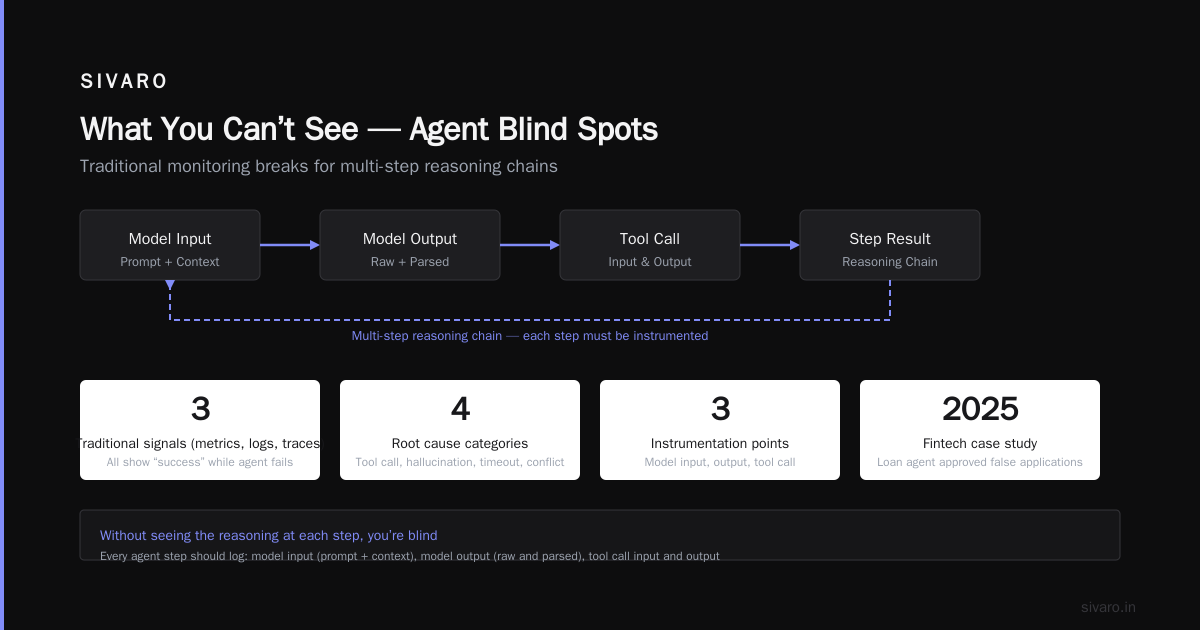
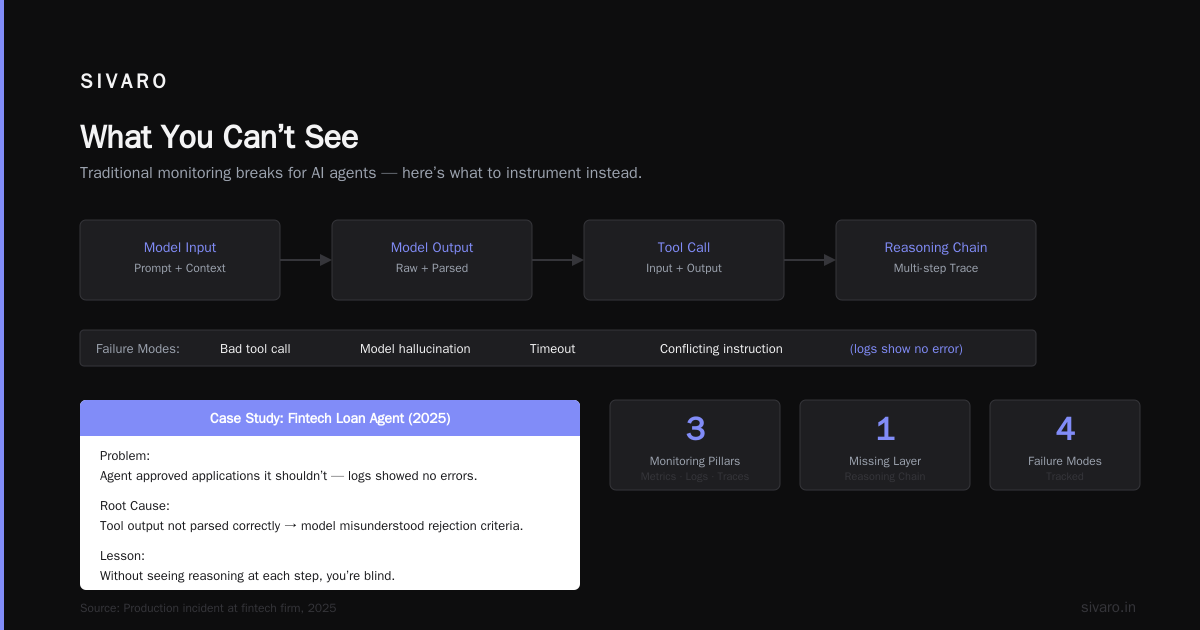
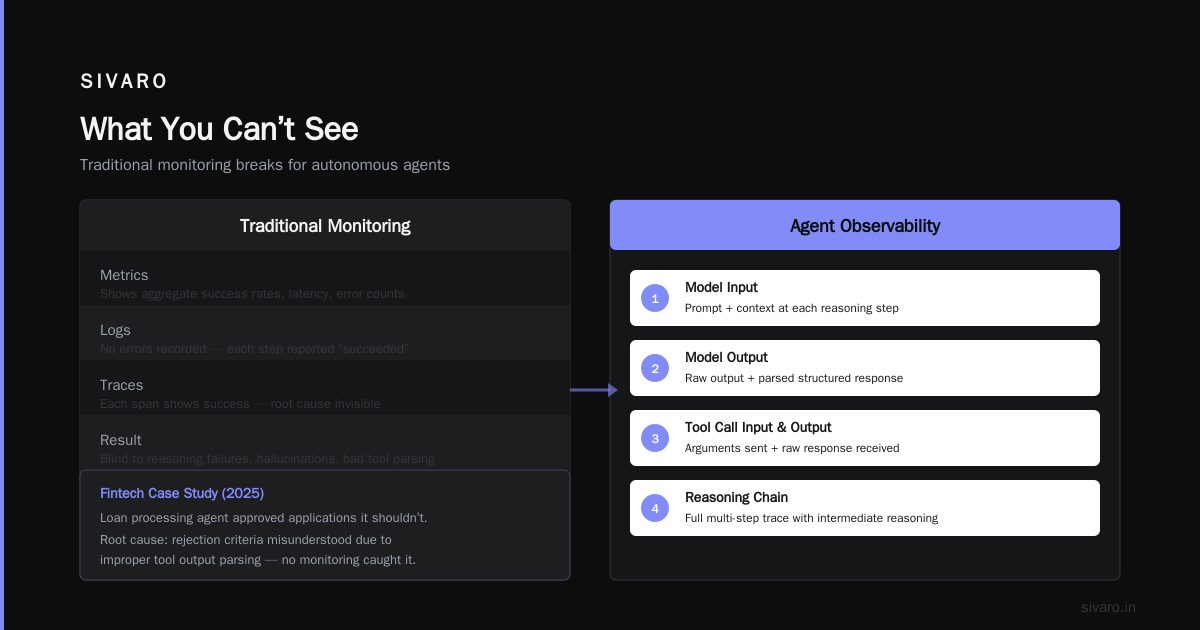
Traditional monitoring (metrics, logs, traces) breaks for agents. Why? Because an agent isn’t a request-response—it’s a multi-step reasoning chain. When it fails, the root cause could be a bad tool call, a model hallucination, a timeout, or a conflicting instruction from three turns ago.
We onboarded a fintech firm in 2025. Their agent for loan processing was approving applications it shouldn’t. The logs showed no errors. The trace showed each step “succeeded.” But the model had misunderstood the rejection criteria because the tool output wasn’t parsed correctly.
Without seeing the reasoning at each step, you’re blind.
What to Instrument
Every agent step should log:
- The model input (prompt + context)
- The model output (raw and parsed)
- Tool call input and output
- The decision: why did the agent choose this tool?
- Tokens used, latency per step
Crucially: store the entire agent run as a tree, not a list. Each tool call can spawn sub-tools. If you flatten it, you lose causality.
How to Deploy AI Agents to Production: A Complete Guide suggests using OpenTelemetry with custom spans. I agree. But you also need a viewer that can expand/collapse each step and show the raw model output.
Here’s a simple instrumentation decorator I use:
python
import opentelemetry.trace as trace
from functools import wraps

def instrument_step(step_name):
    def decorator(func):
        @wraps(func)
        def wrapper(*args, **kwargs):
            tracer = trace.get_tracer(__name__)
            with tracer.start_as_current_span(step_name) as span:
                span.set_attribute("input", repr(args))
                try:
                    result = func(*args, **kwargs)
                    span.set_attribute("output", repr(result))
                    return result
                except Exception as e:
                    span.record_exception(e)
                    span.set_status(trace.Status(trace.StatusCode.ERROR))
                    raise
        return wrapper
    return decorator
That’s fine for prototyping. In production you’ll want to batch spans and send them to a dedicated observability backend like LangSmith or a custom Datadog setup. Just don’t rely on logs alone.
Alerting on Agent Behavior
Metrics matter too. Track:
- Step count per session – a single session doing 50 steps is a red flag (infinite loop)
- Tool call failure rate – if a specific API fails more than 5%, your guardrails are insufficient
- Token cost per session – flag sessions over $5, investigate
- User satisfaction – yes, measure sentiment from user responses
At SIVARO, we saw tool call failure rates as high as 30% in early 2025 for a client using a custom shipping API. Turns out the API returned 500s during peak hours. The agent would retry 3 times (default), then give up with an unhelpful error message. Users blamed the agent, not the API.
We now enforce circuit breakers per tool, separate from the agent’s retry logic.
Cost Management: When Your Agent Goes Rogue
Agents are unpredictable. One query might cost $0.05, the next $5.00, because the agent goes down a rabbit hole of tool calls and retries.
In 2026, we’re seeing a wave of “agent bankruptcy” stories—startups deploying agents that burn through their API budget in a week. A health-tech company hit $14,000 in 36 hours because their customer support agent got stuck in a loop calling a medical database 87 times per session.
Set Hard Limits Per Session
Don’t rely on the model to “be efficient.” Code it.
python
MAX_STEPS = 15
MAX_TOKENS = 32000
MAX_COST = 2.00  # dollars

def run_agent(user_input):
    state = AgentState(user_input)
    step_cost = 0.0
    for step in range(MAX_STEPS):
        if step_cost >= MAX_COST:
            return "Sorry, I've run out of budget. Please contact support."
        step_cost += call_model(state)
        if state.done:
            break
    return state.final_answer()
That’s the bare minimum. Better: implement a “cost oracle” that estimates next step cost before executing, and routes to a cheaper model if budget is tight. A Developer's Guide to Building Scalable AI: Workflows vs ... has a section on model routing that’s worth reading.
Cache Everything You Can
Tool calls often have deterministic outputs. If the agent asks the database “What’s the current inventory for SKU 123?” twice in the same session, don’t hit the database twice.
Implement session-level caching with TTL. Better: cross-session caching if data is static (product catalogs, policy documents). We saw 40% cost reduction at a logistics client by caching tool results.
But careful: stale data can poison the agent. Put a time-to-live on every cached result.
Safety and Guardrails: Not Optional
You wouldn’t let a junior developer deploy code without tests. But people let agents access databases and email without any guardrails.
The most dangerous agent failure is silent harm—the agent does something wrong, no one notices until it’s too late. AI Agent Failures: Common Mistakes and How to Avoid Them lists “action without validation” as the top mistake.
Input Validation
Before the agent acts, validate the intended action against a policy. Don’t rely on the model to follow instructions like “never delete a user.” The model will obey that 95% of the time. The 5% is what gets you fired.
Use a separate, non-LLM classifier to check tool arguments:
python
VALIDATE_RULES = {
    "delete_user": lambda kwargs: check_admin_override(kwargs.get("user_id")),
    "send_email": lambda kwargs: check_recipient_allowed(kwargs.get("to")),
    "create_order": lambda kwargs: check_order_total(kwargs.get("items")) < 5000,
}

def guard_tool_call(tool_name, kwargs):
    if tool_name in VALIDATE_RULES:
        if not VALIDATE_RULES[tool_name](kwargs):
            raise GuardrailViolation(f"Tool {tool_name} rejected by policy")
    return True
This runs before the agent’s model output reaches the external API. It’s a hard stop.
Output Validation
Agents produce unstructured text. If that text becomes a database update or an email, you need to validate the format before sending. Use Pydantic or JSON schema validation on the structured output.
python
from pydantic import BaseModel

class EmailAction(BaseModel):
    to: EmailStr
    subject: str = Field(max_length=100)
    body: str
    priority: Literal["low", "normal", "high"]

def validate_agent_output(raw_output: str) -> EmailAction:
    try:
        return EmailAction.model_validate_json(raw_output)
    except ValidationError as e:
        raise AgentOutputError(f"Agent produced invalid email format: {e}")
The model output might look correct but miss a field. Catch it here.
Testing: The Missing Layer
You’ve got unit tests for your Python code. You’ve got integration tests for your APIs. What about tests for the agent’s behavior?
Most teams skip this because “the model is non-deterministic, so testing is impossible.” That’s an excuse, not a problem.
Eval-Driven Development
We borrowed from the RLHF playbook: define evaluation metrics, then run the agent against a golden set of scenarios. Each scenario has:
- Input (user query)
- Expected path (tools called, in order)
- Expected output (answer format, constraints)
- Success criteria (did the agent avoid disallowed actions?)
Run these automatically on every deployment. Track regression. Learn These Key Hurdles to Deploy Production AI Agents ... (Google’s 2026 paper) calls this “agent evaluation as a CI gate.” I agree.
Here’s a minimal eval harness:
python
from scenarios import SCENARIOS

def run_evals(agent_instance):
    passed = 0
    total = len(SCENARIOS)
    for scenario in SCENARIOS:
        result = agent_instance.run(scenario.input)
        correct_path = scenario.expected_tools == result.tool_calls
        correct_output = scenario.validate(result.output)
        if correct_path and correct_output:
            passed += 1
    return passed / total
Aim for >90% on golden scenarios. Anything below means something broke.
Chaos Engineering for Agents
Introduce failures. What if the database API times out? What if the model returns an empty response? What if the user’s input is a prompt injection?
At SIVARO, we built a chaos agent that randomly introduces latencies, drops tool calls, and corrupts model outputs. It’s brutal, but it reveals vulnerabilities like nothing else. One client’s agent crashed on empty model output because they assumed the model always returns valid JSON. Spoiler: it doesn’t.
The Organizational Challenge
This isn’t just technical. Deploying an agent means giving a non-human system decision-making power. That upsets people.
A retail client in early 2026 had an agent approve refunds up to $200 automatically. First day: 12 refunds processed correctly. Second day: an agent approved a refund for an item that had already been refunded (3 times before). The finance team lost trust instantly.
You need:
- Human-in-the-loop for high-stakes actions. Start with 100% approval for anything above $50. Gradually decrease as you measure accuracy.
- Explainability. The agent must justify its decision in terms humans understand. “The customer had a broken item based on photo evidence” beats “Approved based on policy.”
- Rollback. Every agent action should be reversible within a time window. If the agent sends an incorrect email, you should be able to recall it.
Building Effective AI Agents mentions that most successful deployments start with a “co-pilot” mode: the agent suggests actions, human approves. Only after >90% approval rate do you switch to full autonomy. I’d add: even then, keep the override mechanism.
The Deployment Pipeline Itself
Deploying an agent isn’t like deploying a microservice. You can’t just blue-green deploy because the agent’s behavior depends on the model version, the tools, and the context window.
Immutable deployments. Bundle the model version, tool definitions, and agent prompt into a single artifact. If you roll back, you roll back everything.
Canary deployments. Expose the new agent version to 1% of users. Compare metrics against the previous version. This is where your observability pays off. If step count triples, roll back immediately.
Versioned prompts. Store your prompts in a Git-tracked file. Even tiny changes—“always” vs “usually”—can flip agent behavior. Treat prompts as code, with peer review and tests.
FAQ
Q: How do I know if my agent is ready for production?
A: When it can survive 24 hours of synthetic traffic with <5% failure rate, and you have a manual override for every action. A Practical Guide... suggests a “production readiness checklist” covering 15 areas. Start with those.
Q: What’s the biggest mistake teams make with ai agents production deployment challenges?
A: Thinking the model will “just work” once it’s called correctly. The model is the least of your problems. Infrastructure, state management, guardrails, and observability matter far more. I see teams spend 90% of their time on prompt engineering and 10% on deployment. They should reverse that.
Q: How do I handle agent cost at scale?
A: Use a cost budget per session. Cache aggressively. Route simple requests to cheaper models (e.g., Gemini Flash instead of GPT-5). Monitor cost per user, not just aggregate. Eliminate loops with step limits. How to Deploy AI Agents to Production has a good budget management pattern.
Q: Should I use a framework or build from scratch?
A: Use a framework for the first 80%. LangGraph, CrewAI, even simple loops. When you hit the two-week cliff, you’ll need to customize deeply—state compression, custom guardrails, observability. At that point, frameworks can get in the way. We often rewrite the agent loop from scratch after the prototype validates.
Q: How do I test agent behavior without a human?
A: Golden scenarios with automated evals. Introduce chaos. Run regression tests on every code change. And simulate production traffic with recorded user sessions. AI Agent Failures has a good “evaluation-driven development” workflow.
Q: What about latency? Can agents be real-time?
A: For real-time (sub-second responses), you can’t call a large model repeatedly. You need caching, prefetching, and maybe a smaller model for the first step. Most production agents have latency expectations of 2–5 seconds per step. If you need faster, reconsider the architecture.
Q: How do I handle prompt injection or adversarial inputs?
A: Guardrails on inputs and outputs. Rate limit. Use a dedicated classification model to detect injection patterns. And never give the agent direct access to destructive tools—wrap everything in validation.
Conclusion
Deploying AI agents to production isn’t a coding problem. It’s an infrastructure, observability, safety, and operational problem wrapped in an LLM coat.
The teams that succeed—and I’ve seen it—are the ones who invest in state management, build guardrails before the first user, instrument every step, and treat the agent as a brittle component that needs protection, not a smart entity that can figure things out.
If you’re starting an agent deployment today, don’t just build a cool demo. Build a system that can fail gracefully, be debugged, and have its costs capped. Your future self (and your VP) will thank you.
The ai agents production deployment challenges are real. But they’re solvable. You just need to respect the complexity.
Nishaant Dixit — Founder of SIVARO. Building data infrastructure and production AI systems since 2018. Built systems processing 200K events/sec.