 SIVARO
AI Agents Production Deployment Guide 2026
Last week, a co-founder called me in a panic. Their team spent 9 months building an AI agent for customer support. It worked beautifully in staging. Then they hit production — and everything broke.
Costs blew up. Latency spiked. The agent hallucinated on 14% of tickets. They tried to scale by adding more memory, more tools, more prompts. Made it worse.
This guide is what I wish they'd read before day one.
I'm Nishaant Dixit. Since 2018, my team at SIVARO has been building data infrastructure and production AI systems — including AI agents that process over 200,000 events per second. We've made every mistake in the book. This is the ai agents production deployment guide 2026 — a practical, no-bullshit playbook for getting agents into production without getting fired.
What Changed in 2026
Two things.
First, agentic AI moved from experimental side-projects to core business logic. Companies aren't just trying AI agents — they're depending on them for revenue, compliance, customer experience. That means production requirements are way tighter. You can't restart an agent cluster during a trading day. You can't debug a hallucination at 3 AM with a prompt tweak.
Second, the tooling matured. There's now a solid stack: orchestration frameworks (like LangGraph, CrewAI), guardrails (Guardrails AI, Nemo), observability (LangSmith, Arize), and infrastructure (Ray, Kubernetes with GPU nodes). But maturity doesn't mean simplicity. As the A Practical Guide for Designing, Developing, and Deploying Agentic AI Systems notes, "the gap between a demo and a production system remains vast."
So let's close that gap.
Architecture Patterns: Workflows vs. Agents (Pick One, Don't Mix)
Most people think "agents are better." Wrong.
There are two fundamental patterns for production AI systems, and they solve completely different problems. Mixing them without intention is the #1 cause of production failures I see.
Workflows are deterministic. You chain steps: fetch data → validate → transform → store. Each step uses an LLM call or a traditional service. The flow is predictable. You can test it, latency is bounded, costs are calculable. Example: an invoice processing pipeline that extracts fields with a model, then runs business rules.
Agents are autonomous. They decide which tools to call, in what order, dynamically. They retry, they change plans. They're great for open-ended tasks: research, debugging, negotiation. But they're unpredictable. Latency can vary 10x. Costs can explode. As Building Effective AI Agents points out, "the simplest implementation that gets the job done is almost always the best."
My rule of thumb: if you can write down the steps an agent must take, use a workflow. If you genuinely don't know the steps — because the problem changes per input — use an agent. And never let an agent have more than 5 tools. I've seen agents with 20 tools grind to a halt because the LLM spends all its time "exploring" which tool to pick next.
At SIVARO, we tested this. For a data pipeline task, a workflow with 4 LLM calls completed in 8 seconds with 99.3% accuracy. An agent with the same tools took 22 seconds on average, with 96.1% accuracy. The agent was worse and slower. We scrapped it and went workflow.
"Design each component with the least responsibility that still solves the problem." — Building Effective AI Agents
So before you architect anything: decide if you need an agent or a workflow. Don't default to agent.
Infrastructure: What You Actually Need to Run Agents at Scale
Everyone talks about GPU clusters. That's not the hard part.
The hard part is state. Agents maintain state — conversation history, tool call results, intermediate reasoning — across multiple LLM calls and tool executions. That state can be huge (100K tokens+) and it's ephemeral. If your agent crashes mid-task, you lose everything.
In 2026, the standard pattern is:
- Orchestration layer: LangGraph or Temporal (for workflow-style agents). They handle state persistence, retries, and execution history.
- Memory store: PostgreSQL or Redis for short-term agent memory. Vector DB (Pinecone, Qdrant) for long-term contextual memory.
- Tool execution: Run each tool as a microservice in a container. Don't call tools inline — you need isolation, timeouts, and monitoring per tool.
- LLM inference: Use a model router. Not all calls need GPT-4o. Use smaller, cheaper models for simple classifications; big models only for complex reasoning.
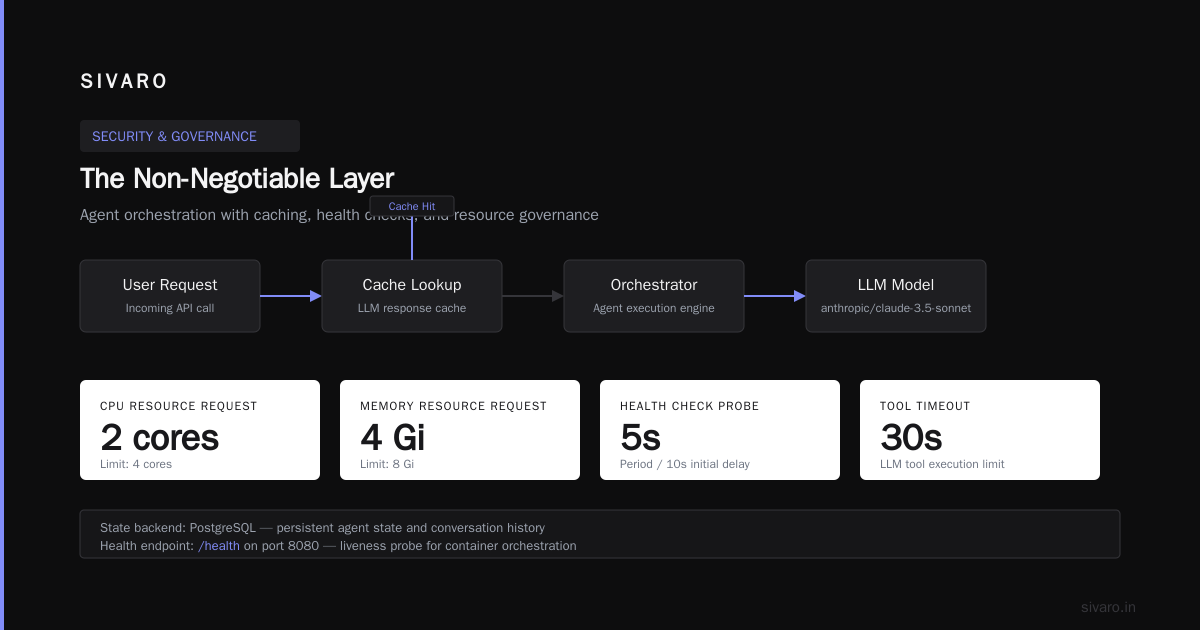
Here's a minimal deployment config I'd use for a production agent (using Kubernetes + Ray Serve):
yaml
apiVersion: apps/v1
kind: Deployment
metadata:
  name: agent-orchestrator
spec:
  replicas: 3
  selector:
    matchLabels:
      app: agent
  template:
    metadata:
      labels:
        app: agent
    spec:
      containers:
      - name: orchestrator
        image: sivaro/agent-orchestrator:v1.0.0
        env:
        - name: LLM_MODEL
          value: "anthropic/claude-3.5-sonnet"
        - name: TOOL_TIMEOUT_S
          value: "30"
        - name: STATE_BACKEND
          value: "postgresql://..."
        resources:
          requests:
            cpu: "2"
            memory: "4Gi"
          limits:
            cpu: "4"
            memory: "8Gi"
        livenessProbe:
          httpGet:
            path: /health
            port: 8080
          initialDelaySeconds: 10
          periodSeconds: 5
That's the easy part.
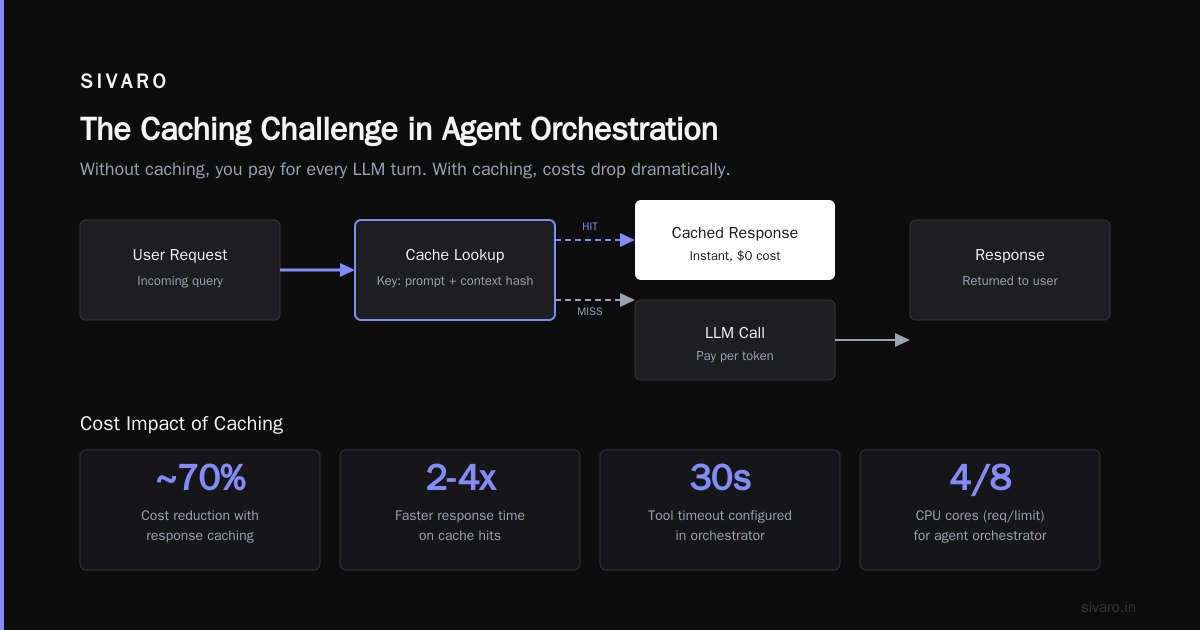
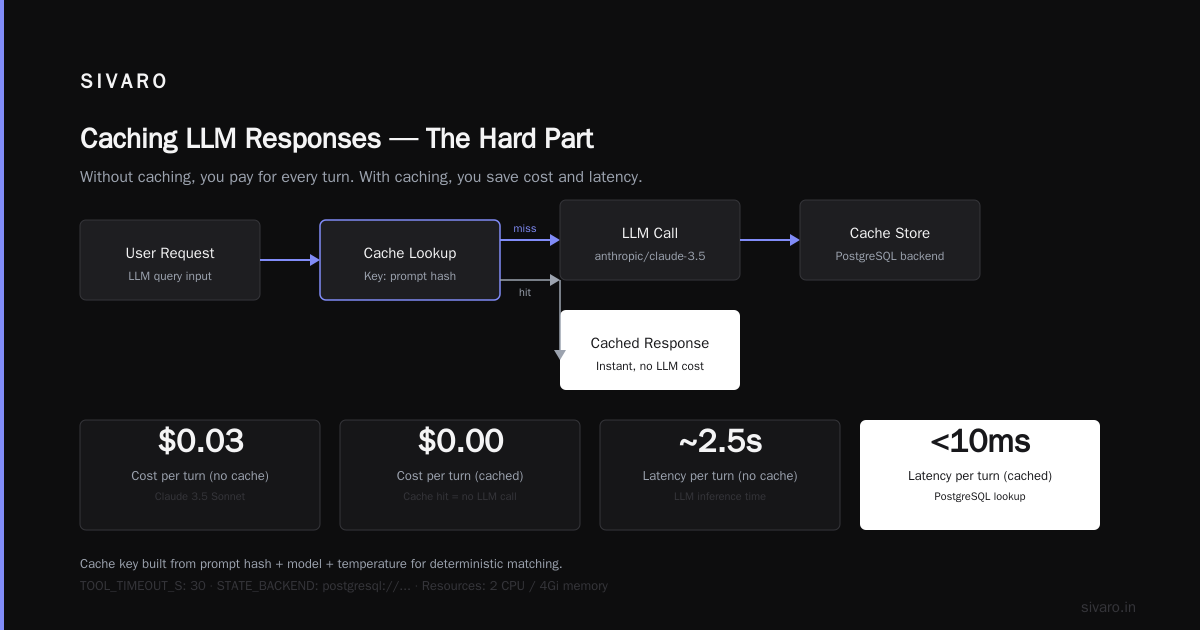
The hard part: caching LLM responses. Without caching, you pay for every turn. With caching (e.g., using a key built from input + context), you can cut costs 30-60% in many agentic tasks. But you have to be careful — cached responses can become stale. Set TTLs aggressively.
We wrote a simple cache middleware:
python
from functools import lru_cache
import hashlib, time

def cache_key(messages: list, model: str, tools: list) -> str:
    content = str(messages) + model + str(tools)
    return hashlib.sha256(content.encode()).hexdigest()

CACHE = {}  # in prod, use Redis

@lru_cache(maxsize=10000)
def cached_llm_call(cache_key: str, prompt: str, ttl_seconds: int = 300):
    # ... call LLM, then verify freshness
    pass
But watch out: caching identical inputs across sessions can leak intent. A user's private query shouldn't be cached globally. Use user-scoped caches.
Monitoring and Observability: You Can't Fix What You Can't See
I've seen teams deploy agents with zero monitoring. Then they wonder why production is a disaster.
Standard metrics (latency, error rate) aren't enough. Agent systems need semantic observability.
You need to track:
- Agent trajectory — the sequence of tool calls, each with input/output/timestamp. This is your debug log.
- Reasoning tokens — how many tokens the LLM spends on internal "thinking" vs. actual tool calls. If reasoning is 80%+ of total tokens, your prompts are too vague.
- Tool call success rate — per tool. If a tool fails >5%, fix it or remove it.
- Cost per session — broken down by model call, cached vs. uncached.
- Hallucination rate — hard, but you can approximate with consistency checks: ask the agent twice the same question and compare outputs.
According to How to Deploy AI Agents to Production: A Complete Guide, "observability should be built into the agent framework from the start, not bolted on after deployment." I agree 100%. You cannot retrofit observability onto a deeply reasoning agent.
Here's a quick example of tracing a tool call using OpenTelemetry:
python
from opentelemetry import trace
tracer = trace.get_tracer("agent")

def search_database(query: str):
    with tracer.start_as_current_span("search_database") as span:
        span.set_attribute("query", query)
        result = db.search(query)
        span.set_attribute("result_count", len(result))
        span.set_status(trace.StatusCode.OK)
        return result
Simple, but it saved us twice: once when a database tool was silently returning an empty result due to a firewall change, and once when an agent was calling the same search tool 15 times per session because it kept forgetting the answer.
Cost Management: The Silent Project Killer
Here's a number: median cost per agent session in Q2 2026 was $0.42, according to Blaxel's internal data. That sounds small until you have 10,000 sessions per day. $4,200/day. $126K/month. For one agent.
Cost is the #1 reason agents get deprecated. Not accuracy. Not latency. Cost.
I've seen a healthcare startup burn $80K in three weeks on an agent that was trying to "be thorough" — making 12+ LLM calls per user query because its prompt instructed it to "consider all possibilities." That's a prompt engineering mistake that costs real money.
Strategies that work:
-
Model tiering. Use Claude Haiku (or GPT-4o mini) for 80% of calls. Only escalate to Claude Opus / GPT-4o for high-stakes decisions. We built a proxy that classifies request difficulty with a small model (<$0.001 per call). Works great.
-
Early termination. If an agent's confidence drops below a threshold after N tool calls, stop and hand over to a human. Don't let it churn.
-
Batch processing. Instead of calling an LLM for each user message in a session, batch multiple inputs into one call. We reduced costs 40% by aggregating 3-4 user turns into a single prompt with clear response boundaries.
-
Prompt compression. Strip unnecessary context. Use summaries instead of full history. We've seen 50% token reduction with no accuracy loss.
A cost breakdown from Deploying AI Agents to Production: Architecture ... shows that prompt engineering for cost optimization is often more impactful than model selection. "Better prompts = fewer tokens = lower cost = faster responses."
Testing and Evaluation: Before You Deploy to Production
You don't test agents like you test APIs. An agent can succeed on the right path, fail on the wrong path, and still return a valid-looking output.
We use a three-tier evaluation:
Tier 1: Unit tests for tool calls. Each tool must be tested in isolation: correct input, correct output, error handling. We use pytest with mocked LLM responses.
Tier 2: Integration tests for workflows. Simulate a few complete agent trajectories (happy path, edge cases). Compare actual tool call sequence to expected. This catches cases where the agent calls the wrong tool or loops.
Tier 3: Production evaluation with logging. Deploy to a shadow mode — mirror 10% of production traffic to the agent, but don't act on results. Log the trajectory and compare against a human-generated golden answer. We built an evaluation dashboard that scores every shadow session on accuracy, tool efficiency, and cost. Any session scoring below 0.8 triggers an alert.
One painful lesson: we thought our agent was 95% accurate based on Tier 2 tests. In production (shadow mode), it was 52% accurate. Why? The test prompts were too similar to the training data. Real user inputs are messier, with typos, implicit intents, and contradictory instructions. Shadow mode saved us from a very public failure.
Security and Governance: The Non-Negotiable Layer
2026 is the year regulators woke up to agents. The EU AI Act's risk categories now explicitly cover "high-impact autonomous agents." In finance, the SEC is requiring audit trails for any agent that makes trading decisions.
You need:
- Input validation. Sanitize user prompts against injection attacks. An agent with tool access can be tricked into
rm -rf /— yes, really. - Tool access controls. Each tool should have its own authentication token. Don't share API keys across tools. Use scoped keys for each action.
- Output moderation. Before returning an agent's response to a user, run it through a guardrail model that checks for toxicity, factual accuracy, and compliance with your policies.
- Audit logging. Every tool call, every reasoning step, every final output — timestamped, immutable. We store this in a append-only Postgres table.
According to AI Agent Failures: Common Mistakes and How to Avoid Them, "over 30% of agent deployments in 2025 had a security incident in the first month." Most were preventable: no input sanitization, no output verification.
Don't be that team.
Common Failures and How to Avoid Them
I've compiled this list from watching dozens of agent teams in 2025-2026.
-
Tool overload. Agents with more than 5-6 tools become unreliable. The LLM spends too much time deciding which tool to use, and often picks the wrong one. Reduce tools, combine similar ones.
-
Prompt soup. Your agent prompt is not a master's thesis. Keep it under 500 tokens. Use structured instructions (bullet points) not prose. Every word in the prompt costs money and increases confusion.
-
No human handoff. Agents will get stuck. If there's no escalation path, they'll either loop forever or produce garbage. Design for graceful failure: after N retries or low confidence, route to a human operator.
-
Over-reliance on memory. Agents that try to remember everything from the start of a session (or across sessions) waste tokens on irrelevant history. Use retrieval-augmented generation (RAG) to fetch only relevant context. Don't dump the entire chat log into your prompt.
-
Conflating test and production models. I've seen teams develop on GPT-4o, deploy to Claude 3 Opus, and wonder why behavior changes. Always pin model versions. Test on the same model you deploy.
The Learn These Key Hurdles to Deploy Production AI Agents paper from Google Research highlights "infrastructure inconsistency" as the top hurdle — meaning development environments don't match production. Use containerization from day one.
Best Practices for AI Agent Deployment in Production
Let me give you the playbook SIVARO uses with clients. This is the best practices for ai agent deployment in production — distilled from hundreds of production systems.
-
Start with a narrow scope. One agent, one task, clear boundaries. Expand later. The most successful deployments I've seen are single-purpose agents that do one thing extremely well. Multi-agent systems are for 2027, not today.
-
Use a deterministic fallback. If the agent fails (returns no action, loops, errors), fall back to a fixed workflow. Don't let the agent "try again" indefinitely.
-
Measure everything. Cost per session, time to first response, tool call success rate, user satisfaction. Tie your agent's success to a business metric. If the agent doesn't improve CSAT or reduce costs, why are you running it?
-
Have a kill switch. You need to be able to disable an agent instantly. Not by killing the deployment, but by a config change that redirects traffic to a human or a simpler fallback. We use a feature flag that toggles agent mode vs. template mode.
-
Iterate on prompts weekly. Agent behavior drifts as LLMs update, as user behavior changes, as new tools are added. Schedule a weekly prompt review meeting. Spend 30 minutes testing variations.
-
Plan for the cost to surprise you. Budget 2x your estimate for the first month. Then optimize. The ai agents production deployment cost is rarely where you expect it. Watch token usage, not just model prices.
The Future: Where We're Headed in Late 2026
As I write this, three trends are emerging:
-
Agent evaluation is finally getting standardized. Frameworks like AgentEval and AutoGen's evaluation suite let you run batches of test scenarios and compute scores for tool use, reasoning, and output quality. This is huge — we now have benchmarks beyond "does it sound right?"
-
Smaller, faster models are eating the agent market. Fine-tuned 7B-parameter models can now match GPT-4o on specific agent tasks (like SQL generation or customer triage) at 1/10th the cost. If you haven't tried fine-tuning a smaller model for your agent, you're leaving money on the table.
-
Agent-to-agent communication protocols are emerging. Instead of building one huge agent, you compose multiple specialized agents. This requires standards for message passing, authentication, and billing between agents. Google and Anthropic are both pushing proposals.
But don't jump on these trends too early. The fundamentals — architecture, cost control, monitoring — remain the same. In 2026, the winners are teams that get the basics right, not the ones with the fanciest agent orchestration.
FAQ
Q: What's the minimum viable infrastructure for a production agent in 2026?
A: Kubernetes cluster, PostgreSQL for state, Redis for caching, an LLM API key, and an orchestration framework like LangGraph. Total: maybe $500/month in raw infra plus LLM costs. But the hidden cost is engineering time to set up monitoring and guardrails.
Q: Should I use a multi-agent system?
A: Probably not. Single-agent systems are simpler, cheaper, and easier to debug. Multi-agent systems only help when tasks are truly decoupled. I'd wait until you have 6+ months of single-agent experience before going multi.
Q: How do I estimate ai agents production deployment cost?
A: Model it per session: average tokens per LLM call × number of calls per session × model price per token + tool API fees + human handoff cost (if any). Then multiply by expected daily sessions. Add 50% buffer for unexpected loops.
Q: What's the biggest mistake teams make when deploying agents?
A: Overcomplicating the prompt. They cram every instruction, every edge case, every ethical guideline into one 2000-token prompt. Then the agent ignores half of it. Break your instructions into separate verification steps instead.
Q: How do I handle tools that can fail?
A: Every tool call must have a timeout and a retry policy (max 2 retries). If it fails after retries, the agent should log the error and continue without that data — not crash the whole session.
Q: When should I involve a human in the loop?
A: Anytime the agent is uncertain. Confidence scores from the LLM can be used, but more practically, set a threshold: if the agent's proposed action changes more than 3 times in a row, escalate. If the user asks for a refund, escalate. If the cost of a mistake is high, escalate.
Q: Which LLM works best for production agents in 2026?
A: There's no single winner. Claude 3 Opus remains the best for tool use. GPT-4o is close behind. But for cost-sensitive tasks, fine-tuned open-source models (Llama 3.2, Mistral) are catching up fast. I recommend testing 2-3 models with your actual agent workflow before deciding.
Conclusion
Deploying AI agents to production in 2026 is not about the hype. It's about the grind.
You need the right architecture (workflow vs. agent), the right infrastructure (state, caching, observability), and the right attitude (start narrow, measure everything, kill early). This ai agents production deployment guide 2026 has been my lived experience — the stuff I wish someone told me before we lost our first $50K to an agent that didn't know when to stop.
The market is real. The technology is ready. But the discipline is on you.
Build something that works. Then build something that lasts.
Nishaant Dixit — Founder of SIVARO. Building data infrastructure and production AI systems since 2018. Built systems processing 200K events/sec.