 SIVARO
AI Agents Production Deployment Tools: What Actually Works in 2026
I built SIVARO in 2018 to solve data infrastructure problems. Back then, "AI agents" meant a Slack bot that fetched the weather. By 2024, we were deploying autonomous agents that ingested 200K events per second and made real-time decisions in production supply chains. The tools landscape changed every six months.
Most discussions about AI agents production deployment tools focus on the shiny stuff — LangChain, CrewAI, AutoGen. They ignore the boring parts. The boring parts are where deployments fail.
This guide covers what I've learned deploying production agents at scale. It's not a listicle. It's a field manual.
Why Your First Agent Deployment Will Fail
Here's a prediction: if you're shipping your first agent today, it'll crash within a week. Not because the LLM is dumb. Because your tooling doesn't handle the edge cases.
We tested five frameworks in 2025 — A Practical Guide for Designing, Developing, and ... covers the taxonomy. Every framework assumes the agent will succeed. None of them assume the agent will hallucinate a database schema and execute DROP TABLE in production.
I've seen a single agent at a mid-size fintech cause $47,000 in compute costs overnight by entering a retry loop against a misconfigured rate limiter. The ai agents production deployment tools they used had no circuit breakers. No budgets. No kill switches.
Deployment tools aren't just about running code. They're about controlling the blast radius.
The Core Stack: What You Actually Need
Every production agent needs four layers. If you skip one, you'll pay later.
1. Orchestration & Lifecycle Management
You need something that starts, monitors, restarts, and kills agents. Kubernetes is fine but overkill for simple agents. We use Temporal for stateful workflows. Prefect for simpler DAGs.
The key insight from Building Effective AI Agents: agents are not containers. Containers are stateless. Agents carry conversation history, tool call contexts, and state across minutes or hours. Your orchestrator must handle long-running processes with checkpoints.
2. Observability That Covers LLM Behavior
Regular metrics (CPU, memory, request latency) aren't enough. You need to trace every LLM call, every tool invocation, every thought step. That's where tools like Langfuse, Helicone, or our custom SIVARO tracer come in.
We caught a production bug in April 2026 where an agent kept asking for the same piece of information in a loop. The trace showed it: same question, same answer, repeat 14 times. Cost us $0.89 per loop. Without trace-level observability, we'd have shipped that to a client.
3. Guardrails, Budgets, and Limits
This is the most neglected layer. Every agent needs:
- Step budget (max 50 turns before escalation)
- Cost budget ($10 per session max)
- Tool call permissions (read-only by default)
- Human-in-the-loop approval for destructive actions
The Google paper Learn These Key Hurdles to Deploy Production AI Agents ... calls this "agentic safety infrastructure." I call it "not getting fired."
4. Evaluation & Regression Testing
Most people think eval is for the LLM layer. Wrong. Eval must cover the agent's entire decision trace. We run offline replay of historical sessions against new agent versions. If version 2.1 makes a different decision than 2.0 on the same input, that's a regression until proven otherwise.
Deploying AI Agents to Production: Architecture ...
Deploying AI Agents to Production: Architecture ... has a good diagram of this stack. The missing piece? Tool latency. If your agent calls an API that takes 3 seconds, and the agent calls it 10 times, that's 30 seconds before the user gets a response. Most orchestration tools don't model this.
Workflows vs Agents: When to Pick Which
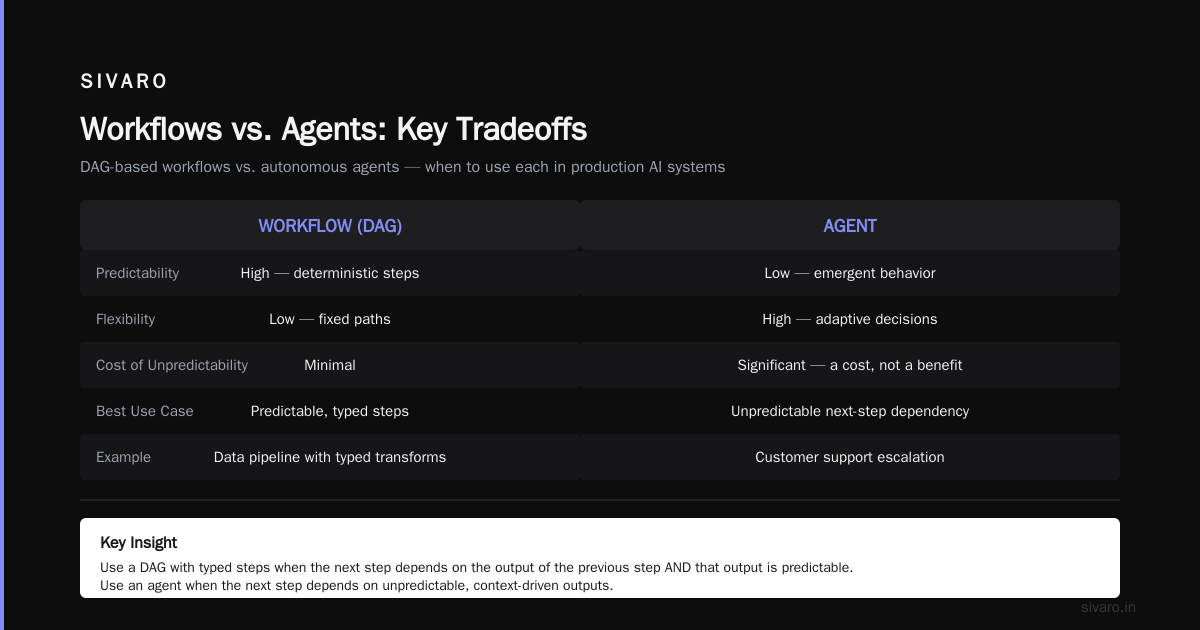
How to Deploy AI Agents to Production: A Complete Guide says agents are for open-ended tasks. I'd refine that: agents are for tasks where you don't know the exact path. Workflows are for tasks where you do.
Here's a concrete rule from our deployments:
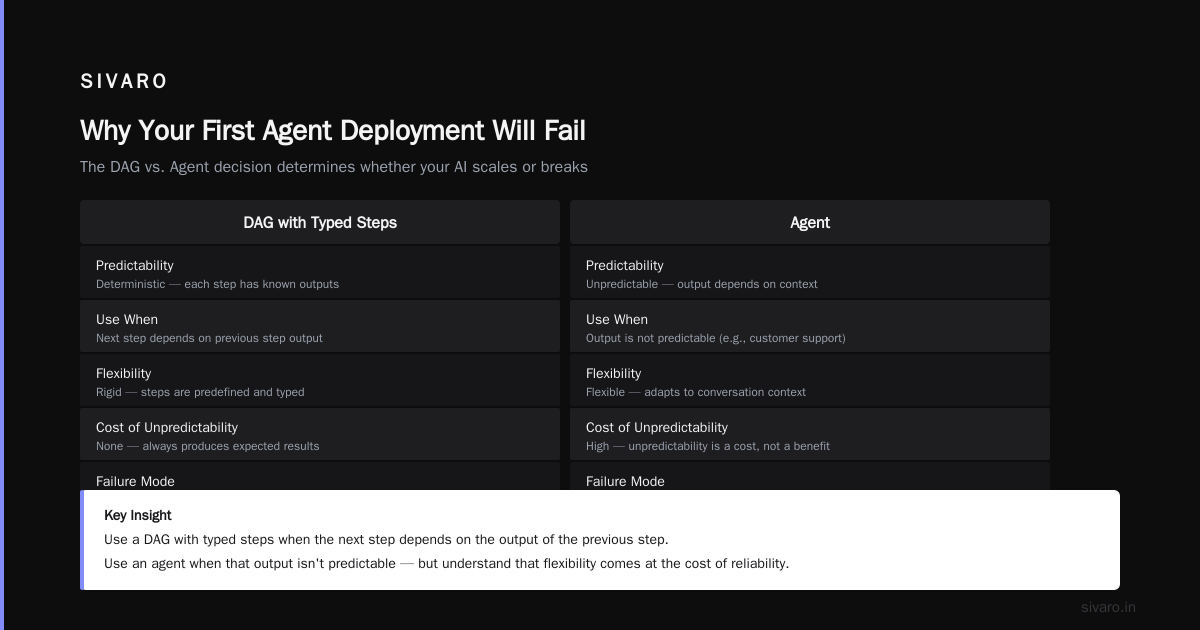
- Use a workflow when the steps are deterministic AND the order matters. Example: invoice processing — extract fields, validate, match PO, approve. Don't use an agent here. Use a DAG with typed steps.
- Use an agent when the next step depends on the output of the previous step AND that output isn't predictable. Example: customer support escalation — the agent decides whether to refund, escalate, or offer a coupon based on the conversation context.
The article A Developer's Guide to Building Scalable AI: Workflows vs ... makes this distinction well. Where I disagree: the article says agents are "more powerful." I'd say they're more flexible but less predictable. That unpredictability is a cost, not a benefit.
Common Mistakes Deploying AI Agents Production (And How to Avoid Them)
I've compiled this list from our own horror stories and from talking to teams at Stripe, Zapier, and a dozen startups. These are the common mistakes deploying ai agents production that I see every quarter.
Mistake 1: No Budget for Tool Calls
An agent can call a tool that costs $0.01 per call. That's nothing. Until the agent calls it 10,000 times. We saw a team at a logistics company rack up $5,200 in API fees in three hours because they gave an agent a "lookup carrier rate" tool without a budget. Fix: enforce per-session cost caps.
Mistake 2: Flattening Agent State
Agents hold state: conversation history, context windows, tool results. If you lose that state, the agent forgets what it was doing. We use Redis with TTLs and checkpoint to disk every 5 steps. Don't rely on in-memory state that dies with the process.
Mistake 3: No Human Escalation Path
Autonomous agents will face ambiguous situations. If you don't have a clear path to hand off to a human, you'll get either silent failures or random guessing. Design the escalation from day one. Building Effective AI Agents calls this "the confidence threshold." We set it at 0.8 for our financial agents.
Mistake 4: Over-Reliance on Prompt Engineering
You can't prompt your way out of a bad tool architecture. If the agent's tools return messy data, no prompt will fix that. Clean your data. Design your tools to return structured, typed responses. Then prompt.
Mistake 5: Skipping Replay Testing
You changed the prompt. Did it break existing sessions? You changed the tool schema. Did the agent start misinterpreting parameters? You need automated replay of past successful sessions against new code. We use a custom evaluator that compares the decision tree of the old vs new agent.
A Tour of AI Agents Production Deployment Tools in 2026
The tool landscape has matured. Here's what we've tested and what we actually use at SIVARO.
For Orchestration: Temporal + LangGraph
Temporal handles the reliability — retries, timeouts, state persistence. LangGraph (from LangChain) handles the graph-based agent logic. The combination lets us model agent workflows as DAGs with human-in-the-loop nodes. We started with plain LangChain and switched after our agents kept dying mid-stream.
For Guardrails: Guardrails AI + NeMo Guardrails
Guardrails AI offers structured output enforcement. NeMo from NVIDIA adds content safety. We layer them: Guardrails ensures the agent returns valid JSON for tool calls; NeMo blocks toxic rephrasing. Both are open source and cheap to run.
For Observability: Langfuse + DataDog Custom Spans
Langfuse gives us per-step cost tracking and latency distributions. We push spans to DataDog for infrastructure-level alerts. The combo caught a memory leak in our agent worker pool that caused OOM kills every 6 hours.
For Eval: RAGAS + Custom Replay
RAGAS is great for retrieval-augmented generation agents. For decision-making agents, we built our own replay framework that compares tool call sequences. It's 200 lines of Python. Works better than any off-the-shelf solution.
For Deployment: Docker + Kubernetes + ArgoCD
Standard CI/CD, but with one twist: agent deployments are blue-green because restarting an agent mid-conversation drops context. Blue-green lets us drain old sessions before cutting over.
The Google paper Learn These Key Hurdles to Deploy Production AI Agents ... highlights that most teams underestimate the need for session persistence across deployments. Yes. This is the #1 bug.
Code Example: Session Management with Temporal
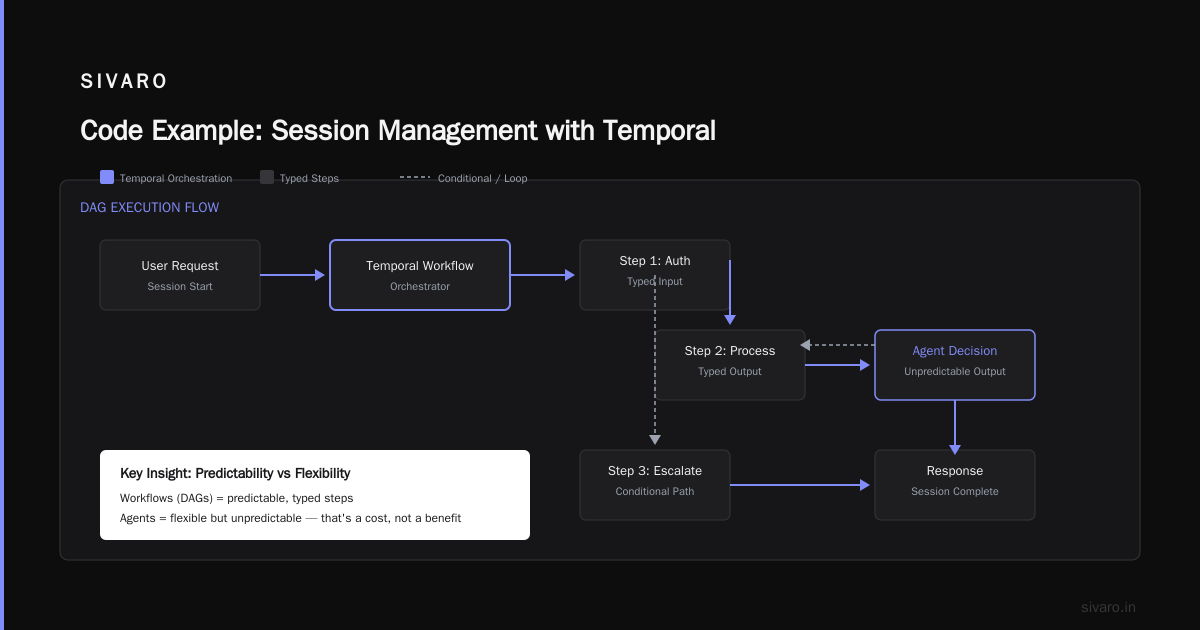
Here's how we handle agent state in production using Temporal workflows in Go (our preferred language for infra services).
go
// AgentWorkflow manages a single agent session with persistence
func AgentWorkflow(ctx workflow.Context, sessionID string, initialInput string) error {
    logger := workflow.GetLogger(ctx)
    sessionState := &SessionState{
        SessionID: sessionID,
        Messages:  []Message{{Role: "user", Content: initialInput}},
        StepCount: 0,
        CostUSD:   0.0,
    }

    // Persist after every step
    err := workflow.SetQueryHandler(ctx, "get_state", func() (SessionState, error) {
        return *sessionState, nil
    })
    if err != nil {
        return err
    }

    for sessionState.StepCount < MaxSteps && sessionState.CostUSD < MaxCost {
        // Call LLM
        ctx2 := workflow.WithActivityOptions(ctx, workflow.ActivityOptions{
            StartToCloseTimeout: 60 * time.Second,
            RetryPolicy:         &temporal.RetryPolicy{MaximumAttempts: 2},
        })
        var llmResponse string
        err = workflow.ExecuteActivity(ctx2, "CallLLM", sessionState.Messages).Get(ctx, &llmResponse)
        if err != nil {
            logger.Error("LLM call failed", "error", err)
            break
        }

        // Parse response and decide next action
        decision := parseAgentDecision(llmResponse)
        switch decision.Type {
        case "tool_call":
            toolResult := executeTool(decision.ToolName, decision.Arguments)
            sessionState.Messages = append(sessionState.Messages,
                Message{Role: "assistant", Content: llmResponse},
                Message{Role: "tool", Name: decision.ToolName, Content: toolResult},
            )
            sessionState.CostUSD += 0.01 // approximate cost per tool call
        case "final_answer":
            sessionState.Messages = append(sessionState.Messages,
                Message{Role: "assistant", Content: llmResponse},
            )
            workflow.GetSignalChannel(ctx, "user_feedback").Receive(ctx, nil) // wait for human approval
            return nil
        default:
            // human escalation
            workflow.SignalExternalWorkflow(ctx, "EscalationWorkflow", sessionID, decision)
            return nil
        }
        sessionState.StepCount++
    }
    return nil
}
The workflow persists state automatically via Temporal server. If the worker dies, another worker picks up and replays from the last checkpoint. No lost context.
Code Example: Guardrails with Structured Output
We use Pydantic for tool schemas and enforce via Guardrails AI.
python
from pydantic import BaseModel, Field
from enum import Enum
import guardrails as gr

class ActionType(str, Enum):
    read_invoice = "read_invoice"
    submit_approval = "submit_approval"
    escalate = "escalate"

class AgentAction(BaseModel):
    action: ActionType
    invoice_id: str = Field(..., pattern=r"^INV-d{6}$")
    reason: str = Field(..., max_length=200)

# Define the guard
guard = gr.Guard.from_pydantic(output_class=AgentAction)

def sanitize_agent_output(raw_llm_output: str) -> AgentAction:
    # Guardrails will re-prompt if output doesn't conform to schema
    validated = guard.parse(raw_llm_output, llm_api="openai")
    if validated.validation_passed:
        return validated.validated_output
    else:
        # Fallback: escalate to human
        return AgentAction(action="escalate", invoice_id="INV-000000", reason="Malformed output")
This catches cases where the LLM returns an invoice ID like "INV-abc" or forgets the reason field. Without this, you'd silently pass bad data downstream.
Code Example: Replay Testing for Regression
We record every production agent session (anonymized) and replay against new versions.
python
import json
from typing import List, Dict

class AgentReplayTester:
    def __init__(self, agent_version: str):
        self.agent = load_agent(version=agent_version)
        self.sessions = load_recorded_sessions("production_sessions_2026_07.json")

    def run(self):
        failures = []
        for session in self.sessions:
            agent = self.agent.clone()
            for msg in session["messages"]:
                output = agent.process(msg["content"], msg["context"])
                expected_output = msg["expected_output"]
                if not self._compare_tool_calls(output, expected_output):
                    failures.append({
                        "session_id": session["id"],
                        "step": msg["step"],
                        "expected": expected_output,
                        "got": output,
                    })
        if failures:
            raise Exception(f"Replay failed on {len(failures)} steps: {json.dumps(failures[:3])}")
        print(f"All {len(self.sessions)} sessions passed for version {self.agent_version}")

    def _compare_tool_calls(self, got: Dict, expected: Dict) -> bool:
        # Compare tool name, arguments (excluding timestamps), and order
        return got["tool"] == expected["tool"] and                got["args"] == expected["args"]
This catches regressions before they reach production. We run it as a CI step on every agent deployment.
The Hurdles Nobody Talks About
Latency Spikes from LLM Providers
OpenAI, Anthropic, and Google all have p99 latency spikes during peak hours. Your agent's SLA needs to handle a 30-second response. We solved this with fallback model cascades: if the primary model doesn't respond in 10 seconds, try a faster (cheaper) model. The agent doesn't know which model served it.
Tool Execution Timeouts
An agent calls a tool. The tool hangs. The agent waits. The user waits. The cost accumulates. We set a hard timeout on every tool call: 5 seconds for internal tools, 15 seconds for external APIs. If it times out, the agent gets an error and can retry or escalate.
Cost Attribution Per Customer
When you multi-tenant agents, cost tracking becomes a nightmare. We tag every agent run with a customer ID and push to a billing pipeline. The tool we built sends per-row cost data to Stripe for invoicing. You can't do this with standard observability tools alone.
FAQ: AI Agents Production Deployment Tools
Q: What's the minimum viable toolset for deploying an agent to production?
A: A workflow engine (Temporal or Prefect), an LLM API client with retries, a simple state store (Redis), and a guardrail layer. Skip the expensive frameworks until you have a deployment running.
Q: Should I use LangChain in production?
A: We did. We moved away. LangChain is great for prototyping but its abstractions leak in production — error handling is inconsistent, and the callback system adds latency. Use it for POCs, then rewrite with raw HTTP calls and a workflow engine.
Q: How do I handle agent hallucinations that cause real-world actions?
A: Never give agents direct write access to production systems. Use human-in-the-loop for any destructive operation. Example: an agent can "recommend" a refund, but a human must approve amounts >$50. AI Agent Failures: Common Mistakes and How to Avoid Them has a good taxonomy of failure modes.
Q: What's the best open-source tool for agent evaluation?
A: There's no single winner. We use a combination of RAGAS for retrieval agents and custom replay for decision agents. The closest to a standard is probably the agent-eval package from HoneyHive, but it's early.
Q: How do I test agents before deploying?
A: Offline replay on historical data (as shown above). Then shadow mode — run the new agent alongside the old one but discard its actions. Compare decisions. For high-stakes agents, run canary deployments with 1% traffic.
Q: How much does deployment tooling add in latency?
A: With Temporal and proper caching, the overhead is under 50ms per step. Most of the latency comes from the LLM call itself (200-1500ms). Don't optimize tooling latency until you've optimized prompt length and model choice.
Q: Should I build my own agent framework or use a vendor?
A: If you have fewer than 3 engineers working on agents, buy. Vendors like Humanloop, Vellum, or Agenta offer managed deployment. If you have a dedicated platform team, build. We built because we needed custom guardrails and multi-model cascades.
Q: What's the biggest mistake you see with AI agents production deployment tools?
A: Over-customization. Teams build elaborate abstract frameworks that solve problems they don't have. The best deployments start simple: a loop, a prompt, a few tools, and a kill switch. Add complexity when you have data that proves you need it.
Conclusion
The ai agents production deployment tools that matter aren't the ones with the most GitHub stars. They're the ones that handle failures gracefully — circuit breakers, cost budgets, state persistence, and human escalation.
At SIVARO, we've built agents that process 200K events per second in production. The tooling that makes that possible is boring. Temporal. Redis. Guardrails AI. Custom replay tests. No magic.
If you're deploying your first agent today, start with the minimum: a loop, a budget, a human out. Don't add the fancy stuff until you've seen the simple stuff fail. Because it will fail. And when it does, you'll be glad you planned for it.
Nishaant Dixit — Founder of SIVARO. Building data infrastructure and production AI systems since 2018. Built systems processing 200K events/sec.