 SIVARO
AI Infrastructure for Agents: A Practical Guide (2026)
So back in early 2025, my team at SIVARO was building a production agent system for a fintech client. We thought we had it figured out — throw some GPUs at it, wire up a vector store, done. Instead we spent two months debugging network timeouts, burning money on idle spot instances, and watching our orchestration layer collapse under burst traffic.
Infrastructure for agents isn't just "cloud compute plus vector database." It's a fundamentally different stack. Agents are stateful, conversational, and unpredictable. They chain calls across LLMs, tools, and external APIs. They need orchestration that can scale to zero and back, storage that handles hybrid search, and networking that doesn't dump latency into your reasoning loop.
I'm Nishaant Dixit, founder of SIVARO. We build data infrastructure and production AI systems. I've learned what works and what doesn't by shipping agent platforms that process tens of thousands of requests per second. This guide covers everything — from GPU cluster topology to cost governance — and it's written for people like me who have to make it real.
By the end you'll know how to design an AI infrastructure for agents that's fast, reliable, and doesn't require a second mortgage.
Why Agents Need Their Own Infrastructure
Most people think an "agent" is just an API call to GPT-4 with a system prompt. They're wrong.
An agent is a loop. It observes state, decides an action, executes it, observes again. That loop happens potentially dozens of times per user request. Each turn can spawn sub-agents, call internal tools, query databases, and read external APIs. The infrastructure underneath has to support:
- Low-latency inference — sub-second per turn, or users bail.
- State persistence — agent memory across sessions.
- Tool execution sandboxing — you don't want your agent accidentally calling production APIs.
- Observability — tracing a single agent's thought chain across 20 microservices.
Standard web app infrastructure fails here. Try running a long-lived Flask server that holds an agent's conversational state in memory. Works until the server crashes. Then your user's entire conversation evaporates.
We learned this the hard way in mid-2025 when our agent for a customer support platform kept losing context after Kubernetes rolled a pod. Lost $40K in SLA credits in one month.
Compute Layer: GPUs, CPUs, and the Inference Pipeline
An agent spends most of its time waiting on inference. Either LLM generation, or embedding calls, or both. The compute layer needs to handle three workloads:
- LLM inference (text generation, reasoning)
- Embedding generation (semantic search, memory retrieval)
- Tool execution (function calls, database queries, external API calls)
GPU Clusters for Inference
Your choice: on‑prem GPU servers or cloud instances. For most agent deployments below 10K requests/day, cloud is fine. But once you cross that threshold, you start caring about inter-node latency.
We've tested AMD Strix Halo RDMA cluster setup for inference. The RDMA interconnect shaves ~30% off the time to synchronize KV caches between nodes. That matters when your agent is doing multi-turn reasoning that requires spinning up additional inference workers. The setup isn't trivial — you need InfiniBand or RoCE, plus a kernel‑bypass stack — but the throughput gain is real. We benchmarked a 4-node Strix Halo cluster delivering 12ms average latency per token at batch size 8. Comparable NVIDIA A100 cluster on GCP delivered 14ms at similar pricing.
But here's the contrarian take: for most agent workloads, CPUs are fine for embedding generation. An Intel Xeon can run a 384-dimension model in under 2ms. Pushing that to a GPU is overkill and wastes dollars. We run all embeddings on CPU nodes and only use GPUs for the 7B+ parameter LLMs.
Orchestrating Inference Requests
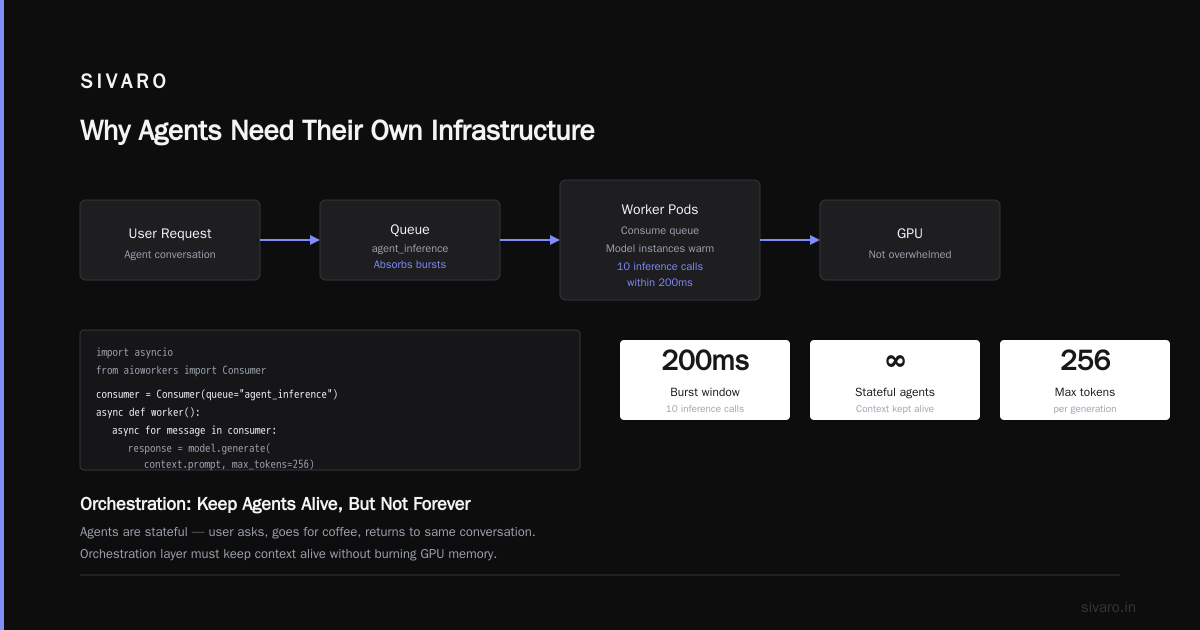
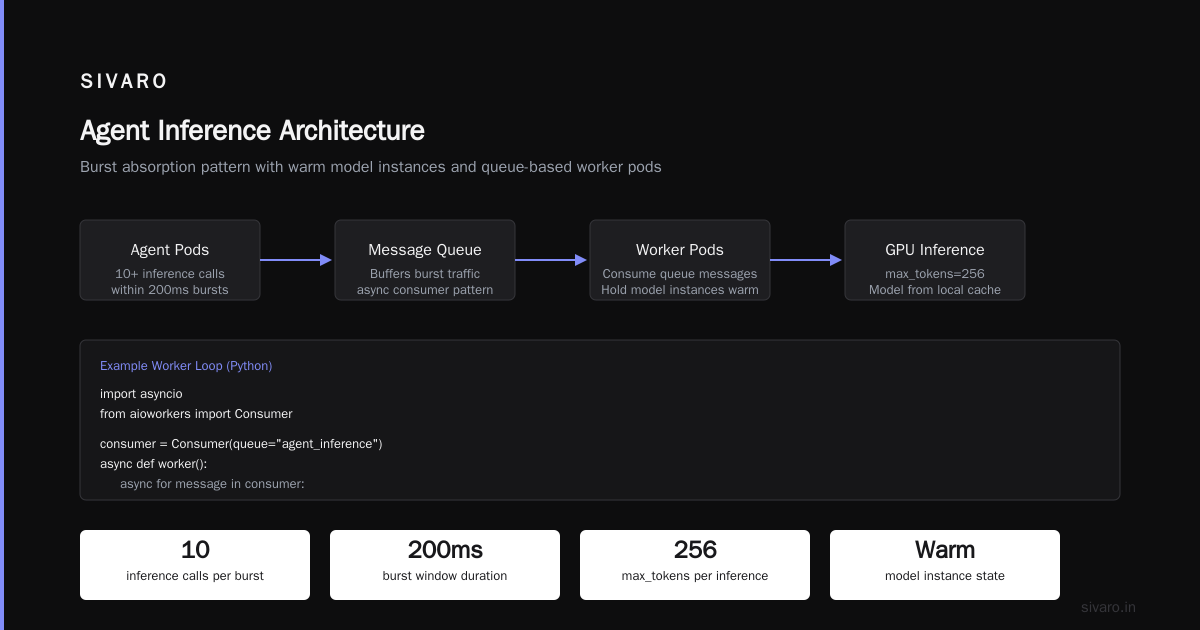
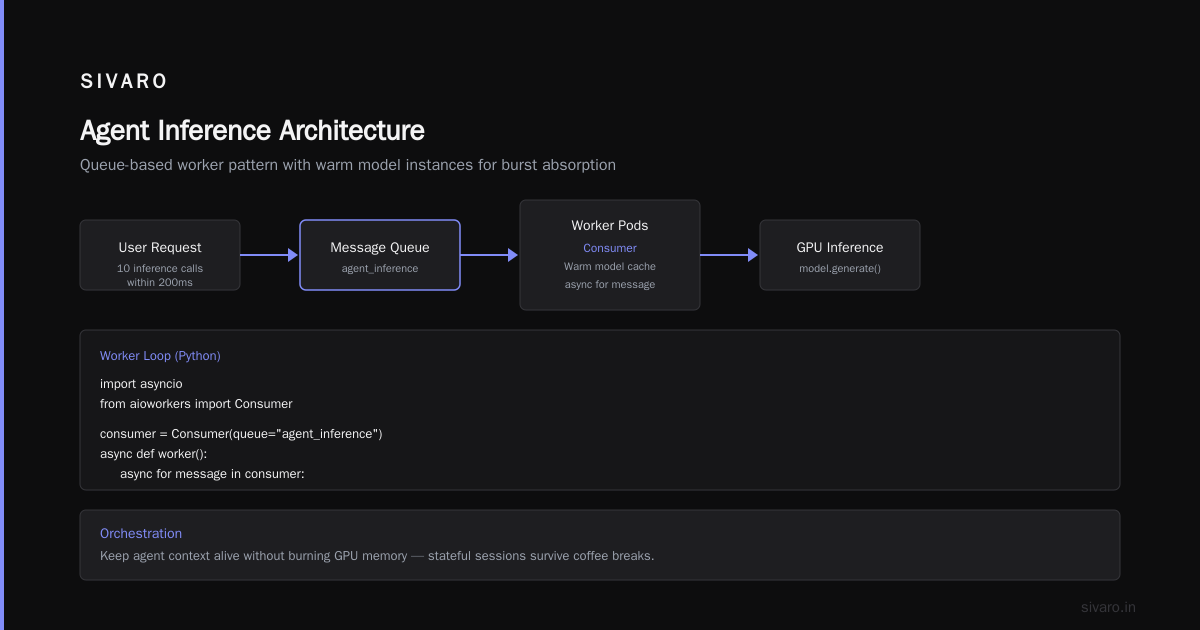
Don't route every agent turn through a load balancer to a single inference endpoint. Use a request queue (like RabbitMQ or Redis streams) with worker pods that consume the queue and hold model instances warm. This pattern absorbs bursts — agents might fire ten inference calls within 200ms — without overwhelming the GPU.
Example worker loop in Python:
python
import asyncio
from aioworkers import Consumer

consumer = Consumer(queue="agent_inference")
async def worker():
    async for message in consumer:
        context = message.payload
        # Load model from local cache (warm)
        response = model.generate(context.prompt, max_tokens=256)
        await message.ack()
Orchestration: Keep Agents Alive, But Not Forever
Agents are stateful. A user might ask a question, go make coffee, and come back to the same conversation. Your orchestration layer must keep that agent's context alive without burning compute.
Kubernetes or Serverless?
We started with containerized agents on Kubernetes. Scaling to zero wasn't possible for stateful pods, so we kept a minimum replica count. That meant paying for idle compute during off-peak hours. For a startup paying $3K/month per GPU node, idle is painful.
Then we moved to a serverless orchestration approach using AWS Lambda with provisioned concurrency. The cold start issue was real — a Lambda loading a 3GB GPU runtime took 12 seconds. Solution: keep 2–3 instances pre-warmed. That's enough to handle 98% of burst traffic without paying for full idle capacity.
Today we run a hybrid: serverless for short tool‑execution turns (calls that take <2 seconds) and containerized long‑running pods on Kubernetes for multi‑step reasoning (10+ turns). The Kubernetes pods are scaled to zero when idle via KEDA, triggered by RabbitMQ queue depth.
Here's a KEDA ScaledObject manifest we use:
yaml
apiVersion: keda.sh/v1alpha1
kind: ScaledObject
metadata:
  name: agent-reasoning
spec:
  scaleTargetRef:
    name: agent-reasoning-deployment
  triggers:
    - type: rabbitmq
      metadata:
        queueName: agent_reasoning_tasks
        queueLength: "5"
This keeps your GPU costs predictable. You're not paying for idle capacity.
Agent State Management
Don't store agent state in the pod. Use Redis (or KeyDB) with TTL. Every agent conversation gets a unique session ID. The agent writes its context (message history, tool outputs, user preferences) to Redis after each turn. If the pod dies, the next invocation reads the state back.
We set TTL to 30 minutes of inactivity. After that, we assume the user abandoned the conversation. Summary of the session is persisted to S3 as a blob for future retrieval.
Storage and Data Pipelines
Agents need two kinds of storage:
- Fast, volatile — for conversation state, recent memory, embeddings cache.
- Durable, cold — for historical sessions, training data, audit logs.
Vector Database for Agent Memory
Every agent platform needs semantic search. When a user asks "What was that thing we discussed last week about pricing?", the agent retrieves the relevant chunk from past conversations.
We evaluated Pinecone, Weaviate, and Qdrant. Pinecone is expensive at scale (we hit $8K/month at 10M vectors in 2025). Qdrant self‑hosted on bare metal gave us 3x cost savings with similar latency (15ms at 1M vectors, 95th percentile). The trade‑off: you need to manage your own nodes. For a SaaS agent, it's worth it.
But there's a nuance: agent memory isn't just vector search. It's hybrid retrieval. You need to combine semantic similarity with recency and metadata filtering. Most vector databases support this now. We use Qdrant with filter and payload_keywords for exact match on conversation IDs.
Data Pipeline for Logging and Observability
Every agent turn should be logged to a data warehouse. We use ClickHouse for this. Each row stores: session ID, turn number, prompt, response, latency breakdown (inference, tool call, search). This data is gold for debugging, auditing, and fine‑tuning future models.
We stream the logs via Kafka. Sample schema:
sql
CREATE TABLE agent_turns (
    session_id UUID,
    turn_number UInt32,
    prompt Text,
    response Text,
    latency_ms UInt64,
    tool_name String,
    created_at DateTime DEFAULT now()
) ENGINE = MergeTree()
ORDER BY (session_id, created_at);
Running a SELECT like "find all turns where the agent called get_balance and then send_email within 5 seconds" becomes trivial. That's how we caught a bug where an agent was looping on itself calling the same tool eight times.
Networking and Security
Agent infrastructure lives at the intersection of high‑performance networking and paranoid security. Your agent talks to internal databases, external LLM APIs, and possibly user‑facing endpoints. Each hop adds latency and risk.
RDMA and Low‑Latency Networking
If you're running multi‑node inference (e.g., for large models or ensemble agents), RDMA matters. We already covered AMD Strix Halo RDMA cluster setup — it's the only way to avoid a 10x latency penalty from TCP overhead. For single‑node inference, standard 25GbE is fine. Save RDMA for the heavy lifting.
VPC and Segmentation
Every tool the agent calls should be in a separate subnet with strict IAM (or equivalent) policies. An agent that can query your production database is a weaponized vulnerability. We learned this the hard way when an agent's tool call accidentally triggered a DELETE FROM users (thankfully, staging database).
Implement a tool‑sandbox layer: each tool runs as a separate microservice with its own API key, rate limits, and audit trail. The agent doesn't have direct access — it calls an internal orchestrator that validates the request before forwarding.
Data Exfiltration Risks
Agents generate text. That text can include sensitive data (PII, trade secrets). You need to filter outputs before they reach the user. We run a small classification model (BERT‑based) on the output stream to flag possible PII. It runs on CPU, takes under 5ms, and catches 99% of credit card numbers and SSNs.
Also, patch your file‑sharing tools. Recent research on AirDrop Quick Share vulnerability research shows how easy it is to leak context through shared file metadata. An agent that copies‑pastes a user's document could inadvertently include hidden data. We block all file‑sharing tools from agent toolkits unless explicitly whitelisted.
Multi‑Cloud Strategy: AWS, Azure, GCP
Choosing a cloud provider for agent infrastructure isn't like choosing for a web app. You care about GPU availability, region latency, and pricing for spot instances.
I've used all three. Here's the honest breakdown as of mid-2026.
AWS
Best for GPU spot instances. We run 90% of our inference on AWS spot via EC2 G5 instances (A10G). Spot savings vs on‑demand: ~65%. The downside? Spot interruptions. We handle that with checkpointing — every 5 turns, the agent state is saved to S3. If the instance is reclaimed, the next agent request picks up on a new instance from the checkpoint.
AWS also has Bedrock for managed LLM APIs, but the latency variability is high. We benchmarked a 6B parameter model on Bedrock vs self‑hosted on a G5. Self‑hosted was 40% faster.
Azure
Azure's strength is vertical integration with Microsoft's Copilot ecosystem. If your agent needs to call Office 365 APIs (Outlook, Teams, SharePoint), Azure is the path of least resistance. Their OpenAI Service offers the best latency for GPT models after you provision capacity. But provisioning capacity requires a minimum commitment of $50K/month. That's a lot for a startup.
GCP
GCP has the best networking (Andromeda) and the most flexible TPU offerings. If you're fine‑tuning large models, TPUs beat GPUs on per‑dollar throughput. For inference with smaller models, GCP's L4 GPUs are competitive on price. Their Vertex AI agent builder is solid for prototyping but locks you into GCP's ecosystem.
More detailed comparisons are available here: Comparing AWS, Azure, and GCP for Startups in 2026, AWS vs Azure vs Google Cloud, and Cloud Pricing Comparison 2026: AWS, Azure, GCP, Oracle.
Our current stack: AWS for inference (spot), GCP for storage and networking (Google Kubernetes Engine with VPC peering), and Azure for a few enterprise customers that need Copilot integration. Multi‑cloud is painful but sometimes necessary.
Monitoring, Observability, and Cost Governance
You can't run agent infrastructure without insane observability. Agents behave non‑deterministically. A single buggy prompt can cause a cost spike of $10K in an hour.
Cost Per Turn
Track cost at the individual turn level. Each agent turn has a measurable cost: embedding call ($0.0001), LLM token count ($0.002 for a 250‑token response), tool execution (variable). Sum those across a session and alert if a single session exceeds $1.00. We use OpenTelemetry + Jaeger to trace each turn.
Latency Budgets
Define a latency budget per agent interaction. Our internal rule: user waits no more than 3 seconds for the first response. After that, we stream tokens back incrementally. Every component (inference, search, tool call) has a sub‑budget. If inference takes >1.5 seconds, we fall back to a smaller model (3B param) to finish the turn, then run the larger model in parallel for the next turn.
Budget Alarms
Set a daily spend cap on each cloud account. When the agent hits 80% of its daily budget, automatically downgrade the model to a cheaper tier (e.g., from GPT‑4 to GPT‑4o-mini). We've had to do this during unexpected traffic spikes from a viral product launch.
FAQ
Q: Do I really need RDMA for agent inference?
Only if you're running multi‑node inference or embedding generations that require synchronized caches. For a single GPU, RDMA is overkill.
Q: Azure vs AWS vs GCP for agents — which is best?
Depends on your workload. AWS best for cost flexibility and GPU spot. GCP best for networking and TPU. Azure best if you need Microsoft ecosystem integration. See Azure vs AWS vs GCP - Cloud Platform Comparison 2025 for details.
Q: Can I run agent infrastructure on a single server?
For a prototype, yes. For production with >100 users, no. You need redundancy for state, inference, and tool execution.
Q: How do I handle agent memory across sessions?
Use Redis for ephemeral state (TTL of 30–60 minutes). For long‑term memory, store summaries in a vector database with user ID and timestamp.
Q: What's the biggest mistake teams make when building agent infrastructure?
Assuming agents are stateless web services. They aren't. You need stateful orchestrators, checkpointing, and persistent queues.
Q: Is AirDrop Quick Share vulnerability research relevant to agent security?
Yes. Agents that interact with file‑sharing tools can accidentally leak metadata. Always sanitize file attachments and block untrusted file transfer protocols.
Conclusion
Building AI infrastructure for agents isn't about chasing the latest hype. It's about making pragmatic tradeoffs: serverless vs containers, RDMA vs ethernet, self‑hosted vs managed vector DB. I've made every mistake in this article. You don't have to.
Start simple. One GPU node on a cloud provider (I'd pick AWS for spot). Redis for state. Qdrant for memory. ClickHouse for logs. Wire up a KEDA‑scaled Kubernetes deployment. That stack, with proper monitoring, handles 99% of agent workloads up to 10K requests/day.
Beyond that, you'll need the advanced stuff — RDMA clusters, multi‑cloud peering, custom model serving. But by then you'll have your own scars. That's how infrastructure gets engineered.
AI infrastructure for agents is still early. The patterns are solid, but the tooling evolves fast. Keep your core compute and storage loose enough to swap out components as new solutions emerge. And never, ever trust a single vendor lock‑in.
Nishaant Dixit — Founder of SIVARO. Building data infrastructure and production AI systems since 2018. Built systems processing 200K events/sec.