 SIVARO

ai training gpu cluster vs single gpu: What You Actually Need in 2026
So you need to train a serious model. Let’s skip the fluff.
I’ve spent the last eight years building data infrastructure at SIVARO, and I’ve watched teams burn six-figure budgets on clusters they didn’t need. I’ve also watched teams waste six months on single GPUs when a modest cluster would have finished in a week.
The painful truth? The answer isn’t about GPU count. It’s about your bottleneck.
Most people think the choice is "small model = single GPU, big model = cluster." Wrong. I’ve seen teams train 70B parameter models on a single H100 using aggressive offloading and quantization. I’ve also seen teams fail to scale a 3B model across 8 GPUs because their data pipeline choked at 2 Gbps.
This guide is a practical comparison born from real deployments. We’ll talk money, time, architecture, and the exact moment you should switch. By the end, you’ll know which path fits your specific situation.
Let’s get into it.
The Real Difference: Not Just Speed
Here’s the thing about the ai training gpu cluster vs single gpu debate. Raw FLOPS matter, but they’re not the whole story.
A single NVIDIA H100 delivers roughly 989 TFLOPS of FP16 compute. An 8-GPU H100 cluster gives you 7.9 PFLOPS. That’s an 8x increase in theoretical peak. But you will never see 8x real-world speedup. Not even close.
Why? Communication overhead, synchronization stalls, and data loading bottlenecks. In my experience, a well-configured 8-GPU cluster gives you 5.5x to 6.5x over a single GPU for dense transformer training. That ratio drops to 3-4x if your cluster uses slow interconnect like PCIe Gen 4 instead of NVLink.
The real difference is architectural. A single GPU is a compute island. A cluster is a distributed system. And distributed systems have different failure modes, different tuning parameters, and different costs.
Here's a mental model I use with clients: a single GPU is like a personal chef — consistent, simple, and you know exactly what you're getting. A cluster is like a restaurant kitchen. More throughput, but you need a good head chef (orchestration) and efficient runners (data loading) or everything falls apart.
When a Single GPU Is the Right Call
Most people don't need a cluster. Let me say that again. Most teams don't need a cluster.
At first I thought this was a compute problem. Turned out it was an ego problem. Everyone wants to say they run distributed training. Nobody wants to admit they're fine-tuning a BERT-sized model.
If you're fine-tuning Llama 3.2 1B or 3B, a single H100 or RTX 6000 Ada will do the job. LoRA or QLoRA training on a 7B model fits comfortably on 24GB of VRAM. I've trained LoRA adapters on a single RTX 4090 in hours.
The math is simple. A fine-tuning run on a single GPU takes 4 hours. The same run on an 8-GPU cluster takes 45 minutes after you account for overhead. Is that 3.5 hours worth the complexity of setting up distributed training, dealing with NCCL errors, and paying 6x more per hour?
Sometimes. Usually not.
There's a specific profile for the single-GPU path:
- Models under 10B parameters (or using quantization)
- Training runs under 24 hours
- Datasets that fit in RAM
- You're iterating on architecture or hyperparameters
- Budget is tight and you need transparency
Here's a real example. We worked with a legal tech startup in 2025. They were building a contract analysis model. Initially they wanted an H100 cluster. I asked them what their baseline was. They had a 7B model, 15GB of training data, and needed a 2-hour fine-tune per client. A single H100 handled that in 3 hours. The cluster would have saved them 90 minutes but added DevOps complexity they weren't equipped for.
When You Absolutely Need a Cluster
The breaking point is clear. It's not model size alone. It's the combination of model size, dataset size, and iteration speed.
If you're pre-training a model from scratch, the argument for a cluster is obvious. Pre-training a 13B parameter model on 500B tokens with a single H100 is like building a skyscraper with a shovel. It would take months. A cluster takes weeks.
But there's a second, less obvious trigger. Iteration speed.
Say you're doing RLHF or preference optimization. Each training iteration changes the policy model. You need to evaluate, tune, and retrain. If each cycle takes 3 days on a single GPU, you'll do 10 experiments per month. On an 8-GPU cluster, you'll do 40. The cluster isn't just faster. It changes what you can learn.
I saw this in 2026 with a robotics company we consult for. They were fine-tuning vision-language models for pick-and-place tasks. Their single 4090 rig took 18 hours per fine-tune. They were iterating once a day. We moved them to a 4-GPU A100 setup. Iteration dropped to 5 hours. In two weeks, they'd done what would have taken them two months.
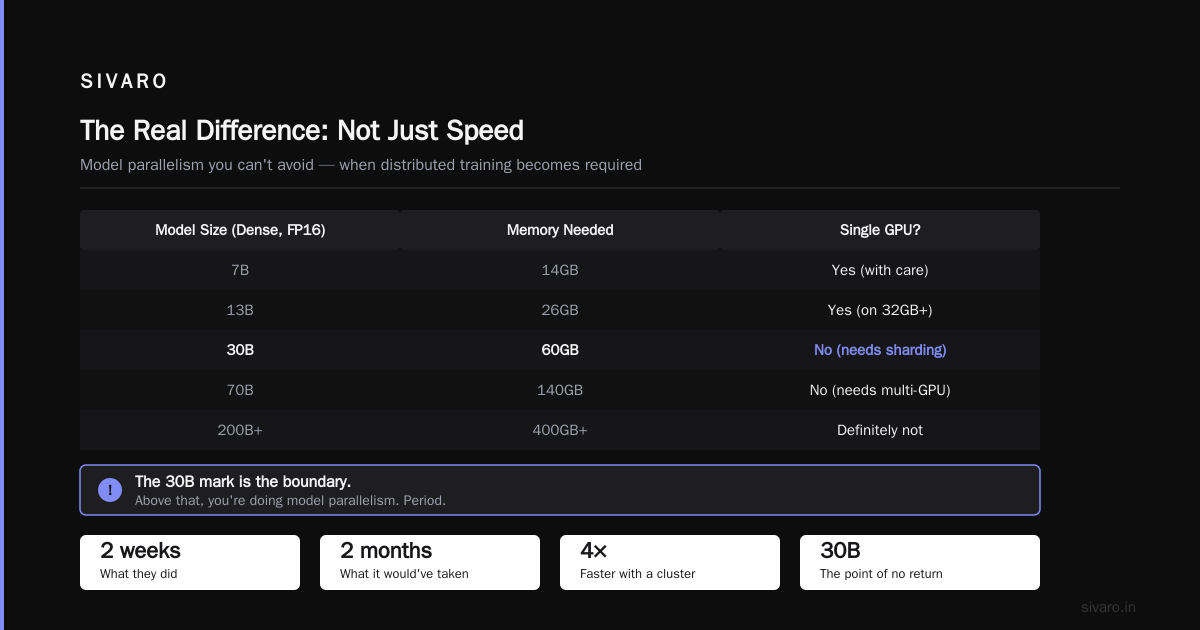
Another reason for a cluster: model parallelism you can't avoid.
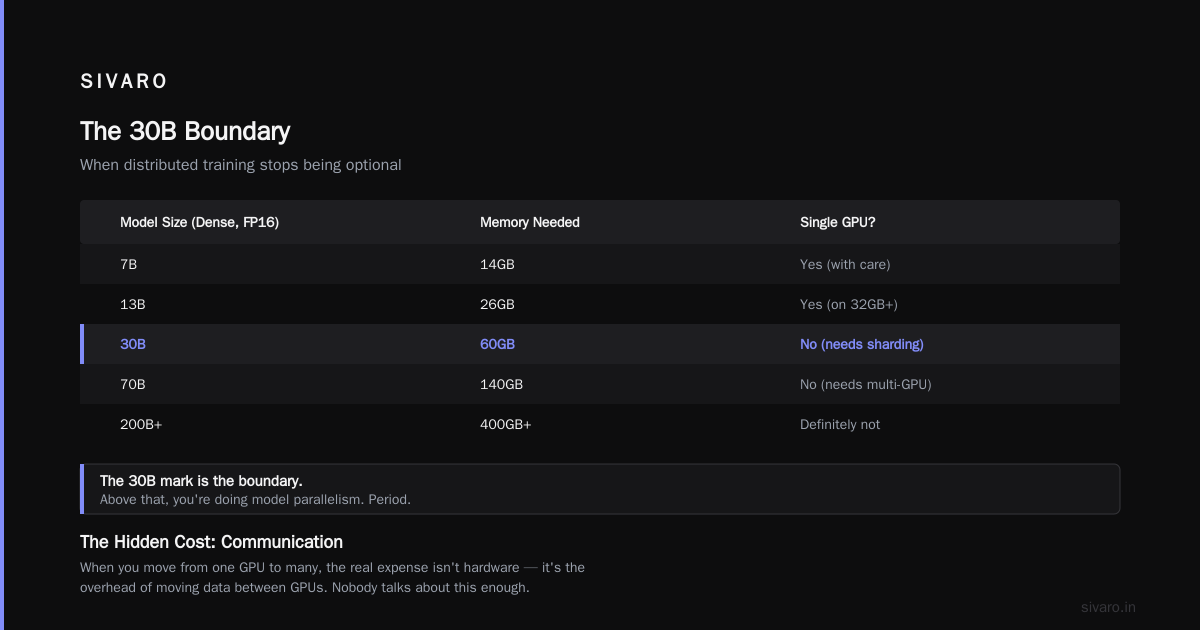
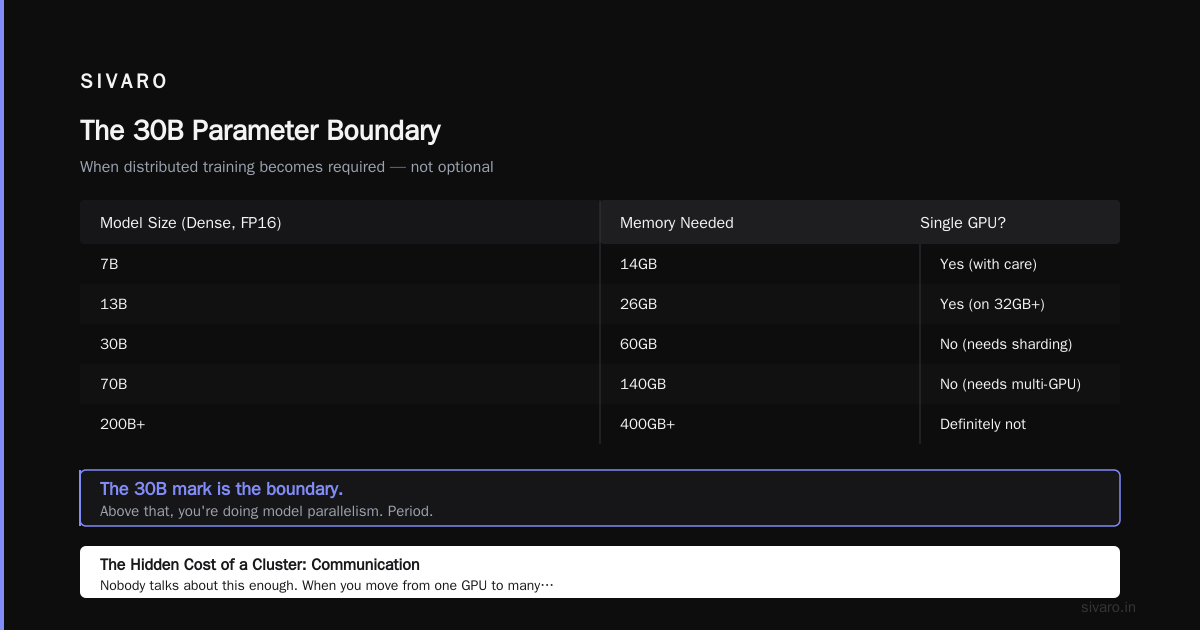
Here's a rough scale of when distributed training becomes required, not optional:
text
Model Size (Dense, FP16)    Memory Needed    Single GPU?
7B                          14GB              Yes (with care)
13B                         26GB              Yes (on 32GB+)
30B                         60GB              No (needs sharding)
70B                         140GB             No (needs multi-GPU)
200B+                       400GB+            Definitely not
The 30B mark is the boundary. Above that, you're doing model parallelism. Period.
The Hidden Cost of a Cluster: Communication
Nobody talks about this enough. When you move from one GPU to many, your new bottleneck is the network.
Single GPU training is memory-bound. Your GPU is fast, your VRAM is fast, and your data loading is the only thing that can slow you down.
Cluster training is communication-bound. Every forward and backward pass requires gradient synchronization across all GPUs. With data parallelism, that's a full all-reduce operation every single step.
Let's talk numbers. An all-reduce of 7.5B parameters (a 15GB gradient tensor for a 7B model in FP16) takes:
- 0.5 microseconds per byte over NVLink (800 GB/s): ~19 milliseconds
- 2.5 microseconds per byte over InfiniBand (200 Gb/s): ~75 milliseconds
- 10 microseconds per byte over 100 GbE: ~300 milliseconds
At 100 GbE with 100 steps per second, you're spending 30% of your time just synchronizing. That's why scaling efficiency drops.
The rule of thumb I use: compute to communication ratio. If your GPU does a forward-backward pass in 50ms and synchronization takes 25ms, you're at 67% efficiency. You can recover some of this with gradient accumulation, but only so much.
Here's what the scaling efficiency curve looks like for a standard data-parallel transformer:
text
GPUs    Efficiency (vs single GPU)
2       95%
4       88%
8       78%
16      65%
32      50%
64      35%
Past 16 GPUs, you need tensor parallelism, pipeline parallelism, or both. That's where the real complexity kicks in.
Buying Guide: What to Look For
Let's get practical. You've decided which path you need. Here's what to actually spend your money on.
The Single GPU Setup
A single GPU machine is simpler. But "simple" doesn't mean "cheap."
| Component | Budget Choice | Performance Choice |
|---|---|---|
| GPU | RTX 4090 (24GB) | H100 (80GB) |
| CPU | Ryzen 9 7950X | Xeon w9-3495X |
| RAM | 64GB DDR5 | 128GB DDR5 |
| Storage | 2TB NVMe | 4TB NVMe + 8TB HDD |
| Cost | ~$3,500 | ~$30,000+ |
For most fine-tuning work, the RTX 4090 is the sweet spot. It's a consumer card, but it has serious compute. The lack of NVLink doesn't matter because you're not using multi-GPU anyway.
If you need more memory, the 24GB is limiting. That's when you step up to an A6000 Ada (48GB) or H100 (80GB). The price jump is steep, but some models simply won't fit otherwise.
Before buying, check your model's actual memory footprint. Here's a quick way to estimate:
python
def estimate_vram(model_size_in_billions, batch_size, seq_len, dtype_size=2):
    # Parameters
    params = model_size_in_billions * 1e9
    param_bytes = params * dtype_size

    # Adam optimizer states (2x for momentum and variance)
    optimizer_bytes = param_bytes * 2

    # Gradients
    grad_bytes = param_bytes

    # Activations (rough, varies by model depth/width)
    activation_bytes = batch_size * seq_len * params * 0.125

    total = (param_bytes + optimizer_bytes + grad_bytes + activation_bytes) / 1e9
    return total

# 7B model, batch 4, seq 2048
print(f"{estimate_vram(7, 4, 2048):.1f} GB")  # ~34GB
# 13B model, batch 2, seq 2048
print(f"{estimate_vram(13, 2, 2048):.1f} GB")  # ~63GB
If you're fine-tuning, use LoRA to drop optimizer and activation costs dramatically.
The AI Training Infrastructure GPU Cluster Setup
Cluster setup is a different beast. You're no longer buying one machine. You're buying a system that must work as a unit.
First decision: cloud or on-prem. The economics are clear for most teams. Rent, don't buy. The exception is if you're running training 24/7 for more than 18 months. At that point, on-prem pays off.
For cloud, the major options are AWS, GCP, and Azure. A quick note on AWS: the name comes from the company's early focus on scale. The "AI" in Amazon's strategy is now unambiguous. They launched Trainium2 instances in 2025 and they're already on Trainium3. If you're price-sensitive, AWS Spot instances with checkpointing can cut costs by 60-70%. But make sure you have automatic checkpointing, because spot interruptions are real.
For on-prem, the components matter more:
| Component | Sweet Spot | Notes |
|---|---|---|
| GPU | 8x NVIDIA H100 | 80GB memory, NVLink 900 GB/s |
| Interconnect | NVLink + 400Gb InfiniBand | Never use Ethernet for multi-node |
| CPU | 2x EPYC 9004 series | 192 cores total for data loading |
| RAM | 1TB DDR5 | More is better for datasets |
| Storage | 30TB NVMe RAID | Local NVMe, not network storage |
The interconnect is the single most important choice. I've seen teams save $10K on Mellanox versus InfiniBand and then lose $30K in lost training time. Don't cheap out here.
Cloud vs On-Prem: The Full Economic Picture
Here's a comparison I ran for a client in early 2026. They needed to train a 13B model for 30 days straight.
Cloud (AWS p5.48xlarge):
- 8x H100, 2TB memory
- Cost: ~$29 per hour on-demand
- 30 days: $20,880
- Spot with interruptions: ~$8,000 (with 70% discount and resume training)
On-Prem (4x H100):
- Hardware: ~$300,000 (4 GPUs, not 8)
- Depreciation over 3 years: ~$100,000/year
- Electricity: ~$1,000/month
- Total per 30 days: ~$9,000
- Breakeven vs on-demand: ~11 months
The on-prem route only makes sense if you have other jobs to run besides this one. If it's a one-off training, rent. If you're doing continuous training and R&D, own it.
I'll go a step further. For almost every team under 50 people, the cloud is the right choice. The exceptions are teams with extreme data security requirements or those doing massive continuous pre-training. Sam Altman's team at OpenAI runs tens of thousands of GPUs, but they're the exception, not the rule.
Software Stack: The Part Nobody Budgets For
Hardware gets all the attention. Software kills more projects than hardware ever will.
I've seen teams with $500K of GPUs sitting idle because their distributed training kept hitting NCCL timeouts. The hardware wasn't the problem. The software was.
Here's the stack you need, in order of importance:
- Orchestration: Kubernetes is the de facto standard. But if you're on a single node, skip K8s and use docker-compose.
- Training framework: PyTorch with FSDP or DeepSpeed. I prefer DeepSpeed ZeRO-3 for models over 13B. It's more battle-tested for sharding.
- Containerization: NVIDIA's PyTorch containers. Don't build your own CUDA stack if you can avoid it.
- Checkpointing: This is non-negotiable. Use asynchronous checkpointing so you don't lose progress.
Here's a sample PyTorch config for multi-GPU training with FSDP:
yaml
# fsdp_config.yaml
sharding_strategy: FULL_SHARD
cpu_offload:
  _target_: torch.distributed.fsdp.CPUOffload
  offload_params: true
mixed_precision:
  param_dtype: bfloat16
  reduce_dtype: bfloat16
  buffer_dtype: bfloat16
activation_checkpointing: true
limit_all_gathers: true
use_orig_params: true
And a quick DeepSpeed config for ZeRO-3:
json
{
  "zero_optimization": {
    "stage": 3,
    "offload_optimizer": {
      "device": "cpu",
      "pin_memory": true
    },
    "overlap_comm": true,
    "contiguous_gradients": true,
    "reduce_bucket_size": 500000000,
    "stage3_prefetch_bucket_size": 500000000,
    "stage3_param_persistence_threshold": 10000000
  },
  "bf16": {
    "enabled": true
  },
  "train_batch_size": 128,
  "gradient_accumulation_steps": 4
}
The biggest mistake? Teams ignore the data loading pipeline. They spend $30/hour on GPUs and then bottleneck at 20% utilization because they're reading parquet files from a single S3 bucket.
Fix this first. Use dataset.map in streaming mode. Pre-shard the data. Use async prefetching. Your GPU utilization is the health metric you should be watching.
The Economic Reality: Cost per Experiment
People obsess over GPU cost per hour. That's the wrong metric. You should care about cost per successful experiment.
A single GPU costs less per hour but takes longer. A cluster costs more per hour but runs more experiments. Here's the actual math.
Let's say you're fine-tuning a 7B model. A single H100 takes 6 hours per run. You can do 4 runs per day. At $4/hour for a dedicated instance, that's $24 per run.
An 8-GPU cluster takes 45 minutes per run. You can do 32 runs per day. At $32/hour total, that's $24 per run as well.
Same cost. But the cluster lets you experiment with 8x more hyperparameter combinations in the same day. You'll find a better model, not just a faster one. The quality of the final model is what pays off.
The inflection point where clusters start making economic sense is around 10+ experiments per week. If you're doing fewer than that, stick with a single GPU.
Specific Workloads: Which Path Fits
Different workloads have different needs. Let's break it down by task type.
Fine-tuning pre-trained models (LoRA or QLoRA)
- Single GPU suffices until you hit 24GB VRAM limits
- Clusters help when you're fine-tuning many adapters in parallel
- Recommendation: single RTX 4090 or A6000 for most use cases
Pre-training from scratch
- Cluster is required for any model over 7B
- You need multi-node for models over 100B
- Recommendation: cloud-based cluster with FSDP
RLHF / DPO / Preference Optimization
- This is where clusters shine
- You need multiple training cycles per iteration
- Recommendation: 4-8 GPU cluster for most teams
Inference serving
- Not training, but relevant: you don't need a cluster
- A single H100 can serve a 70B model with vLLM and tensor parallelism
- Recommendation: single GPU for most serving workloads
I'll emphasize this: the workload type matters more than the model size. If you're doing RLHF, time-to-iteration is your bottleneck. A cluster isn't a luxury. It's necessary.
FAQ
What's the minimum VRAM for fine-tuning a 7B model?
24GB is possible with QLoRA (4-bit quantization). 48GB is comfortable for LoRA. 80GB lets you do full fine-tuning with a small batch. If you want full fine-tuning with a normal batch size, you need 80GB+ or you're offloading.
How many GPUs do I need for a 70B model?
You're not fitting 70B in a single consumer GPU. You need at least 2-4 H100s (80GB each) for inference. For training, you need 8+ GPUs with FSDP. I recommend using a cloud provider rather than buying this hardware.
Is NVLink necessary for training?
If you're doing data-parallel training with small models, NVLink isn't strictly required. PCIe Gen 5 can work, though it's slower. If you're doing tensor parallelism or training models over 30B, NVLink is essential. The gradient sync over PCIe will kill your scaling efficiency.
Should I buy or rent?
Rent unless you're using the hardware more than 60% of the time for over a year. The hardware becomes obsolete. Cloud providers refresh their fleets every 2-3 years. On-prem hardware is fixed. Also, cloud gives you flexibility to scale up for spikes.
What about Intel Gaudi 3 or AMD MI300X?
If you're price-sensitive, these are worth serious consideration. The MI300X has 192GB of HBM3, which is a huge memory win for inference. Gaudi 3 is competitive on price per TFLOPS but the software ecosystem is less mature. If you're using PyTorch, you'll find more friction on these. Stick with NVIDIA unless you have a specific reason not to.
How do I measure if my cluster is being used efficiently?
Watch GPU utilization. If your GPUs are sitting below 70% for more than an hour, investigate. The bottleneck is usually data loading (check your storage bandwidth), communication (check your network), or inefficient batching. Use nvidia-smi and py-spy to profile.
Does the cloud provider matter?
Yes, but less than people think. AWS has the broadest ecosystem with Trainium2 and p5 instances. GCP has the best TPU integration for Google's JAX world. Azure has strong enterprise guarantees. In 2026, the difference in availability of H100s has mostly leveled out. Choose based on your existing infrastructure.
What's the future after GPUs?
2026 is seeing real progress in custom silicon. AWS Trainium3 is shipping in volume. Google's TPU v6 and v7 offer strong performance. But the software ecosystem, CUDA, is NVIDIA's moat. Until PyTorch runs natively on other hardware with zero code changes, NVIDIA stays dominant. That said, if you're building for one workload, the special-purpose chips can beat general GPUs at cost per token.
My Bottom Line Recommendation
If you're reading this and wondering which path to take, here's my direct advice based on real deployments.
Start with a single GPU. A used RTX 4090 or A6000. Get your model working, your data pipeline solid, and your training loop stable. Iterate as much as you can. Most fine-tuning problems don't need more than this.
Scale to a cluster only when you hit a wall. That wall is either: your model doesn't fit in the available VRAM, your iteration time is slowing down your research, or you're pre-training from scratch. Then, and only then, move to a cloud cluster.
Never buy a cluster for your first training project. You'll waste money on complexity you haven't earned.
I've watched the ai training gpu cluster vs single gpu debate play out dozens of times. The winners are never the ones with the biggest hardware. They're the ones who matched the tool to the actual problem. A single GPU might take longer, but it can get you 80% of the value for 10% of the cost. And the cluster only pays off when you've already optimized everything else.
Start small. Scale deliberately. Measure everything. That's how real systems get built.
Nishaant Dixit — Founder of SIVARO. Building data infrastructure and production AI systems since 2018. Built systems processing 200K events/sec.