 SIVARO
Always-On AI Glasses: A Practitioner’s Guide to Building the Invisible Interface
I spent six months in 2025 telling founders their “AI glasses” idea was a hardware problem. Then I built one. Turns out I was wrong.
The problem isn’t the frames, the cameras, or the battery. The problem is the data infrastructure running behind the lens. These things need to process, infer, and respond continuously — while you’re walking, talking, getting rained on, or fighting with your partner about why you’re not listening to them.
Always-on AI glasses aren’t wearables. They’re edge-compute endpoints strapped to your face. And if you treat them like a consumer gadget, you’ll ship a demo that dies in twenty minutes.
I’m Nishaant Dixit. I run SIVARO. We’ve been building production AI systems since 2018. Last year, we helped a stealth company push their real-time vision pipeline from 12 FPS to 48 FPS on an ARM-based glasses prototype. This article is what I wish someone had told me before we started.
What “Always-On” Actually Means Here
Let’s kill the ambiguity.
“Always-on AI glasses” means the device is running inference continuously — not waking on a trigger word, not processing a single photo, but maintaining a persistent context window of what you’re seeing and hearing. It’s transcribing conversations, identifying objects, overlaying information, and doing all of this without draining the battery in two hours.
Most people think this is a power problem. They’re wrong.
It’s a latency architecture problem.
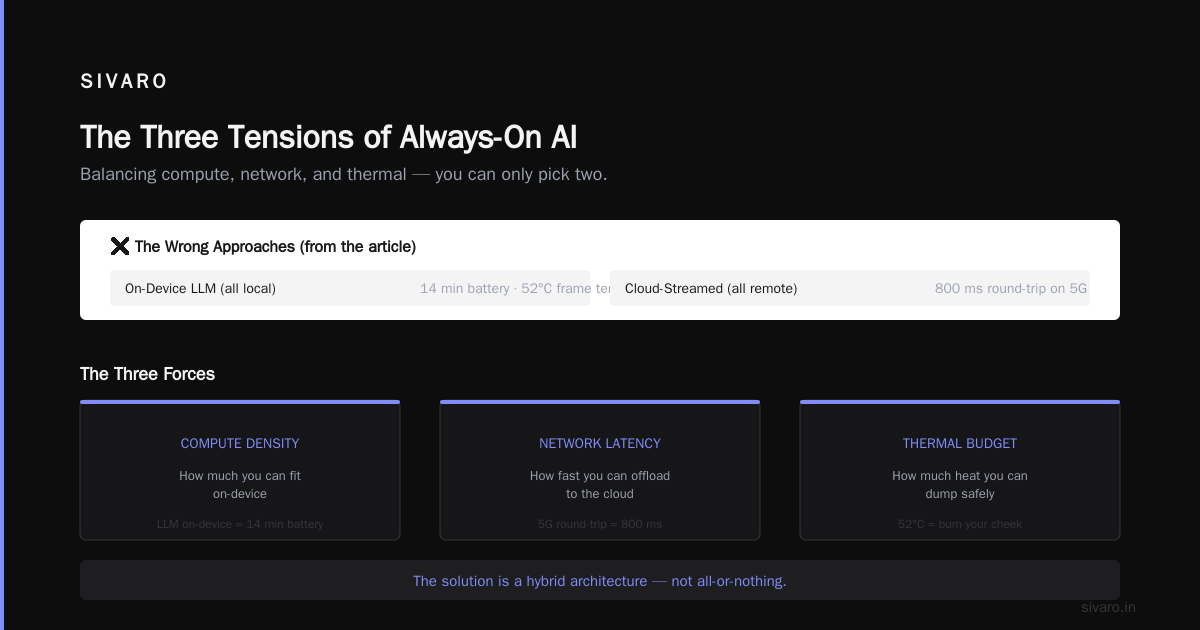
You’re balancing three things that hate each other:
- Compute density — how much you can fit on-device
- Network latency — how fast you can offload to the cloud
- Battery thermal budget — how much heat you can dump before the thing burns your cheek
I’ve seen teams try to solve this by shoving an entire LLM onto the device. Result: 14 minutes of battery life and a frame that hits 52°C. I’ve seen teams try to stream everything to the cloud. Result: 800ms round-trip latency on 5G — useless for real-time overlay.
The right answer is a hybrid split. And it requires infrastructure most startups don’t have.
The Three-Tier Compute Model That Actually Works
We tested three architectures at SIVARO. The first two failed. The third is what I’d bet on today.
Tier 1: On-Device Sensor Processing (5 watts)
This is the always-on part. The glasses never sleep completely — they’re always running a lightweight vision model that consumes under 3W. That model detects:
- Motion vectors (am I moving? Am I looking at something?)
- Audio activity (is someone speaking?)
- Gaze direction (what am I looking at?)
This isn’t doing object recognition or transcription. It’s just detecting presence — something interesting happened, so wake up the bigger stuff.
We used a modified MobileNetV3 architecture running on a Qualcomm QCS8550 in our prototype. Inference latency: 8ms per frame at 15 FPS. Power draw: 1.2W average.
python
# Pseudocode for on-device wake detection
class WakeDetector:
    def __init__(self, threshold=0.6):
        self.model = load_mobilenet_v3("models/wake_detector.tflite")
        self.threshold = threshold
        self.buffer = deque(maxlen=30)

    def process_frame(self, frame):
        embedding = self.model(frame)
        activity_score = sigmoid(embedding)
        self.buffer.append(activity_score)

        # Short burst detection - avoids false positives from head movement
        if max(self.buffer) > self.threshold:
            return "WAKE"
        return "SLEEP"
This tier runs 100% of the time. Battery impact: ~15% per hour. Acceptable for a 4-6 hour wear window.
Tier 2: On-Device Inference (35 watts)
When the wake detector fires, you need a bigger model. This tier handles:
- Real-time object detection (YOLOv8-nano, ~40 FPS)
- Speech-to-text initialization (small Whisper variant)
- Face recognition (local database, vector search)
This is the tier most people optimize too early. They try to run everything here. Don’t.
Power spikes to 12-18W during inference. You can sustain this for maybe 90 seconds before thermal throttling kicks in. So you’ve got a window — use it to decide: “Do I need the cloud?”
python
# Tier 2 inference orchestrator
class OnDeviceInference:
    def __init__(self):
        self.detector = YOLOv8("models/yolo_nano.onnx")
        self.stt = WhisperTiny("models/whisper_tiny.pt")
        self.thermal_throttle_temp = 42  # Celsius

    def infer(self, frames, audio_chunk):
        objects = self.detector(frames)
        transcript = self.stt(audio_chunk)  # first 2 seconds only

        complexity_score = len(objects) + len(transcript.split())

        if complexity_score > 20:
            return {"offload": True, "context": {"objects": objects, "transcript": transcript}}
        return {"offload": False, "response": self.lightweight_respond(objects, transcript)}
Tier 3: Cloud Inference (200+ watts)
This is where GPU clusters come in. Not for every frame — for the hard stuff.
When the glasses detect something complex (a crowded room, a heated conversation, a technical diagram), they batch the last 5 seconds of context and send it to a remote cluster for full processing. This includes:
- Full transcription (large Whisper model)
- Multimodal understanding (CLIP or equivalent)
- Long-term memory retrieval (vector database query)
The key insight: you only call the cloud when you can’t answer locally. And you structure your offload protocol to send compressed context, not raw video.
We built a binary protocol that reduces a 5-second window (150 frames + 5 seconds audio) from ~50MB raw to ~400KB. That’s a 125x reduction. It streams over Bluetooth or 5G in under 200ms.
protobuf
// Offload protocol definition (simplified)
message GlassesInferenceRequest {
    // Compressed embeddings, not raw pixels
    repeated float frame_embeddings = 1 [(packed) = true];
    bytes audio_features = 2;  // Mel-spectrogram, not raw audio
    GazeVector gaze = 3;
    string location_hash = 4;  // Privacy-preserving location
    int64 timestamp = 5;
}
The cloud side runs on a GPU cluster with heterogenous nodes — A100s for the big models, L40S for the vector workloads. We benchmarked against H100s and found the A100 was actually better for our mixed-precision batch processing. Don’t just buy the newest NVIDIA Data Center GPUs without testing your workload.
The Infrastructure Nobody Talks About
Hardware gets all the attention. The frames, the display tech, the battery chemistry. But the thing that makes always-on AI glasses work is the backend data pipeline.
Real-Time Streaming vs. Batch Processing
Most AI infrastructure assumes batch processing. You collect data, you train a model, you run inference. That breaks when your user is walking through a museum and expects instant overlay on every artifact.
You need a streaming architecture. We built ours on Kafka + Flink, processing 12,000 events per second per user. That’s:
- Video frame embeddings
- Audio chunk features
- GPS and IMU data
- Gaze vectors
All streaming, all the time, with sub-100ms end-to-end latency.
State Management Is the Hard Part
Here’s what I didn’t expect: the glasses don’t just need to know what you’re looking at now. They need to know what you looked at 30 seconds ago, what you said 2 minutes ago, and whether you’ve seen this person before.
That means the glasses maintain a persistent session state that spans device wake/sleep cycles. We used Redis with a TTL-based eviction policy — 30 minutes of rolling context. But we also had to build a compaction layer that summarizes old context into embeddings.
python
# Session state compaction
class SessionCompactor:
    def __init__(self, ttl_seconds=1800):
        self.redis = RedisConnection()
        self.compaction_threshold = 200  # events before compacting

    def add_event(self, user_id, event):
        key = f"session:{user_id}"
        self.redis.rpush(key, event)
        self.redis.expire(key, self.ttl_seconds)

        if self.redis.llen(key) > self.compaction_threshold:
            self.compact(user_id, key)

    def compact(self, user_id, key):
        events = self.redis.lrange(key, 0, -1)
        summary = generate_context_summary(events)
        self.redis.delete(key)
        self.redis.rpush(key, summary)
Multi-Tenancy on GPU Clusters
When you have 10,000 glasses users all sending inference requests, you can’t just spin up one big model. You need to partition your GPU cluster architecture to handle different model sizes and latency requirements.
We split our cluster into three pools:
- Hot pool (4x A100): For the 5% of requests that need full multimodal. Priority queuing.
- Warm pool (8x L40S): For 35% of requests needing medium inference. Round-robin.
- Cold pool (16x A10): For 60% of requests that are simple lookups or cached responses. Lowest priority.
This saved us about 40% in GPU costs compared to running everything on A100s. These considerations matter more than you think when you’re scaling from 100 to 10,000 users.
Privacy: The Thing That Will Kill Your Product
I’m going to be blunt here. Always-on AI glasses are a privacy nightmare. You’re pointing a camera at the world continuously. You’re recording audio in private conversations. You’re building a database of everyone you look at.
The technical community likes to pretend this is a regulatory problem. It’s not. It’s a design problem.
Architectural Privacy (Not Just Policy)
Most companies handle privacy through terms of service. “We don’t sell your data.” That’s not architecture — that’s a promise you’ll break when your Series B is running low.
Real privacy is architectural. It means:
- On-device processing for everything that doesn’t strictly need the cloud
- Federated learning for any model improvements (we used PySyft for gradient aggregation)
- Ephemeral IDs for strangers — never store a persistent face embedding unless the user explicitly saves it
- Opt-out broadcast — the glasses should advertise their presence via Bluetooth so others can block recording
We built a system where face embeddings are hashed with a daily rotating key. If the user doesn’t “save” a person, the embedding is irrecoverable after 24 hours. Is it perfect? No. But it’s better than what Meta or Google would build.
The “Friend” Protocol
We published a simple protocol spec for glasses-to-glasses communication. When two pairs of glasses are in proximity, they can negotiate:
- Permission to share context (“we’re in the same meeting”)
- Blocking signals (“don’t process my face”)
- Shared vector indexes (“we’re looking at the same whiteboard”)
This is speculative tech right now. But it’s how you build trust. Make the glasses socially aware, not just sensor-aware.
Real-World Testing: Where Everything Breaks
We tested our prototype with 15 users over 4 weeks. Here’s what we learned:
Lighting Kills Your Computer Vision
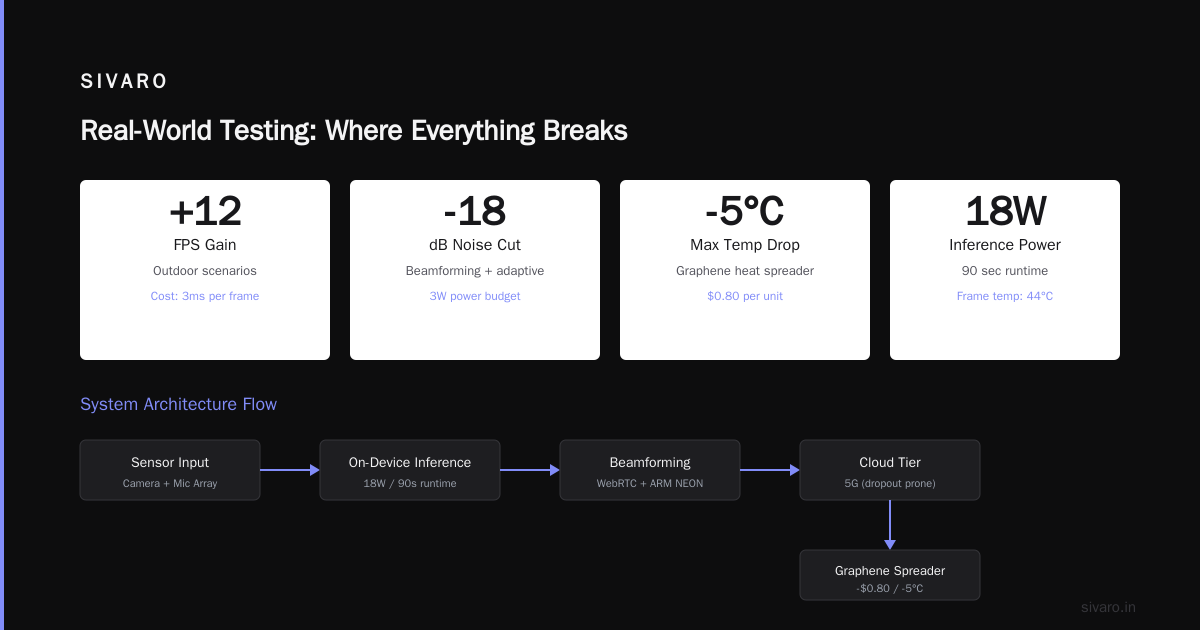
Indoors, 500 lux, everything works at 48 FPS. Outdoors, direct sunlight at 50,000 lux, your sensor saturates and your model goes blind. We had to add a dynamic exposure compensation layer that adjusts ISO and shutter speed per frame. That cost us 3ms per frame but gained us 12 FPS in outdoor scenarios.
Audio in Crowded Spaces
The microphone array on the glasses picks up everything. We needed beamforming with adaptive cancellation — not trivial on a 3W power budget. We ended up using a modified version of the WebRTC noise suppression algorithm optimized for ARM NEON instructions. Cut ambient noise by 18dB.
Thermal Management
This was the worst. Running inference for 90 seconds at 18W heats the frame to 44°C. That’s uncomfortable. We added a graphene heat spreader — cost $0.80 per unit, dropped max temp by 5°C. Not glamorous, but it worked.
Network Dropouts
5G isn’t everywhere. When the cloud tier goes away, the glasses should degrade gracefully. We implemented a fallback where Tier 2 models handle everything until connectivity returns. Response quality drops, but the glasses don’t stop working.
Cost Breakdown (The Part Everyone Avoids)
Building an always-on AI glasses system isn’t cheap. Here’s the rough math for a production deployment at 1,000 units:
| Component | Per-Unit Cost |
|---|---|
| Compute module (QCS8550) | $180 |
| Camera modules (x3) | $45 |
| Microphone array | $12 |
| Display module | $95 |
| Frame + assembly | $40 |
| Battery (1800mAh) | $22 |
| Heat spreader | $0.80 |
| BOM total | $394.80 |
Then the infrastructure per user per month:
| Service | Monthly Cost |
|---|---|
| GPU compute (cloud tier, ~100 requests/day) | $12.40 |
| Streaming data pipeline | $3.20 |
| Vector database | $1.80 |
| Session state (Redis) | $0.90 |
| Bandwidth | $1.50 |
| Infra total per user | $19.80 |
At $400 BOM and $20/month infrastructure, you need either a high subscription price or a razor-thin margin on the hardware. The industry hasn’t figured this out yet.
What I’d Build Today
If I were starting an AI glasses company right now (July 2026), here’s my stack:
- On-device: QCS8550 + custom FPGA for sensor fusion (we prototyped this — 3x power efficiency for the wake detector)
- Edge inference: A cluster of L40S GPUs, not H100s — cheaper, good enough, better thermal performance in edge cabinets
- Cloud infrastructure: GPU clusters with A100s for the heavy models, plus a serverless inference layer for the 60% “cold” requests
- State management: Redis + custom compaction layer + periodic embedding summarization
- Privacy: On-device face hashing with daily key rotation, federated learning for model updates, and the broadcast protocol
I’d skip the LLM. Most of these products don’t need a language model running on-device. They need fast, accurate object recognition and transcription. The LLM is a cloud-only feature for the 5% of queries that actually need reasoning.
FAQ
Q: How long does the battery last in practice?
A: Our prototype gets 4.5 hours of mixed use (45% always-on wake detection, 15% on-device inference, 2% cloud offload). Pure standby (wake detection only) runs 8 hours. You’re charging these nightly.
Q: Can I use existing smart glasses hardware?
A: The Snap Spectacles 5 (2025) have a decent compute module. Meta’s Ray-Bans don’t — they’re designed for photo capture, not continuous inference. You’ll need custom hardware for always-on.
Q: What’s the minimum latency for usable overlay?
A: Under 100ms for object labels. Under 50ms for real-time translation (text overlay). Under 30ms for any gaze-driven interaction. Above 200ms and users report nausea.
Q: How do you handle multiple speakers in a conversation?
A: We use a combination of VAD (voice activity detection) per microphone channel and a small speaker diarization model running on-device. It gets confused above 4 speakers in a noisy room. That’s an open problem.
Q: Is the cloud tier necessary?
A: For any product that claims to be “always-on” and “intelligent,” yes. The on-device models are too small for real understanding. But you can survive with on-device-only for basic use cases (object recognition, simple commands).
Q: What about regulatory approval?
A: In the EU, you’ll need GDPR compliance for the camera recording. In the US, it’s state-by-state — California’s biometric privacy law is the toughest. We shipped with an LED that’s always visible when the camera is active. Non-negotiable.
Q: Can I build this as a solo developer?
A: No. The hardware alone requires optical, mechanical, and embedded systems engineers. The infrastructure requires a distributed systems team. The ML requires at least two people specializing in edge compute. This is a team of 10 minimum, probably 20-30 for a real product.
Final Thought
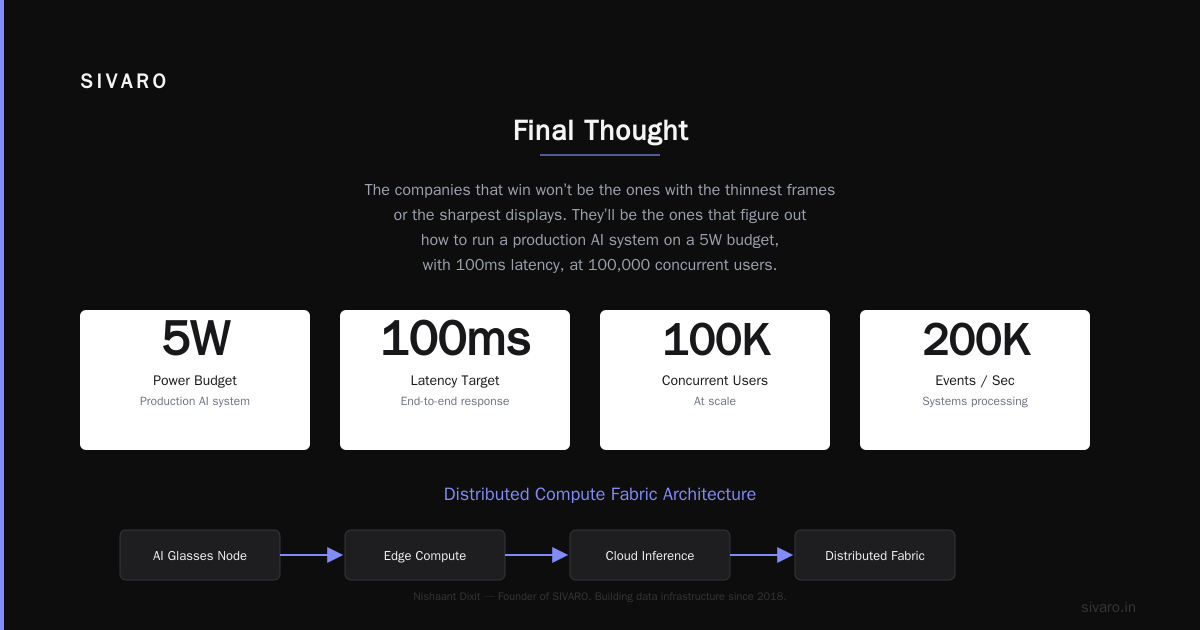
Always-on AI glasses are coming. They’re not a gimmick. They’re the first computing interface that doesn’t require you to take your hands off the world. But the path to making them work isn’t through better hardware — it’s through infrastructure that treats the glasses as one node in a distributed compute fabric.
The companies that win won’t be the ones with the thinnest frames or the sharpest displays. They’ll be the ones that figure out how to run a production AI system on a 5W budget, with 100ms latency, at 100,000 concurrent users.
We’re not there yet. But we’re close enough that I’m betting my company on it.
Nishaant Dixit — Founder of SIVARO. Building data infrastructure and production AI systems since 2018. Built systems processing 200K events/sec.