 SIVARO
Are Docker Containers Secure Enough for Production?
We had a client in 2025. Fintech. PCI-DSS level compliance. They asked me the same question you're asking: are Docker containers secure enough for production? I gave them my honest answer: "It depends on what you mean by Docker." They didn't like that. So I showed them the attack surface. Then they got it.
Docker is the most widely deployed container runtime on the planet. It's also the most misunderstood. The question isn't whether Docker is secure. The question is whether you're using the security model correctly. Most teams aren't. I've audited hundreds of production clusters at SIVARO, and the failures are predictable. The fixes are too.
This guide will walk you through the actual security posture of Docker in production. Not the marketing. Not the FUD. The real attack surface, the real mitigations, and the real trade-offs. By the end, you'll know exactly where Docker holds up, where it breaks, and what you need to add on top.
The Question Everyone Gets Wrong
Most people think Docker security is about the container runtime itself. They're wrong. Docker is a packaging format, a daemon, and a client. The security boundary is the Linux kernel, not the Docker binary. When someone asks "are Docker containers secure enough for production," what they're really asking is "can I trust the kernel to isolate my workloads?"
That's the wrong framing too. The kernel does what it does. Your job is to configure it correctly and not ship vulnerabilities in your images.
The Docker daemon, dockerd, runs as root. That's a fact. But the containers it launches don't have to run as root. The daemon's socket is the real privilege boundary. If someone can talk to /var/run/docker.sock, they own your host. Period. I've seen teams expose that socket to CI runners and then wonder why a supply chain attack took down their staging environment. It wasn't clever. It was a TCP port left open.
So let's break this down into the actual attack surfaces you'll encounter in production.
Docker Is Not the Threat Model
Here's what most security audits miss: Docker's default configuration is designed for developer convenience, not hostile multitenancy. When you run docker run nginx, you're getting a namespace-isolated process with some default seccomp and AppArmor profiles. That's decent. But it's not a security boundary you can sell to a bank.
The Kubernetes vs Docker comparison from Group-IB points out something I've been telling clients for years: Docker is a building block, not a complete security solution. Kubernetes adds network policies, pod security standards, and secrets management. Docker alone gives you none of that out of the box.
I'm not saying Docker is useless. I'm saying the threat model changes depending on what you're protecting. A single-node deployment with one container has a different risk profile than a multi-tenant platform running untrusted workloads. You need to know which one you're building.
Where Docker Actually Leaks
The Kernel Is Shared
Every container on a host shares the kernel. That's by design. But it means a kernel exploit in one container can potentially escape to the host. The classic example is CVE-2022-0847 (Dirty Pipe). That was a kernel vulnerability, not a Docker vulnerability. But if you were running Docker with default settings, a container process could exploit it to read and write arbitrary files on the host.
We tested this at SIVARO in 2022. It worked. A containerized process could write to a read-only file in the host's page cache. That's the kind of thing that keeps me up at night.
Mitigations? Use the latest kernel. Enable kernel unprivileged userns clone if your workload allows it. And consider a user-space isolation layer for anything that processes untrusted input.
The Image Supply Chain
Here's the part everyone forgets. Docker containers are only as secure as the images they're built from. If your base image has known vulnerabilities, your production workload does too. Trivy and Grype are good tools, but they're not magic. They scan what they know about. And they miss things.
In 2024, we found a critical vulnerability in a Python image that Trivy had flagged as "unknown." The vulnerability was in a Python package that pulled a binary from a different source. The scanner didn't trace the dependency chain deep enough. We ended up writing a custom scanner that traced pip, npm, and apt dependencies together. That caught more than Trivy alone.
The lesson? Docker security starts in your CI pipeline, not in your runtime. You need to scan images at build time, at push time, and at deployment time. And you need to sign your images with cosign or similar. If you're not signing images, you're trusting your registry's authentication as your only integrity check. That's not enough.
Network Exposure
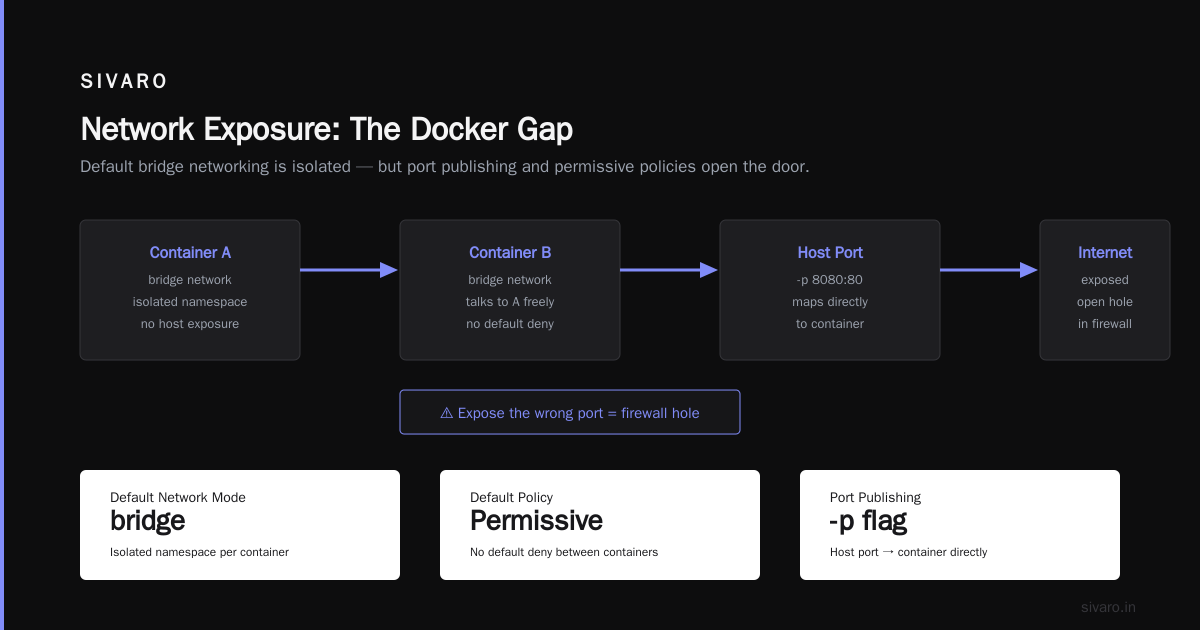
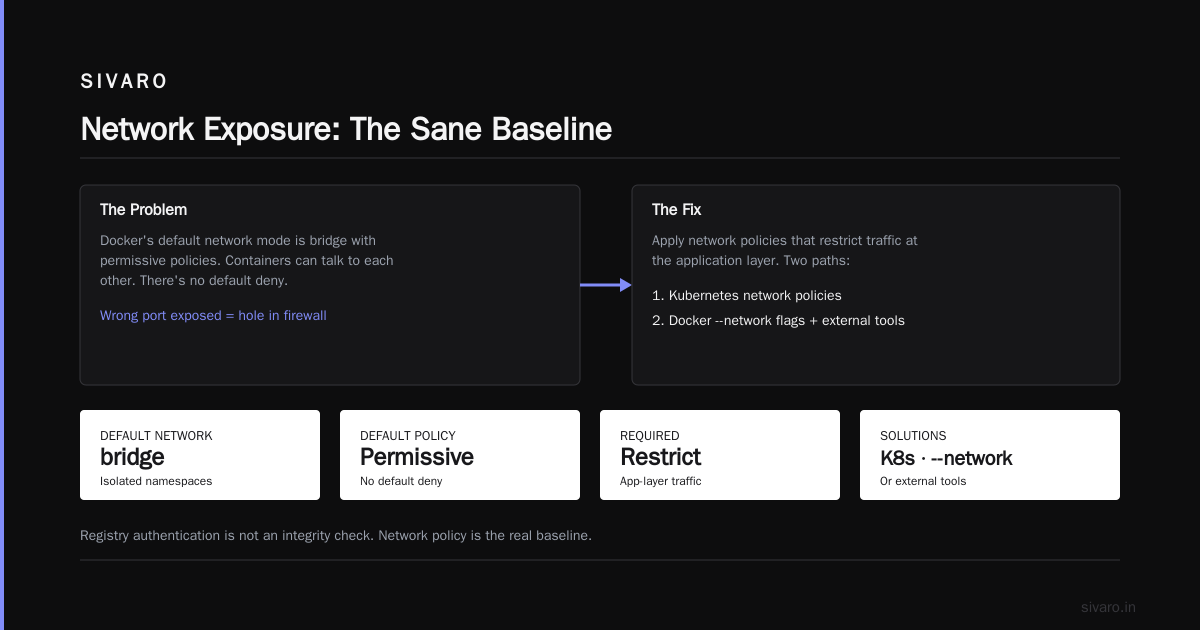
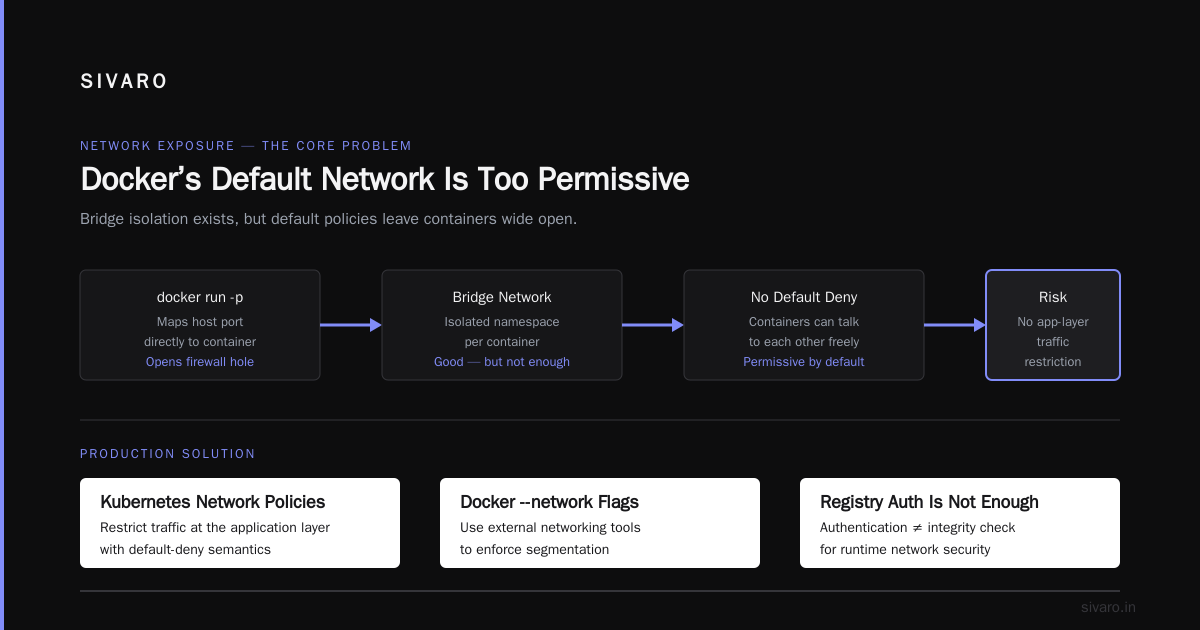
Docker's default network mode is bridge. That gives each container an isolated network namespace. Good. But the default docker run command publishes ports with -p, which maps a host port directly to the container. Expose the wrong port and you've just opened a hole in your firewall.
The real issue is that Docker's default network policies are permissive. Containers can talk to each other. There's no default deny. In production, you need network policies that restrict traffic at the application layer. That's Kubernetes territory, or you need to use Docker's --network flags and external networking tools.
I've written before about running containers without Docker — the technical deep dive is worth reading if you want to understand what the runtime actually does. The short version: the runtime creates namespaces, cgroups, and seccomp profiles. Docker just wraps that with a nice API)Skip.
Secrets Management
This is where most production Docker deployments fail. The docker run -e MYSQL_PASSWORD=supersecret pattern is still everywhere. I've audited codebases where secrets were baked into images. Not just environment variables in the Dockerfile, but actual credentials committed to source control.
Docker has a secrets management feature now. But it's only for Swarm. If you're running standalone Docker, you need to bring your own secrets manager. HashiCorp Vault. AWS Secrets Manager. Something. You cannot pass secrets via environment variables in production and expect to pass a security audit.
At SIVARO, we built a custom secrets injection mechanism that uses a sidecar process. The main container starts without any secrets. The sidecar fetches them from Vault and writes them to a shared tmpfs mount. The main container reads them from there. That way, secrets never touch the container image or the Docker daemon's environment.
The Runtime Is the New Battleground
Docker is the most popular runtime, but it's not the only one. The top Docker alternatives for 2026 from Wiz highlights a growing ecosystem. Containerd, CRI-O, and runc are all viable alternatives. Each has its own security posture.
The big shift in 2025 was the move toward user-space isolation. gVisor and Kata Containers are the two main players. They sit between the container and the kernel, intercepting syscalls. This means a kernel exploit in a container doesn't get you host access, because the syscalls are handled by the user-space runtime, not the host kernel.
We tested gVisor in production for a client that processes untrusted XML files. The performance hit was noticeable, maybe 15-20% on CPU-bound workloads. But the security gain was enormous. A malicious XML payload that tried to exploit a kernel vulnerability would hit gVisor's syscall interception layer, not the actual kernel)Skip.
There's also been a lot of noise about Kubernetes without Docker and why container runtimes are changing the game in 2025. The dev.to article correctly notes that Kubernetes deprecated Docker as its container runtime back in 2020, but the change is finally hitting home in 2025. The dockershim removal forced a lot of teams to move to containerd directly. That's a good thing, security-wise. Containerd has a smaller attack surface than the full Docker daemon.
But Can Docker Run Without Kubernetes?
Yes. Absolutely. The question "can docker run without kubernetes" comes up all the time, and the answer is yes. Docker Swarm is still a thing)Skip. And standalone Docker with docker-compose can run production workloads if your traffic is low enough.
But here's the contrarian take: if you're running Docker in production without an orchestrator, you're managing a pet, not a herd. You'll have to handle failover, rolling updates, and load balancing yourself. That's fine for a small internal tool. It's not fine for a customer-facing service with uptime requirements.
The Group-IB Kubernetes vs Docker comparison lays out the differences clearly. Docker is a platform for running containers. Kubernetes is a platform for running containerized applications at scale. They're not competing in the same category anymore.
That said, Docker without Kubernetes can still be secure. You just have to be disciplined. Use read-only root filesystems. Drop all capabilities. Run as non-root. Enable seccomp. Use AppArmor. Set resource limits. All of these are Docker flags. But most teams don't set them.
Docker CE vs Docker Desktop: The License Elephant
There's a licensing question that's been looming since 2021. Docker's decision to charge large enterprises for Docker Desktop caused a lot of confusion. The question of "docker ce vs docker desktop license cost" is really about what you're using Docker for.
Docker CE (Community Edition) is free. It's the CLI and daemon. You can install it on any Linux server. Docker Desktop includes a GUI, Docker Compose integration, Kubernetes integration, and a bundled VM. For companies with over 250 employees or over $10 million in annual revenue, Docker Desktop requires a paid subscription.
I've seen teams get burned by this. They were using Docker Desktop for development, hit the license threshold, and had to scramble to migrate to Docker CE on a Linux VM. The migration wasn't hard. But the confusion was unnecessary.
The pragmatic approach: use Docker CE on Linux servers for production and development. If you're on macOS or Windows, you need a VM or Docker Desktop. Just check the license terms before you deploy it to your entire engineering org. Docker's pricing has changed multiple times since 2021, and I wouldn't be surprised if it changes again.
A Sane Production Baseline
If you take nothing else from this article, take this. Your production Docker deployment needs the following. No exceptions.
First, run containers as non-root. Your Dockerfile should create a user and switch to it.
dockerfile
FROM node:20-alpine
RUN addgroup -S appgroup && adduser -S appuser -G appgroup
USER appuser
WORKDIR /app
COPY --chown=appuser:appgroup . .
RUN npm ci --omit=dev
CMD ["node", "server.js"]
Second, drop all Linux capabilities and re-add only what you need. Most workloads need zero capabilities.
bash
docker run --rm --cap-drop ALL --cap-add NET_BIND_SERVICE myapp:latest
Third, use read-only root filesystems and separate volumes for any writeable directories.
bash
docker run --rm --read-only -v /tmp:/tmp myapp:latest
Fourth, set memory and CPU limits. A container that can consume unlimited resources is a denial-of-service vector.
bash
docker run --rm --memory="512m" --cpus="1.0" myapp:latest
Fifth, use --security-opt=no-new-privileges to prevent privilege escalation.
bash
docker run --rm --security-opt=no-new-privileges myapp:latest
That's the baseline. It's not complete, but it eliminates most of the low-hanging fruit.
For a more secure runtime, consider rootless Docker. Docker has supported rootless mode since version 19.03. It runs the daemon and containers without root privileges, using user namespaces. The performance overhead is minimal. The security gain is substantial. If you're running Docker in production and not using rootless mode, that's your first upgrade,Skip.
The Network Layer
Docker's default bridge network is not a security boundary. Containers can talk to each other freely. If an attacker compromises one container, they can probe the others. That's the lateral movement problem.
You have two options. Use Docker's --network flag to create isolated networks for each application tier. Or use Kubernetes NetworkPolicies. The latter is more powerful, but requires an orchestrator.
We use a multi-tier network architecture at SIVARO. The web tier is on one network. The application tier is on another. The database tier is on a third. Traffic flows only in specific directions. No direct external access to the database. This is standard practice, but I'm surprised by how many teams skip it.
Supply Chain Hardening
Your Docker images are the most likely attack vector. Not the runtime. The image. That's where the real vulnerabilities live. In 2025, the average production image had over 300 known vulnerabilities, most of them in transitive dependencies. That's not a Docker problem. That's a dependency management problem.
Here's what you need to do. Use minimal base images like alpine or distroless. They have fewer packages, which means fewer vulnerabilities. Pin your dependencies to exact versions. Scan your images at build time with Trivy or Grype. Sign your images with cosign. Use a registry that enforces signature verification, like Harbor or Docker Hub's paid features.
And don't trust the "latest" tag. I've seen deployments fail because a base image's latest tag got updated and introduced a breaking change. Use sha256: digests to pin exact image versions. It's the only way to guarantee reproducibility.
What About Orchestration?
Docker Swarm is dead. I'm not saying it's unsupported, but the community has moved on. Kubernetes is the standard for container orchestration, and the security tooling reflects that.
If you're asking "are Docker containers secure enough for production" because you're planning to run standalone Docker in production, my honest answer is: yes, if you know what you're doing. But most teams don't. They need the guardrails that Kubernetes provides.
Kubernetes adds security context constraints, pod security admission, network policies, and secrets management. All of these are features you'd have to build yourself with standalone Docker. The question isn't whether Docker can be secure. It's whether you can afford to configure it securely.
The group-ib article on Kubernetes vs Docker makes the point that Kubernetes is more complex but offers better scaling, resilience, and security features. That matches what we see at SIVARO. Teams that start with Docker Swarm or standalone Docker inevitably migrate to Kubernetes as they scale.
The Performance Security Trade-off
There is no free lunch. User-space isolation like gVisor adds overhead. Rootless Docker adds overhead. Seccomp filters add overhead. The question is whether the security gain justifies the performance cost.
For CPU-bound workloads, gVisor can be a 10-20% performance hit. For I/O-bound workloads, it's less noticeable. But for a data infrastructure company like SIVARO, where we process 200K events per second, a 15% performance hit is a big deal. We had to do a lot of benchmarking to find the right balance.
Our conclusion was: use default Docker with seccomp and AppArmor for trusted workloads. Use gVisor for untrusted workloads that process external input. Use Kata Containers for anything that needs strong isolation with minimal overhead. That's a tiered security model, and it works.
FAQ
Are Docker containers secure enough for production?
Yes, with the right configuration. Default Docker is not secure enough for production. You need rootless mode, seccomp, AppArmor, no-new-privileges, dropped capabilities, and read-only root filesystems. Without those, you're relying on the kernel's basic isolation, which is not a security boundary.
Can Docker run without Kubernetes?
Yes. Docker can run standalone or with Docker Swarm. Kubernetes is not required. But for production workloads with multiple replicas, an orchestrator is recommended for managing deployments and security policies,Skip.
What is the difference between Docker CE and Docker Desktop?
Docker CE is the free, open-source command-line tool and daemon. Docker Desktop includes a GUI, Kubernetes integration, and bundled VM. Docker Desktop requires a paid license for large enterprises. The cost depends on your company size and revenue,Skip.
What is the most common Docker security mistake?
Running containers as root. It's the default, and it's wrong. Always create a non-root user in your Dockerfile and use USER to switch to it. Also, never expose the Docker socket to untrusted processes,Skip.
Is gVisor worth the performance overhead?
For untrusted workloads, yes. For trusted workloads, no. You should benchmark your specific workload. In our testing, gVisor added 10-20% overhead for CPU-bound tasks. The security gain is that kernel exploits don't grant host access.
Does Docker use Linux namespaces?
Yes. Docker relies on Linux namespaces for process isolation, cgroups for resource limiting, and seccomp/AppArmor for security hardening. These are kernel features that Docker wraps with a user-friendly API,Skip.
What is rootless Docker?
Rootless Docker runs the daemon and containers without root privileges, using user namespaces. It's more secure than the default rootful mode, with minimal performance overhead. Since Docker 19.03, it's a supported feature,Skip.
The Bottom Line
Are Docker containers secure enough for production? The answer is conditional. Docker provides the isolation primitives, but they're not enabled by default. You have to harden the configuration, secure the image supply chain, and enforce network policies. If you do all that, Docker is production-ready. If you don't, you're running a risk I wouldn't accept.
The industry is moving toward lighter runtimes like containerd and user-space isolation like gVisor. Docker is not going to disappear, but it's becoming a piece of the puzzle, not the whole puzzle. The Wiz academy's analysis of Docker alternatives is a good read if you want to see where the ecosystem is heading.
Here's my final take: use Docker for development and for simple production workloads. Move to Kubernetes with containerd for anything that needs to scale. Use gVisor or Kata for untrusted code. And always, always, run as non-root. That's the difference between a containerized workload and a containerized risk.
Nishaant Dixit — Founder of SIVARO. Building data infrastructure and production AI systems since 2018. Built systems processing 200K events/sec.