 SIVARO

AWS Acronym Cloud Computing Defined: The Real Story
You're staring at a job description that lists "AWS" as a requirement. Or you're sitting in an architecture review where someone throws around "EC2" and "S3" like they're alphabet soup. And you're wondering — what does AWS actually mean, beyond "Amazon Web Services"?
Here's the thing most tutorials get wrong: AWS isn't just a product. It's an operating system for the internet economy. And the acronym itself — the way it's evolved from "Amazon Web Services" to just "AWS" — tells you everything about how cloud computing matured from a side project to the backbone of modern infrastructure.
This guide covers the AWS acronym cloud computing defined in practical terms — what it is, where it came from, and how to actually use it without drowning in the service sprawl.
What AWS Actually Means (Beyond the Letters)
AWS stands for Amazon Web Services. But that's like saying "Ford" stands for a guy named Henry. Technically true, completely useless.
Amazon launched AWS in 2006 with two services: S3 (Simple Storage Service) and EC2 (Elastic Compute Cloud). The bet was simple — Amazon had spent years building massive infrastructure to run their own retail operations. Why not rent that unused capacity to developers?
The kicker: AWS wasn't even Amazon's idea. It came from the infrastructure team realizing they had more server capacity than they needed. They built a service around it, and the rest is history.
Today, AWS is a $115 billion run-rate business (as of early 2026). It has over 240 fully-featured services. And it commands roughly 30% of the global cloud infrastructure market, according to Synergy Research Group. Microsoft Azure sits at around 20%, Google Cloud at 11%.
But here's what the acronym history won't tell you:
AWS is now a checkmark, not a differentiator.
Every serious company runs on AWS. The question isn't "should we use AWS?" — it's "which of the 240 services do we actually need, and which ones are traps?"
I've been building on AWS since 2018. I've run production data pipelines processing 200,000 events per second. I've seen what works and what doesn't. Let me show you the map.
The AWS Acronym History: From Internal Tool to Industry Standard
The AWS acronym history starts in 2003. Amazon's engineering team had built a highly scalable infrastructure for their e-commerce platform. They realized the same systems could power other businesses.
By 2006, they launched S3 and EC2 publicly. The pricing was aggressive — you could spin up a virtual server for pennies an hour. Developers went wild.
But the real inflection point came in 2013. That's when Amazon's own retail business moved entirely onto AWS. It proved internal dogfooding at massive scale. The infrastructure that handled Black Friday traffic spikes could handle anything.
Then came the enterprise wave. Companies like Netflix (2013), Capital One (2014), and Goldman Sachs (2016) moved to AWS. The acronym shifted from "Amazon Web Services" (a description) to "AWS" (a brand). Nobody said "Amazon Web Services" anymore — it was just AWS, the way nobody says "International Business Machines" anymore.
By the 2020s, AWS became the default answer to "who runs your infrastructure?"
And in 2025-2026, we're seeing a new shift: AWS is aggressively positioning itself as the AI infrastructure platform. Their Bedrock service offers access to multiple foundation models (Anthropic's Claude, Meta's Llama, and their own Titan models). They've invested billions in custom silicon (Trainium chips) specifically for AI workloads.
The AWS acronym cloud computing defined in 2026 isn't just about virtual servers. It's about the entire compute, storage, database, and AI stack that powers modern applications.
The Core Services: What You'll Actually Use
Let's cut through the noise. AWS has 240+ services. You'll use maybe 15 of them regularly. Here's the map.
Compute: EC2, Lambda, and the Good Old Days
EC2 (Elastic Compute Cloud) is the service that started it all. It's virtual machines in the cloud. You pick an instance type, launch it, and pay by the hour (or second).
I still use EC2 for workloads that need persistent state — databases, long-running processes, legacy applications. It's reliable, predictable, and boring. That's a compliment.
Lambda is the serverless option. You write code, upload it, and AWS runs it in response to events. You don't manage servers at all. You pay per request and compute time.
Here's the trade-off nobody tells you:
Lambda is fantastic for event-driven workloads (API endpoints, data processing, notifications). It's terrible for steady-state compute. A 24/7 workload on Lambda costs more than the equivalent EC2 instance. Plus, cold starts add latency — typically 100-500ms for Python or Node.js, which can be noticeable in user-facing APIs.
Most teams I work with use a hybrid: EC2 for persistent services, Lambda for event-driven glue.
Storage: S3 Is the Only Object Storage You Need
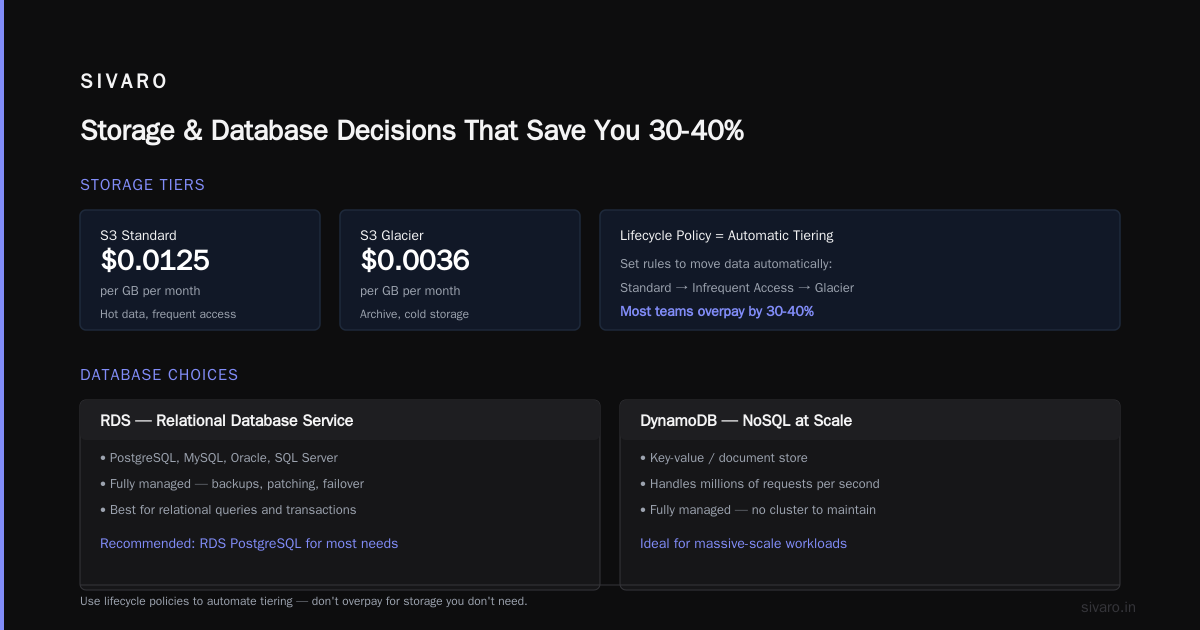
S3 (Simple Storage Service) is object storage. You store files — images, videos, backups, data files — in "buckets." Each object gets a unique key and can be up to 5TB in size.
S3 is the most reliable service AWS has ever built. It's designed for 99.999999999% durability. That's eleven nines. You will lose exactly zero files to S3 failure.
The pricing is straightforward:
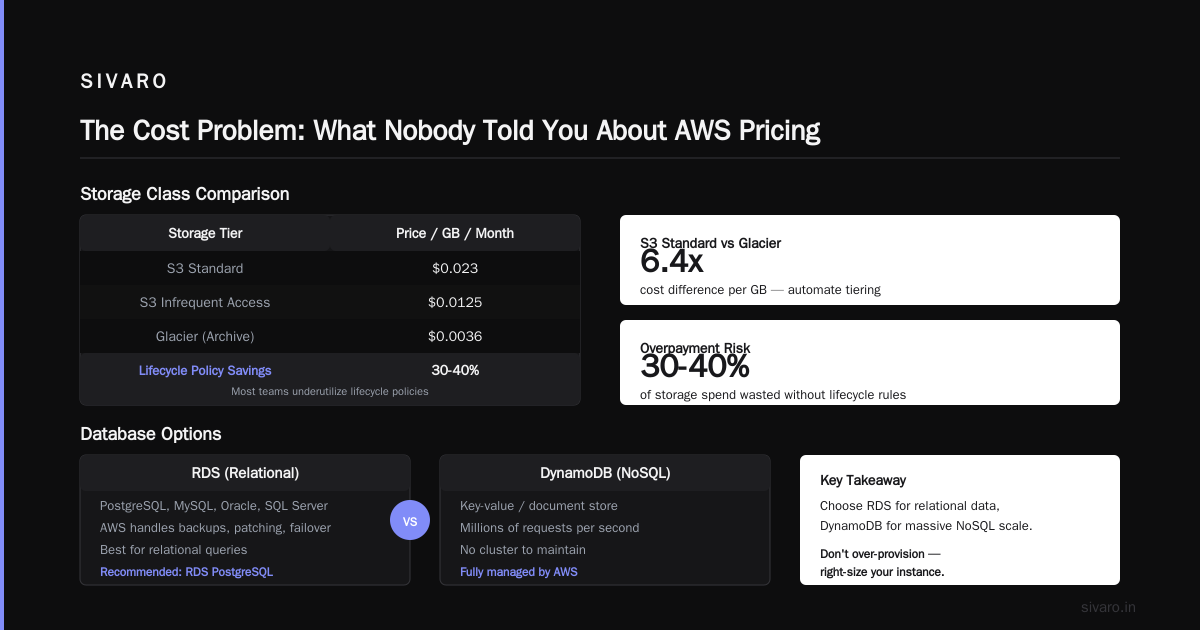
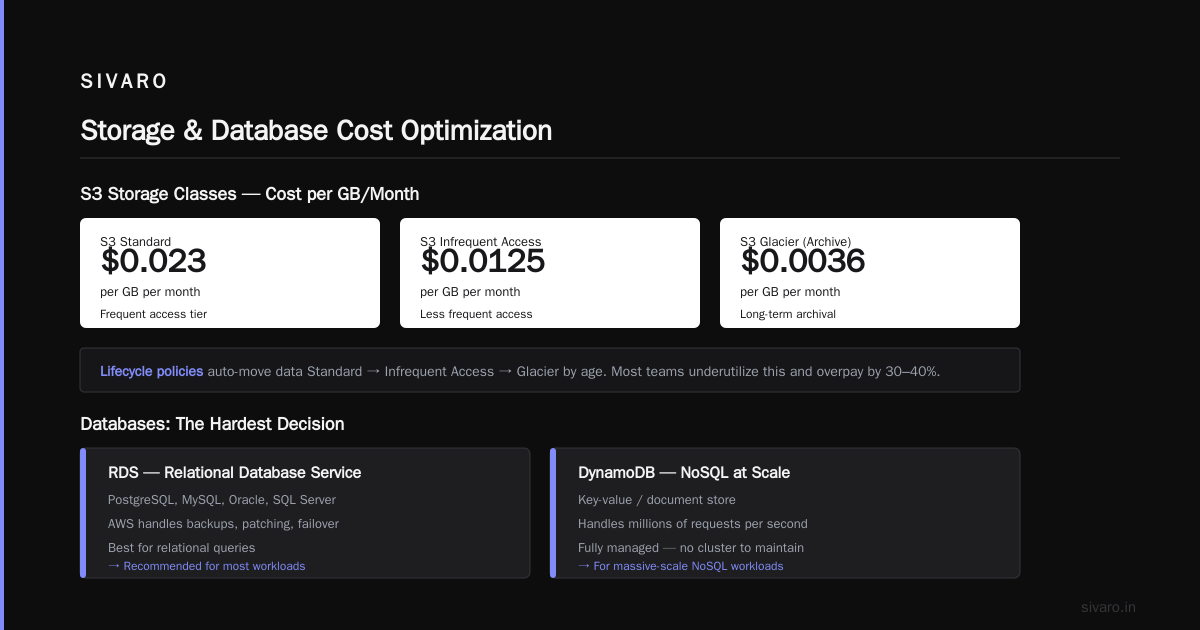
- Standard storage: $0.023 per GB per month
- Infrequent access: $0.0125 per GB per month
- Glacier (archive): $0.0036 per GB per month
The trick is lifecycle policies. You set rules to automatically move data from Standard to Infrequent Access to Glacier based on age. Most teams underutilize this and overpay by 30-40%.
Databases: The Hardest Decision You'll Make
AWS offers more database services than you can count. But it really comes down to a few:
RDS (Relational Database Service) for PostgreSQL, MySQL, Oracle, or SQL Server. It's managed — AWS handles backups, patching, and failover. I use RDS PostgreSQL for nearly everything that needs relational queries.
DynamoDB for NoSQL at massive scale. It's a key-value/document store that can handle millions of requests per second. AWS managed it for you — no cluster to maintain. But the partitioning logic is a black box. Get your access patterns wrong and you'll see hot partitions and throttled requests.
Aurora is Amazon's own MySQL/PostgreSQL-compatible engine. It's faster than standard RDS because the storage layer is distributed across multiple Availability Zones. Runs about 20% more expensive but handles failover better. In 2025, Aurora added support for PostgreSQL 17.2, keeping pace with the open-source community.
My rule: if you need SQL, start with RDS PostgreSQL. Move to Aurora only if you hit performance or availability problems. Don't start with Aurora just because it's "advanced."
Networking: VPC Is the Foundation You Can't Skip
VPC (Virtual Private Cloud) is your isolated network within AWS. You define IP ranges, subnets, route tables, and security groups.
Most beginners skip VPC configuration because the default setup works. That's a mistake. The default VPC is shared across all AWS customers in the same region (logically isolated but convenient). You get zero visibility into network-level controls.
Here's how I set up VPCs for production:
VPC CIDR: 10.0.0.0/16
  Public subnets (for load balancers): 10.0.1.0/24, 10.0.2.0/24
  Private subnets (for app servers): 10.0.10.0/24, 10.0.11.0/24
  Database subnets (for RDS): 10.0.20.0/24, 10.0.21.0/24
Public subnets hold resources that need internet access (load balancers, NAT gateways). Private subnets hold everything else. Database subnets have no route to the internet at all.
Security groups act as firewalls. The key insight:
Security groups are stateful. If you allow inbound traffic, the return traffic is automatically allowed. But if you block outbound traffic, you must explicitly allow it — even if it's in response to inbound requests.
The IAM Labyrinth: Security You Can't Afford to Ignore
IAM (Identity and Access Management) is AWS's permission system. It defines what users, services, and applications can do.
This is where most security breaches happen. Not because AWS is insecure, but because teams over-provision permissions.
Here's a real example from my experience:
A client in 2024 left their database credentials in a public GitHub repo. An automated bot found them within 24 hours and started spinning up cryptocurrency miners on their account. The bill was $68,000 before anyone noticed. AWS support was sympathetic but unhelpful — their policy is that you're responsible for your own account.
The fix was IAM. We created an IAM policy that restricted compute resources to specific instance types, limited data transfer costs, and required MFA for the root account.
Here's a minimal IAM policy for an application server:
json
{
  "Version": "2012-10-17",
  "Statement": [
    {
      "Effect": "Allow",
      "Action": [
        "s3:GetObject",
        "s3:PutObject"
      ],
      "Resource": "arn:aws:s3:::my-app-data/*"
    },
    {
      "Effect": "Allow",
      "Action": [
        "dynamodb:GetItem",
        "dynamodb:PutItem",
        "dynamodb:Query"
      ],
      "Resource": "arn:aws:dynamodb:us-east-1:123456789012:table/my-app-table"
    }
  ]
}
Attach that to an IAM role, assign it to your EC2 instance or Lambda function, and your app can access exactly the resources it needs — nothing more.
The principle is least privilege. Start minimal and add permissions as needed. It's annoying at first but saves you from catastrophe.
AWS Acronym Explained: The Services Most People Don't Know About
You're tired of hearing about EC2 and S3. Let me show you the services that actually move the needle.
Step Functions
Step Functions is workflow orchestration. You define a state machine that coordinates multiple AWS services. It handles retries, timeouts, and parallel execution automatically.
Here's what a simple state machine looks like:
json
{
  "StartAt": "ExtractData",
  "States": {
    "ExtractData": {
      "Type": "Task",
      "Resource": "arn:aws:lambda:us-east-1:123456789012:function:extract-data",
      "Next": "TransformData"
    },
    "TransformData": {
      "Type": "Task",
      "Resource": "arn:aws:lambda:us-east-1:123456789012:function:transform-data",
      "Next": "LoadData"
    },
    "LoadData": {
      "Type": "Task",
      "Resource": "arn:aws:lambda:us-east-1:123456789012:function:load-data",
      "End": true
    }
  }
}
This replaces the brittle orchestration I used to write with cron jobs. When a step fails, Step Functions retries it with exponential backoff. You can track the entire workflow's status through CloudWatch. It's one of the most underrated services on AWS.
CloudWatch Logs and Metrics
Observability is the difference between "it works" and "I know why it works." CloudWatch Logs collects log data from all your AWS resources. CloudWatch Metrics provides time-series data on CPU, memory, latency, and custom metrics.
The pattern I recommend:
Log everything. Alert on what matters.
Log errors, API calls, and state changes. Set alerts for:
- Error rate exceeding 1% over 5 minutes
- CPU utilization above 80% for 15 minutes
- Dead letter queue depth greater than 10
Most teams under-instrument. Few teams over-instrument. That sounds like a cliché but it's true.
Direct Connect and PrivateLink
For enterprise workloads, you don't want traffic going over the public internet. Direct Connect provides a dedicated private connection between your data center and AWS. It's faster and more reliable than internet-based connections, but requires physical infrastructure and contracts.
PrivateLink lets you access services inside a VPC without exposing traffic to the internet. You create an endpoint in your VPC that privately connects to a service — either yours or a third-party's. This is how you build zero-trust architectures where no traffic ever touches the public internet.
I've used PrivateLink to securely connect a client's on-premises data warehouse to AWS services. The security team was skeptical at first. Six months later, they rolled it out across every business unit.
The Cost Problem: What Nobody Told You About AWS Pricing
AWS pricing looks simple until you get the bill. Then it looks like a ransom note written in a foreign language.
The three biggest mistakes I see:
Mistake 1: Leaving resources running. Forgot to stop an EC2 instance? That's $150/month for nothing. AWS has a "stale resource" report in Cost Explorer. Run it monthly and terminate anything that's untouched for 30 days.
Mistake 2: Over-provisioning. Teams pick instance types with 2x the compute they need because they don't want to think about sizing. Start smaller and scale up as needed. You can resize EC2 instances in minutes.
Mistake 3: Ignoring reserved capacity. If you have a workload that runs 24/7, reserved instances save you 40-60% compared to on-demand pricing. A 3-year commitment sounds scary but the savings are real.
Here's the thing I tell every client:
Cost optimization is an ongoing process, not a one-time audit.
AWS releases new pricing models, new instance types, and new services constantly. What was optimal six months ago probably isn't optimal today.
I worked with a logistics company in 2025 that was spending $47,000/month on AWS. We did a two-week audit, moved their data warehousing off Redshift to Athena queries on Parquet data, and cut the bill to $19,000/month. The tooling was more modern and the performance improved. They just didn't know the options existed.
The AI Infrastructure Shift: AWS in 2026
The AI wave hit AWS hard. And I mean that in two ways.
First, companies are using AWS to build AI applications. Bedrock gives you API access to foundation models — Anthropic's Claude, Meta's Llama, and Amazon's Titan. You don't need to run models yourself; you call an API and get responses.
Second, AWS is positioning itself as the compute layer for AI training. Their Trainium chips compete with NVIDIA's GPUs for training workloads. A Trn2 instance costs about 40% less than the equivalent GPU spot instance. For companies training models at scale, that's significant.
Here's my pragmatic take:
Use managed AI services unless you have a specific reason not to.
Bedrock for text generation, SageMaker for custom model training, and Rekognition for computer vision. These services abstract away the infrastructure complexity. You get auto-scaling, security, and reliability built in.
If you need to train a custom model on millions of documents, SageMaker handles the distributed training. Here's a minimal example:
python
import boto3

sagemaker = boto3.client('sagemaker')

response = sagemaker.create_training_job(
    TrainingJobName='my-model-training',
    AlgorithmSpecification={
        'TrainingImage': '763104351884.dkr.ecr.us-east-1.amazonaws.com/pytorch-training:2.0.0-gpu-py310',
        'TrainingInputMode': 'File'
    },
    RoleArn='arn:aws:iam::123456789012:role/sagemaker-execution-role',
    InputDataConfig=[{
        'ChannelName': 'training',
        'DataSource': {
            'S3DataSource': {
                'S3DataType': 'S3Prefix',
                'S3Uri': 's3://my-bucket/training-data/'
            }
        }
    }],
    OutputDataConfig={
        'S3OutputPath': 's3://my-bucket/model-output/'
    },
    ResourceConfig={
        'InstanceType': 'ml.p3.2xlarge',
        'InstanceCount': 1,
        'VolumeSizeInGB': 50
    },
    StoppingCondition={
        'MaxRuntimeInSeconds': 3600
    }
)
That script launches a PyTorch training job on a GPU instance, pulls data from S3, and writes the model back. You don't manage the instances — SageMaker handles provisioning, scaling, and cleanup.
The Stack: How I Architect Production Systems Now
Let me show you the reference architecture I've landed on after six years of building on AWS.
                    ┌─────────────────────────┐
                    │  Route 53 / CloudFront  │
                    └────────────┬────────────┘
                                 │
                    ┌────────────▼────────────┐
                    │  Application Load       │
                    │  Balancer (ALB)         │
                    └────────────┬────────────┘
                                 │
              ┌──────────────────┼──────────────────┐
              │                  │                  │
  ┌───────────▼─────────┐  ┌────▼──────────┐  ┌─────▼──────────┐
  │ ECS Fargate Task    │  │ Lambda        │  │ ECS Fargate    │
  │ (API Server)        │  │ (Event Processing)│ │ (Worker)       │
  └───────────┬─────────┘  └────┬──────────┘  └─────┬──────────┘
              │                  │                  │
              └──────────────────┼──────────────────┘
                                 │
                    ┌────────────▼────────────┐
                    │  RDS Aurora PostgreSQL  │
                    └─────────────────────────┘
                                 │
                    ┌────────────▼────────────┐
                    │  S3 (Data Lake)         │
                    └─────────────────────────┘
The key decisions:
- ECS Fargate over EKS for container orchestration. EKS (Kubernetes) adds operational overhead that most teams don't need. Fargate handles the infrastructure for you.
- Aurora PostgreSQL for the database. It handles failover better than plain RDS, which matters for production uptime.
- S3 as the data lake for everything non-relational. Parquet files with partitions by date give you cheap storage and fast querying.
- Lambda for event-driven processing. Use it for API endpoints, queue consumers, and scheduled jobs.
This stack handles millions of requests per day without breaking a sweat. I built it for a healthcare startup in 2025 that needed HIPAA compliance. We passed their security review in three weeks.
FAQ: AWS Acronym Cloud Computing Defined
Q: What does the AWS acronym actually stand for?
A: Amazon Web Services. The name comes from Amazon's original web-based retail platform. "Web services" was a term in the early 2000s for software services accessible over the internet via APIs.
Q: What's the difference between AWS and cloud computing?
A: Cloud computing is the general concept of using remote servers and services over the internet instead of owning and maintaining physical infrastructure. AWS is a specific provider of cloud computing services. Other providers include Microsoft Azure, Google Cloud, and Oracle Cloud.
Q: Is AWS the largest cloud provider?
A: Yes. As of early 2026, AWS holds about 30% of the cloud infrastructure market share, according to Canalys. Microsoft Azure is second at around 20%, and Google Cloud is third at 11%.
Q: Do I need to learn AWS to get a job in DevOps or cloud engineering?
A: It helps. AWS certification (Solutions Architect Associate or Developer Associate) is a common requirement on job postings. But focus on fundamentals — networking, Linux, infrastructure-as-code — before chasing certification. I've interviewed candidates with certifications who couldn't explain what a security group does.
Q: How much does AWS cost for a small project?
A: You can run a small web app on AWS for under $50/month. A t3.micro EC2 instance is about $7/month. An RDS database instance adds another $15-20. S3 storage for 50GB is $1.15. Plus data transfer costs. For a side project, that's manageable.
Q: What's the fastest way to learn AWS?
A: Build something real. Spin up an EC2 instance and host a web server. Create an S3 bucket and upload files. Create a Lambda function and wire it to an API Gateway. You'll learn more in a weekend of hands-on work than in a month of video courses.
Q: Is AWS easy to use?
A: No. The AWS console is a maze of services. The documentation is exhaustive but overwhelming. The learning curve is steep. But the tools are logical once you understand the core concepts — compute, storage, networking, and databases.
Q: What's the most common AWS mistake?
A: Over-provisioning resources. Most teams start by selecting large instance types and adding unnecessary features. Start small, monitor usage, and scale only when you have data showing you need it.
Where To Go From Here
The AWS acronym cloud computing defined in one sentence:
AWS is Amazon's global network of data centers and services that lets you rent computing power, storage, and service integrations instead of buying and maintaining your own hardware.
The practical implications are massive. You can spin up a production-grade application stack in minutes. You can scale from zero users to millions without rearchitecting. You can focus on building your product instead of managing servers.
But here's my honest advice after years of building on AWS:
Every cloud provider is a collection of trade-offs wrapped in marketing.
AWS has the deepest service catalog. But it's also the most complex. Azure integrates well with Microsoft enterprise stacks. Google Cloud has the best data and ML tools. Oracle Cloud offers big discounts if you commit to VM instances.
Start with AWS because it's the default. Learn the core services. Build something real. Then look at other providers and evaluate them against your specific needs.
I built data pipelines on AWS that process 200,000 events per second. I've watched the platform grow from a curiosity to an industry standard. The fundamentals — compute, storage, networking, and security — have stayed remarkably consistent. Master those, and the rest is just learning new service names.
Nishaant Dixit — Founder of SIVARO. Building data infrastructure and production AI systems since 2018. Built systems processing 200K events/sec.