 SIVARO
AWS Acronym Exhaustion? A Field Guide for Builders
Look, I get it. You're staring at a CloudFormation template and wondering if AWS::EC2::VPC::CIDR is a real thing or a joke someone played on the internet. The acronym soup in AWS is so deep that I've seen senior engineers at SIVARO spend twenty minutes debugging an IAM policy only to realize they mixed up EBS and EFS in a script. It happens.
This is my attempt to cut through the noise. Not a textbook reference. Not a glossary dump. A practitioner's map of the AWS acronyms that actually matter when you're building distributed systems and production AI infrastructure. The stuff that keeps you up at night when your training job stalls or your data pipeline breaks.
I've spent eight years building data infrastructure on AWS. I've made the mistakes so you don't have to. This guide covers the acronyms in the order you'll actually encounter them, not alphabetically. You'll finish with a practical understanding you can use. Nobody cares if you can recite the AWS service catalog; they care if you can ship.
Here's what we're covering: the storage and compute identifiers you'll touch daily, the network acronyms that trip up everyone, the AI and machine learning alphabet soup that's growing by the week, and the tools like the AWS pricing calculator that you should already be using.
The Toy Alphabet: Storage, Compute, and the Services You Can't Avoid
Let's start with the services you'll hit in week one.
EC2 is Elastic Compute Cloud. Virtual machines. You spin them up, you pay for them, you forget to terminate them, you get a surprise bill. Everyone has a parking-lot story about leaving a c5.24xlarge running over a weekend. Don't be that person.
S3 is Simple Storage Service. Object storage that scales to exabytes. It's not a filesystem, no matter how much you want it to be. I've seen teams try to run MySQL on S3-backed volumes using EBS-optimized instances. That's not what S3 is for. Use it for data lakes, model artifacts, backups, and static content. Know the difference between S3 Standard, Intelligent-Tiering, and Glacier. Your costs depend on it.
EBS is Elastic Block Store. This is your virtual hard drive attached to an EC2 instance. It's block storage, designed for a single instance. If you need multi-attach, look at EFS or FSx instead.
EFS is Elastic File System. Shared file storage for Linux instances. FSx extends this to Windows and Lustre workloads. If you're doing HPC or high-throughput data processing, FSx for Lustre is worth a serious look.
RDS is Relational Database Service. Managed Postgres, MySQL, Oracle, SQL Server. Use it. Don't run your own database on EC2 unless you have a very good reason. The operational overhead of patching, backups, and failover simply isn't worth the savings.
DynamoDB is their NoSQL key-value store. Single-digit millisecond latency at scale. I've seen engineers reach for it first because "NoSQL is cool" when they should've used RDS. Both have trade-offs. Pick based on your access patterns, not hype.
Lambda is Functions-as-a-Service. Serverless compute. It's great for event-driven work and integrations. But it's not a substitute for a proper container orchestration system when you have long-running workloads. Cold starts are real. Timeout limits are real. Don't force everything through Lambda.
Kinesis is stream processing. Data ingestion at scale. Good for clickstreams, logs, IoT telemetry. If you're building real-time data pipelines, this is the hub you'll rely on.
SQS and SNS are message queue and pub/sub. SQS is for decoupling microservices. SNS is for fan-out to multiple subscribers. They're simple, they work, and they're cheaper than trying to run Kafka yourself. But if you need replay, ordering, or a long retention window, you'll end up looking at Kafka or MSK. Yes, MSK is Managed Streaming for Apache Kafka. Another acronym for the pile.
The Network Stack: Where VPC Meets Reality
Networking is where I see the most confusion. It's also where misconfigurations cause the most expensive outages.
VPC is Virtual Private Cloud. Your logically isolated section of AWS. Inside it, you create subnets in availability zones.
AZ is Availability Zone. Think of it as a distinct data center within a region. For high availability, you deploy across multiple AZs. It's straightforward until you realize data transfer between AZs costs money. At scale, those pennies add up. We processed 200K events per second across three AZs at one point and the inter-AZ transfer costs were astonishing.
CIDR is Classless Inter-Domain Routing. It's how you define IP address ranges. 10.0.0.0/16 is a common VPC CIDR. In hindsight, we picked a /16 and felt like kings until we ran out of IP space in a year. Plan ahead. Seriously.
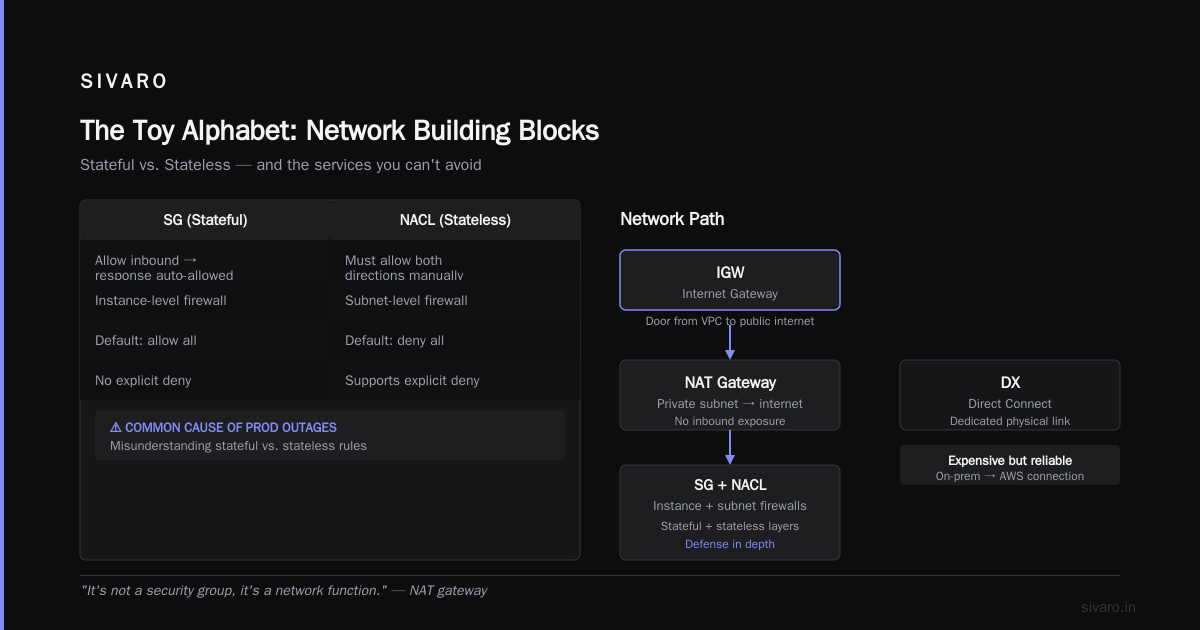
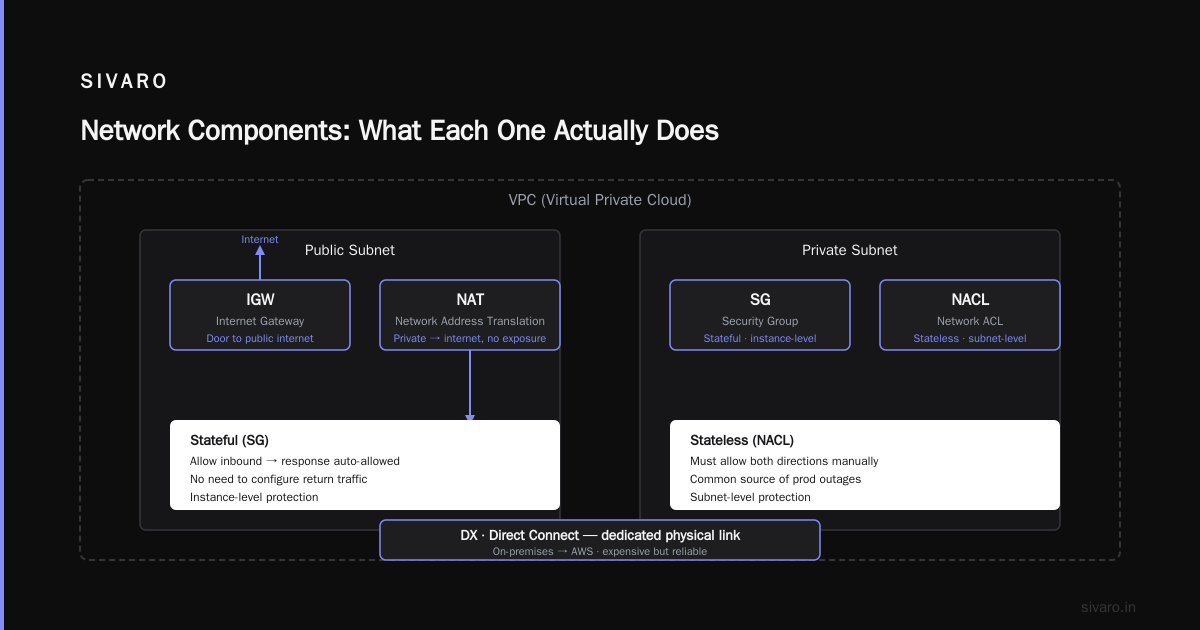
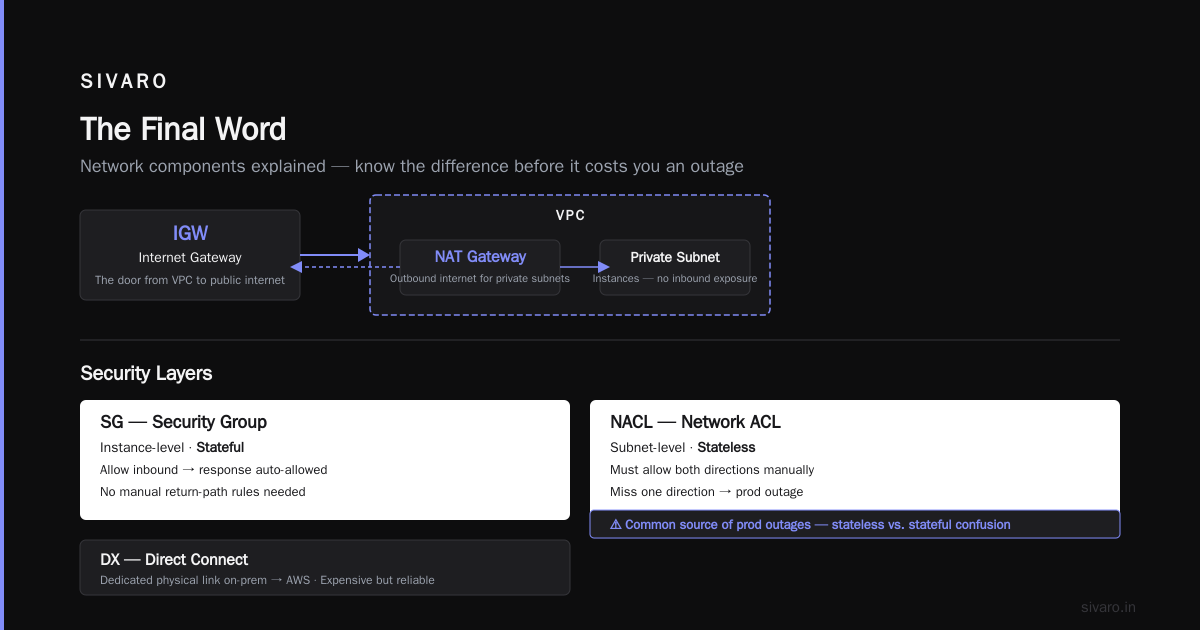
NAT is Network Address Translation. A NAT gateway lets instances in private subnets reach the internet without exposing them to incoming traffic. It's not a security group, it's a network function.
IGW is Internet Gateway. The door from your VPC to the public internet.
SG is Security Group. Your stateful firewall at the instance level. NACL is Network Access Control List — your stateless, subnet-level firewall. The difference matters. Stateful means if you allow inbound, the response is automatically allowed. Stateless means you have to allow both directions manually. This is a common source of prod outages.
DX is Direct Connect. A dedicated physical network link from your on-premises data center to AWS. It's expensive but gives you consistent latency and throughput. For regulated industries or serious hybrid-cloud setups, it's worth the cost.
ELB is Elastic Load Balancer. But the subtle part is Modern Load Balancers. The older CLB (Classic Load Balancer) is practically deprecated. You'll use ALB for HTTP/HTTPS traffic and NLB for TCP/UDP at massive scale. Know the difference. If you're routing gRPC traffic, NLB is your friend.
The AI Alphabet: SageMaker, Inferentia, and the ML Acronym Soup
This is the part of the ecosystem that's growing fastest, and it's the most acronym-dense area I know. It's also where I've spent the most time building production AI systems.
SageMaker is Amazon's managed ML platform. It covers the whole workflow: labeling, training, tuning, deploying, monitoring. It's useful when you want a managed experience that handles infrastructure details.
But here's the contrarian take: SageMaker's managed distributed training is convenient, but it locks you in. The distributed training docs are thorough, but the configuration complexities will surprise you. You'll spend days debugging torchrun settings when you could have run your own Ray cluster. We tested both approaches for a transformer model at SIVARO. The SageMaker path was faster to set up, but running our own cluster with Ray and Docker was simpler to debug when things broke.
S3 shows up again here because it's the backbone for model artifacts and training data. You'll be moving terabytes in and out regularly.
EKS is Elastic Kubernetes Service. ECS is Elastic Container Service. They're both container orchestrators, but they're different. EKS is Kubernetes-as-a-service. ECS is Amazon's native container service. EKS is the industry standard and gives you portability, but ECS is simpler if you're already deep in the AWS ecosystem. Your choice will be pragmatic, not ideological.
ECR is Elastic Container Registry. Where you store your Docker images.
IAM is Identity and Access Management. This isn't just an acronym — it's the foundation of your security posture. You define who can do what. I've seen teams bolt on IAM policies like they're layering paint, stacking permissions until they have a configuration you couldn't reverse-engineer with a team of auditors. Start least-privilege and add only what you need. It's harder at first, but it's the only sustainable approach.
KMS is Key Management Service. It's how you manage encryption keys. Encrypt everything. There is no good reason to run production workloads with unencrypted data at rest. KMS handles the key rotation and policies. Use it.
CFN is CloudFormation. It's Infrastructure-as-Code. You define your resources in JSON or YAML and AWS provisions them. CDK is the Cloud Development Kit — you define the same infrastructure in TypeScript, Python, or other languages. CDK compiles to CloudFormation templates. I used to manage production infrastructure with raw CloudFormation YAML. The "if it isn't a script, it doesn't exist" mindset. That works. But CDK's abstractions make things dramatically faster. At SIVARO we migrated to CDK in 2023 and never looked back. Our deployment times dropped by half once we switched from copy-pasting YAML.
Cognito is identity and access management for your applications (user sign-up, sign-in, and access control). It's different from IAM. Don't confuse them.
WAF is Web Application Firewall. It protects your APIs from common web exploits. If you're running anything public, you should have WAF rules in front of it.
CloudWatch is monitoring and logging. Metrics, logs, alarms. It's not the most feature-rich observability platform, but it's built into everything. If you need deep tracing, look at X-Ray or open-source alternatives like Prometheus and Grafana.
The ML-Specific Alphabet: When you dig into SageMaker's distributed training, you'll see MPI (Message Passing Interface), Horovod for data parallel training, and SMDataParallel — Amazon's custom distributed data parallel library that's optimized for its network infrastructure. Each of these is a strategy to reduce training time and cost.
On the inference side, Elastic Inference (EI) is mostly dead — Amazon stopped supporting it in 2023. Inferentia is Amazon's custom AI inference chip. It's worth understanding because it's wildly cheaper for inference workloads than GPU options. If you're doing production inference at scale, Inferentia might be the right slice of your budget.
And here's a term that's getting attention: sparse attention kernels implementation. You'll see this in the context of transformer models. It's the practice of implementing attention mechanisms that only compute relevant token interactions instead of the full N² matrix. In AWS terms, this affects both EC2 instance choice (GPU vs. CPU) and SageMaker configuration. The accelerator choice matters more than you think if you're running large models.
There's also EFA — Elastic Fabric Adapter. It's a network interface for HPC and ML training that bypasses the regular networking stack for lower latency and higher throughput. If you're running multi-node training, you want EFA. We tested EFA-enabled instances for a natural language processing model back in 2024. The bandwidth improvement was a game changer.
Distributed Training: The Acronyms That Power AI
If you're building production AI systems, you need to understand how the infrastructure works. The acronyms matter less than the concepts, but both are important.
The key distinction is data parallelism vs. model parallelism. Data parallelism copies the model across multiple machines and splits the data. Model parallelism splits the model itself across machines when it's too large to fit in a single GPU. These are complementary approaches, not competing ones. Modern training frameworks combine both with pipeline parallelism and tensor parallelism for the largest models.
Amazon's SMDataParallel focus is to make distributed training simpler and faster, but there are open-source alternatives. The official SageMaker docs on distributed training provide a great baseline. We tested SageMaker's distributed training with HuggingFace Transformers. The experience was seamless, but the cost showed up on the invoice.
When you're doing this, the infrastructure acronyms matter:
- GPU is Graphics Processing Unit. The workhorse of ML.
- TPU is Tensor Processing Unit. Google's custom ML chip. AWS doesn't have a direct equivalent, but Inferentia is the closest.
One thing that caught me off guard: I initially thought "distributed training" was a problem of infrastructure — just add more GPUs and it gets faster. I was wrong. Distributed systems research points out that communication overhead between machines often becomes the bottleneck. You'll see diminishing returns after a certain number of nodes, and the sweet spot for a given model architecture and dataset size requires actual tuning.
IBM's distributed machine learning explainer breaks down the key challenges: stragglers, fault tolerance, and communication efficiency. These aren't just academic concerns. The whole system is only as fast as your slowest node. If you're running 100 GPUs and one of them is a 1% straggler, you waste a GPU-day of compute every single training step.
And there's a deeper point that the research on distributed systems makes: modern AI workloads are just distributed systems with a heavy math component. If you understand distributed systems fundamentals, you can design better ML infrastructure. The inverse is also true: treating ML training as a batch job instead of a distributed system leads to persistent failure.
This is why Akka's take on agentic systems matters. An agentic system — one that makes decisions autonomously across your infrastructure — is a distributed system. It has actors, messages, state, and failure modes. When you label it with new acronyms but understand it as distributed systems, you can engineer it properly.
The Tools You Actually Use: Pricing Calculator and Forecasting
One acronym that's more of a tool than an architecture: the AWS Pricing Calculator. It helps you estimate your monthly bill. I'm shocked how many developers use AWS for years without opening it.
When people ask "aws pricing calculator how to use", I tell them the same thing: start with your architecture diagram and estimate resources at a monthly level. The calculator gives you line items per service and region. Here's the shortcut: once you have it set up, it becomes a forecasting tool for capacity planning.
When we built a new data ingestion pipeline at SIVARO, I sat down with the calculator for an hour. The result: EKS with 20 nodes, S3 for storage, Kinesis for ingestion, and the price tag was $46,000 per month. That number drove every subsequent architecture decision. You can't make informed trade-offs if you don't know the cost of your choices.
When to Go Managed vs. DIY: A Hard-Earned Perspective
The biggest architectural decision you'll make isn't an acronym — it's a trade-off: managed services vs. self-managed alternatives.
Managed services like SageMaker, RDS, and EKS give you operational simplicity. AWS handles updates, failovers, and scaling. At SIVARO, we've used SageMaker for quick experiments and then moved to self-managed inference for cost reasons. Both approaches have their place.
DIY infrastructure using EC2, EKS, and your own ML frameworks gives you control. You decide the instance types, the scaling policies, and the concurrency. But you own the pager. A 3AM page because a node drained and took down your training job is a rite of passage.
There's no universal answer. The right choice depends on your team, your workload, and your budget. We moved from a fully-managed setup to self-managed and saved 40% on our inference costs. The trade-off was engineering time. It was worth it because we had the in-house expertise.
The Truth About Reserved Instances and Savings Plans
Speaking of cost, there's more to the acronym soup: RIs (Reserved Instances) and Savings Plans. Both are prepayment options for significant discounts. Use them. The risk of overprovisioning exists, but the savings are real.
Here's the thing nobody warns you about: your workload changes. Your instance types change. The flexibility of Savings Plans is better than RIs. We bought RIs in 2024 and then switched to newer instance types a year later. That hurt. Savings Plans are more forgiving because they're tied to compute usage, not instance types.
The FAQ Section: Quick Answers for the Impatient
What does AWS stand for in the acronym?
It stands for Amazon Web Services. It's the name of Amazon's cloud computing platform.
How do I know which storage service to use?
If you need object storage, use S3. If you need block storage attached to one instance, use EBS. If you need shared file storage across multiple Linux instances, use EFS. If you need Windows-based shared file storage, use FSx.
What's the difference between IAM and Cognito?
IAM is for AWS identity management — controlling who can access AWS services. Cognito is for application-level identity — managing user sign-ups and sign-ins for your own apps. They're different layers of security.
Is SageMaker worth it for production?
It's a fantastic tool for experimentation and fast iteration. For production at scale, it can be expensive and less customizable. Evaluate your inference costs carefully. For some teams, self-managed inference is cheaper.
What's the difference between an ALB and an NLB?
ALB (Application Load Balancer) operates at Layer 7 and inspects HTTP/HTTPS traffic. NLB (Network Load Balancer) operates at Layer 4 and handles TCP/UDP traffic with lower latency at higher scale. If you need ultra-low latency, go NLB.
Can I use the pricing calculator to forecast my costs?
Yes. That's its main purpose. Set up your architecture in the calculator and it gives you a monthly cost estimate. Use it before you start deploying to catch surprises early.
What's the best way to learn AWS?
Practice. Create an account. Build something small. Break it. Fix it. Cost is a factor, but a few dollars a month is a reasonable tuition for learning the platform.
The Final Word
AWS is a jungle of acronyms. You'll never learn them all, and you don't need to. What you need is a working understanding of the services that power the systems you're building. Start with compute, storage, and networking. Build from there.
The industry is shifting fast. The AI services landscape in 2026 looks nothing like it did in 2024. Every quarter brings a new tool or an update to an old one. Don't chase the shiny stuff. Focus on fundamentals.
One last piece of advice: document your architecture. When someone on your team asks "why are we using EKS and not ECS?", you should be able to explain the trade-offs. Nobody wants to dig through old Slack threads to figure out why decisions were made.
Now go build something.
Nishaant Dixit — Founder of SIVARO. Building data infrastructure and production AI systems since 2018. Built systems processing 200K events/sec.