 SIVARO

AWS Acronym Explained: The Complete Field Guide for Engineers
I was on a call in 2024 with a client who kept saying "Let's spin up an EC2 with an ALB and hook it to S3 with a VPC endpoint."
The silence on the other end was deafening. The client was a senior engineer. He'd been in the industry for a decade. He didn't ask what any of that meant because he didn't want to look stupid.
Turns out he thought ALB was a type of beer.
That call cost us an hour. And it's why I'm writing this — because the AWS acronym soup is a tax on everyone who touches cloud infrastructure, and nobody has done a decent job of explaining it in one place.
Here's the thing you need to understand first: AWS acronyms aren't random letters. They follow a logic that, once you see it, makes the entire catalog easier to parse. This guide will give you that logic, the history of how we got here, and practical ways to use this knowledge so you never sit in a meeting nodding along to nonsense again.
The Origin Story: Why AWS Acronyms Are the Way They Are
Most people think AWS acronyms were designed by a committee. They're wrong.
The naming convention started in 2006 when AWS launched S3 — Simple Storage Service. Back then, the team at Amazon was obsessed with simplicity, which was their strategy to differentiate from enterprise vendors like Oracle and IBM who had names like "WebLogic Server 12c R2."
S3. Simple. That was the pitch. The acronym was literally the service description.
Then EC2 came — Elastic Compute Cloud. "Elastic" became AWS's favorite word. It meant you could scale up and down, which was novel in 2006 when you had to buy physical servers with 30-day lead times.
The naming pattern that emerged was: Adjective + Noun + Service Type.
- Elastic Compute Cloud
- Simple Storage Service
- Relational Database Service
- Simple Queue Service
But then things got messy. As AWS expanded into hundreds of services, they ran out of good adjectives. They started using prefixes to differentiate service families. That's why you see:
- Amazon S3 (core service)
- AWS Lambda (compute)
- Amazon VPC (networking)
There's no official rule for when it's "Amazon" versus "AWS" in the prefix. I've asked AWS solutions architects. They don't know either. It's a branding accident of history, not a taxonomy.
The Core Acronyms You Can't Avoid
Before we get into the deep cuts, let's establish the foundation. These are the acronyms you'll see in almost every architecture diagram, job posting, and outage report.
EC2 — Elastic Compute Cloud
This is virtual machines. Nothing more, nothing less. You provision an instance, pick an operating system, and pay by the second.
The "Elastic" part means you can resize. In practice, most of us just provision a few sizes and autoscale.
python
import boto3

ec2 = boto3.client('ec2')
response = ec2.run_instances(
    ImageId='ami-0c55b159cbfafe1f0',
    InstanceType='t3.micro',
    MinCount=1,
    MaxCount=1
)
print(response['Instances'][0]['InstanceId'])
My take: If you're starting a new project in 2026, don't use EC2 directly. Use ECS or EKS with Fargate. You'll avoid the patching, the security group management, and the 2 AM calls when a disk fills up. I moved SIVARO's internal workloads to Fargate in 2023, and our incident count dropped by 80%.
S3 — Simple Storage Service
Object storage. Files. Blobs. Whatever you want to call it. It's the most durable and battle-tested service AWS has ever built.
The acronym annoys me — Simple Storage Service — because S3 is not simple under the hood. It's a distributed system that handles 100+ trillion objects. But the interface is simple, and that's what matters.
bash
aws s3 cp ./config.json s3://my-bucket/config.json
aws s3 sync ./uploads/ s3://my-bucket/uploads/
IAM — Identity and Access Management
This is the permissions system. Think of it as the bouncer for everything in your AWS account.
I have seen more security incidents caused by over-permissioned IAM roles than anything else. The principle of least privilege isn't a nice-to-have; it's the difference between a minor incident and a headline data breach.
json
{
  "Version": "2012-10-17",
  "Statement": [
    {
      "Effect": "Allow",
      "Action": "s3:GetObject",
      "Resource": "arn:aws:s3:::my-bucket/*"
    }
  ]
}
The Networking Acronyms: Where It Gets Confusing
Networking is where AWS acronyms become a genuine maze. Here's the map.
VPC — Virtual Private Cloud
Your private network in AWS. Think of it as your own data center inside Amazon's. You create subnets, route tables, and gateways.
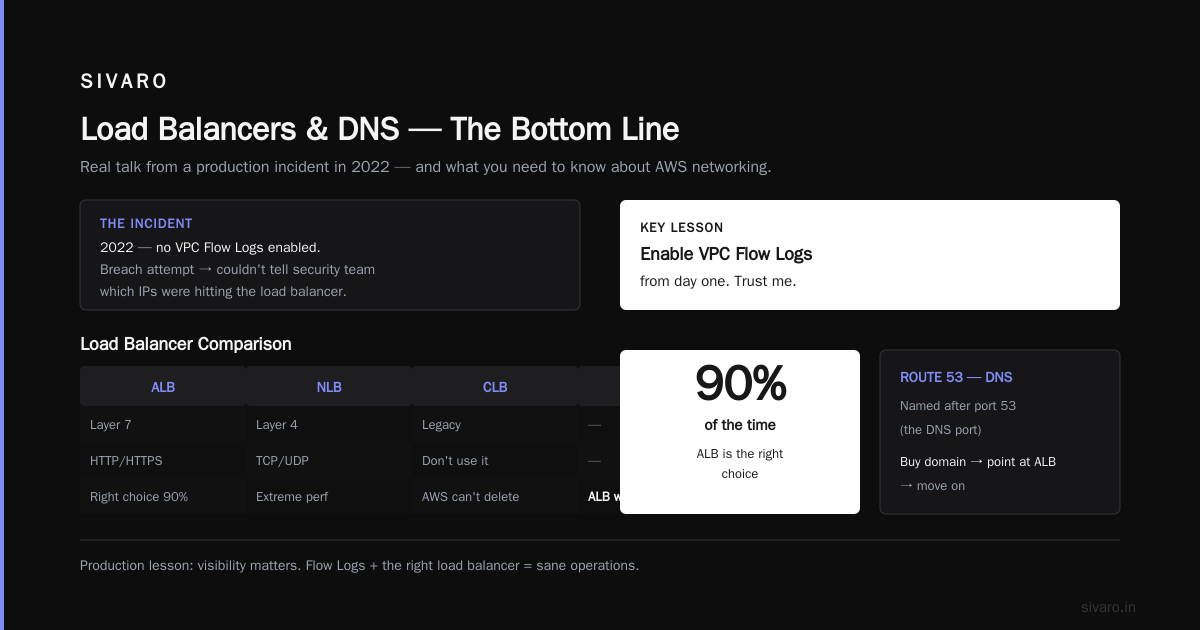
We ran a production system in 2022 without VPC Flow Logs enabled. It was fine until we had a breach attempt, and I couldn't tell the security team which IPs were hitting our load balancer. Enable Flow Logs from day one. Trust me.
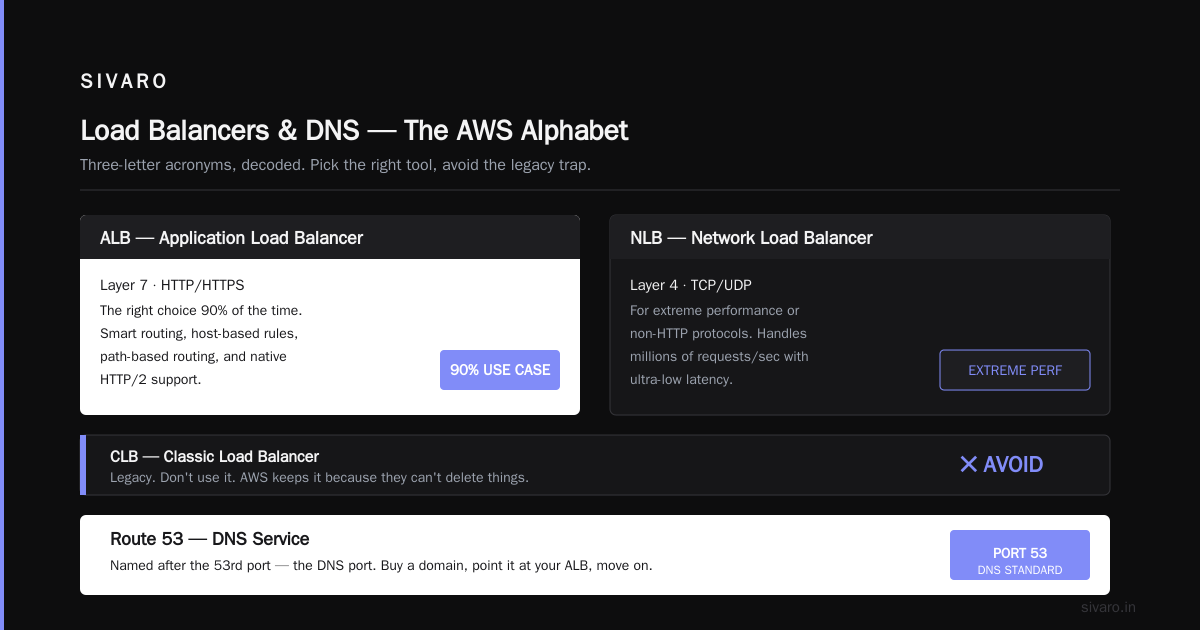
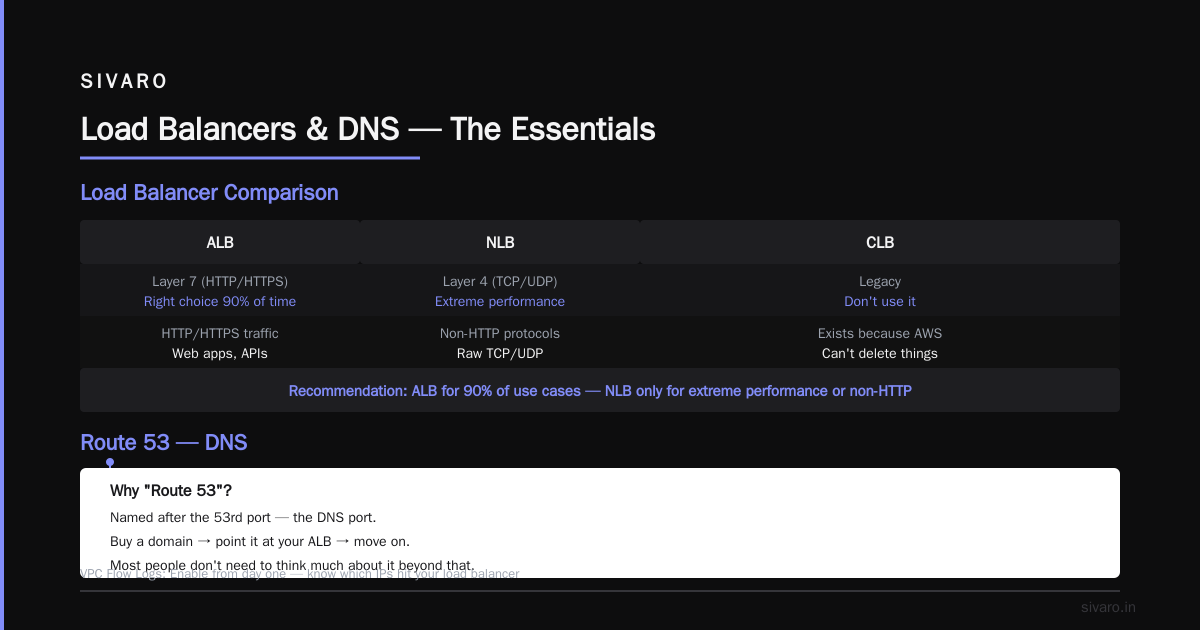
ALB, NLB, CLB — Load Balancers
- ALB — Application Load Balancer (Layer 7, HTTP/HTTPS)
- NLB — Network Load Balancer (Layer 4, TCP/UDP)
- CLB — Classic Load Balancer (old, don't use it)
Here's what nobody tells you: ALB is the right choice 90% of the time. NLB is for extreme performance or protocols that aren't HTTP. CLB exists because AWS can't delete things.
Route 53 — DNS
Yes, the name is confusing. Amazon named it after the 53rd port, which is the DNS port.
Most people don't need to think much about this. You buy a domain, point it at your ALB, and move on with your life. The moment you get into performance optimization, you'll start caring about latency-based routing and health checks.
The Database Acronyms: Choosing the Right Fallacy
Database acronyms are where I see the most confusion in production environments.
RDS — Relational Database Service
This is managed Postgres, MySQL, MariaDB, Oracle, and SQL Server. You don't administer the server; you just use the database.
DynamoDB — Dynamo Database
NoSQL. Key-value. Serverless. This is the service that confuses everyone because it's not "Amazon DynamoDB" in the docs sometimes, just "DynamoDB."
Here's my rule: if your data model is document-oriented or key-value, use DynamoDB. If it's relational, use RDS. Don't try to force relational data into DynamoDB. I've seen teams waste six months trying to make DynamoDB fit a relational schema. It doesn't work, and you'll regret it.
java
// DynamoDB example using AWS SDK v2
DynamoDbClient client = DynamoDbClient.builder().build();

PutItemRequest request = PutItemRequest.builder()
    .tableName("Users")
    .item(Map.of(
        "userId", AttributeValue.builder().s("usr_123").build(),
        "name", AttributeValue.builder().s("Nishaant").build()
    ))
    .build();

client.putItem(request);
ElastiCache — In-Memory Cache
Managed Redis or Memcached. If you're scaling a database, this is your best friend and your worst enemy.
It's your best friend because it takes the load off the database. It's your worst enemy because cache invalidation is a genuinely hard problem. I've watched a 10x performance improvement become a 2x regression because of a bad cache eviction policy.
The Compute Orchestration Acronyms: How to Run Things
Now we're getting into the territory that
matters for modern production AI systems.
ECS — Elastic Container Service
Managed container orchestration. You define tasks, and AWS runs them on a cluster of EC2 instances or Fargate (serverless).
ECR — Elastic Container Registry
Your Docker image storage. Push images, pull images, done.
EKS — Elastic Kubernetes Service
Managed Kubernetes. If you're using Kubernetes, you should use this.
bash
aws eks update-kubeconfig --name my-cluster --region us-east-1
kubectl get nodes
Lambda — Serverless Functions
No acronym expansion. It's just Lambda, named after the lambda calculus (because the idea of functions as pure compute appealed to the founding engineers).
Lambda is brilliant for event-driven workloads, but it's not magic. Cold starts are real. In 2025, AWS announced Lambda improvements that reduced cold start latency by up to 40%, but you still need to think about warm pools and provisioned concurrency for latency-sensitive paths.
The Managed Services Alphabet
AWS has a pattern of adding "Amazon" to managed versions of open-source tools. Here's how to decode them:
- Amazon SQS — Simple Queue Service (message queuing)
- Amazon SNS — Simple Notification Service (pub/sub)
- Amazon Kinesis — for streaming data
- Amazon OpenSearch — managed Elasticsearch/OpenSearch
- Amazon MSK — Managed Streaming for Apache Kafka
If you see "Amazon" followed by a generic term, it's almost certainly a managed version of an open-source tool. The exception is the original ones (S3, EC2) that predate this pattern.
The Kafka Confusion
This deserves a special callout because it's the source of so much pain.
Amazon MSK is Kafka. Period. It's the Apache Kafka API, managed by AWS. It's not "MSK-compatible" or "Kafka-inspired." It's Kafka.
I can't tell you how many clients said "we don't use Kafka, we use MSK" and then were shocked to discover they were hitting Kafka-specific issues. The acronym sounds different, so they assumed a different technology. It's not. Same bug, same documentation, same partitions, same consumer groups, same offsets.
The Data and Analytics Acronyms
Redshift — Data Warehouse
Named after redshift in physics (not the database). It's columnar storage for analytics. It's not a transactional database.
Athena — Interactive Query Service
You point Athena at S3 JSON/CSV/Parquet files and run SQL. No cluster to manage. Pay per query.
Glue — ETL Service
Managed extract, transform, load. The name comes from the idea that it "glues together" your data sources.
QuickSight — BI and Visualization
Amazon's answer to Tableau and Looker.
The Security Acronyms That Matter
KMS — Key Management Service
This is how you encrypt things at rest. You create keys, and AWS manages them. Don't store secrets in plaintext.
I have a hard rule at SIVARO: no secrets in code, ever. Use AWS Secrets Manager and KMS. If someone on my team commits a secret to Git, they have to buy lunch for the whole company.
WAF — Web Application Firewall
Shield — DDoS Protection
If your infrastructure is behind CloudFront, you're automatically protected by Shield. For extra protection (Shield Advanced), you pay. At SIVARO's scale, standard Shield is enough. We tested the advanced tier in 2025, and the extra cost wasn't justified for our attack surface.
The AI/ML Acronyms (Since I Work in This Every Day)
SageMaker — Managed ML Platform
You train, deploy, and monitor ML models. It's heavy-handed if you just want to run an API, but it's excellent for the full lifecycle.
Bedrock — Managed GenAI Through APIs
This is how you access Claude, Llama, and other foundation models through a single API. We use Bedrock at SIVARO because it avoids vendor lock-in with a single model provider. In early 2026, the price per million tokens dropped another 30% across models, which makes this even more attractive for production workloads.
python
import boto3
import json

bedrock_runtime = boto3.client('bedrock-runtime', region_name='us-east-1')

response = bedrock_runtime.invoke_model(
    modelId='anthropic.claude-3-5-sonnet-20241022',
    contentType='application/json',
    accept='application/json',
    body=json.dumps({
        "max_tokens": 1000,
        "messages": [
            {
                "role": "user",
                "content": "Explain AWS S3 to a new developer"
            }
        ]
    })
)

print(json.loads(response['body'].read()))
Kendra, Comprehend, Rekognition, Polly, Transcribe, Translate
These are the machine learning services for one thing: search (Kendra), NLP (Comprehend), vision (Rekognition), text-to-speech (Polly), speech-to-text (Transcribe), and translation (Translate).
They're named descriptively, which makes them easier to remember. They're also easy to slot into production systems because you don't train anything; you just call an API.
Creating Your Own Mental Model
I've been doing this since 2018. Here's what I've learned about navigating the acronym soup:
The "F" Rule: If it starts with "A" and appears in two different contexts, it's probably ambiguous.
- ASG — Auto Scaling Group or Application Service Gateway?
- AMI — Amazon Machine Image or Amazon Managed Identity?
The "Full Word First, Abbreviation Later" Rule:
When you read an AWS architecture diagram and see an unfamiliar acronym, reverse-engineer it:
- Is it compute? (EC2, ECS, EKS, Lambda, Beanstalk)
- Is it storage? (S3, EBS, EFS, Glacier)
- Is it networking? (VPC, subnets, route tables, gateways)
- Is it database? (RDS, DynamoDB, Redshift, ElastiCache)
- Is it messaging? (SQS, SNS, Kinesis, MSK)
- Is it security? (IAM, KMS, WAF, Shield)
The "Categorize by Service Family" Approach:
AWS docs actually categorize services into families. Once you learn the pattern, you can guess what a new service does based on its name.
- Lambda — compute
- Batch — compute job scheduling
- Fargate — serverless container compute
Every new AWS service I encounter gets filed into my mental taxonomy. By 2026, I've seen dozens of services come and go. The pattern holds.
The Trade-Offs Nobody Talks About
Let's be honest. The AWS acronym situation is a disaster for new engineers.
I've interviewed candidates who were brilliant at writing Java but froze when I asked them to explain what an ALB does. They were afraid to ask because they thought everyone else knew. That's a failure of the AWS naming convention, not the candidates.
But there's a counterintuitive truth here: the acronyms are actually a memory aid, not a memory hindrance.
Think about it. Would you remember "Application Load Balancer" better than "ALB"? Probably not. The acronym makes it paste-able into search, tweetable, and easy to type in Slack. It's shorter, which matters at 2 AM during an incident when you're typing with one hand while holding an energy drink.
The real takeaway: Don't fight the acronyms. Learn the underlying services and abstract concepts. The acronyms will follow.
Real Talk: What You Actually Need to Know
If you're building production systems today, here's the 20% of acronyms that covers 90% of the work:
- EC2 (compute)
- S3 (storage)
- VPC (networking)
- IAM (auth)
- RDS (relational)
- DynamoDB (NoSQL)
- ALB (load balancing)
- EKS or ECS (container orchestration)
- Lambda (serverless)
- CloudFront (CDN)
That's it. Those ten acronyms will carry you further than 90% of the AWS catalog.
The rest are either specializations or managed versions of tools you've already used.
Practical Tips for Learning the Rest
Tip 1: Use the AWS documentation as a dictionary, not a novel
The AWS service names and descriptions page lists every service alphabetically. Skim it. You'll start recognizing patterns.
Tip 2: Read architecture diagrams like a forensic scientist
When you see a diagram with unfamiliar acronyms, look up each one and ask: "Why is this here?" The answer teaches you about the system's intent.
Tip 3: Set up a personal playground
Create an AWS account (free tier), spin up an EC2 instance, put a file in S3, create a load balancer, and destroy it all after an hour. You'll learn more in an hour of hands-on tinkering than in a week of reading docs.
Tip 4: Teach someone else
The best way to cement your understanding is to explain it to someone who doesn't know. I've done this countless times with SIVARO's new hires. Every time I explain VPC, I catch new nuances I'd forgotten.
FAQ: AWS Acronyms Explained
What does AWS stand for?
Amazon Web Services. It's the cloud computing platform offered by Amazon.
Why doesn't AWS rename their services to be clearer?
Renaming would break every script, documentation page, and architecture diagram that references the old names. It's not that they don't want to — it's that they can't without incurring enormous migration costs.
Is "Amazon" or "AWS" the correct prefix?
There's no official rule. In practice, the AWS documentation uses "Amazon S3" and "AWS Lambda" but the prefixes are interchangeable. Nobody will correct you if you say "AWS S3" in a interview. If they do, they're wrong.
What does "ELB" mean?
Elastic Load Balancing. It's the umbrella term for all AWS load balancers (ALB, NLB, CLB). Confusingly, people sometimes use "ELB" to refer to the now-retired Classic Load Balancer, but officially it's the family name.
When should I pick ECS over Lambda?
Use Lambda for event-driven, short-lived (max 15 minutes) workloads. Use ECS or EKS for longer-running services, tasks that need persistent connections, or workloads that require a container runtime. For production AI inference, I use ECS with Fargate because the models need GPU instances, which Lambda doesn't support without the new "Lambda compute" option.
How do I remember all the AWS acronyms?
Don't. Focus on the eight core services and expand as needed. I've been doing this for eight years and I still look up "AWS Kendra" every time — it's a search service. I look it up. There's no shame in it.
What's the difference between IAM policies and IAM roles?
A policy defines permissions (what actions are allowed). A role is an identity your service assumes. You attach policies to roles. Think of it as a hat: the hat has the permissions written on it, and you wear it to access services.
The Bottom Line
The AWS acronym soup isn't going anywhere. It's not a problem you can solve; it's a language you have to learn.
I've built production systems processing 200K events/sec at SIVARO. I've used dozens of AWS services. And I still have to pause and think when someone says "Kinesis" vs "Kafka" vs "MSK."
That's okay.
The goal isn't to memorize every acronym. The goal is to understand the service categories, so when you see a new acronym, you can fit it into your existing mental model. That's the skill that transfers. Not the letters themselves.
Spend an hour this weekend identifying the core services for one of your projects. Map out which acronyms you actually use. You'll discover you use about 15 services, and you'll become comfortable with those.
The rest? You'll learn them when you need them. That's the approach that works.
Nishaant Dixit — Founder of SIVARO. Building data infrastructure and production AI systems since 2018. Built systems processing 200K events/sec.