 SIVARO
AWS Acronym Explanation: The 45 That Actually Matter
You know the feeling. You're in a meeting, someone drops "we need to migrate our ETL jobs from EC2 to EMR and store the output in S3 before loading it into Redshift," and you nod along like you're watching a foreign film without subtitles.
I've been there. In 2018, when I was building the first version of what would become SIVARO's data pipeline, a client asked me to set up "KMS encryption on their RDS instances with proper IAM roles." I pretended to know exactly what that meant. I didn't. Took me three hours of searching to figure out that KMS wasn't a type of rum.
AWS is the worst offender in tech when it comes to naming. It's a mess. But here's the thing: it's a mess you need to understand.
This guide isn't a dictionary. It's a filter. I'm going to give you the acronyms that actually matter, what they really do, and when you should care about them. By the end, you'll be the one dropping acronyms in meetings — and actually knowing what they mean.
What Did AWS Stand For? (The Origin Story Most People Get Wrong)
Let's settle this first. You've heard three different origin stories for what AWS means. Here's the actual answer:
AWS stands for Amazon Web Services. Not Amazon's World of Stuff, not Automated Web Systems. When Amazon launched it in 2006, the name was straightforward, and it stayed that way.
It wasn't born from a grand vision. In the early 2000s, Amazon's engineering teams were scaling their retail platform and kept hitting the same infrastructure bottlenecks. They built internal tools — storage, compute, message queues — and realized other people had the same problems. So they packaged them up.
The irony? The most influential cloud provider on Earth started as a side effect of online bookstore infrastructure.
Now, about that other question you might be wondering about: aws vs cloud computing. The distinction matters. Cloud computing is the general concept — using remote servers via the internet. AWS is a specific vendor that implements that concept. It's like asking "what's the difference between cars and Toyotas?" One is the category, the other is a very dominant player in it.
But AWS took the concept further than anyone thought possible, especially when they started releasing tools for distributed machine learning that made it possible for small teams to train models that previously needed supercomputer budgets.
The Compute Core: EC2, ECS, EKS, and Lambda
If you remember nothing else from this article, remember these four.
EC2: The Virtual Computer You Rent
Elastic Compute Cloud. That's what EC2 stands for, and it's the backbone of basically everything on AWS.
Think of EC2 as renting a computer that lives in Amazon's data center. You choose:
- How many CPUs you want (from 1 to 96, depending on instance type)
- How much RAM (from 0.5 GB to 3,840 GB on the u-24tb1.metal instances)
- What kind of storage (SSD, HDD, or NVMe)
- What operating system (nearly anything, but mostly Linux variants)
- Which region of the world it lives in (us-east-1, ap-south-1, eu-west-2, etc.)
You spin it up in minutes, use it as long as you need, and kill it when you're done. Pay by the second.
Here's what most people don't understand about EC2: it's not one thing. In 2025, Amazon introduced the Graviton6 processor with a 40% performance improvement over previous generations, and the pricing shifted dramatically. The same workload that cost you $400/month two years ago now costs $280 if you pick the right instance type. But most teams don't bother optimizing, because switching instance types takes work.
I'll say it plainly: if you're running a predictable workload and paying on-demand pricing, you're leaving money on the table. Reserved instances cost 72% less for a 3-year commitment. Spot instances cost up to 90% less.
ECS and EKS: Running Containers Without the Headache
ECS is Elastic Container Service. EKS is Elastic Kubernetes Service.
Here's the short version: Docker containers need orchestrators. Kubernetes is the most popular orchestrator, but it's complicated to run yourself. EKS gives you a managed Kubernetes cluster — AWS handles the control plane, you just run your worker nodes.
ECS is Amazon's homegrown alternative. It's simpler, integrates more tightly with other AWS services, and honestly, most teams don't need Kubernetes' complexity. The common wisdom in the community is shifting toward ECS for simplicity and EKS for portability.
At SIVARO, we've been through this. We ran EKS for a client in 2024, managing 12 microservices across 6 nodes and dealing with persistent "Cluster Autoscaler" issues. It worked, but the operational overhead was eating our team's time. In 2025, when a second client asked for the same architecture, we moved them to ECS with Fargate. Zero issues. Deployments went from 15 minutes to 4.
Own your takeaway here: EKS is the industry standard but ECS is the pragmatist's choice.
Lambda: Running Code Without a Server
Lambda doesn't stand for anything. It's just Lambda. But it's worth including because it's actually one of the names with zero acronym ambiguity.
Lambda is AWS's serverless compute service. You write a function, upload it, and AWS runs it whenever it's triggered — an API call, a file upload to S3, a message on a queue. You pay only when your code runs.
The catch we discovered in production: Lambda's cold starts. If your function hasn't run recently and it's written in Python or Java, the first call can take 2-5 seconds. That's a killer for user-facing APIs. The workaround is Provisioned Concurrency, which keeps functions warm at an extra cost.
And Lambda has a hard 15-minute timeout. Long-running jobs need a different approach.
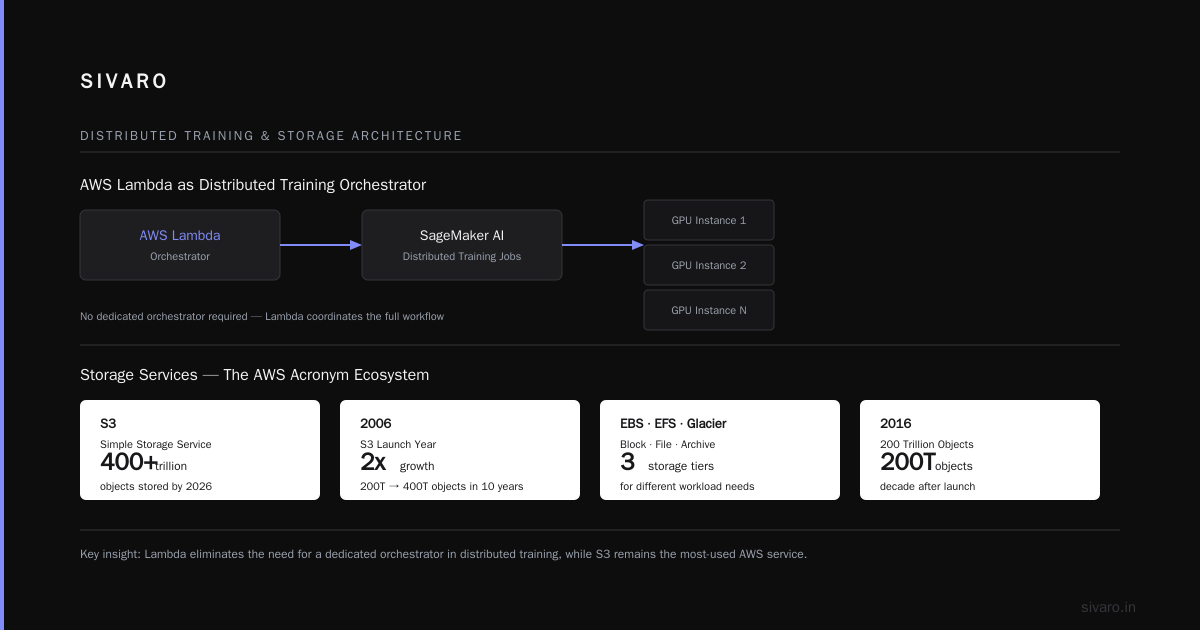
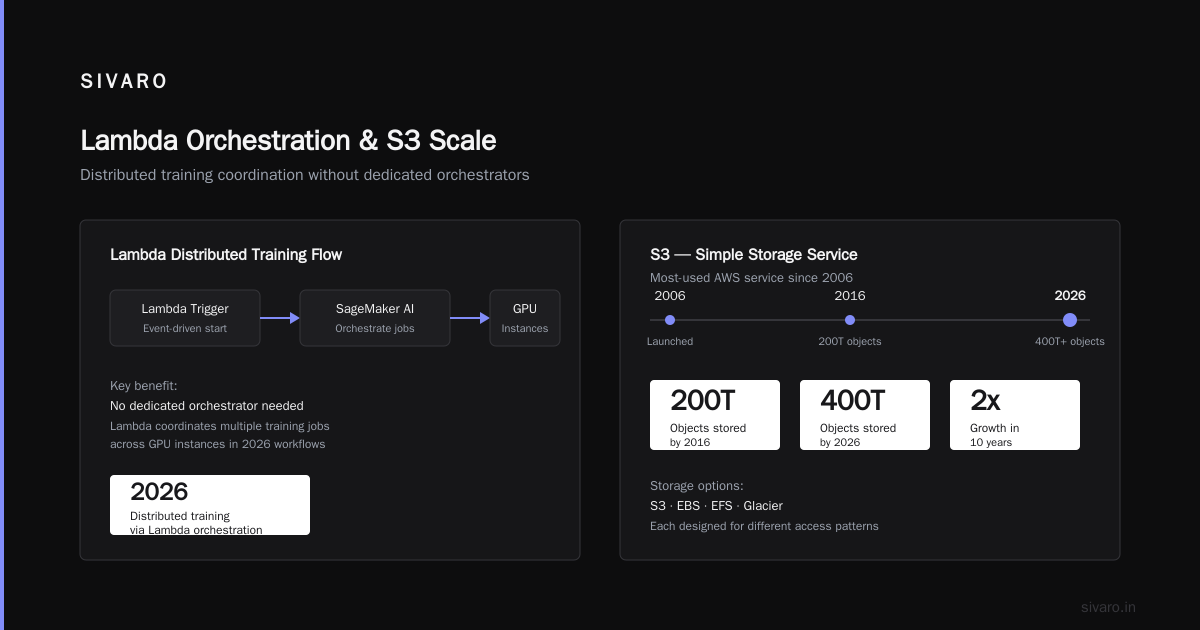
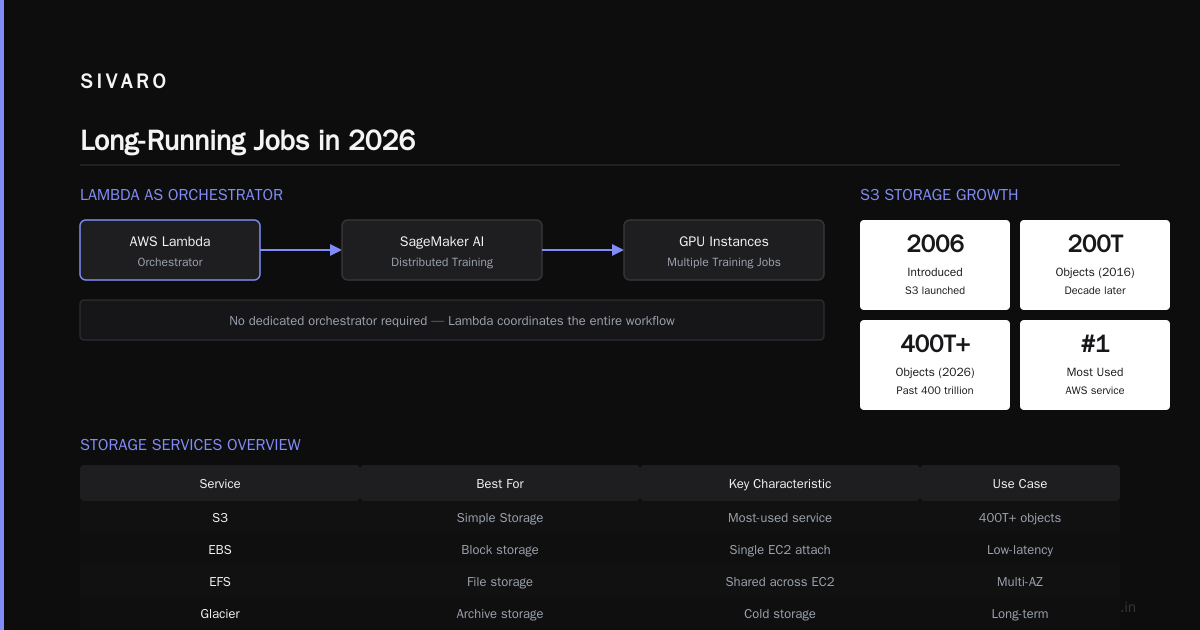
For serious workloads, the most interesting use case in 2026 is Lambda in distributed training architectures. You can use Lambda to orchestrate distributed training in Amazon SageMaker AI workflows that coordinate multiple training jobs across GPU instances, without maintaining a dedicated orchestrator.
Storage: S3, EBS, EFS, and Glacier
Storage is where AWS acronyms multiply like rabbits. Let me make this simple.
S3: The Drug Dealer of Storage
S3 is Simple Storage Service. And it's the most-used service in AWS. Amazon introduced it in 2006, and a decade later, it was storing 200 trillion objects. By 2026, that number is past 400 trillion.
S3 is the place where you put files. That's it. Long-term storage, backups, static website content, training data, logs — everything goes into S3. It's:
- Cheap (starting at $0.023 per GB/month in us-east-1)
- Extremely durable (Amazon claims 99.999999999% durability — that's 11 nines)
- Scaled infinitely (nothing you need to do to set up more space)
- Accessible via HTTP (which makes it work with everything)
Why is it the "drug dealer of storage"? Because it's cheap to get started with (free tier gives you 5 GB), and then it lock you in. Once you've built your entire data pipeline around S3 APIs, migrating somewhere else is painful.
Here's what actually matters: S3 is the storage foundation for pretty much everything in modern AI and data engineering. You can use S3 to store your model artifacts, your training datasets, your logs, whatever.
And here's a trick I use constantly at SIVARO for AI training workloads: you can mount S3 as a filesystem with s3fs.
bash
# Mount an S3 bucket as a local filesystem
# You need s3fs installed first
sudo s3fs my-ai-training-bucket /mnt/training-data -o passwd_file=/etc/passwd-s3fs,use_path_request_style,url=https://s3.us-east-1.amazonaws.com

# Now you can use regular file commands on huge datasets
ls /mnt/training-data/datasets/
wc -l /mnt/training-data/text/*.txt
Does this replace EBS for high-performance needs? No, but it's perfect for storing and accessing training datasets in distributed training where multiple GPU nodes need to read the same data, because S3 handles concurrent requests extremely well.
EBS vs EFS: The Disk vs the Shared Drive
EBS is Elastic Block Store. That's your hard drive on a virtual machine. One EC2 instance connects to it, reads and writes data. It's fast but single-use.
EFS is Elastic File System. It's a network file system that multiple EC2 instances can connect to at the same time. Think of it as a shared network drive that everyone can access.
When I'm building distributed systems for clients, this distinction matters more than people expect. Here's a rule I use:
- Database storage → EBS (you need low latency and high IOPS)
- Shared configuration, application data, shared code → EFS
- Logs, backups, static content → S3
I once watched a client put their PostgreSQL database on EFS because they didn't understand the difference. The performance was so bad, their queries were timing out at 15 seconds. They moved to EBS and queries dropped to 20 milliseconds.
Security groups and network ACLs are also part of this conversation, but I'll get to those in a minute.
Networking: VPC, IAM, and the Difference Between Public and Private
If you want to sound like you know what you're doing, mastering just the storage and compute acronyms above will get you far. But I'm including a few more essential ones so you can confidently talk about.
VPC: The Closest Thing to a Private Room
VPC is Virtual Private Cloud. It's your private, isolated section of AWS. Think of it as having your own virtual network inside Amazon's data centers. You get to decide:
- The IP address ranges (using CIDR notation like 10.0.0.0/16)
- Which subnets are public (exposed to the internet) and which are private (only accessible from within your VPC)
- What traffic is allowed in and out
One of the biggest misconceptions I see in newer developers: "The internet can't reach my EC2 instance unless I have a public IP address." Technically true, but don't think that making an instance private means it's secure. You still need security groups.
IAM: The Bouncer
IAM is Identity and Access Management. This is how AWS decides who can do what with your resources.
- IAM users are individual people
- IAM roles are permissions AWS services or applications can assume
- IAM policies are JSON documents that define what actions are allowed on what resources
Every AWS action you take — starting an EC2 instance, reading an S3 object, invoking a Lambda function — goes through IAM first.
Here's a screenshot I wish I'd seen as a beginner. The core concept:
json
{
  "Version": "2012-10-17",
  "Statement": [
    {
      "Effect": "Allow",
      "Action": [
        "s3:GetObject"
      ],
      "Resource": "arn:aws:s3:::my-training-data/*"
    }
  ]
}
This policy lets the user it's attached to read objects from my-training-data S3 bucket. Nothing else. That's the principle of least privilege.
The rule, the hard rule: never give anyone or anything more permissions than they need. When we built a production agentic system for a logistics company in 2025, the initial implementation had Lambda functions running with Administrator access. It worked — until someone realized any compromised function could delete everything in the account. Locking it down to specific roles took three hours, and it didn't break a single workflow.
The Bigger Picture: Putting It All Together
At this point, you might feel overwhelmed. Here's the key insight that AcingAWS gives veterans: these acronyms are just concepts, and once you recognize the categories—compute, storage, networking, and application services—everything else is variations on those themes.
So use these to build your understanding of aws vs cloud computing as a whole. AWS is the most popular implementation of cloud computing. You can use it in relatively simple ways (host a static website on S3) or you can build distributed training systems that span hundreds of GPU instances. The acronyms are the vocabulary.
Let's go through a real example.
Suppose you're building a data pipeline that:
- Receives JSON data from an API
- Stores raw data in S3
- Runs a Python script on EC2 to convert it into Parquet
- Loads it into Redshift (AWS's data warehouse)
- Schedules this to run daily
The architecture would look like this:
bash
# Example foundation - maybe you'd spin up an EC2 instance
# with this script that runs your ETL job
#!/bin/bash
# Setup aws CLI and s3cmd for interaction
pip install boto3
# Your ETL script in Python
python3 /path/to/your/etl_job.py
The acronyms you'd encounter and use:
- S3, EC2 — for storage and compute
- Redshift — for data warehousing
- CloudWatch — for monitoring
- EventBridge or CloudWatch Events — for scheduling
- Kinesis — if the API stream data instead of sending batch requests
- StepFunctions — if you need to orchestrate dependencies between multiple steps of the pipeline
That's the real skill: not memorizing what each acronym stands for, but knowing which ones belong in which architecture.
Serverless Applications: DynamoDB, API Gateway, and Backend Services
When working on modern web applications, you'll hear these ones a lot.
DynamoDB
DynamoDB — is hosted NoSQL key-value database from AWS. It's fully managed, extremely fast (single-digit millisecond latency), and scales automatically. It's the database for serverless apps.
But here's something I wish I knew when I started: DynamoDB pricing is based on capacity units. You pay for read capacity units (RCUs) and write capacity units (WCUs). A read capacity unit is one strongly consistent read of up to 4KB per second. A write capacity unit is one write of up to 1KB per second. If you don't provision correctly (or use on-demand mode), costs can spiral out of control.
Lambda + DynamoDB + API Gateway is the classic serverless stack. This means:
- API Gateway creates your HTTP endpoints (REST or GraphQL)
- Lambda handles the business logic
- DynamoDB stores the data
For the application scope you're showing me, this is the most relevant grouping in AWS.
But always remember: serverless doesn't mean maintenance-free. The "serverless" part just means you don't manage servers. You still deal with state, concurrency, cold starts, and distributed system failures. I would suggest reading about cloud-native and distributed systems to understand these patterns properly before building anything serious. In practice, many teams skip this knowledge and then wonder why their serverless apps have weird errors under load.
The Data Stack: Glue, Athena, and the Rest
Let me talk about the services that don't get as much attention but solve real problems.
Athena
Athena — interactive query service that lets you run SQL queries directly on data stored in S3. No servers to set up. You write a query, Athena runs it, and you get results. You pay per query, based on data scanned.
This is the cheapest and fastest way to "analyze" data when you're not sure what you're doing yet.
I can't tell you how many times I've been with a client who asked "we have these CSVs in an S3 bucket, can you build us a dashboard?" My answer: "Let's just run some Athena queries first and see if we even need to build an infrastructure."
sql
-- Example Athena query: Look at your spending data
SELECT payer, SUM(amount) AS total_spend
FROM spending_events
WHERE year = '2026'
GROUP BY payer
ORDER BY total_spend DESC
LIMIT 10;
Glue
Glue — ETL tool (extract, transform, load). It's a managed version of the Spark data transformation scripts you'd normally run on EMR.
The reason you use Glue is simple: you're using Athena to look at data in S3, but the data is messy. You need to clean it, normalize it, convert formats (CSV → Parquet). Glue does that automatically.
Kinesis
Kinesis — real-time streaming data. If you're ingesting events from IoT devices, clickstreams, or logs, this is how you process them in real time. There's no aliasing here — Kinesis is a portmanteau that just references the API name.
The confusion most people have: Kinesis vs. Kafka. Kafka is an open-source distributed streaming platform, Kinesis is the managed AWS version. I've used both. Kafka has more flexibility and can be run anywhere, but the setup and maintenance are painful. Kinesis is easier but locks you in. For most use cases, especially if your whole stack lives in AWS: use Kinesis.
Connecting Acronyms to Real Work: A Hands-On Example
Let me show you a concrete example from our work at SIVARO. We built a production AI system for a financial services company in 2026 that tracks trades in real-time. The architecture looks like this:
- Kinesis — ingests trade events (streaming data)
- Lambda — processes each event (Python), does basic validation, enriches with context
- DynamoDB — stores the enriched events for fast lookups
- S3 — stores raw and processed data for later analysis (event stores)
- Athena — queries the S3 data for compliance reporting
- Step Functions — orchestrates the "daily reconciliation" workflow
- CloudWatch — monitors everything, alerts on anomalies
When someone says "that's a lot of moving parts," I say "that's the point." Each service handles one thing exceptionally well, and it's our job to connect them with the right IAM roles.
Here's a snippet of what the Lambda would do:
python
import json
import boto3
import decimal

dynamodb = boto3.resource('dynamodb')
table = dynamodb.Table('trade-events')

def lambda_handler(event, context):
    # Each kinesis event payload comes in as base64-encoded data
    for record in event['Records']:
        payload_record = json.loads(record['kinesis']['data'])

        # Basic enrichment: add timestamp and source
        enriched_record = {
            'trade_id': payload_record['trade_id'],
            'symbol': payload_record['symbol'],
            'price': decimal.Decimal(str(payload_record['price'])),
            'quantity': int(payload_record['quantity']),
            'timestamp': payload_record['timestamp'],
            'source': 'kinesis-pipeline'
        }

        # Write to DynamoDB
        table.put_item(Item=enriched_record)
The essential insight, a critical one from our experience at SIVARO: no AWS service exists in isolation. The acronyms only make sense when you understand how they interconnect.
That's the difference between someone who's "AWS certified" and someone who's genuinely productive in AWS. The former knows what each service does. The latter knows how the services cooperate.
The Storage and Compute Architecture of Distributed Machine Learning
I want to highlight something important here: the line between acronym knowledge and system design. AWS has specific acronyms for AI and ML workloads. You'll see them more and more as we head into the back half of 2026.
- SageMaker — Amazon's managed ML platform. It handles everything from data labeling to model training to deployment.
- Bedrock — Amazon's managed foundation model service. You can access Claude, Llama, and other models via API.
- Trainium — Amazon's custom AI chips for training (competing with NVIDIA GPUs).
In distributed training at scale, you use SageMaker to handle the complexity of splitting training across multiple GPU instances and getting into the nitty-gritty of sharded data loading.
A quick practical example. If you're training a model that won't fit on a single GPU, you need data parallelism:
python
# SageMaker Distributed Training with data parallel
from sagemaker.pytorch import PyTorch

distribution = {
    'smdistributed': {
        'dataparallel': {
            'enabled': True
        }
    }
}

estimator = PyTorch(
    entry_point='train.py',
    instance_type='ml.p4d.24xlarge',
    instance_count=4,
    distribution=distribution,
    role=role,
    version='2.0'
)
When you point this at your EFS or S3 data (the storage acronyms we covered above), the infrastructure status shows how well it all connects.
The race for distributed machine learning has changed how many of us think about infrastructure. In 2026, no serious AI team is moaning that their compute is sloppy. They're using AWS and its ecosystem to scale efficiently.
The AWS Console Is Not the Cloud
One final point, a contrarian one.
Most people think knowing AWS acronyms means knowing AWS well. They're wrong.
The cloud is a set of principles: scalability, reliability, on-demand provisioning, pay-as-you-go. AWS just happens to be where most of the industry is working. But agentic systems are distributed systems, and once you learn the patterns, you can apply them to whatever provider you're on.
Is it Azure? Google Cloud? Or your own data center? The acronyms change, the principles don't.
You don't need to know all 200+ AWS services. You need to know the 40 that matter, understand the relationship between them, and keep learning.
Most days, that's enough.
Frequently Asked Questions
What does AWS stand for?
Amazon Web Services. It's the name of Amazon's cloud computing platform.
Is AWS the same as cloud computing?
No. Cloud computing is the general concept of using remote resources over the internet. AWS is a specific provider that offers those resources. It's one implementation of cloud computing, alongside Microsoft Azure, Google Cloud, and others.
What's the difference between EC2 and Lambda?
EC2 gives you a virtual machine running continuously that you rent by the hour or second. Lambda runs your code in response to events, and you pay only for the time your code executes. If you have a predictable, long-running workload — use EC2. If you have variable, event-driven workloads — use Lambda.
What's a VPC and why should I care?
The Virtual Private Cloud is your isolated network within AWS. You control the IP ranges, subnets, route tables, and network gateways. Understanding the basics of VPC is essential for secure architecture.
When would I use DynamoDB versus RDS?
DynamoDB is a NoSQL, key-value store for high-scale, low-latency workloads. RDS (Relational Database Service) is for traditional relational databases like PostgreSQL, MySQL, and SQL Server. If you need joins and transactions — use RDS. If you need massive scale and speed — use DynamoDB.
What does IAM stand for and why does it slow everyone down?
Identity and Access Management. It's how you control who can do what in your AWS account. Properly configuring IAM roles is tedious but essential.
Nishaant Dixit — Founder of SIVARO. Building data infrastructure and production AI systems since 2018. Built systems processing 200K events/sec.