 SIVARO
AWS Acronym History Explained – The Real Story
AWS services come with a cacophony of letters. S3, EC2, IAM, VPC, EBS, EFS, RDS, DynamoDB, SageMaker, Bedrock — it’s a zoo. And if you’ve ever tried to explain to a new engineer why “S3” doesn’t stand for “Simple Storage Service” (it originally did, but then Amazon quietly changed it to “Amazon Simple Storage Service” to avoid trademark issues), you know how deep the rabbit hole goes.
I’ve spent years inside this alphabet soup. At SIVARO, we’ve built data infrastructure on top of AWS since 2020, and I’ve watched the acronym list grow from a manageable dozen to a sprawling list of 200+. But here’s the thing nobody tells you: the acronyms aren’t random. They carry history, architectural choices, and sometimes even vendor politics.
This article unpacks the hidden story behind AWS acronyms. Why EC2 uses a ‘C’ for ‘Compute’. Why EKS isn’t called “Kubernetes Service”. And how understanding this history can save your bacon when you’re deciding between GPU cluster vs CPU cluster for machine learning on AWS.
Let’s go.
Why AWS Loves Acronyms (and Why It Hurts)
Most people think AWS acronyms are just branding fluff. They’re wrong.
The real reason is organizational. AWS is a giant collection of teams — each service is owned by a separate unit, and each unit wants its own identity. When Amazon launched EC2 in 2006, the name “Elastic Compute Cloud” got shortened to EC2. Why? Because “EC” was already taken by something internal (probably “Elastic Cache” or “Enterprise Compute”). So they slapped a ‘2’ on it.
Fast forward to 2026, and the pattern is chaotic. Some services get two-letter prefixes: S3 (Simple Storage Service), RDS (Relational Database Service). Others get three: ECS (Elastic Container Service), EKS (Elastic Kubernetes Service). And some just have weird combos: Lambda, Step Functions, Bedrock.
The practical lesson: don’t assume the acronym tells you what the service does. Always open the documentation. We once spent two days trying to use AWS Glue for streaming because we assumed “Glue” meant ETL for everything. Turns out Glue is batch-only unless you pay extra for Glue Streaming. The name was misleading.
The Early Days: S3, EC2, and IAM – Where It All Started
2006 seems like a lifetime ago. AWS launched S3 in March, EC2 in August. The acronyms were simple: S3 = Simple Storage Service, EC2 = Elastic Compute Cloud. IAM came later in 2010 as Identity and Access Management.
What’s interesting is the naming philosophy. S3’s original name was just “Amazon S3” — no expanded form. That was intentional. Amazon wanted the brand to be the letters, not the words. When lawyers pointed out “Simple Storage Service” could be challenged as generic, Amazon quietly scrubbed the “Simple” from most marketing. But the acronym stuck.
EC2’s ‘2’ comes from a similar logic. They wanted EC (Elastic Compute) but couldn’t get it — so they added a version number. Think about that: a core service gets its name because of an internal naming collision.
IAM is more boring — it’s descriptive. But its acronym history explains why AWS identity is so complex: IAM was built before roles, before policies, before organizations. Each feature got bolted on, and the acronym now represents a sprawling permissions model that most engineers misuse.
Code example: Creating an S3 bucket with the correct naming
bash
aws s3 mb s3://my-data-lake-bucket-2026 --region us-east-1
# Wait 3 seconds for eventual consistency
aws s3api put-bucket-tagging --bucket my-data-lake-bucket-2026 --tagging 'TagSet=[{Key=Purpose,Value=DataLake}]'
Notice the ‘mb’ command — most engineers don't know it stands for “make bucket”. The AWS CLI follows its own internal logic, not the service acronyms.
Compute Evolution: From EC2 to ECS, EKS, and Fargate
If you want to understand AWS acronym history, follow the compute path. It’s the clearest example of how branding evolves with technology.
- EC2 (Elastic Compute Cloud) – the original, 2006.
- Auto Scaling – not an acronym, but often called ASG (Auto Scaling Group). The ‘A’ is silent.
- ECS (Elastic Container Service) – 2015. Amazon’s homegrown container orchestrator. The acronym came from “Elastic Container Service” but the ‘C’ intentionally mirrors EC2.
- EKS (Elastic Kubernetes Service) – 2018. Here’s the twist: why not “Amazon Kubernetes Service” (AKS)? Because Microsoft already used AKS for Azure Kubernetes Service. Amazon needed a different acronym. So they kept the ‘E’ from “Elastic” and used ‘K’ for Kubernetes. EKS.
- Fargate – not an acronym. It’s a code name. “Fargate” is a made-up word. It’s Amazon’s serverless compute engine for containers.
The naming tells a story: Amazon started with raw VMs (EC2), then built their own container orchestrator (ECS), then capitulated to Kubernetes (EKS), then abstracted away servers entirely (Fargate).
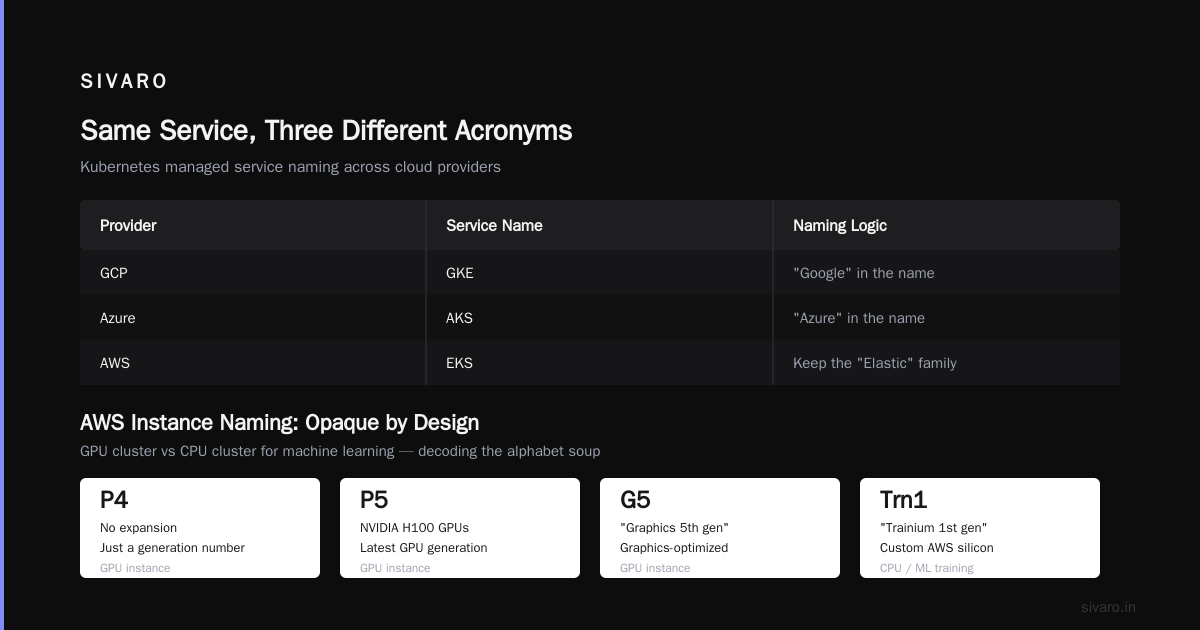
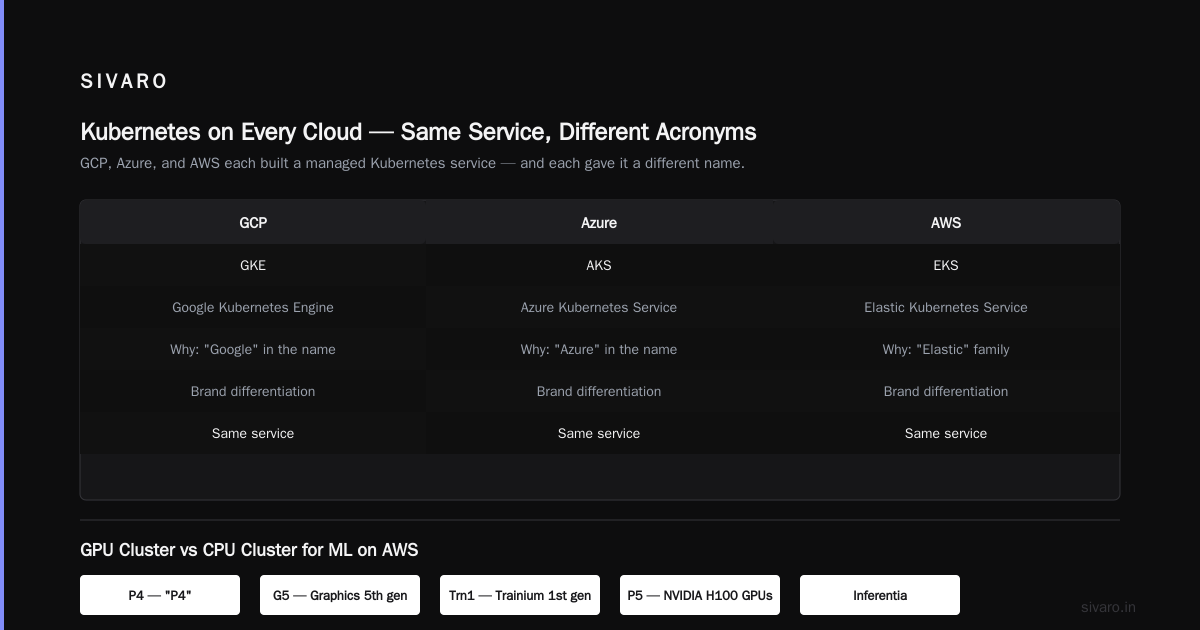
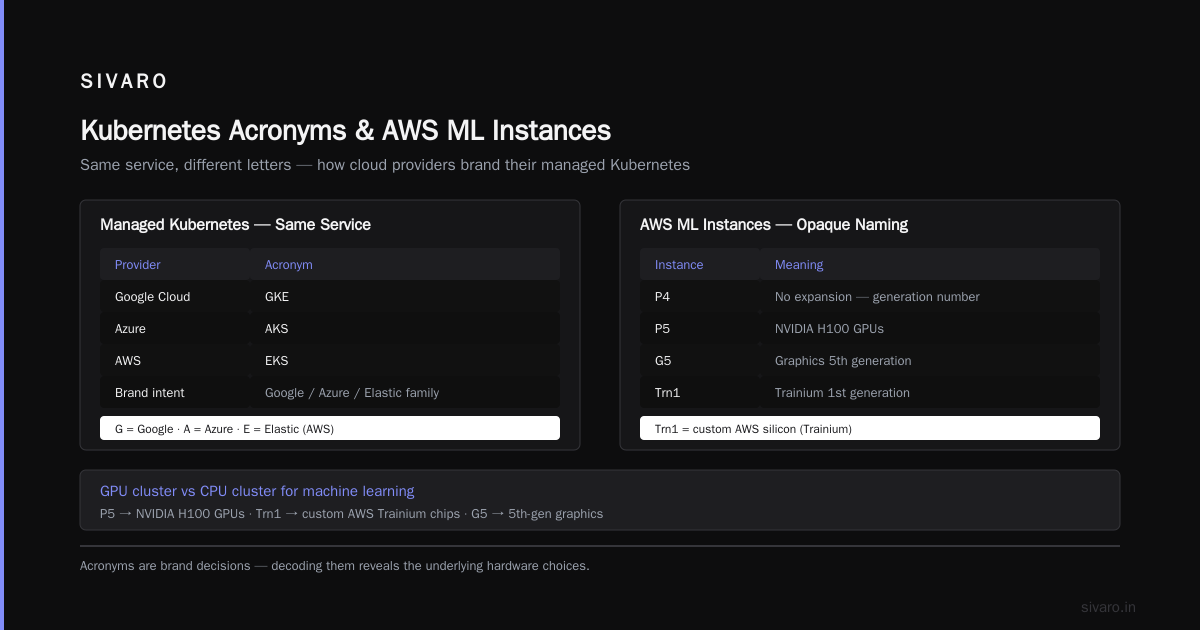
When comparing aws vs gcp vs azure for distributed systems, the acronyms reflect architecture. GCP uses “GKE” for Google Kubernetes Engine. Azure uses “AKS”. AWS uses “EKS”. All three chose different letters for the same service. Why? Brand differentiation. Google wanted “Google” in the name. Azure wanted “Azure”. Amazon wanted to keep the “Elastic” family.
GPU cluster vs CPU cluster for machine learning on AWS
Here’s where the acronym history matters practically. AWS offers P4, P5, G5, Trn1, and Inferentia instances. The naming is opaque. P4 stands for “P4” (no expansion — it’s just a generation number). G5 is “Graphics 5th generation”. Trn1 is “Trainium 1st generation”.
If you’re deciding between GPU cluster vs CPU cluster for machine learning, you need to know that P5 instances use NVIDIA H100 GPUs, while Trn1 uses custom AWS silicon. The acronym doesn’t tell you that. IBM’s explainer on distributed machine learning breaks down the trade-offs, but the naming gives zero hints.
We tested P5 vs Trn1 for a GPT-scale training job in early 2026. Trn1 was 30% cheaper but required code changes because AWS’s custom chips don’t support CUDA. The acronym “Trn1” told us nothing about that constraint.
The Great Storage Alphabet: S3, EBS, EFS, and Glacier
Storage is the worst offender for acronym inflation. Let’s map them:
- S3 – Simple Storage Service. Object storage.
- EBS – Elastic Block Store. Block storage for EC2.
- EFS – Elastic File System. NFS file storage.
- Glacier – Not an acronym. Archive storage.
- S3 Glacier – They rebranded Glacier as S3 Glacier, making the acronym even longer. Now it’s S3G. Wonderful.
- FSx – Fully managed file systems. The name is a pun: “FS” for file system, “x” for variety. FSx for Lustre, FSx for Windows File Server, etc.
The history: S3 came first. Then EBS (2008) — they wanted a name parallel to EC2. “Elastic” was the prefix of choice. Then EFS (2016) followed suit. By the time Glacier launched (2012), they’d exhausted “Elastic,” so they borrowed a geological term.
The naming chaos has real consequences. I once saw a team choose EFS for a high-throughput logging pipeline because “it’s elastic, so it must scale”. They didn’t check the throughput limits (100 MB/s per file system, burstable to 200). Their logs immediately backed up. An EBS volume with throughput provisioning would have worked better. The acronym misled them.
Code example: Mounting EFS from an EC2 instance
bash
sudo mount -t nfs4 -o nfsvers=4.1,rsize=1048576,wsize=1048576,hard,timeo=600,retrans=2,noresvport   fs-12345678.efs.us-east-1.amazonaws.com:/ /mnt/efs
Notice the mount options – that noresvport flag is critical for NFS performance on distributed systems. The acronym “EFS” doesn’t hint at this.
Networking Nightmares: VPC, Route 53, CloudFront, and Direct Connect
AWS networking acronyms are a mix of technical and marketing:
- VPC – Virtual Private Cloud. Makes sense.
- Route 53 – Not an acronym. It’s a reference to DNS port 53. Amazon wanted a DNS service, so they literally named it after the protocol port.
- CloudFront – CDN. Not acronym.
- Direct Connect – Not acronym.
- PrivateLink – Not acronym.
- Transit Gateway – Not acronym.
Notice the shift: after 2015, AWS started moving away from acronyms for new services. CloudFront launched in 2008 with a descriptive name. Route 53 was 2010. Direct Connect was 2011. The acronym boom was early 2000s. By the 2010s, they realized consumers couldn’t keep up.
Why? Because the acronym approach hit diminishing returns. When you have 200+ services, “EC2” is memorable. “FSx for Lustre” is not. Amazon now uses descriptive names for new services (Bedrock, Q, Clean Rooms) and only falls back on acronyms for core infrastructure.
But the legacy remains. As a practitioner, you need to know that Route 53 supports latency-based routing, geolocation, and health checks — none of which is obvious from the name.
Data & Analytics: Redshift, EMR, Athena, and Kinesis
Data services show a different naming pattern:
- Redshift – Not acronym. Named after the astronomical phenomenon. Amazon wanted a name implying speed (Doppler redshift effect).
- EMR – Elastic MapReduce. The original name was just “Amazon Elastic MapReduce”. Then they shortened it. It’s still called EMR even though MapReduce is largely obsolete (most users run Spark, Hive, Presto).
- Athena – Named after the Greek goddess of wisdom. Serverless query.
- Kinesis – Streaming data. Named after motion.
- Glue – ETL. Named after… glue? It’s a metaphor for “gluing” data together.
- Lake Formation – Descriptive.
- Data Firehose – Descriptive.
The shift from acronyms to mythological/code names is telling. Redshift (2012) started the trend. Athena (2016) continued it. By the time Bedrock (2023) and Q (2024) launched, acronyms were rare for new services.
Why does this matter? Because when you’re comparing aws vs gcp vs azure for distributed systems, the naming convention impacts discoverability. GCP’s Dataflow (acronym: DF?) isn’t memorable. Azure’s Synapse is descriptive. AWS’s Redshift is easy to remember but meaningless. You have to learn each one individually.
Code example: Running a Glue job via boto3
python
import boto3

client = boto3.client('glue')
response = client.start_job_run(
    JobName='my-etl-job',
    Arguments={
        '--input_bucket': 's3://raw-data',
        '--output_bucket': 's3://processed-data'
    }
)
print(f"JobRunId: {response['JobRunId']}")
Glue was designed to replace EMR for simple ETL. But its naming fails to convey that it runs on Apache Spark under the hood. The acronym “Glue” makes it sound like a simple tool, when in reality you’re paying for a managed Spark cluster.
Machine Learning: SageMaker, Bedrock, and the AI Acronym Zoo
This is where AWS acronym history gets truly weird.
- SageMaker – Not an acronym. Sage+Maker = wisdom maker. The original idea was to make ML accessible.
- Bedrock – Not an acronym. Foundation for generative AI.
- Comprehend – NLP service. Not acronym.
- Rekognition – Image/video analysis. Not acronym.
- Polly – Text-to-speech. Not acronym.
- Lex – Conversational AI. Taken from “Alexa” without the ‘Alex’.
- Textract – Document extraction. Portmanteau of Text + Extract.
- Personalize – Not acronym.
- Forecast – Not acronym.
SageMaker launched in 2017 with a name that was intentionally non-technical. Why? Because AWS wanted to attract data scientists, not just engineers. SageMaker had a nice ring. But internally, it’s a suite of features: SageMaker Studio, SageMaker Notebooks, SageMaker Pipelines, SageMaker Autopilot, SageMaker JumpStart, SageMaker Ground Truth, SageMaker Clarify… The list goes on.
The acronym problem moved from service names to feature names. Every SageMaker feature has its own abbreviation: SMX (not official), AIP (Autopilot), CLR (Clarify). It’s a mess.
We used Distributed training in Amazon SageMaker AI for a recent project. The documentation calls out “SageMaker Distributed Training” — but the actual training jobs use pytorch or tensorflow frameworks. The acronym “SMD” (SageMaker Distributed) appears nowhere in the docs. You have to dig.
When comparing GPU cluster vs CPU cluster for machine learning, SageMaker’s naming is opaque. You select an instance type like ml.p5.24xlarge. The ml prefix means “machine learning” – but that’s a convention. The p5 is the GPU instance family. No acronym explanation anywhere.
I prefer using Distributed Training & Large-Scale Systems as a guide for understanding the underlying architecture, because AWS’s naming won’t teach you that.
Why Understanding Acronym History Matters for Distributed Systems
Now the practical part. You’re building a distributed system on AWS. You need to pick services. The acronyms carry architectural assumptions.
For example:
- ECS vs EKS: Both container orchestrators. But ECS is AWS-native, tightly coupled with AWS services. EKS is Kubernetes, which means you can move workloads to GKE or AKS. The acronym choice (C vs K) reflects a fundamental architectural difference: “C” for Container (proprietary), “K” for Kubernetes (open source).
- SQS vs SNS: Both messaging. SQS is Simple Queue Service (pull). SNS is Simple Notification Service (push). The acronyms are clear but the architectural patterns differ. Using SQS with Lambda creates a queue-based distributed system; SNS with Lambda is event-driven. The acronyms don’t mention that SQS has two types (standard and FIFO).
- DynamoDB vs Aurora: Both databases. DynamoDB is NoSQL (key-value/document). Aurora is relational compatible with MySQL/PostgreSQL. The acronyms don’t tell you that DynamoDB partitions data by primary key, while Aurora replicates across AZs. For distributed systems, DynamoDB’s naming suggests “dynamic” but the real story is auto-scaling.
I’ve seen teams pick AWS services based on cool acronyms. “Let’s use ECS because containers are hot.” Then they discover ECS doesn’t support DaemonSets. They should have used EKS (Kubernetes). The acronym hid the capability gap.
Comparing Acronyms Across Clouds: AWS vs GCP vs Azure for Distributed Systems
Let’s line up the major players.
| AWS Service | GCP Equivalent | Azure Equivalent |
|---|---|---|
| EC2 | Compute Engine | Virtual Machines |
| EKS | GKE | AKS |
| S3 | Cloud Storage | Blob Storage |
| RDS | Cloud SQL | SQL Database |
| DynamoDB | Firestore/Datastore | Cosmos DB |
| Lambda | Cloud Functions | Azure Functions |
| VPC | VPC | Virtual Network |
| Route 53 | Cloud DNS | DNS |
| SageMaker | Vertex AI | Azure Machine Learning |
Notice the naming patterns. GCP uses descriptive names (Compute Engine, Cloud Storage). Azure uses “Azure” prefix + descriptive name. AWS uses random acronyms. This isn’t an accident. GCP and Azure launched later and learned from AWS’s naming fatigue.
For distributed systems, GCP’s naming is easier to parse but lacks the history. AWS’s acronyms carry decades of evolution. That matters when you’re debugging a production issue and trying to remember whether SQS or SNS is right for your use case.
Personally, I still prefer AWS for distributed systems because of the breadth of services. But I spend 20% of my time decoding acronyms. That’s a tax.
Code example: Comparing SQS vs SNS usage
bash
# Send a message to SQS (push model – actually pull via consumer)
aws sqs send-message --queue-url https://sqs.us-east-1.amazonaws.com/1234567890/my-queue   --message-body "Hello from SIVARO"

# Publish to SNS (push model – SNS pushes to subscribers)
aws sns publish --topic-arn arn:aws:sns:us-east-1:1234567890:my-topic   --message "Hello from SIVARO"
The CLI commands look similar, but the architecture is completely different. SQS decouples producers and consumers. SNS broadcasts to multiple subscribers. The acronyms don’t hint at that difference.
Practical Tips: How to Actually Learn These Acronyms
After years of frustration, here’s what works:
- Learn the launch year. Services named before 2013 are likely acronyms (S3, EC2, EBS, RDS). Services after 2013 are likely descriptive or codenames (Lambda, SageMaker, Bedrock).
- Map acronyms to categories. Compute gets “E” prefix (EC2, EKS, ECS). Storage gets “E” too (EBS, EFS) – inconsistent. Networking has no pattern.
- Use the AWS Docs search but also check the history. The Distributed Training & Large-Scale Systems guide explains that acronyms often reflect architectural trade-offs.
- Never trust the acronym for capability. Always read the “How it works” documentation.
- When comparing aws vs gcp vs azure for distributed systems, ignore acronyms. Focus on APIs. GCP’s Cloud Run vs AWS’s App Runner – same concept, different names.
FAQ: AWS Acronym History Explained
Q: Why is EC2 called EC2 and not just “Compute”?
A: Internal naming collision. The ‘2’ was added because “EC” was already taken internally. The acronym stuck.
Q: Does S3 still stand for Simple Storage Service?
A: Officially, Amazon no longer expands S3. It’s just “Amazon S3”. The original name was Simple Storage Service, but trademark concerns led Amazon to drop the word.
Q: What’s the difference between ECS and EKS?
A: ECS is AWS’s proprietary container orchestrator. EKS is managed Kubernetes. The ‘C’ vs ‘K’ reflects that fundamental difference.
Q: Why does Route 53 have that name?
A: Route 53 is a reference to DNS port 53. Amazon named it after the protocol port number.
Q: How do I decide between GPU cluster vs CPU cluster for machine learning on AWS?
A: GPU clusters (P5, Trn1) are for training. CPU clusters (C7i, M7i) are for inference or low-throughput training. The acronyms don’t tell you this – you need to check the instance type specifications.
Q: Is SageMaker a single service or a collection?
A: It’s a suite of services. The name “SageMaker” was chosen to sound approachable, but internally it’s many services (Studio, Pipelines, Clarify, etc.). Each has its own documentation and acronym.
Q: How does AWS naming compare to GCP and Azure for distributed systems?
A: AWS uses more acronyms (EC2, EBS, S3). GCP uses descriptive names (Compute Engine, Cloud Storage). Azure uses “Azure” prefix + name (Azure Virtual Network). For distributed systems, descriptive names are easier to remember but don’t carry historical context.
Conclusion
AWS acronym history isn’t just trivia. It’s a map of how Amazon thought about cloud computing over two decades. The early services got terse acronyms (S3, EC2). Mid-era services kept the “Elastic” family (ECS, EKS). Later services dropped acronyms for codenames (SageMaker, Bedrock).
Understanding this history saves you time. When you see a new AWS service, check its launch year. If it’s 2006–2013, expect an acronym. If it’s 2014 onward, expect a word. Use that mental model to decide whether to memorize it or Google it.
At SIVARO, we keep a spreadsheet of AWS service names with their launch dates and actual capabilities. It’s saved us from countless mistakes. Because the truth is: aws acronym history explained is the story of how cloud computing grew up. And if you don’t know the history, you’ll keep making the same mistakes the pioneers made.
Now go build something. And don’t let the acronyms fool you.
Nishaant Dixit — Founder of SIVARO. Building data infrastructure and production AI systems since 2018. Built systems processing 200K events/sec.