 SIVARO

AWS Acronym History: The Complete Decoder for Cloud Computing Jargon
AWS acronym history isn't a trivia question. It's a survival skill.
I learned this the hard way in 2019. I was sitting in a design review at a fintech client's office in Pune. The architect was walking through their migration plan. Every sentence had three acronyms. ECS, Fargate, RDS, S3, Lambda, CloudFront, VPC, IAM, KMS. I nodded along for forty minutes. Then he asked me a question about their EBS snapshot strategy. I had no idea what EBS was.
I'd been building software for a decade. I felt like an idiot.
That's when I started keeping a running document of every AWS acronym I encountered. By the time I founded SIVARO in 2022 and started building production data systems for clients, that document had grown into a reference guide my engineers actually use.
This article is that guide, expanded and updated. Because here's the thing: AWS now has over 200 services. Every single one has an acronym. Most of them are poorly named. And nobody at AWS is going to explain them to you.
What Is AWS Acronym History and Why It Matters
AWS acronym history is the study of how Amazon Web Services names its products — and it's a mess.
Some acronyms are straightforward. S3 stands for Simple Storage Service. It was announced in 2006, and it was exactly what it said: simple object storage. EC2 stands for Elastic Compute Cloud. Also from 2006. Also straightforward.
Then it got weird.
Why is the database service called RDS when it's the Relational Database Service? Fine, that's clear. But why is the managed Kubernetes service called EKS — Elastic Kubernetes Service — when Kubernetes clusters aren't elastic at all? Why is the serverless compute service called Lambda, a name that tells you literally nothing about what the service does?
I'll tell you the real answer: AWS naming has been inconsistent since the beginning, and the acronyms have only gotten worse as the company has expanded.
Understanding aws acronym history means knowing what each abbreviation actually stands for, why the service got that name, and — most importantly — what the service actually does underneath the name.
The Foundational Acronyms You Need to Know Cold
Let's start with the services you'll encounter in every single architecture you build.
S3: Simple Storage Service
Launched March 14, 2006. The first AWS service, alongside EC2 and SQS.
Here's what most people don't know: S3 wasn't initially designed to be a general-purpose object store. It was built for Amazon's own retail business — storing product images and static assets. The public launch came later, and it changed cloud computing forever.
The "Simple" in the name made sense in 2006. There was nothing else like it. You put objects in buckets, you get a URL, done. The simplicity was the killer feature.
Today, S3 has grown into a monster. Over 100 trillion objects stored. Twelve nine's of durability. And the API surface has exploded — versioning, replication, lifecycle policies, event notifications, intelligent-tiering. It's anything but simple now. But the acronym stuck.
EC2: Elastic Compute Cloud
The "Elastic" in EC2 means you can scale your server capacity up and down based on demand. You spin up instances when traffic spikes, scale them back down when it's quiet. That was revolutionary in 2006, when provisioning a server meant a six-week procurement cycle and a three-year commitment.
Here's a contrarian take: "Elastic" was more of a marketing term than a technical reality for most of EC2's history. For years, you had to manually add and remove instances. The actual elasticity — auto-scaling — came much later and was a separate service (Auto Scaling Groups, launched in 2011).
IAM: Identity and Access Management
IAM is the service you can't avoid. Every single AWS operation is gated by IAM permissions. Launching an EC2 instance? IAM. Reading from S3? IAM. Calling Lambda? IAM.
IAM launched in 2011, and it's one of the few AWS services where the acronym actually makes sense. It manages identities (users, roles, groups) and their access (permissions, policies) across your AWS account.
The problem with IAM isn't the name. It's the depth. IAM policies are JSON documents that can be insanely complex. I've seen production incidents caused by a single missing Action in a policy. In 2024, AWS added IAM Roles Anywhere, which lets workloads outside AWS use IAM roles. The complexity doesn't stop.
VPC: Virtual Private Cloud
VPC launched in 2009 and gave you a logically isolated section of AWS where you could run your resources. Before VPC, all EC2 instances shared a flat network. VPC gave you subnets, route tables, network ACLs, and security groups. It was the difference between hosting code on a shared network and having your own data center slice.
Here's the thing most people don't realize: when you use Lambda today, you're using VPC under the hood. Even "serverless" is running in someone's VPC. The acronym might seem old-school, but it's still the foundation of AWS networking.
The Compute Acronyms: Lambda, ECS, EKS, Fargate, ECR
This is where AWS naming goes off the rails.
Lambda
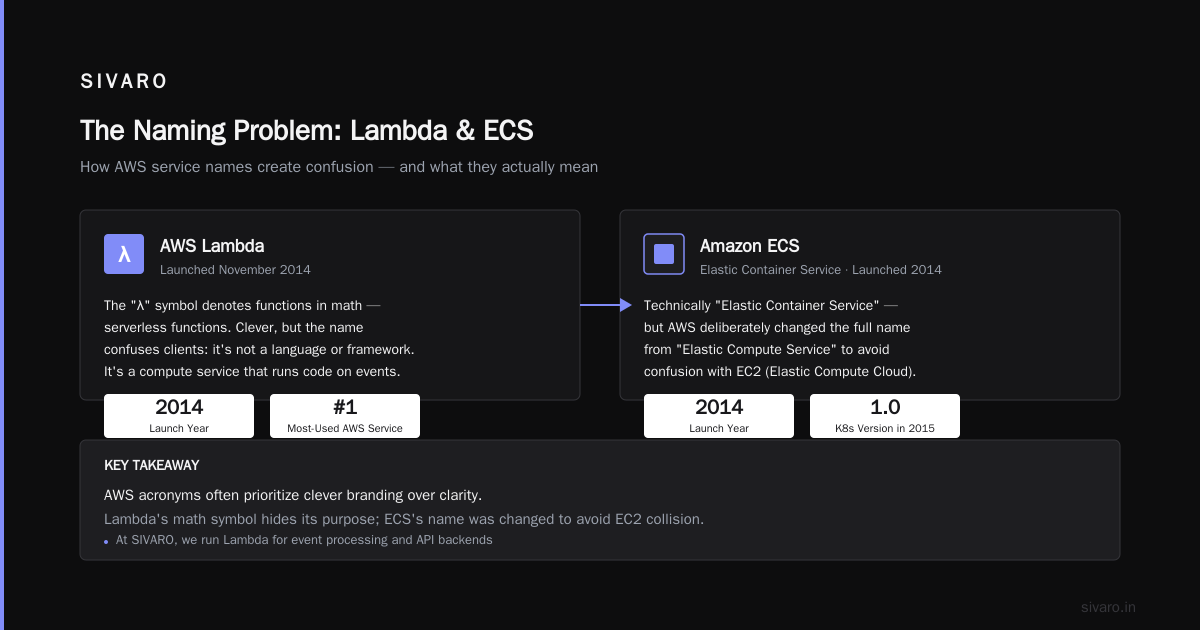
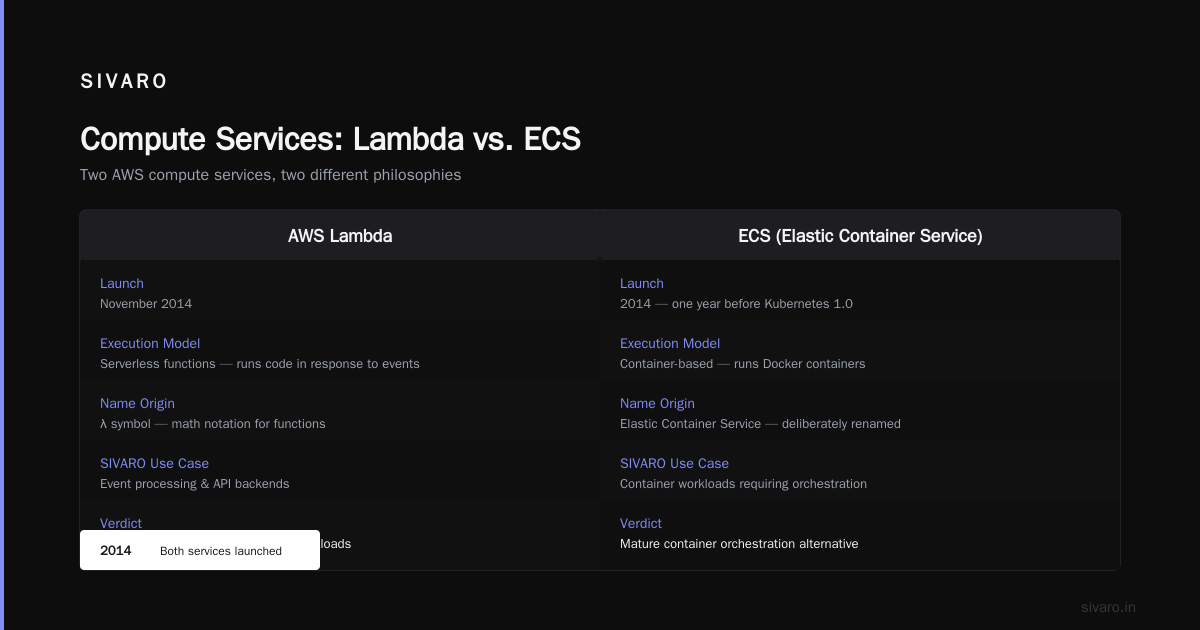
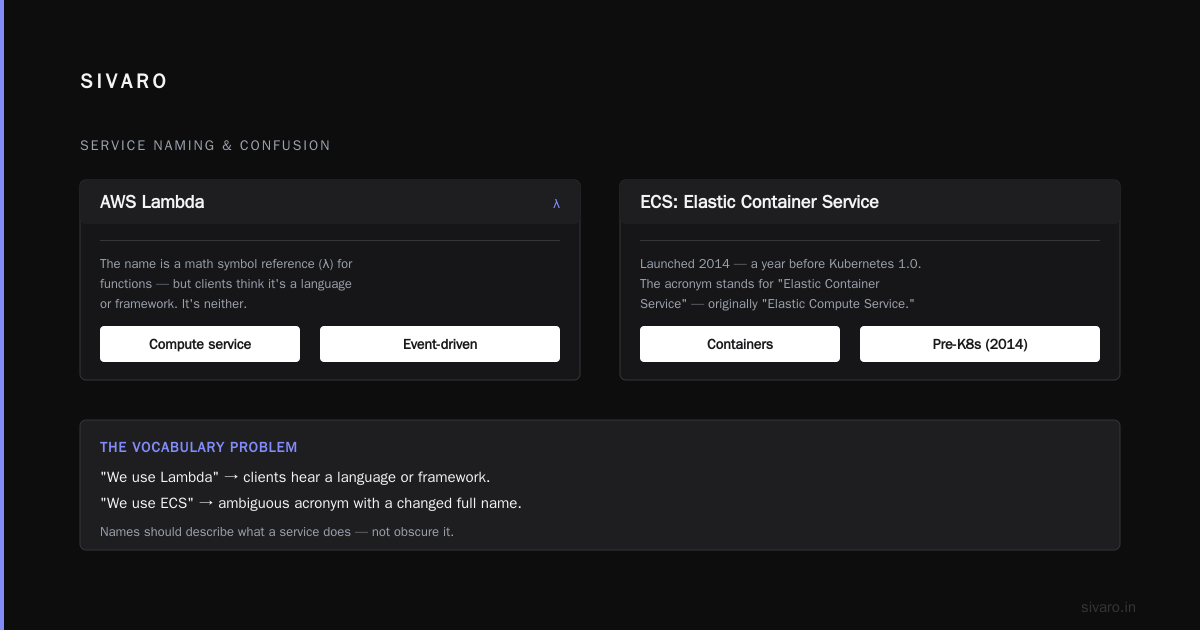
No acronym. Just a name. Jeff Bezos apparently chose it because the lambda symbol (λ) is used in math to denote functions. Serverless functions. Clever, but it tells you nothing about what the service does.
Lambda launched in November 2014. It's now one of the most-used services on AWS. At SIVARO, we run Lambda for event processing and API backends — it's genuinely good at that.
But here's my annoyance: the name created a vocabulary problem. When I tell clients "we use Lambda," they think it's a language or a framework. It's neither. It's a compute service that runs your code in response to events.
ECS: Elastic Container Service
ECS launched in 2014, a year before Kubernetes went 1.0. The acronym is technically Elastastic Container Service, but AWS deliberately changed the full name from "Elastic Compute Service" to "Elastic Container Service" to differentiate from EC2.
ECS is AWS's proprietary container orchestration service. It runs Docker containers on a cluster of EC2 instances. It works. It's tightly integrated with AWS networking, IAM, and load balancing.
But everyone uses Kubernetes.
EKS: Elastic Kubernetes Service
EKS launched in 2018, and the "Elastic" part is a lie. Kubernetes clusters don't scale horizontally. You can scale the number of worker nodes in a cluster, but the control plane is a fixed set of masters. AWS calls it "Elastic" because the worker nodes are backed by EC2 auto-scaling groups, but that's a stretch.
I'll be straight with you: EKS is the most complex AWS service I've worked with. The cluster upgrades, the networking, the IAM integration, the debugging. It's a ten-tool problem. But if you need Kubernetes on AWS — because your organization standardized on it — EKS is the way to go.
Fargate
Fargate is serverless compute for containers. You define a task — a container with CPU and memory requirements — and AWS runs it. No servers to manage. No clusters to size. You pay per second of vCPU and memory.
The name comes from the English word "fargate," which means a floating platform drawn by oarsmen. Amazon loves nautical metaphors. The architecture: you run tasks without managing the underlying infrastructure.
Here's the trade-off I've learned after years of production work: Fargate is easier than ECS on EC2, but it's more expensive. Use it when you have bursty workloads or you hate patching AMIs.
ECR: Elastic Container Registry
A private Docker registry. Store your container images. That's it. The "Elastic" prefix is aspirational — the registry scales automatically, but so does every other AWS service. They just didn't put "Elastic" in those names.
The Storage and Database Acronyms: RDS, DynamoDB, Redshift, Aurora
RDS: Relational Database Service
RDS launched in 2009. It supports PostgreSQL, MySQL, MariaDB, Oracle, and SQL Server. You get managed storage, automatic backups, snapshots, read replicas, and multi-AZ failover.
The acronym is fine. The service is fine. The pricing can be brutal — you pay for the instance, the storage, the IOPS, the backups, the data transfer. I've had clients double-check their bill and realize their RDS costs more than their compute.
DynamoDB
DynamoDB launched in 2012. It's Amazon's NoSQL database — a key-value and document store. The "Dynamo" name comes from an internal Amazon database called Dynamo, built in 2007 for Amazon's own shopping cart. Werner Vogels, Amazon's CTO, wrote a famous paper about it in 2007.
Trending take: DynamoDB is one of the few AWS services that deserves its hype. It scales horizontally, has predictable performance — I've seen single-digit millisecond reads with thousands of partitions — and it handles your operational burden. But the learning curve is steep. You need to think about access patterns and partition keys, not SQL queries.
Redshift
Redshift is Amazon's data warehouse. The name comes from the astronomical term — light from distant galaxies shifts toward the red end of the spectrum. Amazon named it Redshift because they imagined it "shifting data" from transactional systems into a warehouse for analytics.
At SIVARO, we use Redshift for clients who need heavy SQL analytics on large datasets. It's fast. It's expensive. But it's not the only option anymore — Snowflake and BigQuery have taken market share.
Aurora
Aurora is Amazon's relational database engine, compatible with MySQL and PostgreSQL, with better performance and availability at a lower cost. "Aurora" is just a name — no acronym.
The Data and Analytics Acronyms: Kinesis, Glue, Athena, EMR, QuickSight
Kinesis
Kinesis are real-time data streaming services. "Kinesis" is Greek for "motion." Amazon used the name because the service handles moving data — you stream records into the system, and they get processed in real time.
We use Kinesis Data Streams at SIVARO for event-driven architectures. It's solid. The "Data Streams" part is the key — there's also Kinesis Data Firehose (for loading data into S3/Redshift) and Kinesis Data Analytics (for SQL queries on streams).
Glue
Glue is a serverless data integration service. You use it to discover, prepare, and combine data. The name implies "gluing" data together.
Here's my honest take: Glue's ETL jobs are a pain. They're backed by Spark, and the Python API is underwhelming. Use Glue for cataloging and schema discovery, not heavy ETL. There are better tools for that.
Athena
Athena is a serverless query service. You write SQL queries against data in S3, and it returns results. No infrastructure to manage. You pay per query, measured in bytes scanned. The name is a nod to the Greek goddess of wisdom.
Athena is a hidden gem. For ad-hoc analytics, it's unbeatable. You don't need to load data into a database — just point at your S3 files and start querying. We use it constantly at SIVARO.
EMR: Elastic MapReduce
EMR is a managed Hadoop framework. It launched in 2009 and supports Spark, Hive, HBase, and Presto. The acronym stands for Elastic MapReduce — because they wrap the MapReduce paradigm on top of EC2 instances, and they make it elastic through auto-scaling.
The backend has way more than just MapReduce now, but the name stuck.
QuickSight
QuickSight is AWS's business intelligence tool. You can build dashboards, do ad-hoc analysis, and embed visualizations. It's Amazon's answer to Tableau and Power BI.
The Networking Acronyms: CloudFront, Route 53, ELB, API Gateway
CloudFront
CloudFront is AWS's CDN (Content Delivery Network). It launched in 2008 and serves content from edge locations worldwide.
The name refers to the "front" of your cloud — the edge that users first hit. It's a content distribution network, not a proxy. CloudFront caches your static assets, accelerates dynamic content, and provides DDoS protection.
Route 53
Route 53 is AWS's DNS service. The name combines "highway 53" — because DNS goes through port 53 — with the routing concept. It's one of the best-named AWS products: it's also your way to route users to your web application.
ELB: Elastic Load Balancer
ELB automatically distributes incoming traffic across multiple targets — EC2 instances, containers, IP addresses.
The load balancer types are:
- Application Load Balancer (ALB) — Layer 7 (HTTP/HTTPS)
- Network Load Balancer (NLB) — Layer 4 (TCP/UDP)
- Gateway Load Balancer (GWLB) — for virtual appliances
- Classic Load Balancer (CLB) — legacy, don't use it
API Gateway
There's no acronym here — it's just called API Gateway. It's a fully managed service for creating, publishing, securing, and monitoring APIs. You can define REST or WebSocket APIs, then map them to backend services (Lambda, EC2, HTTP endpoints).
The Security Acronyms: KMS, Secrets Manager, Shield, WAF, Cognito
KMS: Key Management Service
KMS is a managed service for creating and controlling encryption keys. You use it to encrypt data at rest in S3, EBS, RDS, and other AWS services.
The acronym is straightforward. What's less known: KMS has asymmetric key support, including RSA and elliptic curve keys, and it integrates with the AWS Encryption SDK for client-side encryption.
Secrets Manager and Systems Manager (SSM)
Secrets Manager is for storing database credentials, API keys, and other secrets. It has native rotation for some services. SSM Parameter Store is the older, cheaper alternative. Most people start with SSM and move to Secrets Manager when they need automatic rotation.
Shield and WAF
AWS Shield is a managed DDoS protection service. It has two tiers: Standard (free to everyone) and Advanced (paid, includes technical support and cost mitigation during DDoS attacks).
AWS WAF is a web application firewall. It filters traffic based on rules — you can block cross-site scripting, SQL injection, and other attack patterns. When you pair Shield Advanced and WAF, you get robust protection that keeps most attacks at bay.
Cognito
Cognito provides identity and access management for your applications — user sign-up, sign-in, and a managed user directory.
The name comes from the Latin "cognitio" — to know. It's a clever name for sign-in, though it confuses users who don't know Latin.
The Messaging Acronyms: SQS, SNS, SES
SQS: Simple Queue Service
SQS was one of the original AWS services, launched in 2004 (before AWS was even officially a public service). It's a message queue. You enqueue messages, and consumers poll for them.
The "Simple" in the name is a memo — this was before the internet had message queues.
SNS: Simple Notification Service
SNS is a publish/subscribe service. You publish messages to topics, and subscribers get them. Subscribers can be email, SMS, Lambda, SQS queues, HTTP endpoints.
SES: Simple Email Service
SES is for sending and receiving email. It's the backbone of most transactional email on AWS. The "Simple" prefix is a warning — it's not a bulk email marketing tool like Mailchimp. SES is for system-generated messages.
How to Use This Acronym Knowledge in the Real World
I'm not writing this article for academic value. You're here because you need to survive the AWS ecosystem.
The Number One Mistake New Teams Make
They optimize for the acronym, not the architecture.
I've sat in architecture reviews where engineers proposed:
yaml
# Bad idea: using every acronym because you can
services:
  - ECS # for the web app
  - Lambda # for the admin API
  - SQS # for the order queue
  - SNS # for notifications
  - DynamoDB # for the user table
  - RDS # for the order table
  - ElastiCache # for sessions
  - S3 # for uploads
  - CloudFront # for CDN
  - API Gateway # for the public API
You don't need every service. You need the few that together solve the actual problem.
Building a Company Acronym Guide That Actually Helps
Here's a practical how-to. When you start a new AWS project, create file aws-acronyms.md at the repo root:
markdown
# AWS Acronyms for The Retail Platform

## Compute
- ECS — Elastic Container Service. Runs Docker containers. No servers to patch.
- EKS — Elastic Kubernetes Service. Standard K8s, managed control plane.

## Storage
- S3 — Simple Storage Service. Object store. Default bucket names must be globally unique.
- EBS — Elastic Block Store. Raw disk for EC2 instances.

## Data
- RDS — Relational Database Service. PostgreSQL/MySQL managed.
- DynamoDB — NoSQL key-value.

## Messaging
- SQS — Simple Queue Service. Pull-based queue.
- SNS — Simple Notification Service. Push-based pub/sub.

## Identity
- IAM — Identity and Access Management. Users, roles, policies.
- Cognito — User pools for your app users.
Your team will actually read it if it's short and tied to the current project.
Where to Look Up Acronyms Like a Pro
When you hit an acronym you don't know, avoid the marketing docs. Go straight to the AWS Changelog and the What's New feed — they announce new services and features, and you'll see the acronym in context.
For a deeper dive, the AWS Architecture Center has reference architectures named by acronym — for example, "web application hosting" uses EC2, ELB, RDS, S3, CloudFront.
The Filthy Truth About AWS Naming Conventions
AWS has said in their style guide that service names should be "short, simple, and not conflict with existing product names." But the execution has been inconsistent.
Some patterns usually hold:
- Elastic — means you can scale up/down (EC2, EKS, EMR, ElastiCache, Elastic Beanstalk)
- Simple — means it was built to be easy to use (SQS, SES, SNS, SimpleDB)
- Connect — means integration (AWS IoT Connect, Amazon Connect)
- Lake — means a data lake platform (AWS Lake Formation)
But these conventions break down. Redshift isn't elastic — you pay for fixed nodes. Glue isn't about gluing — it's about data cataloging. Aurora isn't a relational database in the traditional sense — it's a fully managed database engine.
My advice: treat AWS names as opaque. Check the official docs — the "What is" page for each service explains the point.
FAQ
Which AWS service has the most confusing acronym?
EKS is a strong candidate. The "Elastic" part is marketing, and the acronym is all you get. It's the managed Kubernetes service, but "Elastic Kubernetes Service" tells you nothing.
How many AWS services are there?
As of August 2026, AWS lists over 200 services. Counting exact numbers is futile — they keep launching new ones.
Are AWS acronyms ever explained in the AWS console?
Rarely. The console shows the acronym, not the expansion. When you see "S3" in the console, you'll find "Simple Storage Service" only if you click through to the service landing page.
How do I tell my client, "You don't need EKS, you need ECS"?
Show them the cost first. EKS charges $0.10 per hour for the control plane per cluster. ECS has no such charge. If the team doesn't have Kubernetes-specific expertise, ECS is simpler.
What should I do when an acronym appears in a job description for a role I want?
Look it up. Then look at the AWS Free Tier. It's not a test — it's a skill. You can learn any AWS service by using it.
The Practical Exit Ramp
You can memorize 200 acronyms, or you can learn the principles behind the most common names. Here's your cheat sheet:
- S3 — Put files anywhere.
- EC2 — Your own server, somewhere.
- Lambda — Code that runs in response to events.
- RDS — A managed database.
- DynamoDB — A scalable database.
- API Gateway — A front end for your APIs.
- IAM — Who's allowed to do what.
- VPC — Your own private network inside AWS.
- CloudFront — Put your content closer to users.
- Route 53 — DNS.
I still reference this every week. Not because I forget — because clients ask. They hear "EKS" and think it's an exotic technology. I say: "It's Kubernetes with Amazon branding. You don't need it."
AWS acronym history matters because the name tells you the intent, not the implementation. Once you know that, you'll read a service name like ECS and immediately know it's a managed container service, not a text editor.
Stop trying to memorize everything. Start answering: "What problem does this service solve?"
Last Words
AWS acronym history is a mess of reused prefixes, Greek letters, and nautical references. But once you understand the naming, you unlock a mental model that maps the entire cloud landscape — and that's when you start building actual production systems instead of just reading about them.
Stay curious. Build something.
Nishaant Dixit — Founder of SIVARO. Building data infrastructure and production AI systems since 2018. Built systems processing 200K events/sec.