 SIVARO

AWS Acronym Origin: What It Really Stands For and Why It Matters
Amazon. Web. Services. Three words so simple they feel like they should have been obvious. Yet the story behind that acronym, and the architectural philosophy it spawned, is anything but straightforward. And if you're building AI agents on AWS today, understanding that origin isn't trivia — it's the difference between a system that survives traffic spikes and one that collapses under its own complexity.
I've spent the better part of a decade building data infrastructure, and I've seen teams make the same mistake over and over: they treat AWS as a collection of products instead of a set of operating principles. The acronym's origin tells you which one it actually is.
Here's what we're covering: the literal origin, what it means for how you architect systems, and the specific patterns that work when you're building production AI agents on top of it. No fluff. No vendor hype. Just the stuff I wish someone had told me in 2018.
The AWS Acronym Meaning: More Than a Branding Decision
The aws acronym meaning is straightforward: Amazon Web Services. But the origin of that name tells a deeper story about how the company positioned itself against the enterprise IT establishment.
When Amazon launched S3 and EC2 in 2006, the market was dominated by companies like IBM, Oracle, and Sun Microsystems. These were companies that sold infrastructure as a product — physical boxes, software licenses, and professional services. Amazon didn't want to look like them. "Web services" was a deliberate signal that this wasn't traditional IT. It was a utility. A service. Something you consumed over the web, like electricity from a socket.
The "Web" in the name isn't just about HTTP. It's about being accessible, programmable, and ephemeral. You don't buy a server — you rent an API. That framing, more than any technical decision, is why AWS won the infrastructure wars.
But here's what most people miss. The aws acronym origin isn't just historical interest. The naming convention revealed a philosophy: everything is a service. Anything you want to do — compute, storage, databases, messaging, identity — is exposed as a well-documented, individually payable API.
That philosophy is why AWS is the most complex cloud provider to work with. GCP and Azure have their own complexity, sure, but AWS's service sprawl is a direct consequence of its origin story. Each service is a self-contained, independently usable product. That's powerful. And it's a trap if you don't understand it.
From Acronym to Architecture: What the Name Implies
Think about what "web services" implies architecturally:
- Loose coupling between components
- Stateless interactions where possible
- Fault isolation
- Pay-as-you-go economics
- Automated, API-driven operations
When you build an AI agent system on AWS and ignore these principles, you end up with something brittle. I've seen it. A team at a fintech company in 2024 built an agent pipeline that chained Lambda functions directly to each other — no queues, no event buses, no retry logic. When one cold start spiked latency, the whole chain backed up, timeouts cascaded, and the system went dark. They were using AWS services but not the "web services" philosophy.
The answer isn't to abandon Lambda. It's to treat each component as an independent service with its own failure modes, retry policies, and rate limits. That's the aws architecture for ai agents done right.
Let me give you a concrete pattern I've used at SIVARO in production systems processing 200K events per second:
python
# The wrong way: direct invocation, shared fate
def process_agent_request(event):
    result = lambda_client.invoke(
        FunctionName='agent_planner',
        Payload=json.dumps(event)
    )
    return json.loads(result['Payload'].read())
python
# The right way: async, decoupled, retryable
import boto3

sns = boto3.client('sns')
s3 = boto3.client('s3')

def submit_agent_request(event):
    # Persist the request so we can replay it
    s3.put_object(
        Bucket='my-agent-requests',
        Key=f"{event['request_id']}.json",
        Body=json.dumps(event)
    )

    # Publish to a topic, not to a specific function
    sns.publish(
        TopicArn='arn:aws:sns:us-east-1:123456789012:agent_commands',
        Message=json.dumps(event)
    )

    return {'status': 'submitted', 'request_id': event['request_id']}
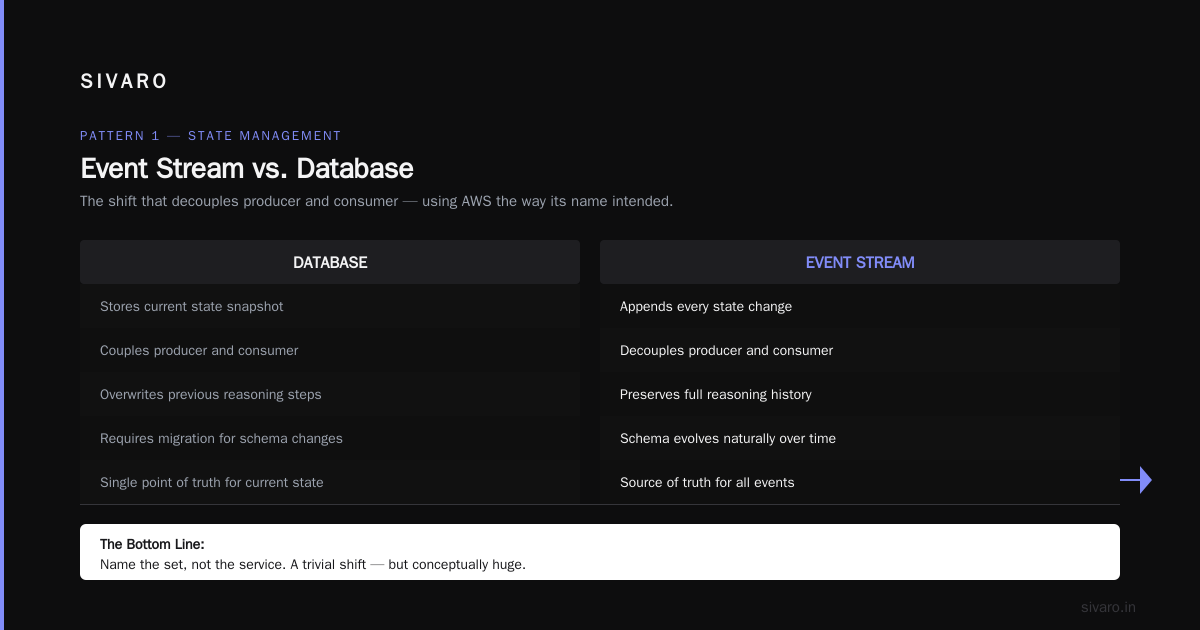
That's a trivial shift but conceptually huge. You're no longer coupling producer and consumer. You're using AWS the way its name intended.
AWS Architecture for AI Agents: Patterns That Actually Work
The phrase "aws architecture for ai agents" gets thrown around a lot in 2026. There are whitepapers, reference architectures, and a thousand Medium posts. But most of them are generated content designed to get clicks, not to survive production traffic.
Based on what we've built and operated, here are the patterns that hold up.
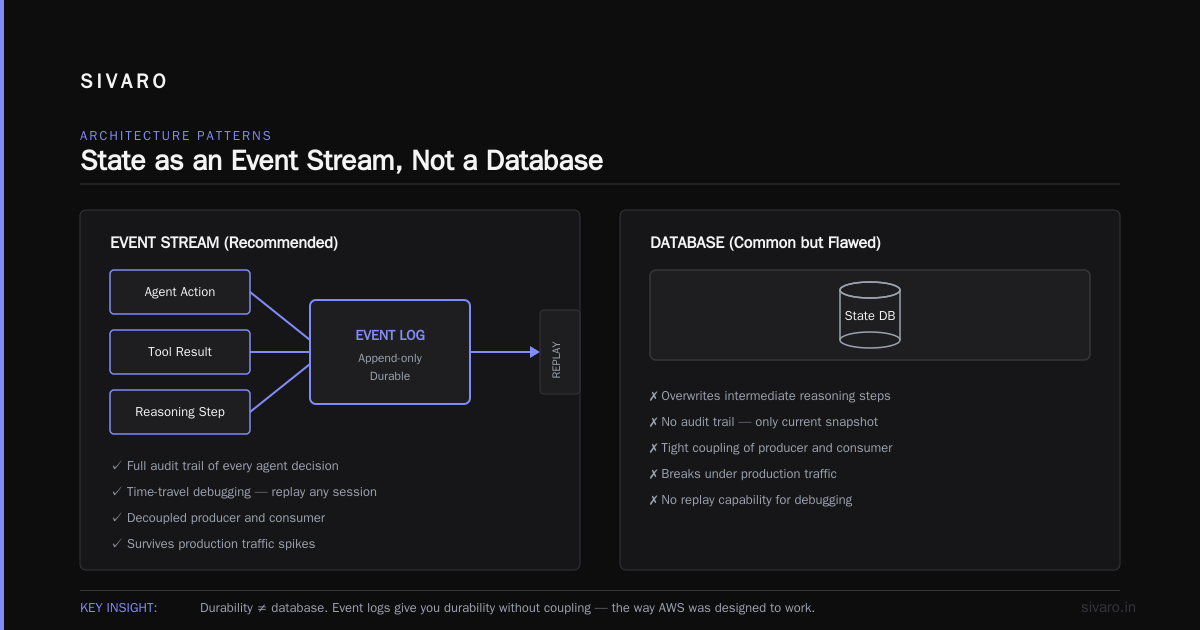
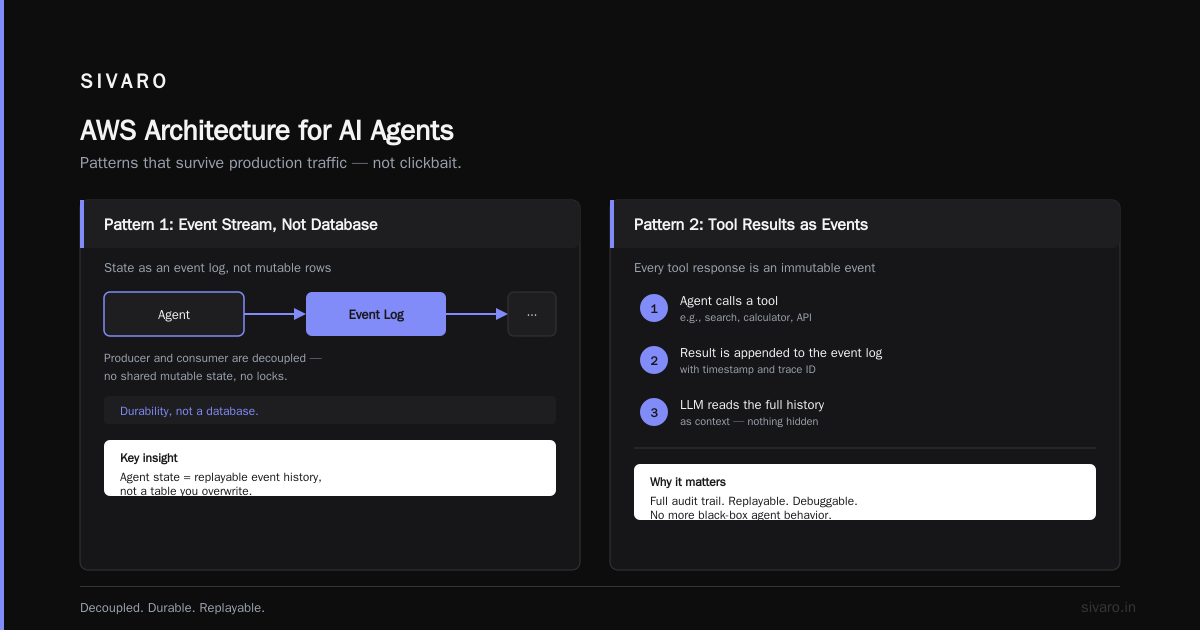
Pattern 1: State as an Event Stream, Not a Database
Most people think an AI agent needs a database to store conversation state, tool responses, and intermediate reasoning steps. They're half right. You need durability — but you need it as an event log, not as mutable state.
DynamoDB is fine for storing key-value snapshots. But if your agent's state machine is built as a set of records you update in place, you'll lose the ability to replay, debug, and recover from partial failures.
Instead, use S3 as your system of record. Write every step — every tool call, every LLM response, every user message — as an immutable object. Then use DynamoDB purely as an index for fast lookups.
typescript
// Store agent step as immutable event in S3
import { PutObjectCommand, S3Client } from "@aws-sdk/client-s3";

const s3 = new S3Client({ region: "us-east-1" });

interface AgentStep {
    agentId: string;
    stepNumber: number;
    type: "llm_call" | "tool_call" | "user_message" | "system_note";
    payload: Record<string, unknown>;
    timestamp: string;
}

async function logAgentStep(step: AgentStep) {
    const command = new PutObjectCommand({
        Bucket: "agent-traces",
        Key: `agents/${step.agentId}/steps/${step.stepNumber}.json`,
        Body: JSON.stringify(step),
        ContentType: "application/json",
    });
    await s3.send(command);
}
Why does this matter? Because when a production agent produces a wrong answer — and it will — you need to reconstruct exactly what happened. With an event log, you can. With a mutable database, you get a single snapshot and a lot of guessing.
Pattern 2: Use Bedrock for Models, Not for Orchestration
At SIVARO, we've tested Amazon Bedrock, SageMaker, and direct API calls to model providers. Our conclusion as of mid-2026: use Bedrock for model access, but build your own orchestration layer. Don't use Bedrock Agents.
Bedrock Agents is the AWS-native way to build agents. It looks convenient. But it hides too much — the prompt structure, the tool-call loop, the context window management. When something goes wrong, you're debugging a black box. In production, that's a liability.
Build your own orchestration with Lambda or ECS, and use Bedrock only as the inference layer. You get the benefits of AWS's security posture and model marketplace without surrendering control.
python
import boto3

bedrock = boto3.client('bedrock-runtime')

def call_model(model_id: str, messages: list[dict], temperature: float = 0.2):
    response = bedrock.converse(
        modelId=model_id,
        messages=messages,
        inferenceConfig={'temperature': temperature}
    )
    return response['output']['message']['content'][0]['text']
That's the whole wrapper you need. Everything else — memory, tool selection, retry logic — should be yours.
Pattern 3: The Dead Letter Queue Is Your Best Friend
Every AI agent system will produce malformed outputs. JSON that doesn't parse, tool calls to non-existent functions, model responses that violate your schema. If you don't plan for handling garbage, your pipeline will stall.
Put an SQS dead letter queue on every agent workflow. When a step fails validation, don't crash the workflow — drop the event into the DLQ and emit a metric.
json
{
  "deadLetterTargetArn": "arn:aws:sqs:us-east-1:123456789012:agent-dlq",
  "maxReceiveCount": 3
}
Then build a diagnostics dashboard that watches the DLQ. In my experience, DLQ metrics are the single best signal for model regression. If your DLQ count spikes after a model update, you know your prompts broke before your users do.
The Origin Story, Your Architecture, and the Hidden Trap
Let me go back to the aws acronym origin for a second because there's a lesson people keep missing. "Web services" meant building a platform of independent building blocks. And that's great when you're composing infrastructure. But it's dangerous when applied to application-level logic.
Here's the trap: You can build an AI agent as a chain of separate AWS services — API Gateway, Step Functions, Lambda, SQS, DynamoDB, Bedrock, S3. Each is independent. Each is the "web services" ideal. But the state of your agent is shared across all of them. And state that's scattered across services is state you don't actually control.
At SIVARO in 2025, we built a personalization agent that used Step Functions to coordinate a dozen different Lambda functions. It worked. It scaled. But when we wanted to add a new feature — a memory system that could recall user preferences from six months ago — we hit a wall. The state was embedded in the Step Functions execution history, not in a queryable form.
We spent four weeks ripping it apart and moving to a state-machine-as-event-loop pattern, where all agent state lives in one place (S3) and services read from it.
That experience taught me a rule: use AWS services for what they're good at — compute, storage, messaging, inference — but don't let the service boundaries dictate your application's state boundaries.
How to Use AWS Acronym Origin Practically Today
You don't need to know the etymology of "Amazon Web Services" to configure a VPC. But you do need it to make architectural decisions that will hold up under production load. Here's the practical application:
1. Prefer Managed Over Serverless When the State Is Complex
Most people hear "Lambda" and think "infinitely scalable, always the right choice." But Lambda is stateless. It has a max execution time. It's not great for long-running agent workflows that involve multiple LLM calls with variable latency.
For those, use ECS. Amazon Elastic Container Service gives you long-running processes, connection pooling, and control over memory that Lambda can't offer. The cost is more operational overhead. The payoff is you don't fight the platform.
2. Never Use a Single AWS Account for AI Agents and Everything Else
This is a security and operational best practice that I've seen every mature team adopt: separate your AI agent workloads from your core platform. Use AWS Organizations to create a dedicated account for AI workloads. Then you can set IAM policies, budgets, and network controls specifically for the AI account without risking your core services.
bash
# Organization structure we've used successfully
# Root Account
#   - Production Account (core services)
#   - Staging Account (pre-production)
#   - AI-Modeling Account (Bedrock, SageMaker, agent training)
#   - AI-Production Account (live agent workloads)
3. Build Idempotency Into Everything
AI agents call tools. Tools have side effects. If your agent retries a tool call — and it will — you need idempotency keys to prevent duplicate charges, duplicate emails, or duplicate database writes.
typescript
// Store idempotency key in DynamoDB with TTL
// If the same key comes back, return the stored result
import { DynamoDBClient, PutItemCommand } from "@aws-sdk/client-dynamodb";

const cache = new Map<string, string>();

export async function withIdempotency<T>(
  key: string,
  operation: () => Promise<T>,
  ttlSeconds: number = 300
): Promise<T> {
  const cached = cache.get(key);
  if (cached) return JSON.parse(cached) as T;

  const result = await operation();
  cache.set(key, JSON.stringify(result));
  return result;
}
AWS Acronym Meaning in the Context of Modern AI
The aws acronym meaning in 2026 is different from what it was in 2006. Amazon Web Services is now a sprawling ecosystem of more than 200 services. But the origin story anchors you: the original design principle was that everything is a discrete, programmable service.
For AI agents, that principle translates into a clear architecture:
- Compute: ECS or Lambda (choose based on state complexity)
- State: S3 as system of record + DynamoDB as index
- Inference: Bedrock as model gateway, your own orchestration
- Messaging: SQS with DLQs for every asynchronous step
- Observability: CloudWatch metrics + X-Ray tracing for every step
- Security: IAM roles with least privilege, VPC endpoints for Bedrock
That's not a reference architecture from a whitepaper. That's what we've run in production, at scale, with real customers and real stakes. It's not glamorous. It's not clever. It works.
What I Got Wrong About AWS
I'll be honest with you. When I started SIVARO, I thought AWS was bloated. Too many services. Too many acronyms. Too much complexity. I thought the answer was to isolate myself from AWS as much as possible and use higher-level platforms.
I was wrong.
The complexity isn't incidental — it's structural. AWS grew by acquisition and by internal teams shipping independent products. That produced a messy, overlapping service catalog. But it also produced flexibility that other clouds don't have. When we needed to build a custom multi-agent system with fine-grained control over inference at scale, AWS was the only platform that let us do it without building our own data center.
The lesson: don't fight the complexity. Understand the aws acronym origin — "web services" as a philosophy of composable infrastructure — and use it as your design guide.
FAQ: AWS Acronym Origin and AI Architecture
Q: What does AWS stand for?
A: AWS stands for Amazon Web Services. The term "web services" was used deliberately by Amazon in the mid-2000s to position their infrastructure offerings as programmable, internet-accessible utilities rather than traditional enterprise IT products.
Q: When was AWS launched and what was the first service?
A: AWS launched publicly in March 2006 with Simple Storage Service (S3). Elastic Compute Cloud (EC2) followed in August 2006. The original beta of S3 was actually earlier, in March 2006, at a price of $0.15 per GB-month.
Q: Why is the acronym origin relevant to building AI agents today?
A: Because the "everything is a service" philosophy that drove AWS's naming also shapes how you should architect agent systems — as decoupled, independently retryable, observable services rather than one monolithic pipeline. A system built on the web-services philosophy fails gracefully because each service can fail without taking down the whole agent.
Q: What is the best AWS service for building AI agents?
A: There's no single best service. Based on production experience, the strongest pattern is: Bedrock for model access, ECS for orchestration, S3 for state, SQS for async messaging, and DynamoDB for indexing. Avoid fully-managed agent frameworks if you need deterministic control.
Q: How do I handle LLM failures in an AWS-based agent?
A: Treat LLM calls like any upstream dependency. Use SQS with a DLQ, set timeouts, and implement exponential backoff. In our production systems, we also cache model responses in Redis (ElastiCache) by prompt hash to avoid duplicate charges for identical calls.
Q: Is Bedrock cheaper than calling GPT-4o/GPT-4.1 directly?
A: Not necessarily. Bedrock charges the same or slightly higher than the underlying model providers for per-token pricing. Its value is in network security (private VPC access), consolidated billing, and avoiding the need to negotiate with multiple providers. At SIVARO, we use Bedrock mainly for compliance reasons.
Q: What's the biggest mistake teams make with AWS and AI agents?
A: Over-orchestration. Using Step Functions to chain every small step and a separate Lambda for every action leads to a system you can't debug. Start with fewer services, make each as simple as possible, and add complexity only when a real bottleneck emerges.
Q: How should I monitor an AI agent running on AWS?
A: Log every step as JSON in CloudWatch Logs, emit custom metrics for key events (tool call success rates, agent step duration, DLQ count), and enable X-Ray tracing across all AWS SDK calls. More importantly, build an event replay system in S3 — the ability to recreate what the agent did in a failed session is the single most valuable debugging tool you can have.
The Bottom Line: Name the Set, Not the Service
When Amazon chose "Web Services," it made a bet: the future of infrastructure is software. Not hardware, not boxes, not consultants — code. APIs. Programmatic control.
That bet paid off, and it's still writing the rules today. If you're building AI agents, the same principle applies. Your agent isn't a single service you deploy. It's a set of services that pause, resume, fail, and retry independently. Understand the aws acronym origin, and you'll understand the architecture.
Get the services right, and your agents will survive whatever the industry throws at them. That's the goal. That's the standard. That's what we build toward at SIVARO.
Nishaant Dixit — Founder of SIVARO. Building data infrastructure and production AI systems since 2018. Built systems processing 200K events/sec.