 SIVARO
AWS Acronyms in Distributed Systems: The Field Guide You Actually Need
Look, I get it. You're staring at a console full of letters — EC2, ECS, EKS, S3, Lambda, VPC, IAM — and it feels like alphabet soup. I was there in 2018 when SIVARO started, and I thought I could just wing it with a few instances and a load balancer.
Then a client's system went down at 2 AM because I didn't understand how availability zones actually work. That was a good night.
Here's the thing about aws acronym distributed systems: they're not just random letters. Each acronym represents a decision about how your system scales, fails, and recovers. Get those decisions wrong, and you're not just dealing with a bug — you're dealing with an architecture that fights you every single day.
In this guide, I'm going to break down the AWS acronyms that matter for distributed systems, explain what they actually mean (not the marketing version), and tell you what works in production. We'll cover compute, storage, networking, and the AI infrastructure wave that's hitting right now. No fluff. Just what I've learned building and running systems that process 200K events per second.
Let's start with the one everyone thinks they know.
EC2, ECS, EKS: The Compute Trifecta That Confuses Everyone
EC2: The Virtual Server You'll Never Stop Paying For
EC2 stands for Elastic Compute Cloud. It's a virtual machine. That's it. But here's the thing — the "elastic" part is a promise that AWS doesn't always keep.
When I first started, I thought EC2 meant I could just spin up instances and forget about them. Wrong. You need to think about instance families, vCPU counts, memory, storage types, and network performance. The AWS documentation on compute makes it sound simple, but the reality is that choosing the right EC2 instance is like choosing the right engine for a car — you can't just grab the biggest one and call it a day.
The EC2 G4 instances changed things for GPU workloads. When we started doing machine learning inference, we thought we needed massive GPU clusters. Turns out G4s were the sweet spot for a lot of our workloads. Not the fastest, but the price-performance ratio was what mattered.
python
# A basic EC2 launch pattern we use
import boto3

ec2 = boto3.resource('ec2', region_name='us-east-1')
instances = ec2.create_instances(
    ImageId='ami-0abcdef1234567890',
    InstanceType='t3.medium',
    MinCount=1,
    MaxCount=1,
    KeyName='production-key',
    SecurityGroupIds=['sg-12345678'],
    SubnetId='subnet-12345678'
)
ECS vs EKS: The Container Wars
ECS is Elastic Container Service. EKS is Elastic Kubernetes Service. Most people think EKS is automatically better because Kubernetes is the industry standard. Here's my contrarian take: for most teams, ECS is the better choice.
Why? Because Kubernetes adds operational complexity that most teams don't need. The control plane, the etcd cluster, the networking — it's a full-time job just to maintain it. ECS handles the orchestration for you. It's simpler, and simplicity is a feature in distributed systems.
We run ECS in production for most of our microservices. It works. The auto-scaling is predictable, the service discovery is straightforward, and I don't need a dedicated SRE team just to keep the cluster alive.
That said, if you're already running Kubernetes on-premises, or if you need the portability, EKS makes sense. Just know what you're signing up for.
The AWS Acronym Meaning in Cloud Computing: It's About Abstraction
Here's what I've learned about aws acronym meaning in cloud computing: each acronym represents a level of abstraction. EC2 abstracts the physical server. ECS abstracts the container orchestration. Lambda abstracts the server entirely.
The question is never "which is best" — it's "which abstraction level fits your team's expertise and your workload's requirements?"
S3: Simple Storage Service, Complex Consistency Questions
S3 stands for Simple Storage Service. The name is a lie. It's not simple when you dig into consistency models, versioning, lifecycle policies, and cross-region replication.
Here's the part that trips everyone up: S3 is now strongly consistent. It wasn't always that way. Before December 2020, S3 had eventual consistency for reads after writes. That meant you could write an object and immediately try to read it — and get nothing. That was a nightmare for distributed systems.
Now it's strongly consistent, which is better, but it still doesn't mean what you think it means. S3 strong consistency means the data is available across all availability zones in a region. It doesn't mean your application logic is consistent. That's still your job.
python
# S3 lifecycle configuration we use for data retention
import boto3

s3 = boto3.client('s3')

response = s3.put_bucket_lifecycle_configuration(
    Bucket='sivaro-data-lake',
    LifecycleConfiguration={
        'Rules': [
            {
                'ID': 'archive-after-30-days',
                'Status': 'Enabled',
                'Prefix': 'logs/',
                'Transitions': [
                    {
                        'Days': 30,
                        'StorageClass': 'STANDARD_IA'
                    }
                ]
            }
        ]
    }
)
The hard truth about S3 in distributed systems: it's the backbone of your data lake, but it's not a database. Don't try to query it like one. Use it for what it's good at — storing blobs of data at massive scale — and use databases for, well, database things.
VPC and AZs: The Network That Holds It All Together
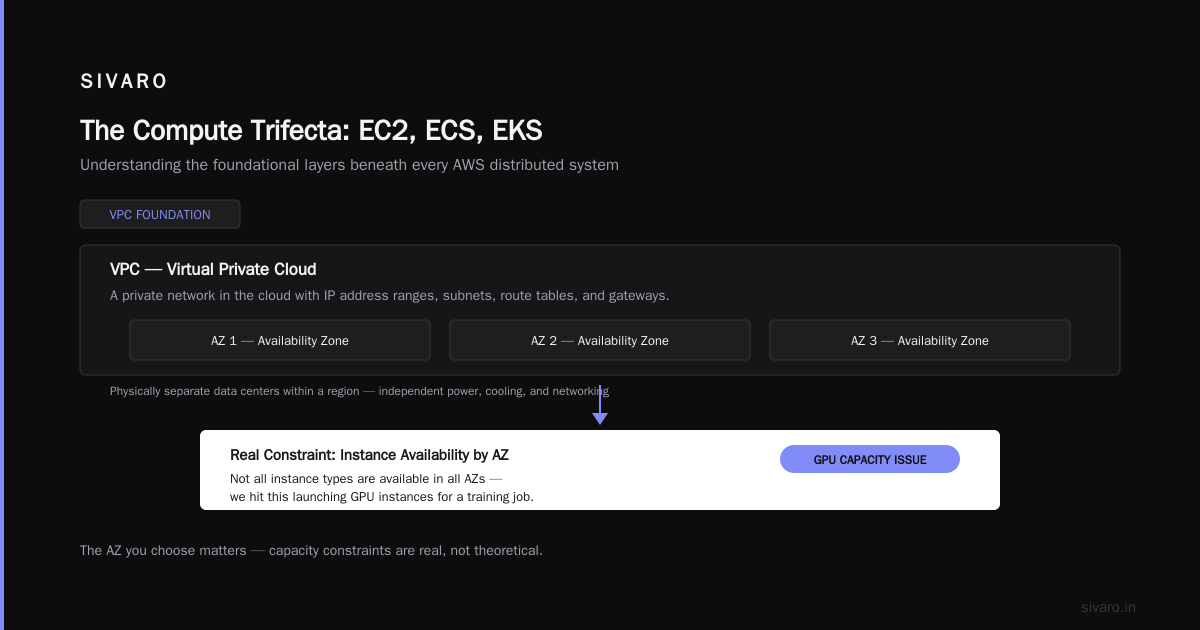
VPC is Virtual Private Cloud. AZ is Availability Zone. These are the fundamental building blocks of any AWS distributed system, and most people don't understand them deeply enough.
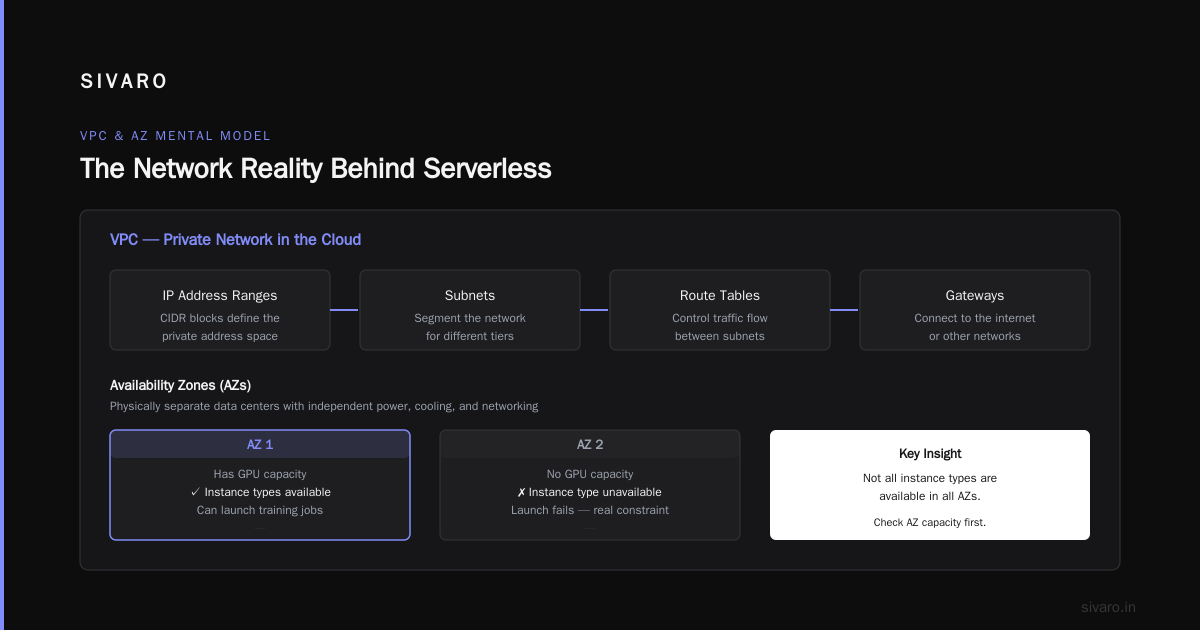
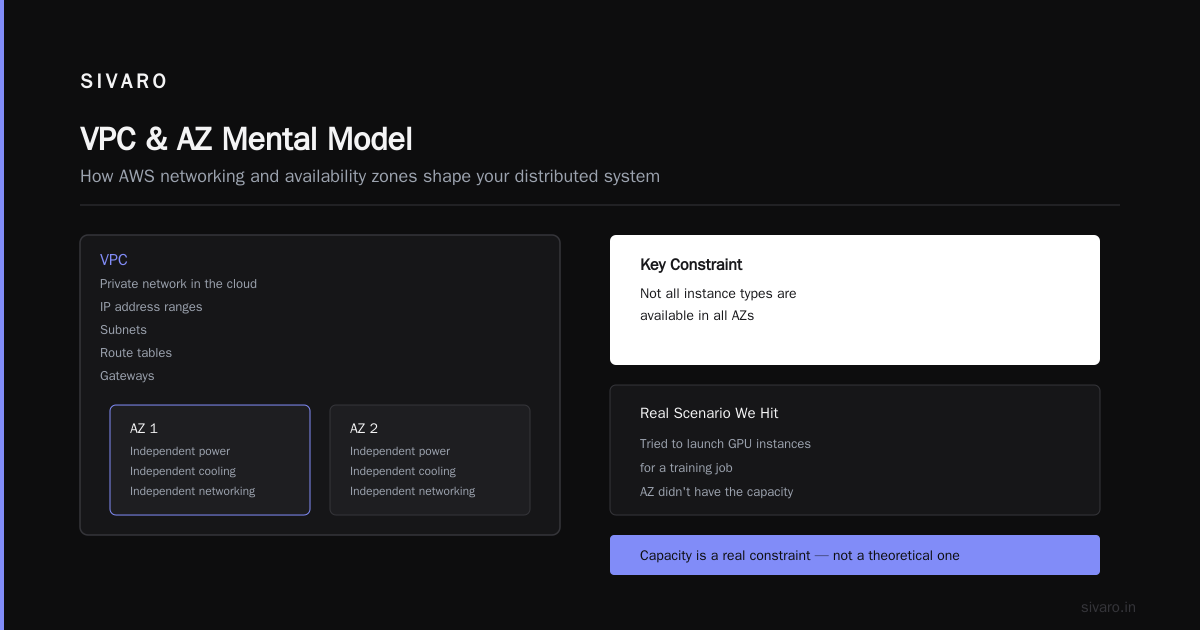
Here's the mental model I use: a VPC is a private network in the cloud. It has IP address ranges, subnets, route tables, and gateways. Within that VPC, you have AZs — physically separate data centers within a region that have independent power, cooling, and networking.
The AWS documentation for GPU instances makes a point that applies broadly: you need to think about which AZ your resources are in, because not all instance types are available in all AZs. We hit this when trying to launch GPU instances for a training job — the AZ we were in didn't have the capacity. That's a real constraint, not a theoretical one.
For a distributed system, the key decision is whether to run across multiple AZs for high availability or stay in one AZ for lower latency and cost. Most people say "obviously multi-AZ" — and they're right for production workloads. But it doubles your cost for the same capacity, and it introduces cross-AZ data transfer charges.
The trade-off is real. We run multi-AZ for our critical production services, but we keep our development and staging environments in a single AZ. No reason to pay for redundancy when you're just testing.
yaml
# Terraform snippet for multi-AZ architecture
resource "aws_subnet" "app_subnet_a" {
  vpc_id            = aws_vpc.main.id
  cidr_block        = "10.0.1.0/24"
  availability_zone = "us-east-1a"
}

resource "aws_subnet" "app_subnet_b" {
  vpc_id            = aws_vpc.main.id
  cidr_block        = "10.0.2.0/24"
  availability_zone = "us-east-1b"
}

resource "aws_lb" "app_lb" {
  name               = "app-load-balancer"
  internal           = false
  load_balancer_type = "application"
  subnets = [
    aws_subnet.app_subnet_a.id,
    aws_subnet.app_subnet_b.id
  ]
}
The AI Infrastructure Wave: Trainium, Inferentia, and Project Rainier
Let's talk about what's happening right now in 2026. The AI infrastructure arms race is real, and AWS is making some bold moves.
Trainium is AWS's custom AI accelerator chip. Amazon's own documentation positions it as a lower-cost alternative to NVIDIA GPUs for training machine learning models. The Project Rainier announcement — one of the world's largest AI compute clusters — shows AWS is betting big on this.
Here's my take: custom silicon is the future of AI infrastructure, but it's not ready for everyone. Trainium requires you to port your models to the AWS Neuron SDK, and that's not a trivial effort. We tried it for a small model and the performance was good, but the developer experience was clunkier than using CUDA on NVIDIA GPUs.
If you're building a large-scale AI system, you need to think about cost. The SIVARO article on the million-token context window talks about how even with massive context windows, the memory constraints of serving these models are brutal. The hardware you choose matters.
And if you're comparing AWS to Azure or GCP for AI workloads, this Udemy comparison is still relevant even if the specific numbers are dated. The fundamental trade-offs haven't changed: AWS has the broadest service catalog, Azure integrates best with Microsoft tooling, and GCP has the most mature Kubernetes story.
The Acronym That Actually Matters: DAG
Here's an acronym that doesn't get enough attention in AWS conversations: DAG — Directed Acyclic Graph. It's not an AWS service, but it's the fundamental structure behind how distributed systems process workflows.
Step Functions, Airflow, even Kubernetes workflows — they're all DAGs. Understanding DAGs helps you design systems that don't have circular dependencies and deadlocks.
We had a production incident where a workflow had a cycle — service A called service B, which called service A. Neither could complete. The fix wasn't a code change; it was redesigning the workflow as a proper DAG with a state machine.
json
{
  "StartAt": "ProcessData",
  "States": {
    "ProcessData": {
      "Type": "Task",
      "Resource": "arn:aws:states:::lambda:invoke",
      "Parameters": {
        "FunctionName": "process-data",
        "Payload": {
          "input.$": "$.input"
        }
      },
      "Next": "ValidateOutput"
    },
    "ValidateOutput": {
      "Type": "Choice",
      "Choices": [
        {
          "Variable": "$.status",
          "StringEquals": "SUCCESS",
          "Next": "Complete"
        }
      ],
      "Default": "RetryProcessing"
    },
    "RetryProcessing": {
      "Type": "Task",
      "Resource": "arn:aws:states:::lambda:invoke",
      "Parameters": {
        "FunctionName": "retry-processing",
        "Payload": {
          "input.$": "$.input"
        }
      },
      "Next": "ValidateOutput"
    },
    "Complete": {
      "Type": "Succeed"
    }
  }
}
AI Agent Coordination Without Centralized Control
Now here's where things get interesting. In 2026, everyone's talking about AI agents — autonomous systems that make decisions and take actions. But most people are building them wrong.
The common pattern is to have a central orchestrator that coordinates everything. One agent thinks, then tells another agent what to do, which tells another, and so on. This is a monolithic architecture in disguise, and it fails exactly the way monoliths fail: one slow agent blocks everything.
The better approach is ai agent coordination without centralized control. Think of it like a distributed system: each agent is an independent service that communicates through message queues and event buses. No single point of failure, no bottleneck.
Here's the pattern we use at SIVARO:
- Each agent is a Lambda function or ECS task that does one thing well.
- Agents communicate through SQS queues or SNS topics.
- A state machine (Step Functions) tracks the overall workflow but doesn't control the individual agents.
- Dead letter queues catch failures so nothing gets lost.
This isn't theoretical. We built a system that processes customer support tickets with AI agents, and the event-driven architecture handles thousands of concurrent conversations. The old centralized approach crashed under load. The distributed approach scales linearly.
python
# SQS-based agent communication pattern
import boto3
import json

sqs = boto3.client('sqs')

def dispatch_agent_task(queue_url, task_data):
    response = sqs.send_message(
        QueueUrl=queue_url,
        MessageBody=json.dumps(task_data),
        MessageGroupId=task_data['conversation_id'],
        MessageDeduplicationId=f"{task_data['conversation_id']}-{task_data['sequence']}"
    )
    return response['MessageId']

# Each agent polls its queue and processes independently
def agent_worker(queue_url):
    while True:
        messages = sqs.receive_message(
            QueueUrl=queue_url,
            MaxNumberOfMessages=1,
            WaitTimeSeconds=20
        )
        for message in messages.get('Messages', []):
            task = json.loads(message['Body'])
            # Process the task
            result = process_task(task)
            # Publish result to next queue
            sqs.send_message(
                QueueUrl=task['next_queue'],
                MessageBody=json.dumps(result)
            )
            # Delete processed message
            sqs.delete_message(
                QueueUrl=queue_url,
                ReceiptHandle=message['ReceiptHandle']
            )
The beauty of this pattern is that it handles bursts gracefully. If a million conversations come in at once, the queues buffer them and the agents process at their own pace. No orchestrator to overload. No single point of failure.
The trade-off is complexity. You need to handle message ordering, deduplication, and exactly-once processing — all hard problems. But the alternative is a fragile system that breaks under load.
Lambda, Fargate, and the Serverless Illusion
Lambda is AWS's function-as-a-service offering. Fargate is serverless compute for containers. Both promise to eliminate server management. Both deliver on that promise. But they create their own set of problems.
Lambda cold starts are the classic issue. If you're running a spikey workload with functions that get invoked sporadically, you'll see latency spikes of 500ms to 2 seconds. That kills real-time applications.
We use Lambda for event processing and synchronous API endpoints, but we use ECS with Fargate for anything latency-sensitive. The Fargate tasks are always running, so there's no cold start penalty.
Here's another thing that surprises people: Lambda is expensive for sustained workloads. If you're processing millions of events per second continuously, the per-invocation cost adds up fast. ECS on Fargate with a fixed number of tasks is often cheaper.
The serverless illusion is that you don't need to think about infrastructure. You do — you just think about it differently. Capacity planning becomes cost modeling. Scaling becomes configuration. You trade operational complexity for financial complexity.
DynamoDB, RDS, and the Database Decision
DynamoDB is AWS's NoSQL database. RDS is Relational Database Service. These are the two most common database choices on AWS, and they serve completely different purposes.
DynamoDB is for high-throughput, key-value access patterns. It scales horizontally, handles massive read/write volumes, and has predictable performance at any scale. But it's not a relational database. No joins, no complex queries, no transactions (well, there's now transactions, but they're limited).
RDS is for relational workloads that need SQL. Transactions, joins, constraints — everything you get from a traditional database. But it's a single-node system (or a multi-AZ cluster with one primary and one standby). You can't scale RDS horizontally the way you can scale DynamoDB.
Here's the decision framework we use:
- Need sub-10ms access to individual records by primary key? → DynamoDB
- Need complex queries with joins and aggregations? → RDS
- Need both? → Use DynamoDB for the hot path, RDS for the analytical path, and sync between them
We've built systems that use both. The event stream goes into DynamoDB for real-time processing, then gets replicated to RDS for analytics. It's more complex, but it's the right architecture for the problem.
The AWS Acronym Distributed Systems Cheat Sheet
Let me give you a quick reference of the acronyms you'll actually encounter:
- EC2: Elastic Compute Cloud — virtual machines
- ECS: Elastic Container Service — container orchestration (simpler than Kubernetes)
- EKS: Elastic Kubernetes Service — managed Kubernetes
- S3: Simple Storage Service — object storage
- VPC: Virtual Private Cloud — your private network
- AZ: Availability Zone — isolated data center within a region
- IAM: Identity and Access Management — who can do what
- Lambda: Serverless functions
- SQS: Simple Queue Service — message queue
- SNS: Simple Notification Service — pub/sub messaging
- DynamoDB: NoSQL database
- RDS: Relational Database Service
- CloudFormation: Infrastructure as code (YAML/JSON templates)
- Step Functions: State machine workflow orchestration
- ElastiCache: In-memory caching (Redis or Memcached)
The aws acronym distributed systems vocabulary isn't just about knowing what each service does — it's about knowing how they fit together.
The Hard Lessons Nobody Tells You
Let me share three hard lessons from building distributed systems on AWS.
Lesson 1: You will run out of IP addresses. In a VPC, you have a finite number of private IPs. When you scale, you need more. If you didn't plan your CIDR block correctly, you'll have to rebuild your VPC. We learned this the hard way when we exhausted a /24 subnet in production.
Lesson 2: IAM policies will be your biggest bottleneck. The most common cause of production incidents at SIVARO isn't code bugs — it's IAM permission issues. Someone changes a role, a policy, or a trust relationship, and suddenly services can't talk to each other. Version control your IAM policies. Review them before you deploy.
Lesson 3: CloudFormation drift is real. Infrastructure as code is great until someone makes a manual change in the console. That manual change creates drift between your code and your actual infrastructure. The next time you deploy, CloudFormation might overwrite or delete the manual change — causing an outage. Use drift detection regularly.
bash
# Check for drift in your CloudFormation stacks
aws cloudformation detect-stack-drift --stack-name production-stack
The Future: What Comes After the Acronyms
Here's where I'm going to make a bold prediction: the era of managing individual AWS services manually is ending. The AI accelerator hardware like Trainium and the massive clusters like Project Rainier are changing what's possible. But the real change is in how we build.
In 2026, we're seeing a shift toward AI-native architectures where the infrastructure itself is intelligent. Systems that auto-tune themselves, that detect anomalies before they become incidents, that handle failures without human intervention.
The aws acronym distributed systems vocabulary will evolve. But the fundamentals won't change: distributed systems are about managing failure, and every AWS service is a tool for handling failure at a different layer.
At SIVARO, we're building systems that coordinate AI agents without a central brain, using the same distributed systems principles we've always used. Message queues for communication. State machines for workflow. Redundancy for reliability. The acronyms change, but the patterns remain.
Frequently Asked Questions
Q: What does EC2 actually stand for?
A: Elastic Compute Cloud. It's AWS's virtual machine service. You rent a virtual server, choose the operating system, configure the resources, and pay by the second. The "elastic" part means you can scale up or down based on demand.
Q: What's the difference between ECS and EKS?
A: ECS is AWS's own container orchestration service — simpler, tightly integrated with AWS. EKS is managed Kubernetes — more portable, more complex. For most teams without existing Kubernetes expertise, ECS is the pragmatic choice. If you need portability or are already running K8s elsewhere, EKS makes sense.
Q: Is S3 a database?
A: No. S3 is object storage. It's great for storing files, data lake content, backups, and static assets. But it's not a database — no indexing, no complex queries, no transactions. Use it for what it's good at and use actual databases for structured data.
Q: What's a VPC and why do I need one?
A: VPC stands for Virtual Private Cloud. It's your own isolated network within AWS where you control IP addressing, subnets, route tables, and security. You need one because it's the foundation of any production AWS architecture — it's how you isolate and secure your resources.
Q: What is Lambda good for and what is it bad for?
A: Lambda is great for event-driven processing, APIs, and short-lived tasks that don't need persistent connections. It's bad for sustained workloads where the per-invocation cost adds up, and it's bad for latency-sensitive applications because of cold starts. Know when to use Lambda vs. a container service.
Q: How do you choose between DynamoDB and RDS?
A: If you need high-throughput key-value access with predictable latency at scale, use DynamoDB. If you need complex SQL queries, transactions, and joins, use RDS. For many systems, you'll use both — DynamoDB for the hot path and RDS for analytics.
Q: What is the most common cause of AWS distributed system failures?
A: In my experience, it's not the infrastructure failing — it's misconfiguration. IAM permissions, VPC routing, security group rules, and autoscaling thresholds are the usual culprits. The infrastructure is remarkably reliable. Our mistakes are what break systems.
Bottom Line
AWS acronyms are a vocabulary for building distributed systems. Each one represents a set of trade-offs. EC2 gives you control but requires management. Lambda gives you simplicity but costs more at scale. S3 gives you durability but isn't a database.
The key is to understand what each service is actually good at, what it's bad at, and how it fits into the broader system. Don't pick a service because it's popular. Pick it because it solves a specific problem better than the alternatives.
And when in doubt, remember this: distributed systems are about managing failure. Every architectural decision should be made with the question in mind — "What happens when this fails?" Because it will fail. The only question is how gracefully it fails and how quickly you can recover.
Build for failure. Design for scale. And learn from the incidents — they're the best teachers.
Nishaant Dixit — Founder of SIVARO. Building data infrastructure and production AI systems since 2018. Built systems processing 200K events/sec.