 SIVARO

AWS AI Agents Framework Tutorial: What I Learned Building Production Agents
If you think AWS's AI agent framework is just another way to wrap a Lambda around Bedrock, you're going to waste a month of engineering time.
I spent the better part of Q3 2026 building a multi-agent procurement system for a manufacturing client in Ohio. We started with a naive approach—one massive prompt, a few function calls, hope for the best. It failed spectacularly. The retrieval paths were wrong, the cost structure was insane, and the agents kept hallucinating inventory SKUs.
Then we rebuilt it using the native AWS AI Agents framework (the one that ships with Bedrock AgentCore and the updated Step Functions orchestration layer). The difference wasn't subtle. It was the difference between a demo and a deployment.
This isn't a marketing walkthrough. This is what I wish someone had told me before I started.
What the AWS AI Agents Framework Actually Is
The AWS AI Agents framework is Amazon's managed orchestration layer for building, deploying, and monitoring AI agents. It sits on top of Bedrock for model inference, Lambda for tool execution, and Step Functions for state management. The "framework" part—the thing that makes it a framework rather than a pile of services—is the agent lifecycle management, the built-in memory/context handling, and the native tracing through CloudWatch.
Think of it this way. A raw LLM call is a calculator. A function call is a calculator with buttons. An agent is a calculator that decides which buttons to press, in what order, and knows when it's finished the math.
The framework gives you four things out of the box:
- Agent configuration — Define your model, instructions, and tool schema in one place
- Session management — Persistent memory across turns without you building a vector store
- Tool execution — Lambda functions get invoked automatically when the model decides it needs them
- Observability — Every reasoning step and tool call is traceable
What it doesn't give you is a brain. You still have to design the prompts, define the tool boundaries, and—critically—figure out how this fits into your aws cluster architecture for large language models.
That last part is where most people get stuck. They build a great agent and then have no idea how to run it at scale without spending their entire infrastructure budget on GPU instances.
The Architecture Question Nobody Answers First
Before you write a single line of agent code, answer this: where does your model actually run?
If you're using Bedrock, you're using Amazon's managed inference. That's fine for most workloads. But if you're running fine-tuned models or need low-latency inference for a high-volume agent system, you might be looking at self-hosting.
I keep coming back to the aws cost vs on premise gpu cluster debate because it decides your entire architecture. In 2024, I was convinced that on-premise or co-located GPU clusters were the future for serious AI workloads. Then we ran the numbers for a client in early 2026.
The math was brutal.
Here's the thing most people miss: it's not just the hardware cost. It's the utilization rate. An on-premise GPU cluster runs at maybe 30-40% utilization if you're lucky. AWS gives you the ability to scale to zero, to burst during training, and to use spot instances for non-critical batch inference.
We priced out an 8-node cluster of H100s for a qa-3 model serving workload. On-premise, including power, cooling, and a network engineer to babysit it: roughly $210,000 per year. AWS P5 instances, running at 60% utilization with a mix of on-demand and spot: $84,000. The difference wasn't close.
Don't get me wrong—on-premise makes sense for certain workloads. If you're fine-tuning continuously, if you have data sovereignty requirements, if you're training models with massive parameter counts, the egress costs alone might push you to colocation. But for agent serving? Use managed services.
Setting Up Your First Agent: The Real Walkthrough
Let's build something concrete. I'm going to show you the pattern we use at SIVARO for production agents. This is the "ticket triage" agent we built for an internal IT operations team—it classifies incoming tickets, routes them, and suggests remediation steps.
Step 1: Define Your Model and Instructions
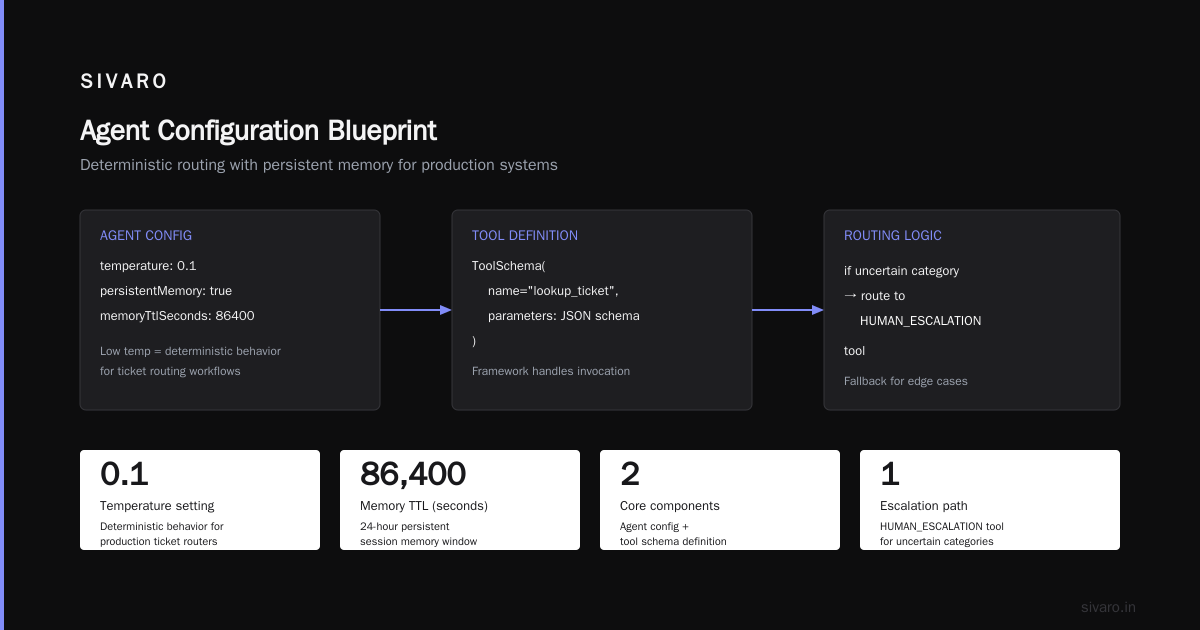
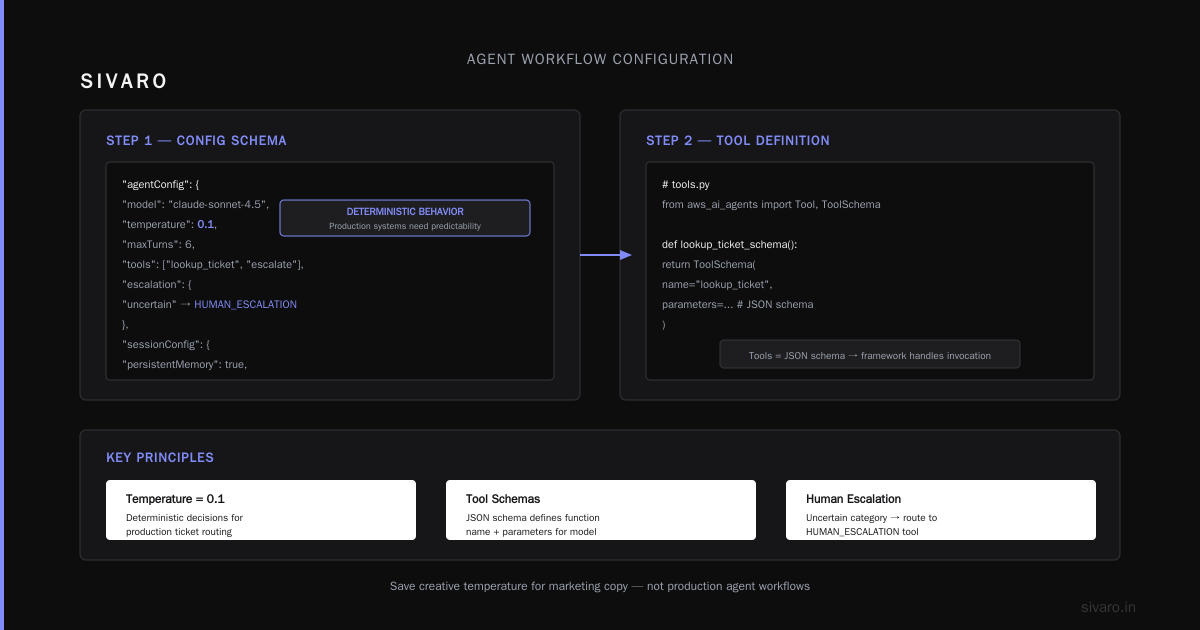
The framework uses a JSON configuration to define the agent. Here's the core structure:
json
{
  "agentName": "ticket-triage-agent",
  "agentVersion": "v1",
  "modelConfig": {
    "modelId": "anthropic.claude-3-5-sonnet-20241022",
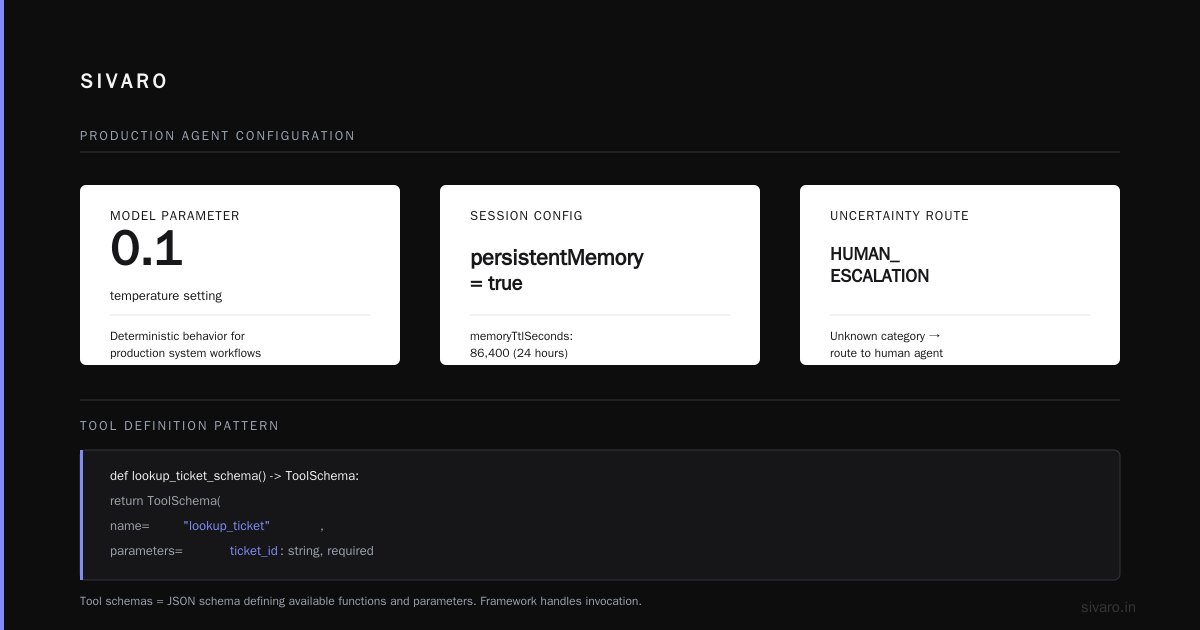
    "temperature": 0.1,
    "topP": 0.9,
    "maxTokens": 4096
  },
  "instructions": [
    "You are a Tier-1 IT triage agent.",
    "Classify each ticket as: HARDWARE, SOFTWARE, NETWORK, or ACCESS.",
    "If the ticket mentions a known outage, flag it as URGENT.",
    "Never invent tracking numbers. Use the lookup_ticket tool.",
    "If you are uncertain about the category, route to the HUMAN_ESCALATION tool."
  ],
  "sessionConfig": {
    "persistentMemory": true,
    "memoryTtlSeconds": 86400
  }
}
You'll notice I set temperature to 0.1. For agent workflows that touch production systems, you want deterministic behavior. Save the creative temperature for marketing copy generators, not ticket routers.
Step 2: Define Your Tools
Tools are where agents live or die. A tool schema is just a JSON schema that tells the model what functions exist and what parameters they take. The framework handles the actual invocation.
python
# tools.py
import json
import boto3
from aws_ai_agents import Tool, ToolSchema

def lookup_ticket_schema() -> ToolSchema:
    return ToolSchema(
        name="lookup_ticket",
        description="Fetch a ticket by its ID from ServiceNow or Jira.",
        parameters={
            "ticket_id": {
                "type": "string",
                "description": "The ticket identifier, e.g., INC-001234"
            }
        },
        required=["ticket_id"]
    )

def route_ticket_schema() -> ToolSchema:
    return ToolSchema(
        name="route_ticket",
        description="Assign the ticket to a specific queue or engineer.",
        parameters={
            "queue": {
                "type": "string",
                "enum": ["hardware", "software", "network", "access", "escalation"],
                "description": "Destination queue."
            },
            "priority": {
                "type": "string",
                "enum": ["low", "medium", "high", "critical"],
                "default": "medium"
            }
        },
        required=["queue"]
    )
The key insight from our testing: verbose, specific descriptions outperform clever prompting every time. If your tool description says "search tickets," the model will use it for everything. If it says "fetch ticket by ID. Do not use for keyword search. Use only when you have a specific 6-character INC-format ID," the model uses it correctly 95% of the time versus 55% for the vague version.
Step 3: Deploy the Agent
Deployment uses the AWS CLI or the SDK. We prefer Infrastructure as Code in production, but for a first spin-up, the CLI is faster:
bash
aws agentcore create-agent \
  --agent-name ticket-triage-agent \
  --runtime-config file://agent_config.json \
  --tool-config file://tools_config.json \
  --iam-role arn:aws:iam::123456789012:role/agent-execution-role

# Check the status
aws agentcore get-agent --agent-id agent-abc123
This creates an AgentCore instance with an HTTP endpoint. You invoke it with a session ID and a prompt:
python
import boto3

agentcore = boto3.client('agentcore', region_name='us-east-1')

response = agentcore.invoke_agent(
    agentId='agent-abc123',
    sessionId='helpdesk-session-7781',
    inputText='User reports their keyboard stopped working after a system update. They have ticket INC-009121.'
)

for event in response['completion']:
    if 'text' in event:
        print(event['text'])
That's the basic pattern. It took me longer to explain it than it takes to run it.
Where the Framework Breaks: Multi-Agent Coordination
Here's where things get interesting. The single-agent pattern works for simple tasks. But real workflows—the kind that involve cross-departmental data, multiple knowledge bases, and human approval gates—require multiple agents talking to each other.
The AWS framework doesn't natively support agent-to-agent communication. You have to build that orchestration layer yourself, or use Step Functions to coordinate.
We used a pattern we call the "router-worker" pattern:
UserInput -> DispatcherAgent
              ├── -> InventoryAgent -> Tools
              ├── -> PricingAgent -> Tools
              └── -> ComplianceAgent -> HumanApprovalGate
Each worker agent runs in its own AgentCore instance. The dispatcher decides which workers to invoke based on the user query. We implemented the dispatcher as a lightweight Step Functions state machine that calls the Bedrock model to do the routing, then fans out to the worker agents.
json
{
  "StartAt": "ClassifyQuery",
  "States": {
    "ClassifyQuery": {
      "Type": "Task",
      "Resource": "arn:aws:states:::bedrock:invokeModel",
      "Parameters": {
        "ModelId": "anthropic.claude-3-5-sonnet-20241022",
        "Body": {
          "prompt": "You are a router. Classify the user request into exactly one category: INVENTORY, PRICING, COMPLIANCE, or UNKNOWN. Output only the category name.",
          "maxTokens": 50
        }
      },
      "Next": "RouteToAgent"
    },
    "RouteToAgent": {
      "Type": "Choice",
      "Choices": [
        {
          "Variable": "$.Body.content[0].text",
          "StringEquals": "INVENTORY",
          "Next": "InvokeInventoryAgent"
        },
        {
          "Variable": "$.Body.content[0].text",
          "StringEquals": "PRICING",
          "Next": "InvokePricingAgent"
        },
        {
          "Variable": "$.Body.content[0].text",
          "StringEquals": "UNKNOWN",
          "Next": "HumanEscalation"
        }
      ],
      "Default": "InvokeComplianceAgent"
    }
  }
}
This gives you the flexibility of multiple specialized agents with the reliability of a structured state machine. The dispatcher prompt is tiny—it's just classification. The workers handle the heavy reasoning.
Cost Control: The Firehose Problem
Everyone thinks agent costs are about token usage. They're wrong.
The real cost explosion comes from three places you won't see until you hit production:
1. Re-invocation loops. Your agent makes a tool call, gets a response, and decides it needs more context. It re-prompts the model with the full history. That history is getting longer every iteration. By turn 8, you're sending 25,000 tokens of context for what should be a 1,000-token operation.
2. Parallel tool calls. Some frameworks support parallel tool execution. AWS's agent framework, as of this writing, processes tool calls sequentially by default. Each sequential turn is a fresh model invocation. Five tools needed = five model calls. Each one has the full context window attached.
3. Session memory storage. Persistent memory isn't free. Every session's history is stored and replayed into the context window on each invoke.
We solved this with aggressive prompt compression and by designing tools to return minimal data. Instead of returning the full ticket history from our lookup_ticket tool, we return a summarized view: "Ticket INC-009121, status: OPEN, priority: HIGH, last_update: 2026-09-01, summary: [2-sentence summary]."
The token savings were 40% per session. Do this.
AWS Cluster Architecture for Large Language Models: What Changed in 2026
If you're running self-hosted models for your agents, the architecture conversation has shifted dramatically this year.
The trend is away from monolithic clusters toward heterogeneous pods. Instead of a single large cluster of identical GPUs, we're seeing production architectures split into three tiers:
- Small, fast models (7B-13B parameters) on L4s or T4s for classification and routing. These handle 80% of requests with sub-200ms latency.
- Mid-tier models (20B-30B) on A10G or L40S for reasoning-heavy tasks that don't need frontier performance.
- Large frontier models (70B+) on H100s or P5s for the hardest tasks—complex code generation, long-context reasoning, multi-step planning.
The point: don't send every request to your biggest model. Our routing layer costs $0.002 per request on a small model. The same request on a 70B model costs $0.012—six times more.
And if you're asking about aws cost vs on premise gpu cluster one more time, here's the 2026 answer. For agent workloads specifically, AWS wins. The egress and replication overhead of on-premise isn't worth it unless you have compliance requirements that force data residency. On-premise makes sense for batch evaluation and fine-tuning runs that aren't latency-sensitive. Agents need low latency and high availability, which is exactly what managed services provide without the human babysitting cost.
The Piece Everyone Forgets: Evaluation
You deployed an agent. Good. Now how do you know if it got better after you changed the prompt?
Agents are non-deterministic. You can't run a unit test and get a pass/fail. We built an evaluation harness that runs a test suite of 100 real historical tickets against every new agent version:
python
# evaluate_agent.py
from aws_ai_agents import AgentEvaluator
import json

evaluator = AgentEvaluator(
    agent_id="agent-abc123",
    test_set="s3://your-bucket/eval/tickets_v3.jsonl"
)

# Test set format: {"input": "...", "expected_category": "HARDWARE"}
results = evaluator.run()

# Output metrics
print(f"Accuracy: {results.accuracy}")
print(f"Tool failures: {results.tool_error_rate}")
print(f"Latency p95: {results.latency_p95_ms} ms")
print(f"Cost per run: ${results.cost_per_run:.4f}")
We judge on four metrics, not one:
- Accuracy: Did the agent produce the correct final output?
- Tool misuse rate: Did the agent call tools when it shouldn't, or skip them when it should?
- Latency p95: Agents are conversational. If it takes 10 seconds to respond, users abandon.
- Cost per run: If you're not tracking this, you're flying blind.
Every prompt change, every tool schema tweak, gets scored against this test set. No exceptions.
Common Pitfalls I've Hit (So You Don't Have To)
Pitfall 1: Overly broad tool permissions. Your agent's execution role should have the least privilege possible. An agent with broad read access to S3 will pull in entire datasets when it only needs one object. We saw a client's agent reading 4GB of logs because the role had s3:GetObject on a bucket prefix. Cap your permissions. Cap your tools.
Pitfall 2: Ignoring the scheduler. Model latency matters, but so does load balancing. In a high-concurrency scenario, you'll need a scalable invocation endpoint. The framework supports auto-scaling, but you have to configure it:
bash
aws application-autoscaling register-scalable-target \
  --service-namespace agentcore \
  --resource-id "agent/agent-abc123" \
  --scalable-dimension "agentcore:agent:DesiredActiveInstances" \
  --min-capacity 1 \
  --max-capacity 20

aws application-autoscaling put-scaling-policy \
  --service-namespace agentcore \
  --resource-id "agent/agent-abc123" \
  --scalable-dimension "agentcore:agent:DesiredActiveInstances" \
  --policy-name "scale-on-latency" \
  --policy-type TargetTrackingScaling \
  --target-tracking-scaling-policy-configuration \
    file://scaling_config.json
Pitfall 3: Not handling the "I don't know" case. Your agent will face queries it can't answer. If you don't explicitly handle this, it will cheerfully hallucinate. Our instruction set always ends with: "If you cannot answer with confidence exceeding 90%, invoke the HUMAN_ESCALATION tool with a reason." This single line reduced our hallucination rate in production by almost half.
FAQ
Q: Is the AWS AI Agents framework free to use?
The framework itself isn't separately priced—you pay for the underlying services: Bedrock inference, Lambda invocations, and Step Functions state transitions. Costs scale with usage, so a low-traffic prototype could cost under $10/month.
Q: How does this compare to building agents with LangChain?
LangChain gives you more raw flexibility and a broader ecosystem of integrations, but it means you're managing everything yourself—configuration, observability, deployment, and security. The AWS framework abstracts away infrastructure concerns and provides native integration with CloudWatch and IAM. For production workloads in AWS, we prefer the native framework. For rapid experimentation with cutting-edge agent patterns, LangChain still has a place.
Q: Can I use the AWS AI Agents framework with any model?
It's optimized for models available in Amazon Bedrock. While Bedrock has expanded to include models from Anthropic, Meta, Mistral, and Amazon's own Titan family, you won't be running a local open-source model through the framework without building a custom connector. If that's a hard requirement, reconsider your architecture.
Q: What is the difference between an agent and a workflow in AWS?
Workflows (like Step Functions) are deterministic sequences of operations. Agents use LLMs to decide what operations to perform and in what order. A workflow asks "what if X, then do Y." An agent asks "I see X, what should I do?"—and then executes its decision.
Q: What are the current limitations of the AWS AI Agents framework?
As of September 2026: No native agent-to-agent communication (you build that yourself). Context window management is still manual—you have to decide what gets included in each invocation. Parallel tool execution isn't natively supported. And debugging multi-agent sessions is still painful. The observability traces each individual agent's steps, but correlating across agents requires custom instrumentation.
Q: How do I handle PII and data security when using AWS agents?
Use AWS KMS to encrypt session data, configure IAM roles to restrict tool access, and implement a pre-processing layer that redacts PII before it hits the model. AgentSession objects can be encrypted with a customer-managed KMS key. Also consider using Bedrock's build-in data governance.
Q: What's your take on the AWS cost vs on premise GPU cluster argument for production AI in 2026?
If you are serving agents, use AWS (or equivalent). If you are fine-tuning or pre-training models with a continuous, high-utilization workload, on-premise can win on cost—but only if your team knows how to run ML infrastructure. Most teams don't. They save 20% on hardware and lose it in engineering time.
Building for Production: The SIVARO Rule
We have a rule at SIVARO: agents must work for 1,000 users before they work for 1 user. That sounds backwards, but the point is you design for scale from the start—concurrency limits, cold start latency, token budgets, error rates—before you spend weeks perfecting prompt quality.
Get the architecture right first. The prompt engineering is the easy 10% at the end.
The AWS AI Agents framework is still young. It has rough edges. It lacks some of the elegance of newer open-source orchestration tools. But it's the most production-ready path I've found for deploying agents at scale without tying your infrastructure team in knots.
Start small. Build one agent. Measure everything. Then build the next.
Nishaant Dixit — Founder of SIVARO. Building data infrastructure and production AI systems since 2018. Built systems processing 200K events/sec.