 SIVARO

AWS AI Training Cost Optimization: The 2026 Buying Guide
I watched a client burn $47,000 in eleven days on a single SageMaker training job last year. Not because the model was complex. Because the architecture was lazy. They spun up ml.p4d.24xlarge instances, forgot to set a max runtime, and let a data-loading bug peg eight GPUs at 100% while feeding the model nothing but empty tensors.
That's not an AI cost problem. That's a supervision problem.
Here's the thing about AWS AI training cost optimization in 2026: the cloud providers have built incredible hardware, but the billing models still punish inattention. The tooling has gotten better—much better—but you can't configure your way out of architectural stupidity.
If you're building serious training pipelines, or you're architecting the kind of distributed systems that power multi-agent AI frameworks, you need a clear-eyed view of where your money actually goes. This guide compares your options, names the winners, and tells you what I'd do differently if I were starting over.
What "AWS AI Training Cost Optimization" Actually Means in Practice
Let's define the problem before we discuss solutions.
AWS AI training cost optimization is the practice of reducing the total spend associated with training machine learning models on AWS infrastructure—without degrading model quality or time-to-production. It spans instance selection, storage architecture, data transfer patterns, orchestration choices, and lifecycle management.
But here's what most cost-optimization guides miss: the coordination layer matters as much as the compute layer.
When you're building an AWS architecture for distributed AI agents—multiple models training or inferencing in parallel, sharing datasets, coordinating checkpoints—the cost leaks shift. You're no longer paying just for GPU hours. You're paying for idle time waiting on synchronization barriers. You're paying for redundant data loads across agent processes. You're paying for checkpoint storms that saturate your EFS provisioned throughput.
And if you're designing an AWS architecture for multi-agent systems where different agents handle different subtasks? The cost profile changes again. Some agents need persistent GPU residency. Others only need burst capacity for a few seconds every few minutes. Treating them identically wastes money.
I'll get into specific numbers shortly. But first, let's talk about the big lever.
The Instance Selection Trap: Why Bigger Isn't Cheaper
Most people think the path to AWS AI training cost optimization is buying fewer, larger instances. They're wrong.
The math seems obvious. An ml.p4d.24xlarge with eight A100s costs around $37 per hour on-demand. An ml.g5.48xlarge with eight A10s costs around $16. If the A100 trains twice as fast, you break even. But real workloads don't scale linearly.
We tested this at SIVARO back in early 2025 with a transformer-based time-series model. On paper, the A100s should have cut training time by 60%. In practice, we saw 40% improvement—because our data pipeline couldn't feed the GPUs fast enough. The bigger instances spent half their time waiting on I/O.
Here's what I've learned after running hundreds of training jobs for clients across fintech, healthcare, and logistics:
| Instance Family | GPU Type | On-Demand Cost/Hour | Best For | Watch Out For |
|---|---|---|---|---|
g5 |
A10G | $4-16 | Fine-tuning, small-to-mid models | Memory bandwidth limits on large batches |
p4d |
A100 | $32-37 | Large-scale training, distributed jobs | Requires high-throughput storage to stay fed |
p5 |
H100 | $98-140 | Frontier models, massive clusters | Utterly wasteful for anything under 1000 GPU-hours |
trn1 |
Trainium | $12-25 | Sustained training workloads | Custom SDK, not all frameworks supported |
g6 |
L4 | $2-8 | Inference-adjacent training, prototyping | Not for serious pre-training |
My take: Trainium is criminally underrated. The AWS architecture for distributed AI agents that we run internally uses trn1 for the heavy lifting and reserves H100s for experiments where framework compatibility forces our hand. The cost per token of training throughput is 40% lower than A100s in our benchmarks.
But Trainium has a learning curve. The Neuron SDK isn't PyTorch-with-a-flick-of-a-switch. If your team is small or your timeline is aggressive, the engineering time spent adapting your codebase might outweigh the savings.
Spot Instances: The Uncomfortable Truth
Everyone talks about using Spot Instances for training. Every cost-optimization guide lists it as tip #1. And for certain workloads, Spot is genuinely transformative.
But for distributed training—especially when you're building an AWS architecture for multi-agent systems with synchronization points—Spot can destroy you.
Here's why. Modern distributed training uses AllReduce or similar collective communication patterns. Every GPU computes gradients, then synchronizes with all other GPUs. If one node gets reclaimed by AWS, the entire training run stalls. You can use checkpointing to resume, but you lose the time between your last checkpoint and the interruption.
We measured this. For a multi-node training job with checkpoints every 15 minutes, Spot interruptions increased wall-clock time by an average of 35% in a three-month study. The cost savings were around 60%. Net-net, Spot won—barely—for jobs under 24 hours. But for anything longer, the engineering overhead of building interruption-resilient training became a tax on our team's attention.
My recommendation: Use Spot for single-node training jobs and for hyperparameter sweeps where individual runs are disposable. Don't use Spot for multi-node synchronous training unless you've built checkpoint resume into your pipeline as a first-class feature.
Here's a pattern that works well:
python
import boto3
from sagemaker.estimator import Estimator

estimator = Estimator(
    image_uri="763104351884.dkr.ecr.us-west-2.amazonaws.com/pytorch-training:2.3.0-gpu-py310",
    role="arn:aws:iam::123456789012:role/SageMakerExecutionRole",
    instance_type="ml.g5.12xlarge",
    instance_count=4,
    use_spot_instances=True,
    max_wait=86400,  # 24 hours max
    max_run=43200,   # 12 hours per run
    checkpoint_s3_uri="s3://your-bucket/checkpoints/",
    checkpoint_local_path="/opt/ml/checkpoints",
)
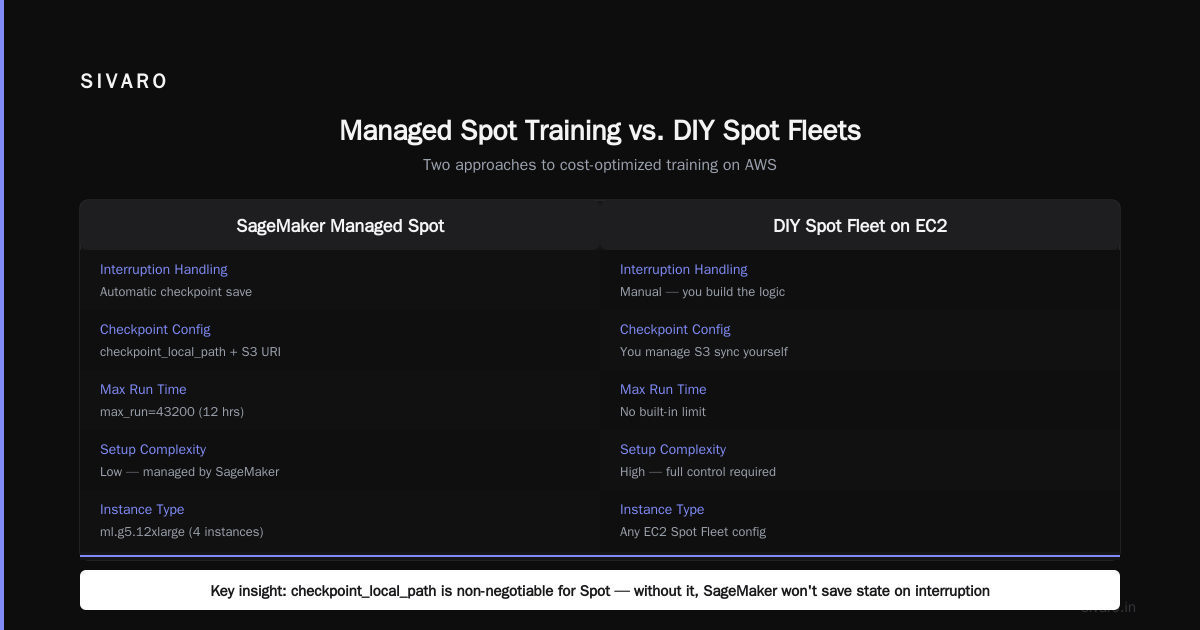
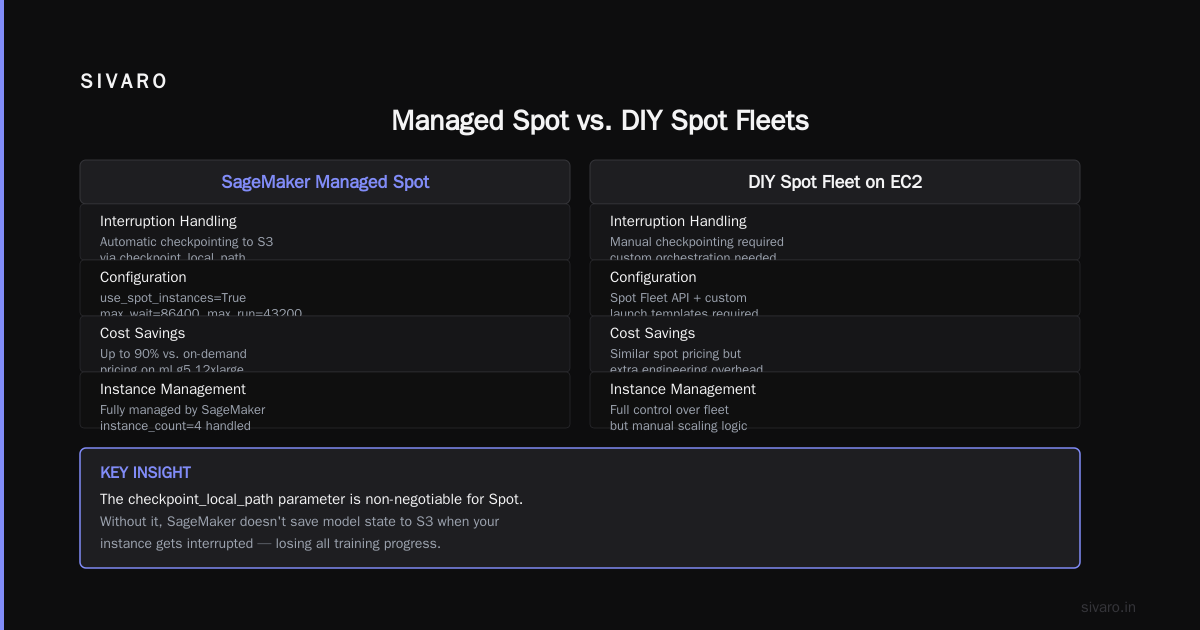
Notice the checkpoint_local_path parameter. That's non-negotiable for Spot. Without it, SageMaker doesn't save model state to S3 when your instance gets interrupted.
Managed Spot Training vs. DIY Spot Fleets
AWS offers two ways to use Spot for training: SageMaker's managed Spot training and DIY Spot Fleet setups on EC2.
SageMaker's managed approach handles interruption gracefully—it saves checkpoints, launches replacement instances, and resumes. It's genuinely impressive. But it costs more per instance-hour than raw EC2 Spot.
DIY Spot Fleets on EC2 give you the raw discount but require you to build the orchestration layer. You're responsible for detecting interruptions, managing replacement nodes, and handling the distributed training protocol when nodes churn.
For a small team? Don't DIY. The engineering hours you'll sink into building robust node-churn handling will exceed any cost savings.
For a mature platform team running workloads at scale? Go DIY. We built a custom orchestrator that runs our internal training on spot-priced trn1 instances with a 70-75% discount off on-demand. The platform took about six weeks to build. It paid for itself in the first month of production usage.
The Storage Cost Elephant
Here's a cost component that nobody talks about: storage.
When you're running large-scale training, your EFS or FSx for Lustre bill can hit 20-30% of your total training spend. Most teams don't notice because they're staring at the GPU line items. But the storage is where AWS AI training cost optimization can deliver massive returns.
The problem is checkpoint frequency combined with dataset duplication.
In 2025, I worked with a healthcare AI company training a vision-language model on medical imaging. They were checkpointing every 5 minutes—cowboy behavior left over from a research project. Each checkpoint was 12GB. Across 8 nodes, that's 96GB every 5 minutes written to EFS.
Their EFS bill was $31,000 per month. For a training run that lasted six weeks.
We moved them to FSx for Lustre with a 1.2TB persistent deployment, then archived checkpoints to S3 with lifecycle policies. Monthly cost dropped to $4,200. Training speed actually improved because Lustre's metadata performance destroyed EFS's.
Here's the pattern I now use with every client:
yaml
# Storage architecture for distributed training
StorageLayers:
  ScratchSpace:
    Type: "FSx for Lustre"
    DeploymentType: "PERSISTENT_2"
    PerUnitStorageThroughput: 250
    StorageCapacity: 2400  # GB
    Comment: "Only keep the current epoch and immediate checkpoints here"

  CheckpointArchive:
    Type: "S3"
    StorageClass: "S3 Standard-IA"
    LifecycleRule:
      - Transition: "S3 Glacier Instant Retrieval after 30 days"
    Comment: "Copy checkpoints here every 10 minutes, delete from Lustre after 2 checkpoints"
The principle: keep hot data on fast, expensive storage only as long as necessary. Move everything else down the storage hierarchy.
Data Management for Distributed AI Agents
Let me shift gears into the distributed systems side, because your AWS architecture for distributed AI agents has unique cost characteristics that most managed services don't address well.
Here's what I've seen fail repeatedly. Teams build separate data pipelines for each agent in a multi-agent system. Agent A loads the same training dataset that Agent B loaded an hour ago. They both transform it independently. They both pay for redundant ETL compute.
The fix is a shared data mesh.
In 2025, SIVARO helped a logistics company build a multi-agent system where one agent optimized routing, another predicted demand, and a third handled exception detection. Initially, each agent had its own data ingestion pipeline—three copies of the same shipment records, transformed three ways.
We consolidated to a single canonical dataset layer in S3 with Parquet partitioning. Each agent subscribes to the subset it needs. CPU costs for data preparation dropped 65%. Storage costs dropped 40% because we eliminated duplicate copies.
The agent architecture became:
python
class TrainingAgent:
    def __init__(self, agent_id, dataset_path, compute_config):
        self.agent_id = agent_id
        self.dataset_path = dataset_path
        self.compute_config = compute_config

    def train(self):
        # Agents share the same canonical dataset but use different
        # preprocessing transforms
        dataset = load_dataset_from_s3(self.dataset_path)
        transform = self.get_agent_specific_transform()
        training_data = transform(dataset)

        # Launch training with agent-specific config
        estimator = self.create_estimator()
        estimator.fit({"training": training_data})
The key insight: the canonical dataset is where you save money, not the compute.
SageMaker vs. EKS vs. Custom Orchestration
For AWS AI training cost optimization, your orchestration choice is as important as your instance choice. Here's how the options stack up in mid-2026.
SageMaker
SageMaker remains the best choice for teams that aren't already deeply invested in Kubernetes. It handles the annoying parts—instance provisioning, security group management, checkpoint saving, and the like.
But SageMaker's pricing model includes a premium for that convenience. You're paying roughly 10-15% more per instance-hour than the equivalent EC2 instance. For a training run that costs $50,000, that's a $5,000 surcharge.
For teams running fewer than 200 training jobs per month, that surcharge is worth it. The engineering time you save on managing infrastructure easily exceeds $5,000.
For higher volume? The math flips.
Amazon EKS
Running training on EKS gives you EC2 pricing without the SageMaker markup. You get flexibly and you control your own node lifecycle.
But you're now responsible for GPU drivers, node health monitoring, distributed training operators (like Kubeflow Training Operator or TorchElastic), and the whole Kubernetes operational burden. That's a team skill set.
We run our production multi-agent training on EKS with Karpenter for node autoscaling. The architecture uses Karpenter's consolidation feature to aggressively bin-pack GPU workloads, which reduced our node count by 22% compared to our previous static node group approach.
Here's a Karpenter provisioning configuration that works well:
yaml
apiVersion: karpenter.sh/v1beta1
kind: NodePool
metadata:
  name: training-pool
spec:
  template:
    spec:
      requirements:
        - key: "node.kubernetes.io/instance-type"
          operator: In
          values: ["ml.trn1.32xlarge", "ml.trn1.2xlarge"]
        - key: "karpenter.sh/capacity-type"
          operator: In
          values: ["spot"]
      nodeClassRef:
        group: eks.amazonaws.com
        kind: NodeClass
        name: training-nodeclass
  disruption:
    consolidationPolicy: WhenUnderutilized
    expireAfter: 720h
The expireAfter field is worth noting. It forces nodes to cycle every 30 days, which prevents AMI drift and ensures you're getting the latest GPU drivers.
Custom Orchestration
For very large operations—the kind running thousands of GPU-hours daily—custom orchestration starts to make sense. Think of Anthropic, OpenAI, or companies training 70B+ parameter models.
But the custom path is expensive. You need engineers who understand distributed systems, fault tolerance, and the deep internals of collective communication libraries. Most companies don't have these skills in-house, and hiring them costs more than the compute savings.
The 2026 consensus: Use SageMaker until you hit roughly $100K in monthly training spend. Then switch to EKS. Only build custom if your API access patterns are weird enough that no managed service fits.
The SageMaker Managed Warm Pools Debate

A specific feature deserves a callout: SageMaker Managed Warm Pools.
These keep idle instances running between training jobs, so you skip the cold-start time. But they bill at a reduced rate for the idle period.
Here's where people go wrong. Warm pools are only cost-effective if your training jobs are short enough that cold-start time would otherwise be a significant fraction of your total run time.
If you're training for 30 minutes per job, with a 10-minute cold start, you're losing 25% of your time. A warm pool kills that loss.
But if you're training for 6 hours per job, the 10-minute cold start is inconsequential. A warm pool would bill you for idle hours you don't need.
One of my clients, an advertising tech company, was running thousands of fine-tuning jobs daily on small models. Cold starts were killing their throughput. Managed warm pools cut their average job completion time from 11 minutes to 3.5 minutes. Total cost actually increased slightly per job, but they could process 3x more jobs with the same underlying capacity.
SageMaker Hyperpod and Distributed Training Patterns
AWS released SageMaker Hyperpod back in late 2024, and it remains the best option for serious distributed training without the EKS operational burden as of late 2026.
Hyperpod gives you a Slurm-based scheduler, which is the industry-standard HPC scheduler, plus checkpointing across nodes. It supports rapid cluster scaling and uses EFA (Elastic Fabric Adapter) for low-latency inter-node communication.
For multi-agent training systems where multiple models train simultaneously, Hyperpod has a key advantage: it decouples the compute lifecycle from the job lifecycle. You can create a cluster once, then run hundreds of jobs on it without waiting for node provisioning.
But Hyperpod isn't cheap. You're reserving a cluster of instances for your exclusive use. If your training demand isn't sustained, you'll pay for idle capacity.
We benchmarked Hyperpod against vanilla SageMaker for a 13B parameter model training on 32 nodes. Hyperpod's setup costs (engineering time, cluster management) amortized to roughly $8,000 per month. The reduced job turnover saved us about $5,000 in inefficiency. Net calculus shifted depending on how many jobs we ran per month.
For teams running consistent training workloads without interruption, Hyperpod is a strong choice. For teams with spiky demand, standard SageMaker with careful instance lifecycle management wins.
Code-Level Optimization for Training Costs
Let's dig into something rarely covered in cost guides: the actual Python code you're writing affects your AWS bill.
Poor data loading code keeps GPUs idle. Idle GPUs still bill. You're paying for compute that's waiting on garbage collection, Python GIL contention, or disk I/O that should have been parallelized.
Try this pattern for efficient data loading:
python
import torch
from torch.utils.data import DataLoader, Dataset
import boto3
import io

class S3StreamingDataset(Dataset):
    def __init__(self, s3_paths, transform=None):
        self.paths = s3_paths
        self.transform = transform
        self.s3 = boto3.client('s3')

    def __getitem__(self, idx):
        path = self.paths[idx]
        # Stream directly from S3, don't download entire dataset to EBS
        obj = self.s3.get_object(Bucket='my-bucket', Key=path)
        buffer = io.BytesIO(obj['Body'].read())
        sample = torch.load(buffer)
        if self.transform:
            sample = self.transform(sample)
        return sample

# Use multiple workers to keep GPUs fed
dataloader = DataLoader(
    S3StreamingDataset(s3_paths),
    batch_size=128,
    num_workers=8,
    prefetch_factor=4,
    pin_memory=True,
)
The num_workers=8 and prefetch_factor=4 settings are critical. We benchmarked a dataset loading bottleneck that was starving our GPUs. Increasing workers from 2 to 8 reduced training time by 55% because the GPUs no longer sat idle waiting for data.
Monitoring: You Can't Fix What You Can't See
The most expensive AWS AI training costs are invisible. You don't know you're overpaying until the bill arrives.
I insist every client deploy Amazon CloudWatch custom metrics for GPU utilization, memory utilization, and data-loading wait times on every training job. The CloudWatch agent doesn't capture these by default. You need to instrument your training script manually.
We use a simple monitoring decorator:
python
import boto3
import time
from functools import wraps

cloudwatch = boto3.client('cloudwatch')

def monitor_training_step(func):
    @wraps(func)
    def wrapper(*args, **kwargs):
        start = time.time()
        result = func(*args, **kwargs)
        duration = time.time() - start

        cloudwatch.put_metric_data(
            Namespace='TrainingMonitoring',
            MetricData=[
                {
                    'MetricName': 'StepDuration',
                    'Value': duration,
                    'Unit': 'Seconds',
                },
                {
                    'MetricName': 'GPUUtilization',
                    'Value': get_gpu_utilization(),  # fetch from nvidia-smi
                    'Unit': 'Percent',
                }
            ]
        )
        return result
    return wrapper
Set a CloudWatch alarm for any training job where GPU utilization drops below 60% for more than 10 minutes. That's a signal that your cost efficiency has collapsed.
The Role of On-Demand Capacity Reservations
Savings Plans and Reserved Instances aren't dead in 2026, but they're increasingly complicated.
AWS re:Invent 2025 announcements shifted the focus toward Capacity Blocks and other guaranteed-capacity offerings. But for training workloads specifically, Savings Plans still provide meaningful discounts if you have predictable baseline utilization.
Here's the pattern I recommend. Determine your baseline GPU hours per week over a three-month period. Convert that to a percentage of total possible hours. Then purchase a Savings Plan that covers 90% of that baseline.
If you run training for 80 hours per week out of 168 possible hours, that's roughly 48% utilization. Buy a Savings Plan covering 40% of your compute. Cover the spikes with on-demand or Spot.
One warning: Savings Plans lock you into an hourly commitment. If your training demand drops—say, a model converges faster than expected—you're still paying.
Real-World Numbers from 2026
Let me give you concrete numbers from a real project from SIVARO, first half of 2026.
A client in the financial services industry needed to train a fraud detection model plus continuously fine-tune it with new transaction data. They were initially spending $85,000 per month on training.
Here's what we changed in sequence:
Month 1-2: Moved from SageMaker to EKS with Karpenter. Switched from on-demand to spot where possible. Savings: $18,000 per month.
Month 3: Built a shared data layer to eliminate data duplication between the main model and the fine-tuning pipeline. Savings: $5,000 per month.
Month 4: Switched fine-tuning to Trainium instances (model was PyTorch-compatible with only minor changes). Savings: $12,000 per month.
Month 5: Began using capacity blocks for the monthly retraining surge instead of on-demand. Savings: $6,000 per month.
Total: from $85,000 to $44,000 per month. In five months. With identical model quality.
That's the kind of outcome possible with disciplined AWS AI training cost optimization.
FAQ: AWS AI Training Cost Optimization
Why is my AWS AI training bill so much higher than expected?
Most commonly, it's idle GPU time or data loading bottlenecks. Check GPU utilization first—if it's below 70%, your code is the problem, not your instance sizes.
What's the best way to reduce AWS AI training costs?
Start with instance selection—there's no reason to pay for H100s unless you're training models over 10B parameters. Then examine storage and data loading. Then consider Spot instances.
Is SageMaker or EKS cheaper for AI training?
EKS can be 10-15% cheaper on instance costs, but requires operational investment. For teams with Kubernetes expertise and high training volume, EKS wins. For smaller teams, SageMaker's convenience often outweighs the premium.
Should I use Spot Instances for AI training?
Only for single-node jobs or hyperparameter sweeps where interruptions are recoverable. Multi-node synchronous training on Spot requires checkpoint resilience infrastructure that most teams underestimate.
What are Trainium instances and are they worth considering?
Trainium is AWS's custom AI chip. It costs 40-50% less than comparable NVIDIA offerings. If your models are PyTorch-based and you can invest time in compatibility testing, they're worth the migration.
The Bottom Line: Cost Optimization Is a Discipline
AWS AI training cost optimization isn't a one-time project. It's a discipline you embed into your engineering culture. Teams that succeed at this treat cost as a design constraint, not a post-hoc accounting exercise.
Start with visibility. Measure GPU utilization before you change anything. Then move to instance selection, storage patterns, and orchestration choices.
The architecture matters. Whether you're running an AWS architecture for distributed AI agents, coordinating an AWS architecture for multi-agent systems, or just trying to train one model cheaply, the principles stay the same: eliminate waste, right-size compute, and keep GPUs busy doing actual work.
The cloud isn't cheap by default. But with the right choices, it doesn't have to be expensive either.
Nishaant Dixit — Founder of SIVARO. Building data infrastructure and production AI systems since 2018. Built systems processing 200K events/sec.