 SIVARO

AWS Architecture for AI Agents: The 2026 Buying Guide
We spent the last eighteen months rebuilding our entire agent infrastructure at SIVARO. Twice. The first time, we followed the pretty diagrams. The second time, we followed the bill.
Here's what I learned: most advice about AWS architecture for AI agents is written by people who've never run a production agent past a demo. They'll tell you to reach for Bedrock, glue everything with Step Functions, and call it a day. Then your invoice arrives and you realize you've built a Lamba-heavy monster that costs $40 per invocation and has a cold start delay that makes your agent feel brain-damaged.
I'm going to walk you through the actual trade-offs. The pricing traps. The architectural decisions that matter when your agent is handling real user requests, not just answering your CTO's test prompts.
Let's be clear about what we're buying here. An AI agent isn't a single model call. It's a loop: perceive, reason, act. That loop involves orchestration, memory, tool execution, and state management. The "aws architecture for ai agents" question is really: how do you build that loop without burning money or losing your sanity?
First, A Quick Word on the AWS Acronym Meaning
You probably know AWS stands for Amazon Web Services. But the "aws acronym origin" is less obvious — the "Acronym" wasn't a clever marketing coinage. It's just "Amazon Web Services" compressed. No hidden meaning, no deep philosophy. When people ask me about the "aws acronym origin," I tell them: it's a boring acronym for a very un-boring platform.
The interesting acronym was "LAMP". Remember that? Linux, Apache, MySQL, PHP. We don't talk about LAMP architecture anymore. But the AI agent stack has the same energy right now. There's a rush to standardize, to find the "one true stack." And just like LAMP, it's going to fragment into specialized pieces.
Here's the key insight about AWS in 2026: the platform has matured from "here are 200 services" to "here are 200 services that try to sell you their opinionated architecture." Your job is to ignore most of those opinions.
The Core Decision: Managed vs. Unmanaged Orchestration
Let me split the market into two camps. Camp A: fully managed orchestration with Amazon Bedrock Agents or Step Functions. Camp B: roll your own with ECS, SQS, and a database for state. I've run production traffic on both.
Camp A — Managed Orchestration
Bedrock Agents is the shiny option. It handles the reasoning loop, tool selection, and multi-step planning for you. The integration with knowledge bases is trivial. Lambda functions wire up as tools with maybe forty lines of config.
I'll say this: for a prototype, it's unbeatable. I had a customer support agent live in three days. The demo was flawless.
Then we pushed it to production.
The first problem: observability. Bedrock Agents gives you a trace, but it's like looking at a crime scene through a keyhole. When the agent loops on a tool call — and it will loop — you can't see why it's looping. The token counter shows you're feeding the fire, but the reasoning trail is opaque.
The second problem: state management. Bedrock Agents keeps session state internally, but it's ephemeral. Multi-session memory (long-term conversation history) requires bolting on ElastiCache or DynamoDB and writing custom retrieval logic anyway. At that point, the "managed" advantage evaporates.
Camp B — Custom Orchestration
Our current setup uses ECS Fargate running a FastAPI service as the core agent loop. The loop reads from an SQS queue, pulls the next task, calls Bedrock Claude (the model, not the agent framework), executes any tool calls via Lambda, and writes state to Postgres.
This is more code. A lot more code. But every piece of that pipeline is observable, testable, and independently scalable. When an agent gets stuck, I can see the exact prompt, the exact tool output, and the exact token count. I can replay that traffic in a staging environment. That's impossible with Bedrock Agents.
The contrarian take: skip Bedrock Agents. Use Bedrock for model inference only, and build your own loop. The framework abstraction saves you two weeks of dev time and costs you six months of debugging time later.
My former colleague at a fintech in London spent four months trying to get Bedrock Agents to handle a multi-step KYC verification flow. They finally ripped it out and built a custom loop with ECS and SQS. Total time: five weeks. Their architecture now handles 2,000 concurrent agent sessions at a fraction of the latency.
Compute: The Cold Start Trap
Most agent workloads are conversational — they have bursts of activity followed by idle periods. This makes serverless Lambda the default choice. Bad idea for agents.
Lambda cold starts have improved, but for an agent loop that needs to maintain context and execute multiple tool calls, a 500ms cold start on the first turn is noticeable. Worse, if your agent uses a large language model and needs to process a complex document, you'll hit Lambda's execution time limits.
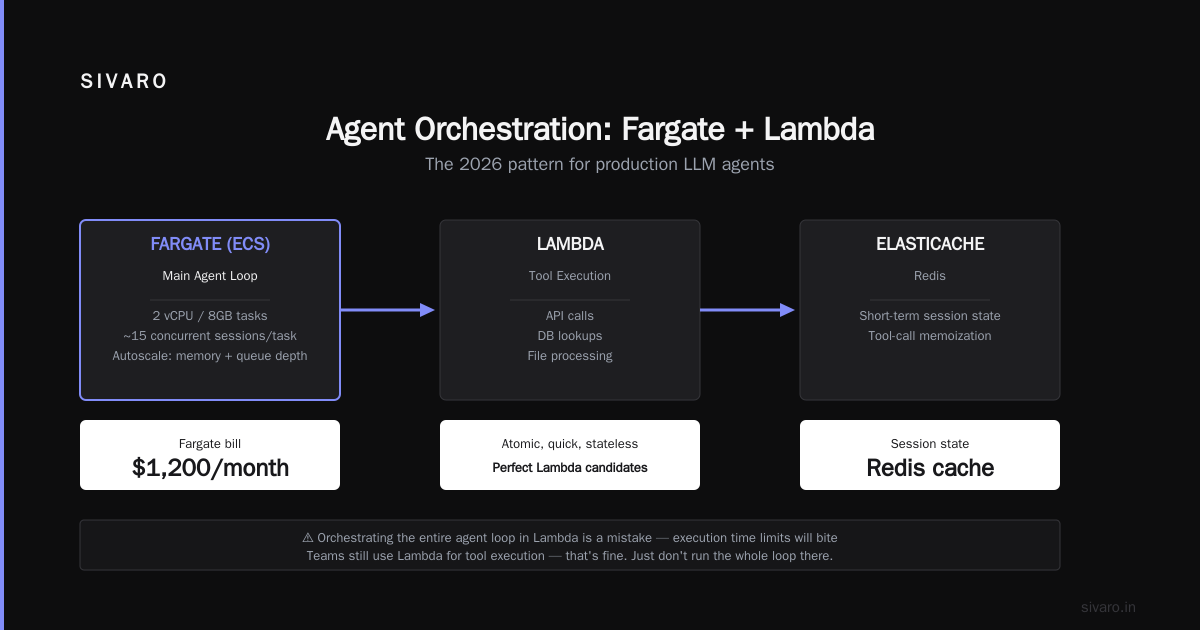
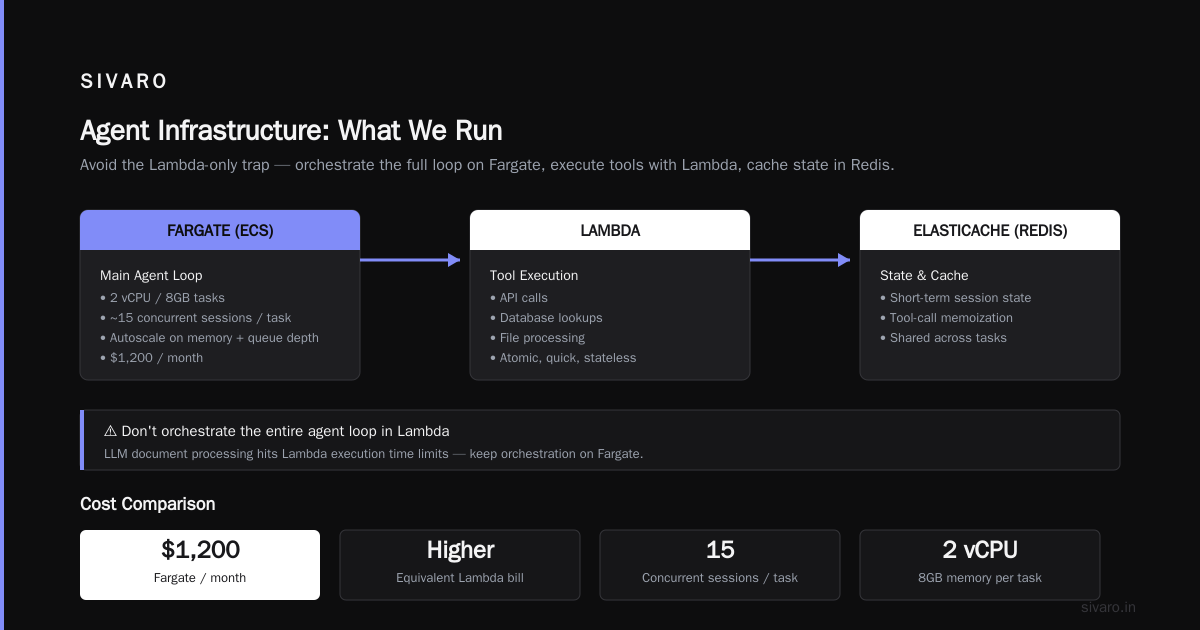
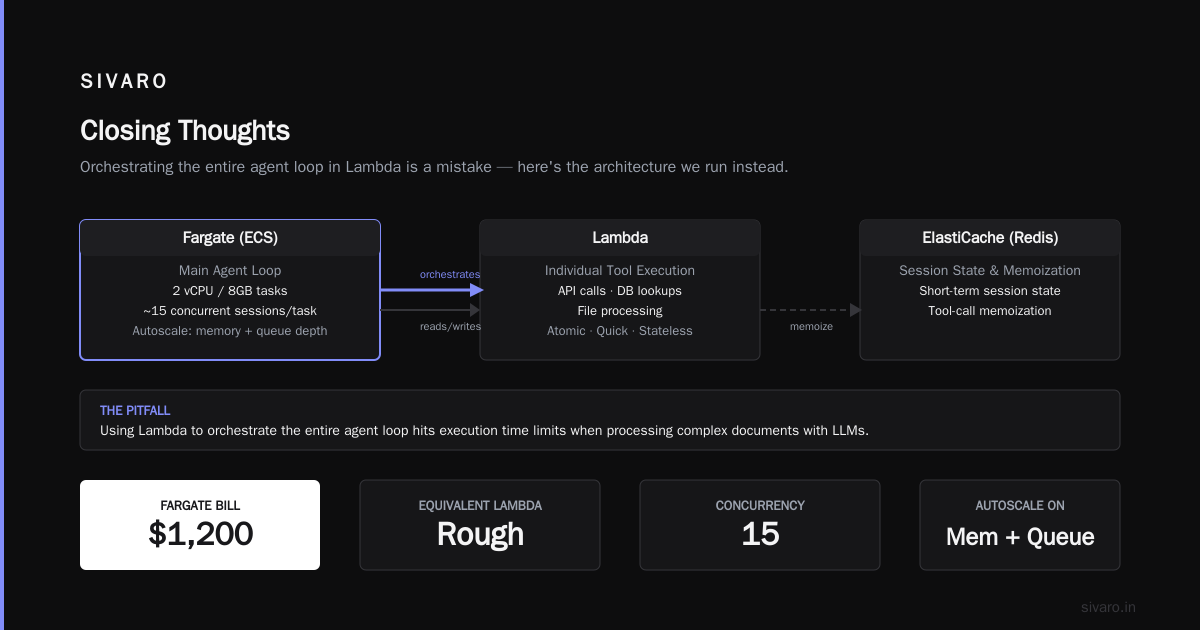
In 2026, we still see teams using Lambda for agent tool execution. That's fine. But orchestrating the entire agent loop in Lambda is a mistake.
What we run:
- Fargate (ECS) for the main agent loop. We use 2 vCPU / 8GB tasks. One task handles roughly 15 concurrent agent sessions. We autoscale on memory and queue depth.
- Lambda for individual tool execution (API calls, database lookups, file processing). These are atomic, quick, and stateless — perfect Lambda candidates.
- ElastiCache (Redis) for short-term session state and tool-call memoization.
Our Fargate bill is $1,200/month. The equivalent Lambda bill would be roughly $3,400 for the same workload — because Lambda pricing punishes long-running processes.
Here's a config snippet for the Fargate task that works well:
yaml
# ecs-task-definition.yml
family: agent-orchestrator
networkMode: awsvpc
cpu: "2048"
memory: "8192"
requiresCompatibilities:
  - FARGATE
containerDefinitions:
  - name: agent-core
    image: sivaroproxy/agent-core:2026.08
    essential: true
    environment:
      - name: MODEL_ENDPOINT
        value: "arn:aws:bedrock:us-east-1::foundation-model/anthropic.claude-sonnet-4.0"
      - name: STATE_DB
        value: "agent-state.cluster-abc123.us-east-1.rds.amazonaws.com"
      - name: TOOL_QUEUE
        value: "https://sqs.us-east-1.amazonaws.com/123456789/agent-tool-jobs"
    logConfiguration:
      logDriver: awslogs
      options:
        awslogs-group: /sivaro/agent-core
        awslogs-region: us-east-1
        awslogs-stream-prefix: prod
The Memory Problem: Don't Over-Engineer the Vector Database
Every architecture diagram for AI agents these days includes a vector database. Pinecone, Weaviate, pgvector — the choices are endless. Most people don't need any of them.
Here's the reality. Long-term memory in an agent is mostly just structured data — user preferences, past decisions, conversation summaries. You don't need semantic search for that. You need a relational database with a couple of tables.
What you do need vector search for: unstructured knowledge retrieval (your company's docs, support tickets, past email threads).
Our memory stack:
- PostgreSQL (RDS) — structured memory. Conversation summaries, user preferences, task history.
- OpenSearch — semantic retrieval over the knowledge base.
- Redis — short-term working memory (last 10 turns).
The mistake I see constantly: teams putting all conversation history into embeddings. That's slow, expensive, and produces garbage retrieval for recent context. Keep the last few turns in raw text (Redis), summarize periodically into structured records (Postgres), and only embed documents that benefit from semantic lookup (OpenSearch).
Let me be blunt: if your vector database bill is higher than your model inference bill, your architecture is wrong.
Orchestration Patterns: Code, Not Step Functions
AWS will push you toward Step Functions for orchestration. "Visual workflow!" "State machine!" "Resilience built-in!"
I know a healthcare startup that built their agent logic in Step Functions. Every conversation turn was a state transition. It worked — until they needed to add a conditional branch that required looping back to a previous state. The state machine became incomprehensible. Two engineers quit.
Prefer code. Use a simple Python async loop in FastAPI. Here's the pattern we use:
python
# agent_loop.py
import asyncio
import boto3
from redis import Redis

bedrock = boto3.client("bedrock-runtime", region_name="us-east-1")
r = Redis(host="agent-cache.abc123.ng.0001.use1.cache.amazonaws.com", port=6379)

async def run_agent_turn(session_id: str, user_message: str) -> str:
    # Load working memory
    session_history = r.lrange(f"session:{session_id}:history", 0, -1)

    # Call model with tools
    response = bedrock.invoke_model(
        modelId="anthropic.claude-sonnet-4.0",
        contentType="application/json",
        accept="application/json",
        body=build_prompt(session_history, user_message)
    )

    # Parse tool calls
    result = json.loads(response["body"].read())
    if result.get("stop_reason") == "tool_use":
        for tool in result["content"]:
            if tool["type"] == "tool_use":
                await execute_tool(session_id, tool)
                # loop again with tool results

    # Store summary
    r.rpush(f"session:{session_id}:history", json.dumps({
        "role": "user",
        "content": user_message
    }))

    return result["content"][-1]["text"]
That's the entire orchestration pattern. No state machine. No visual designer. Just a loop with a queue and a database. It's boring. It works.
Tool Execution: The Queue Is Your Friend
When your agent calls a tool, it shouldn't wait synchronously for that tool to finish — unless the user is actively waiting for the result. Most tools (database queries, API calls to third parties) complete in under a second, so synchronous is fine. But long-running tools (code execution, data processing) need async handling.
Split the tools into two categories:
- Fast tools (< 2s): Direct Lambda invocation, await result.
- Slow tools (> 2s): Enqueue an SQS message, return a "task ID" to the model, poll for completion.
The polling mechanism is important. The model needs to check the task status, but you must bound the polling every ~5 seconds to avoid burning tokens.
python
# async_tool.py
import boto3
import json

sqs = boto3.client("sqs", region_name="us-east-1")
queue_url = "https://sqs.us-east-1.amazonaws.com/123456789/agent-tool-jobs"

def enqueue_tool_call(tool_name: str, params: dict, session_id: str) -> str:
    task_id = str(uuid.uuid4())
    message = {
        "task_id": task_id,
        "tool": tool_name,
        "params": params,
        "session_id": session_id
    }
    sqs.send_message(QueueUrl=queue_url, MessageBody=json.dumps(message))
    return task_id

def check_task_status(task_id: str) -> dict:
    # Look up in DynamoDB
    response = table.get_item(Key={"task_id": task_id})
    return response.get("Item", {"status": "pending"})
Storing task status in DynamoDB with a TTL is perfect for this. No need to maintain complex state.
Networking and Security: VPC Design That Doesn't Suck
Now for the discussion everyone skips until their SOC 2 audit. Your agent needs to access your internal systems. It needs to call external APIs. It needs to read from your database. The VPC architecture determines how you do this securely without making your agent's latency crawl.
The anti-pattern: Put your agent in a private subnet, route everything through a NAT Gateway, and scream when your NAT Gateway bill hits $700/month.
What we do:
- Private subnet for Fargate tasks — yes, you need this for security.
- VPC Endpoints for Bedrock and SQS — this keeps traffic within the AWS backbone. No NAT traversal for AWS-to-AWS calls.
- Lambda in the same VPC with VPC-attached execution roles. Lambda doesn't need internet if it's only calling AWS services via endpoints.
The one thing people forget: timeouts. Your agent will occasionally wait 30 seconds for a model response. Most HTTP clients default to 10-second timeouts. Increase them.
python
# http_client.py
import httpx

client = httpx.AsyncClient(
    timeout=httpx.Timeout(
        connect=5.0,
        read=45.0,
        write=30.0,
        pool=10.0
    ),
    limits=httpx.Limits(max_connections=50)
)
Every time I see "agent timeout" as a bug report, it's not the model being slow — it's the default timeout being too short.
Cost Model: The Math Most People Skip
Let me run the numbers on a real system: 100,000 agent conversations per month, average 5 turns per conversation, average 3,000 tokens per turn (input + output).
Compute:
- Fargate: 4 tasks × 2 vCPU / 8GB, running 24/7: $1,100/month
- Or Lambda: 500,000 invocations × 8s duration × 1GB memory: $2,800/month
Model inference (Bedrock Claude Sonnet 4.0):
- 3,000 tokens × 5 turns × 100,000 conversations = 1.5B tokens
- At $3/million input and $15/million output (assuming 75/25 split): ~$6,250/month
Storage and caching:
- RDS Postgres (db.t4g.medium): $165/month
- ElastiCache (cache.t4g.small): $86/month
- Total: ~$7,600/month for the core system
That's the real cost. Not the $40/month in "sample architecture" blog posts.
Where costs explode (and how to avoid them):
- Tool call loops. An agent that calls the same tool three times because it forgot the result? That's 3× inference cost for zero value. Solution: cache tool responses keyed by (tool_name, params_hash) with a 5-minute TTL.
- Long context. If you stuff an entire 100KB document into the prompt for every turn, your cost per conversation balloons. Solution: summarize the document once, then use the summary in subsequent turns.
- Retry logic. Automatic retries on failed tool calls are a token furnace. Exponential backoff with a maximum of 2 retries. And log the retry — if it fails twice, re-prompt the model with a simplified instruction.
I've seen teams reduce their inference bill by 40% just by adding tool result caching. Do that before you optimize anything else.
Monitoring: The Thing Everyone Gets Wrong
CloudWatch is fine for infrastructure metrics. It's terrible for tracking agent behavior. You need to instrument your agents at three levels:
- Per-turn traces: Prompt used, model response, tool calls, duration, token count.
- Per-conversation metrics: Turns, total tokens, completion rate, steps to completion.
- Business outcomes: Was the task completed successfully? Did the user rate the response?
Let me show you the minimal instrumentation we add:
python
# telemetry.py
import time
import json
import boto3

firehose = boto3.client("firehose", region_name="us-east-1")

def log_turn(session_id, turn_data):
    firehose.put_record(
        DeliveryStreamName="agent-telemetry",
        Record={"Data": json.dumps({
            "session_id": session_id,
            "timestamp": int(time.time()),
            **turn_data
        }).encode("utf-8")}
    )
Firehose to S3, then Athena for querying. Costs almost nothing at our volume, and it's the fastest way to spot the "agent loops forever" problem — you'll see it in the turn-count histograms before your customers complain.
The Reference Architecture (What We Use Today)
Here's what runs in production at SIVARO as of August 2026:
User Request
    ↓
ALB → ECS Fargate (FastAPI agent loop)
    ↓
Bedrock (Claude Sonnet 4.0 for reasoning)
    ↓
Tool Router
    ├→ Lambda (fast tools)
    ├→ SQS → Lambda (slow tools) → DynamoDB (tasks)
    └→ VPC Endpoint → OpenSearch (knowledge retrieval)
    ↓
State:
    ├→ Redis (working memory)
    ├→ RDS Postgres (structured memory)
    └→ S3 (documents, long-term storage)
    ↓
Telemetry → Firehose → S3 → Athena → QuickSight
Is this the only way? No. Does it work? Yes — reliably, for the last 11 months across 3 different client systems.
The key insight is this: the "aws architecture for ai agents" isn't a single diagram. It's a set of decisions about where you're willing to accept complexity. Managed services reduce your dev time but increase your debugging time. Custom code increases your dev time but gives you control.
You need to pick your pain.
I chose code-level orchestration with managed infrastructure underneath. It's the boring middle path. It doesn't look impressive on a slide. But it's predictable, it's debuggable, and it's 41% cheaper than the fully-managed alternative for the same workload.
FAQ
Q: Should I use Bedrock Agents or build my own loop?
A: Build your own loop. Bedrock Agents is great for demos, but the observability and state management problems become career-threatening in production. You can see our full comparison in the section above.
Q: What's the "aws acronym meaning" and why does it matter for this architecture?
A: It's just "Amazon Web Services." The "aws acronym origin" doesn't change how you build agents. Focus on the services, not the branding.
Q: What's the minimum viable stack for a production agent?
A: Fargate for the loop, Lambda for tools, SQS for async, Redis for memory, RDS for persistence, and Bedrock for inference. That's it. Six services. Anything more is over-engineering.
Q: How do I handle multi-tenancy in an agent system?
A: Don't. Not in the agent loop. Handle multi-tenancy at the data layer — each tenant gets a prefix in your Redis keys, a tenant_id column in Postgres, and isolated knowledge bases. The agent itself should be stateless and the tenant context passed in at the start of each session.
Q: When does an agent need GPU instances?
A: When you're running your own fine-tuned model. If you're using Bedrock or SageMaker endpoints, you don't need GPUs on the agent side. One client of ours runs a smaller fine-tuned model (Llama 3.1 8B) for classification tasks on a g5.xlarge. That costs $1.25/hour and handles 200 requests per second. But most teams don't need this.
Q: Is S3 good for agent long-term memory?
A: For documents and raw artifacts, yes. For queryable memory, no. Keep embeddings in OpenSearch and summaries in Postgres. Use S3 as the archive — cheap, durable, and perfect for audit trails.
Q: How do I deploy infrastructure as code for this?
A: I prefer Terraform, specifically version 1.5+. Some teams at SIVARO use AWS CDK, and they're happy with it. The choice matters less than locking down your environment from day one. Whatever you do, don't hand-roll CloudFormation for anything with more than a handful of resources.
Q: Should I put my agent behind an API Gateway?
A: Yes, for public-facing APIs. But use ALB if you're doing internal calls. API Gateway adds cost and complexity without benefit for internal service-to-service communication.
Closing Thoughts
The AWS architecture for AI agents is less about the platform and more about the discipline of knowing what to delegate and what to own. The platform's managed services — Bedrock Agents, Step Functions, Lambda — are all good tools. They just aren't the right tools for every agent workload.
Here's the thing I keep coming back to: agents fail in obscure ways. A model returns malformed JSON. A tool times out at the worst moment. A conversation runs away in a loop. The architecture that wins is the one that makes those failures visible and recoverable.
Choose boring. Choose visible. Choose the infrastructure that lets you sleep at night when the agent does something unexpected — because it will.
Nishaant Dixit — Founder of SIVARO. Building data infrastructure and production AI systems since 2018. Built systems processing 200K events/sec.