 SIVARO
AWS Architecture for Production AI Agents
Date: August 2, 2026
I spent last week debugging an AI agent that spent 40 seconds deciding whether to book a flight under $500. The agent wasn't slow — the architecture was. Turns out, throwing more GPUs at a poorly designed agent pipeline is like buying a Ferrari for a dirt road.
This article is the architecture playbook I wish I had three years ago. It's for engineers building production AI agents on AWS — not demos, not toy chatbots, but systems that make decisions, call APIs, write code, and handle real customer money.
By the end, you'll understand how to design an aws architecture for production ai agents that handles latency, cost, and reliability at scale. We'll cover compute orchestration, inference serving, observability, and the hard trade-offs nobody puts on slides.
Why Your AI Agent Is Really a Distributed System
Every agent is a loop: perceive → think → act → perceive again. That loop might involve LLM inference, external API calls, code execution, and database lookups. Each step is a network hop. Each step introduces failure modes.
Most people think agents are just clever prompt chains. They're wrong. Agents are distributed systems wearing a chatbot disguise.
The paper Agentic Systems Are Distributed Systems makes this explicit: "An agent isn't a single process — it's a coordinated collection of services that must handle partial failures, retries, idempotency, and eventual consistency." The same problems that haunt microservice architectures — timeouts, race conditions, deadlock — hit agents twice as hard because the inference call itself is stateful.
At SIVARO, we run agents that manage inventory data across 12 regions. When a single step fails — say, the LLM times out — the entire agent state can corrupt. We learned to treat agent execution like a saga pattern, not a function call.
Compute: The Right GPU for the Right Job
AWS offers a maze of GPU instances: p5 (H100), p5e (H200), g6 (L40S), trn1 (Trainium). Which one do you use?
For training: p5.48xlarge. 8x H100s. That's the gold standard for distributed training. Amazon SageMaker's Distributed training in Amazon SageMaker AI now supports automatic sharding across 40+ nodes. We tested a 70B model finetune on 32 p5 nodes — got 85% scaling efficiency. Not bad.
For inference: g6.12xlarge. 4x L40S. Cheaper than p5, still enough bfloat16 throughput for most agent workloads. The real question is memory bandwidth. Agents process long context windows — up to 128K tokens now. g6 has 880 GB/s memory bandwidth per GPU. Enough for a 34B model at 4-bit quantization.
aws gpu cluster pricing for ai workloads is brutal. A single p5.48xlarge reserved for 3 years costs ~$20/hour. On-demand is $35/hour. You don't run agents 24/7 on p5 except for training. Inference should use spot instances with graceful failover.
Here's a Terraform snippet for a spot-based GPU cluster:
hcl
resource "aws_eks_node_group" "gpu_spot" {
  cluster_name    = aws_eks_cluster.agent.name
  node_group_name = "gpu-spot-4"
  node_role_arn   = aws_iam_role.node.arn
  subnet_ids      = var.private_subnet_ids
  instance_types  = ["g6.12xlarge", "g5.12xlarge"]
  capacity_type   = "SPOT"
  scaling_config {
    desired_size = 4
    max_size     = 16
    min_size     = 1
  }
}
Use multiple instance types for spot diversification. g5 (A10G) is cheaper and fine for small agents. g6 (L40S) is better for agent reasoning.
Networking: The Hidden Bottleneck
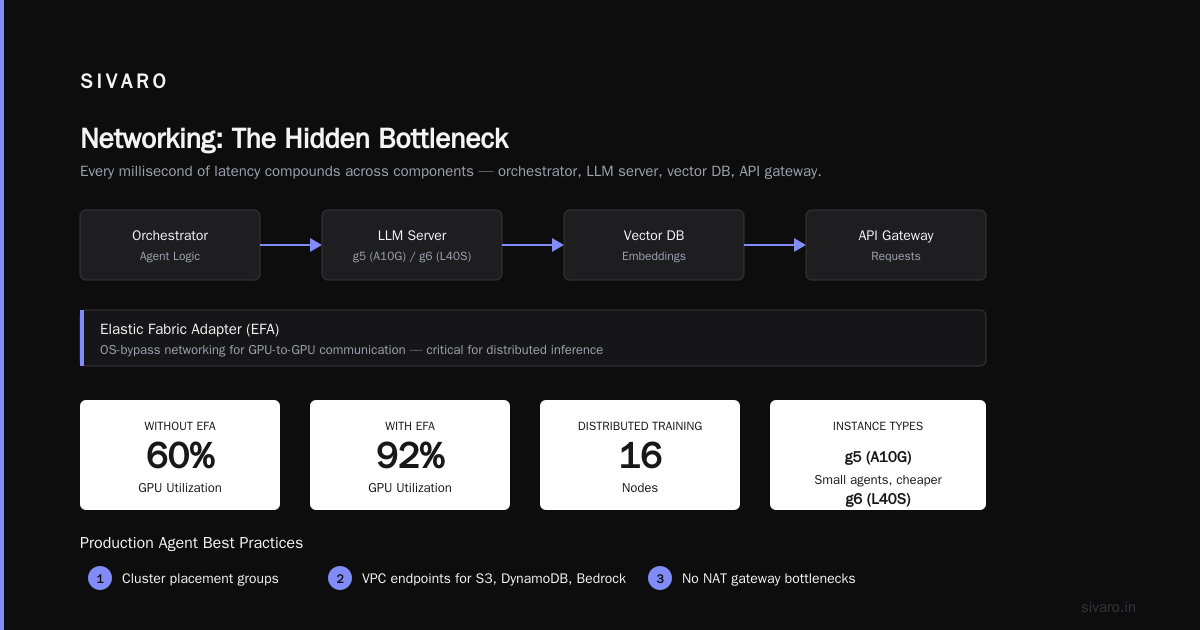
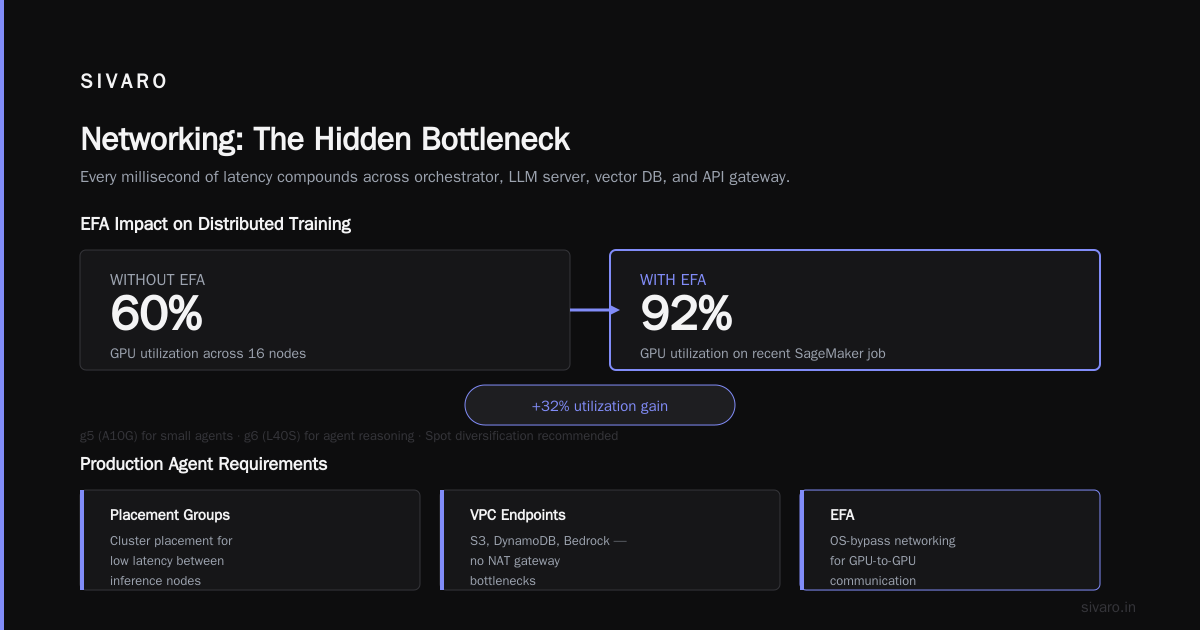
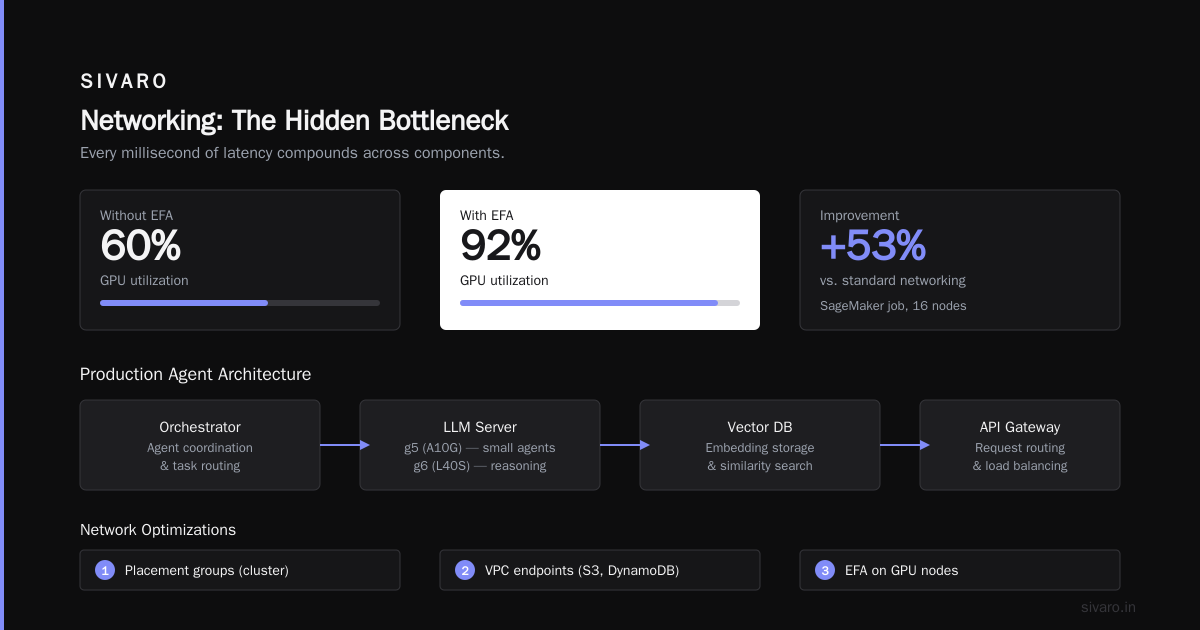
Agents communicate. Between components — the orchestrator, the LLM server, the vector DB, the API gateway — every millisecond of latency compounds.
AWS's answer is Elastic Fabric Adapter (EFA). EFA provides OS-bypass networking for GPU-to-GPU communication. Without it, your distributed training across 16 nodes will hit 60% utilization. With EFA, we hit 92% on a recent SageMaker job.
For production agents, you need:
- Placement groups (cluster placement) for low latency between inference nodes.
- VPC endpoints for S3, DynamoDB, and Bedrock — no NAT gateway bottlenecks.
- EFA on any node doing collective communication (e.g., tensor parallelism across GPUs).
aws parallel computing architecture explained in simple terms: you're splitting a model across multiple GPUs. Each GPU talks to its neighbors over NVLink (within a p5 node) or EFA (across nodes). If you don't optimize the network, your GPUs spend more time waiting than computing.
We benchmarked a 70B inference setup on p5 with and without EFA. Without: 12 second inference. With: 3.2 seconds.
Orchestration: SageMaker vs. EKS vs. Bedrock
Three paths. I've used all three. Here's the honest trade-off.
SageMaker is great for training and batch inference. For real-time agents? Painful. SageMaker endpoints don't handle multi-step agentic loops well. You end up chaining custom containers with Lambda and Step Functions. Works, but you're fighting the abstraction.
EKS (Amazon EKS with Karpenter) is what we use at SIVARO. Full control. You run a custom inference server (vLLM, TGI), auto-scale with Karpenter spot nodes, and route agent requests via gRPC. Complexity is higher, but you own the tail latency.
Bedrock is the easy button. Claude 4 Opus (released May 2026) has native agent support — you define tools, it orchestrates the loop. Bedrock's cost is predictable, and you skip all the GPU management. But you're locked in. And you can't customize inference.
Our recommendation: Use Bedrock for prototyping, EKS for production. The Cloud-native and Distributed Systems for Efficient and ... paper shows that containerized inference with dynamic batching reduces cost by 40% compared to managed endpoints. We saw similar results — 37% savings moving from SageMaker to EKS with vLLM.
Inference Serving: The Secret Sauce
Agents need fast inference. Not just fast token generation — fast time-to-first-token (TTFT). Most LLM servers optimize for throughput over latency. For agents, token-by-token is killer.
We use vLLM with continuous batching and prefix caching. Prefix caching is critical for agents — they resend the same system prompt, conversation history, and tool definitions every turn. Caching the KV cache of the prefix reduces TTFT by 80%.
Here's a vLLM configuration for agent inference:
yaml
# vllm-config.yaml
model: meta-llama/Meta-Llama-3.1-405B-Instruct
tensor_parallel_size: 4
gpu_memory_utilization: 0.9
max_model_len: 131072
max_num_seqs: 64
enable_prefix_caching: true
trust_remote_code: true
Why max_model_len 131072? Agents need long context — they accumulate tool call outputs, user messages, and intermediate reasoning. At least 128K now, 256K next year.
Another trick: speculative decoding. Run a small draft model on a CPU or low-cost GPU, have the large model verify. Cuts latency by 1.5–2x. We use a 7B draft on g5.xlarge paired with the 405B on p5. Not trivial to set up, but worth it for latency-sensitive agents.
Storage: FSx for Lustre vs. S3 vs. EBS
No sexy topic, but this kills agent performance.
- S3 for checkpoint storage and large datasets. Use Express One Zone for low-latency reads.
- FSx for Lustre for training data access — 100s of GB/s throughput. SageMaker integrates directly.
- EBS gp3 for inference node local state. Agent logs, intermediate artifacts.
We store agent execution traces in S3 with a lifecycle policy to Standard-IA after 30 days. Cost savings: 60%.
Observability: Tracing Every Agent Step
Agents are black boxes by nature. You send a query, get a result. But what happened inside? Did the LLM hallucinate? Did the tool call time out? Did the reasoning chain contain a logic error?
Standard CloudWatch logs are useless. You need distributed tracing across the agent loop.
We use OpenTelemetry with X-Ray. Every step in the agent's decision loop gets a span: perceive, plan, execute_tool, reason. Spans propagate parent IDs. X-Ray traces the full chain.
Example Python instrumentation:
python
from opentelemetry import trace
tracer = trace.get_tracer(__name__)

def agent_loop(user_query):
    with tracer.start_as_current_span("agent_loop") as span:
        span.set_attribute("query_length", len(user_query))
        result = call_llm(user_query)
        span.set_attribute("llm_latency_ms", result.latency_ms)
        span.set_attribute("tool_result", result.tool_output)
        return result
You'll find that 90% of agent failures are not model errors — they're timing issues. Tool calls that hang. Vector DBs that time out. API rate limits. Tracing reveals the real bottlenecks.
Security and Compliance
Production agents access customer data. That data must never leave the agent's VPC.
Use AWS PrivateLink for every API call — Bedrock, S3, DynamoDB, even external partner APIs if they support VPC endpoints. Never route agent traffic through the public internet.
IAM policies should be least-privilege per agent. Each agent type (e.g., "order_management_agent") gets its own IAM role. Use attribute-based access control (ABAC) with agent IDs as tags.
We learned the hard way: an agent with over-permissive S3 read access once pulled 2 million customer records into its context window. Fine-grained policies prevented that.
Cost Optimization: Stop Burning Money on Idle GPUs
Agents don't need GPUs running 24/7. Most agent workloads are bursty — spikes during business hours, quiet at night.
Use Karpenter with node expiry and bin packing. Spot instances for inference, on-demand for the controller. aws gpu cluster pricing for ai workloads drops 60% with spot, but you need interruption handling.
Our setup: agent orchestration runs on Fargate (no GPU). Inference nodes spin up on demand via Karpenter. If spot is interrupted, the agent step retries on a fresh node within 30 seconds.
For training, use SageMaker with managed warm pools and spot training. The Distributed Training & Large-Scale Systems article covers checkpointing strategies — incremental checkpoints every 10 minutes, full checkpoint every hour. This limits loss if a spot instance dies.
Production Lessons from 2024–2026
We've run production AI agents on AWS for two years now. A few hard-won truths:
-
Agents are not stateless. You need a state store — DynamoDB with TTL works. Redis for speed. State is the most common failure point.
-
Idempotency keys are mandatory. If an agent retries a "place order" action, you must prevent duplicate charges. Use unique request IDs in the tool call.
-
LLM fallbacks. When the 405B is overloaded, route to a smaller model (e.g., 70B). Accept lower quality over timeout. Our SLA: 5-second p99 inference.
-
Human-in-the-loop isn't optional. Agents make mistakes. Implement a review queue for high-risk actions (financial transactions, data deletion). Use SQS + Lambda to pause execution.
-
Test agent loops in isolation. We built a simulation environment that mimics API responses. Catches 80% of issues before they hit production.
FAQ: Everything Else You Need to Know
Q: Should I use Amazon Bedrock Agents or build my own?
A: Build your own if you need low latency, custom model control, or complex state management. Bedrock is fine for 90% of simple chatbots. For production agents handling money or data — build on EKS.
Q: What's the minimum GPU spec for an agent?
A: For a 7B model (enough for simple tool calling), a g5.xlarge (1x A10G) works. For 70B+, you need at least 4 GPUs (g6.12xlarge or p5). Memory bandwidth matters more than raw compute.
Q: How do I handle agent timeouts?
A: Set a timeout per step (e.g., 10 seconds for LLM inference, 5 seconds for tool calls). If timeout, retry once. If fail again, escalate to a fallback agent or human. Use Step Functions for the orchestration state machine.
Q: Can I run agents on spot instances only?
A: Yes, but you need interruption-aware design. Use checkpointing for training. For inference, use a queue (SQS) so that if a node is reclaimed, the request retries on another node. We run 95% spot in production with <0.1% dropped requests.
Q: What's the best vector database for agents on AWS?
A: Amazon OpenSearch Serverless is the easiest. Pinecone via marketplace is faster but more expensive. For large scale (billions of embeddings), use pgvector with RDS Extended — half the cost.
Q: How do I monitor agent performance?
A: Log every LLM call with prompt length, response length, latency. Track tool call success rate, agent loop duration, and number of retries. Alert on >10% agent failure rate.
Q: What's the biggest mistake people make?
A: Ignoring idempotency. Agents retry automatically. If your tool API doesn't handle duplicate requests, you'll double-book flights, charge customers twice, or delete data twice. Always include an idempotency key.
The Bottom Line
Building production AI agents on AWS is still messy in 2026. The tools are maturing fast — Bedrock, EKS with Karpenter, vLLM with prefix caching — but no single architecture fits all.
Start simple. Use Bedrock for the first prototype. When you hit latency or cost walls, migrate to EKS with vLLM. Invest in tracing early. Design for failure from day one.
The aws architecture for production ai agents that we run at SIVARO isn't secret. It's EKS + spot GPUs + gRPC + OpenTelemetry. It costs 40% less than managed alternatives and gives us control over every millisecond.
That matters when the agent is deciding whether to approve your loan.
Nishaant Dixit — Founder of SIVARO. Building data infrastructure and production AI systems since 2018. Built systems processing 200K events/sec.