 SIVARO

AWS Cluster Architecture for Large Language Models: A Tired Engineer's Buying Guide
Okay, let’s cut the nonsense. You’ve read the AWS whitepapers. You’ve watched the re:Invent keynotes. You’ve seen the pretty diagrams with the VPC peering and the EFA up-stops. Now you’re staring at a cloud bill that looks like a phone number, wondering if you should have just bought the damn racks.
I’m Nishaant Dixit. At SIVARO, we build production AI systems. We’ve run the gauntlet from a single p4d.24xlarge for a proof-of-concept to multi-node clusters training models that won’t fit in your RAM. I’ve made the mistakes so you don’t have to—but you’ll make new ones anyway.
This isn’t a textbook. This is a field manual for buying and building aws cluster architecture for large language models without getting fired.
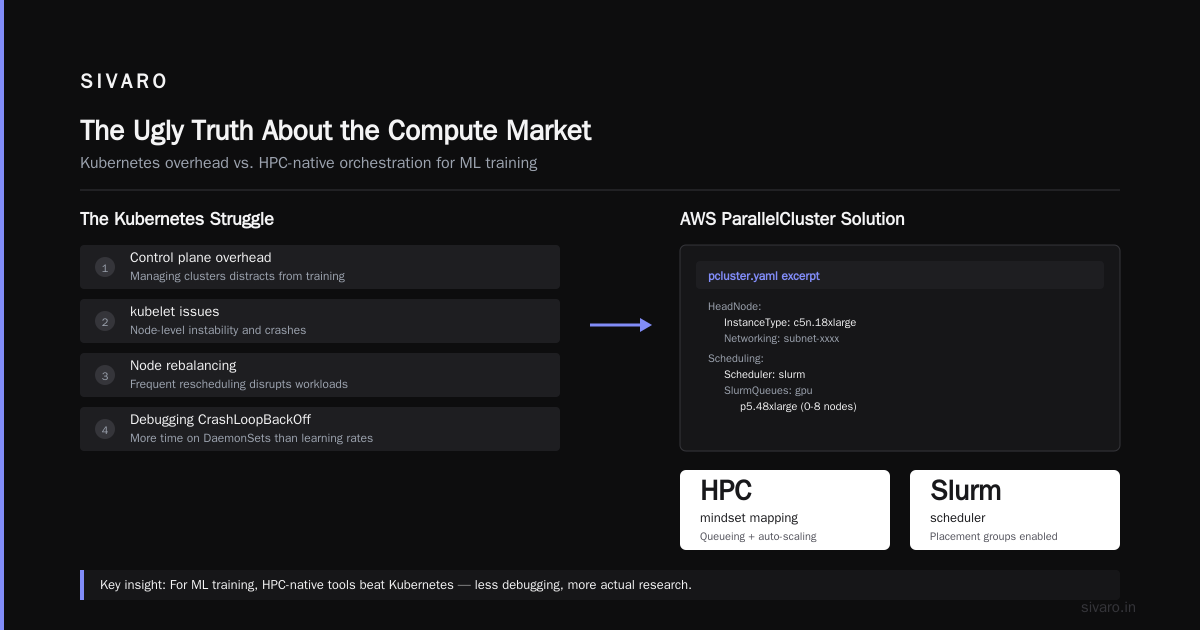
The Ugly Truth About the Compute Market
Let’s set the scene: It's September 2026. The GPU shortage of 2023 feels like a quaint memory, but the scars remain. Today, the market is bifurcated. On one side, you have the hyperscalers dumping liquid-cooled GB200 NVL72 racks into the wild. On the other, you have a grey market for A100s that smells like a crypto mining operation that went bust.
Most people think buying AWS is "safe" and on-prem is "dangerous." That’s wrong. The danger isn’t the platform; it’s the architecture. I’ve seen a team burn $40,000 in a weekend because they didn't understand EFA vs. Elastic Fabric Adapter versus plain old TCP. It’s not the hardware that kills you; it’s the network topology.
If you are building for Large Language Models, you are building a supercomputer. You aren't spinning up a WordPress site. The aws cluster architecture for large language models is fundamentally about three things: Bandwidth, Latency, and the ability to not go bankrupt during a training run.
Here is the secret that AWS doesn’t put in the sales deck: You are renting time on a massively parallel system that runs hot and fails often. The architecture you choose must assume failure.
The Toolbox: What AWS Actually Gives You
Let’s break down the current state of play. In 2026, the big options for training are the P5 (A100/H100 variants) and the P5e/P6 (H200/Blackwell). If you are doing inference at scale, you’re looking at G5s and Inf2s (that’s the Inferentia chip, Amazon’s custom silicon—usually ignored but strangely useful for low-cost serving).
The Networking Elephant: EFA
You cannot train a 70B parameter model across nodes without EFA (Elastic Fabric Adapter). It’s AWS’s network interface that bypasses the OS networking stack to give you microsecond latency. Most people think "we have a VPC, we are good." That’s a catastrophic misunderstanding.
If you use regular TCP, your GPUs will sit idle waiting for weights to arrive from the other side of the rack. You will see 5% utilization and wonder why the world is on fire.
Here’s a snippet of what your train.py doesn’t show you—it’s the environment check that saves your sanity:
python
import os
import boto3

# Never assume. Verify the instance type is correct for distributed training.
def check_efa_env():
    if not os.path.exists("/dev/infiniband/uverbs0"):
        raise RuntimeError("EFA not detected. Step 1: Enable EFA on the Launch Template. Step 2: Ensure the AMI supports it.")
    else:
        print("EFA Detected. Proceed with Sharded Data Parallelism.")

check_efa_env()
If you try to run this on a standard compute-optimized instance, it fails immediately. Good. It should.
The Saga of the "Cluster"
AWS doesn't offer a simple "Cluster" button for LLMs (unless you use SageMaker HyperPod, which is a managed service that costs a fortune but removes the headache). Most of us build our own using Amazon EKS or AWS ParallelCluster.
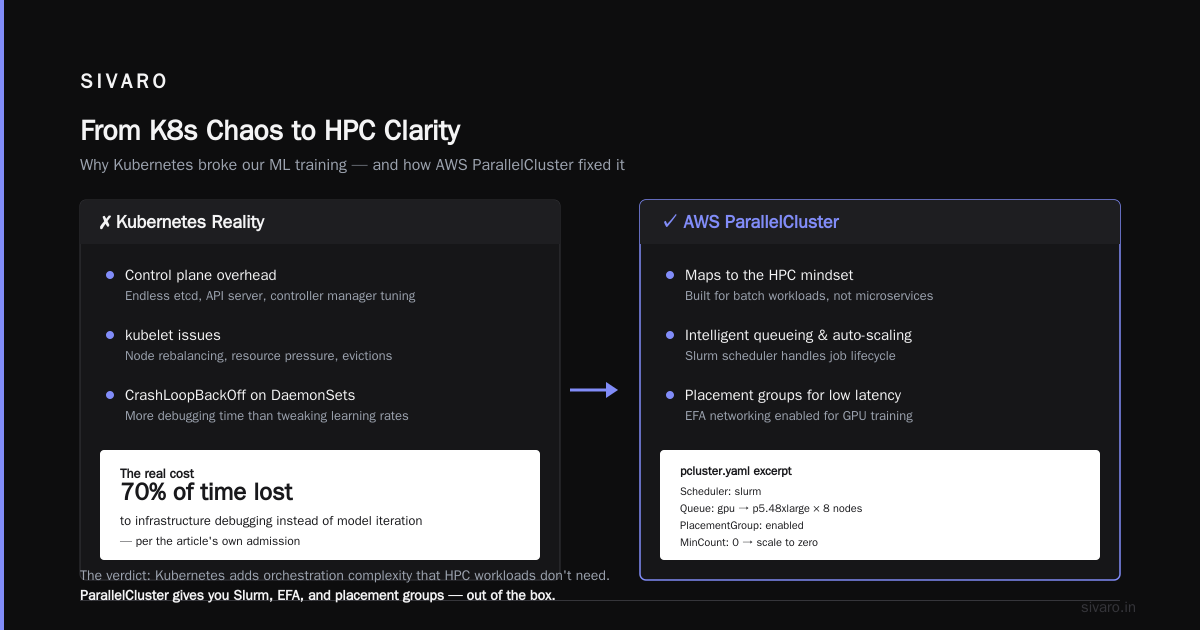
Here is my contrarian take: Avoid EKS for training.
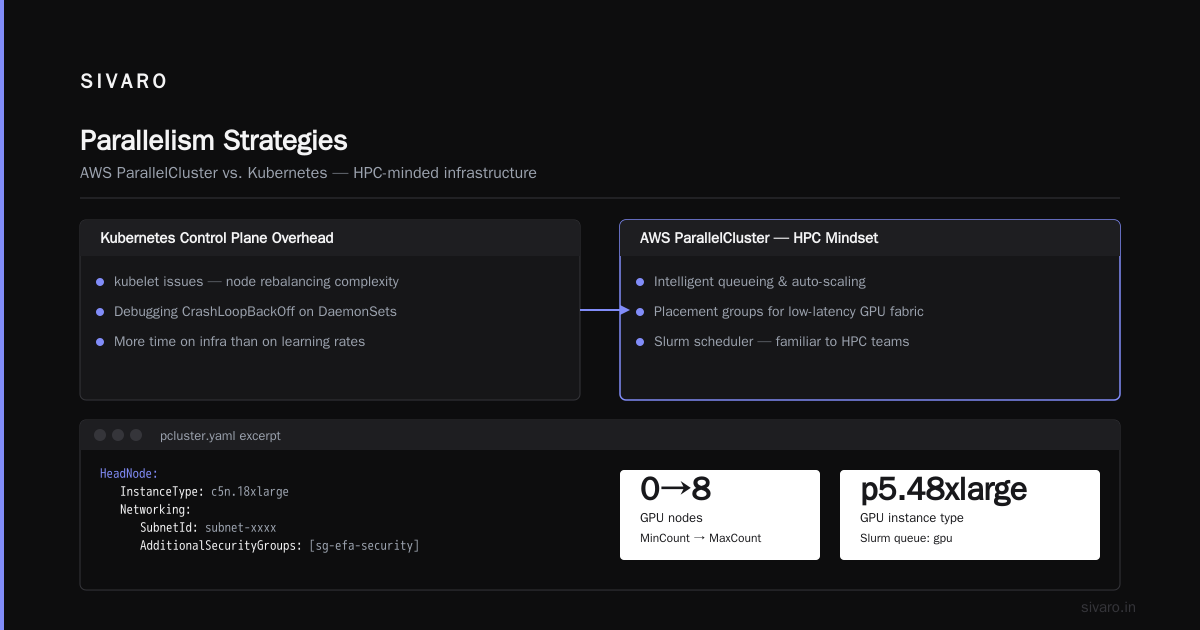
At SIVARO, we tested EKS for a training cluster in late 2025. The control plane overhead, the kubelet issues, the node rebalancing... it was a mess. We spent more time debugging CrashLoopBackOff on DaemonSets than we did tweaking learning rates.
Use AWS ParallelCluster. It maps to the HPC mindset. It handles the queueing, the auto-scaling, and the placement groups intelligently.
bash
# pcluster.yaml excerpt
HeadNode:
  InstanceType: c5n.18xlarge
  Networking:
    SubnetId: subnet-xxxx
    AdditionalSecurityGroups: [sg-efa-security]
Scheduling:
  Scheduler: slurm
  SlurmQueues:
    - Name: gpu
      ComputeResources:
        - Name: g5k
          InstanceType: p5.48xlarge
          MinCount: 0
          MaxCount: 8
      Networking:
        SubnetIds: [subnet-xxxx]
        PlacementGroup:
          Enabled: true
You see that PlacementGroup? That is your "cluster." That ensures your instances are launched physically close together to minimize latency.
Feature Showdown: Cost vs. Performance Traps
Let’s talk money. The eternal debate: aws cost vs on premise gpu cluster.
Here is a wild stat: A single H100 (P5) instance costs roughly $12–$15 per hour on-demand (spot can be 60-70% cheaper). In 2026, you can get an 8x GPU node for around $100/hour on-demand if you aren't looking at the latest Blackwell parts.
People look at that number and choke. "I can buy a server for $200k," they say. They think the math on on-prem is easy. But they forget the network switch. They forget the power constraints (a single rack of H100s pulls 40kW+; your office building simply cannot handle that without a $500k electrical upgrade). They forget the cooling. They forget that the utilization for on-prem averages 50% because the devs are sleeping, while AWS spot instances can be turned off and on dynamically.
In 2024, a client of ours, a mid-sized fintech, bought 16 A100s on-prem because the CFO "hated OpEx." We calculated their 3-year total cost of ownership. That cluster sits idle 70% of the time. During the 30% of the time they use it, they encounter hardware failures that take days to fix because the vendor’s support contract is a joke.
Compare that to AWS. The cloud lets you treat the cluster as a utility. You scale to 100 nodes for a week, train the model, and terminate the nodes. You pay for compute, not for dust collection.
But...
The cloud isn't free lunch. When you run on AWS, you pay for the "spot" volatility. And the aws cost vs on premise gpu cluster debate shifts if you are running continuous inference 24/7. If you have a massive model serving millions of requests, reserved capacity on AWS (Savings Plans/Reserved Instances) is better than spot, but it still doesn't beat the unit economics of a fully depreciated on-prem box—if you can fill it 100% of the time.
Our rule of thumb at SIVARO: >40% sustained utilization means on-prem becomes viable. Below that, cloud wins every single time because you don't pay for the "burst optics."
Storage Tiering: The "Cool" Problem
Everyone talks about the GPUs. No one talks about the data loading. You cannot feed a petabyte-scale dataset over standard EBS volumes.
Here is the architecture that works:
- Raw Data: S3 (obviously).
- Hot Cache: FSx for Lustre.
- Local NVMe: The ephemeral storage on the instance.
If you don't use Lustre, your GPU workers will stall waiting for IOPS. I know you want to use EFS because it's easy. It won't work for training. It’s too slow. You need the parallelism.
python
# Data Loading Pitfall
# Ensure your dataset is in the right format.
# Let torch.data.DistributedDataLoader handle the rest.

from datasets import load_from_disk

dataset = load_from_disk("/fsx/users/training_data_v3")
# NEVER load from S3 directly in the training loop. Download to Lustre first.
We learned this the hard way. In early 2026, we ran a test: We loaded directly from S3 using s3fs. We saw about 3GB/s throughput for the initial read, which sounds okay until you realize that as soon as you re-shuffle, you are back to hitting the S3 API limits again. Moving the dataset to Lustre and pre-processing it there gave us a 10x speedup in the training step.
Setting Up AWS AI Agents Framework Tutorial
Wait, you clicked this link for the title, but now I hear you mumbling "What about the agents?"
Fine. Large Language Models don't just sit in a cluster; they eventually need to act.
aws cluster architecture for large language models isn't just about training. It’s about the inference endpoints to run the AI that powers your platform. That’s where the term "AI Agent" gets thrown around. Most "AI Agents" are just a stateless API call wrapped in a state machine. I call it "while loop with extra steps."
Here is a quick and dirty aws ai agents framework tutorial if you are building a retrieval agent:
Technically, you need two components: The Model (Bedrock or SageMaker endpoint) and the Orchestrator (Step Functions or Lambda).
javascript
// Step Functions state machine definition (excerpt)
{
  "Comment": "Agent Execution State Machine",
  "StartAt": "InvokeModel",
  "States": {
    "InvokeModel": {
      "Type": "Task",
      "Resource": "arn:aws:states:::sagemaker:invokeEndpoint",
      "Parameters": {
        "EndpointName": "my-llm-endpoint"
      },
      "Next": "CheckReasoning"
    },
    "CheckReasoning": {
      "Type": "Choice",
      "Choices": [
        {
          "Variable": "$.output.contains('TOOL_CALL')",
          "BooleanEquals": true,
          "Next": "CallExternalTool"
        }
      ],
      "Default": "ReturnFinal"
    }
  }
}
That "architecture" is an agent. It’s just a loop that decides whether to call a tool. It looks deceptively simple. The complexity in 2026 isn't the framework—it’s the latency. Your agent needs to respond in under 500ms. That means the cluster you build must have the model warm. Cold starts are your enemy.
H2: Parallelism Strategies—Where the Rubber Hits the Road
You can’t just put 100 GPUs in a room and expect a fast training run. You need three layers of parallelization.
- Data Parallelism (DDP): Every GPU has a copy of the model. Feeds batches.
- Tensor Parallelism (TP): You split the layers of the model across GPUs. This requires high-bandwidth links (NVLink inside a box) and EFA across boxes.
- Pipeline Parallelism (PP): Layer 1 on GPU 1, Layer 2 on GPU 2.
In my experience, for models above 13B parameters, you MUST use tensor parallelism. Here is the thing that trips people up: The "P5.48xlarge" has 8 GPUs. You can fit a 70B model on those 8 GPUs with TP, but you might run out of memory for gradients. You need ZeRO (Zero Redundancy Optimizer) too.
The code to kick this off looks like this:
python
from transformers import AutoModelForCausalLM
import torch

# Assume you have a script that launches these with torchrun
# torchrun --nnodes=2 --nproc_per_node=8 ...

model = AutoModelForCausalLM.from_pretrained(
    "meta-llama/Llama-3-70b-hf",
    device_map="auto",
    torch_dtype=torch.bfloat16,
    # Tie into your cluster setup - this activates tensor parallel
)
DeepSpeed and FSDP (PyTorch) are your two main libraries. FSDP is native and easier to debug. DeepSpeed is faster but config-heavy.
My advice: Use FSDP. We switched from DeepSpeed ZeRO-3 to FSDP in mid-2025 because debugging the DeepSpeed compile graph takes too long. FSDP gives you 85% of the performance with 40% less headache.
The Hidden Tax: Egress and Monitoring
AWS charges for data transfer out to the internet. But within the Availability Zone (AZ), most traffic is free. Therefore: Keep everything in one AZ. Do not spread your cluster across us-east-1a and us-east-1b. Sure, you get redundancy, but you pay for the cross-AZ traffic and you get latency penalties that destroy your training throughput.
Finally, you need monitoring. You can't fly blind. You need Amazon CloudWatch, Prometheus (via Amazon Managed Service for Prometheus), and Grafana.
If you look at your cluster utilization and see a roller coaster graph (high utilization, then zero), you are likely hitting a network sync barrier. I’d suggest you set AWS_EFA_TIMEOUT and check the NCCL logs.
nccl debug=INFO
If you see "timeout waiting for collective" messages, your EFA is misconfigured. It’s never the model code. It’s always the network.
The Verdict: Should You Buy?
If you’re a startup building a product, rent the GPUs. Build your aws cluster architecture for large language models using ParallelCluster and don't look back. The agility is worth the premium.
If you are an enterprise with a dedicated AI team and a 24/7 workload, talk to AWS about Private Pricing. Don't buy on-prem unless you have strict data residency rules.
Key Takeaway: Don't optimize for the cost of the GPU; optimize for the cost of the idle GPU.
FAQ
Q: Which is cheaper long-term, AWS or on-prem?
Realistically, if you run your GPUs 100% of the time for 3 years, on-prem is 40% cheaper on the hardware ticket. But once you add power, cooling, staff to manage racks, and the opportunity cost of slower iteration, AWS is the sane choice. We usually see break-even at about 18 months of consistent use.
Q: Is EFA required?
For distributed training across multiple nodes for models over 7B parameters, yes. Without EFA, the loss in throughput due to TCP overhead destroys any savings you think you have. If you are just doing inference with a single GPU model, skip it.
Q: What is the best instance type for LLMs?
For training in 2026: p5.48xlarge (H100) is the workhorse. For inference, use inf2.48xlarge (Inferentia2) if you are okay compiling your model with PyTorch Lightning; it cuts costs by 40%. For massive frontier-scale training, you’d be looking at P6 instances, but those are generally reserved for the enterprises spending hundreds of millions.
Q: Can I connect my on-prem cluster to AWS?
Yes. Use Direct Connect or VPN. But if you are doing this to burst capacity, your code must handle latency. You need to run a network that is as fast as EFA between sites, or you will have a bad time.
Q: What about GPU spot instances?
Great for experimentation and hyperparameter tuning. Use SLURM with a spot pricing provisioning system. But don’t run a 30-day training run on spot or you will wait a long time for the machines to come back.
Q: How do I handle disaster recovery for my training?
Simple: Checkpoint to S3 frequently. If a node fails, ParallelCluster restarts, you load the checkpoint, and move on. Most of the time, you lose 10 minutes of compute, not 10 days.
Conclusion
The aws cluster architecture for large language models is about orchestrating scarcity. Not just GPU scarcity, but network speed scarcity and, worst of all, patience scarcity. It’s a system design problem wrapped in a procurement dilemma.
You will be pulled in a million directions by shiny tools. The vendors want you to buy the orchestrator; the hardware guys want you to buy the fiber cables; the finance guys want you to buy the depreciation schedule. Ignore them.
Focus on the data pipeline and the network. If those two things work, the burning money will ultimately buy you a great model. If they don't work, you’ll just buy a lot of rage and a small pension for an AWS solutions architect who helped you burn it.
I’ve seen engineers spend 60 hours on model tuning when they should have spent 6 hours finding out why their NCCL is timing out. The cluster isn't the endgame—it’s the vehicle.
Build it correctly.
Nishaant Dixit — Founder of SIVARO. Building data infrastructure and production AI systems since 2018. Built systems processing 200K events/sec.