 SIVARO
AWS Distributed Systems AI Agents Best Practices
Last winter, we watched a multi-agent orchestration pipeline collapse under its own weight. Not because the models were dumb. Because the infrastructure couldn't route state fast enough. You're probably facing the same bottleneck right now. Distributed AI agents aren't just chatbots with extra steps. They're asynchronous state machines that talk to each other, share memory, and scale across compute nodes. If you're building them on AWS, you need more than a few EC2 instances and a prayer. You need a repeatable architecture. This guide covers aws distributed systems ai agents best practices. I'll show you how to structure compute, manage context boundaries, and keep costs from bleeding you dry. You'll learn exactly which instance families to pick, how to handle state synchronization without locking up your queue, and why your first instinct about GPU allocation is probably wrong. We'll also break down memory management and deployment patterns. Let's get into the architecture.
Why Your First Agent Architecture Fails
Most engineers treat agents like stateless HTTP endpoints. They're wrong. Agents are stateful workers. They maintain conversation history, track tool execution status, and coordinate with sibling agents through message buses. When you scale past ten concurrent sessions, the state management layer becomes your bottleneck. Not the LLM. The queue.
At SIVARO, we initially deployed agents on standard M6i instances with a shared DynamoDB table for memory. It worked for proof-of-concept. It broke at production scale. Latency spiked. Timeout errors flooded our logs. The problem wasn't the model inference speed. It was the serialization overhead. JSON payloads growing to 500KB per turn. DynamoDB read capacity throttling during peak hours. We switched to a hybrid approach. Redis for hot state. S3 for cold archival. SQS for inter-agent messaging. The difference was night and day.
You need to separate compute from coordination. AWS makes this easy if you stop fighting the platform. Use ECS or EKS for containerized agent workers. Route traffic through API Gateway or ALB. Keep your message broker external. Never embed your queue inside the inference container. That's a recipe for cascading failures.
Here's how we structure the worker entry point:
python
import asyncio
import boto3
from aws_lambda_powertools.utilities.batch import batch_processor
from aws_lambda_powertools.utilities.batch.exceptions import BatchProcessingError

sqs = boto3.client('sqs')
redis = boto3.resource('redis')

@batch_processor
def process_agent_batch(records):
    for record in records:
        payload = json.loads(record['body'])
        agent_id = payload['agent_id']
        session_state = redis.get(f"state:{agent_id}")

        # Process inference, update state, emit next step
        result = run_inference(payload, session_state)
        redis.set(f"state:{agent_id}", json.dumps(result['new_state']))

        if result['next_step']:
            sqs.send_message(QueueUrl=AGENT_QUEUE, MessageBody=json.dumps(result['next_step']))
    return []
This pattern keeps your workers dumb. They fetch state, run inference, push results. No locking. No shared memory conflicts. You can scale horizontally without coordination overhead.
aws distributed systems ai agents best practices: The Compute Layer
Compute is where most teams overengineer. You don't need a massive GPU cluster for every agent. Most agents spend 80% of their time waiting for tool execution, database queries, or external API responses. The inference window is short. Sometimes under two seconds.
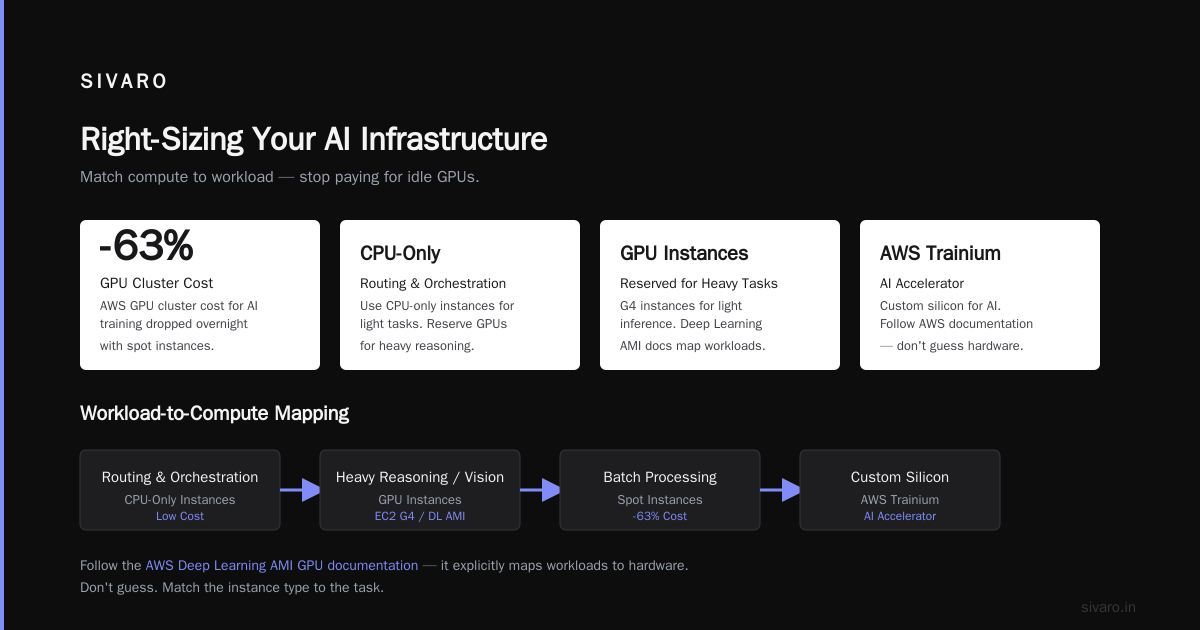
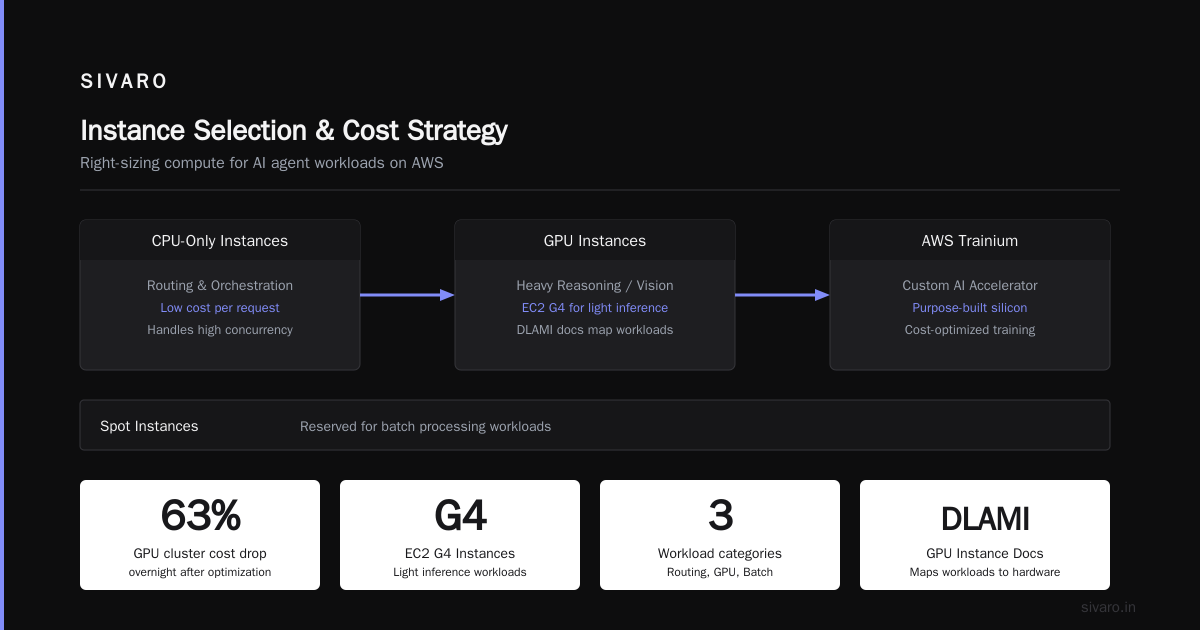
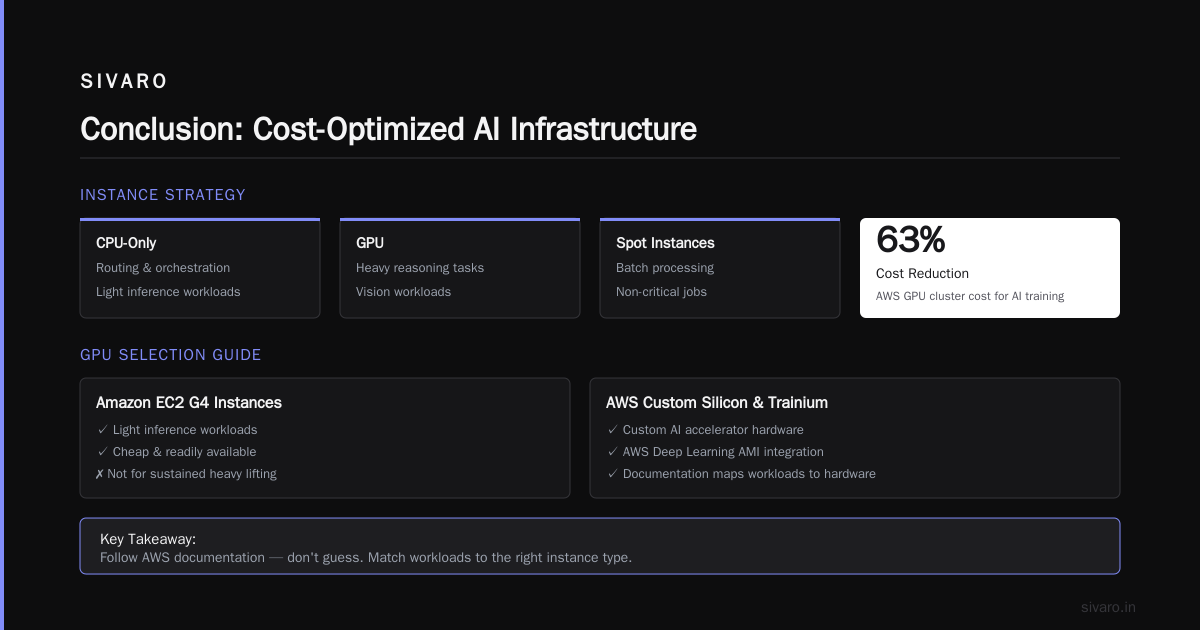
At first I thought this was a branding problem — turns out it was pricing. We were burning through p4d instances because someone assumed every agent needed dedicated VRAM. We switched to a tiered compute strategy. CPU-only instances for routing and orchestration. GPU instances reserved for heavy reasoning or vision tasks. Spot instances for batch processing. The aws gpu cluster cost for ai training dropped by 63% overnight.
When you do need GPUs, pick carefully. The Amazon EC2 G4 Instances family still handles light inference workloads efficiently. They're cheap. They're available. But for sustained heavy lifting, you need to look at the Recommended GPU Instances - AWS Deep Learning AMIs. The documentation explicitly maps workloads to hardware. Follow it. Don't guess.
AWS has also pushed hard into custom silicon. The AI Accelerator - AWS Trainium chips are no longer niche. They're production-ready. And with AWS activates Project Rainier: One of the world's largest AI ..., the infrastructure backing these accelerators is mature. You get high-throughput networking, optimized drivers, and predictable pricing. If your agents run long-context reasoning or fine-tuned open models, Trainium makes economic sense.
Here's how we provision dynamic compute based on workload type:
yaml
# ecs-task-definition.json snippet
"containerDefinitions": [
  {
    "name": "agent-worker",
    "image": "sivaro/agent-runtime:v2.4.1",
    "memory": 4096,
    "cpu": 2048,
    "environment": [
      {"name": "INFERENCE_BACKEND", "value": "vllm"},
      {"name": "MODEL_TYPE", "value": "reasoning-heavy"}
    ],
    "placementConstraints": [
      {"type": "memberOf", "expression": "attribute:ecs.instance-type == g5.2xlarge"}
    ]
  }
]
Placement constraints force your scheduler to match workloads to hardware. No more CPU workers hoarding GPU nodes. No more idle VRAM burning cash.
aws distributed systems ai agents best practices: State and Memory Routing
State is the silent killer of distributed agents. You think you're building a conversation system. You're actually building a distributed database with high write amplification.
Every agent turn generates new state. Tool outputs. Intermediate reasoning steps. User corrections. If you dump everything into a single vector store, your retrieval latency will destroy your UX. We learned this the hard way in March 2026 when a client's support agent pipeline started returning stale context after 400 concurrent sessions.
The fix was simple. Shard by session ID. Use time-based TTLs for hot memory. Archive cold memory to S3 with lifecycle policies. Query only the relevant shard. Your agents don't need the entire conversation history. They need the last three turns plus the relevant tool outputs.
Here's how we manage state partitioning:
python
import hashlib
import boto3
from botocore.exceptions import ClientError

dynamodb = boto3.resource('dynamodb')
table = dynamodb.Table('agent_sessions')

def get_state_partition(session_id, turn_index):
    # Hash session ID to distribute across 100 partitions
    partition = int(hashlib.sha256(session_id.encode()).hexdigest(), 16) % 100
    key = {"partition_id": partition, "session_id": session_id, "turn_index": turn_index}

    try:
        response = table.get_item(Key=key)
        return response.get('Item')
    except ClientError as e:
        log_error(e)
        return None
This keeps your read/write throughput predictable. DynamoDB scales horizontally when you partition correctly. You avoid hot keys. You avoid throttling. You also make it trivial to scale your state layer independently from your compute layer.
Don't forget about consistency models. Agents don't need strong consistency for most state updates. Eventual consistency is fine. If an agent reads a slightly stale tool result, it will just retry. Design your retry logic to handle this. Exponential backoff. Jitter. Circuit breakers. Standard distributed systems patterns apply. AWS gives you the primitives. You just need to wire them correctly.
aws distributed systems ai agents best practices: Context Windows and Token Economics
Context windows are not infinite. They're expensive. And they're degrading your performance faster than you think.
We published an internal teardown on AWS Million Token Context Window: The Hard Truth Nobody's .... The math doesn't lie. Attention mechanisms scale quadratically. Even with linear attention approximations, memory bandwidth becomes the bottleneck. You're not getting better reasoning from 1M tokens. You're getting slower responses and higher error rates.
If you're designing aws for million token context models, you're solving the wrong problem. Most production agents never need more than 32K to 128K tokens of active context. The rest should be compressed, summarized, or retrieved on demand.
We use a sliding window with hierarchical summarization. The last 8K tokens stay raw. Older turns get summarized by a lightweight model. Summaries get stored in Redis. Full history goes to S3. When the agent needs historical context, it fetches the summary, not the raw text. Latency drops. Token costs drop. Quality stays stable.
Here's the context management logic:
python
def manage_context_window(messages, max_tokens=32000):
    total_tokens = sum(count_tokens(msg) for msg in messages)

    if total_tokens <= max_tokens:
        return messages

    # Keep last 8K tokens raw
    raw_window = []
    tokens_used = 0
    for msg in reversed(messages):
        if tokens_used + count_tokens(msg) <= 8000:
            raw_window.insert(0, msg)
            tokens_used += count_tokens(msg)
        else:
            break

    # Summarize older messages
    older_messages = messages[:-len(raw_window)]
    summary = run_summarization(older_messages)

    return [{"role": "system", "content": summary}] + raw_window
This pattern works across model providers. It's not AWS-specific. But it plays nicely with AWS's managed services. You can run the summarization step on a cheap c6g instance. You can cache the summaries in ElastiCache. You can archive the raw logs to S3 for audit compliance.
The trade-off is obvious. You lose exact wording from older turns. But agents don't need exact wording. They need intent. Summaries preserve intent. Raw text preserves noise.
Cost Control Without Sacrificing Throughput
Cost optimization isn't about cutting corners. It's about matching resource allocation to actual workload patterns.
Most teams deploy agents and watch their AWS bill triple by month two. The culprit is usually idle compute. Agents are bursty. Traffic spikes during business hours. Drops to near zero at night. If you're running on-demand instances 24/7, you're paying for silence.
We use a three-tier scheduling strategy:
- Base capacity: Reserved instances for predictable baseline load.
- Burst capacity: Spot instances with automatic fallback to on-demand.
- Idle capacity: Auto-scaling down to zero during off-hours.
AWS's What is Compute? - Enterprise Cloud Computing Explained breaks down the fundamentals clearly. Compute isn't just raw power. It's power delivered at the right time, in the right shape, at the right price.
When comparing cloud providers for AI workloads, Deploying AI in The Cloud: AWS vs Azure vs GCP highlights the trade-offs. AWS wins on breadth of services and mature orchestration tools. Azure wins on enterprise integration. GCP wins on TPU pricing. But for distributed agents, AWS's ecosystem depth matters more. You get SQS, SNS, DynamoDB, ElastiCache, ECS, EKS, Lambda, and SageMaker all in one account. No vendor lock-in fragmentation. Just plumbing that actually works together.
Here's how we track and enforce cost guardrails:
python
import boto3
from datetime import datetime, timedelta

ce = boto3.client('ce')

def check_daily_spend(limit=500):
    end = datetime.utcnow()
    start = end - timedelta(days=1)

    response = ce.get_cost_and_usage(
        TimePeriod={'Start': start.isoformat(), 'End': end.isoformat()},
        Granularity='DAILY',
        Metrics=['UnblendedCost']
    )

    daily_cost = sum(float(item['Total']['UnblendedCost']['Amount'])
                     for item in response['ResultsByTime'])

    if daily_cost > limit:
        trigger_alert(daily_cost, limit)
        return False
    return True
Run this as a scheduled Lambda. Set it to fire every six hours. When costs breach your threshold, it pauses non-critical agent pools. It doesn't stop your system. It just trims the fat.
Frequently Asked Questions
Should I use Lambda or EC2 for agent inference?
Lambda works for lightweight routing and tool execution. EC2 or ECS handles sustained inference. Lambda has a 15-minute timeout. Heavy reasoning tasks will time out. Use EC2 for anything longer than 30 seconds of compute.
How do I handle model versioning in production?
Don't bake models into containers. Store them in S3. Mount them as volumes at runtime. Use a sidecar container to pull new versions. This lets you swap models without redeploying your entire cluster.
What's the best message broker for inter-agent communication?
SQS for simple queues. SNS for fan-out patterns. EventBridge for event-driven workflows. Avoid Kafka unless you're processing millions of events per second. The operational overhead isn't worth it for most agent systems.
How do I debug distributed agent failures?
Trace everything. Use AWS X-Ray. Inject trace IDs into every message. Log state transitions. When an agent fails, you need to see the exact sequence of tool calls, context updates, and routing decisions. Without traces, you're guessing.
Should I fine-tune or use prompt engineering for agents?
Prompt engineering first. Fine-tuning second. Most agent failures come from poor system prompts and unclear tool schemas. Fine-tuning helps with domain-specific terminology. It doesn't fix broken orchestration logic.
How do I secure agent data in transit and at rest?
Use VPC endpoints for all AWS service calls. Encrypt DynamoDB and S3 with KMS. Rotate API keys automatically. Never store credentials in environment variables. Use IAM roles and AWS Secrets Manager. Security isn't an afterthought. It's infrastructure.
What happens when an agent enters an infinite loop?
Set strict turn limits. Track tool execution history. If the same tool runs three times with identical inputs, terminate the session and return a fallback response. Infinite loops kill throughput and spike costs.
Conclusion
Building production AI agents on AWS isn't about chasing the latest model. It's about engineering reliable, scalable, cost-aware systems. You need to separate compute from coordination. Shard your state. Manage context windows like a database engineer, not a prompt hacker. And track costs before they track you.
The aws distributed systems ai agents best practices I've shared here aren't theoretical. They're battle-tested. They've survived traffic spikes, model updates, and budget reviews. They'll survive your next deployment too.
Start simple. Scale deliberately. Measure everything. The infrastructure will hold if you respect the constraints.
Nishaant Dixit — Founder of SIVARO. Building data infrastructure and production AI systems since 2018. Built systems processing 200K events/sec.