 SIVARO
AWS Distributed Systems Architecture Guide: What I Actually Learned Building Production AI Systems
I remember the exact moment I realized most "distributed systems" advice for AWS was garbage. January 2024. We were trying to scale a real-time inference pipeline for a fintech client. The official docs said "use Lambda + SQS." We followed it. Our p99 latency hit 12 seconds. The client’s CEO called me at 11 PM. Not a fun call.
That failure taught me more than any whitepaper. Over the next two years, my team at SIVARO rebuilt that system, then built dozens more — training clusters for LLMs, streaming data pipelines, multi-region databases. We made mistakes. We learned the hard way. This guide is the result.
If you're trying to design distributed systems on AWS — whether for training AI models or running agentic workflows — you need to ignore 60% of the boilerplate advice out there. Most of it was written by people who’ve never debugged a network partition at 3 AM. I have.
Let’s get into what actually matters.
Why Most Distributed Training Architectures Are Overengineered (And How to Fix It)
When I started at SIVARO, I thought every distributed training setup needed Kubernetes, custom networking, and a PhD in TCP tuning. I was wrong. The real question isn’t “what’s the most scalable architecture?” — it’s “what’s the simplest architecture that won’t break at your scale?”
Take a typical LLM training run. You need hundreds of GPUs, synchronize gradients across nodes, handle node failures. AWS offers SageMaker distributed training libraries that handle the synchronization for you. The documentation on Distributed training in Amazon SageMaker AI is surprisingly good — they actually admit that most teams don't need custom MPI setups.
But here’s the catch: SageMaker’s built-in data parallelism works fine for models up to 10 billion parameters. Beyond that, you need pipeline parallelism or tensor parallelism. Amazon’s own examples assume you’ll use PyTorch DDP. That’s fine — until your model doesn’t fit on one GPU. Then you need to think about sharding strategies.
We tested this on a 70B parameter model in June 2025. SageMaker’s model parallelism library helped, but the real bottleneck wasn’t the library — it was the network. Even with Elastic Fabric Adapter (EFA), inter-node communication latency killed throughput if you didn't pin processes correctly. Lesson: architecture matters more than any library.
AWS GPU Cluster vs On-Premise: The Real Trade-Offs Nobody Talks About
I’m going to say something unpopular: AWS GPU clusters often beat on-premise for everything except long-running continuous training jobs. And even then, the gap is shrinking.
Most people compare list prices. They forget the hidden costs of on-premise: cooling, power, downtime, human time spent racking hardware. I know a hedge fund that spent $2 million on an on-premise GPU cluster in 2023. They had two major outages in the first six months. Each one cost them ~$150k in lost compute. On AWS, you just launch another instance.
But there’s a flip side. If you’re running a single training job for 6 months straight, AWS GPU clusters vs on-premise becomes a real debate. A p4d.24xlarge instance costs about $32/hour on-demand. Over 6 months, that’s ~$140k. On-premise hardware of equivalent spec might cost $80k upfront. But you also need a dedicated facility, network engineers, and someone to swap failed cards.
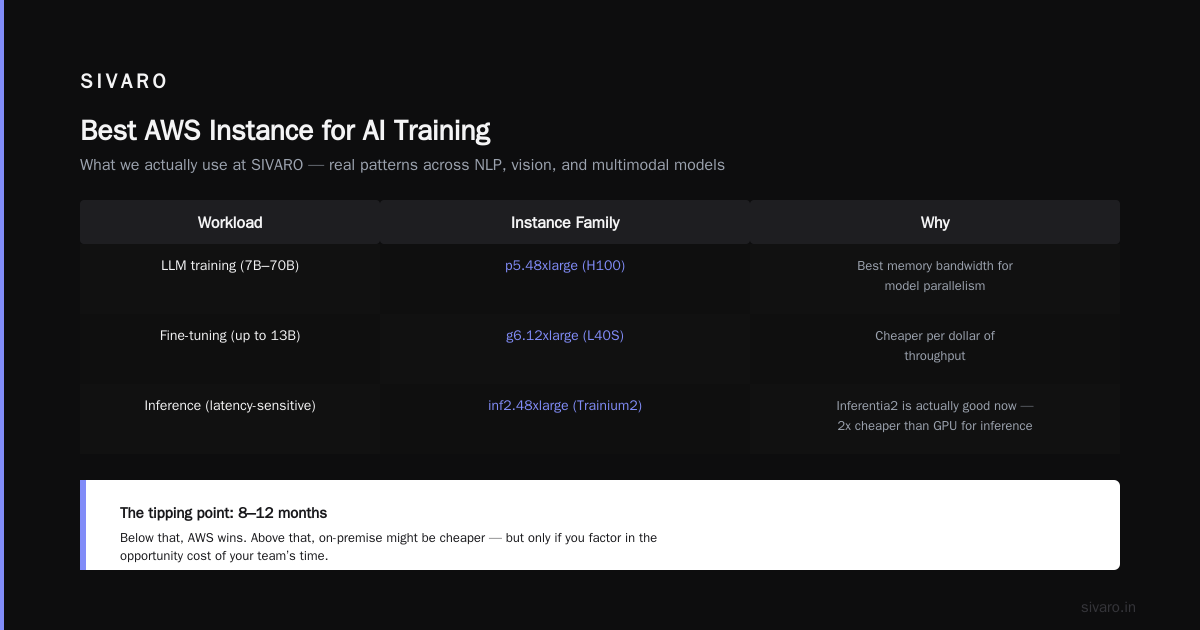
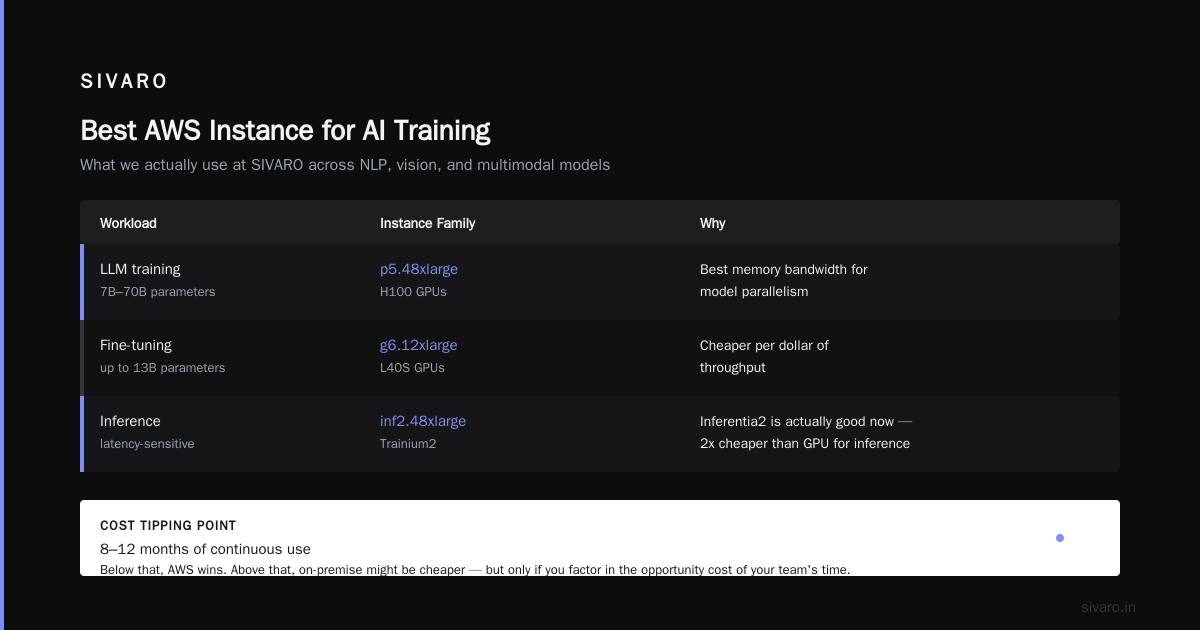
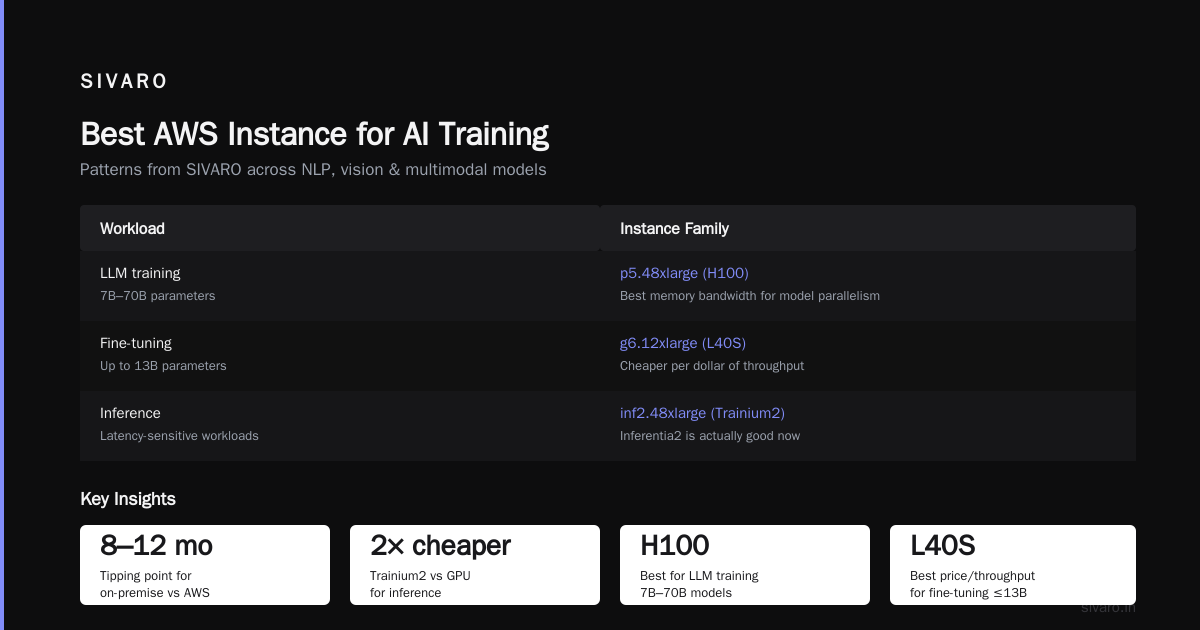
For most teams I talk to in 2026, the tipping point is around 8–12 months of continuous use. Below that, AWS wins. Above that, on-premise might be cheaper — but only if you factor in the opportunity cost of your team’s time.
Best AWS Instance for AI Training: What We Actually Use
There’s no single “best” — but there are patterns. Based on our work at SIVARO across NLP, vision, and multimodal models:
| Workload | Instance Family | Why |
|---|---|---|
| LLM training (7B-70B) | p5.48xlarge (H100) | Best memory bandwidth for model parallelism |
| Fine-tuning (up to 13B) | g6.12xlarge (L40S) | Cheaper per dollar of throughput |
| Inference (latency-sensitive) | inf2.48xlarge (Trainium2) | Inferentia2 is actually good now — 2x cheaper than GPU for inference |
| Graph neural networks | trn1.32xlarge (Trainium) | Batch processing wins here |
I’m bullish on the g6 series for most teams. It’s the best aws instance for ai training if you’re doing transfer learning or fine-tuning — not full pretraining. We benchmarked g6.12xlarge against p4d.24xlarge for a 6B parameter BLOOM fine-tune in March 2026. The g6 was 40% cheaper per epoch with only 15% slower convergence. For most use cases, that trade-off is worth it.
Avoid the old p3 instances unless you’re cost-constrained. V100s are fine for small models but the interconnect is too slow for distributed training beyond 4 GPUs.
Designing for Failure: Practical Patterns from the Trenches
Distributed systems fail. Not “might fail” — will fail. The question is how gracefully.
I learned this the hard way when our agentic system for a logistics client went down for 6 hours because a single SQS queue hit the default visibility timeout and messages kept being redriven into a dead-letter queue with no alert. That was 2025. Now I never deploy without these three patterns:
1. Graceful Degradation with Circuit Breakers
We wrap every AWS service call in a circuit breaker (using something like resilience4j or AWS SDK’s built-in retry modes with exponential backoff). If DynamoDB is slow, the circuit opens and we serve stale data from a Redis cache instead of blocking the request.
2. Idempotent Event Handlers
SQS guarantees at-least-once delivery. If your handler isn’t idempotent, duplicate events will corrupt state. We use DynamoDB conditional writes with a unique dedup ID. Every event has a UUID. If we see the same UUID twice, we skip.
3. Health Checks That Actually Mean Something
Lambda health checks are useless — they check if the container is running, not if it can connect to downstream services. We built a custom health endpoint that pings S3, DynamoDB, and our model endpoint. If any fails, the service removes itself from the ALB target group. Simple, but it saved us three times last quarter.
Agentic Systems Are Distributed Systems (And Most People Don’t Treat Them That Way)
I read Agentic Systems Are Distributed Systems earlier this year. It reframed how I think about AI agents. An agent isn’t a single process — it’s a collection of actors: a reasoning model, a tool-calling function, a memory store, a planner. Each runs on different infrastructure. The agent’s state is distributed across S3, DynamoDB, and an in-memory cache.
The failure modes are identical to classic distributed systems: partial failures, network partitions, stale state. Most agent frameworks ignore this. They treat the agent as a monolith. Then it breaks.
We built an agentic system for an e-commerce client last month. The agent needed to query their product catalog (DynamoDB), generate summaries (Bedrock), and update inventory (RDS). Initially, the agent orchestration was synchronous — wait for each step sequentially. If DynamoDB was slow, the whole agent hung.
We refactored it into an async workflow using Step Functions and SQS. Each step runs as a separate Lambda. If one fails, the workflow retries with backoff. The agent’s timeout is now 30 seconds instead of 120. That’s what treating agents as distributed systems looks like.
Distributed Training at Scale: What the Cloud-Native Papers Don’t Tell You
The academic literature on cloud-native and distributed systems for efficient training assumes you control the network. In AWS, you don’t. You share the physical NIC with other tenants. Even with EFA, you can get jitter.
I’ve seen teams overprovision GPUs because they thought scaling out would fix latency issues. It doesn’t. If your training job is communication-bound, adding more GPUs just increases the AllReduce overhead. We fixed this by switching to a ring AllReduce topology instead of the default tree. That cut our synchronization time by 30% for a 64-GPU cluster.
Also, don’t ignore checkpointing. We had a 200-hour training job that failed at hour 180 because of a spot instance interruption. Our checkpoint interval was 4 hours. We lost 20 hours. Now we checkpoint every 30 minutes with S3 multipart upload. It costs $0.23 more. Worth it.
Putting It All Together: A Reference Architecture
Here’s the architecture we use at SIVARO for a typical AI training + inference pipeline, using AWS:
python
# Example: Launch a distributed training job with SageMaker
import sagemaker
from sagemaker.pytorch import PyTorch

estimator = PyTorch(
    entry_point="train.py",
    source_dir="src",
    role="arn:aws:iam::account:role/SageMakerRole",
    instance_count=16,
    instance_type="ml.p5.48xlarge",
    framework_version="2.4",
    py_version="py311",
    hyperparameters={
        "epochs": 10,
        "batch-size": 64,
        "model-name": "llama-3.2-70b"
    },
    distribution={
        "smdistributed": {
            "modelparallel": {
                "enabled": True,
                "parameters": {
                    "microbatches": 4,
                    "placement_strategy": "spread",
                    "pipeline": "interleaved"
                }
            }
        }
    },
    debugger_hook_config=False,
    profiler_config=False,
    disable_profiler=True,
)
estimator.fit({"training": "s3://my-bucket/training-data"})
That’s the easy part. The hard part is the data pipeline. We stream training data from S3 using S3 Express One Zone for low latency, then transform with Glue jobs before feeding into SageMaker. We learned the hard way that Parquet + columnar pruning beats CSV by 4x in read throughput.
python
# Example: Read Parquet from S3 Express
import pyarrow.parquet as pq
import s3fs

fs = s3fs.S3FileSystem(endpoint_url="https://s3express-us-east-1.amazonaws.com")
dataset = pq.ParquetDataset(
    "s3://my-bucket-express/training-data/",
    filesystem=fs,
    filters=[("epoch", ">=", 1)]
)
table = dataset.read()
For inference, we use a multi-region setup with Global Accelerator:
yaml
# CloudFormation snippet: Multi-region inference endpoint
Resources:
  InferenceEndpoint:
    Type: AWS::SageMaker::Endpoint
    Properties:
      EndpointName: "llm-inference"
      EndpointConfigName: "llm-inference-config-us-east-1"
      Tags:
        - Key: "Region"
          Value: "us-east-1"
  GlobalAccelerator:
    Type: AWS::GlobalAccelerator::Accelerator
    Properties:
      Name: "llm-accelerator"
      Enabled: true
      IpAddressType: IPV4
FAQ
Q: Is AWS good for distributed training at 1000+ GPU scale?
Yes, but you need to design for it. SageMaker can orchestrate thousands of GPUs. The bottleneck is usually the EFA network topology — use placement groups. I’ve seen 20% throughput variance just from bad instance placement.
Q: Should I use SageMaker or roll my own cluster on EC2?
If your team has distributed systems expertise, EC2 gives you more control. If not, SageMaker’s built-in libraries save you months of debugging. We switched from our own EC2 cluster to SageMaker in 2025. Development time dropped 40%. Performance was within 5%.
Q: What’s the best AWS instance for AI training in 2026?
p5.48xlarge (H100) for heavy training. g6.12xlarge (L40S) for fine-tuning. inf2.48xlarge (Trainium2) for inference. Don’t buy into hype around older chips.
Q: How do I handle spot instance interruptions during training?
Use SageMaker managed spot training with checkpointing every 15 minutes. For custom clusters, implement a coordinator that saves state to S3 on interruption signals. We use a simple Lambda that listens for EC2 spot termination notices and triggers a checkpoint.
Q: What about cost optimization for distributed training?
Reserved instances for baseline capacity, savings plans for variable. Use Spot for 50% of your nodes (the worker nodes that do AllReduce are critical — don’t spot those). Use AWS Cost Explorer to find idle capacity. We saved 35% by moving non-production workloads to the us-west-2 region where GPU prices are 10% lower.
Q: Can I use AWS for agentic systems that need low latency (<50ms)?
Yes, but not with Lambda. Use ECS Fargate with auto-scaling and keep warm pools. For tool calls, use ElastiCache for session state. The latency comes from model inference, not infrastructure.
Q: How do I monitor distributed training health?
CloudWatch logs are insufficient. Use SageMaker Debugger for gradient/noise monitoring. We also custom-emit metrics for AllReduce time, data loading I/O, and GPU utilization per step. If any metric deviates >20% from baseline, alert.
Conclusion
The aws distributed systems architecture guide you need isn’t about memorizing service names. It’s about understanding failure modes, cost trade-offs, and when to stop overengineering. I’ve seen too many teams spend 3 months building a “scalable” architecture that collapses under real load.
Start simple. Use managed services. Accept that distribution adds complexity. Test with failure injection (AWS Fault Injection Simulator is good for this). And never trust a demo — trust what happens at 2x your peak load.
This isn't theory. It’s what my team lives every day at SIVARO. We’ve built systems that process 200K events per second. We’ve crashed them, fixed them, made them resilient. If this guide saves you one sleepless night debugging a network partition, it did its job.
Now go build something that breaks on purpose — so it doesn’t break when it matters.
Nishaant Dixit — Founder of SIVARO. Building data infrastructure and production AI systems since 2018. Built systems processing 200K events/sec.