 SIVARO
AWS Distributed Systems Architecture: The Patterns That Actually Work in Production
The first system I ever deployed on AWS collapsed at 2,000 users. It was 2018. We were migrating a client's monolith to what I thought was a clever microservices setup on EC2, using a load balancer I'd configured from a blog post. The entire architecture was one availability zone deep, with a database that had no failover. When the AZ blipped, everything went dark. The client didn't care why. They just saw the error page.
Here's the thing I've learned after eight years at SIVARO, building data infrastructure that processes 200,000 events per second: most people think AWS distributed systems architecture is about picking the right services. It isn't. It's about understanding failure modes and designing for them before they happen. The services are easy. The thinking is hard.
This guide isn't a certification cram sheet. It's a working manual for engineers who need to build systems that survive contact with production. If you're running anything beyond a toy workload, this will save you real pain.
What AWS Distributed Systems Architecture Actually Means
Let's define the term before we go deeper. AWS distributed systems architecture is the practice of designing applications across multiple independent compute nodes, storage systems, and networks that work together to appear as a single system. The computation is distributed. The storage is distributed. The failure domains are distributed. Your mental model must be distributed too.
Think about it in terms of what Amazon Web Services (which is what aws meaning amazon web services refers to) gives you: a set of building blocks that are themselves distributed systems. S3 stores your objects across multiple facilities. DynamoDB replicates across three AZs. These aren't single machines magically scaled up. They're networks of machines running consensus algorithms and replication protocols. When you build on top of them, you inherit both their strengths and their failure modes.
The cloud-native research community has been formalizing these patterns Cloud-native and Distributed Systems for Efficient and.... The academic work is catching up to what practitioners have known for years: distributed systems fail in specific, often predictable ways. The key is making those failures invisible to your users.
The Fundamental Problem: The Network Is Not Reliable
Here's a statement that sounds obvious but changes everything when you internalize it: the network between your components will fail, will be slow, will drop packets. When you sign up for AWS (the meaning of Amazon Web Services in this context is "we're giving you a datacenter's worth of infrastructure, but the network is still a network"), you're not escaping physics. The network is the most failure-prone part of any distributed system.
This single fact drives every meaningful architectural decision. It's the reason you need queues instead of direct service-to-service calls. It's why you need timeouts and retries with exponential backoff. It's why you design for idempotency, because a retried request will arrive more than once.
I've seen this happen repeatedly with clients at SIVARO. A startup builds a service that does what works in a demo. Then the retries start. The retries aren't planned for, so they cause duplicate processing. The duplicates cause data corruption. The corruption causes more retries. It's a cascade of failure that happens all because somewhere in the chain, a request was sent twice.
Control Plane vs Data Plane: The First Design Decision
Let's talk about something that doesn't get enough attention. The first decision you should make on AWS—before picking any specific service—is where your control plane and data plane live. This distinction has gotten more serious since AI workloads started taking over in 2025 and 2026.
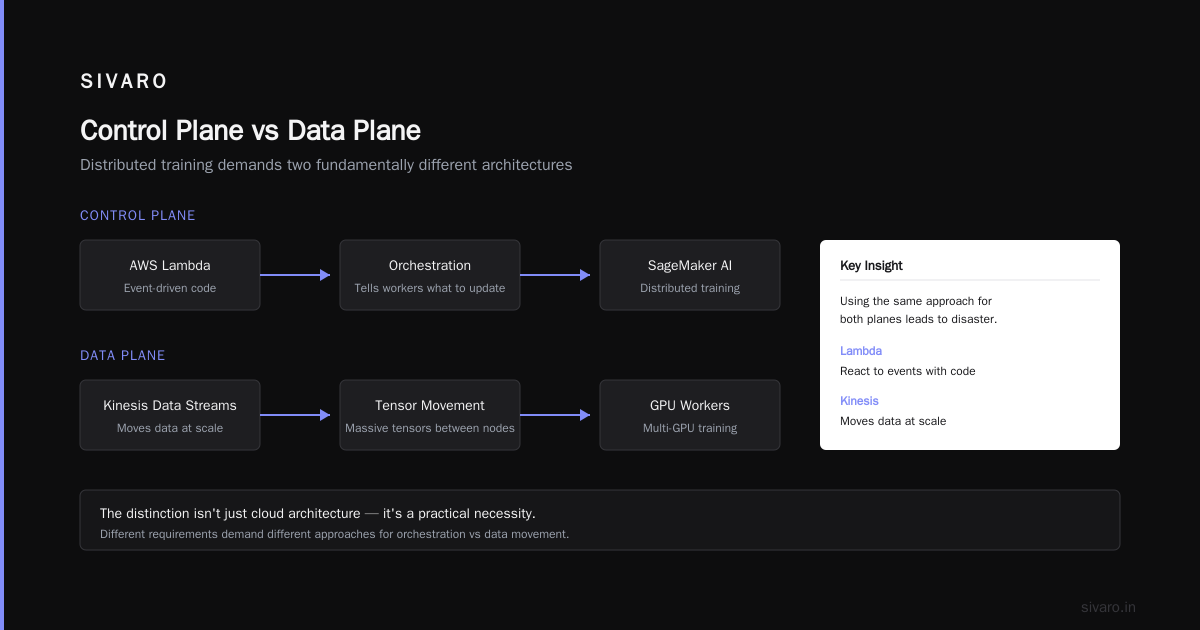
The control plane handles orchestration: which tasks run, where they run, what configuration they use. The data plane handles the actual work: processing events, serving requests, computing results. In a poorly designed system, these are entangled. In a good system, they're clearly separated.
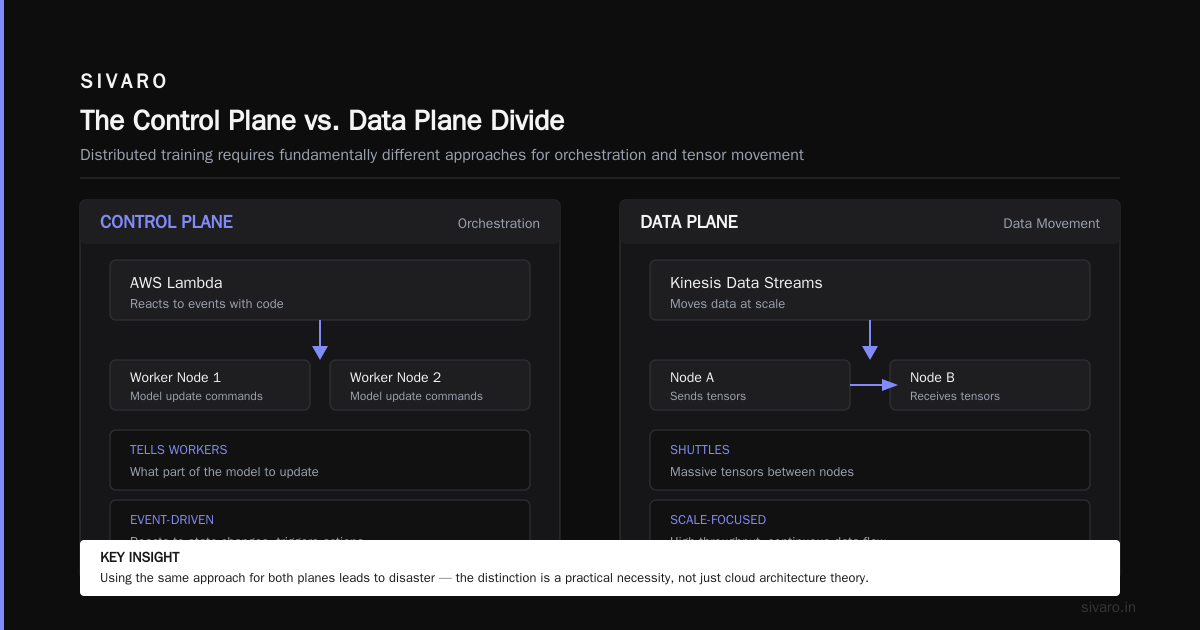
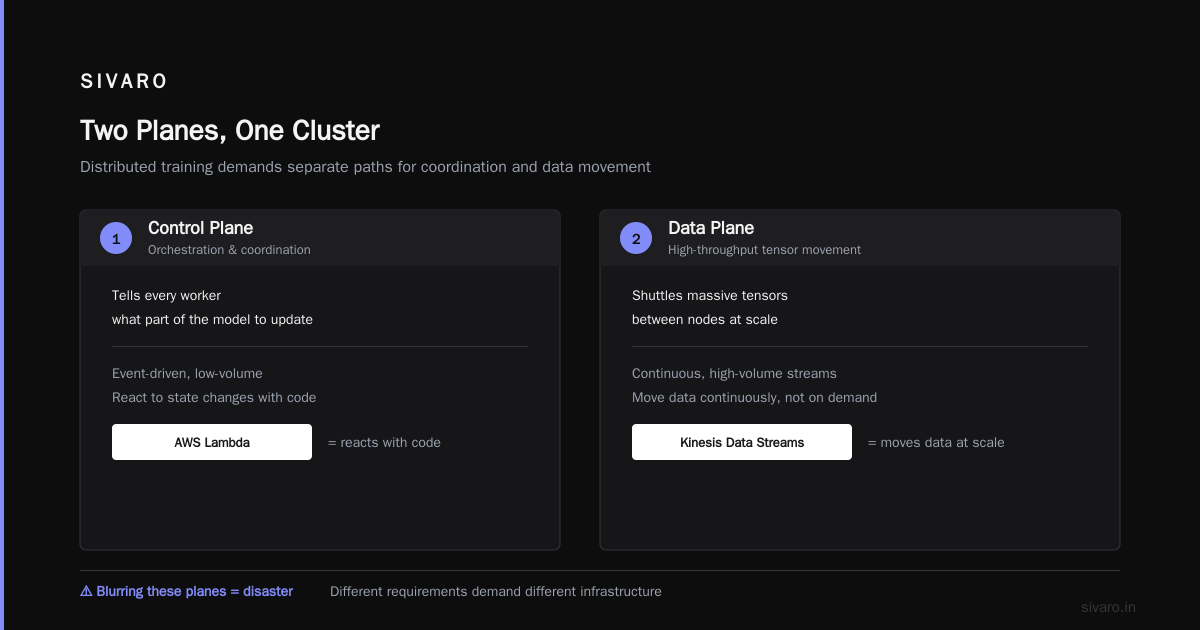
With AI workloads specifically, this distinction is the foundation of distributed training. When you're training models across multiple GPUs, you need a control plane telling every worker what part of the model to update, and a data plane shuttling massive tensors between nodes Distributed training in Amazon SageMaker AI. These have fundamentally different requirements, and trying to use the same approach for both leads to disaster.
This is literally the difference between something like AWS Lambda for orchestration and Kinesis Data Streams for data movement. Lambda reacts to events with code. Kinesis moves data at scale. The distinction between control and data planes isn't for cloud architecture. It's a practical necessity.
The AWS Services I Actually Use — and Why
Rather than listing every service AWS offers (you can find that documentation yourself), let me share the patterns that work in production. These are the choices I've validated with real workloads processing 200K+ events per second.
Compute: It Depends (Seriously)
I get asked constantly whether you should use EC2, ECS, Lambda, or Kubernetes (EKS). The answer depends on your workload characteristics. I know that's unsatisfying. Let me be specific.
Lambda is great for request-response patterns with unpredictable load and low concurrency requirements. If you're processing a webhook or an API call that takes less than a minute, this is the right choice. It's also harder to debug when things go wrong, and cold starts are a real issue if you're running latency-sensitive workloads. If you need over a couple thousand concurrent invocations, you'll need to look at the account limits carefully.
EC2 gives you the most control. If you're running stateful services, databases, or anything that needs sustained CPU or memory, raw instances are often the answer. You manage more, but you control more. For stateful services where you need to process reliably and handle interruptions, EC2 is the pragmatic choice.
EKS is great when you need Kubernetes. (I'm sure you were all waiting for my opinion on this.)
Here's the hard truth about aws for ai agents vs kubernetes: Kubernetes is a distributed systems framework, but it's also a platform. The AI agents in production on AWS don't actually require Kubernetes. They require a stateful workflow, message queueing, and the ability to call models and tools in a reliable way. Agentic Systems Are Distributed Systems makes this point beautifully: an agent's lifecycle, failure modes, and message-passing architecture are exactly the challenges we've been solving in distributed systems for decades. Use the right infrastructure for the job.
Put it this way: if you're building an internal tool with simple request-response, use Lambda. If you're building a data pipeline that needs to process massive streams, use ECS with a message queue front. If you need to run a platform where various teams deploy containerized services with specific networking requirements, use EKS.
Define your requirements first. Don't pick a technology for the sake of using it.
Storage: S3 Is the Foundation
S3 isn't just object storage. It's the backbone of almost every serious data architecture I've built. It's durably tolerant of outages (it's designed to sustain loss of two facilities simultaneously), and the interface is so simple it's almost invisible.
For production systems, don't overthink S3. It's the best choice for backups, logs, batch processing, and the data lake layer. You can do fine with Amazon FSx for Lustre for high-performance workloads in specific cases, but for general distributed systems, S3 is the foundation. The cost structure is better than I expected, and the lifecycle policies for moving data to Glacier for archival mean you don't have to delete old data—you just archive it.
Data Stores: Purpose-Built Beats One-Size-Fits-All
Database selection is the most expensive mistake you can make. I've seen teams use DynamoDB for relational data and need to rewrite their entire application. I've seen teams use RDS for workloads that need graph traversal or vector search and hit performance walls.
I'll stand by this recommendation: DynamoDB is excellent for key-value and document workloads. If your access pattern is "give me item by primary key" or "give me items by a known partition key," it's the right call. I've built event stores in DynamoDB that handle 200K+ writes per second without breaking a sweat.
When your access pattern is relational—joins, aggregations, complex queries—use a relational database. RDS with Postgres or MySQL is fine. I've seen too many people rail against the relational model, then build a mess of denormalized data in NoSQL databases that they spend months trying to un-fix.
Messaging: SQS and SNS Handle the Load
I use SQS for almost everything that needs asynchronous processing. It's a distributed queue that provides exactly-once delivery and is amazingly reliable. The key insight I've learned: use SQS to decouple your services. Your API lands a message in a queue. Your worker picks it up, processes it, and returns it to the queue if processing fails. This breaks synchronous dependencies and absorbs load spikes that would otherwise crush your services.
For fan-out patterns—where an event needs to trigger multiple downstream actions—SNS is the right choice. Think of it as a pub-sub system where the event is consumed and then delivered to multiple subscribers.
The SageMaker Question for Distributed ML
Now let's talk about distributed machine learning, because this is where the real architectural decisions are happening in 2026. When you're training a model on a cluster of GPU instances, you're building a distributed system. The same principles apply, just with different service boundaries.
Amazon SageMaker handles a lot of the distributed training complexity for you. It manages the cluster, handles data distribution, and provides built-in metrics for debugging Distributed training in Amazon SageMaker AI. However, I've seen many teams hit the limits of SageMaker's abstractions and need to move to managing their own clusters with tools like Slurm.
The question comes down to this: is your model training a one-time thing he supports, or is it a core part of your ongoing production system? If you're iterating on models weekly, if you're doing experiments, if you're retraining based on data that changes daily, you need real control. If you're training models occasionally and don't want to operate the infrastructure, SageMaker is the better choice for you.
Distributed training isn't just a compute problem. It's also a data distribution problem. The training data needs to be delivered to each worker node efficiently. The gradients need to be aggregated efficiently. There's a LOT of engineering that goes into that Distributed Training & Large-Scale Systems. I've found that for the simplest cases, using DataLoader utilities in PyTorch keeps things manageable. But when the model gets big or the data gets big, you need dedicated solutions for sharding and data loading.
The Pattern for AI Agents
The biggest architectural shift I'm seeing in 2026 is the homogenous machine learning model being replaced by AI agents — autonomous systems that call multiple tools, decide what to do, and interact with the world. Most people building these agents for AWS use the same Lambda functions they'd use for everything else, which works until the agent needs state.
An agent needs to maintain context across multiple steps. It needs to remember what it's done, retry failed tool calls, and coordinate with other agents. That's just a distributed system with a workflow engine on top.
Don't use a one-size-fits-all approach here. If you're building simple agents, use Step Functions for state management. If you're building complex multi-agent systems, look at specialized orchestration frameworks built on top of AWS infrastructure. The key insight is to treat agent state as the distributed state problem it is, not as a problem you can solve with a global mutable variable.
Secrets, Networking, and Security: The Boring Stuff That Saves You
Security isn't the fun part of distributed systems. But it's the part that prevents everything else from being a pointless exercise.
Use AWS Secrets Manager to centralize secrets. Every time I see credentials hardcoded in config files or environment variables, I know the system will eventually cause a "somehow all our DB credentials leaked" incident. Secrets Manager rotates credentials automatically. It gives you a way to control access. It has a cost, but it's worth it.
Use VPCs properly. I see a lot of teams create one VPC with everything in it, which is like having one house with no doors between your living room and your drug lab. Separate your services into different subnets based on trust levels. Put your database in a private subnet with no direct internet access. Use security groups for network access control.
This isn't about implementing complex zero-trust architectures. It's about basic hygiene. Start with the simplest correct setup, then expand from there.
Observability is a Must
I've worked with systems where the only way to debug an issue was to look at log files across twenty different services. I've also worked with systems where you can trace a single request from entry to exit, see every data store interaction, and understand exactly why a query was slow. The difference isn't the complexity of the system. It's the observability.
CloudWatch is a good place to start. It gives you metrics, logs, and alarms. The cost can creep up, but it's better than being blind.
Use distributed tracing. AWS X-Ray does a great job of showing you how requests flow through your services and where time is being spent. It will often surprise you by showing you a bottleneck you never suspected.
The FAQ Section
How do I choose between DynamoDB and Aurora?
DynamoDB is for key-value and document workloads where you need low-latency access at any scale. Aurora is for relational workloads. If you need joins, transactions across multiple tables, or complex queries, choose Aurora. If you need simple "look up this item by this key" access, choose DynamoDB.
Should I use SQS or Kinesis for my message queue?
SQS is for point-to-point messaging between services with a simple queue model. Kinesis is for streaming ingestion of large amounts of data. If you're processing events with a lambda and need each event processed once, SQS is likely the right choice. If you're collecting a time series of clickstream data or sensor data at high volume and want to process it with real-time analytics, Kinesis is better.
What does "multi-AZ" actually mean?
A multi-AZ deployment replicates your infrastructure across multiple Availability Zones, which are independent data centers within a region. The point is to eliminate a single point of failure. If one AZ goes down, your system continues running from another.
How do I handle disaster recovery on AWS?
The short answer: use another region for full disaster recovery. The longer answer: it depends on your downtime tolerance. A simple approach is to use S3 cross-region replication to copy critical data. For full failover, you'd replicate your entire stack in another region.
Can I use AWS for AI agents vs Kubernetes?
Yes. As stated above, the answer depends on your needs. Use Kubernetes if you need the container orchestration platform as a service for your infrastructure. Use AWS's serverless and managed services for simpler agent workloads. In the end, the principles of distributed systems apply to both.
Conclusion
AWS distributed systems architecture is about designing for failure before it happens. It's about understanding that the network will fail, that services will go down, and that your system will need to survive those moments. It's about embracing the fundamental truth that a distributed system is not harder to build because it's complicated—it's harder because the failure modes are more varied.
At SIVARO, we've built systems that process 200,000 events per second and handle billions of API requests. We've done this by keeping our architecture simple, using managed services where, making sure we have proper failure handling, and maintaining observability across everything.
Efficient engineering isn't about the most complicated stack. It's about the right stack. And the right stack is always the one that keeps your system working when the thing that shouldn't fail, fails.
Nishaant Dixit — Founder of SIVARO. Building data infrastructure and production AI systems since 2018. Built systems processing 200K events/sec.