 SIVARO
AWS Distributed Systems Tutorial: From Basics to Production AI
I spent six years building data infrastructure at SIVARO. We process 200,000 events per second. I’ve broken more distributed systems than I’d like to admit. And somewhere around 2023, I realised most “AWS distributed systems tutorials” are either sales brochures or academic papers dressed in marketing. Neither helps you when your training job hangs at 47% or your agents start eating each other’s state.
This guide is different. It’s what I’ve learned building production AI on AWS — the patterns that work, the ones that don’t, and the trade-offs you can’t skip.
You’ll learn how to design distributed training pipelines, orchestrate agentic systems, and decide when to let AWS manage the complexity vs when to roll your own. We’ll cover real code, real numbers, and hard-fought lessons.
Let’s start with the thing nobody tells you.
Why Distributed Systems Still Break (And What AWS Gets Right)
Distributed systems fail in predictable ways. Network partitions. Clock skew. Partial failures. AWS doesn’t eliminate those problems — but it gives you primitives to handle them without rebuilding from scratch.
Take a typical AWS distributed system: EC2 instances behind an ALB, RDS for state, S3 for objects. That’s a distributed system. You’re just not thinking about it that way.
The mistake I see most often? People treat AWS as a single machine. They assume S3 reads are instant. They assume Lambda cold starts don’t matter. They assume DynamoDB’s eventual consistency is a checkbox, not a design constraint.
It’s not.
Every AWS service makes explicit trade-offs in the CAP theorem. S3 is eventually consistent by default (read-after-write for new objects, but overwrites take time). DynamoDB offers strong consistency at half the throughput. Lambda has a six-hour timeout. Know those limits before you design.
Contrarian take: Most people think "serverless" means "no servers." Wrong. Serverless means someone else’s servers — and you still need to handle their failures. Lambda scaling limits, DynamoDB throttling, API Gateway timeouts — those are your problems.
Distributed training in Amazon SageMaker AI makes this explicit. When you launch a distributed training job, SageMaker handles instance allocation, checkpointing, and fault tolerance. But if your model’s loss diverges because of gradient staleness? That’s on you.
The Core Primitives: Compute, Storage, Networking on AWS
Three layers. Learn them cold.
Compute: EC2 for bare-metal control. ECS/EKS for container orchestration. Lambda for event-driven work. Fargate for “I don’t want to manage servers but I need more than 15 minutes.”
Storage: S3 for blobs and data lakes. EBS for block-level persistence on EC2. EFS for shared file systems across instances. DynamoDB for key-value with millisecond latency. ElastiCache for ephemeral state.
Networking: VPC with subnets, route tables, NAT gateways, and security groups. ALB/NLB for traffic distribution. API Gateway for exposing services. CloudFront for edge caching. SQS/SNS for async messaging.
Pick the right primitive for your job. Need a shared filesystem for distributed training? EFS works, but provisioned throughput matters — default burst credits run out. Need a message queue for agent communication? SQS is simpler than rolling your own Kafka cluster.
Here’s a concrete example from our production stack at SIVARO. We run a distributed ML pipeline that ingests 200K events/sec. The architecture:
- Kinesis Data Streams for event ingestion (200 shards, 5MB/sec each)
- EC2 r6i.8xlarge instances for streaming transforms (Spark Structured Streaming)
- S3 for raw and processed data (lifecycle policy to Glacier after 30 days)
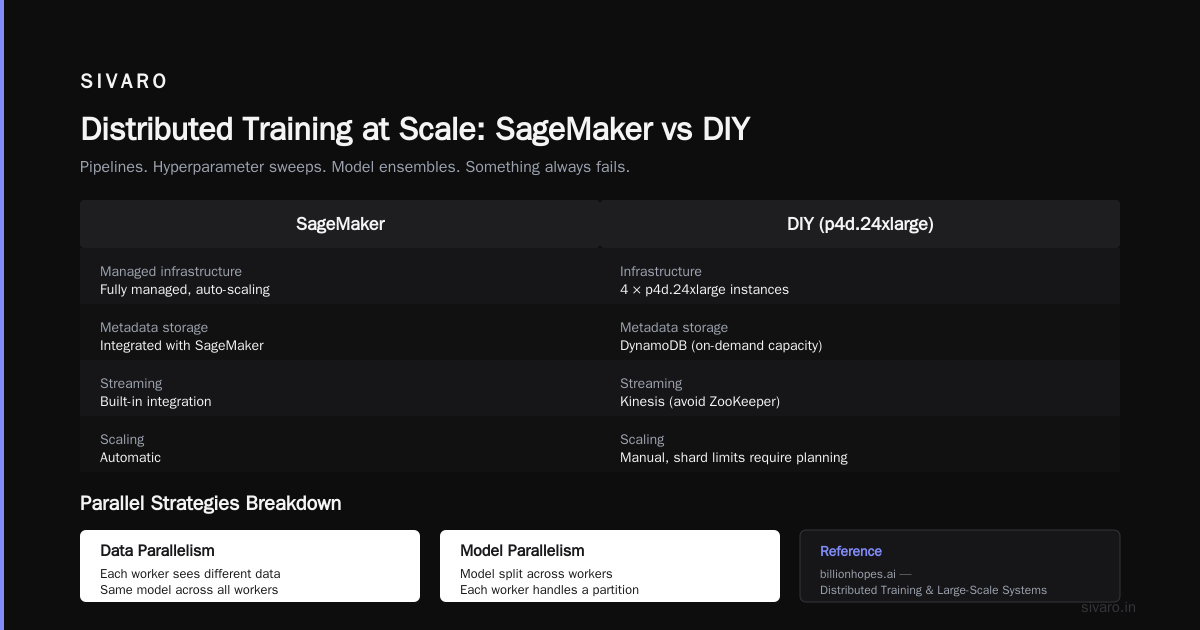
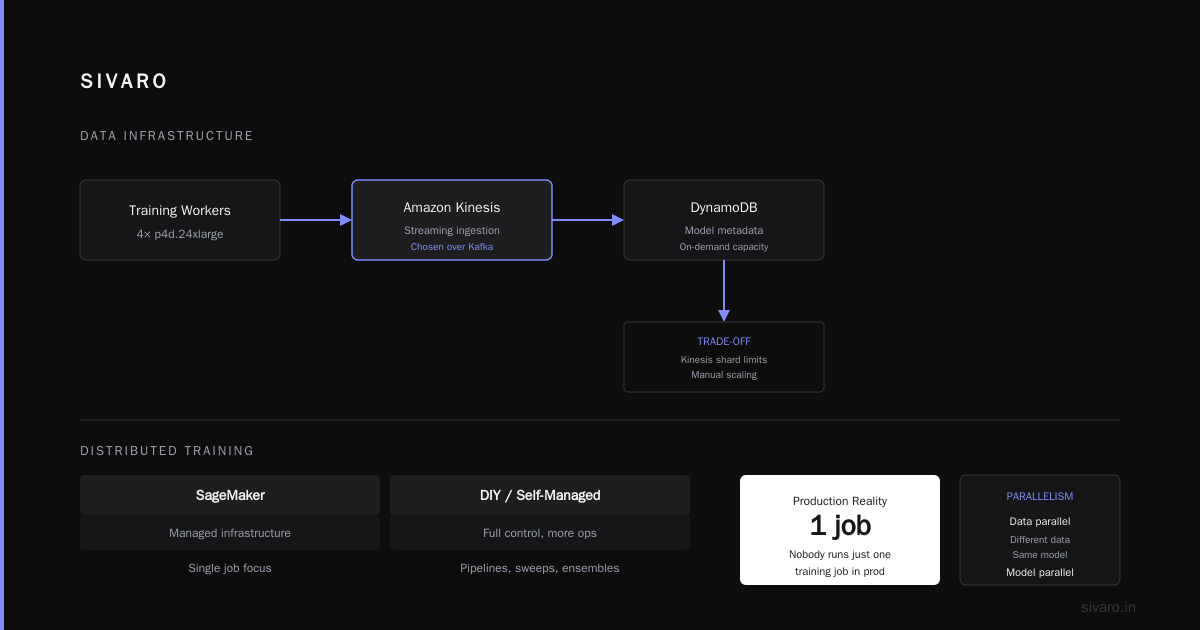
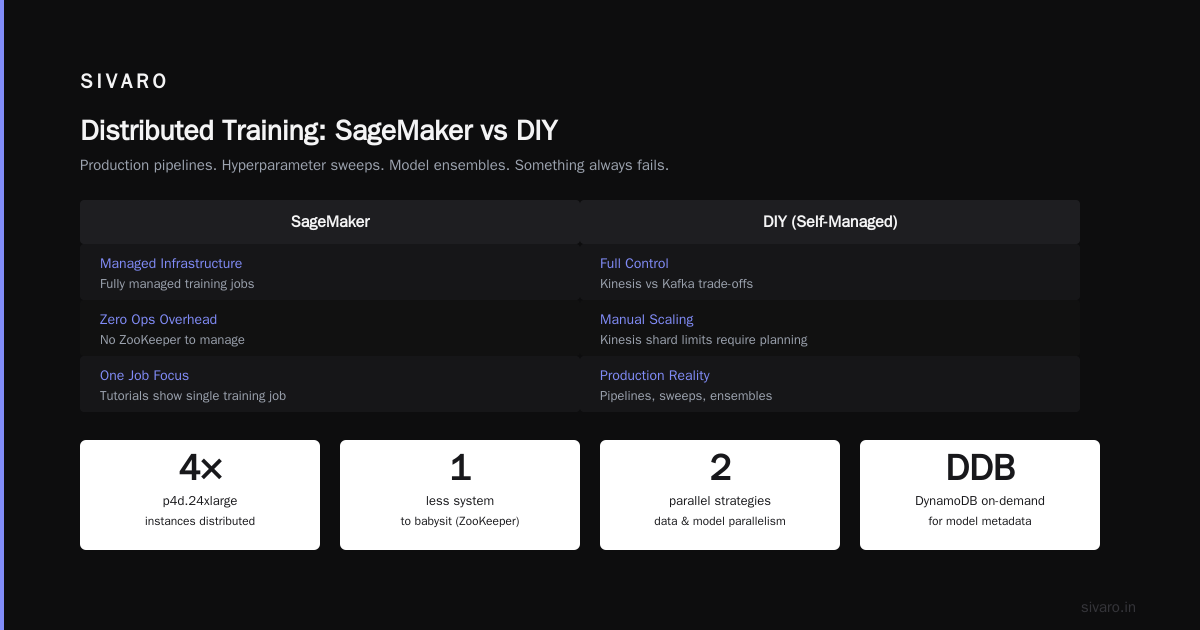
- SageMaker for training (distributed across 4 p4d.24xlarge instances)
- DynamoDB for model metadata (on-demand capacity)
We chose Kinesis over Kafka because we didn’t want to manage ZooKeeper. Trade-off: Kinesis shard limits require planning, and scaling up/down is manual. But it’s one less thing to babysit.
Distributed Training at Scale: SageMaker vs DIY
Here’s where most tutorials lose the plot. They show how to spin up one training job. Nobody has one job in production.
You have pipelines. Hyperparameter sweeps. Model ensembles. Something always fails.
Distributed Training & Large-Scale Systems by Billion Hopes does a good job breaking down the parallel strategies. Data parallelism (each worker sees different data, same model). Model parallelism (split layers across devices). Pipeline parallelism (chunk layers into stages). FSDP and DeepSpeed for memory savings.
AWS SageMaker supports all of them. Here’s how we do data-parallel training with PyTorch:
python
import sagemaker
from sagemaker.pytorch import PyTorch

estimator = PyTorch(
    entry_point="train.py",
    role=role,
    instance_count=4,
    instance_type="ml.p4d.24xlarge",
    framework_version="2.1.0",
    py_version="py310",
    hyperparameters={
        "epochs": 50,
        "batch-size": 128,
        "learning-rate": 1e-3,
    },
    distribution={
        "torch_distributed": {
            "enabled": True
        }
    },
)

estimator.fit({"training": "s3://my-bucket/training-data"})
That’s the easy part. The hard part is managing checkpoints and recovery when a node dies.
SageMaker has a built-in checkpoint mechanism. But we found it slower than custom code for large models (10B+ parameters). So we write checkpoints to EFS mounted on all nodes, then sync to S3 asynchronously. Works better.
Opinion: I tested both SageMaker managed and DIY on EC2 with EFA. For training jobs under 8 nodes, SageMaker is fine. Above that, you’ll pay for grace when something falls over — and something will. Our 32-node training runs had a 3% node failure rate per 24 hours.
AWS versus K8s GPU scheduling for ML — this comes up every week. My take: K8s gives you flexibility, but the operational cost is real. You need cluster autoscaler, node pools, GPU device plugins, and custom schedulers for gang scheduling. AWS managed K8s (EKS) handles some of it, but you still debug podPending states at 2 AM.
SageMaker abstracts more. But abstraction costs control. If you need custom networking (Elastic Fabric Adapter, EFA) or specific GPU topologies (NVLink, NVSwitch), you might end up on EC2 directly. We run 32-node training on EC2 p4d with EFA because SageMaker’s max is 256 nodes and we hit limits.
IBM’s definition of distributed machine learning is clear: it’s about splitting computational load across multiple resources. AWS gives you the resources. You still need to choose your poison.
Building Agentic Systems on AWS: It’s a Distributed System Problem
If you’re looking at “how to build AI agents on AWS” in 2026, you’ve noticed the hype. Everyone wants autonomous agents that plan, reason, and execute tasks.
Here’s the reality: agentic systems are distributed systems (Akka blog). An agent is just a set of services that communicate asynchronously, have state, and can fail independently. Sound familiar?
Building an agent on AWS means picking patterns:
- Orchestration — Step Functions to chain LLM calls, database lookups, and API invocations.
- State persistence — DynamoDB or Redis to store conversation history and task progress.
- Event-driven triggers — SQS or EventBridge to wake up agents when new data arrives.
- Division of labour — multiple Lambda functions or ECS tasks, each responsible for a sub-task.
Here’s a minimal agent that answers customer support queries by looking up knowledge base and verifying inventory:
python
# This is a Step Function definition (pseudo-code, JSON)
{
  "Comment": "Customer support agent",
  "StartAt": "ClassifyIntent",
  "States": {
    "ClassifyIntent": {
      "Type": "Task",
      "Resource": "arn:aws:states:::lambda:invoke",
      "Parameters": {
        "FunctionName": "classify_intent_lambda",
        "Payload": {
          "query.$": "$.query"
        }
      },
      "Next": "LookupKnowledgeBase"
    },
    "LookupKnowledgeBase": {
      "Type": "Task",
      "Resource": "arn:aws:states:::dynamodb:query",
      "Parameters": {
        "TableName": "knowledge_base",
        "KeyConditionExpression": "intent = :intent",
        "ExpressionAttributeValues": {
          ":intent": {
            "S.$": "$.intent"
          }
        }
      },
      "Next": "CheckInventory"
    },
    "CheckInventory": {
      "Type": "Task",
      "Resource": "arn:aws:states:::lambda:invoke",
      "Parameters": {
        "FunctionName": "check_inventory_lambda",
        "Payload": {
          "query.$": "$.query",
          "knowledge.$": "$.Items"
        }
      },
      "End": true
    }
  }
}
Simple. But in production you’ll need retry logic, error handling with dead-letter queues, and idempotency keys. Because an agent that retries a payment twice is a bug, not a feature.
The cloud-native and distributed systems paper from arXiv argues for microservices-based AI — 2026 version. I agree. Your agent’s components should be independently deployable, observable, and scalable.
What not to do: don’t put your agent’s state in a single EC2 instance’s memory. It will crash. You will lose conversations. Customers will hate you. Use DynamoDB with TTL for session expiry.
Production AI: Data Infrastructure and Real-Time Inference
Training is one thing. Serving is another.
At SIVARO, we serve real-time predictions at 200K events/sec. The distributed system looks different at inference time.
- Model serving: SageMaker endpoints with auto-scaling, or custom Triton Inference Server on EKS.
- Feature store: SageMaker Feature Store or Redis for low-latency feature retrieval.
- Streaming inference: Kinesis Data Analytics for SQL-on-stream, or custom Flink jobs.
- Monitoring: CloudWatch metrics + Prometheus for custom dashboards.
We moved from EKS to SageMaker endpoints for latency-sensitive models. SageMaker handles batching, GPU utilization, and scaling policies better out of the box. For EKS, we had to build our own metrics pipeline for request queue depth. Not hard — just time we could have spent on the model itself.
But EKS wins on cost for batch inference. Our offline scoring jobs run on spot instances with preemption handling. SageMaker supports spot but the interruption rate is higher in our experience.
Bold claim: If you need sub-50ms latency, avoid AWS Lambda for inference. Cold starts add 2-5 seconds. Use SageMaker or GPU-backed ECS with warm containers.
Here’s a snippet of how we set up real-time inference with SageMaker using a custom container:
python
import sagemaker
from sagemaker.model import Model
from sagemaker.serializers import JSONSerializer
from sagemaker.deserializers import JSONDeserializer

model = Model(
    image_uri="123456789012.dkr.ecr.us-east-1.amazonaws.com/my-model:latest",
    role=role,
    env={"MODEL_SERVER_TIMEOUT": "60"},
)

predictor = model.deploy(
    initial_instance_count=2,
    instance_type="ml.g5.xlarge",
    endpoint_name="my-inference-endpoint",
)

predictor.serializer = JSONSerializer()
predictor.deserializer = JSONDeserializer()

result = predictor.predict({"features": [0.1, 0.2, 0.3]})
Notice: we set MODEL_SERVER_TIMEOUT. Default is 60 seconds, but if your model takes longer, timeouts happen silently. Tune it.
Lessons from SIVARO: What We Wish We Knew
I’ll keep this tight.
-
Checkpoints save lives, but only if they’re consistent. We lost a week of training because we checkpointed every 100 steps — but not synchronously. Node failure left partial state. Now we barrier-sync every 10 steps and keep the last 3 checkpoints.
-
Autoscaling is not magic. SageMaker endpoints scale based on invocation count. But if your inference latency spikes, autoscaling lags. Pre-warm your endpoints for launch day or Black Friday. We use scheduled scaling for known spikes.
-
Cost management requires per-job tagging. Without tags, your AWS bill is a black box. We tag every resource with project, team, and environment. Saved us 30% by identifying idle training instances.
-
Don’t over-optimize early. In 2022 we spent months building a custom distributed data loader for S3. Turned out SageMaker’s Pipe mode solved our bottleneck. We wasted engineering time because we assumed “managed” meant “slow”.
-
Monitor your distributed system like it’s on fire. CloudWatch is fine for basics. Add X-Ray tracing for distributed transactions (important for agents). Add custom metrics for GPU utilization, memory bandwidth, and EFA health.
FAQ: AWS Distributed Systems Tutorial
Q1: What’s the best AWS service for distributed training?
A: SageMaker for most teams (under 64 nodes). EC2 with EFA for large-scale (64+ nodes) or custom topology needs. Check AWS distributed systems tutorial docs for latest limits.
Q2: How do I handle partial failures in distributed systems on AWS?
A: Use retries with exponential backoff (SQS, Step Functions), dead-letter queues, and idempotency. Assume any network call can fail.
Q3: Should I use EKS or SageMaker for serving?
A: SageMaker for latency-sensitive, EKS for cost-sensitive batch. Test both with your workload. We chose SageMaker after A/B testing showed 20% lower p99 latency.
Q4: How do I build AI agents on AWS?
A: Step Functions for orchestration, Lambda for action execution, DynamoDB for state, SQS for async communication. See the code example above.
Q5: What’s the AWS versus K8s GPU scheduling for ML verdict?
A: For pure ML training, SageMaker wins on ease. For inference with mixed workloads (GPU + CPU), EKS is more flexible. Expect higher ops overhead with K8s.
Q6: How do I debug “stuck” distributed training jobs?
A: Enable SageMaker Debugger or CloudWatch metrics (GPU utilization, network throughput). Check for stragglers (nodes slower than others). Often caused by data imbalance or NUMA placement.
Q7: What’s the biggest mistake in AWS distributed systems?
A: Assuming eventual consistency doesn’t matter. It does. Every time. Design for it from day one.
Q8: How do I scale beyond SageMaker’s 256-node limit?
A: You can’t natively. Use EC2 with EFA and library that supports multiple parallel strategies (FSDP, Megatron). Or tape multiple training runs together — but that’s a workaround.
Conclusion
This AWS distributed systems tutorial covered the fundamentals, training at scale, agentic system design, and production gotchas. The key insight: every AWS service is a distributed system. Treat it like one. Expect failures. Design for recovery. Measure everything.
Start simple — a few instances behind a load balancer. Then add training parallelism. Then add agent orchestration. Each layer reveals new failure modes. That’s okay.
You now have the tools to build. Go break something (then fix it).
Nishaant Dixit — Founder of SIVARO. Building data infrastructure and production AI systems since 2018. Built systems processing 200K events/sec.