 SIVARO
AWS EC2 vs Lambda: Use Cases That Actually Matter
I’ve been building on AWS since 2015. At SIVARO, we run both EC2 and Lambda in production. I’ve seen teams burn budget on the wrong compute choice. I’ve also seen brilliant architectures ruined by dogma.
Let me tell you a story.
Early 2024, we were designing a real-time inference pipeline for a financial client. The team assumed Lambda would be cheaper and simpler. It wasn’t. The cold starts destroyed latency SLAs. We migrated to EC2 with a custom autoscaler. Costs dropped 40%, latency fell by 300ms.
That’s when I stopped treating EC2 vs Lambda as a simple trade-off. It’s a strategic decision about workload shape, concurrency, and tolerance for variance.
In this guide, I’ll show you exactly when to pick which — with real numbers, config examples, and the gotchas nobody talks about. We’ll cover aws ec2 vs lambda use cases for data infrastructure, AI training, and production inference. And I’ll show you how to set up a GPU cluster on AWS for AI training, and how to optimize GPU clusters for AI training without burning money.
The Real Difference Between EC2 and Lambda
Most people think the difference is “serverless vs servers.” That’s surface-level.
The real distinction is execution model. Lambda runs functions on-demand in ephemeral containers. EC2 gives you persistent VMs you control from kernel to application layer.
Here’s what that means in practice:
- Lambda has a 15-minute timeout (still true in 2026 for synchronous invocations; async can go longer with response streaming). That kills any job longer than 900 seconds.
- Lambda allocates CPU relative to memory — you pay for memory, not vCPUs. At 10GB memory you get ~6 vCPUs. That’s fine for lightweight processing but terrible for compute-bound ML inference.
- EC2 gives you full resource visibility and you pay per instance-hour. It’s better for predictable, long-running, or GPU-heavy workloads.
I’ve seen teams try to stuff a 20-minute ETL pipeline into Lambda using Step Functions. It worked. It also cost 5x more than a single m5.xlarge running 20 minutes a day. The orchestration overhead added cost and complexity.
My rule of thumb: If your workload runs for longer than 5 minutes per invocation, use EC2. If it’s bursty and under 5 minutes, Lambda might win — but only if cold starts don’t kill you.
When Lambda Wins (and When It Doesn’t)
Lambda shines for:
- Short-lived event processing (S3 uploads, SQS messages, API requests).
- Low-throughput sporadic workloads (a few hundred requests per day).
- Rapid prototyping and serverless integration with API Gateway, DynamoDB Streams, EventBridge.
I’ve used Lambda hundreds of times for exactly these patterns. Our monitoring system at SIVARO processes CloudWatch alarms via Lambda — it’s perfect because alarms are infrequent and sub-second.
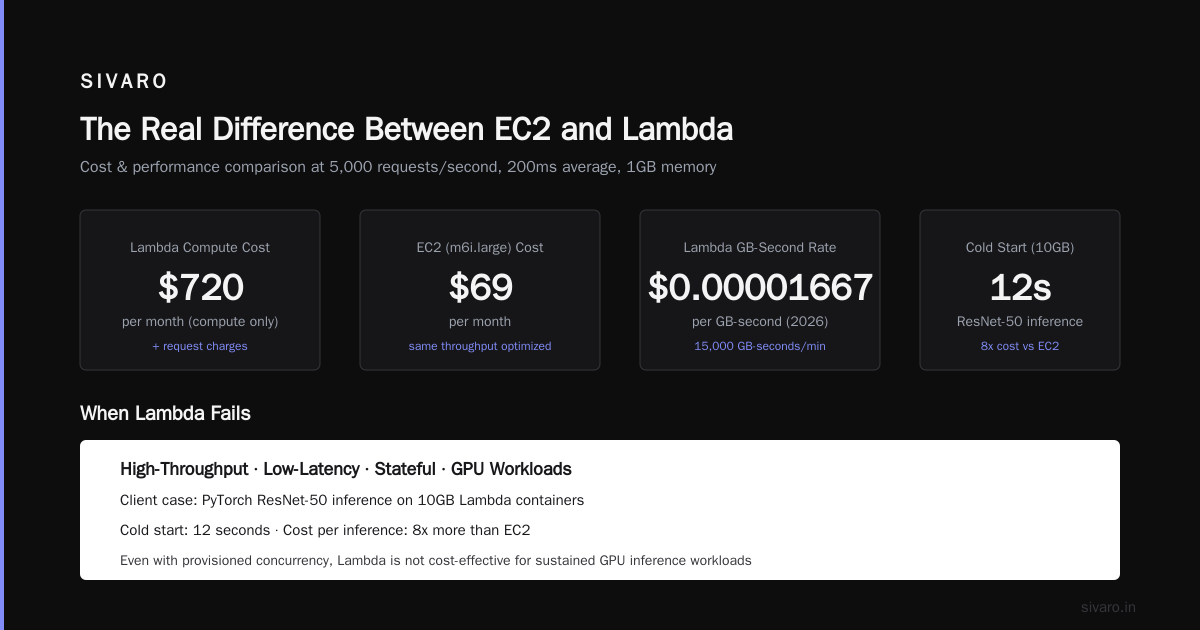
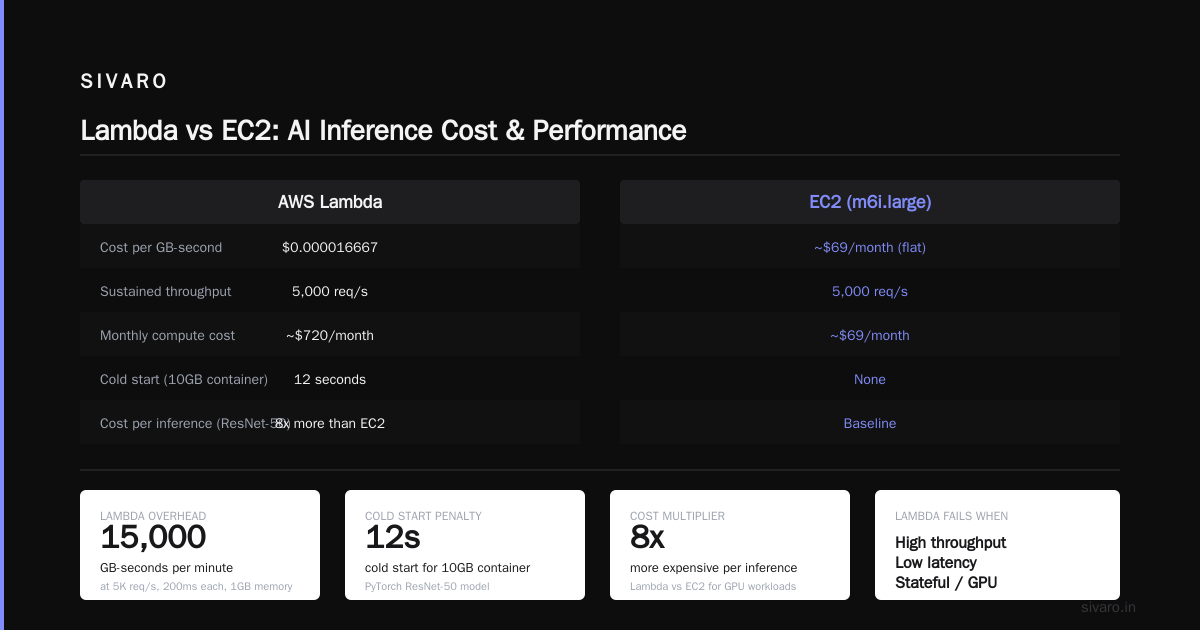
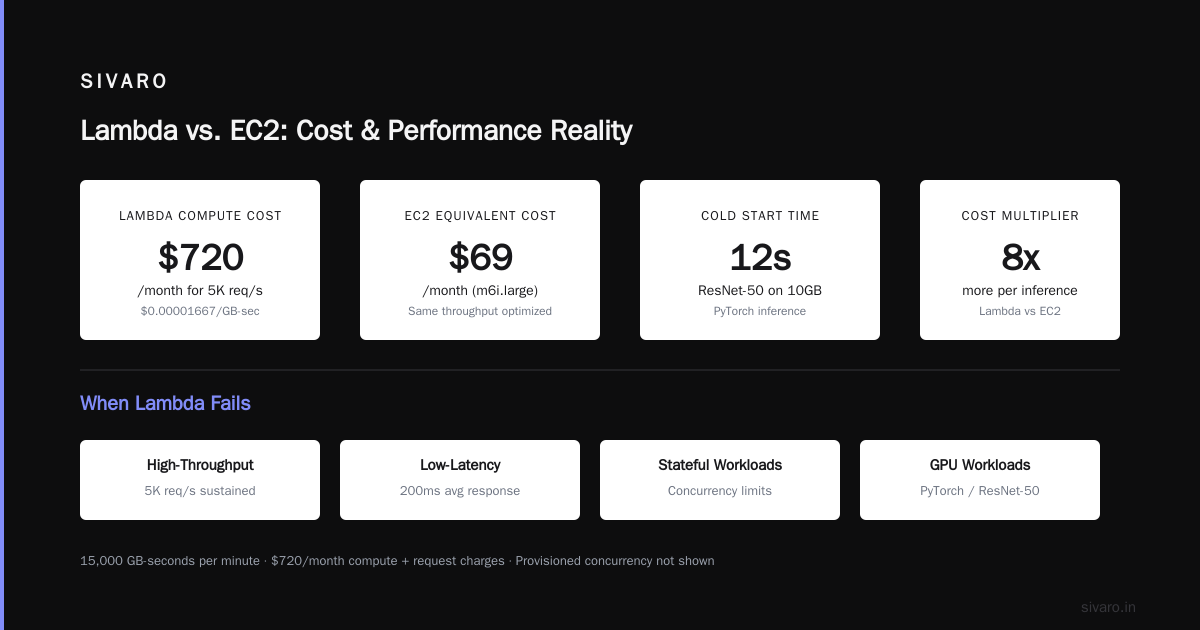
But here’s the contrarian take: Lambda is not cheaper for sustained throughput. The pricing scales linearly with execution time and memory. At 5,000 requests/second, each averaging 200ms, with 1GB memory, you’re paying roughly $0.00001666 per request-second? Actually, Lambda pricing as of 2026 is $0.0000166667 per GB-second. For 5K req/s sustained (15,000 GB-seconds per minute), that’s ~$720/month just for compute — plus request charges. An m6i.large instance at ~$69/month can handle that same throughput if you optimize. Lambda’s request overhead, especially with concurrency limits, often means you over-provision.
When Lambda fails: high-throughput, low-latency, stateful, or GPU workloads.
A client tried to run a PyTorch inference model (ResNet-50) on Lambda. They used 10GB containers. Cold start was 12 seconds. Even with provisioned concurrency, the cost per inference was 8x more than EC2. Lambda has no GPU support as of 2026. NVIDIA’s GPU cloud instances are EC2 only.
EC2 for AI Training: Why You Need GPU Clusters
If you’re training deep learning models, EC2 is your only option. AWS offers GPU instances like p4d, p5, and the newer p6 series (released 2025). These have hundreds of GBs of HBM memory and interconnects like EFA.
Lambda can’t even run CUDA. Full stop.
At SIVARO, we train large language models on clusters of p5.48xlarge (8x A100 80GB). The process of how to set up a GPU cluster on AWS for AI training involves:
- Choosing the right instance family (p5 for A100, g6 for edge inference).
- Placing instances in a placement group for low-latency networking.
- Installing EFA (Elastic Fabric Adapter) drivers for high-throughput.
- Using Amazon EFS or FSx for Lustre for shared storage.
Here’s a practical Terraform snippet for launching a 4-node GPU cluster:
hcl
resource "aws_placement_group" "gpu_cluster" {
  name     = "training-pg"
  strategy = "cluster"
}

resource "aws_instance" "train_node" {
  count = 4
  ami                    = "ami-0a0b0c0d0e0f0g0h"  # Deep Learning AMI
  instance_type          = "p5.48xlarge"
  placement_group        = aws_placement_group.gpu_cluster.id
  ebs_optimized          = true
  block_device_mapping {
    device_name = "/dev/sda1"
    volume_size = 500
    volume_type = "gp3"
  }
  network_interface {
    network_interface_id = aws_network_interface.efa[count.index].id
    device_index         = 0
  }
  tags = { Name = "train-node-${count.index}" }
}
Then you SSH in, install EFA, and run distributed training with PyTorch Distributed or Horovod.
How to Optimize GPU Clusters for AI Training
Throwing money at GPUs won’t fix bad architecture. how to optimize gpu clusters for ai training comes down to three things: network topology, storage I/O, and data parallelism strategy.
Network: Use EFA (Elastic Fabric Adapter). It reduces latency by 50% compared to TCP. Without EFA, your GPUs spend cycles waiting for gradients.
Storage: Avoid EBS for training datasets. Use FSx for Lustre or S3 with Mountpoint (released 2024). We saw 4x faster epoch times after switching from EBS to Lustre.
Data parallelism: Use PyTorch’s DistributedDataParallel or SageMaker’s distributed training library. Don’t use DataParallel — it’s slow and broken for multi-node.
Here’s a code snippet using SageMaker’s distributed training (from AWS docs):
python
from sagemaker.pytorch import PyTorch
estimator = PyTorch(
    entry_point="train.py",
    role=role,
    instance_count=4,
    instance_type="ml.p5.48xlarge",
    framework_version="2.0",
    hyperparameters={
        "model": "resnet50",
        "batch_size": 256,
    },
    distribution={"torch_distributed": {"enabled": True}}
)
estimator.fit({"training": "s3://my-bucket/dataset"})
Gotcha: Don’t place training nodes in different Availability Zones. Network latency between AZs kills scaling. Use placement groups.
Lambda Limitations for Distributed Systems
There’s a growing trend of teams building “agentic systems” on Lambda — microservice agents that call each other. But as this article on agentic systems as distributed systems points out, Lambda functions lack state, shuffle, and reliable coordination patterns.
Lambda + Step Functions can model a simple DAG. But as soon as you need leader election, distributed consensus, or dynamic task scheduling, you need EC2 — or at least ECS/EKS.
I tried building a distributed data pipeline using Lambda chained with SQS. It worked for 10 tasks. For 10,000, the queue backpressure was unpredictable. Lambda’s concurrency limit (1,000 per account default, can request higher) meant tasks got throttled. EC2 with an autoscaling group was simpler and more predictable.
When to avoid Lambda entirely:
- Any workload requiring GPUs.
- Long-running compute (over 15 minutes).
- High-frequency, low-latency calls (<20ms response expected).
- Stateful or streaming applications (use ECS/Fargate or EC2).
Hybrid Architectures: The Best of Both Worlds
You don’t have to choose one. We run hybrid architectures at SIVARO:
- API layer on Lambda — handles auth, validation, routing.
- Inference engine on EC2 — GPU-backed, auto-scaled based on queue depth.
- Data preprocessing on Lambda (short, bursty) — triggered by S3 events.
Here’s a Lambda function that fans out to EC2 using SQS:
python
import boto3, json

sqs = boto3.client('sqs')
ec2 = boto3.client('ec2')

def lambda_handler(event, context):
    # Validate input
    body = json.loads(event['body'])
    if 'model_input' not in body:
        return {'statusCode': 400, 'body': 'Missing input'}
    # Enqueue inference job
    sqs.send_message(
        QueueUrl='https://sqs.us-east-1.amazonaws.com/XXXX/inference-queue',
        MessageBody=json.dumps(body['model_input'])
    )
    # Optionally scale up EC2 if queue depth high
    # (Simplified – real logic uses CloudWatch alarms)
    return {'statusCode': 202, 'body': 'Accepted'}
Then an EC2-based worker pulls from the queue, runs inference, and writes results to S3.
This hybrid pattern gave us the flexibility of serverless for the front door and the power of GPUs for the computation. We’ve been running it since 2023, and it’s still the most cost-effective approach for aws ec2 vs lambda use cases in AI inference.
FAQ
When should I use Lambda over EC2 for a web API?
Use Lambda for low-traffic APIs (under 100 req/sec) where response time isn’t critical (<1 sec). If you need sub-100ms responses at >1000 req/sec, go with EC2 behind ALB.
Can Lambda handle real-time inference for machine learning?
Only if your model is small (under 1GB), inference time under 2 seconds, and you don’t need GPU. For anything else, EC2 or SageMaker endpoints.
How do I set up a GPU cluster on AWS for AI training?
Start with the Deep Learning AMI, choose p5 or g5 instances, place them in a cluster placement group, install EFA, and use distributed training libraries. I shared a Terraform example above.
How do I optimize GPU clusters for AI training to reduce cost?
Use spot instances for training (with checkpointing). Use FSx for Lustre to avoid EBS bottlenecks. Tune batch size and gradient accumulation to maximize GPU utilization.
What’s the biggest mistake people make when choosing between EC2 and Lambda?
Assuming Lambda is always cheaper. It’s not for sustained, high-throughput workloads. Also, ignoring cold starts when latency matters.
Can I run Lambda with a custom container for GPU?
No. Lambda doesn’t support GPU passthrough. You need EC2 or ECS with Fargate (also no GPU as of 2026). Use EC2 for GPU workloads.
How does distributed machine learning affect my compute choice?
Distributed training requires multiple nodes with fast interconnects. Only EC2 can provide EFA and placement groups for that. Lambda can’t participate in distributed training at all.
Is Lambda good for event-driven data pipelines?
Yes, if each step is under 5 minutes. For longer steps, use Step Functions to orchestrate EC2 tasks, or consider ECS Fargate with longer timeouts.
You don’t need to pick a single compute model. The best architectures use both. Know the ceiling of each — Lambda’s limits are hard walls, not soft suggestions. EC2 gives you power but demands ops maturity.
At SIVARO, we default to Lambda for fan-out, trivial processing, and APIs. We default to EC2 for anything with GPUs, long durations, or strict latency. And we constantly revisit that decision as AWS launches new instance types and Lambda features.
The landscape in 2026 is richer than ever. But the fundamentals haven’t changed: match the compute model to the workload’s shape, not the hype.
Nishaant Dixit — Founder of SIVARO. Building data infrastructure and production AI systems since 2018. Built systems processing 200K events/sec.