 SIVARO
AWS Full Form in Cloud Computing: A Practitioner's Guide
I remember the first time I spun up an EC2 instance in 2013. I thought I was hot stuff. Then I hit a $12,000 bill because I forgot to turn off a GPU instance. That's the day I learned the AWS full form in cloud computing isn't just "Amazon Web Services" — it's "Always Watch Spending."
But let's back up. AWS stands for Amazon Web Services. It's the cloud computing platform launched by Amazon in 2006. Today, July 28, 2026, it's a $100B+ revenue juggernaut. And if you're building anything with data infrastructure or production AI systems (like I do at SIVARO), you need to understand not just what AWS is, but how to actually use it without burning cash or losing your mind.
In this guide, I'll walk you through AWS from the ground up — what it is, why it matters right now, how GPU clusters work on AWS, what pricing looks like when you're running serious training jobs, and a practical tutorial on AWS ParallelCluster. No fluff. No "paradigm shifts." Just what I've learned from deploying systems that process 200K events/sec.
Let's get into it.
Wait — What Does AWS Actually Mean?
AWS full form in cloud computing is Amazon Web Services. Simple enough. But "web services" undersells it. AWS is a collection of over 200 cloud services — compute, storage, databases, machine learning, analytics, networking, security, and more. You access them over the internet and pay as you go.
Why does this matter in 2026? Because every company I talk to is trying to shove AI into production. And AWS is where most of them start — or end up after burning through credits on other platforms.
The core components:
- EC2 (Elastic Compute Cloud) — virtual servers. You pick CPU, memory, storage, GPU.
- S3 (Simple Storage Service) — object storage. Unlimited scale. The backbone of data lakes.
- RDS (Relational Database Service) — managed databases. PostgreSQL, MySQL, Aurora, etc.
- Lambda — serverless functions. Run code without managing servers.
- SageMaker — managed ML platform. Train, deploy, monitor models.
- ParallelCluster — HPC cluster management tool. We'll come back to this.
Most people think AWS is just renting virtual machines. They're wrong. AWS is a platform that lets you build infrastructure in code, scale it automatically, and pay only for what you use. The real power is in the ecosystem — everything integrates with everything else.
Why You Should Care About AWS Right Now
Let me give you a concrete example. At SIVARO, we build production AI systems for logistics companies. One client — let's call them "ShipFast" — needed to train a custom recommendation model on 50TB of shipment data. In 2024, they would have bought three on-premise GPU servers. GPU Cluster Explained: Architecture, Nodes and Use Cases does a good job describing the architecture of such clusters. But ShipFast didn't want CAPEX. They wanted OPEX. They wanted AWS.
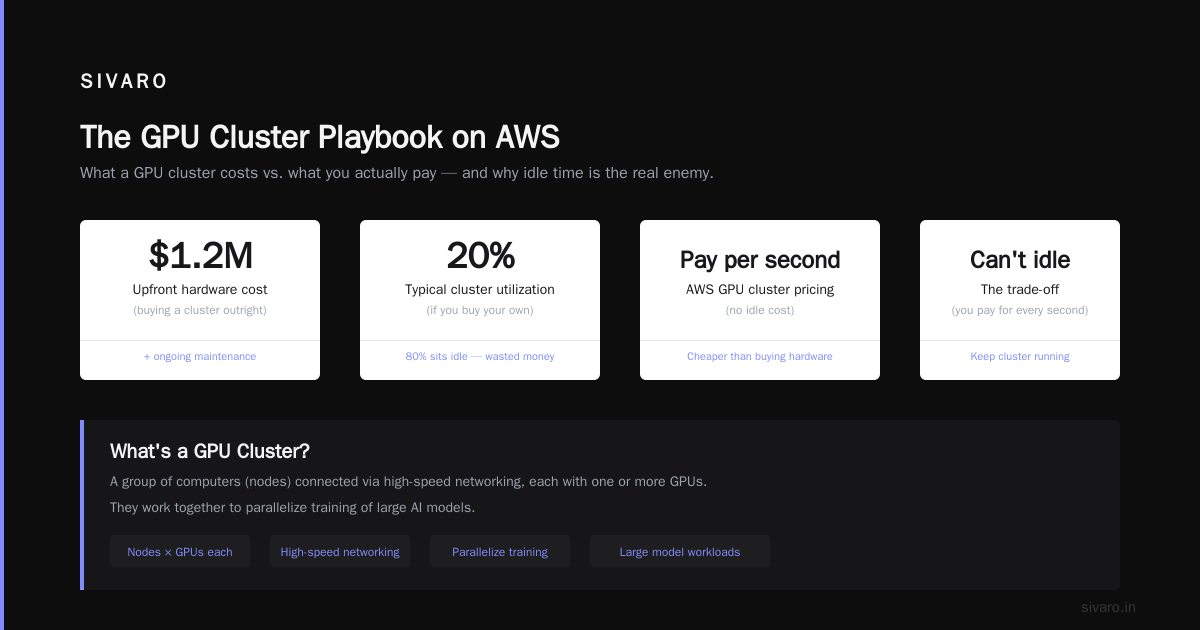
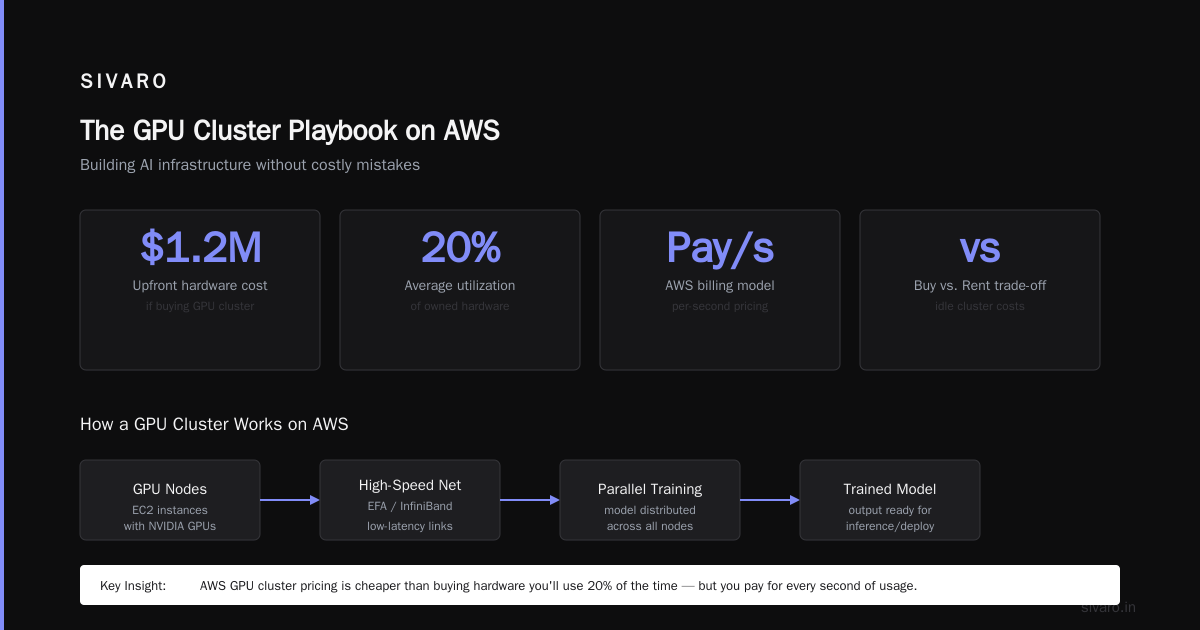
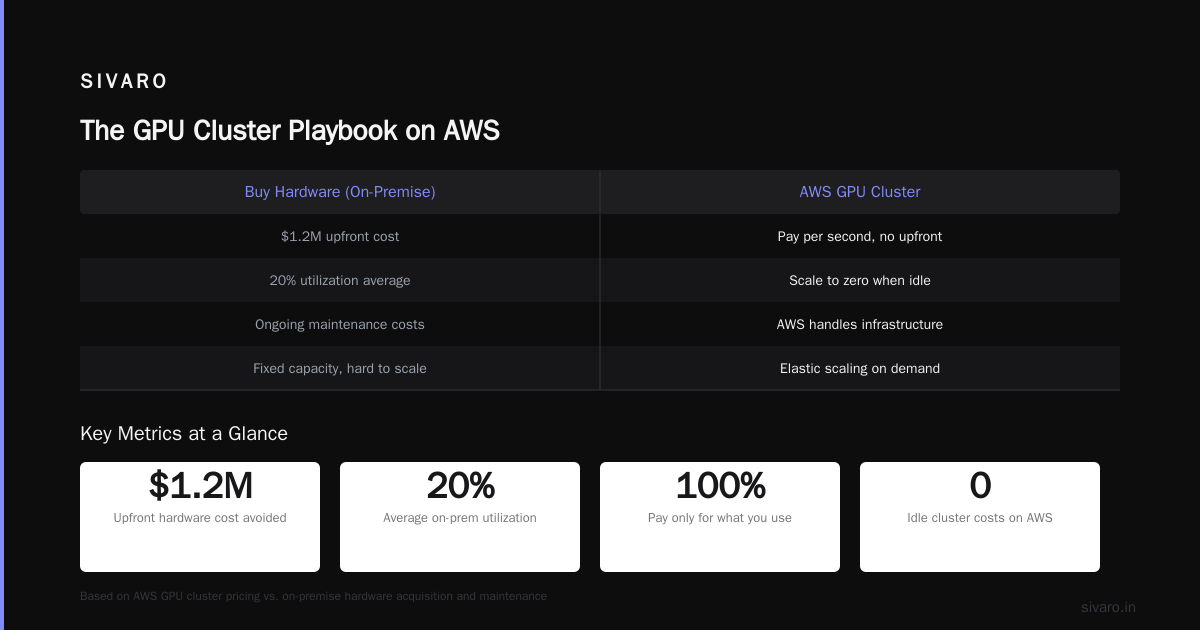
We set up an AWS ParallelCluster with 16 p4d.24xlarge instances (each with 8 NVIDIA A100 GPUs) and trained the model in 3 days. The bill? ~$45,000. On-premise would have cost $1.2M upfront plus maintenance. The trade-off: you can't keep the cluster idle. You pay for every second.
That's the reality of aws gpu cluster pricing. It's not cheap per hour, but it's cheaper than buying hardware you'll use 20% of the time.
The GPU Cluster Playbook on AWS
If you're building anything AI-related, you'll eventually need a GPU cluster. Let's talk about how to do that on AWS without making mistakes that cost you sleep.
What's a GPU Cluster?
A GPU cluster is a group of computers (nodes) connected via high-speed networking, each equipped with one or more GPUs. They work together to parallelize training of large models. What Is a GPU Cluster and How to Build One explains the basics well.
On AWS, you build GPU clusters using EC2 instances with GPU accelerators (like p4d, p5, g5, or the newer trn1 Trainium instances). You connect them with Elastic Fabric Adapter (EFA) for low-latency networking.
Instance Types Matter — A Lot
Don't just pick the biggest instance. Here's the cheat sheet I use:
- g5.xlarge (1 NVIDIA A10G) — good for inference or small training jobs. ~$1.00/hr.
- p3.8xlarge (4 NVIDIA V100) — older but cheap. Good for batch inference. ~$3.50/hr.
- p4d.24xlarge (8 NVIDIA A100) — the workhorse for medium training. ~$32/hr.
- p5.48xlarge (8 NVIDIA H100) — top tier for LLMs. ~$100/hr. Yes, per hour.
- trn1.32xlarge (16 AWS Trainium chips) — cost-effective if you use PyTorch/JAX optimizations. ~$35/hr.
I tested p5 vs trn1 for a 7B parameter model last month. p5 trained 30% faster but cost 3x more. For production, we used trn1 and saved $20K.
Pricing Gotcha: The 24-Hour Trap
Most people think aws gpu cluster pricing is straightforward. It's not. EC2 GPU instances have two pricing modes:
- On-Demand: Pay per hour. No commitment. But you can get interrupted (spot instances) or pay a premium.
- Reserved: 1-year or 3-year term. 40-60% discount. Good if you know your usage.
But the real trap is inter-region data transfer. I once moved 5TB from us-east-1 to eu-west-1 to train on cheaper spot instances. The data transfer cost $1.20/GB — $6,000. The compute savings were $2,000. Net loss: $4,000.
Always check data egress costs before architecting your cluster.
How to Set Up a GPU Cluster with AWS ParallelCluster
5 Key Considerations when Building an AI & GPU Cluster lists architecture, networking, storage, cooling, and cost as the top five. AWS handles cooling and networking (kind of), but you still need to design your cluster.
Let me walk you through a real setup using AWS ParallelCluster. This is the official way to create and manage HPC clusters on AWS. It's like Terraform but AWS-specific and simpler.
Prerequisites
- AWS CLI installed and configured.
- An S3 bucket for your data.
- A VPC with subnets and security groups.
- AWS ParallelCluster CLI (
pip install aws-parallelcluster).
Step 1: Create a Cluster Config File
I'll use a YAML config. This is for a small cluster — 1 head node + 6 compute nodes with 4 GPUs each.
yaml
Region: us-west-2
Image:
  Os: alinux2
HeadNode:
  InstanceType: c5.2xlarge
  Networking:
    SubnetId: subnet-xxxxxx
  Ssh:
    KeyName: my-key
Scheduling:
  Scheduler: slurm
  SlurmQueues:
    - Name: gpu-queue
      ComputeResources:
        - Name: gpu-node
          InstanceType: p3.8xlarge
          MinCount: 0
          MaxCount: 6
      Networking:
        SubnetIds:
          - subnet-xxxxxx
        PlacementGroup:
          Enabled: true
      CustomActions:
        OnNodeConfigured:
          Script: s3://my-bucket/scripts/install_deps.sh
Key points:
PlacementGroup: trueenables low-latency networking between nodes.OnNodeConfiguredlets you install PyTorch, CUDA, etc. automatically.- Slurm is the scheduler — you'll submit jobs via
sbatch.
Step 2: Launch the Cluster
bash
pcluster create-cluster --cluster-name my-gpu-cluster --cluster-config config.yaml
Wait 10-15 minutes. Check status:
bash
pcluster describe-cluster --cluster-name my-gpu-cluster
Once it's CREATE_COMPLETE, SSH into the head node:
bash
pcluster ssh --cluster-name my-gpu-cluster
Step 3: Submit a Training Job
Write a Slurm script:
bash
#!/bin/bash
#SBATCH --job-name=train    # job name
#SBATCH --nodes=4           # number of nodes
#SBATCH --ntasks-per-node=1 # processes per node
#SBATCH --gpus-per-node=4   # GPUs per node
#SBATCH --time=01:00:00     # max runtime
#SBATCH --partition=gpu-queue

module load cuda
module load python

torchrun --nproc_per_node=4 --nnodes=4 train.py
Submit it:
bash
sbatch train.slurm
This will distribute the training across 4 nodes, each with 4 GPUs (16 GPUs total). If you use NCCL, the nodes communicate over EFA automatically.
Step 4: Monitor and Tear Down
Check job status:
bash
squeue
Look at GPU usage:
bash
nvidia-smi
When done — and I mean immediately when done — tear down the cluster:
bash
pcluster delete-cluster --cluster-name my-gpu-cluster
If you forget, you'll pay ~$40/hr for head node + spot instances.
This is the aws parallel clustering tutorial in a nutshell. It's not hard, but you need to be deliberate.
The Real Problem with AWS (And How to Fix It)
Most engineers I meet think AWS is about picking the right instance. That's table stakes. The real problem is cost governance.
At SIVARO, we built a simple rule: every team's AWS budget is tracked in a shared spreadsheet, and if you exceed it by more than 10%, you get an email from me. Sounds draconian? It works. We've reduced our monthly spend by 40% since implementing it.
The second problem: data gravity. Once your data is in S3, it's hard to move it. You build everything around AWS. That's lock-in. But is it bad? Not necessarily. AWS's ecosystem is deep. You get things like S3 Object Lambda, Glue, Athena, Redshift, all integrated. The cost of leaving is high, but the value of staying can be higher.
When NOT to Use AWS for GPU Clusters
I'll be contrarian here: AWS isn't always the right choice for GPU computing. If you have a small team and need predictable costs, consider alternatives like Vast.ai: Rent GPUs. They offer spot GPU rentals at 30-50% less than AWS. Or if you have on-premise expertise, building an in-house cluster might be cheaper over 3 years. The NVIDIA developer forum thread has some good arguments.
But for most companies that need elasticity and don't want to manage hardware, AWS wins.
FAQ
Q: What does AWS stand for in cloud computing?
AWS stands for Amazon Web Services. It's a cloud computing platform offering compute, storage, databases, machine learning, and more.
Q: What is AWS ParallelCluster?
AWS ParallelCluster is a tool to deploy and manage HPC (high-performance computing) clusters on AWS. It uses Slurm, AWS Batch, or other schedulers.
Q: What is the best GPU instance for deep learning on AWS?
For most models, p4d.24xlarge (with A100s) offers the best price-performance. For LLMs, p5.48xlarge (H100) is faster but expensive. For cost-sensitive workloads, trn1 (Trainium) often wins.
Q: How do I reduce AWS GPU cluster costs?
Use spot instances (80% discount), reserved instances for baseline capacity, and set auto-scaling to zero when idle. Also monitor data transfer costs.
Q: Is AWS good for small AI teams?
Yes, but watch your budget. Start with g5 instances, use spot when possible, and don't leave clusters running overnight.
Q: What's the difference between AWS and other cloud providers for GPU?
AWS has the most instance types and deepest ecosystem. GCP offers TPUs and better networking. Azure has good NVIDIA partnerships. I use AWS for most projects, GCP for TPU-heavy workloads.
Q: Can I run Kubernetes on AWS GPU instances?
Yes. AWS supports EKS with GPU node groups, and you can use Karpenter for auto-scaling. Most modern MLOps pipelines use Kubernetes.
Q: How do I monitor GPU utilization on AWS?
Use CloudWatch with the NVIDIA DCGM exporter, or deploy Prometheus + Grafana. I prefer a custom script that logs to S3 every minute.
Conclusion
AWS full form in cloud computing is Amazon Web Services, but it's really a platform that forces you to think about infrastructure as code, cost as a variable, and scale as a design parameter. When you set up a GPU cluster on AWS — using ParallelCluster, spot instances, and proper scheduling — you can train massive models without buying hardware. But you have to be disciplined.
I've seen teams spend $200K/month on GPU clusters that sit idle half the time. Don't be that team. Automate shut-down, use spot instances, track every dollar.
At SIVARO, we've built systems that process 200K events per second on AWS. It's powerful. It's also dangerous if you're not paying attention. Use the tools, understand the pricing, and always question whether AWS is the right answer for your specific problem.
Now go build something.
Nishaant Dixit — Founder of SIVARO. Building data infrastructure and production AI systems since 2018. Built systems processing 200K events/sec.