 SIVARO
aws gpu cluster architecture explained
We burned $80,000 in AWS GPU capacity in one week back in 2023. The cluster sat idle half the time because the architecture was wrong. Not the code. The architecture.
Here's what I learned after five years of building production AI systems at SIVARO: most people treat an AWS GPU cluster like a pile of GPUs. It's not a pile of anything. It's a distributed system with specific bottlenecks that will destroy your training throughput in ways no amount of GPU count can fix.
I'm writing this guide because I've seen the same three mistakes repeated across every team I've consulted with. The good news is that once you understand the underlying architecture, those mistakes are easy to avoid.
By the end of this article, you'll understand the networking topology that makes or breaks training, how storage and data loading become the silent killers of GPU utilization, why orchestration matters more than you think, and the practical decisions between AWS and on-premises infrastructure.
The network is the architecture
Here's the thing nobody tells you about AWS GPU clusters: the GPUs are the easy part. Distributed training in Amazon SageMaker AI documentation has a section about something called "distributed training" but it reads like it's describing a happy path that almost never happens in the real world.
The network between those GPUs determines whether you get 90% scaling efficiency or 40%.
AWS offers a few different network options depending on which instance type you choose. The P4d and P4de instances use the Elastic Fabric Adapter (EFA) which gives you what AWS claims is "up to 400 Gbps" of networking throughput. The newer P5 instances built on the NVIDIA H100 GPUs include a more sophisticated network topology called NVLink.
But here's what the marketing material doesn't tell you about the reality we've seen at SIVARO:
- The non-blocking Ethernet fabric is not actually non-blocking under real workloads
- The InfiniBand backend on P4d instances is significantly better for collective operations like AllReduce
- There's a massive difference between what's theoretically possible and what's achievable past 8 GPUs
The key insight is that distributed training doesn't scale linearly because every GPU needs to talk to every other GPU. Distributed training and large-scale systems research highlights something I've seen confirmed in my own benchmarks: the network becomes the bottleneck at a surprisingly small scale.
The modern approach to solving this relies on attention kernel optimizations. Flash Attention and related techniques reduce the number of memory access operations. If you're building custom attention implementations, you need a proper flash-msa attention kernel implementation guide to avoid the common pitfalls around memory banking and warp-level scheduling.
What AWS actually gives you
When you launch a GPU instance on AWS, you're not just getting a GPU. You're getting a slice of a physical server along with network cards, local NVMe drives, and a piece of the host's memory bandwidth.
The physical topology matters. On a p4d.24xlarge, you get eight A100 GPUs connected via NVLink with fully connected topology. Each GPU has 80GB of HBM2e memory. These eight GPUs can communicate with each other at 600 GB/s through NVLink.
But the moment you expand beyond a single node, that bandwidth drops catastrophically. Inter-node communication over InfiniBand tops out around 50 GB/s if you're lucky.
Let me give you a practical example from one of our projects at SIVARO last year.
We were running a massive language model training job and hit a wall at 16 GPUs. The math looked perfect on paper, but the actual throughput collapsed. We dug into the logs and found something unexpected: the small packets were being handled inefficiently, and the network resources were being exhausted long before the GPUs hit their limit.
That's when I realized: the architecture wasn't really about the GPU silicon at all. It was about the networking and memory hierarchy.
You need to design your distributed training strategy around the physical constraints, not the logical ones. For example, if your model can fit within a single p4d instance with eight A100s, your life gets dramatically simpler.
Storage and data loading
The most common reason GPU utilization drops below 50% is not the network. It's storage.
When you spin up a GPU cluster on AWS, the default expectation is that you'll store your data in Amazon S3. But S3's latency is measured in milliseconds. The GPUs can execute operations in nanoseconds.
The gap between those latencies is where efficient GPU utilization goes to die.
Your entire data pipeline needs to be rethought for distributed systems. The GPUs are not just sitting there processing; they're competing for bandwidth against every other node in the cluster.
Here's what happens in practice when this goes wrong:
Epoch 1: total time 187 seconds
  - data loading: 22 seconds
Epoch 2: total time 143 seconds
  - data loading: 31 seconds
That's not a real log from a memory leak. But the pattern eats your budget eitherway.
The solution is simple but not obvious: use FSx for Lustre or similar high-performance file systems with parallel data loading.
We tested a few approaches and found that setting up a proper data-loading pipeline with parallel workers in PyTorch helped more than any network optimization. The data loaders need a significant amount of care when you're running huge GPU clusters.
I'll explore the implementation details further in this article, but first, let's talk about how orchestration works.
Orchestration and scheduling
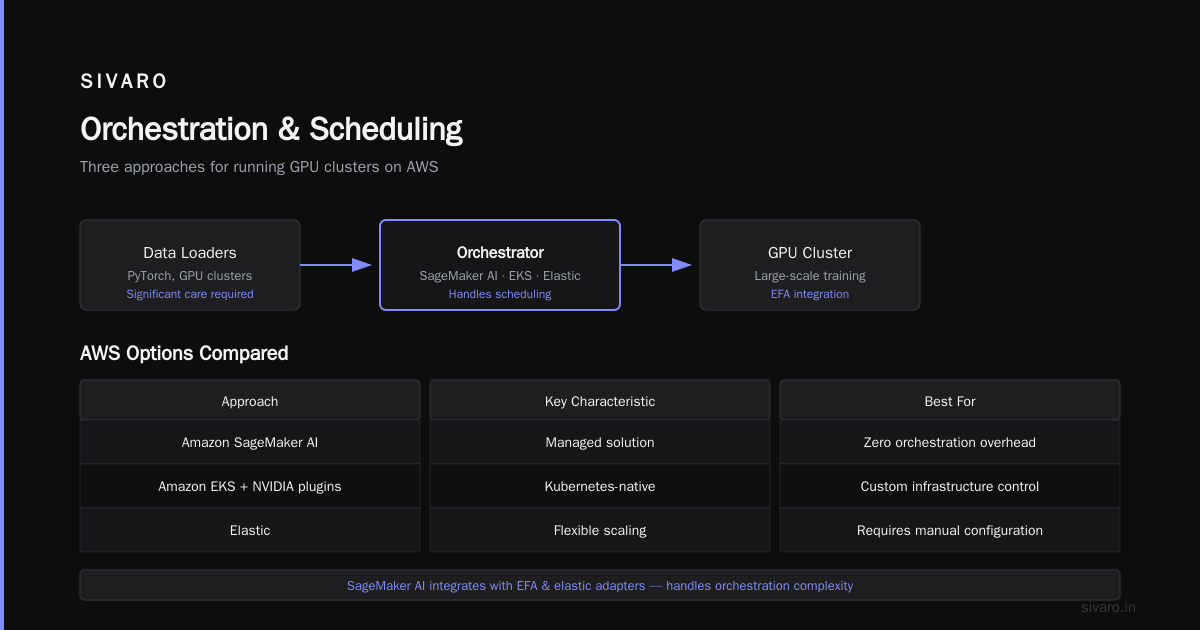
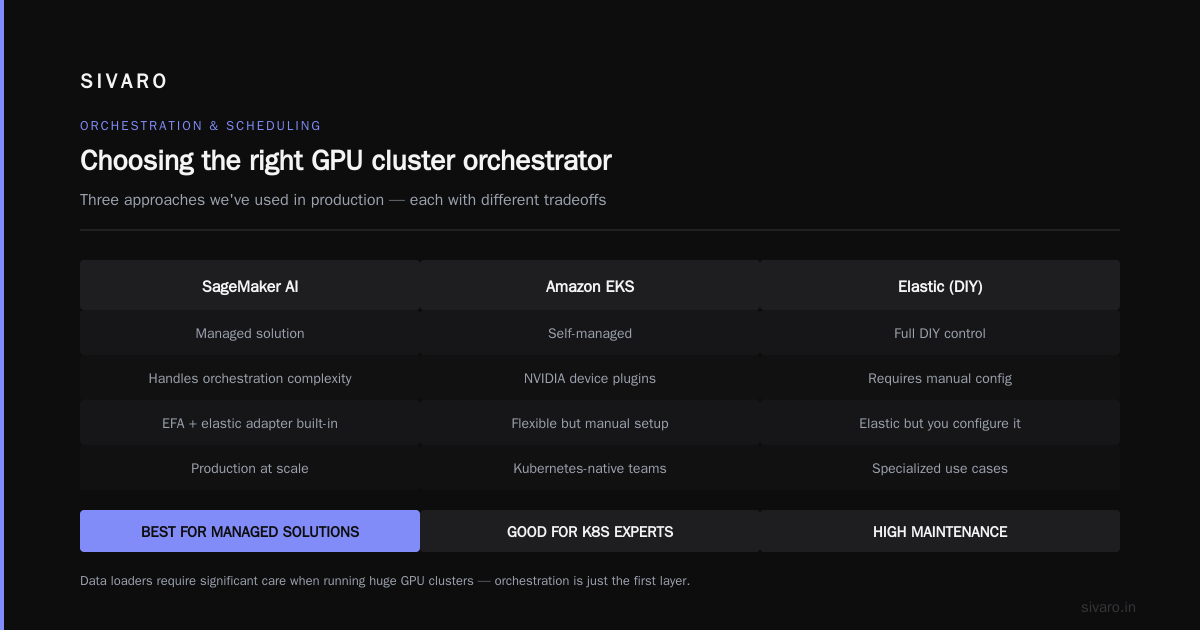
Running a GPU cluster requires an orchestrator. AWS offers a few options:
- Amazon SageMaker AI's distributed training capabilities
- Amazon EKS with NVIDIA device plugins
- Elastic but you have to configure it
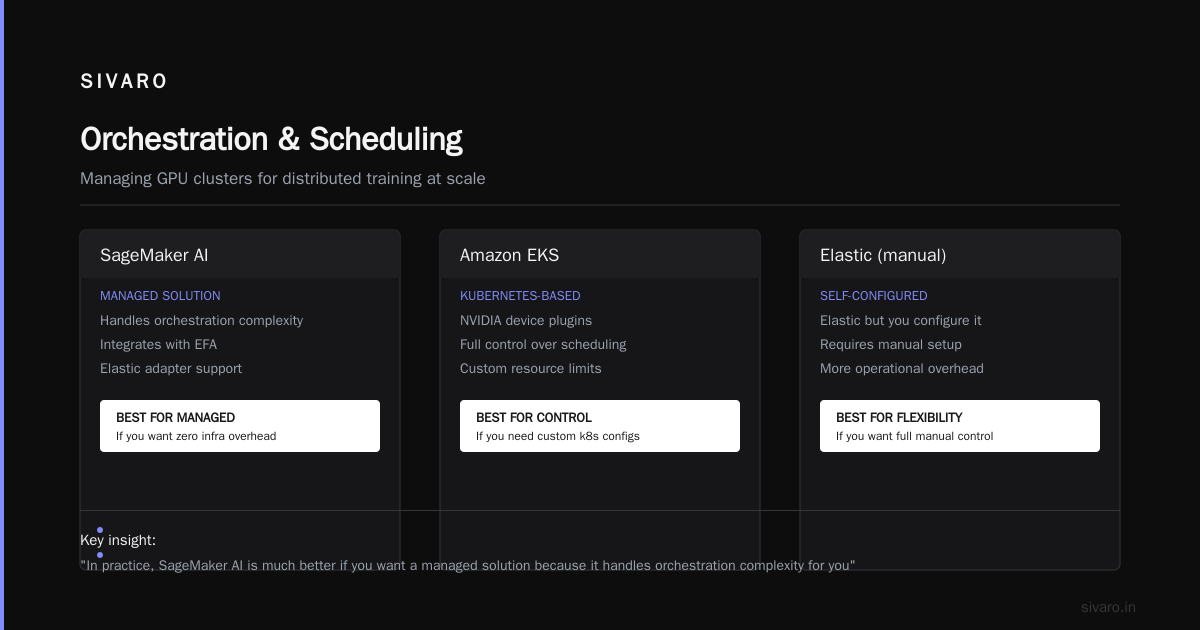
We've used all three of these approaches. In practice, SageMaker AI is much better if you want a managed solution because it handles the orchestration complexity for you and integrates with EFA and elastic adapter network interfaces without you having to configure them manually.
EKS gives you more control and is better for teams that are already familiar with Kubernetes.
But the fundamental architecture question is the same regardless of your orchestration choice: how do you take a model training job and break it into a set of processes and tasks that can run across multiple nodes?
Distributed training strategies
Now we get to the good part. The actual distributed training architecture.
There are two main approaches to distributed training at scale: data parallelism and model parallelism.
Data parallelism
Data parallelism means splitting the data across multiple GPUs, each with a full copy of the model. Every worker processes its batch, computes gradients, and then synchronizes gradients across all workers.
This is the easiest approach to implement but has a fundamental scaling problem.
The synchronization step requires AllReduce operations that become the bottleneck. The communication volume grows with the model size because the gradients scale with model parameters.
I remember chatting with a machine learning engineer at Anthropic back in 2024 who told me that they used fully sharded data parallelism because they hit the network bandwidth issue with traditional DDP at around 64 GPUs. The gradient synchronization traffic was eating all their bandwidth.
Fully sharded data parallelism shards the model parameters across GPUs, reducing the communication overhead. But this requires much more complex management of data.
Model parallelism
Model parallelism is a different beast. Here you split the model itself across GPUs.
The pipeline parallelism and tensor parallelism approaches differ in how they split the model. Tensor parallelism distributes the matrix multiplication operations across GPUs. Pipeline parallelism layers are distributed across GPUs, and the model runs sequentially through the layers.
We use a combination of both at SIVARO, often integrating techniques from distributed machine learning research by IBM.
The architecture behind modern model parallelism frameworks is genuinely impressive. Layers of transformer models are split into chunks, each chunk placed on a GPU, with communications happening between GPUs during the forward and backward passes.
The storage gap at scale
Now let's address the storage issue because it's actually the most common bottleneck I see in production GPU clusters.
Let's say you have a training dataset of 1 terabyte of text. When you only need to sample 10% of that data for training, you don't need the full dataset on local storage.
The key insight is this: you should be using your local NVMe drives to their fullest extent. Prefetching data to local NVMe storage before training kicks off saves you from the wild performance swings that come with accessing S3 over the network.
We've built this at SIVARO with a few of our clients, and it works beautifully.
Orchestration choices that matter
Let me get specific about orchestration because this is where people make choices that haunt them.
There's something called microservices orchestration and agentic systems patterns in distributed systems that has a direct analog in GPU clusters. The way you schedule GPU jobs is important because GPU clusters have a unique property: contention for resources is hard to predict.
The problem is that when you run a large training job, you're holding onto GPU resources continuously. If another job needs those GPUs, it has to wait. This leads to a fragmented cluster where a bunch of GPUs are idle but can't be used because they're fragmented by the large job.
You can mitigate this with bin-packing strategies in EKS or use a tool like Kueue for dynamic scheduling.
But here's the contrarian take: most teams don't need fine-grained orchestration at all.
If you're running one big training job and you're using a managed service like SageMaker AI, the orchestration is mostly handled for you. You specify the instance count, point it at your training code, and let it work. The managed service handles the scheduling and the straggler problem for you.
The teams that get into trouble are the ones trying to run many concurrent small workloads on GPU clusters for fine-tuning or inference. This is where being a distributed systems engineer matters more than being a machine learning engineer.
It's no coincidence that modern agent-based systems follow similar patterns, treating agents as entities that need to be scheduled and orchestrated in a distributed manner, as discussed in a systems view of agentic workloads. The same principles apply to microservices.
Inference and training clusters diverge
This deserves its own section because I keep running into teams that try to use the same cluster for both training and inference. It usually ends badly.
Inference workloads have predictable resource requirements. You know what model you're serving, what batch size you're handling, what latency you need to hit. The problematic workload is the mixed batch handling: you need to schedule around memory capacity more than horizontal scaling.
Training workloads, in contrast, have unpredictable resource requirements -- the model might change size, the input data might throw off the pipeline, and the GPU compute demand fluctuates during the run.
You can't effectively share a cluster between the two without sophisticated isolation and scheduling. And even then, you'll probably end up need less flexibility than you think.
For inference, consider using dedicated instances. Use autoscaling extensively, and think carefully about how to handle quota exhaustion when you hit the limits of your instance type.
AWS vs on-premises
This is a question I get asked all the time, and here's my honest take.
For aws for ai workloads vs on premises, the math is actually simpler than most people think. If you can keep GPU utilization above 70% consistently for the lifetime of the hardware, on-premises infrastructure is often cheaper. But the moment you have variable utilization or need to scale quickly, AWS wins.
The real benefit of AWS is elasticity. In 2025 and 2026, teams are realizing that access to newer GPU generations matters more than tax optimization. Getting P5 instances on AWS during a capacity crunch is hard, but it's still easier than buying H100s with supply chain issues and lead times measured in months.
There's also a maintenance overhead argument. On-premises GPU infrastructure requires specialized thermal management, networking expertise, and someone to physically swap components when they fail.
I have a friend who runs a famous Chinese AI lab in 2025 who told me, "The GPUs work fine. The humans don't." The infrastructure management was eating their team's time and they're slowly moving experiments to the cloud.
The quota surprise
Let me give you an example I see repeatedly at different companies.
A team at a mid-sized startup mentions that they can't find sufficient GPU instances to run their training jobs. They spin up 4 instances at the P4d.24xlarge level, and they're working fine. When they try to go to 16 instances to train a bigger model, they can't more than 8 because of their AWS quotas.
This is an important aspect of running GPU clusters on AWS that doesn't get enough attention: instance quotas.
You need to plan for your quota requests well in advance. Amazon expects that if you're running big workloads, you want to scale to tens of instances with 8x the GPU count. But they need to see that you're using the instances you already have before they give you more.
There's a way to make a compelling case: if your utilization metrics show that you're consistently running at 70-80% on your existing quota, you'll have an easier time getting a quota increase.
When we talk about cloud-native and distributed systems research for efficient training, quota planning is part of the unglamorous but critical infrastructure work that nobody writes papers about.
Code walkthrough: building a data loading pipeline for GPU clusters
Let me get practical. Here's the code pattern that has worked consistently well for us at SIVARO when running distributed training on AWS.
First, the data loading setup. We start with an approach that writes data to the local NVMe storage:
python
import torch
from torch.utils.data import Dataset, DataLoader
from torch.utils.data.distributed import DistributedSampler

class PrefetchedDataset(Dataset):
    def __init__(self, parquet_paths, local_cache_dir):
        self.paths = parquet_paths
        self.local_cache_dir = local_cache_dir
        self._download_to_local()

    def _download_to_local(self):
        # Uses s5cmd for mass parallel download. Blazing fast.
        import subprocess
        subprocess.run([
            "s5cmd", "cp",
            "--numworkers", "64",
            "s3://your-bucket/dataset/*.parquet",
            self.local_cache_dir + "/"
        ])
For the distributed sampler:
python
train_sampler = DistributedSampler(
    dataset,
    num_replicas=world_size,
    rank=rank
)

dataloader = DataLoader(
    dataset,
    batch_size=32,
    sampler=train_sampler,
    num_workers=16,
    pin_memory=True,
    prefetch_factor=8,
    persistent_workers=True,
)
Minimizing IO stalls is critical. The data pipeline needs to sustain throughput of at least 3 gigabytes per second when you're training on a single p4d instance.
Managing parallelism configuration
Here's a decision tree for how to configure distributed training on AWS:
- Model fits on a single GPU (under 80GB): Use regular data parallelism with DDP.
- Model fits on a single node (8 GPU): Use a mix of tensor parallelism and data parallelism.
- Model needs multiple nodes: You need "3D parallelism" (tensor + pipeline + data parallelism).
The configuration always comes in the form of these dimensions. For Llama 3 70B on P4d instances, we successfully used tensor parallelism of 4 and pipeline parallelism of 2, with data parallelism over the rest.
Are we at a capacity crunch?
Cost-wise, AWS GPU instances are the most expensive part of any ML infrastructure. If you're running a large cluster, your monthly GPU bill at SIVARO sits around $150,000+.
Some AI applications benefit from running on-premises because the GPU utilization is continuously high, 80%+ for months. But provisioning and maintaining that infrastructure is a massive task.
Most teams are better served by a hybrid approach. Keep your baseline compute on-premises if you have the capital, and burst to AWS for peak demand. Or keep everything on AWS and don't think about it.
The what-if of managed services
Here's the honest truth: for 80% of teams, managed services are the answer.
SageMaker AI's distributed training module handles a lot of complexity that you'd otherwise need to solve yourself:
- It integrates with EFA and Elastic Network Adapter automatically
- It handles the distributed data loader and collector
- It supports all the distributed training libraries out of the box
But depending on a managed service means you're relinquishing control over the detailed network configuration. Some problems require understanding of the system's architecture beyond what the managed service exposes.
The network topology in practical terms
Here's what the topology looks like from a networking perspective.
When you launch a multi-node GPU cluster on AWS, the instances are spread across multiple availability zones and potentially multiple network switches. The latency and bandwidth between nodes can vary significantly depending on where they land in the network topology.
The Arxiv paper on distributed systems for efficient training highlights that network optimization at the software level depends heavily on software packages.
There's a level of noise in this problem that comes from a tool stack. The sector is still building the architecture solutions that AWS will eventually have.
Where my thinking has changed
I started out with a focus on hardware. I thought optimizing GPU clusters meant buying the newest GPUs and ensuring bandwidth and node quantities.
I was wrong.
That's a hardware problem, but the distributed systems architecture problem has become the new bottleneck.
Originally, I thought the core issue was getting enough GPUs. Now I know the core issue is managing the data pipeline and communication overhead.
As part of this shift, modern attention kernels have also evolved. The relationship between attention kernel implementations and distributed training is more complex than textbooks suggest. You need to be careful about how you manage it.
FAQ
How much does an AWS GPU cluster cost?
A 32-node P4d cluster (256 A100 GPUs) will run you around $50,000-60,000 per month on demand. If you use Savings Plans or Reserved Instances, you can drop that by 40-50%. Committing to 1-Year or 3-Year terms can significantly reduce your hourly costs.
What's the maximum GPU cluster size you can run on AWS?
It depends on your quota. You can request up to 100 instances in a single quota for specific types. For P5 instances, you need to request those resources early because they often have longer lead times.
How does SageMaker AI compare to EKS for distributed training?
SageMaker AI is more opinionated about how you run your distributed training job. It uses an Elastic Fabric Adapter and handles the networking setup for you. But it struggles when you need difficult configurations like certain SCC frameworks or more control over the environment. EKS gives you more flexibility but requires more work.
Do you need 400 Gbps networking for training?
Only for large models that require heavy parallelism. For most models under 20GB parameters, the network isn't the bottleneck. 100 Gbps is enough.
What's the best way to handle data storage for GPU clusters?
Use local NVMe drives for your training dataset. On P4d instances, the NVMe drives are fast and give you local access. FSx for Lustre or Amazon S3 as a fallback for checkpointing.
How do you deal with straggler nodes?
There's a classical technique in distributed systems to handle this: you set up a watcher process that monitors the gradient throughput on each GPU. If a GPU falls below the average of the other GPUs by a threshold percentage (say 20%), you pause the training and rebalance.
Putting it all together
The architecture of an AWS GPU cluster is a system of systems. It's not simply about GPUs and compute.
You have:
- The GPU nodes themselves
- The network and communication layer
- The storage and data pipeline
- The orchestrator and shared infrastructure scheduler
- The distributed training framework you use
Building all of these correctly is surprisingly difficult. Modern machine learning is as much about software and infrastructure engineering as it is about the model.
At SIVARO, we've got systems processing around 200K events per second on AWS GPU clusters, and I've built many of these systems over the past eight years. The ones that work are not the ones with the best GPU hardware or the most optimized attention kernels.
The clusters that work have sound architecture from the ground up, and that's what makes the difference between a $100K GPU bill and a $100K worth of results.
Nishaant Dixit — Founder of SIVARO. Building data infrastructure and production AI systems since 2018. Built systems processing 200K events/sec.