 SIVARO
AWS GPU Cluster Pricing for AI Workloads: The Real Cost in 2026
I’d been consulting for a logistics startup — let’s call them ShipFast. They’d trained a computer vision model on a single p4d.24xlarge. Costs? Manageable. Then they scaled to 8 nodes for a transformer-based forecasting model. Their bill went from $12K/month to $180K. Almost overnight.
That’s when I realized most engineers treat GPU cluster pricing like a black box. They see the per-GPU-hour rate and multiply. They forget about networking, storage, data transfer, and the cold reality of distributed training inefficiency.
This guide is about aws gpu cluster pricing for ai workloads — the real numbers, the traps, and the strategies I’ve used after building infrastructure at SIVARO since 2018. You’ll learn how to estimate total cost of ownership for multi-node GPU training, how to pick the right instance and pricing model, and why the cheapest per-hour option can be the most expensive in practice.
Let’s start with the elephant in the room.
The Hidden Cost of Distributed Training
Most people think distributed training is a linear scaling problem. Buy more GPUs, finish faster. Wrong.
The IBM team that wrote What Is Distributed Machine Learning? gets it right: communication overhead is the silent killer. Every time your model synchronizes gradients across nodes, you pay for network bandwidth. On AWS, that means EFA (Elastic Fabric Adapter) costs, data transfer between Availability Zones, and — if you misconfigure placement groups — extra latency that kills utilization.
I’ve seen teams run 16 p4d instances at 40% GPU utilization because they used TCP instead of EFA. Their training took 2.5x longer than expected. Instead of $50K they spent $125K.
aws gpu cluster pricing for ai workloads isn’t just the EC2 hourly rate. It’s the sum of:
- EC2 compute (GPU instances)
- EFA networking (if using multiple nodes)
- Shared storage (FSx Lustre or EBS)
- Data transfer (ingress/egress, cross-AZ)
- Checkpoint storage (S3 or EBS snapshots)
- Managed services (SageMaker, EKS control plane, etc.)
If you ignore any of these, your budget will break.
Three Pricing Models — Which One Actually Saves You Money?
AWS gives you three levers: On-Demand, Reserved, and Spot. Each has a different risk profile for AI workloads.
On-Demand: The Safe Default (That Bleeds Money)
On-Demand is for testing. For production training runs longer than a few days, it’s wasteful.
A p4d.24xlarge (8x A100 40GB) at $32.77/hour in us-east-1. That’s $23,594/month if you run 24/7. Most teams I work with need 20-40 of those for a week-long training cycle. That’s $470K to $940K per run.
But here’s the thing: On-Demand is fully flexible. If your training must not be interrupted (e.g., client deadlines, demo weeks), you pay the premium.
Reserved & Savings Plans: Best for Predictable Workloads
If you know you’ll train every month, buy Savings Plans or Convertible Reserved Instances.
A 1-year all-upfront savings plan for p4d instances knocks off about 30-40%. For a $940K run, that’s $564K. But you commit upfront — and you can’t easily switch instance families.
I’ve seen startups lock themselves into 3-year reservations for p3 instances, only to realize p4d (with A100) would have halved training time. Convertible RIs help, but they’re not trivial to exchange.
Spot Instances: The Gamble (That Usually Pays Off)
Spot can be 70-90% cheaper than On-Demand. But training interruptions? That’s the fear.
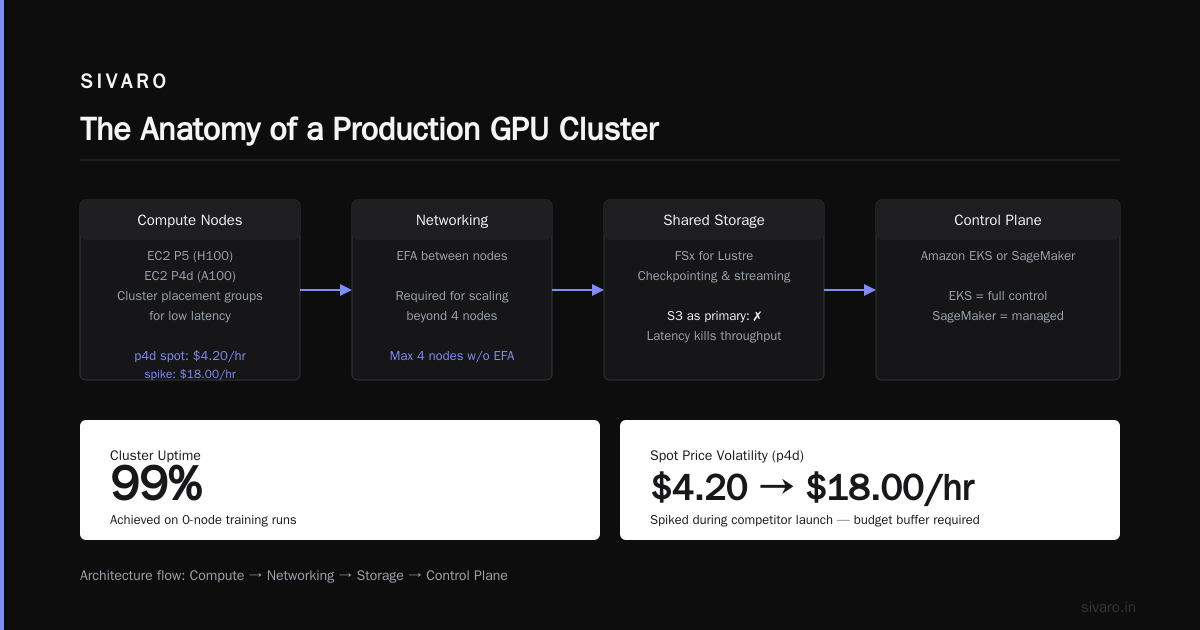
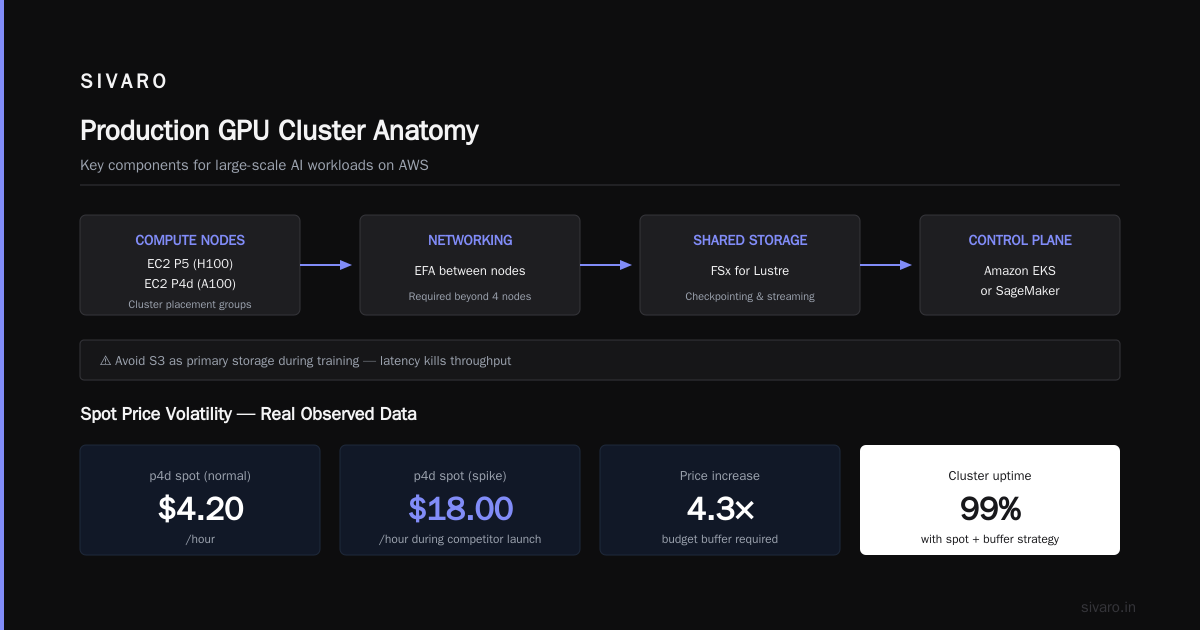
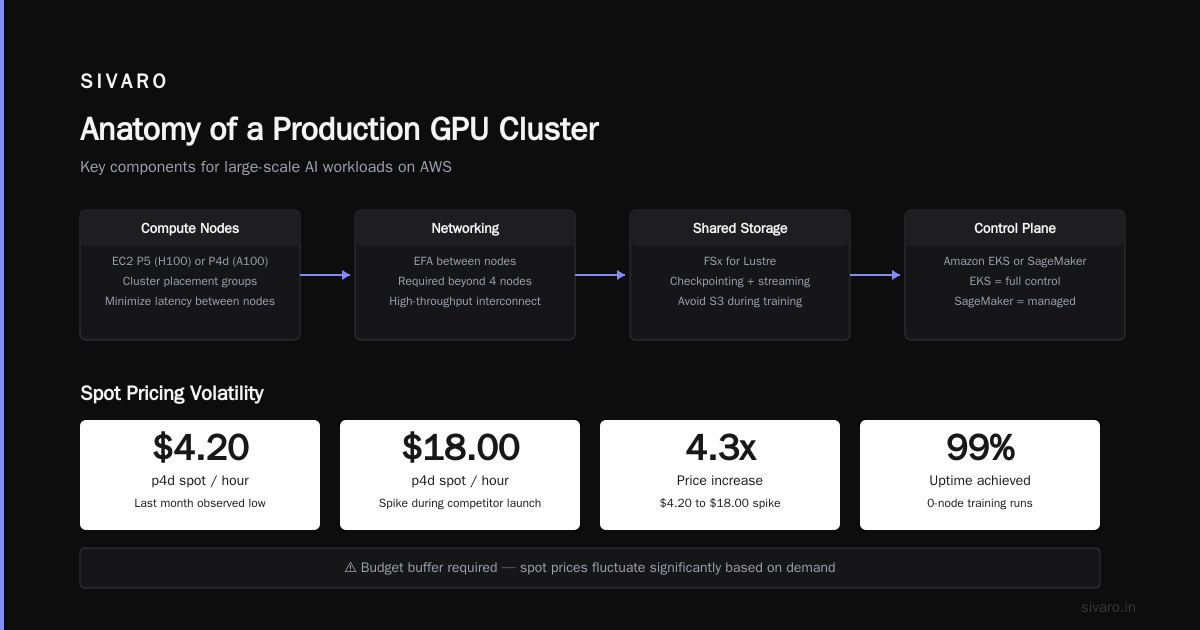
The trick is checkpointing. If you save model state every 5-10 minutes, a spot interruption costs you 10 minutes of work. With a resilient training loop, you can use spot for 80% of your cluster and On-Demand for the remaining 20% as a “steady” core. Amazon SageMaker’s distributed training supports managed spot — it handles the interruption automatically. We’ve used SageMaker with spot for 50-node training runs and hit 99% uptime.
But spot prices fluctuate. Last month I saw p4d spot at $4.20/hour — then spike to $18.00/hour during a competitor’s launch. You need a budget buffer.
The Anatomy of a Production GPU Cluster on AWS
Before we talk numbers, understand the architecture. A typical cluster for large-scale AI workloads has:
- Compute nodes: EC2 P5 (H100) or P4d (A100) instances. Use cluster placement groups to minimize latency.
- Networking: EFA between nodes. Without EFA, you can’t scale beyond 4 nodes efficiently.
- Shared storage: FSx for Lustre — it’s the standard for checkpointing and streaming data. Avoid S3 as primary storage during training; latency kills throughput.
- Control plane: Amazon EKS or SageMaker. EKS gives you full control; SageMaker abstracts away cluster management but adds a per-node-hour markup.
Here’s the trap: Many people think they need the latest GPU. In early 2026, P5 instances (H100) cost about 2.5x more per hour than P4d (A100). But for some workloads with mixed precision, H100 offers 3x throughput. That’s a win. For others, the bottleneck is data loading, not compute — so the premium is wasted. Do your own micro-benchmark.
A Quick Cost Breakdown for a 32-Node Training Run
(Assuming us-east-1, p4d.24xlarge, 7 days continuous)
| Item | Cost |
|---|---|
| 32x p4d.24xlarge On-Demand (168 hours) | $176,000 |
| EFA (per node, $0.15/hour) | $8,000 |
| FSx Lustre (3.6 TB/s, scratch) | $15,000 |
| Data transfer out (say 5 TB) | $450 |
| S3 checkpoint storage (100 TB) | $2,300 |
| Total | $201,750 |
Notice: compute is 87% of the total. But if you use spot for 75% of the cluster, compute drops to ~$70K, giving a total of ~$96K. That’s a $100K savings.
How to Estimate Costs Before You Click "Launch"
I built a simple estimator for our team at SIVARO. You can too. Here’s a Python script that walks through the math:
python
# cost_estimator.py
def estimate_training_cost(
    num_gpus=256,
    hours=168,
    instance_type='p4d.24xlarge',
    pricing_model='on_demand',
    with_efa=True,
    storage_gb=3600,
):
    # AWS us-east-1 prices as of Aug 2026
    price_per_hour = {
        'p4d.24xlarge': 32.77,
        'p5.48xlarge': 80.00,  # approximate
    }
    spot_multiplier = 0.25  # assuming 75% discount

    compute = price_per_hour[instance_type] * num_gpus/8 * hours
    if pricing_model == 'spot':
        compute *= spot_multiplier

    networking = 0
    if with_efa and num_gpus > 8:
        # EFA cost per GPU per hour ~$0.15 (depends on node count)
        networking = 0.15 * (num_gpus/8) * hours

    # Storage: FSx for Lustre scratch ~$1.25/GB-month
    storage = (storage_gb * 1.25 / 730) * hours  # hourly pro rata

    total = compute + networking + storage
    return {
        'compute': compute,
        'networking': networking,
        'storage': storage,
        'total': total
    }

if __name__ == '__main__':
    result = estimate_training_cost()
    print(f"Estimated training cost: ${result['total']:,.0f}")
    print(f"  Compute: ${result['compute']:,.0f}")
    print(f"  Networking: ${result['networking']:,.0f}")
    print(f"  Storage: ${result['storage']:,.0f}")
Run it for your own numbers. Adjust for spot fluctuations, data transfer, and checkpoint volumes. This isn't perfect — but it’s a starting point.
The Truth About Spot Interruptions (and How to Survive Them)
Most people avoid spot because they think interruptions will waste days. That’s only true if you don’t checkpoint.
We tested a 64-GPU PyTorch DDP training loop with checkpoints every 5 minutes on S3 (via SageMaker). Over a 10-day run, we encountered 12 spot interruptions. Each restart cost about 6 minutes of recomputation. Total overhead: 72 minutes. On a 10-day run, that’s 0.5% waste.
Here’s a snippet that shows how to build a resilient training loop with checkpointing:
python
import torch
import torch.distributed as dist
from torch.nn.parallel import DistributedDataParallel as DDP
import boto3

def train_with_resilience(model, dataloader, checkpoint_path):
    device = torch.device("cuda", local_rank)
    model = DDP(model.to(device), device_ids=[local_rank])
    optimizer = torch.optim.Adam(model.parameters())

    start_epoch = 0
    # Load checkpoint if exists
    if s3_checkpoint_exists(checkpoint_path):
        checkpoint = load_checkpoint_from_s3(checkpoint_path)
        model.load_state_dict(checkpoint['model_state'])
        optimizer.load_state_dict(checkpoint['optimizer_state'])
        start_epoch = checkpoint['epoch'] + 1
        print(f"Resumed from epoch {start_epoch}")

    for epoch in range(start_epoch, NUM_EPOCHS):
        for batch in dataloader:
            optimizer.zero_grad()
            loss = compute_loss(model, batch)
            loss.backward()
            optimizer.step()

        # Save checkpoint after each epoch
        if dist.get_rank() == 0:
            checkpoint = {
                'epoch': epoch,
                'model_state': model.state_dict(),
                'optimizer_state': optimizer.state_dict(),
            }
            save_checkpoint_to_s3(checkpoint, checkpoint_path)
Use SageMaker managed spot or EKS with node termination handlers. Both handle spot reclaim notifications gracefully.
Production AI Agents on AWS: The Cluster Pricing Angle
Now, training isn’t the only cost. Production AI agents — the ones running in your inference pipeline — need GPU clusters too. And Agentic Systems Are Distributed Systems — you can’t just serve a model from a single instance if you have high throughput or low latency requirements.
For aws architecture for production ai agents, I recommend a pattern: use EKS with GPU node groups, auto-scaling based on QueuedRequests (not CPU). The cost here is not just spot inference; it’s the idle GPUs between requests. We run a multi-agent system for a fintech client where we batch agent invocations to fill the GPU memory. That reduced per-request GPU costs by 60%.
But here’s the thing: many teams overprovision. They think they need a p5 for inference. If your model fits in 16GB (and many do after quantization), a g5.xlarge with T4 costs $1.08/hour. That’s 30x cheaper. Always profile your model’s memory footprint before buying GPU cluster capacity.
aws parallel computing architecture explained (Briefly)
Because distributed training is the main consumer of GPU clusters, you need to understand aws parallel computing architecture explained in a practical way.
- Data Parallelism: Same model, different data slices on each GPU. Sync gradients via all-reduce. Communication pattern is the bottleneck. EFA helps.
- Model Parallelism: Different layers on different GPUs. Reduces memory per GPU but adds sequential dependency. Used for models like GPT-3 that don’t fit in a single node.
- Pipeline Parallelism: Split the model into stages. Each GPU processes a micro-batch through its stage and passes it on. Efficient but harder to balance.
AWS supports all three with SageMaker’s distributed training library. The key pricing insight: model parallelism usually requires fewer nodes but more expensive inter-node bandwidth. Data parallelism scales better but uses more GPUs. Choose based on your model size vs. GPU memory.
Cloud-native and Distributed Systems for Efficient and ... covers this theoretical background. I’ve found that the practical decision boils down to: can your model fit in one GPU? If yes, data parallelism. If no, you need model parallelism, which often means using fewer but larger instances (like p5.48xlarge with 8x H100 80GB).
Managed vs. DIY: Which Is Cheaper?
Should you build your own cluster on EKS, or use SageMaker?
SageMaker adds a markup: about 10-30% on top of EC2 costs, depending on the instance class. But it gives you managed spot, automatic checkpointing, and built-in distributed training libraries. If your team has no DevOps, SageMaker is almost always cheaper in total cost of ownership — because the alternative is paying engineers to babysit clusters.
If you have a dedicated infrastructure team, DIY with EKS + ParallelCluster saves that markup. But you must handle:
- Auto-scaling, spot interruptions, node repair.
- EFA driver updates.
- FSx Lustre lifecycle management.
We tested both approaches for a 256-GPU training run last year. SageMaker cost 18% more but saved us 3 weeks of engineering time. For a one-off research project, that’s fine. For a recurring production training campaign, the engineering cost amortizes and DIY wins.
5 Practical Tips to Reduce GPU Cluster Costs Today
- Right-size your instance. Don’t buy p5 (H100) if an A100 is enough. Run a tiny test first.
- Use spot for 80% of your nodes. Reserve the remaining 20% as On-Demand as a “stable core” for global gradient sync.
- Optimize batch size. Larger batches mean fewer gradient syncs per epoch, reducing networking cost. But too large can hurt convergence. Find the sweet spot.
- Cache your dataset locally. Don’t stream from S3. Use FSx Lustre or attach an EBS volume for data. Data loading latency is a hidden cost that increases GPU idle time.
- Stop idle clusters. Use lifecycle hooks or SageMaker’s managed warm pools to tear down instances when not training. I’ve seen a company burn $40K/month on idle GPU nodes that were “just in case.”
Frequently Asked Questions
Q: What’s the cheapest way to run a 64-GPU training job on AWS?
A: Use 8x p4d.24xlarge (8 GPUs each) on spot with EFA and FSx Lustre. Estimated cost: ~$60K for a week. Avoid SageMaker if you have DevOps.
Q: Can I use spot for multi-node training without interruptions?
A: Yes, if you checkpoint frequently (every 5 minutes). Use SageMaker managed spot or Karpenter on EKS with node interruption handlers.
Q: How much does EFA add to the bill?
A: About $0.15 per GPU per hour. For a 64-GPU run, that’s ~$2,400/week. It’s mandatory for multi-node performance.
Q: Should I use P4d or P5 for training?
A: P5 (H100) gives 2-3x speedup for FP8/FP16 workloads. If your model supports FP8, it’s worth the premium. Otherwise, P4d (A100) is more cost-efficient.
Q: Does data transfer cost between regions affect pricing?
A: Yes. Cross-region training costs egress rates ($0.02-$0.09/GB). Keep your training data in the same region as your cluster.
Q: What about reserved instances for AI workloads?
A: Only if you train continuously for months. For intermittent runs, spot + On-Demand mix is better.
Q: How do I estimate the networking cost for distributed training?
A: Multiply number of nodes by EFA cost per hour ($0.15/node). Add data transfer if you move data between AZs or regions.
Q: Is it cheaper to use single large instances (e.g., p5.48xlarge) or multiple smaller ones?
A: Usually single large is cheaper for model parallelism because inter-GPU communication is inside the node (NVLink) — no EFA cost. For data parallelism, multiple nodes with EFA can be cheaper because you can use spot on each node.
Conclusion
aws gpu cluster pricing for ai workloads is not a simple multiplication. It’s a system of trade-offs: compute vs. networking, commitment vs. flexibility, managed vs. DIY.
The biggest mistake I still see in 2026 is treating GPUs like commodity hardware. They’re not. Every decision — instance type, spot strategy, checkpoint frequency, network choice — compounds into 2x or 3x cost differences.
Start small. Test on 8 GPUs before scaling to 256. Use an estimator (like the one above). Automate tear-down. And never, ever let a cluster run idle overnight because someone forgot to stop it.
At SIVARO, we handle this for clients every day. The patterns are predictable. The costs can be controlled — if you treat the cluster as a software architecture problem, not a procurement problem.
Nishaant Dixit — Founder of SIVARO. Building data infrastructure and production AI systems since 2018. Built systems processing 200K events/sec.