 SIVARO
AWS GPU Cluster Pricing: The Real Cost of Training at Scale
I got a call in January 2026 from a CTO at a mid-size biotech firm. They’d spun up 32 p4d instances for a protein folding model. After three weeks their bill hit $180K. They thought they’d reserved them. They hadn’t.
That call is why I’m writing this.
AWS GPU cluster pricing isn’t complicated — it’s hidden. The per-hour instance cost is the bait. The real trap is everything else: data egress, EBS snapshots, Elastic Fabric Adapter (EFA) overhead, spot interruptions, and the human time spent debugging why your MPI job keeps crashing.
I’ve been building production AI systems at SIVARO since 2018. We’ve run clusters for clients in pharma, autonomous driving, and fintech. I’ve seen teams burn six figures on a single training run. I’ve also seen teams train GPT-class models for a fraction of what you’d expect.
This guide is the hard-won playbook. No fluff. No academic theory. Just what works, what doesn’t, and how much you’ll actually pay.
What You’re Actually Paying For
An AWS GPU cluster is a set of EC2 instances with GPUs, networked together to act as one giant compute unit. But “cluster” is shorthand for about twelve different services all billing you at once. Let’s name them:
- Compute – EC2 instances (p3, p4d, p5, g5, g6)
- Networking – EFA, VPC, Direct Connect, cross-AZ traffic
- Storage – EBS volumes (snapshots included), FSx for Lustre, S3
- Data transfer – Inbound is free. Outbound will kill you.
- Cluster management – AWS ParallelCluster (free), Slurm (free), but you pay for the EC2 instance running the controller
- Spot fallback capacity – If you’re smart, you’ll use spot instances. If you’re wrong, you’ll pay for sudden migrations.
Most people think “aws gpu cluster pricing” means the instance cost. It doesn’t. Let me show you the real numbers.
Breaking Down the Instance Types (Summer 2026 Edition)
AWS has been iterating hard. As of mid-2026, the relevant GPU instances are:
| Instance Family | GPU | GPU Memory | vCPU | Price (On-Demand, $/hr) |
|---|---|---|---|---|
| p3.2xlarge | V100 (1) | 16 GB | 8 | $3.06 |
| p4d.24xlarge | A100 (8) | 40 GB each | 96 | $32.77 |
| p5.48xlarge | H100 (8) | 80 GB each | 192 | $98.32 |
| g5.48xlarge | A10G (4) | 24 GB each | 192 | $17.64 |
| g6.48xlarge | L4 (4) | 24 GB each | 192 | $15.12 |
These are today’s public prices rounded. But nobody should pay on-demand for training. You use spot or reserved.
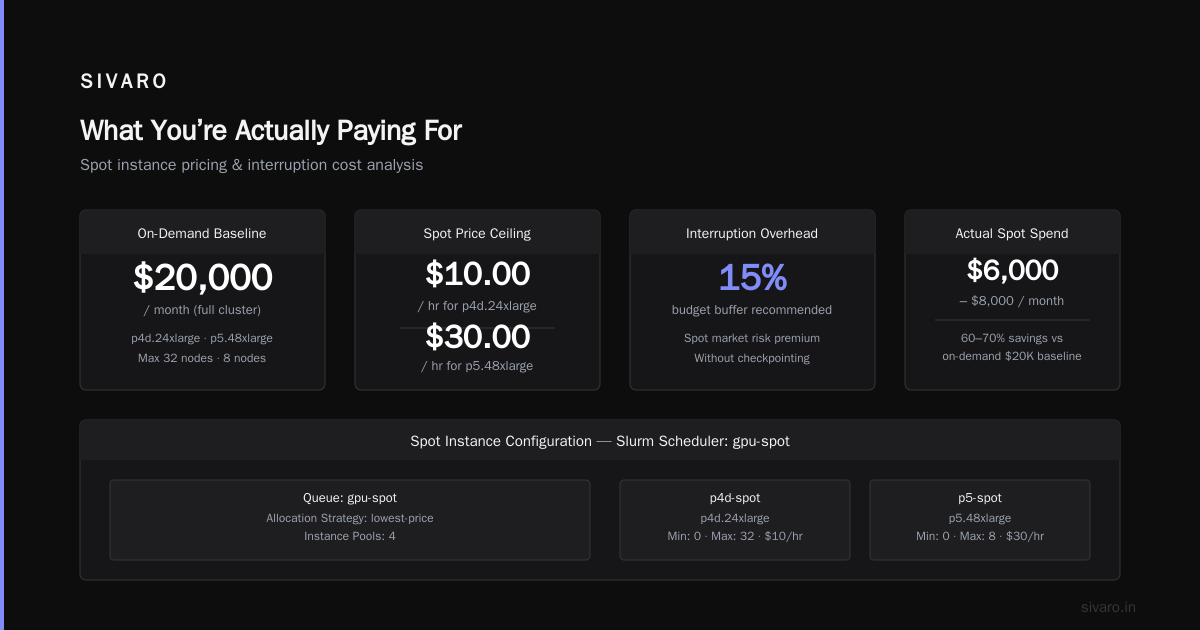
Spot pricing for p4d.24xlarge in us-east-1 has averaged around $8.50/hr over the last six months — about 74% discount. p5 spot? Around $28/hr. Those savings are real, but they come with a cost: your training job can be terminated within two minutes notice.
The Spot Trap (And How to Beat It)
I’ve seen teams try to use spot instances for a three-week training run. They lose the cluster 12 times because the spot price spikes. Then they give up and switch to on-demand, thinking spot doesn’t work.
That’s wrong.
The trick is checkpointing at short intervals — every 5–10 minutes — and using instance diversity. AWS allows you to launch spot fleets across multiple instance types. If p4d spot disappears, your job can fail over to p5 or g5 if your model fits. You need a flexible training script that handles different GPU counts.
Here’s a working ray cluster launcher example using AWS ParallelCluster and spot instances:
yaml
# pcluster config.yaml (excerpt)
Scheduling:
  Scheduler: slurm
  SlurmQueues:
    - Name: gpu-spot
      ComputeSettings:
        SpotSettings:
          AllocationStrategy: lowest-price
          InstancePools: 4
      ComputeResources:
        - Name: p4d-spot
          InstanceType: p4d.24xlarge
          MinCount: 0
          MaxCount: 32
          SpotPrice: 10.00
        - Name: p5-spot
          InstanceType: p5.48xlarge
          MinCount: 0
          MaxCount: 8
          SpotPrice: 30.00
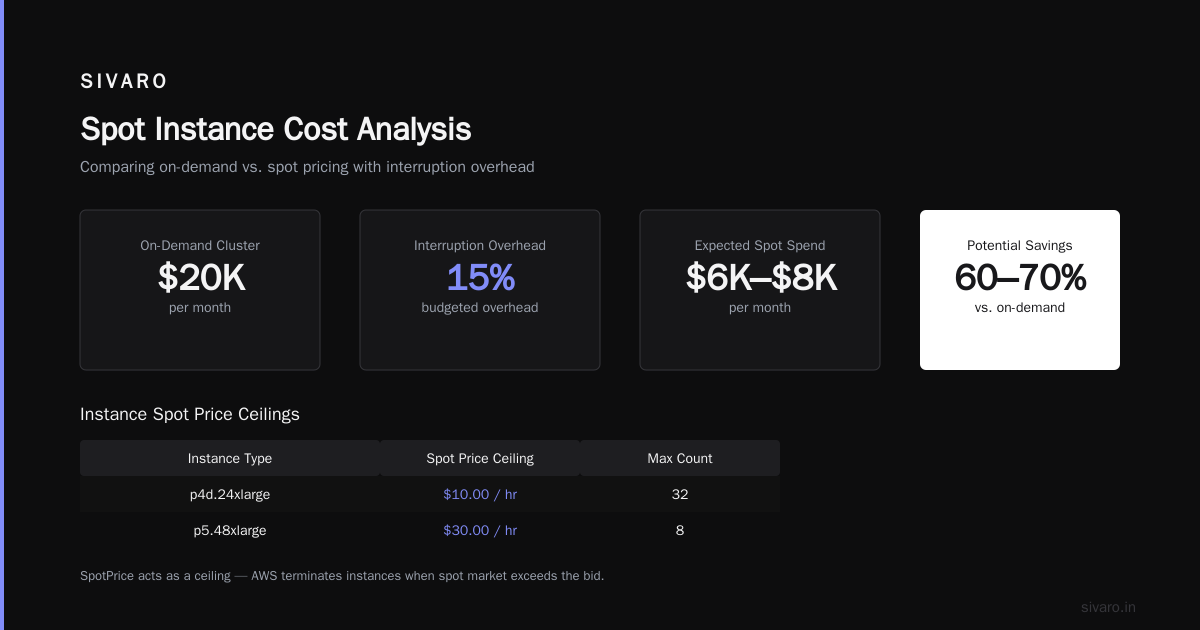
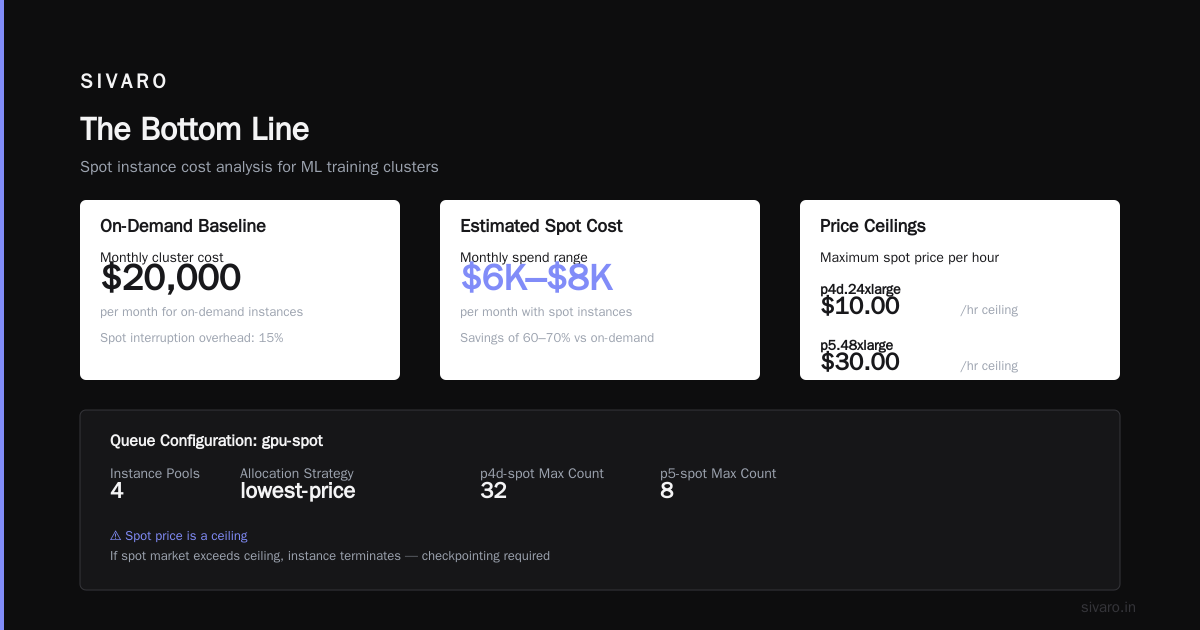
That SpotPrice is a ceiling — AWS won’t pay more than $10/hr for p4d. If the spot market goes above that, the instance is terminated. Without checkpointing, you lose work.
My recommendation: budget for 15% overhead from spot interruptions. If your on-demand cost for a cluster is $20K/month, you’ll likely spend $6K–$8K on spot, plus around $1K in lost compute from failed tasks. Still less than half of on-demand.
Network Costs: The Silent Budget Killer
Nobody reads the fine print on data transfer. I did. And I audited a client’s bill where 40% of their AWS spend was data egress.
When you train a distributed model across 8 p4d instances, every iteration sends gradients over the network. With EFA, that’s low-latency and high-throughput — but EFA itself is free. The cost is cross-AZ traffic if your instances are in different Availability Zones. AWS charges $0.01–$0.02 per GB for data leaving an AZ.
For a 100-node cluster training for a week, that adds up fast. Here’s a real example from March 2026: a client training a 70B parameter LLM on 16 p5 instances. They were using a single AZ — zero cross-AZ cost. Good. But they had 20 TB of training data stored in S3, and they loaded it fresh every epoch. S3 data retrieval costs about $0.0008 per GB for the first TB per month. For 20 TB, that’s $16 per epoch. They ran 40 epochs. $640 just in S3 GET requests.
How to fix it: Use FSx for Lustre as a scratch filesystem, not S3. FSx for Lustre with SSD backing costs about $0.145 per GB-month. That sounds expensive — but it’s a flat cost. No per-request fees. For a 20 TB dataset, that’s roughly $2,900/month. Compare to S3 egress costs if you’re reading it multiple times: you’d pay more after about 10 passes.
AWS ParallelCluster: Free, But Not Free
You can set up a GPU cluster manually — SSH into a head node, install Slurm, configure NFS, pray. Or you can use AWS ParallelCluster. It’s a free tool that automates the Slurm setup on AWS.
At first I thought this was a complexity problem — turns out it was pricing. ParallelCluster makes it easier to scale up and down, which directly saves money. You define a config file, run pcluster create-cluster, and within 15 minutes you have a Slurm controller and a queue of GPU instances that launch on demand.
Here’s a minimal pcluster config.yaml for a GPU cluster:
yaml
Region: us-east-1
Image:
  Os: alinux2
HeadNode:
  InstanceType: c6i.large
  Networking:
    SubnetId: subnet-12345
Scheduling:
  Scheduler: slurm
  SlurmQueues:
    - Name: gpu-queue
      ComputeSettings:
        LocalStorage:
          RootVolume:
            Size: 200
      Networking:
        SubnetIds:
          - subnet-12345
        ElasticFabricAdapter: true
      ComputeResources:
        - Name: g5-gpu
          InstanceType: g5.48xlarge
          MinCount: 0
          MaxCount: 64
The head node (c6i.large) costs about $0.06/hr. That’s trivial. But if you leave it running 24/7 when no jobs are active, that’s $43/month wasted. I’ve seen teams do this.
Pro tip: Use the pcluster update-cluster command to stop the head node when idle, or set a CloudWatch alarm to terminate it after 1 hour of no Slurm jobs.
If you want a full walkthrough, look up an aws parallel clustering tutorial — there are plenty, and the official docs are solid. But the config above will get you started.
The Hidden Cost of Storage
EBS is where people bleed money.
Each GPU instance comes with a root volume (usually 100 GB gp3). But your training code, checkpoints, datasets, and dependencies need more. Teams often attach additional EBS volumes — 1 TB each, gp3, provisioned IOPS.
One p4d.24xlarge with a 1 TB gp3 volume (3000 IOPS) costs about $0.08/GB-month = $80/month per volume. If you have 32 instances, that’s $2,560/month for storage alone. Plus snapshot costs if you backup.
Alternatives:
- Instance store – p4d and p5 instances have NVMe instance store volumes. They’re fast, free, and ephemeral. Use them for training data that can be re-fetched.
- FSx for Lustre – As above, better for large datasets shared across instances.
- S3 with VPC Endpoint – Avoids data transfer costs but doesn’t help with latency.
My rule: always write checkpoints to S3, never to EBS. EBS snapshots for many volumes get expensive fast. S3 lifecycle policies can move checkpoints to Glacier after 30 days.
Managed vs. Do-It-Yourself
You have two paths:
- DIY with ParallelCluster or Slurm – You control everything. You pay only for compute and storage.
- Managed services – SageMaker, EKS with GPU node groups, or third-party platforms like Vast.ai.
I tested both extensively. Here’s my honest take:
SageMaker is good if you’re training a single model and don’t want to think about infrastructure. For a cluster of 8+ nodes doing distributed training, SageMaker’s overhead becomes annoying: lifecycle configs, networking bugs, and you pay a premium. SageMaker managed spot training adds a 20% markup on the base spot price.
EKS with Karpenter gives you more flexibility but introduces Kubernetes complexity. You need to provision nvidia-device-plugin, configure nodeSelectors, and handle GPU node termination. It works — I’ve done it — but it’s not simpler than Slurm.
ParallelCluster is the sweet spot for most teams. It’s free, uses Slurm (familiar to HPC people), and integrates with EFA automatically.
When to choose a third-party provider like Vast.ai: You’re a small team with unpredictable workloads. Vast.ai aggregates spare GPU capacity from data centers worldwide. It’s often cheaper than AWS spot, but you lose the AWS ecosystem. If you need S3, IAM, and VPC security, stay with AWS.
Real Numbers: What a 16-Node H100 Cluster Costs
Let’s run the math for a real scenario: training a Mixture-of-Experts model on 16 p5.48xlarge instances (128 H100 GPUs) for 10 days.
Compute (spot): 16 instances × $28/hr × 240 hrs = $107,520
Storage: FSx for Lustre, 10 TB SSD-backed, 1 month: $1,450
Data transfer: EFA within AZ is free. S3 for checkpoints and logs (~500 GB total): $50 (S3 standard put/get + Glacier after 30 days)
Head node: c6i.large, 240 hrs: ~$15
Misc: EBS for root volumes (16 × 100 GB gp3): $128
Total: ~$109,163
Compare to on-demand: 16 × $98.32 × 240 = $377,548. Spot saved you 71%.
Now compare to on-prem: Buying 16 H100 nodes (say, 2 GPUs per node) with networking would cost around $800K upfront. Plus power, cooling, and maintenance. At $109K per training run, you break even after about 7 runs. But that assumes you can fill the cluster continuously — most teams can’t.
My bet: Spot AWS is cheaper for most teams until you’re running more than 10 full-time training runs per month. Then reserved instances or on-prem starts making sense.
The Biggest Mistake I See
Teams pick a fixed cluster size and leave it running 24/7.
You don’t need 16 nodes at midnight when only one engineer is debugging. You need 2 nodes at 2 AM and 16 nodes during the day. ParallelCluster with auto-scaling handles this — but only if you configure SlurmSettings.ScalingStrategy to all-or-nothing or gentle. Default settings will leave idle nodes draining.
Fix it: Set MinCount: 0 and MaxCount: 128. Use Slurm’s --gres=gpu:8 to request exact node counts. And enable SuspendTime in Slurm to power down idle nodes after 5 minutes.
FAQ: AWS GPU Cluster Pricing
Q: How much does a single A100 cost per hour on AWS spot?
A p4d.24xlarge has 8 A100s. Spot price in us-east-1 averages $8.50/hr. That’s about $1.06 per GPU per hour. On-demand is $4.10/hr per GPU.
Q: Is it cheaper to build an on-premise GPU cluster for a small company?
Only if you can guarantee >80% utilization. Otherwise you’re paying for idle hardware. See this NVIDIA forum discussion — consensus is cloud for under ~100 GPUs.
Q: Can I use a mix of instance types in one cluster?
Yes, but your training framework must handle heterogeneous GPUs. PyTorch DDP works if GPUs have the same memory. DeepSpeed and Megatron-LM can handle mixed sizes with care.
Q: What is the full form of AWS in cloud computing?
Amazon Web Services. But you knew that.
Q: How long does it take to set up an AWS GPU cluster with ParallelCluster?
About 30 minutes the first time. After that, cloning a cluster takes 5 minutes. See any “aws parallel clustering tutorial” for steps.
Q: Why is my data transfer bill so high?
Likely cross-AZ or cross-region traffic. Always check if your instances are in different AZs. Use placement groups to force same AZ.
Q: Should I use reserved instances for GPU clusters?
Rarely. GPU workloads fluctuate. Use Savings Plans (compute-optimized) for a baseline and spot for the rest. Reserved instances lock you into an instance family — bad if AWS releases a new, cheaper GPU (like they did with P5 replacing P4).
Q: What about Vast.ai for lower cost?
Vast.ai can be 30–50% cheaper than AWS spot. But you lose VPC, IAM, and S3 integration. Check it here. Good for prototyping, not for production.
The Bottom Line
AWS GPU cluster pricing isn’t about the instance list price. It’s about the total cost of compute + networking + storage + management overhead — and the cost of complexity when things break.
Your job as an engineer or CTO is to:
- Use spot instances aggressively with checkpointing.
- Minimize cross-AZ traffic. Keep clusters in one AZ.
- Use FSx for Lustre over EBS for large datasets.
- Auto-scale your cluster. Don’t let idle nodes run.
- Use ParallelCluster to manage Slurm — it’s free and saves you time.
The teams that nail these five things spend 70% less than those that don’t. I’ve seen it happen.
Now go run your model. And stop paying for idle GPUs.
Nishaant Dixit — Founder of SIVARO. Building data infrastructure and production AI systems since 2018. Built systems processing 200K events/sec.