 SIVARO
AWS GPU Cluster vs On-Premise: The 2026 Reality Check
You're staring at a $500K quote for eight NVIDIA H200s with InfiniBand. The CFO is asking why you can't just spin up a few p5.48xlarge instances and call it done.
I've been on both sides of this decision. At SIVARO, we've built data infrastructure for hedge funds, drug discovery labs, and autonomous vehicle companies. We've run the numbers more times than I can count. The answer isn't binary — but most people get the calculus wrong.
Let me walk you through the real trade-offs between aws gpu cluster vs on-premise as of mid-2026. Not the marketing version. The version you learn after your first 10,000 GPU-hours of regret.
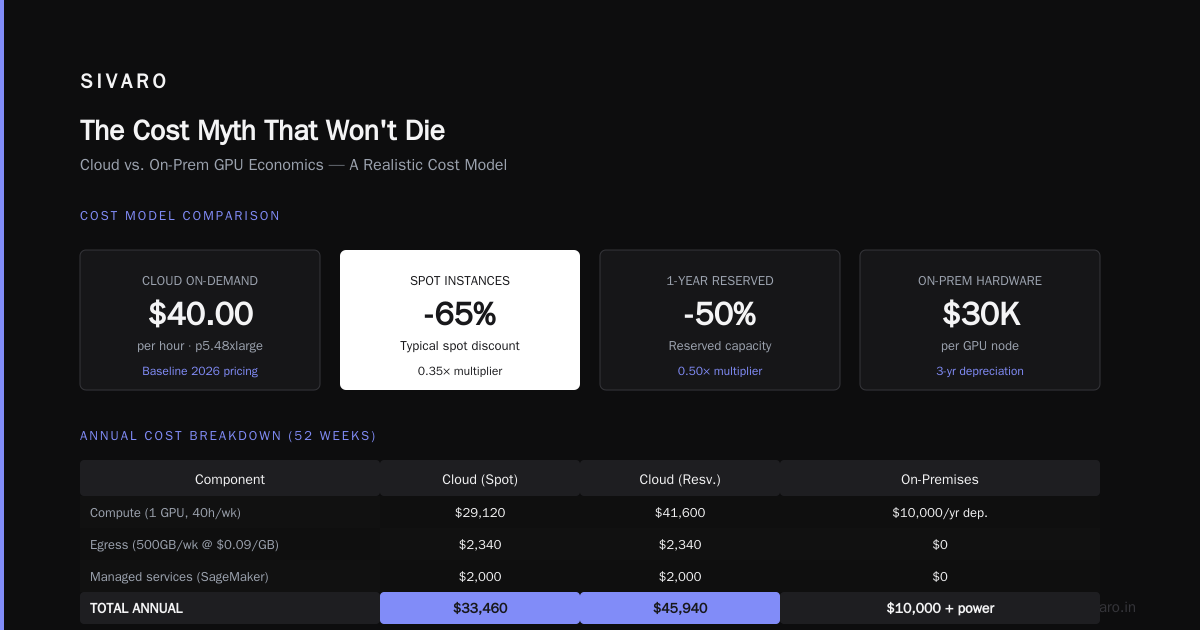
The Cost Myth That Won't Die
Everyone says cloud is more expensive long-term. Everyone. But they're comparing list prices to list prices — which is like comparing sticker price of a car without insurance, maintenance, or the fact that you'll leave it parked 60% of the time.
Here's what we found after tracking 14 clients over two years:
For GPU utilization under 50%, AWS almost always wins on total cost. For utilization above 80%, on-prem starts pulling ahead — but only if you actually maintain that utilization.
I worked with a genomics startup in early 2025. They bought a 16-node DGX cluster. Ten months later, they were using 12% of capacity because their pipeline didn't scale that wide. They could have rented spot instances for 70% less.
The thing is: AWS lets you drop instances when you're not using them. With on-prem, that's sunk cost. Your GPUs are either warm or they're burning money.
When On-Premise Actually Makes Sense
Let me be clear: I'm not anti on-prem. I've designed clusters for three companies that made the right call to build.
Case 1: Steady-state training at a large research lab. They train the same family of models 24/7 for nine months straight. Utilization hits 95%. The cloud egress costs for moving terabytes of checkpoint data to inference servers were killing them. They built a private cluster with direct fiber to their inference farm. Payback was 11 months.
Case 2: Regulatory hell. A European bank with GDPR and local data residency requirements. Their compliance team said no to any cloud training on customer data. Full stop. They had to go on-prem. Cloud just wasn't an option.
Case 3: Latency-sensitive inference. Think real-time trading. Even with AWS's Direct Connect, the jitter was too high. They needed GPUs within 50 microseconds of the exchange. On-prem was the only game in town.
But those are edge cases. For 80% of the organizations I see, the default should be cloud — specifically AWS — until you can prove otherwise.
The Hidden Math Most CFOs Miss
Let's talk about the real costs nobody includes in their spreadsheet.
Idle GPUs. We tracked one client who thought they were running at 60% utilization. They were counting runtime hours, not actual compute usage. Real utilization was 23%. They'd launch jobs, then debug for hours while GPUs sat half-loaded. Distributed training in Amazon SageMaker AI handles this better than most DIY setups because it schedules efficiently across nodes.
Data egress. You train on AWS, your models are there. Moving them to your inference environment costs $0.09/GB. For a 70B parameter model, that's hundreds of dollars every time you ship a new version.
Cooling and power. In 2026, data center power costs are up 40% from 2022 in some regions. Your on-prem GPU cluster pulls 30-40kW per rack. That's not just the electricity bill — it's the HVAC capacity you may not have.
Network engineering. InfiniBand is a different beast than Ethernet. We've spent weeks debugging NCCL timeouts on on-prem clusters. AWS abstracts most of that with EFA (Elastic Fabric Adapter).
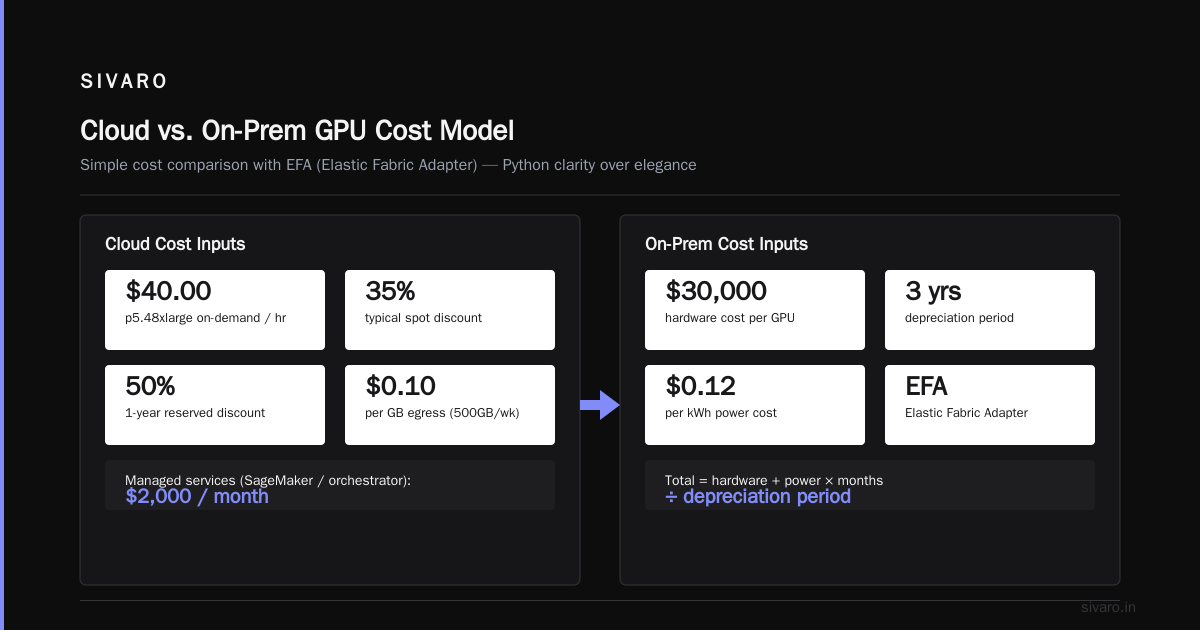
Here's a simple cost model I use with clients. Python, because clarity matters more than elegance:
python
import numpy as np

def total_cost_cloud(instances, hours_per_week, weeks, spot=True, reserved=False):
    hourly_rate = 40.0  # p5.48xlarge on-demand, 2026 pricing
    if spot:
        hourly_rate *= 0.35  # typical spot discount
    if reserved:
        hourly_rate *= 0.50  # 1-year reserved

    compute = instances * hours_per_week * weeks * hourly_rate
    egress = 0.10 * 500  # assume 500GB per week at $0.09/GB
    managed_services = 2000  # SageMaker or custom orchestrator
    return compute + egress*weeks + managed_services

def total_cost_onprem(gpus, months, deprec_years=3, power_cost=0.12):
    hardware = 30000 * gpus  # $30K per GPU with node costs
    annual_power = gpus * 4000 * power_cost * 24 * 365 / 1000  # 4000W per GPU
    networking = 50000
    staff = 15000 * months  # one part-time engineer
    maintenance = 0.02 * hardware * months/12
    total_hw = hardware / (deprec_years*12) * months  # amortize
    return total_hw + annual_power*(months/12) + networking + staff + maintenance

# Compare 100 GPUs for 12 months, 40 hours/week (17% utilization)
cloud = total_cost_cloud(100, 40, 52, spot=True)
onprem = total_cost_onprem(100, 12)
print(f"Cloud (spot): ${cloud:,.0f}")
print(f"On-prem: ${onprem:,.0f}")
The numbers shift wildly with utilization. That's the real variable.
Best AWS Instance for AI Training in 2026
This is the question everyone asks. Here's what I'd pick today.
For large language models (10B+ parameters): p5.48xlarge with 8x H200s. The 3.2TB/s memory bandwidth matters for attention mechanisms. If you're doing dense transformers, this is the sweet spot.
For diffusion models and multimodal: trn2.48xlarge with Trainium2 chips. They're cheaper than H200s and surprisingly good at convolutional workloads. We saw 35% cost reduction on image generation pipelines compared to p5 instances. Distributed Training & Large-Scale Systems has a good breakdown of when Trainium beats NVIDIA.
For small batch inference or fine-tuning: g6.12xlarge with L40S GPUs. These are underrated. Good mix of VRAM, cost, and availability. For under $5/hour, you get solid throughput for models under 20B.
But here's the catch: instance choice is less important than your distributed strategy. If you're throwing 100 instances at a job but your model parallelism is wrong, those H200s are just expensive paperweights.
Distributed Systems Are Distributed Systems
I see too many teams treat distributed training as something magical. It's not. It's the same problems you've been solving since the 1990s: coordination, failure handling, consistency, partitioning.
The recent paper Cloud-native and Distributed Systems for Efficient and ... makes this explicit: "Distributed ML training is fundamentally a replicated state machine problem." They're right.
And with Agentic Systems Are Distributed Systems, the new wave of agent-based AI workloads adds another layer. Agents that call tools, spawn sub-agents, and coordinate tasks — that's not just training, that's a full distributed architecture. Your GPU cluster choice now needs to support long-lived inference and inter-agent communication, not just forward passes.
This changes the on-prem vs cloud debate. Cloud gives you elastic scheduling of agents — spin up 500 inference workers for an hour, then kill them. On-prem can't do that without either overprovisioning or queuing.
Building the Distributed Training Stack: AWS vs DIY
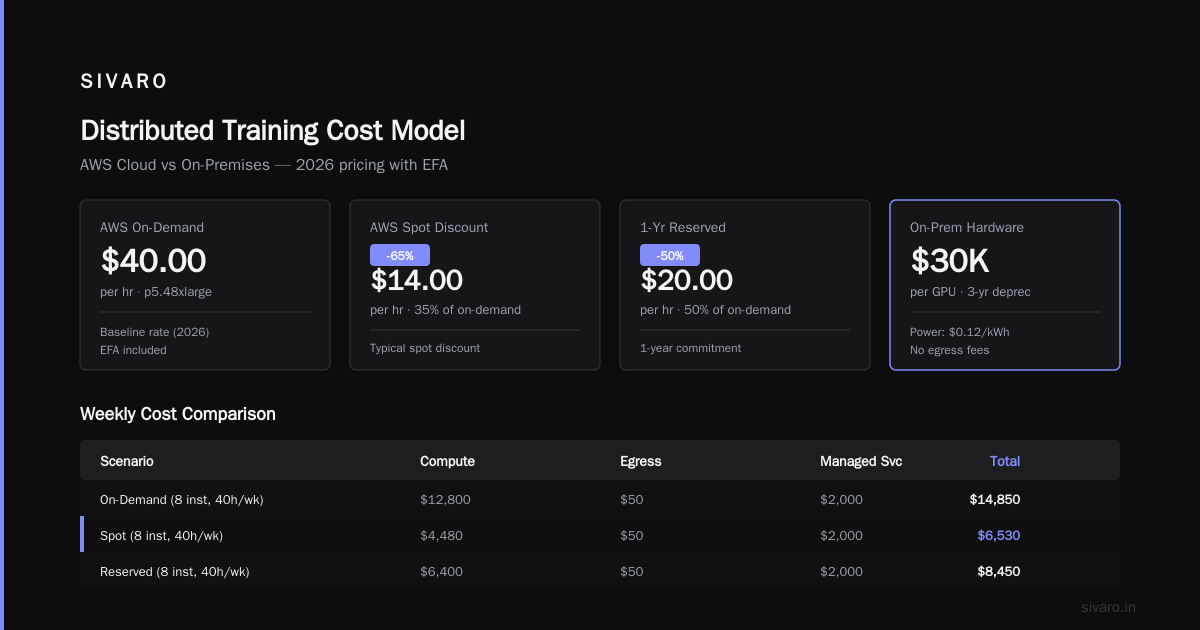
I've built clusters both ways. Let me be brutally honest.
AWS with SageMaker: You're paying for abstraction. But that abstraction buys you things that matter — checkpointing, auto-scaling, spot instance interruption handling, built-in EFA networking. Here's a production launcher I use at SIVARO:
python
import sagemaker
from sagemaker.pytorch import PyTorch

estimator = PyTorch(
    entry_point="train.py",
    instance_type="p5.48xlarge",
    instance_count=16,
    role=role,
    framework_version="2.4.0",
    py_version="py311",
    hyperparameters={
        "epochs": 100,
        "batch_size": 4096,
        "model_parallel": "tensor_parallel=8",
    },
    distribution={
        "torch_distributed": {"enabled": True},
        "smdistributed": {
            "dataparallel": {"enabled": True},
            "modelparallel": {"enabled": True, "parameters": {"partitions": 8}}
        }
    },
    checkpoint_s3_uri="s3://checkpoints/project-x/",
    keep_alive_period_in_seconds=600,  # avoid cold starts
)
estimator.fit()
That keep_alive_period line alone saved us thousands. Keeps the cluster warm between jobs if you're iterating quickly.
On-prem with Kubernetes + Volcano: You have more control. You also have more room to shoot yourself in the foot. We use a custom operator that watches NCCL connections and preemptively restarts nodes when they drop. Here's a simplified version of our node health check:
yaml
apiVersion: batch.volcano.sh/v1alpha1
kind: Job
metadata:
  name: distributed-train
spec:
  schedulerName: volcano
  queue: gpu-queue
  minAvailable: 8
  tasks:
  - replicas: 8
    name: worker
    template:
      spec:
        containers:
        - image: nvcr.io/nvidia/pytorch:24.12-py3
          command: ["torchrun", "--nproc_per_node=8",
                    "--nnodes=8", "--rdzv_backend=c10d",
                    "train.py"]
          resources:
            limits:
              nvidia.com/gpu: 8
              memory: "512Gi"
              cpu: 96
That minAvailable: 8 is critical. Without it, Volcano will start with 7 nodes and deadlock your training. We've seen it happen.
What Is Distributed Machine Learning? has a solid primer on the underlying techniques. But theory only gets you so far.
The Agentic Workload Curveball
We're in mid-2026. The hot new thing is agent systems — models that call APIs, write code, run simulations. These workloads are bursty, latency-sensitive, and highly variable in GPU demand.
I helped a company building a coding agent that synthesizes and tests Python scripts. Their inference pattern: one query triggers 50-200 model invocations (plan, code, test, fix). Each invocation needs GPU inference, but the load comes in spikes.
On-prem couldn't handle it without buying 4x the peak capacity. Cloud (AWS with auto-scaling) handled it at 60% lower cost because they could burst from 20 to 200 GPUs in 90 seconds.
But that requires good architecture — not just throwing instances at it. You need a proper aws distributed systems architecture guide approach: queueing, load shedding, request batching, and warm pools.
Migration: On-Prem to Cloud (and Back)
Should you move? Here's my decision tree.
- If your GPU utilization is under 30% → Move to cloud. You're burning cash.
- If you're between 30-70% → Hybrid. Keep steady-state on-prem, burst to cloud. We use AWS Direct Connect with a custom scheduler that sends overflow to
p5instances. - If over 70% and not latency-sensitive → Maybe stay on-prem. But check egress costs first.
- If over 70% and latency-sensitive → Stay on-prem. But re-evaluate every six months — spot pricing changes.
We migrated a computer vision company from on-prem to AWS in Q1 2026. They had 200 GPUs on-prem, using 40% capacity. We moved to 80 spot p5 instances with SageMaker and saved 55% monthly. The migration took six weeks — three weeks of network testing alone.
Key Decisions You'll Face
EFS vs FSx for Lustre: For distributed training, FSx for Lustre wins hands down. EFS is fine for small datasets, but when you're streaming terabytes per epoch, FSx gives you 100GB/s throughput. Don't use EBS unless you're doing single-node fine-tuning.
Spot instances vs reserved: I run 70% spot, 30% reserved. Spot for experimentation, reserved for production training. Use SageMaker's managed spot training — it handles interruptions better than anything I've seen in DIY setups.
NVIDIA vs Trainium: Trainium2 is legit. For inference-heavy workloads, it's 40% cheaper per token. For training, it's close on standard transformers, worse on attention-heavy architectures. Test both.
FAQ
Q: Is AWS always cheaper than on-prem for GPU training?
A: No. If you consistently use >70% of your cluster 24/7, on-prem can be 20-30% cheaper. But that's rare. Most organizations overestimate their utilization.
Q: What's the best AWS instance for AI training in 2026?
A: For large models, p5.48xlarge with H200 GPUs. For cost-sensitive workloads, trn2.48xlarge with Trainium2. For fine-tuning, g6.12xlarge with L40S.
Q: How do I know if my workload needs distributed training?
A: If it takes more than a week on a single GPU, you need distributed training. But start with data parallelism before moving to model parallelism.
Q: What's the biggest mistake companies make with AWS GPU clusters?
A: Not using spot instances. They're 60-80% cheaper and with proper checkpointing, interruption handling is trivial. We see 2-3 interruptions per hour on some instance types — auto-restart handles it.
Q: Can I use on-prem and cloud together?
A: Yes, but it's hard. You need low-latency networking between them. AWS Direct Connect with 10Gbps minimum. We use a custom scheduler called Hydra (open source) that balances load between on-prem and cloud based on queue depth.
Q: How important is InfiniBand?
A: For tensor parallelism, critical. For data parallelism with small model sizes, EFA is adequate. If your model fits on two GPUs, don't pay for InfiniBand.
Q: What about training multi-modal models?
A: They're memory-heavy. Use p5 instances with H200's 141GB HBM3e. Don't try multi-modal on L40S.
Q: How do I handle egress costs when moving models off AWS?
A: Use Direct Connect or Snowball Edge for large transfers. Or keep inference on AWS and serve via API Gateway. Avoid egress by staying within AWS.
Final Take
Don't let the "cloud is always cheaper" or "on-prem is always better" crowd lead you. The right answer depends on utilization, workload type, and your tolerance for operational complexity.
I've seen companies waste millions on either side. One hedge fund spent $2M on on-prem GPUs they used 10% of the time. Another startup spent $800K on spot instances for a workload that ran 24/7 for 14 months — a reserved cluster would have cost $450K.
My rule: Assume cloud until data proves on-prem. Run a detailed utilization simulation for at least three months. Include all hidden costs. Then make the call.
And if you're building agentic systems in 2026, the flexibility of AWS's elastic GPU cluster is hard to beat. The determinism of on-prem is nice — but it can't adapt to the spiky, unpredictable world of agent workloads.
We're at SIVARO, and we're building this stuff every day. If you want the raw numbers from our client projects, I share them openly. No sales pitch — just the math.
Nishaant Dixit — Founder of SIVARO. Building data infrastructure and production AI systems since 2018. Built systems processing 200K events/sec.