 SIVARO
aws meaning explained: What It Actually Means for Your AI Infrastructure in 2026
I remember the call clearly. Mid-2021, a startup founder I’d been advising asked: “Should we just use AWS for our training jobs, or build our own cluster?” He’d read the hype. He thought AWS was the only serious option. He was wrong.
AWS meaning explained, at its core, is simple: Amazon Web Services is a cloud platform that rents compute, storage, and networking on demand. But in 2026, that answer is dangerously incomplete — especially if you’re building production AI systems.
I’ve been doing this since 2018 at SIVARO. We’ve designed GPU clusters for hedge funds, biotech labs, and autonomous vehicle teams. We’ve seen the AWS bill shock. We’ve also seen the pain of self-hosting. This guide is the no-BS breakdown of what AWS means for real AI workloads, when to use it, when to walk away, and how to decide.
What AWS Actually Is (and Isn’t)
AWS meaning explained as “the biggest cloud provider” is technically true but practically useless. Think of AWS as a rental market. You pay for servers by the hour (or second). You get root access, networking, and a global footprint. But you also inherit a complicated bill, shared tenancy, and a lot of configuration decisions.
The core service most AI teams use is EC2—Elastic Compute Cloud. You pick an instance type (like p4d.24xlarge with 8 A100 GPUs), launch it, SSH in, and start training. If you’re just running a single model, that’s fine. If you’re running 100 models across 50 nodes, it gets messy fast.
AWS also offers managed AI services—SageMaker, Bedrock, etc. I don’t use them much. They abstract away important details and lock you into tight vendor contracts. For production systems, we prefer raw compute with orchestration we control.
So the real meaning of AWS for AI practitioners: a flexible but expensive way to get GPU compute without buying hardware. That flexibility has a price—both in dollars and in operational friction.
The Real Cost of AWS GPU Instances
Let’s talk dollars, because that’s where most people get shocked.
An AWS p4d.24xlarge (8 A100 40GB) on-demand costs about $32.77 per hour. That’s $23,600 per month per instance. You can get better pricing with reserved instances (1-year upfront cuts it to ~$15/hour). But still — a cluster of 10 such nodes would burn through $200k+ a month.
Now compare that to renting dedicated GPU clusters from providers like Vast.ai. They offer per-hour GPU rentals at 60–70% less than AWS on-demand. A single RTX 4090 (great for inference, not great for training) runs around $0.45/hour on Vast. But you lose the managed networking and S3 integration.
The question isn’t “which is cheaper?” — it’s “what are you trading off?” We tested both extensively. For short-lived burst jobs (a few hours), AWS EC2 is fine. For long-running training that runs weeks, you want dedicated clusters or on-premise. The math tilts hard at month two.
I’ve seen teams blow $500k in three months on AWS GPU instances because they never set budgets or stop idle nodes. That’s not a cloud problem. That’s a discipline problem. But AWS makes it easy to be undisciplined.
AWS EC2 vs GPU Cluster Rental for AI: The Real Trade-offs
You’re reading this because you’re trying to decide: AWS EC2 GPU instances or renting a dedicated GPU cluster from somewhere like Vast or RunPod or Lambda Labs? Or building your own?
Here’s my take after years of building both:
- AWS wins for: Fast prototyping, multi-region deployments, integration with S3/CloudWatch, and when you need to spin up and down rapidly.
- Dedicated GPU rental wins for: predictable long-running training, lower cost per GPU-hour, no noisy neighbors (AWS instances are shared physical hosts unless you pay for dedicated).
- On-premise GPU cluster wins for: total control, predictable cost, but high upfront capital and ops overhead.
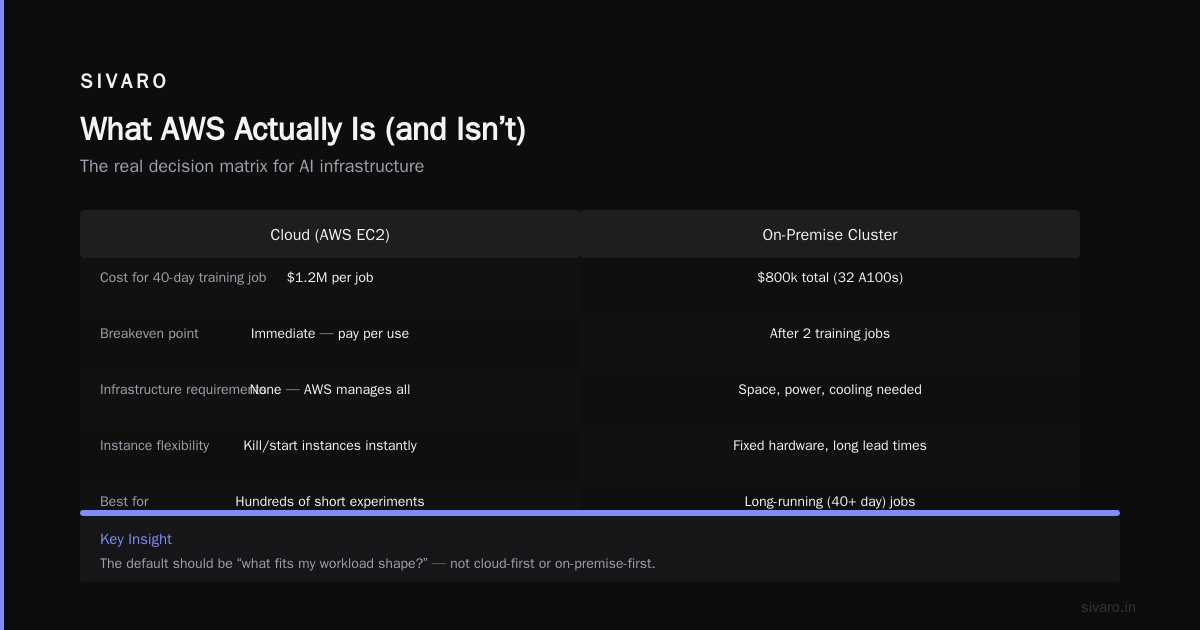
Most people think AWS is the default. They’re wrong. The default should be “what fits my workload shape?”
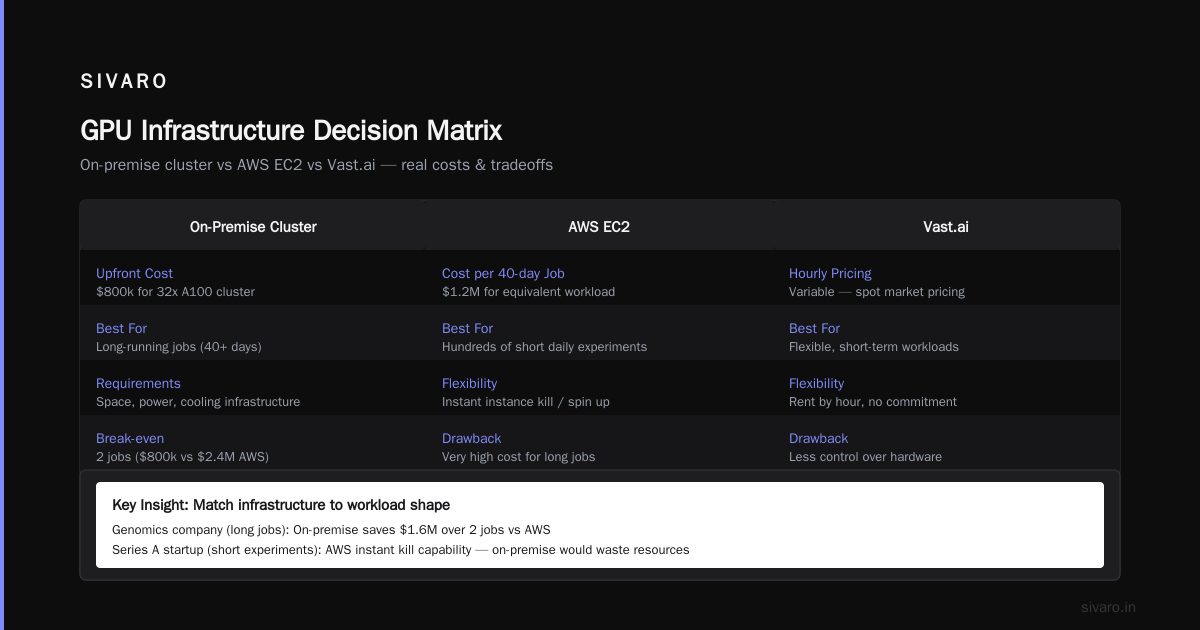
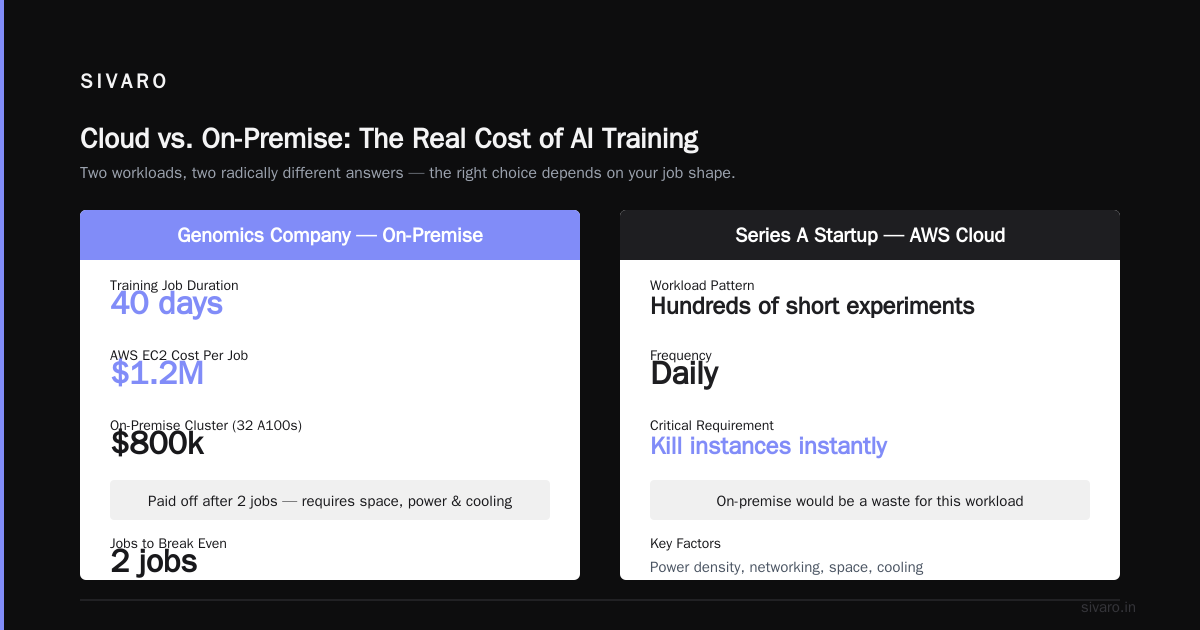
For example, at SIVARO we help a genomics company that runs training jobs lasting 40 days. AWS EC2 would cost them $1.2M per job. They built an on-premise cluster with 32 A100s for $800k total — two jobs and it’s paid off. But that only works if you have the space, power, and cooling.
On the other hand, a friend at a Series A startup uses AWS exclusively. His team runs hundreds of short experiments daily. They need the ability to kill instances instantly. On-premise would be a waste.
The decision matrix changes constantly. 5 Key Considerations when Building an AI & GPU Cluster lists factors like power density, networking, and cooling — things AWS handles for you, but at a premium.
GPU Cluster Architecture: What You Need to Know
Since we’re talking AWS meaning for AI, you need to understand what a GPU cluster actually does. Because AWS offers many abstractions, but knowing the raw architecture helps you make better choices.
A GPU cluster is a set of servers (nodes) connected by high-speed networking (InfiniBand or RoCE). Each node has one or more GPUs (e.g., 8 A100s). The nodes coordinate to train a single large model using parallelization strategies like data parallelism, model parallelism, or pipeline parallelism.
If you’re running distributed training on AWS, you’re building a virtual GPU cluster. AWS offers ParallelCluster (a tool to manage clusters on EC2), but you still need to configure Slurm or Kubernetes yourself. GPU Cluster Explained: Architecture, Nodes and Use Cases gives a good overview of node types (compute, storage, management) and the networking fabric.
Key takeaway: AWS’s EC2 instances are the bricks. You build the cluster. That’s why many teams get stuck — they think renting 8 A100 instances automatically makes them a cluster. It doesn’t. You need interconnect setup, orchestration, monitoring, and fault tolerance.
When AWS Works for AI (and When It Hurts)
Let me be blunt. AWS is not optimized for AI training. It’s optimized for general cloud workloads — web servers, databases, queues. The GPU instances are an afterthought. Here’s how that shows up:
Good:
- Fast provisioning. You can get an A100 instance in under 2 minutes.
- Near-infinite scale for inference. AWS can serve millions of model requests per second if you design it right.
- Robust integrations with tools like SageMaker (though I avoid it) and S3 for checkpoint storage.
Bad:
- Networking bottlenecks. EC2 instance bandwidth is limited. For large model training, you need EFA (Elastic Fabric Adapter), which costs extra and has limited support.
- Instance availability issues. In 2022–2023, AWS had major GPU shortages. You couldn’t get p4d instances in us-east-1. Today (2026) it’s better, but still not guaranteed.
- Pricing complexity. Reserved instances, spot instances (huge cost savings but risk of interruption), dedicated hosts — it’s a maze. What Is a GPU Cluster and How to Build One notes that many teams overpay because they don’t understand spot pricing dynamics.
We saw a client pay $15k for 10 hours of training because they used on-demand p4d instances for a job that could have run on spot instances at 1/3 the cost — with checkpointing every 10 minutes, interruption risk was minimal.
The point: AWS meaning explained without understanding spot instances is like explaining cars without mentioning fuel options.
Building Your Own GPU Cluster vs Renting from Vast.ai vs AWS
Okay, let’s compare three concrete options for a small AI team (say 5 engineers training models up to 70B parameters):
Option A: AWS EC2
- Cost: ~$23,600/month per 8-GPU node on-demand. Spot can drop to $7k/month.
- Setup time: 15 minutes to first instance, but cluster setup takes days.
- Flexibility: Spin up/down instantly.
- Risk: Shared tenancy (noisy neighbors) unless you pay for Dedicated Instances.
- Ops: You manage everything — OS, drivers, networking, orchestration. Or use ParallelCluster.
Option B: Rent from Vast.ai
- Cost: $0.45/hour per RTX 4090, $1.20/hour per A100 80GB.
- Setup time: 5 minutes to rent a box. They have pre-configured images.
- Flexibility: Pay per hour, no long-term commitment.
- Risk: Variable performance (shared infrastructure). Some providers have reliability issues.
- Ops: Minimal — they handle hardware. You still install software.
Option C: On-premise GPU cluster
- Cost: $300k–$500k for a 32 A100 cluster (capital) plus ~$40k/year in power/cooling.
- Setup time: 3–6 months to procure, rack, and wire.
- Flexibility: Full control. You own it.
- Risk: Hardware failures, power outages, underutilization.
- Ops: Full-time team needed for maintenance, networking, and driver updates.
Which is best? Depends on your horizon. If you plan to run models for 2+ years, on-premise wins on total cost. If you need burst capacity for 6 months, Vast or similar GPU rental is cheapest and easiest. AWS is the middle ground — convenient but expensive.
I’ve seen startups succeed with each approach. The ones that failed tried to stay on AWS too long without understanding the cost implications.
Code: Launching a GPU Instance on AWS
Here’s how to get started with a single A100 node on AWS using the AWS CLI. This is the basic building block.
bash
# Launch a p4d.24xlarge instance with Deep Learning AMI
aws ec2 run-instances   --image-id ami-0abcdef1234567890   --count 1   --instance-type p4d.24xlarge   --key-name my-key-pair   --security-group-ids sg-12345678   --subnet-id subnet-12345678   --block-device-mappings DeviceName=/dev/sda1,Ebs={VolumeSize=200}   --tag-specifications 'ResourceType=instance,Tags=[{Key=Name,Value=training-node}]'
Then you SSH in, install NVIDIA drivers if not already present, and run your training script. Simple. But for distributed training across multiple nodes, you need something like this Slurm job script (after setting up ParallelCluster):
bash
#!/bin/bash
#SBATCH --nodes=4
#SBATCH --ntasks-per-node=8
#SBATCH --gres=gpu:8
#SBATCH --time=48:00:00
#SBATCH --output=training_%j.log

srun python train.py --model-config config.yaml --distributed
AWS doesn’t give you Slurm out of the box. You install it. Or use Kubernetes with NVIDIA’s GPU operator.
For spot instances (cheaper but interruptible), add --instance-market-options MarketType=spot to the CLI call. Then handle interruption with checkpointing:
python
import signal
import torch

def handle_interrupt(signum, frame):
    print("Spot interruption signal received. Saving checkpoint...")
    torch.save(model.state_dict(), "checkpoint_interrupted.pt")
    sys.exit(0)

signal.signal(signal.SIGTERM, handle_interrupt)
That’s the reality of AWS for AI. Powerful but requires you to build the safeguards yourself.
AWS GPU Cluster Pricing: The Hidden Costs
Most people focus on the per-hour price. But “aws gpu cluster pricing” includes more than instance cost. Here’s what you’re actually paying:
- Compute (EC2): $32.77/hr for p4d.24xlarge on-demand.
- Storage: EBS volumes cost $0.08/GB-month. A 16TB volume for data set adds $1,280/month.
- Networking: Data transfer out to internet costs $0.09/GB. For model checkpoints and logs, this adds up fast.
- ELB/CloudWatch: Monitoring and load balancing. Negligible but not zero.
- Support: Business support starts at $100/month. Enterprise is $15k+.
Our team built a cost calculator for a client. The total monthly cost for a 10-node A100 cluster with 100TB storage and moderate network traffic came to $287,000/month on-demand. With 3-year reserved instances and spot usage, they could drop to $95,000/month still higher than on-premise at scale.
The hidden killer? Unused instances. I once audited a company that left 5 p4d instances running idle for 3 weeks. That’s $27,000 down the drain.
When to Avoid AWS Entirely
Here’s a contrarian take: if your AI workload is stable and predictable, don’t use AWS. Use dedicated GPU rental or on-premise.
I’ve seen teams waste entire engineering quarters fighting AWS quotas, instance availability, and networking configurations. One company spent 6 months trying to get distributed training working on AWS ParallelCluster before switching to a dedicated colo cluster that ran in 2 weeks.
What is the best option to setup on premise GPU cluster for a small company — that NVIDIA forum thread has real stories. People argue for prebuilt solutions like Supermicro or Nvidia DGX. The consensus: if you have the room and the budget for a single DGX (8 GPUs), it pays off in 9 months vs AWS.
That said, don’t overcorrect. If your model sizes change weekly, or you’re exploring new architectures, AWS’s flexibility is worth the premium. It’s a tool, not a religion.
FAQ
What does AWS stand for?
Amazon Web Services. It’s the cloud computing division of Amazon, offering over 200 services including compute, storage, databases, and AI/ML tools.
Is AWS good for AI training?
It can be, but it’s not the best choice for long-running training jobs. For short experiments and inference, it’s excellent. For sustained training, look at dedicated GPU rental or on-premise.
How much does a GPU cluster cost on AWS?
For an 8-GPU A100 instance, on-demand is ~$32.77/hour. Reserved instances can cut that in half. Spot instances can be 60–70% less. But total cost includes storage, networking, and management overhead.
AWS EC2 vs GPU cluster rental for AI — which is cheaper?
For short burst jobs (hours), EC2 wins on convenience. For long-running (days+), GPU rental like Vast.ai or dedicated clusters are significantly cheaper — often 50–70% less per GPU-hour.
Can I use AWS GPUs spot instances safely?
Yes, with checkpointing. If your training code saves state every few minutes, spot interruptions won’t lose progress. AWS doesn’t support preemptible instances like Google Cloud, but spot is similar.
What is AWS meaning explained in simple terms?
It’s a giant rental marketplace for computer servers. You pay for what you use, no upfront cost. For AI, you rent GPU-powered servers to train and run models, but you manage the software yourself.
Should I use AWS or build my own cluster?
If your workload exceeds 6 months of continuous GPU usage and you have realistic power/cooling, build. If you need flexibility and can stomach higher cost, use AWS. If you want lowest cost for moderate scale, rent dedicated cloud GPUs.
Conclusion
AWS meaning explained today isn’t just “Amazon’s cloud.” It’s a decision point for anyone building AI infrastructure. It’s a flexible but expensive platform that excels at short-term experimentation and inference at scale. It falls short for sustained deep learning training at cluster scale.
The best engineers I know treat AWS as a starting point, not the final answer. They benchmark, they calculate TCO, and they migrate workloads to the most cost-effective platform for each job. At SIVARO, we do this every day. We’ve seen that mixing AWS for burst capacity with dedicated GPU clusters for steady loads yields the best of both worlds.
Don’t let the hype decide for you. Run your own numbers. Test with spot instances. And always, always keep an eye on the real cost of idle GPUs.
Nishaant Dixit — Founder of SIVARO. Building data infrastructure and production AI systems since 2018. Built systems processing 200K events/sec.