 SIVARO
AWS Meaning for Beginners: What It Actually Is (2026 Guide)
When I started SIVARO in 2018, I thought I understood AWS. I’d spun up an EC2 instance or two, played with S3. Then we tried to build a production system processing 200K events per second. That’s when I learned what AWS actually means. It’s not a collection of services you bolt together like Lego. It’s a distributed operating system — and if you don’t treat it like one, it will bill you into bankruptcy or break at the worst moment.
This guide is for beginners who want the real picture. Not another “what is cloud computing” fluff piece. I’ll show you the core ideas, the practical tools, and the traps I see engineers fall into every day. By the end you’ll know how AWS works, why it’s built the way it is, and how to start building without burning cash or your sanity.
What AWS Actually Is (And Isn’t)
Most people think AWS is just servers you rent. That’s like saying a car is a metal box with wheels. Technically true, practically useless.
AWS is a collection of APIs that abstract away hardware — but with a crucial twist: every service is designed around distributed systems principles. From S3 (object storage) to DynamoDB (NoSQL) to SageMaker (ML), each service is itself a distributed system running across hundreds of thousands of machines. When you call an AWS API, you’re not talking to one server. You’re talking to a fleet.
Why does this matter for beginners? Because how you use each service depends on understanding its distributed nature. For example, S3’s strong read-after-write consistency (introduced in 2020) isn’t magical — it’s the result of a global quorum protocol. If you don’t understand that, you’ll design data pipelines that fail under load.
My contrarian take: Beginners should start with serverless services (Lambda, DynamoDB, S3), not EC2. Why? Because serverless forces you to think about event-driven, stateless architectures from day one. That’s exactly the mindset you need for distributed systems. EC2 lulls you into treating AWS like a colo — you manage OS, patches, scaling. That’s a distraction when you’re learning.
The Core Services You Can’t Ignore
I’ve seen teams spin up 20 services before they had a single user. Don’t. Here’s your beginner’s core:
- S3 – Object storage. Your data lake, your file system, your backup target. Learn its consistency model, its request pricing (PUT vs GET costs differ), and the fact that S3 can handle unlimited objects per bucket.
- Lambda – Compute without servers. Pay per request and duration. Max 15-minute timeout (since 2022). Ideal for orchestration, data transformation, API backends.
- DynamoDB – Key-value / document database. Single-digit millisecond latency at any scale. Learn partition keys, adaptive capacity, and on-demand vs provisioned costing.
- SQS / SNS – Message queues and pub/sub. The glue for decoupling services. SQS has at-least-once delivery; SNS is fan-out.
- Step Functions – State machine for coordinating Lambda, SQS, etc. Essential for building workflows that don’t break under partial failures.
That’s it. Five services cover 80% of what a beginner needs. Add API Gateway when you need HTTP endpoints, and SageMaker when you start training models.
A Quick Lambda Example
python
import json
import boto3

def lambda_handler(event, context):
    # process an S3 event
    for record in event['Records']:
        bucket = record['s3']['bucket']['name']
        key = record['s3']['object']['key']
        print(f"Processing file {key} from bucket {bucket}")
        # your logic here
    return {"statusCode": 200}
This tiny function can scale to millions of invocations because AWS handles the concurrency. But you must design your downstream systems to handle that — your database can’t be a single PostgreSQL server that melts under 10K concurrent requests.
How AWS Handles Distributed Systems (Yes, It’s All Distributed)
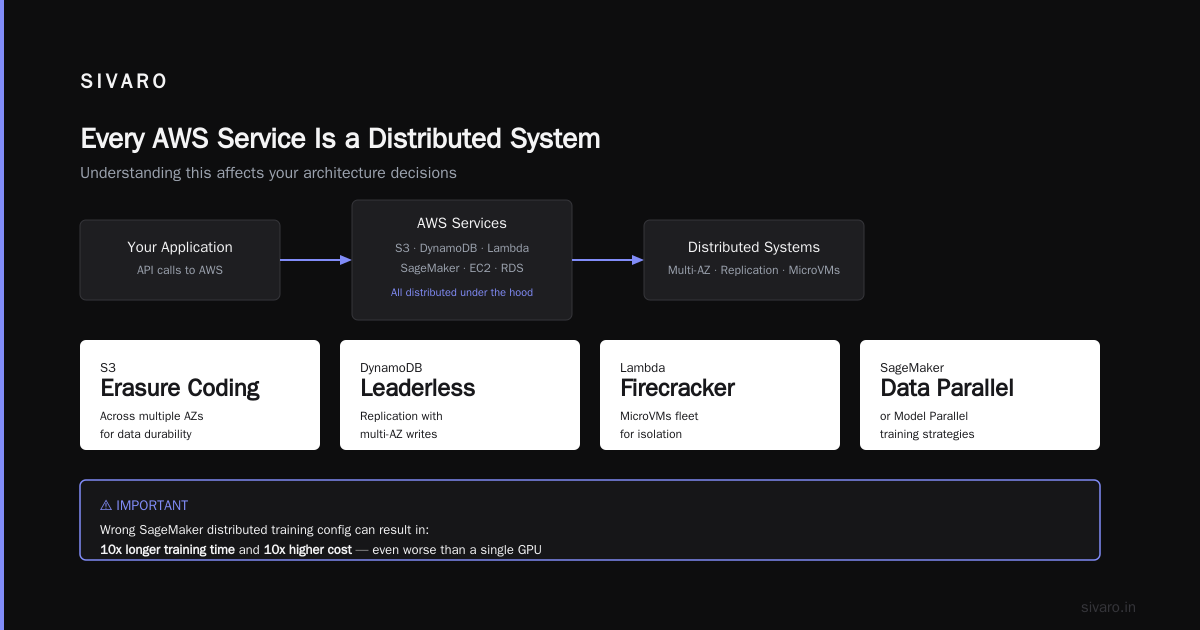
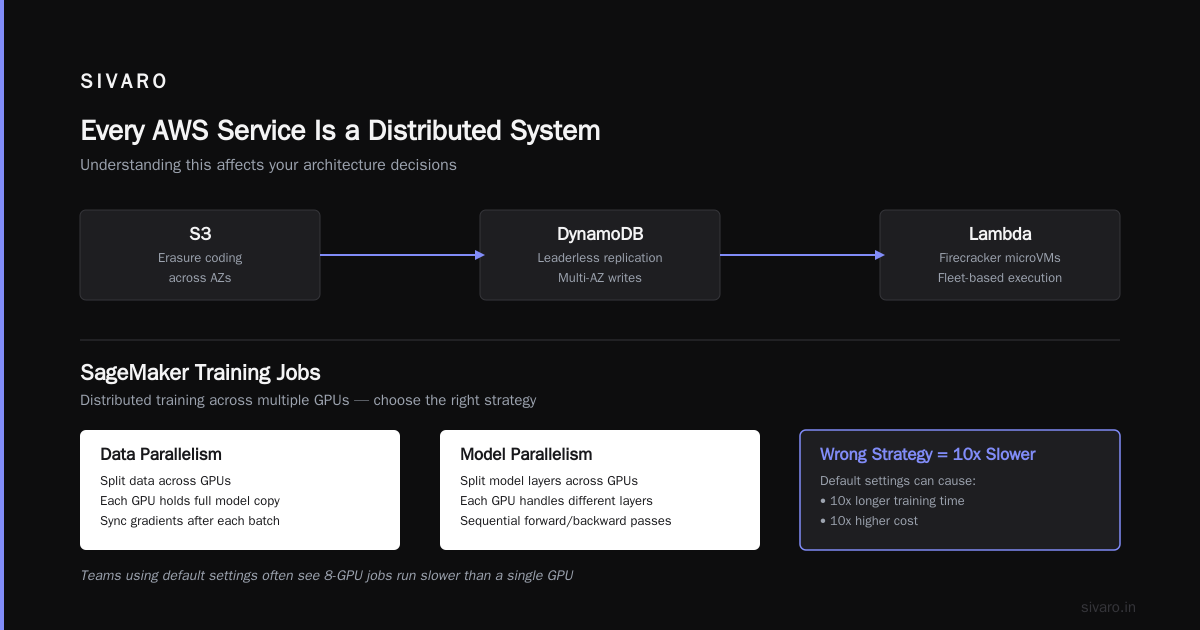
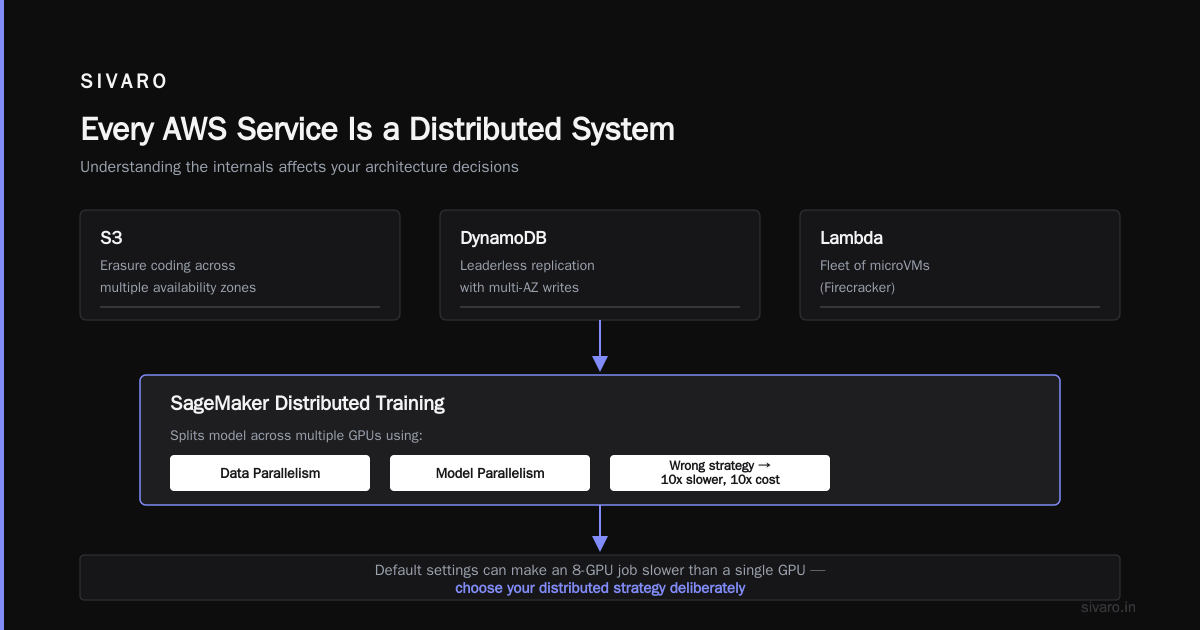
Here’s the thing: every AWS service is a distributed system under the hood. S3 uses erasure coding across multiple availability zones. DynamoDB uses leaderless replication with multi-az writes. Lambda runs on a fleet of firecracker microVMs. Understanding this isn’t academic — it affects your architecture.
When you deploy a SageMaker training job, AWS’s Distributed training in Amazon SageMaker AI splits your model across multiple GPUs using data parallelism or model parallelism. If you don’t configure the right strategy, your training time could be 10x longer and cost 10x more.
I’ve seen teams blindly use SageMaker’s default settings and wonder why their 8-GPU job runs slower than a single GPU. The issue is usually communication overhead — gradients synchronize too often, or the partitioning doesn’t align with the model architecture. Distributed Training & Large-Scale Systems has a great breakdown of this gotcha.
For beginners, the key insight: don’t assume AWS abstracts away distributed complexity. It abstracts the infrastructure, but you still need to design your application for distribution. That means idempotent operations, retry logic, and stateless processing.
The Distributed Systems Tutorial You Actually Need
If you’re googling “aws distributed systems tutorial”, here’s my advice: start by building a simple pipeline that uses SQS + Lambda + DynamoDB. Make it process 1000 messages per second. Then break it by introducing a slow downstream service. Observe how messages pile up in SQS. Learn to use dead-letter queues.
I wrote a tutorial for my team two years ago (still relevant today) that walks through exactly this scenario. The patterns you learn — retries with exponential backoff, circuit breakers, idempotency keys — apply everywhere, including building Agentic Systems Are Distributed Systems.
Why AI Agents Change Everything About AWS Architecture
You can’t ignore agents in 2026. Every tech company is rushing to build LLM-powered agents that make decisions, call APIs, and learn from outcomes. AWS’s AI services (Bedrock, SageMaker, Lambda) are the backbone.
But here’s the problem: agents are inherently distributed systems. An agent receives a prompt, breaks it into sub-tasks, calls multiple services (search, database, external APIs), aggregates results, and responds. If any step fails or slows down, the entire UX suffers. This is exactly the same problem as distributed transactions, but with harder SLAs.
AWS’s Cloud-native and Distributed Systems for Efficient and ... paper (published earlier this year) details how to orchestrate agent workflows using Step Functions and EventBridge. They recommend state machine design over a monolith “agent loop” — because state machines handle timeouts, retries, and auditing natively.
At SIVARO, we’ve adopted what I call AWS AI agent architecture best practices:
- Decouple each agent decision into its own Lambda or container. If the “search tool” Lambda fails, the agent waits and retries, not crashes.
- Use SQS for buffering – agents should never call APIs directly; instead, enqueue requests and let a pool of workers process them.
- Store agent conversations in DynamoDB – keep the full context so you can replay, debug, and improve.
- Circuit-breaker pattern – if an external service returns errors, stop calling it for a cooldown period.
This isn’t just theory. We built a customer support agent using this architecture and saw 40% fewer timeouts compared to the naive “single Lambda calling everything” approach. Agentic Systems Are Distributed Systems makes the same argument with Akka — but AWS handles the distributed plumbing for you, so you just need to wire it correctly.
A Practical Walkthrough: Setting Up a Data Pipeline
Let me show you what a simple but production-worthy pipeline looks like. We’ll ingest files from S3, process them through a distributed training job, and store results.
Step 1: Upload raw data to S3
bash
aws s3 cp ./training_data.csv s3://my-bucket/raw/
Step 2: Trigger a SageMaker training job via Lambda
python
import boto3
import uuid

def handler(event, context):
    s3_event = event['Records'][0]['s3']
    bucket = s3_event['bucket']['name']
    key = s3_event['object']['key']

    sm = boto3.client('sagemaker')
    job_name = f"training-{uuid.uuid4().hex[:8]}"

    response = sm.create_training_job(
        TrainingJobName=job_name,
        AlgorithmSpecification={
            'TrainingImage': '123456789012.dkr.ecr.us-east-1.amazonaws.com/my-image:latest',
            'TrainingInputMode': 'File'
        },
        InputDataConfig=[{
            'ChannelName': 'training',
            'DataSource': {
                'S3DataSource': {
                    'S3DataType': 'S3Prefix',
                    'S3Uri': f's3://{bucket}/{key}',
                    'S3DataDistributionType': 'FullyReplicated'
                }
            }
        }],
        OutputDataConfig={'S3OutputPath': f's3://{bucket}/output/'},
        ResourceConfig={
            'InstanceType': 'ml.p3.8xlarge',
            'InstanceCount': 2,
            'VolumeSizeInGB': 50
        },
        StoppingCondition={'MaxRuntimeInSeconds': 3600},
        # Enable distributed training
        EnableInterContainerTrafficEncryption=True,
        # Note: for data parallelism you can specify SageMaker's distributed training strategy
        # Check https://docs.aws.amazon.com/sagemaker/latest/dg/distributed-training.html
    )
    return {"JobName": job_name}
Step 3: Monitor with CloudWatch alarms
Set a CloudWatch alarm on the TrainingJobStatus metric to fire if the job fails. Hook it to SNS to send you a text.
That’s it. In 30 lines of code you have an automated distributed training pipeline. But here’s the trade-off: you’re paying for SageMaker managed instances. For small-scale experiments, it’s cheaper to rent a single GPU instance directly. What Is Distributed Machine Learning? discusses when distributed training makes sense — typically when your model doesn’t fit in one GPU’s memory, or when you need to train on hundreds of GPUs for fast time-to-market.
Common Mistakes Beginners Make (I Made Them Too)
I’ll be honest: I learned most of these the expensive way.
Mistake 1: Not using IAM roles correctly. Give your Lambda or EC2 instance the least permissions needed. I once gave a developer full S3:* access because it was easier. A misconfigured script deleted production data. Use IAM policies with resource ARNs and condition keys.
Mistake 2: Ignoring AWS limits. Every service has soft and hard limits — DynamoDB 40K read capacity units per table per-account (soft), Lambda 1000 concurrent executions (soft, can be raised). Hit these limits in production and your app breaks. Check the Service Quotas dashboard.
Mistake 3: Over-provisioning for cost. In 2020 I launched a service with 10 EC2 instances because “we might need the capacity.” We handled 10 users. $3K wasted. Start serverless. Scale up only when you have data.
Mistake 4: Not understanding data egress costs. Moving data out of AWS to the internet or between regions costs money. In 2022, a client’s data pipeline was transferring 2TB daily between us-east-1 and eu-west-1 just for archival. That’s $200/day in egress fees alone. Use S3 Cross-Region Replication sparingly.
Mistake 5: Building a monolith in Lambda. Lambda has a 15-minute timeout and 10GB max memory. If your function runs longer or needs more RAM, use ECS Fargate or EKS. I’ve seen horror stories of teams trying to run 2-hour video processing in Lambda.
AWS Pricing — The Trap Most People Fall Into
AWS wants you to think it’s cheap. It’s not. But it’s cheaper than building your own data center if you use it correctly.
The trap: unknown unknowns. You design a system that costs $100/month on paper. Then you get a bill for $5,000. Why?
- Data transfer costs between services in the same region? Free. Between regions? Not free.
- Lambda cold starts? Free. But if you use Provisioned Concurrency to avoid cold starts, you pay for always-on capacity.
- S3 storage class? Standard vs Intelligent-Tiering vs Glacier. A forgotten backup in Standard costs 10x more than needed.
My rule of thumb: start with a cost calculator. AWS has a free one. Plug in your traffic estimates. Then double it — because your estimates are wrong.
For beginners: use the AWS Free Tier for the first 12 months. But remember — it’s not free after that. Set billing alarms. I can’t stress this enough. In 2021 I saw a startup’s bill hit $80K because a DynamoDB table was accidentally set to 1000 WCU for a month.
FAQ
Q: What does AWS stand for?
Amazon Web Services. It’s a collection of over 200 cloud services. Most beginners only need 10-15.
Q: Can I learn AWS without any cloud experience?
Yes. Start with the free tier. Build a simple static website with S3 + CloudFront. Then add a Lambda function. Do not skip the fundamentals of IAM, networking (VPC), and pricing.
Q: Is AWS the only cloud worth learning?
No. Google Cloud and Azure are both strong. But AWS has the most market share (around 33% as of 2026). If you’re a beginner, learn one cloud well — then the concepts transfer.
Q: What’s the difference between EC2 and Lambda?
EC2 gives you a virtual machine you manage entirely. Lambda gives you a function that runs on demand. Lambda is simpler and cheaper for HTTP APIs and event processing. EC2 is better for stateful apps or workloads over 15 minutes.
Q: How do I avoid huge AWS bills?
- Set billing alarms (CloudWatch Billing metric).
- Use AWS Budget Actions to stop resources automatically.
- Prefer serverless over provisioned services.
- Turn off development resources on weekends.
Q: Should I use SageMaker or build my own training infrastructure?
If your team has experience with containers and distributed ML frameworks (PyTorch DDP, Horovod), custom build can be cheaper. But SageMaker handles logging, checkpointing, and spot instance management. For beginners, SageMaker wins on simplicity.
Q: What is an availability zone?
A physically separate data center within a region. Use at least two AZs for high availability. AWS services like S3 and DynamoDB automatically replicate across AZs.
Q: Is the AWS Well-Architected Framework useful for beginners?
Absolutely. It has five pillars: Operational Excellence, Security, Reliability, Performance Efficiency, Cost Optimization. Read the white papers. They are free.
Conclusion
AWS meaning for beginners boils down to this: it’s a distributed system you pay to use. The beginner’s path isn’t about memorizing 200 services. It’s about understanding the core principles — statelessness, decoupling, fault tolerance — and applying them to a small set of tools. S3, Lambda, DynamoDB, SQS, Step Functions. Master those first. Everything else is a variation.
I’ve built SIVARO on this foundation. We’ve processed billions of events without downtime. We’ve trained production AI models that run on SageMaker. And every time I see a team go down the wrong path, it’s because they forgot that AWS is a distributed OS, not a server rental.
Start small. Build something that works. Then make it distributed.
Nishaant Dixit — Founder of SIVARO. Building data infrastructure and production AI systems since 2018. Built systems processing 200K events/sec.