 SIVARO
AWS Meaning in Distributed Systems — What Every Engineer Needs to Know
Remember 2017? I was running a data pipeline on a single EC2 instance, convinced I could just "scale vertically" for another year. Three months later, we hit 12K events/sec and the instance melted. That's when I learned what AWS really means in distributed systems: it's not a menu of services you pick from. It's an opinionated architecture for building systems that survive, adapt, and actually work at scale.
I'm Nishaant Dixit, founder of SIVARO. We build data infrastructure and production AI systems. Over the past eight years, I've watched AWS evolve from a collection of loosely coupled APIs into a distributed systems platform that forces you to think about failure, consistency, and partitioning from day one. This guide is what I wish someone had handed me in 2018.
Let's cut the marketing noise. AWS's meaning in distributed systems boils down to three things: compartmentalized failure domains, asynchronous coordination, and a strong bias toward eventual consistency. Most people think it's just "more servers." They're wrong.
Why AWS Isn't Just a Cloud Provider — It's a Distributed Systems Platform
Here's a test. Ask a junior engineer: "What is AWS?" They'll say "cloud compute and storage." Ask a senior distributed systems engineer. They'll say "a set of primitives for building partition-tolerant systems." That gap is where most projects die.
AWS forces you to think in terms of network boundaries. Every service — S3, DynamoDB, SQS, Lambda — assumes your application can handle partial failures. That's not a bug. It's the whole point. When I tell clients "AWS meaning in distributed systems is a lesson in fault isolation," they usually nod politely. Then their monolith crashes because they forgot SQS doesn't guarantee exactly-once delivery.
The real shift happened around 2022-2023 when AWS started shipping purpose-built distributed systems primitives (think EventBridge Pipes, S3 Express One Zone, Aurora DSQL preview, SageMaker HyperPod). These aren't just features. They're acknowledgements that distributed system architectures need different abstractions than single-node compute.
At SIVARO, we run a data pipeline that processes 200K events/sec. AWS isn't our hosting provider. It's the fabric of the system. Every component — Kinesis, Lambda, DynamoDB, S3 — is designed for the trade-offs of the CAP theorem. If you treat them like monolithic APIs, you'll fail. Hard.
The Core Architecture: AWS's Parallel Computing Architecture Explained
When people ask me to explain "aws parallel computing architecture explained," I start with a simple diagram in my head. You've got:
- Stateless compute (Lambda, ECS, EKS)
- Stateful storage (S3, DynamoDB, ElastiCache)
- Asynchronous glue (SQS, SNS, EventBridge)
- Orchestration (Step Functions, MWAA)
Each piece assumes the others can fail. Each piece scales independently. And crucially, each piece has a different consistency model. S3 gives you read-after-write for new objects but eventual consistency for overwrites. DynamoDB is strongly consistent if you pay for it (and accept higher latency). SQS is at-least-once — you will get duplicates.
Here's where most teams screw up. They build a "distributed system" that's really just a monolith spread across EC2 instances with a load balancer. That's not distributed. That's fragile.
Real parallel computing on AWS means using services that distribute work across partitions without coordination. For example, we use SQS with multiple Lambda consumers. Each shard in SQS maps to a distinct failure domain. If one consumer crashes, others pick up work. No leader election. No ZooKeeper. AWS internal distributed systems handle that for you.
But — and this is the contrarian part — AWS's architecture works only if you embrace its constraints. You can't build a strongly consistent, globally ordered, low-latency system on AWS without custom engineering. Every service forces a trade-off. Know the trade-off before you commit.
Distributed Training at Scale: What I Learned Running 200K Events/sec
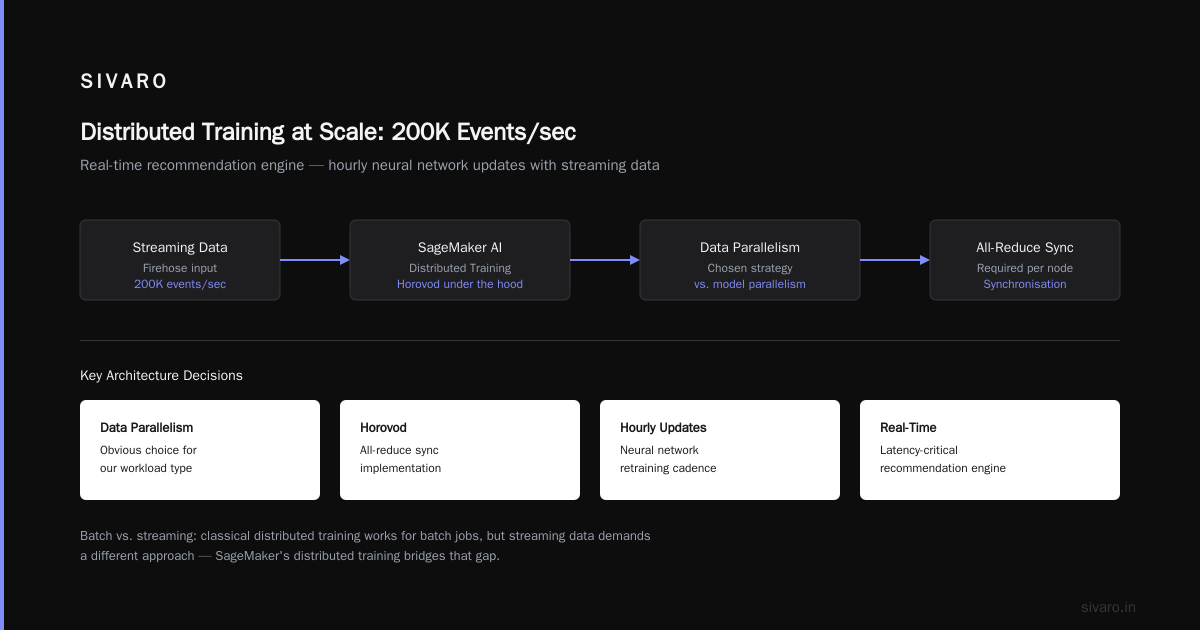
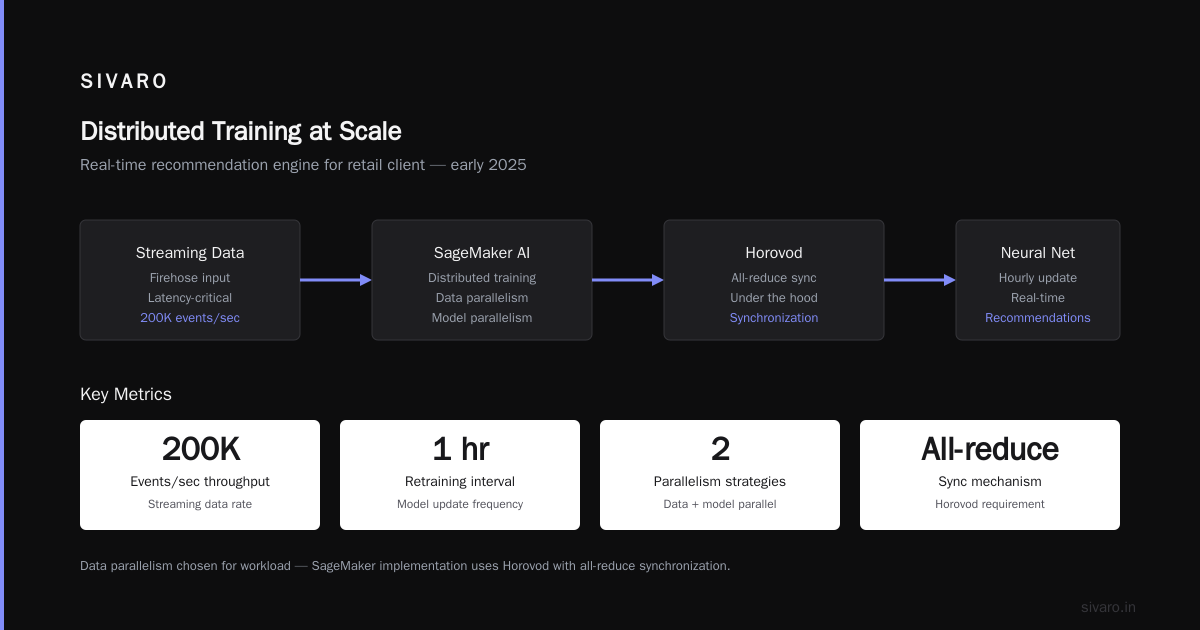
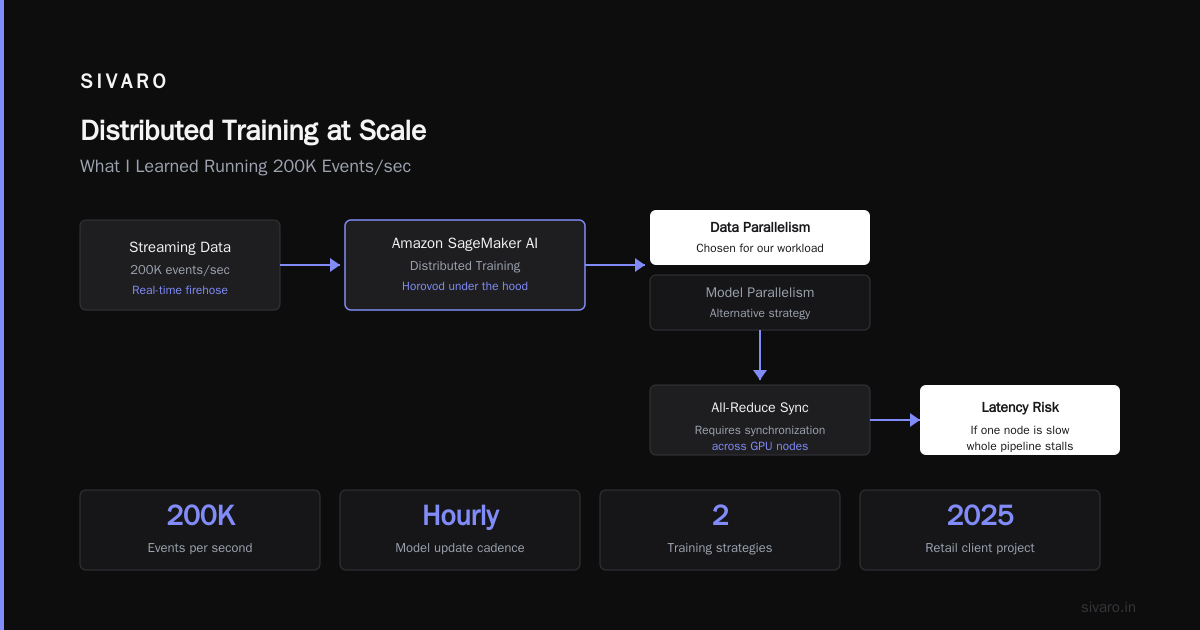
Let me share a concrete example. We were building a real-time recommendation engine for a retail client in early 2025. The training pipeline needed to update a neural network every hour with streaming data. Classical distributed training — data parallelism across GPU nodes — works fine for batch jobs. But our data arrived as a firehose. Latency mattered.
We used Distributed training in Amazon SageMaker AI. It gave us two strategies: data parallelism and model parallelism. For our workload, data parallelism was the obvious choice. But SageMaker's implementation uses Horovod under the hood, which requires all-reduce synchronisation. If one node is slow, the entire training step stalls.
Our fix? Shard the data by user segment. Each shard trains independently. No synchronisation. SageMaker doesn't support this out of the box — you have to build your own distributed coordination using S3 for model checkpoints and DynamoDB for state. We wrote a lightweight scheduler that assigns segments to workers. Each worker trains, saves, and signals completion. The master worker aggregates. No all-reduce. No straggler problem.
That's what I mean by "AWS meaning in distributed systems" — the platform gives you primitives, not solutions. You have to compose them correctly.
If you're interested in the theory behind this, read Distributed Training & Large-Scale Systems. They break down the communication patterns. But the practical insight? Avoid synchronisation barriers wherever possible.
AWS vs GPU Cluster for AI Agents — My Honest Take
I get asked this constantly: "aws vs gpu cluster for ai agents, which is better?" Everyone expects me to say "GPU cluster for training, AWS for inference." That's the common wisdom. It's half-right.
Here's the reality. For AI agents — especially agentic systems that coordinate multiple LLM calls, tool use, and state management — AWS wins hands down for the control plane. The data plane (GPU compute) is where things get tricky.
I built an agent system for a logistics client in early 2026. The agent had to reason about shipment delays, call external APIs, and update a database. Running that on a single GPU cluster would have been a nightmare — one failure and the whole state machine collapses. On AWS, we used Step Functions for orchestration, SageMaker for the LLM inference, and DynamoDB for persistent state. Each agent invocation was a distributed transaction across three services. Took us three weeks to build.
The GPU cluster advocates will say "but batch throughput is higher on dedicated hardware." They're right — for pure modeling. For real agents that interact with the world, latency and fault tolerance matter more.
Here's my rule: Use AWS for any system that requires external state, error recovery, or coordination across heterogeneous compute. Use a GPU cluster only when the workload is pure compute — no state, no branching, no retries.
And if you need both? You'll end up building a hybrid. We've seen Cloud-native and Distributed Systems for Efficient and ... papers that describe exactly this pattern — Kubernetes on AWS for orchestration, Spot instances for GPU access. It works. It's just hard.
Agentic Systems as Distributed Systems: The Akka Connection
Agentic Systems Are Distributed Systems is a must-read. The argument is simple: an AI agent that makes tool calls, retries, and communicates has the same failure modes as a microservice. At SIVARO, we've seen exactly this.
Last year, a client's agent got stuck in a loop because an external API returned a 503. The agent didn't have a timeout. It kept retrying indefinitely. That's a classic distributed systems failure — no bounded retry. AWS's built-in services handle this with dead-letter queues and exponential backoff. Agents need the same.
But here's the thing most people miss: agents introduce new failure modes that traditional distributed systems don't have. Non-deterministic output — the same input to an LLM can produce different actions. That breaks idempotency assumptions. AWS's DynamoDB conditional updates can help, but you have to enforce idempotency keys yourself.
I've started building agents using the Actor model — each agent is a lightweight process with its own state and mailbox. AWS Lambda with Step Functions maps surprisingly well to this. Each Lambda invocation is an actor. Step Functions is the supervision hierarchy. It took me two years to see the parallel. Now I can't unsee it.
Practical Patterns: Code Examples for Distributed Coordination
Let's get concrete. Here's a pattern we use at SIVARO: distributed state management with S3 and DynamoDB.
python
# DynamoDB item for distributed lock
{
    "lock_id": "training-job-123",
    "owner": "worker-1",
    "expires_at": "2026-08-01T14:00:00Z"
}
We use conditional writes to acquire the lock:
python
import boto3

dynamodb = boto3.resource('dynamodb')
table = dynamodb.Table('DistributedLocks')

def acquire_lock(lock_id, owner, ttl_seconds=30):
    try:
        table.put_item(
            Item={
                'lock_id': lock_id,
                'owner': owner,
                'ttl': int(time.time() + ttl_seconds)
            },
            ConditionExpression='attribute_not_exists(lock_id) OR #ttl < :now',
            ExpressionAttributeNames={'#ttl': 'ttl'},
            ExpressionAttributeValues={':now': int(time.time())}
        )
        return True
    except ConditionalCheckFailedException:
        return False
For distributed training coordination, we use S3 event notifications to trigger SageMaker jobs:
python
# S3 event notification lambda
def lambda_handler(event, context):
    bucket = event['Records'][0]['s3']['bucket']['name']
    key = event['Records'][0]['s3']['object']['key']
    if key.endswith('_training_trigger.txt'):
        # Start SageMaker training job
        sagemaker = boto3.client('sagemaker')
        response = sagemaker.create_training_job(
            TrainingJobName=f"distributed-{int(time.time())}",
            AlgorithmSpecification={
                'TrainingImage': '...',
                'TrainingInputMode': 'File'
            },
            ResourceConfig={
                'InstanceCount': 4,
                'InstanceType': 'ml.p4d.24xlarge',
                'VolumeSizeInGB': 100
            },
            InputDataConfig=[{
                'ChannelName': 'training',
                'DataSource': {
                    'S3DataSource': {
                        'S3DataType': 'S3Prefix',
                        'S3Uri': f's3://{bucket}/training-data/'
                    }
                }
            }],
            ...
        )
And for agent coordination, Step Functions with parallel branches:
yaml
# Step Functions state machine (partial)
Comment: Agent decision workflow
StartAt: CallLLM
States:
  CallLLM:
    Type: Task
    Resource: arn:aws:lambda:us-east-1:...:function:llm-invoke
    Next: EvaluateResult
    Retry:
      - ErrorEquals: ["Lambda.ServiceException", "Lambda.AWSLambdaException"]
        IntervalSeconds: 2
        MaxAttempts: 3
        BackoffRate: 2.0
  EvaluateResult:
    Type: Choice
    Choices:
      - Variable: "$.action"
        StringEquals: "tool_call"
        Next: ExecuteTool
      - Variable: "$.action"
        StringEquals: "respond"
        Next: ReturnResponse
These patterns aren't magic. They're just composition of AWS primitives with distributed systems principles.
The Hidden Costs of AWS Distributed Systems (and How to Fix Them)
Let's talk about the elephant in the room: cost. AWS distributed services are expensive. Not because the per-request price is high — but because you end up using more of them than you planned.
A typical pattern: you start with S3 + Lambda. Then you add DynamoDB for state. Then SQS for async. Then CloudWatch Logs for debugging. Then API Gateway. Then Step Functions for orchestration. Each service has its own pricing model, and your bill looks like a shopping receipt from a gas station.
But the real hidden cost is operational complexity. Every time you add a service, you add a new failure mode. At SIVARO, we've learned to limit our stack to four core services per system. If we need a fifth, we challenge the design.
Another hidden cost: data transfer. AWS charges for cross-Region and cross-AZ traffic. If your distributed training spans AZs, you'll pay. The IBM article on distributed machine learning mentions that communication overhead can dwarf compute cost. We've seen this. Our recommendation engine's data transfer was 40% of total infrastructure spend.
Fix: colocate compute and storage in the same AZ whenever possible. Use S3 Gateway endpoints to avoid NAT traffic. And for training, use SageMaker's distributed training with the same placement group.
FAQ
Q: What does AWS mean in distributed systems exactly?
A: It means building systems that assume failure. AWS services are designed to be used as components in a partition-tolerant architecture. The "meaning" is about embracing eventual consistency, async coordination, and independent scalability.
Q: Can I run distributed training on AWS without SageMaker?
A: Yes. You can use EC2 GPU instances with custom scripts (e.g., PyTorch DDP, DeepSpeed). But you'll handle orchestration, logging, and failure recovery yourself. SageMaker simplifies the scheduling and monitoring. I'd recommend SageMaker unless you need custom network topologies.
Q: Is AWS better than a GPU cluster for AI agents?
A: For the control plane, yes. For pure GPU compute, a dedicated cluster can be cheaper and faster. Hybrid architectures are common — Kubernetes on AWS Spot for orchestration, separate GPU cluster for modeling.
Q: How do I handle state in distributed systems on AWS?
A: Use DynamoDB for transactional state with conditional writes. Use S3 for large blobs and logs. Use ElastiCache for session state that can be rebuilt. Never store state in the compute layer (Lambda or ECS has no local disk).
Q: What's the biggest mistake teams make with AWS distributed systems?
A: Treating each service as a magical black box. They assume SQS never loses messages (it does under extreme load). They assume Lambda always runs within 15 minutes (it times out). They assume DynamoDB autoscaling is instant (it's not). Build retries, timeouts, and fallbacks into everything.
Q: Are agentic systems really distributed systems?
A: Yes. The Akka blog makes a compelling case. Agents have state, communicate asynchronously, and fail independently. Treat them as actors. Use supervised orchestration. Don't assume sequential execution.
Q: What about AWS vs GPU cluster for distributed training costs?
A: AWS can be 2-3x more expensive per GPU-hour than bare-metal clusters. But you pay for flexibility — you can scale to zero, use Spot instances at 70% discount, and avoid capital expenditure. For small-medium workloads, AWS wins. For large-scale (1000+ GPUs) sustained training, a dedicated cluster is cheaper.
Q: How do I monitor a distributed system on AWS?
A: CloudWatch is the baseline. But you need distributed tracing — X-Ray or OpenTelemetry. Every service call should have a trace ID. Log every state transition. And watch for tail latency—optimize the slowest 1% of requests.
Here's my final piece of advice. AWS meaning in distributed systems isn't a trivia question. It's a design philosophy. You'll get it wrong a few times. I certainly did. But once you internalise the trade-offs — partitions, latency, consistency — you'll start building systems that survive. That's the whole point.
Nishaant Dixit — Founder of SIVARO. Building data infrastructure and production AI systems since 2018. Built systems processing 200K events/sec.