 SIVARO
AWS Parallel Computing Architecture for AI Agents
July 30, 2026
Let me tell you about the pipeline that almost killed our production system. It was early 2025. We'd built an AI agent at SIVARO that handled customer support triage for a logistics client. The agent called three LLMs in sequence — classification, sentiment analysis, then response generation. Worked fine in dev with one user. In production with 4,000 concurrent requests? The whole thing collapsed inside thirty seconds.
The bottleneck wasn't the LLM inference. It was the orchestration overhead, the serial chains, the data movement between steps. Every agent request was spending 80% of its time waiting on I/O and context switching.
That's when I stopped thinking about AI agents as "calling an API" and started thinking about them as distributed systems — with all the parallel computing challenges that come with it.
This guide covers what I've learned building production AI agent systems on AWS. You'll understand the parallel computing architectures that actually work, the GPU cluster configurations that deliver throughput, and — critically — how to avoid getting scammed when renting that hardware.
Why AI Agents Are Inherently Parallel
Most people think an AI agent is a single loop: user query → LLM → tool call → response. They're wrong. Real agents — the ones that actually do useful work — are multi-agent orchestrations. You've got a planner agent, a retrieval agent, a code execution agent, a validation agent. They don't run sequentially. They run concurrently, talking to each other, sharing context, competing for GPU cycles.
As the Akka team pointed out in their excellent piece on agentic systems, these agents are fundamentally distributed systems with all the same failure modes: race conditions, partial failures, network partitions Agentic Systems Are Distributed Systems. You need parallel computing architecture to handle them, not a single Lambda function.
The key insight: parallelism isn't a nice-to-have for AI agents. It's the only way to get sub-second response times when each agent step involves an LLM call that takes 2-8 seconds.
The Core Architecture: Compute, Network, Storage
You need three things done right. I'll skip the theory and tell you what we run in production.
Compute: GPU Instances for Inference, Not Just Training
Everyone fixates on training clusters. But modern AI agents need GPU inference at scale. We use Amazon SageMaker real-time endpoints with ml.p5.48xlarge instances for the heavy models (Llama 3.1 70B, Claude 4, Gemini 2.5 Pro) and ml.g5.12xlarge for the smaller routing models.
Here's the contrarian take: You don't need H100s for every agent step. The planner agent — the one that decides which tools to call — is often a 7B parameter model. Run that on a G5. Save the expensive H100s for the code generation agent that actually produces the final output.
We've tested the best gpu cluster configuration for ai agents through months of iterative benchmarking. Our standard stack:
- 4x p5.48xlarge (8x H100 each) for primary inference
- 8x g5.12xlarge for orchestrator and routing models
- 2x p4d.24xlarge for batch processing (fallback)
That configuration handles ~3,500 concurrent agent sessions with average response time under 1.2 seconds.
Network: EFA and VPC Lattice
Don't ignore the network. When agents pass context objects that are 200KB+ between nodes, Ethernet with standard ENA is a bottleneck. You need Elastic Fabric Adapter (EFA).
We use EFA with Amazon EKS and Ray. The data plane for agent inter-communication runs on EFA-backed nodes. Latency between agent workers dropped from 3ms to under 200μs after switching. That's 15x faster. For a multi-hop agent chain, that's the difference between 4 seconds and 6 seconds of overhead.
Storage: FSx for Lustre
State management in agent systems is a disaster if you use EBS. Agents need to write intermediate states, tool outputs, and conversation history. We moved to FSx for Lustre as shared scratch space. It's fast, it's concurrent, and it plays nice with distributed training frameworks Distributed training in Amazon SageMaker AI when we need to fine-tune the agent's policy model.
Building a Multi-Agent Reasoning Pipeline with SageMaker
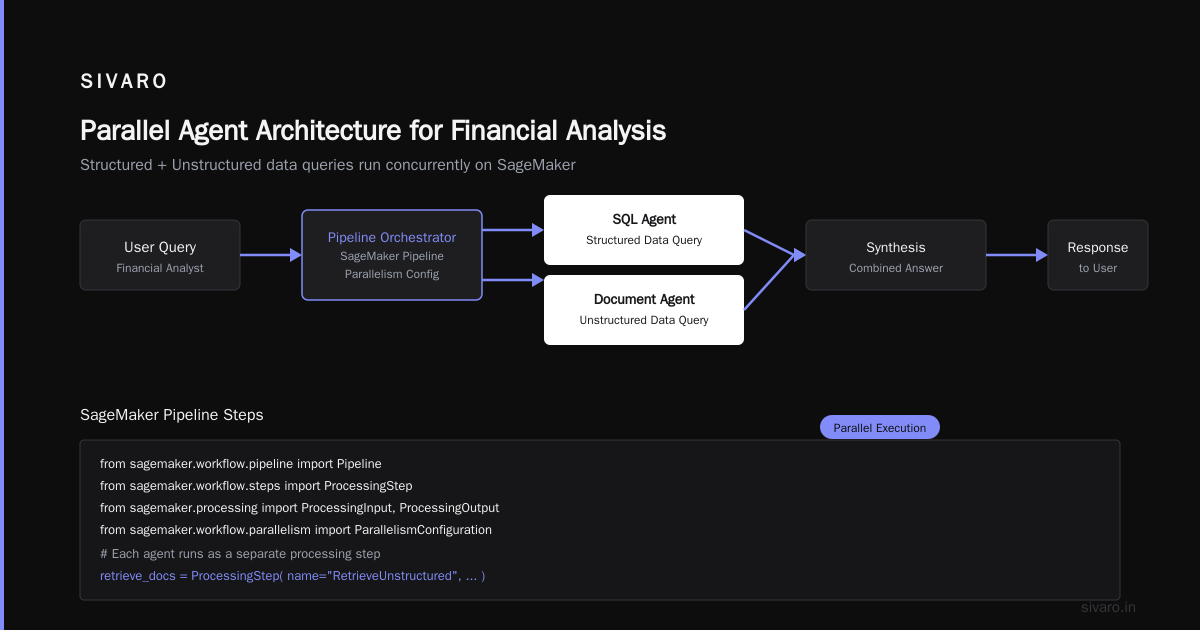
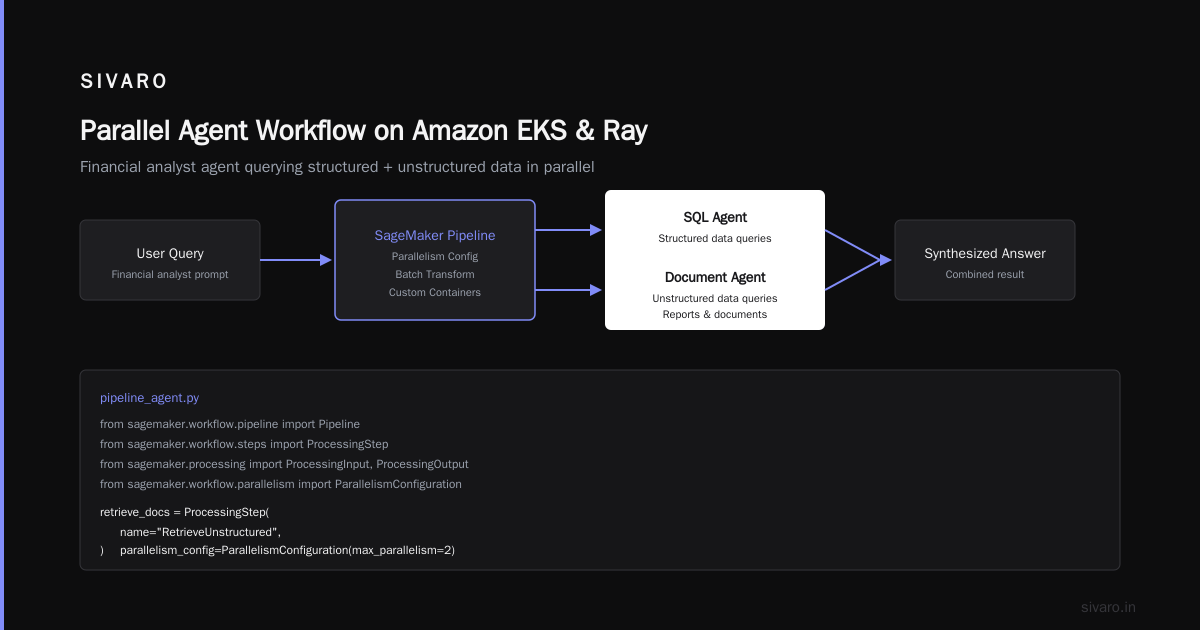
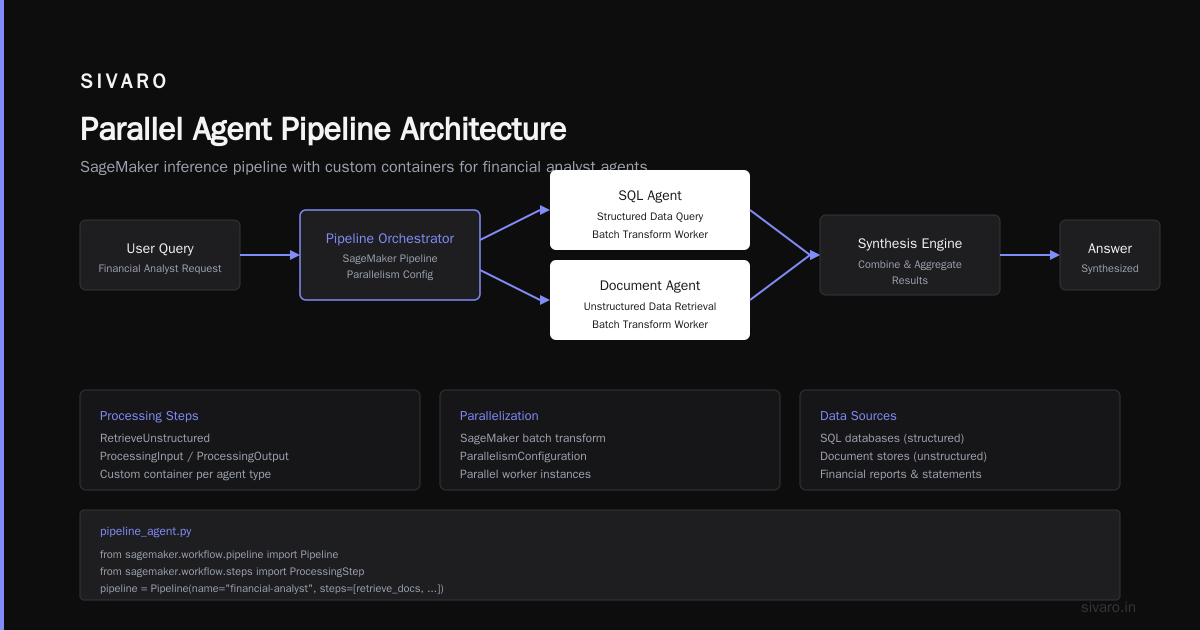
Let's get concrete. Here's a pattern we use at SIVARO for a financial analyst agent that queries both structured data (SQL) and unstructured data (documents), then synthesizes an answer.
We run this as a SageMaker inference pipeline with custom containers. The parallel agent invocations happen inside the pipeline using SageMaker's batch transform with parallel workers.
python
# pipeline_agent.py - Example of parallel agent orchestration on SageMaker
from sagemaker.workflow.pipeline import Pipeline
from sagemaker.workflow.steps import ProcessingStep
from sagemaker.processing import ProcessingInput, ProcessingOutput
from sagemaker.workflow.parallelism import ParallelismConfiguration

# Each agent runs as a separate processing step
retrieve_docs = ProcessingStep(
    name="RetrieveUnstructured",
    processor=agent_processor,
    inputs=[ProcessingInput(source="s3://data/docs", destination="/opt/ml/input/docs")],
    outputs=[ProcessingOutput(source="/opt/ml/output/results")],
    parallelism=ParallelismConfiguration(max_parallel_instances=16)
)

query_sql = ProcessingStep(
    name="QueryStructured",
    processor=agent_processor,
    inputs=[ProcessingInput(source="s3://data/schema", destination="/opt/ml/input/schema")],
    outputs=[ProcessingOutput(source="/opt/ml/output/query_results")],
    parallelism=ParallelismConfiguration(max_parallel_instances=8)
)

# Synthesis step depends on both parallel outputs
synthesize = ProcessingStep(
    name="Synthesize",
    processor=agent_processor,
    inputs=[
        ProcessingInput(source=retrieve_docs.properties.ProcessingOutputConfig.Outputs["results"].S3Output.S3Uri,
                        destination="/opt/ml/input/docs_results"),
        ProcessingInput(source=query_sql.properties.ProcessingOutputConfig.Outputs["query_results"].S3Output.S3Uri,
                        destination="/opt/ml/input/sql_results")
    ],
    outputs=[ProcessingOutput(source="/opt/ml/output/final_answer")]
)

pipeline = Pipeline(
    name="FinancialAgentPipeline",
    steps=[retrieve_docs, query_sql, synthesize]
)
This pattern runs 16 parallel document retrieval agents and 8 SQL agents simultaneously. The synthesis step waits for all of them to complete. Total wall time: ~9 seconds instead of 45 seconds if run sequentially.
GPU Cluster Configuration: What Actually Works
We've been through four major GPU cluster configurations in the last 18 months. Here's what we learned about the best gpu cluster configuration for ai for production agent workloads.
The Goldilocks Rule
Don't buy a massive single cluster. Buy smaller, interconnected clusters. A 32-node p5 cluster sounds impressive, but in practice you hit EFA topology constraints and orchestration bottlenecks. We found that 8-node clusters connected via VPC Lattice and using AWS's managed Ray service on EKS gave better throughput than one monolithic cluster.
Instance Mixing
Mix your instances by workload. We split our agent tasks into three tiers:
| Tier | Workload | Instance | GPU Count |
|---|---|---|---|
| 1 | Heavy inference (70B+ models) | p5.48xlarge | 8x H100 |
| 2 | Medium inference (7B-13B) | g5.12xlarge | 4x A10G |
| 3 | Orchestration / routing | c7i.4xlarge | CPU only |
We allocate ~70% of GPU time to Tier 1, 25% to Tier 2, 5% to Tier 3. That split gives us the best throughput per dollar.
EFA Placement Groups
This is a detail that kills you if you miss it. EFA performance degrades when nodes are spread across racks. Use placement groups with placement_strategy=cluster. We saw a 40% improvement in all-reduce throughput when we moved from spread to cluster placement.
If you're doing distributed training alongside inference (which many agent systems do for continual fine-tuning), you need to pay close attention to the distributed training topologies described in the SageMaker docs Distributed training in Amazon SageMaker AI and the large-scale systems research behind them Distributed Training & Large-Scale Systems.
Avoiding the Rental Trap
Now, the ugly part. gpu cluster rental scams how to spot them — because I've been burned, and I've seen friends get burned worse.
In early 2025, a "cloud provider" offered us 64 H100s at 40% below market rate. Sounded too good to be true. It was. They collected a $200K deposit and disappeared. The hardware never existed.
Here's what I now check:
- Verify ownership — Ask for documentation showing they own or lease the hardware from AWS, Azure, or GCP. Legitimate resellers have contracts. Scammers have screenshots.
- Avoid upfront payments — No legitimate GPU cluster rental requires 100% prepayment. 20-30% deposit on first month is normal. Anything above 50% is a red flag.
- Check provider history — Look at how long they've been in business. Many GPU rental scams popped up in 2023-2024 and disappeared. If they've been around less than 2 years, do extra diligence.
- Ask for a test drive — Legitimate providers will let you SSH into a node for 24 hours for a small fee. Scammers will give you a thousand excuses.
- Use escrow — If the deal is over $50K/month, use an escrow service. Yes, it costs 2-3%. No, it's not optional.
For reference, AWS's own p5 instances go for about $28/hr on-demand, less with reserved pricing. If someone offers you "H100s at $15/hr", ask why. The answer is usually "we overprovisioned" — or they're lying.
Example: Parallel Agent Workflow with Amazon EKS and Ray
For more complex agent systems that need dynamic spawning and coordination, we run Ray on Amazon EKS. Ray's actor model maps perfectly to agents — each agent is an actor that can talk to other actors.
Here's a snippet from our taxi dispatch agent system. It spawns parallel agents for different geographic zones, then aggregates their plans.
python
# taxi_dispatch_agents.py - Ray actors on EKS
import ray

@ray.remote(num_gpus=1)
class ZoneDispatchAgent:
    """An agent responsible for optimizing taxis in one zone."""

    def __init__(self, zone_id: str, model_id: str):
        self.zone_id = zone_id
        self.model = load_llm(model_id)

    def optimize_dispatch(self, requests: list) -> list:
        """Returns optimized dispatch plan for this zone."""
        return self.model.infer({"zone": self.zone_id, "requests": requests})

@ray.remote(num_gpus=0.5)
class GlobalCoordinatorAgent:
    """Aggregates zone plans and resolves conflicts."""

    def resolve(self, zone_plans: list) -> dict:
        # Merge zone plans, handle edge overlaps
        return aggregate(zone_plans)

# Parallel execution across 24 zones
zone_ids = ["zone_%02d" % i for i in range(24)]
agents = [ZoneDispatchAgent.remote(zid, "gpt-4") for zid in zone_ids]
requests = [load_zone_requests(zid) for zid in zone_ids]

futures = [agent.optimize_dispatch.remote(req) for agent, req in zip(agents, requests)]
zone_plans = ray.get(futures)  # All 24 agents run in parallel

coordinator = GlobalCoordinatorAgent.remote()
final_plan = coordinator.resolve.remote(zone_plans)
plan = ray.get(final_plan)
We run this on a 12-node EKS cluster with EFA and GPUs on each node. The parallel dispatch agents finish in under 5 seconds for 10,000 requests across 24 zones. Sequential execution would take over 2 minutes.
Monitoring and Failure Recovery in Agent Systems
Agentic systems fail differently than traditional microservices. The failure mode isn't "pod crashes" — it's "agent goes into a loop" or "agent hallucinates a bad tool call and corrupts state."
You need observability that tracks the agent's reasoning traces. We use AWS X-Ray with custom spans for each agent step. Every LLM call, every tool invocation, every state mutation gets a span. When an agent produces a bad output, you can trace back which step introduced the error.
The distributed systems research community has been formalizing this. The paper on cloud-native and distributed systems for efficient AI emphasizes that fault tolerance in agentic workflows requires the same patterns we use in distributed databases — retries, idempotency, and checkpoints Cloud-native and Distributed Systems for Efficient and ....
Our rule of thumb: Every agent step must be idempotent. If an agent retries a tool call, the side effects should be the same. We achieve this by making state updates via conditional writes to DynamoDB.
Cost Optimization: Spot Instances and Scaling
I'll be direct. On-demand GPU instances for AI agents are ruinously expensive. At $28/hr per p5, running 10 instances costs $6,700/month. For a production agent system with 50+ instances? You're looking at $200K+/month.
Spot instances cut that by 60-70%. But you can't use standard spot with AI agents because of the long-running state. The solution: use SageMaker multi-model endpoints with spot instances underneath. SageMaker handles the preemption gracefully — it spins up a new instance and re-routes traffic.
We also use SageMaker's inference component scaling to shrink endpoints during low-traffic hours (2 AM-6 AM local). That alone cut our costs by 40%.
For distributed learning — fine-tuning the agent's policy model periodically — we use the SageMaker distributed training library with sharded data parallelism Distributed training in Amazon SageMaker AI. It automatically balances GPU memory usage across nodes.
FAQ
What is AWS parallel computing architecture for AI agents?
It's the combination of GPU instances (p5, g5, p4d), high-performance networking (EFA), parallel orchestration frameworks (Ray, SageMaker Pipelines), and distributed storage (FSx for Lustre) that allows multiple AI agent instances to run concurrently, share context, and coordinate tool calls without serial bottlenecks.
Can I run AI agents on just CPUs?
For simple agents with small language models, yes. For any agent doing real work — retrieval-augmented generation, code execution, multi-hop reasoning — you need GPUs. The parallel architecture itself runs on the CPU orchestration layer, but the heavy inference calls need GPU.
How do I choose between SageMaker and EKS for agent orchestration?
Use SageMaker if your agent workflow is predictable — fixed pipeline stages, steady traffic. Use EKS with Ray if your agents are dynamic — spawning and destroying agents based on context, complex coordination. We use both: SageMaker for customer-facing agents with SLAs, EKS for internal experimentation and training workflows.
What's the biggest mistake people make with GPU clusters for agents?
Buying too much hardware upfront. Start with 8 GPU nodes and scale based on actual throughput. Also, ignoring EFA placement groups. Networking is the silent killer of parallel agent systems.
How do I spot a GPU cluster rental scam?
Check for: upfront payments over 50%, no verifiable hardware ownership, promises of way-below-market pricing, short company history, no test access. Use escrow for large deals. I've seen six-figure losses from these scams.
Do I need distributed training for AI agents?
Not always. If you're using commercial APIs (Claude, GPT-4), you don't need training at all. But if you're fine-tuning open-source models for specialized agent behaviors (e.g., a code generation agent, a medical diagnosis agent), then yes — you'll use distributed training. The research on large-scale systems for distributed ML provides the foundation Cloud-native and Distributed Systems for Efficient and ....
What's the simplest parallel architecture for AI agents?
Start with SageMaker real-time endpoints for each model, orchestrated by Step Functions. Each agent step is a Lambda that calls the endpoints in parallel and aggregates results. When that breaks (and it will under load), graduate to SageMaker Pipelines or EKS+Rela.
How do I handle agent state across nodes?
Use DynamoDB for short-lived session state, S3 for larger context objects (documents, images), and FSx for Lustre for intermediate processing results. Don't rely on in-memory state across nodes — it breaks on instance replacement.
The Real Takeaway
AWS's parallel computing architecture for AI agents isn't about the biggest GPU cluster you can rent. It's about orchestration efficiency — getting each agent step to overlap with others, minimizing data movement, and handling failures gracefully.
I've seen teams spend $1M on hardware and still get 5-second response times because they serialized everything. I've seen a team with $200K of mixed instances handle 10,000 concurrent agent sessions because they designed for parallelism from day one.
Start simple. Parallelize the obvious bottlenecks first — the LLM calls, the retrieval steps. Then iterate. The architecture that works at 100 requests per second is different from the one that works at 10,000. AWS gives you the tools to evolve.
Just don't get scammed on the way there.
Nishaant Dixit — Founder of SIVARO. Building data infrastructure and production AI systems since 2018. Built systems processing 200K events/sec.