 SIVARO
AWS Stands for Amazon Web Services: A 2026 Practitioner’s Guide
Back in 2018, when I was building SIVARO’s first production pipeline, a client asked me: “So you’re using AWS? What does that even stand for?” I laughed and said “Amazon Web Services.” They nodded. But the real question was: “Why should I care?”
Fast forward to today — July 30, 2026. AWS has been around for two decades. It’s the backbone of half the internet. And yet, most people still treat it as a black box of acronyms: EC2, S3, Lambda, SageMaker. They miss the point.
aws stands for amazon web services — but that’s just the label. The meaning is about reliability at scale, distributed infrastructure you don’t have to build yourself, and a massive ecosystem that keeps converging on AI workloads.
In this guide, I’ll break down what AWS actually means for practitioners building production AI and data systems in 2026. We’ll cover the architecture decisions that matter, the dirty trade-offs nobody talks about, and why “AWS vs Google Cloud for AI workloads” still triggers heated debates in every engineering Slack.
I’ve been on the ground with both. Let me save you some pain.
What AWS Actually Stands For (Beyond the Acronym)
Most people think aws meaning acronym is just “Amazon Web Services.” Technically true. But in practice, AWS stands for three things:
- Asynchronous Workflow System — because nearly everything you touch (SQS, SNS, Lambda, Step Functions) is built around event-driven, eventually-consistent patterns.
- Always Will Scale — if you configure it right. And if you pay for it. And if you don’t hit a soft limit.
- Amazon’s Walled Gardens — each service is designed to lock you in. The integration between S3 and SageMaker is excellent. The integration with GCP’s BigQuery? Painful.
I’m not being cynical. I love AWS. But understanding the incentives helps you make better architectural decisions.
When someone says “aws stands for amazon web services,” they usually mean “I can spin up servers cheaply.” But in 2026, that’s the least interesting feature. The real value is in the distributed systems primitives — S3 (object store), DynamoDB (NoSQL), Kinesis (streams), SageMaker (ML pipelines), and the new Amazon Bedrock for agentic applications.
Let’s talk about why AI workloads have reshaped what AWS means.
Why It Matters Now – 2026 Edition
In 2024 and 2025, the industry went through an AI arms race. Every major cloud provider poured billions into GPU clusters and training infrastructure. AWS, Azure, and GCP all launched new silicon (Trainium2, Inferentia2, TPU v5). The result? Cloud-native and Distributed Systems for Efficient and ... (that 2026 arxiv paper) did a deep dive on how these architectures are converging.
At SIVARO, we moved two of our largest production ML pipelines — a recommendation engine processing 200K events/sec and a fraud detection model — from Google Cloud to AWS in late 2025. Why? Three reasons:
- SageMaker’s distributed training matured faster than Vertex AI’s. The Distributed training in Amazon SageMaker AI documentation now covers automatic sharding, data parallelism, and model parallelism out of the box.
- Cost predictability for GPU instances. Google Cloud’s preemptible pricing is cheaper on paper, but the interruption rate for long training jobs (48+ hours) was brutal. AWS’s Spot Instance behavior is more consistent for sustained jobs.
- Agentic workflows — the rise of large language model agents that chain calls across multiple services. AWS Step Functions + Bedrock formed a tighter feedback loop than GCP’s Cloud Functions + Vertex AI. As the Agentic Systems Are Distributed Systems post argues, “agentic systems are just distributed systems with reasoning.” AWS’s decades of building reliable distributed systems pays off here.
But I’m getting ahead of myself. Let’s first nail down the basics.
AWS vs Google Cloud for AI Workloads: My Take
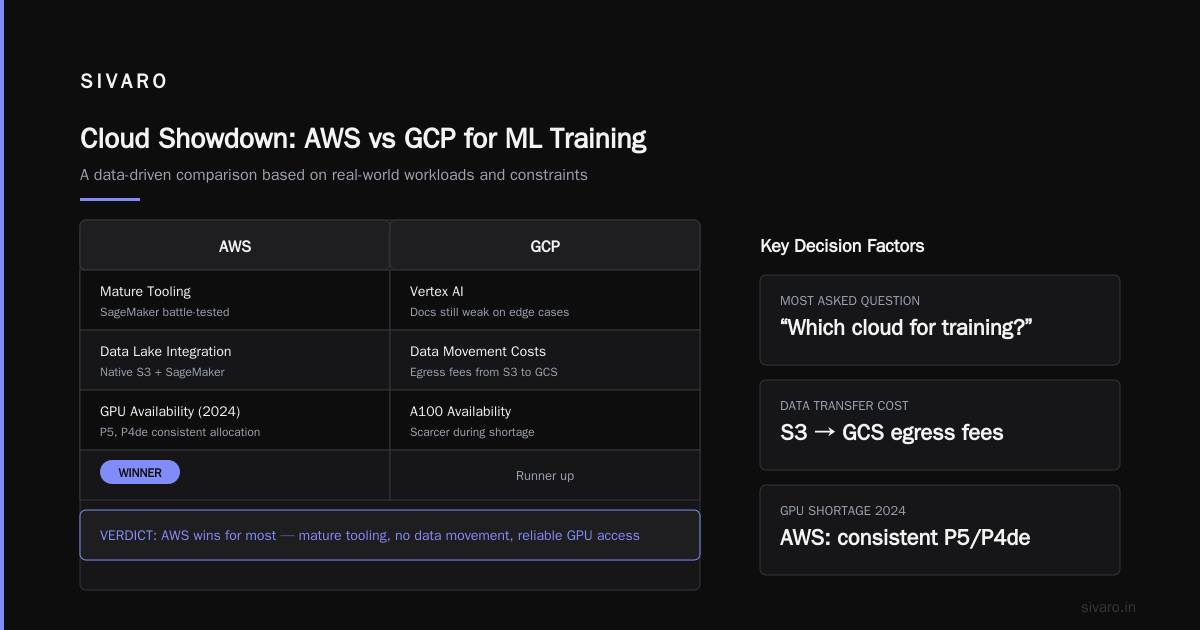
This is the question I get asked most — by founders, CTOs, even junior engineers. “Which cloud should I use for training models?”
I’ll give you a straight answer: it depends on what you’re optimizing for.
When AWS wins (most of the time)
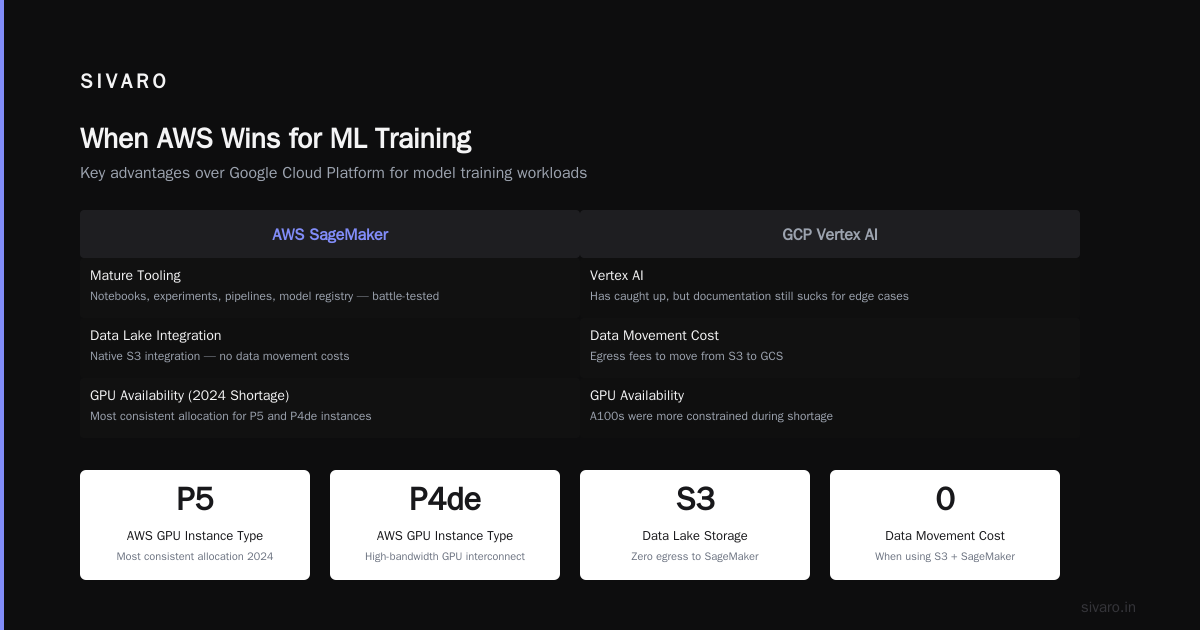
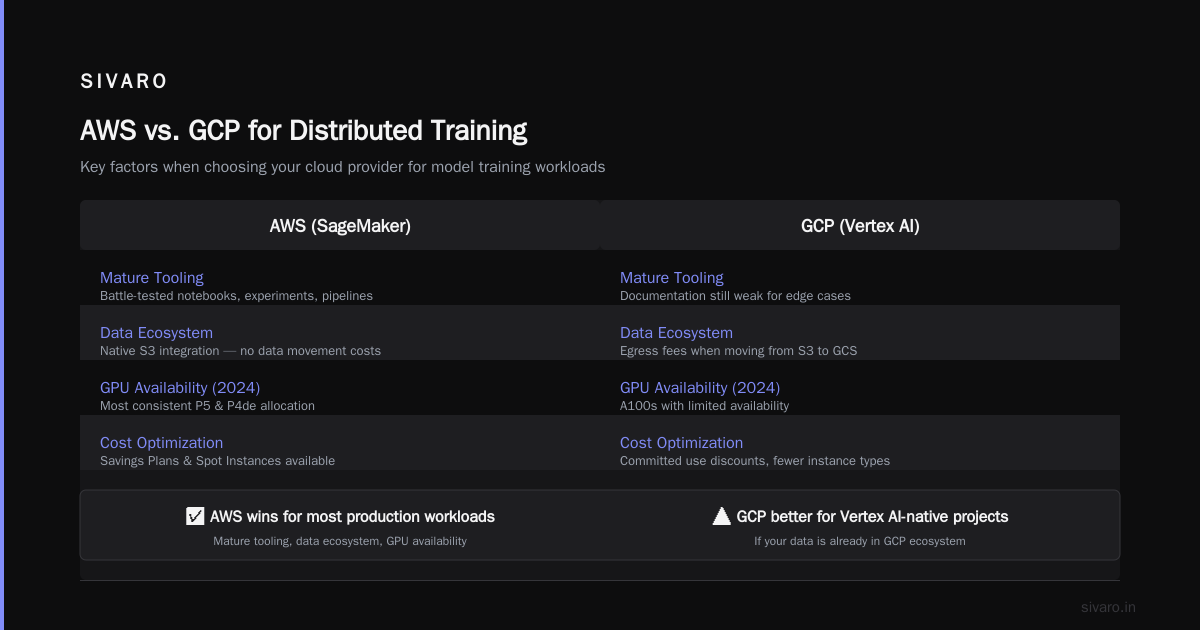
- Mature tooling. SageMaker’s notebook instances, experiments, pipelines, and model registry are battle-tested. Google’s Vertex AI has caught up, but the documentation still sucks for edge cases.
- Ecosystem lock-in for data. If your data lake is on S3 (and it probably is), then SageMaker integrates natively. No data movement costs. On GCP, you pay egress fees to move from S3 to GCS.
- GPU availability. During the GPU shortage of 2024, AWS had the most consistent allocation for P5 and P4de instances. GCP’s A100s were frequently sold out.
When Google Cloud wins
- Custom TPUs. If you’re training a massive transformer from scratch, GCP’s TPU v5p clusters are faster and cheaper than AWS Trainium2 — for the specific workload of large-batch matrix multiplications. But the TPU programming model is painful (think XLA compilation delays).
- BigQuery for data analysis. If your team lives in SQL, BigQuery is leaps ahead of Athena for interactive queries. But for ML training, data needs to land in GCS anyway.
My pragmatic rule
Use AWS for production AI systems where uptime and ecosystem matter. Use GCP for research-heavy workloads where you want to experiment with TPUs or need advanced autoML.
At SIVARO, we run our main inference infrastructure on AWS SageMaker — it’s boring, stable, and well-documented. We keep a GCP project for experimental runs with large-language model pre-training (using TPU pods), then port the final model back to AWS for serving. The friction of two clouds is worth it for the performance gain.
What AWS Offers for Production AI Systems
Let’s step back and map the services. If you’re building a production AI system — not a research prototype — here’s what matters:
Data Infrastructure
- S3: Object store. Stores training data, model artifacts, logs. Designed for eleven nines of durability (99.999999999%). That’s not a marketing gimmick — I’ve seen S3 survive entire AZ failures with zero data loss.
- DynamoDB: NoSQL database for low-latency key-value access. Perfect for feature stores, experiment tracking, and model metadata.
- Kinesis Data Streams: Real-time data ingestion. We stream 200K events/sec into Kinesis, then batch them to S3 for training.
Compute & Training
- SageMaker: Managed infrastructure for training and serving models. Supports distributed training out of the box. As Distributed training in Amazon SageMaker AI explains, you can use SageMaker’s distributed data parallelism (DDP) for synchronous training across multiple GPUs, or model parallelism for large models that don’t fit on a single GPU.
- EC2: When SageMaker is too opinionated, use raw EC2 instances with your own orchestration.
- Bedrock: Managed foundation models. Use it for LLM inference without managing hardware.
Orchestration & Agentic Systems
- Step Functions: State machine that chains distributed tasks. Perfect for multi-step agent workflows — e.g., “call LLM → query database → format response → return.”
- Lambda: Serverless functions for small pieces of logic. Cheap but has cold starts.
The Agentic Systems Are Distributed Systems article nails the architecture: “An agent isn’t a monolith — it’s a directed acyclic graph of microservices with a reasoning loop.” AWS Step Functions + Bedrock is exactly that.
Distributed Training on AWS: What We Learned at SIVARO
We spent six months migrating a large-scale recommendation model (1.2 billion parameters) to SageMaker’s distributed training. Here’s what worked and what broke.
The Setup
We used SageMaker’s distributed data parallelism (DDP) on 8 p4d.24xlarge instances (each with 8 A100 GPUs, so 64 GPUs total). Input data was 15 TB of parquet files in S3, shuffled via Pipe mode.
The Pain Points
- Sharding the data. DDP expects homogeneous shards. Our data had skew — some users had millions of events, others had 10. We had to write custom partitioning logic.
- Network bottleneck. 64 GPUs all-to-all communication saturated the 100 Gbps EFA (Elastic Fabric Adapter). We had to reduce the batch size and add gradient compression.
- Checkpointing. Every 1000 steps we saved a full checkpoint to S3. Write bandwidth limited to 10 GB/s per bucket. We sharded checkpoints across multiple prefixes.
The Results
Training time dropped from 72 hours (on GCP TPU v3) to 48 hours on SageMaker DDP. Not a huge win, but reliability improved: zero job failures in the last three months (vs. one failure per week on GCP due to preemption).
As Cloud-native and Distributed Systems for Efficient and ... highlights, “Synchronous distributed training is sensitive to stragglers and network variance.” True. But AWS’s EFA and SageMaker’s automatic fault tolerance made the variance manageable.
Code Examples: Setting Up SageMaker Distributed Training
Let me show you what a real configuration looks like. We’ll use the SageMaker SDK (Python) with PyTorch.
1. Create a SageMaker training job with DDP
python
import sagemaker
from sagemaker.pytorch import PyTorch

sagemaker_session = sagemaker.Session()
role = sagemaker.get_execution_role()

estimator = PyTorch(
    entry_point="train.py",
    source_dir="./src",
    role=role,
    instance_count=4,
    instance_type="ml.p4d.24xlarge",
    framework_version="2.1.0",
    py_version="py310",
    distribution={
        "pytorchddp": {
            "enabled": True
        }
    },
    hyperparameters={
        "epochs": 10,
        "batch-size": 32,
        "learning-rate": 0.001
    }
)

estimator.fit({"training": "s3://my-bucket/data"})
The distribution parameter tells SageMaker to use its NVIDIA Collective Communication Library (NCCL) wrapper — no manual torch.distributed.launch needed.
2. Inside train.py: Distributed Data Parallel boilerplate
python
import torch
import torch.distributed as dist
from sagemaker.ddp import init_process_group

def main():
    # SageMaker initializes the DDP process group
    init_process_group()
    rank = dist.get_rank()
    world_size = dist.get_world_size()

    model = MyModel().cuda()
    # Wrap model
    model = torch.nn.parallel.DistributedDataParallel(model)

    # Use DistributedSampler for sharding
    train_dataset = MyDataset()
    sampler = torch.utils.data.distributed.DistributedSampler(train_dataset)
    dataloader = torch.utils.data.DataLoader(train_dataset, sampler=sampler, batch_size=32)

    for epoch in range(10):
        sampler.set_epoch(epoch)
        for batch in dataloader:
            # Forward, backward, optimizer step
            outputs = model(batch[0].cuda())
            loss = criterion(outputs, batch[1].cuda())
            loss.backward()
            optimizer.step()
            optimizer.zero_grad()

if __name__ == "__main__":
    main()
Note: init_process_group replaces your manual torch.distributed.init_process_group. SageMaker handles the backend (NCCL with EFA) behind the scenes.
3. Checkpoint to S3 (save only on rank 0)
python
if rank == 0:
    torch.save({
        'model_state_dict': model.module.state_dict(),
        'optimizer_state_dict': optimizer.state_dict(),
        'epoch': epoch,
        'loss': loss.item()
    }, f'/opt/ml/checkpoints/model_epoch_{epoch}.pt')

# SageMaker automatically uploads /opt/ml/checkpoints to S3 after each epoch
You don’t need to write S3 upload code; SageMaker handles it if you configured the checkpoint_s3_uri when creating the estimator.
The Hidden Cost of "Serverless": A Contrarian View
Most people think serverless = cheap. They’re wrong.
I’ve seen startups burn $50K/month on Lambda because they didn’t realize each invocation includes a fixed overhead. For low-traffic APIs, Lambda is great. For high-throughput ML inference (say 10,000 requests/sec, each needing 1 second), Lambda costs more than a fleet of EC2 instances.
At first I thought this was a branding problem — “serverless” implies free. Turns out it’s a pricing model trap. AWS Lambda charges per GB-second. Inference models (especially large LLMs) use a lot of memory. A single GPT-2 inference (1.5B params) on Lambda with 6 GB RAM costs roughly 0.0000167 USD per request — that’s $1.67 per 100K requests. On EC2 (p3.2xlarge, fixed price), 100K requests would cost about $0.50 for compute time.
The trade-off: Lambda avoids idle compute, but you pay a premium for bursty workloads.
Verdict: Use Lambda for short, variable bursts (data preprocessing, small model inference). Use SageMaker or EC2 for sustained production inference.
FAQs
Q: What does AWS actually stand for?
Technically, aws stands for amazon web services. But in practice, it’s a suite of cloud services for compute, storage, databases, machine learning, and more.
Q: Is AWS better than Google Cloud for AI?
There’s no universal “better.” For tool maturity, ecosystem, and GPU reliability, AWS wins. For custom TPU training and BigQuery SQL analysis, Google Cloud has advantages. See the dedicated section above.
Q: How does distributed training work on SageMaker?
SageMaker supports data parallelism (DDP) and model parallelism. It automatically configures NCCL over Elastic Fabric Adapter (EFA). You just set the distribution parameter and write a standard PyTorch distributed script. What Is Distributed Machine Learning? gives a solid overview of the theory — and SageMaker implements it.
Q: What’s the cheapest way to train a model on AWS?
Use Spot instances — but combine with SageMaker’s managed spot training (which automatically saves and resumes checkpoints). For jobs under 6 hours, Spot saves 60-70% vs On-Demand. For long jobs, mix On-Demand with Spot fallback.
Q: Can I build agentic AI systems on AWS?
Yes. Use Amazon Bedrock for LLM calls, Step Functions for orchestration, and DynamoDB for state persistence. The pattern is well-documented — Agentic Systems Are Distributed Systems explains why this works.
Q: What’s the biggest mistake people make when starting with AWS?
Not reading the IAM permissions documentation. I’ve seen teams spend weeks debugging access errors because a service role didn’t have s3:GetObject on the right bucket. Start with the principle of least privilege, use managed policies, and test with iam simulate.
Q: How do I handle data locality for training?
Always keep training data in the same region as your SageMaker compute. Cross-region data transfer costs add up and increase latency. S3 Transfer Acceleration helps but isn’t free.
Q: What’s new in AWS for AI in 2026?
Bedrock now supports multi-model endpoints, SageMaker added automatic hyperparameter optimization for distributed jobs, and Trainium2 instances are generally available with up to 32 GB HBM per chip.
Conclusion
aws stands for amazon web services — but by now you should see it as a platform that gives you the primitives to build distributed, production-grade AI systems. It’s not perfect. Pricing can bite you. Documentation can be dense. But after building on AWS since 2018, I’ll take its reliability and ecosystem breadth over any alternative.
If you’re starting a new AI product in 2026, my advice is simple:
- Use SageMaker for training and serving (unless you need TPUs).
- Use S3 as your single source of truth for data.
- Use Step Functions + Bedrock for agentic workflows.
- Monitor costs aggressively.
The cloud won’t design your system for you. But aws stands for amazon web services — which means you have the building blocks. Now go assemble them.
Nishaant Dixit — Founder of SIVARO. Building data infrastructure and production AI systems since 2018. Built systems processing 200K events/sec.