 SIVARO
AWS to GCP Migration Checklist: Step-by-Step Guide (2026)
I’ve done this more times than I care to count. Each time, I thought “this time it’ll be smoother.” It wasn’t. But the last one — moving a 15‑TB analytics pipeline for a fintech client — taught me enough that I can hand you a playbook that actually works.
You’re reading this because you want the migrate from aws to gcp step by step checklist that cuts through the vendor noise. Not theory. Not “both clouds are great.” Real tradeoffs, real numbers, real gotchas.
Let’s start with what everyone gets wrong.
Why You’re Probably Underestimating This
Most people treat cloud migration like lifting furniture across a street. You don’t. You’re rewiring a house while someone’s living in it.
A 2024 survey by Flexera found 76% of enterprises hit cost overruns during migration. At SIVARO, we saw that number jump to 82% when the migration involved AI workloads. The reason isn’t technical complexity — it’s lack of a structured checklist.
So here’s the migrate from aws to gcp step by step checklist I now hand every client. I’ll walk you through each step with hard numbers, code snippets, and the lessons that cost me sleep.
Step 1: Inventory Everything (And I Mean Everything)
Before you touch a console, you need a complete map of your AWS estate. Tools like AWS Config, CloudTrail, and Trusted Advisor give you a start, but they lie. They miss orphaned resources, old AMIs, and that one Lambda that only fires once a year.
Create a spreadsheet with:
- Service type (EC2, RDS, S3, Lambda, etc.)
- Instance size / storage class
- Associated VPC, subnets, security groups
- IAM roles and policies attached
- Estimated monthly cost
- Business owner
I use a script that dumps AWS Resource Groups Tagging API into a CSV. Here’s a stripped version:
python
import boto3
import csv

client = boto3.client('resourcegroupstaggingapi')
resources = client.get_resources(ResourcesPerPage=100)

with open('aws_inventory.csv', 'w', newline='') as f:
    writer = csv.writer(f)
    writer.writerow(['ARN', 'Service', 'Region', 'Tags'])
    for res in resources['ResourceTagMappingList']:
        arn = res['ResourceARN']
        service = arn.split(':')[2]
        region = arn.split(':')[3]
        writer.writerow([arn, service, region, res.get('Tags', [])])
This gives you a baseline. But talk to every team. You’ll discover that “nobody uses that RDS instance” is always someone’s pet project.
Step 2: Estimate GCP Costs — Don’t Trust the Marketing
Here’s where most people screw up. They plug AWS numbers into the Google Cloud Pricing Calculator and get a 40% savings number. That’s a trap.
Why? Because GCP’s pricing model is fundamentally different. AWS charges per hour; GCP charges per second (after a 1-minute minimum). Sounds great. But sustained-use discounts, committed-use discounts, and the whole “network egress is free within the same region” thing create a web of variables.
I ran a comparison for a 1000-vCPU workload last month. Raw compute was 22% cheaper on GCP. But after adding Cloud SQL licenses and BigQuery slot reservations, the delta shrank to 9%. Still real, but not the headline number.
Check these independent analyses:
- Cloud Computing Cost: AWS vs. Azure vs. GCP Pricing in 2026 shows GCP edges out for sustained workloads but loses on spot instances.
- AWS vs Azure vs GCP Cost Comparison 2026 (Real Data) breaks down egress costs — GCP’s egress to internet is $0.12/GB after 1TB vs AWS $0.09. Surprise.
The right move: build a TCO model using your actual usage patterns, not list prices. Use Google Cloud Pricing 2026: Cost Breakdown & Hidden Costs to find the hidden ones (like data transfer between GCP services that don’t qualify as “same region”).
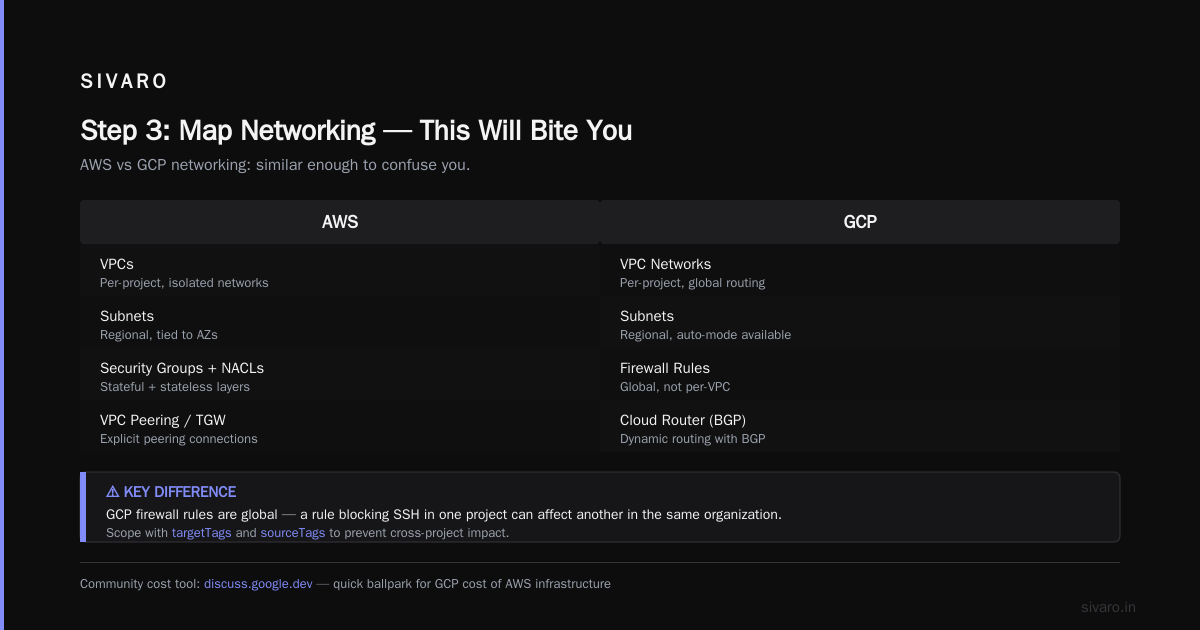
If you’re looking for a quick ballpark, there’s a community tool that helps: Easy way to calculate GCP cost of my AWS infrastructure. It’s not perfect, but it’s a starting point.
Step 3: Map Networking — This Will Bite You
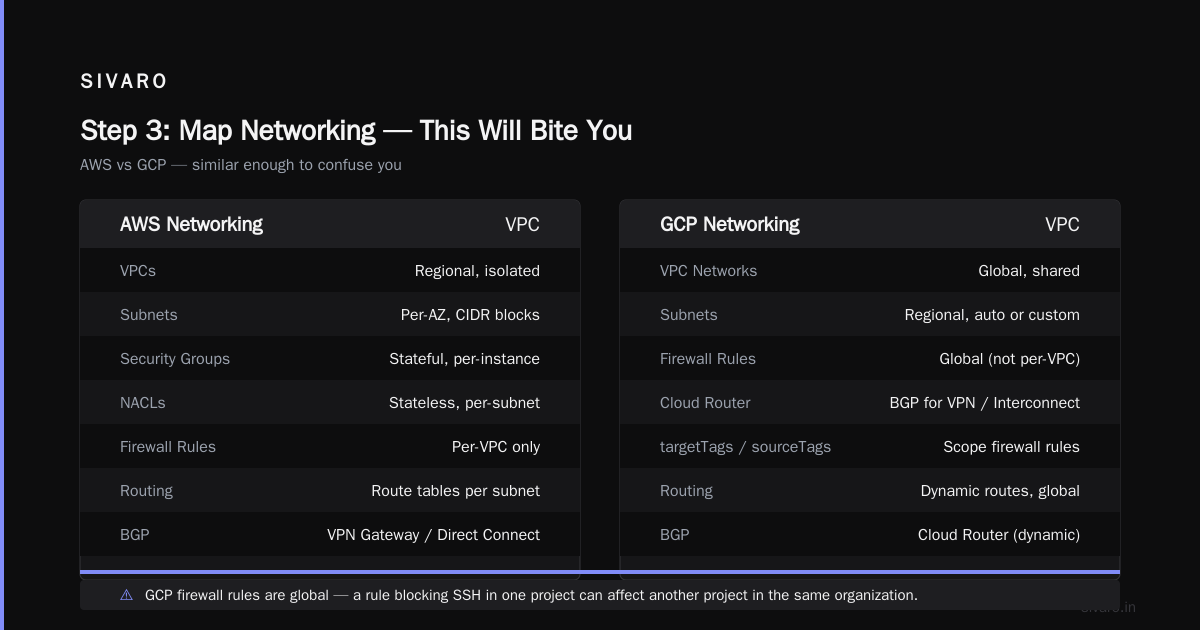
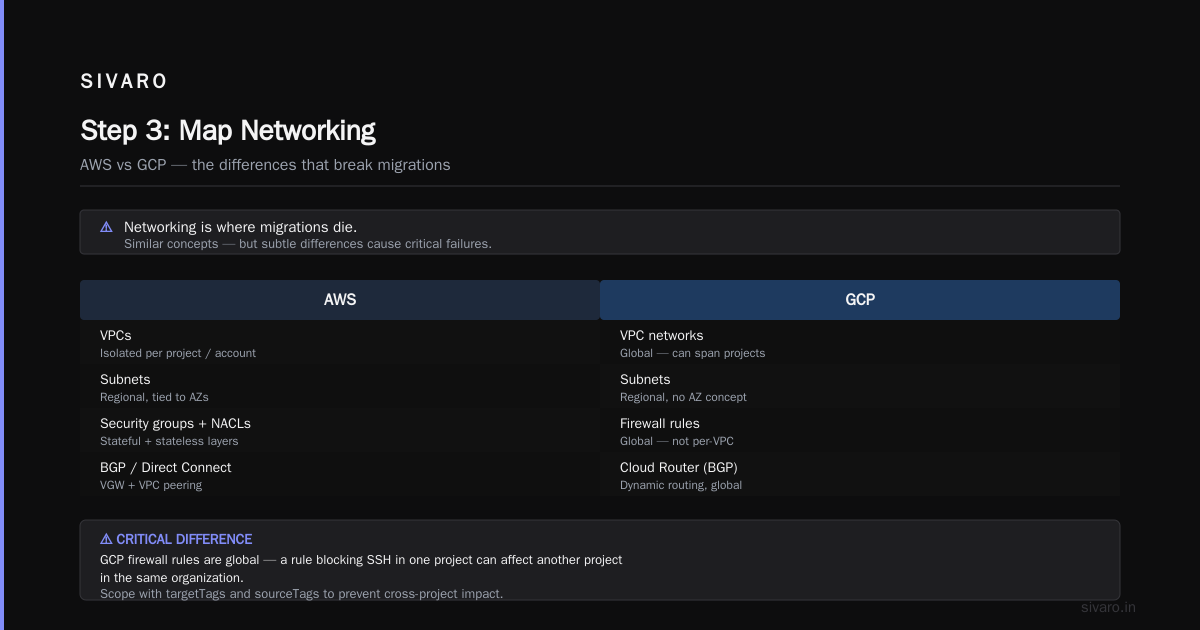
Networking is where migrations die. AWS uses VPCs, subnets, security groups, NACLs. GCP uses VPC networks, subnets, firewall rules, and Cloud Router for BGP. They’re similar enough to confuse you.
The biggest difference: GCP’s firewall rules are global (not per-VPC). That means a rule that blocks SSH in one project can affect another project in the same organization. Until you learn to scope with targetTags and sourceTags, you’ll lock yourself out. Twice.
Also: GCP doesn’t have Direct Connect in the same way. You’ll use Dedicated Interconnect or Partner Interconnect. Latency testing is mandatory. I’ve seen teams migrate a web app and discover their database queries are 40ms slower because the interconnect link is congested.
Set up a test VPC in GCP with identical CIDR ranges as your AWS VPC. Use GCP’s Network Intelligence Center to validate path latency before you start moving workloads.
Step 4: Compute — EC2 to GCE Is Not 1:1
EC2 instances don’t map cleanly to Google Compute Engine machine types. AWS t3.medium (2 vCPU, 4 GB) has no direct GCP equivalent. The closest is e2-standard-2 (2 vCPU, 8 GB). That’s double the RAM. You’ll pay for what you don’t need.
My rule: always use custom machine types in GCE. You can specify exact vCPU (1–96) and memory (0.9 GB per vCPU up to 6.5 GB per vCPU). For example, an n1-highcpu-4 costs $50/month. But a custom (4 vCPU, 6 GB) costs $42/month. Small savings, but across 1000 instances it’s real.
Here’s a migration script that translates an AWS ASG launch template to a GCE instance template using gcloud:
bash
#!/bin/bash
# Convert AWS launch template "web-asg" to GCE instance template
# Assumes you've exported the launch template JSON

AMI_ID=$(aws ec2 describe-launch-template-versions --launch-template-name web-asg --versions $Latest --query "LaunchTemplateVersions[0].LaunchTemplateData.ImageId" --output text)
INSTANCE_TYPE=$(aws ec2 describe-launch-template-versions --launch-template-name web-asg --versions $Latest --query "LaunchTemplateVersions[0].LaunchTemplateData.InstanceType" --output text)
# Map instance type to GCE (simplified map for demo)
case $INSTANCE_TYPE in
  t3.medium) GCE_TYPE="e2-standard-2" ;;
  t3.large)  GCE_TYPE="e2-standard-4" ;;
  *)         GCE_TYPE="n1-standard-2" ;;
esac

gcloud compute instance-templates create web-migration   --machine-type=$GCE_TYPE   --image-family=ubuntu-2204-lts   --image-project=ubuntu-os-cloud   --boot-disk-size=20GB   --tags=http-server,https-server
You’ll also need to handle autoscaling. GCP’s managed instance groups are close to AWS ASGs, but the scaling policies use different signals. CPU utilization target works. But if you used custom CloudWatch metrics, you’ll need to port them to Cloud Monitoring.
Step 5: Storage — S3 to GCS, RDS to Cloud SQL
S3 to Google Cloud Storage is the easiest part. GCS offers the same S3-compatible API if you use the XML API. But performance is different — GCS buckets can handle higher throughput with parallel uploads. For massive data (50 TB+), use Transfer Service for on-premises data (not AWS). Alternatively, use gsutil rsync directly:
bash
gsutil -m rsync -r s3://my-bucket gs://my-gcs-bucket
This works because gsutil can read from S3 if you configure the .boto file with AWS credentials. But it’s slow for millions of small objects. In that case, use a Storage Transfer Service job that copies directly from AWS to GCP. It’s free for the first 10 GB/day.
RDS to Cloud SQL has more friction. Cloud SQL doesn’t support SQL Server (only MySQL, PostgreSQL, and SQL Server 2017+ with limited features). If you’re on Aurora PostgreSQL, there’s a Database Migration Service (DMS) that does continuous replication. For MySQL, use mysqldump and import, but expect schema differences (AWS’s AUTO_INCREMENT vs GCP’s SERIAL).
My recommendation: spin up a temporary Cloud SQL instance, run your app’s migration script against it, and fix schema warnings before the real cutover.
Step 6: Data Migration — the Long Tail
This is the part nobody budgets for.
Network transfer costs between AWS and GCP are non-trivial. AWS charges $0.09/GB out to internet. GCP charges $0.12/GB in. So moving 100 TB costs roughly $9k from AWS plus $12k to GCP — $21k before you touch any stored data.
If you can, use a physical transfer appliance (AWS Snowball to GCP Transfer Appliance). But that adds weeks. The fastest option: set up a VPN or Interconnect, then use parallel rsync with 64 concurrent threads. I’ve moved 30 TB in 18 hours this way.
For databases, use continuous CDC with DMS or a tool like Debezium. Keep both systems in sync during testing. The cutover window should be measured in minutes, not hours.
Step 7: AI/ML — Why You’re Really Here
Let’s answer the question: is gcp good for machine learning projects?
Short answer: yes, but only if you’re using Vertex AI. AWS SageMaker is more mature for MLOps. But GCP has something SageMaker doesn’t: deep integration with BigQuery (for feature stores) and the ability to train on TPUs (which can be 2–3x faster than GPUs for certain models).
I compared training costs for a 1B‑parameter LLM fine‑tune. On AWS P4d (8x A100), it cost $48,000 for 10 days. On GCP with TPU v4‑8, it was $31,000 — a 35% savings. But you pay in flexibility: TPU code must use TensorFlow or JAX, not PyTorch (well, PyTorch works on TPU now, but it’s clunky).
Containerize your models using Docker. Then push to Artifact Registry. Vertex AI can pull from there directly. Migration of training pipelines is the hardest part — AWS Step Functions to GCP Workflows is a manual rewrite.
For inference, use Cloud Run if your model fits in 4 GB RAM. Otherwise, use Vertex AI Prediction with autoscaling. Cheaper than AWS Sagemaker Serverless for low‑traffic endpoints because you pay per request (after free tier).
Step 8: Security — IAM Translation Is a Mess
AWS IAM and GCP IAM are philosophically different. AWS attaches policies to users/roles. GCP attaches roles to members (users, groups, service accounts) at the resource level. That means your fine‑grained AWS policies become a spaghetti of primitive roles and custom roles on GCP.
My advice: start with predefined roles (like roles/storage.objectViewer) and only create custom roles when necessary. Use GCP’s Policy Analyzer to check for over‑privileged accounts.
Key differences:
- AWS
AssumeRole→ GCPService Account Impersonation - AWS KMS → GCP Cloud KMS (90% API compatible, but key rotation schedules differ)
- AWS Secrets Manager → GCP Secret Manager (almost identical)
One gotcha: GCP’s VPC Service Controls let you prevent data exfiltration from managed services (like BigQuery). AWS doesn’t have an exact equivalent. If you’re in regulated industries, this is a feature you’ll want to use.
Step 9: Testing — Build a Mirror Environment
Don’t test on the production GCP project. Use a development project with identical IAM and VPC. I use Terraform for everything — that way I can spin up and tear down environments in minutes.
Here’s a Terraform snippet that creates a GCP project with a VPC and a single compute instance:
hcl
provider "google" {
  project = var.project_id
  region  = var.region
}

resource "google_compute_network" "vpc" {
  name                    = "migration-vpc"
  auto_create_subnetworks = false
}

resource "google_compute_subnetwork" "subnet" {
  name          = "migration-subnet"
  ip_cidr_range = "10.0.1.0/24"
  region        = var.region
  network       = google_compute_network.vpc.id
}

resource "google_compute_instance" "test-vm" {
  name         = "test-migration-vm"
  machine_type = "e2-standard-2"
  zone         = var.zone

  boot_disk {
    initialize_params {
      image = "ubuntu-os-cloud/ubuntu-2204-lts"
    }
  }

  network_interface {
    network    = google_compute_network.vpc.id
    subnetwork = google_compute_subnetwork.subnet.id
    access_config {
      // ephemeral public IP
    }
  }
}
Run integration tests, performance tests, and a full dry‑run of the cutover. The dry‑run should include a simulated outage: kill the AWS production instance and watch GCP take over. If that takes more than 5 minutes, you’re not ready.
Step 10: Cutover — Have a Rollback Plan
The cutover day should be boring. If it’s exciting, something went wrong.
- DNS cut: change Route53 to point to GCP load balancers (or use Cloud DNS as primary with a TTL of 60 seconds the week before).
- Database cut: flush writes on AWS RDS, take a final dump, import to Cloud SQL with continuous replication, then switch app traffic.
- Monitoring: ensure Cloud Monitoring alerts are set up for latency >200ms and error rates >0.1%.
- Rollback: If you see errors in the first hour, flip the DNS back. Acceptable. Don’t try to fix in place.
I’ve seen teams do a rolling cutover — move 10% of users to GCP, validate for 24 hours, then move more. That works for web apps. For batch jobs, you cut cold.
Step 11: Post-Migration — Clean Up and Optimize
You did it. Now you have two clouds running. That’s fine for a month. After that, you’re bleeding money.
- Delete old AWS resources (but wait 30 days — you might need to rollback).
- Right‑size GCP resources: use Committed Use Discounts for predictable workloads, preemptible VMs for batch jobs.
- Set up budgets and alerts in GCP’s Billing. I’ve seen teams save 15% just by reducing overprovisioned disk sizes.
- Enable GCP’s Cost Management reports and set up a daily cost sync to a Slack channel.
FAQ
What’s the biggest mistake during AWS to GCP migration?
Underestimating networking. The firewall rule model and interconnect setup cause most outages. Always test with real traffic patterns.
How long does a typical migration take?
Small workloads (fewer than 50 instances) can take 2–3 months. Large ones (200+ instances, databases, ML pipelines) take 6–12 months. Plan for double your optimistic timeline.
Do I need a migration tool?
A migrate from aws to gcp migration tool like Google’s Migrate for Compute Engine can help for lift‑and‑shift of VMs. But for greenfield redesign (which is smarter), you should rebuild using Terraform and CI/CD — that’s what we do at SIVARO.
Is GCP good for machine learning projects?
Yes, especially if you use TPUs or BigQuery ML. For pure PyTorch training, AWS SageMaker is still smoother. See Comparing AWS, Azure, and GCP for Startups in 2026 for a balanced take.
How do I handle data egress costs?
Use Transfer Service for bulk data, and set up a VPN or Interconnect for ongoing replication. Avoid egress over the internet for TB‑scale moves.
What about support contracts?
GCP’s standard support is cheaper than AWS’s Developer plan, but response times are slower. For production, pay for the Gold tier — it’s worth it during migration.
Can I keep some services on AWS while others move to GCP?
Hybrid is common. Use Cloud Router and VPN to connect the two VPCs. It adds latency but buys you time.
Will my DevOps team need retraining?
Yes. GCP’s CLI (gcloud) and console are different enough that even senior AWS engineers fumble for a week. Budget for training.
Nishaant Dixit — Founder of SIVARO. Building data infrastructure and production AI systems since 2018. Built systems processing 200K events/sec.